2026 Best Parental Control: Bark vs Qustodio vs Net Nanny
Bark is the strongest fit for families prioritizing broad automated risk alerts across supported messages, social platforms, searches, and saved media. Qustodio is better suited to families that want a balanced combination of screen-time limits, app controls, web filtering, location features, and supported social alerts. Net Nanny is mainly relevant to families focused on web filtering and browsing rules, although its current child-device compatibility is much narrower and should be checked before subscribing.
None of the three is best for every family. The right choice depends on the child's device, whether the priority is detecting risky activity or setting daily boundaries, and how much setup the family is willing to complete.
This comparison brings together observations reported in our individual product reviews and current official documentation. Features that vary by child device, subscription, region, permissions, or setup are identified throughout the article.
- Quick Verdict: Bark vs Qustodio vs Net Nanny
- How We Tested
- Social Monitoring and Risk Alerts
- AI Chatbot Monitoring
- Web Filtering and Adult-Content Protection
- Screen Time, App Limits, and App Blocking
- Location Tracking and Place Alerts
- Ease of Setup and Customer Support
- Pricing and Value for Families
- Privacy, Transparency, and Family Communication
- Which App Fits Your Family?
- What If You Need Customizable Alerts Plus Device Controls?
Quick Verdict: Bark vs Qustodio vs Net Nanny
Choose Bark If...
Best for broad automated risk detection. Bark is the clearest fit when the main concern is receiving alerts about supported activity related to cyberbullying, self-harm, predatory behavior, sexual content, violence, or other online risks. Its alert-led approach is designed to show parents relevant context when a potential issue is detected instead of presenting a complete log of everything a child does.
Coverage varies by child device, connected account, platform, subscription, and setup. Deeper monitoring on an iPhone may require Bark Sync, the Bark Desktop App, or another supported setup. Bark App features should also not be confused with the more granular controls built into Bark Phone.
Choose Qustodio If...
Best for balanced parental controls and supported risk alerts. Qustodio combines daily limits, app rules, routines, web filtering, location tools, and supported social or message alerts in one dashboard. It is especially relevant when managing everyday device use matters as much as identifying concerning topics.
Some communication features require Qustodio's full Android app or computer-assisted iPhone setup. Social alerts also vary by platform, supported app, subscription, and configuration; they should not be described as access to every conversation.
Choose Net Nanny If...
Best considered for web filtering on a currently supported device. Net Nanny focuses on category-based browsing rules, adult-content protection, screen-time schedules, and activity reporting. It is not a Bark-style private-conversation risk detector.
Net Nanny's current official support page lists Windows, macOS, and iOS as supported child platforms and says Android, Kindle Fire, and Chromebook are not currently supported. Families should confirm that their exact device and operating-system version are compatible before paying.
How We Tested
We tested Bark and Qustodio on a Google Pixel 7 because their Android versions provide broader monitoring and control features. Since Net Nanny does not currently support Android, we tested it on an iPhone 14.
We compared the apps using the same core criteria: risk alerts, web filtering, screen-time rules, app blocking, location features, setup, and ease of use. See our complete parental control app testing methodology for our broader review standards.
Note: Alert delivery, web filtering, app blocking, screen-time reporting, and location updates can be affected by the operating system, app version, subscription, permissions, background activity, network conditions, battery settings, VPN or device profile, and whether a supported account or app remains connected. A result from one controlled test should not be treated as a guarantee of future performance.
- Whether supported risk alerts reached the parent promptly and provided useful context
- Whether web filters blocked the websites and content categories used in our test scenarios
- Whether screen-time limits, schedules, and app-blocking rules worked as configured
- What location information each app provided and how easy it was to access
- How setup, controls, and available features differed between Android and iPhone
We also checked current pricing, plans, supported platforms, refund terms, and recently released features against official provider information. Results may vary depending on the device, operating system, permissions, subscription, network conditions, and app version.
Social Monitoring and Risk Alerts
Bark provides the broadest alert-led approach, Qustodio combines supported social alerts with stronger daily device controls, and Net Nanny is primarily a web-filtering tool rather than a private-conversation risk detector.
Bark: Broad Automated Risk Detection
On supported devices and connected accounts, Bark analyzes texts, selected social activity, searches, and saved photos or videos for categories such as bullying, self-harm, predatory behavior, sexual content, and violence. When it detects a potential issue, parents receive an alert with a relevant snippet or media context. Bark says these alerts are not necessarily real time because its system analyzes context rather than only matching individual keywords.
In our practical testing, Bark's social detection proved impressively fast, delivering alerts in under a minute.
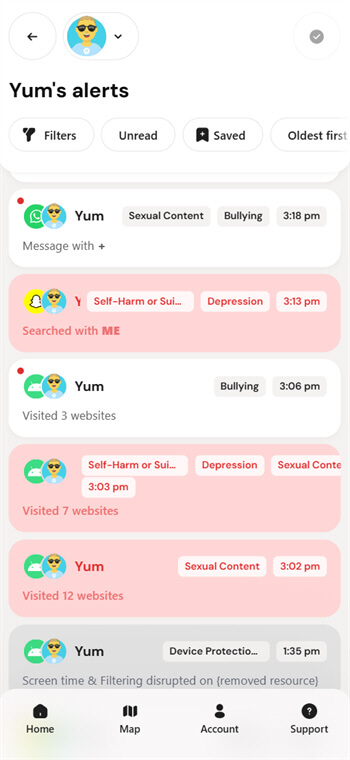
Coverage is not uniform. Some services require the child's login credentials, and deeper iPhone monitoring may require Bark Sync, the Bark Desktop App, or Bark Home. Bark does not create a guaranteed archive of every private message, and unsupported, encrypted, deleted, or disappearing content may not be available.
Qustodio: Supported Social and Message Alerts
Qustodio combines concerning-topic alerts with screen-time rules, app limits, and routines. Its official documentation describes social alerts for supported apps, with app and platform coverage varying.
Our testing found that Qustodio's social detection performed well, sending an alert to the parent account in under one minute.
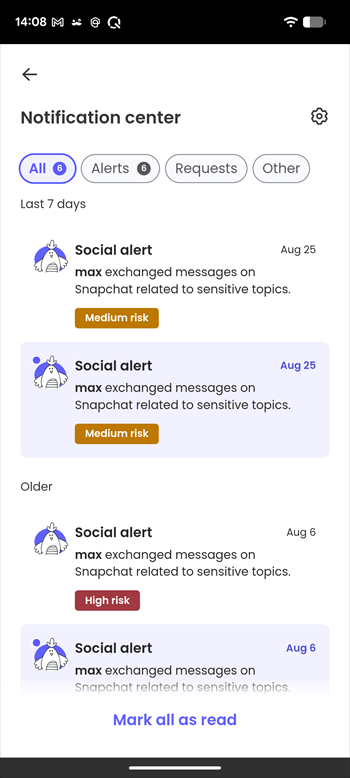
Calls and SMS monitoring on Android requires the full Qustodio Kids app from its help center. On iPhone, calls, SMS, iMessage, and certain social alerts require a Premium subscription plus a Windows or Mac computer running Qustodio's Calls & Messages app.
Qustodio may show a summary, snippet, or message content depending on the feature and settings. That does not mean it can monitor every social app or preserve every chat.
Net Nanny: Web-Focused Protection
Net Nanny's main value is controlling web access and filtering page content. It can block or warn about selected categories and report certain web activity on a supported device, but it should not be positioned as equivalent to Bark or Qustodio for supported private-message risk alerts.
AI Chatbot Monitoring
Bark
Bark has extended its AI-powered content scanning to AI chatbot conversations. It monitors interactions on platforms like ChatGPT and Gemini for the same risks it tracks on social media. Also, its alerts are sent only when something needs attention, keeping parents informed while protecting kids' privacy.
Bark is a strong fit for families that prefer broad, automated risk detection. However, some parents may want more control over the specific topics that trigger an alert. For this more customizable approach, AirDroid Parental Control allows families to set selected keywords for its AI chat content detection feature.
Qustodio
Qustodio offers ChatGPT monitoring through its Smart Alerts feature. On a protected Android device, Qustodio uses AI-powered technology to review a child's ChatGPT conversations for signs of risky topics. If concerning content is detected, parents receive a real-time alert with a summary of what was discussed and can review alerts or adjust the feature in the Smart Alerts settings.
Net Nanny
Net Nanny currently does not offer dedicated AI chatbot monitoring features. Surely, parents can use it to track and manage when and how long children can use the AI apps. Compared to Qustodio, it lacks a category of AI-powered platforms.
A Supplemental Android Option: AirDroid
On supported child Android devices, AirDroid Parental Control allows families to configure selected safety keywords for supported AI-chat notifications. This may be useful when a family is responding to a specific concern and wants customizable alerts alongside device controls. It should be treated as a supplemental option rather than a fourth direct competitor in this three-product comparison.
Keyword alerts may be incomplete or lack context, and they should not be described as access to a child's complete AI-chat history. See our AI chatbot parental-monitoring comparison for supported platforms, setup requirements, and additional limitations.
Web Filtering and Adult-Content Protection
Net Nanny is the most web-filtering-focused product in this comparison, while Qustodio combines filtering with broader device controls. Bark also blocks sites and categories, but automated risk detection remains its main differentiator.
| Product | Filtering approach | Important limit |
|---|---|---|
| Bark | Blocks selected sites, apps, or categories through supported filtering setups and routines | Coverage depends on the child device, VPN/filter status, browser, and Bark product |
| Qustodio | Allows, blocks, or alerts by web category and specific site on supported browsers and platforms | Behavior differs by Android, iOS, desktop, browser, VPN/profile setup, and plan |
| Net Nanny | Uses category rules and page-content analysis for web filtering on supported platforms | Current child-device support excludes Android, Kindle Fire, and Chromebook according to its support page |
Private browsing, unsupported browsers, third-party VPNs, encrypted in-app browsers, and operating-system changes can alter enforcement. A provider's statement that web filtering is supported does not establish how it performed in a particular test.
Screen Time, App Limits, and App Blocking
These controls are easy to confuse. An individual app limit gives one recognized app its own daily allowance. A shared daily allowance lets multiple activities draw from the same pool of time. A schedule or routine changes access during selected hours, such as homework time or bedtime. App blocking may either prevent an app from opening or cut off its internet access, depending on the product and child device.
Bark
The Bark App supports daily and weekly routines that change which apps and websites can access the internet at selected times. Parents can create different rules for periods such as school, free time, and bedtime, as well as block selected apps or site categories on supported devices.
In our hands-on testing, Bark's routines and blocking rules were accurate and generally easy to manage. The configured restrictions were applied consistently in our test scenarios, making the feature useful for enforcing recurring family schedules.
However, Bark App should not be described as providing a precise daily minute allowance for every individual app. Its main approach is schedule-based access and internet blocking. Bark Phone includes additional built-in app and contact controls, and those features should not automatically be attributed to the regular Bark App.
Qustodio
Qustodio provides daily device limits, restricted-time schedules, custom routines, and rules for recognized games and apps. Parents can allow an app, block it completely, or assign it an individual daily time limit, depending on the child device, supported app, and subscription plan.
Qustodio performed accurately in our screen-time, app-limit, and app-blocking tests. Its limits and restrictions generally matched the rules we configured, and the centralized dashboard made it straightforward to review usage and adjust individual app settings.
Enforcement can still differ between Android and iPhone because of Apple's system restrictions and Qustodio's supported-app database. Families should confirm that the specific apps they want to manage are recognized on the child's device.
Net Nanny
Net Nanny offers daily screen-time allowances, allowed-hour schedules, device or internet pausing, and app blocking on supported platforms. In our testing, its app-blocking controls performed well: the supported app rules were practical to configure and generally worked as expected. Net Nanny's official documentation does not describe the same type of individual per-app minute allowance offered by Qustodio.
Screen-time tracking was less reliable. The screen-time information shown by Net Nanny did not consistently match the device use we observed, so we would not rely on its reported totals alone when enforcing a precise daily allowance.
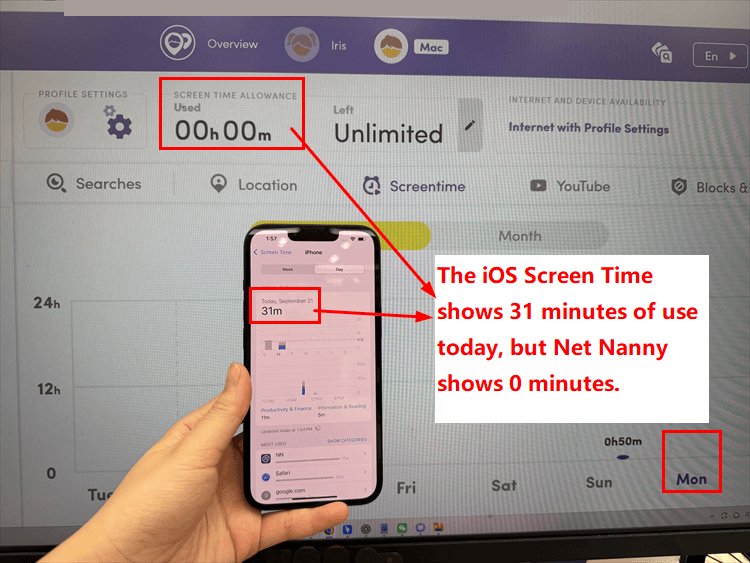
Net Nanny's current support documentation also states that Apple devices can manage an estimated list of common apps rather than every installed app. Android child devices are not currently supported. On iOS, the Net Nanny Child App must remain active in the background, which may also affect reporting and enforcement if the app stops running.
Location Tracking and Place Alerts
Bark and Qustodio provide current-location maps, location history, and place-based arrival or departure alerts on supported devices. Net Nanny officially documents current location and location history for supported iOS devices, but its current platform coverage and geofencing documentation require closer attention.
Bark
Bark's location features include a Family Map showing the child's current location, up to one week of location history on supported phones, recorded trips, and child-initiated check-ins. Parents can also create Favorite Locations, position the location pin, and adjust the boundary radius. These place-based boundaries function as geofences: Bark can automatically send a push notification when the child's device arrives at or leaves a selected location.
Location tracking is available through the Bark Kids app on supported Android devices and iPhones, as well as on Bark Phone. The Bark Watch can report its current location, but Bark states that Favorite Location alerts are not supported on the watch.
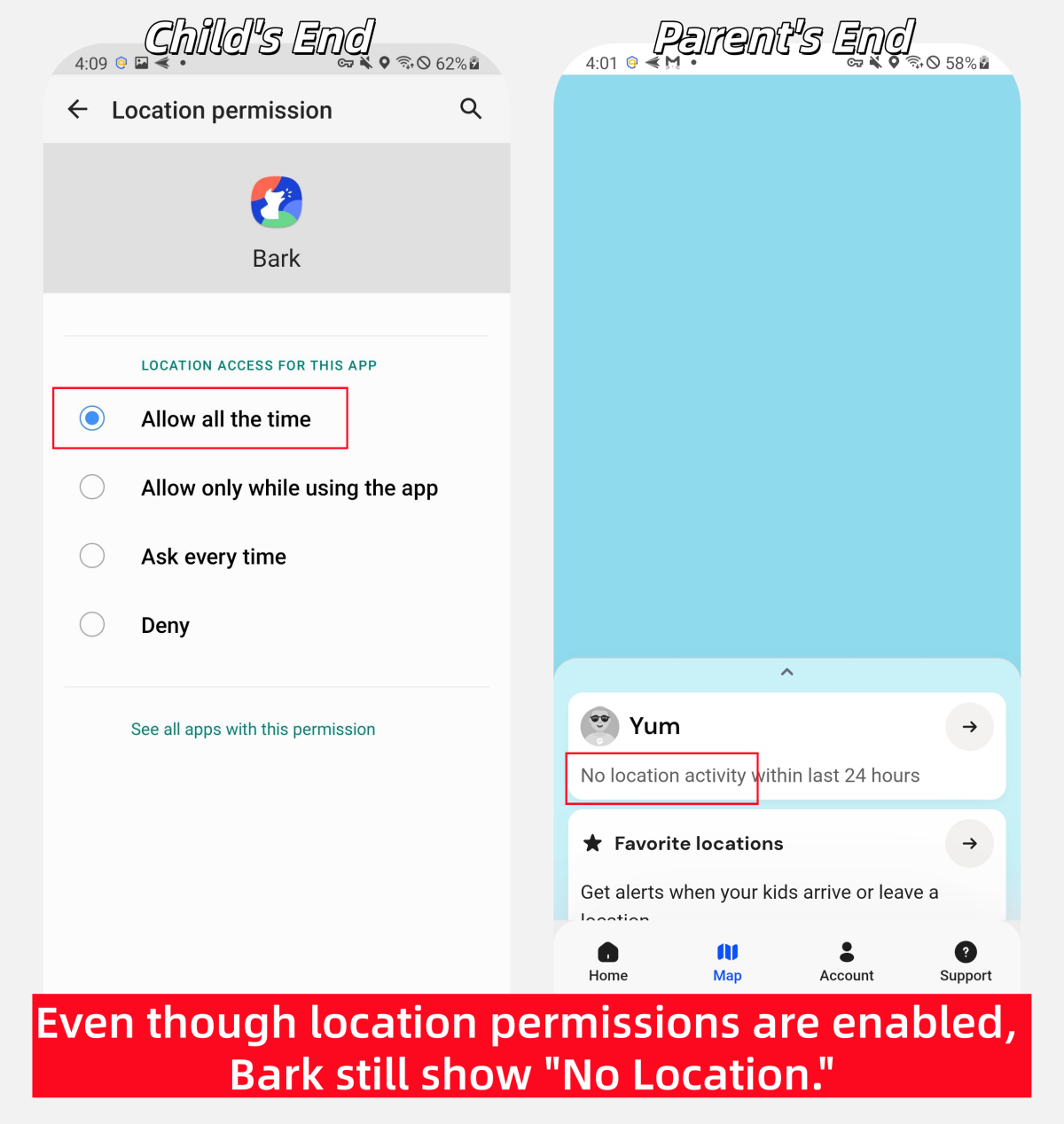
In our hands-on testing, Bark's location tools were useful overall and generally worked as expected when the location data refreshed correctly. However, we also encountered several occasions when Bark did not return or update the child's location. The issue was intermittent rather than constant, and factors such as the network connection, GPS conditions, background permissions, or battery restrictions may have contributed.
Qustodio
Qustodio's Family Locator displays the real-time or last reported locations of protected Android and iOS devices on a family map. Parents can open an individual location, get directions through the device's native maps app, and review location entries in the child's Activity Timeline. Qustodio retains reported location history for up to 30 days.
Its My Places feature uses geofencing technology. Parents can save locations such as home or school and receive a push notification when the child's device enters or leaves the defined area. Qustodio updates the location when it detects that the device has moved; parents cannot manually change the update frequency. Access to the live map and Family Locator requires a Premium plan, while the free version provides more limited location entries in the activity timeline.
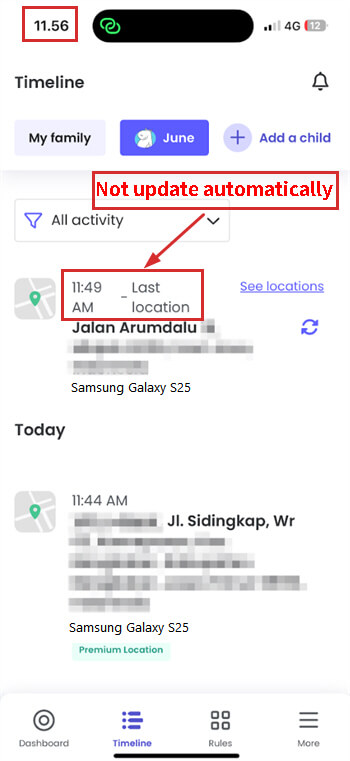
In our hands-on testing, Qustodio's location tools were generally useful and worked well most of the time. However, we occasionally found that the displayed location did not update when expected.
Net Nanny
Net Nanny's official documentation describes a Family Overview Map that can show a child's current or most recently reported location, display locations by address, and combine the locations of multiple children on one screen. Its current support documentation also describes a Location History view containing up to 60 days of reported locations.
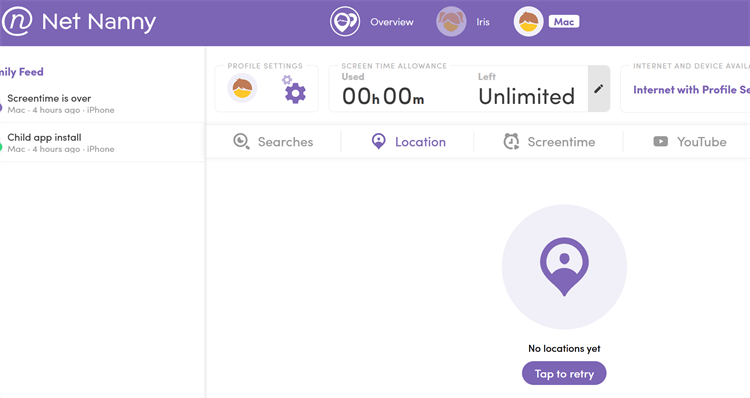
During our hands-on testing, Net Nanny repeatedly failed to display the child's location, even after we tried the feature on two iOS devices. We could not determine the exact cause. It may have been related to our network environment, location permissions, background-app behavior, VPN configuration, synchronization, or another setup-specific issue.
This result does not prove that Net Nanny's location feature fails on every supported iPhone. Families considering it should test location reporting on the child's exact device and network before relying on it for everyday safety.
Ease of Setup and Customer Support
Setup ease and customer-support availability are separate questions. A guided installation can be simple even when advanced monitoring requires additional permissions, account connections, or computer-assisted setup.
Bark
Bark guides families through creating profiles, adding a child device, connecting accounts, and enabling monitoring, routines, filtering, and location. Advanced coverage can take longer because Android permissions, child account credentials, or a separate iPhone monitoring setup may be required. Bark's official help center and support channels should be the primary source for current setup assistance.
Qustodio
Qustodio uses a centralized parent app or web dashboard for rules and activity. Basic protection uses parent and child apps, while full Android calls/SMS monitoring requires a separate help-center download. iPhone calls/messages monitoring requires a Mac or Windows computer and an initial cable connection; later updates depend on the computer and child iPhone being on the same Wi-Fi. Qustodio advertises email support, while priority phone support is tied to Care Plus.
Net Nanny
Net Nanny provides a parent dashboard, help pages, email support, and live chat. Setup should begin with a compatibility check because its current official product and support pages list only Windows, macOS, and iOS as supported child platforms.
Pricing and Value for Families
Pricing checked on September 21, 2026. Prices below are USD prices displayed on official US pages. Taxes, promotions, regional pricing, app-store billing, renewal pricing, and feature availability may differ. A monthly equivalent is not the same as an actual monthly billing option.
| Pricing point | Bark | Qustodio | Net Nanny |
|---|---|---|---|
| Free plan | No ongoing free plan listed for Bark App | Yes, for one child device with limited features | No ongoing free plan verified |
| Free trial | 7 days for Bark App plans | A Premium trial is available after free signup; the duration depends on the active signup offer | No standard free trial is advertised on the current product page |
| App plan pricing | Bark Jr: $5/month or $49/year; Bark Premium: $14/month or $99/year | Basic displayed from $59.95/year; Complete displayed at $104.95/year | $54.99/year |
| Devices covered | Unlimited children and devices for Bark App subscriptions | Free: 1 device; Basic: up to 5; Complete: unlimited | 5 PC, Mac, or iOS devices |
Privacy, Transparency, and Family Communication
Privacy depends on what data a product collects, what parents can view, how each feature is configured, and whether the child understands the family's safety rules. No app should be treated as a substitute for communication.
- Bark: Its alert-led design can limit routine exposure of ordinary activity, but an alert may still reveal sensitive context. Use the lowest sensitivity and narrowest coverage that reasonably addresses the concern.
- Qustodio: Reports, controls, and supported alerts can provide more direct activity detail. Decide in advance which records a parent genuinely needs to see.
- Net Nanny: Its filtering-focused approach may suit families that mainly want browsing boundaries rather than broader communication monitoring.
Explain the rules, review them together, and remove features that are no longer necessary. A risk alert is a signal to check context and begin a supportive conversation; it is not proof that a child did something wrong.
Which App Fits Your Family?
| Family priority | Best starting point | Why |
|---|---|---|
| Broad automated risk detection | Bark | Its core design centers on supported content analysis and contextual alerts |
| Balanced controls and supported alerts | Qustodio | It combines routines, app limits, web filtering, location, and selected communication alerts |
| Web filtering | Net Nanny, if the child device is supported | Filtering is its core positioning, but present compatibility is narrow |
| Screen time and recognized-app limits | Qustodio | It offers more explicit daily limit and app-rule options across supported platforms |
| Social-risk alerts | Bark | It provides broader alert-led coverage across supported services and devices |
| Child Android | Bark for broad alerts; Qustodio for daily controls; AirDroid for customizable supported alerts | The right choice depends on whether detection, device management, or family-defined keywords matter most |
| Child iPhone | Bark or Qustodio if the family accepts extra setup | Both can require a computer or additional setup for deeper communication coverage |
| Minimal monitoring | Apple Screen Time or Google Family Link may be sufficient | Built-in tools may meet basic time, download, and content-boundary needs without a broader monitoring subscription |
The best product is the one that addresses the family's primary concern with the least intrusive setup that works reliably on the child's actual device.
What If You Need Customizable Alerts Plus Device Controls?
Families may not want to choose between Bark's broad automated alerts, Qustodio's everyday device controls, and Net Nanny's web-focused protection. AirDroid Parental Control offers a more comprehensive alternative by connecting customizable safety signals, granular device rules, and real-world safety features.
- Customizable safety alerts. On supported child Android devices, families can select supported social or AI apps, define keywords related to a known concern, and receive available risk signals.
- More granular app management. Individual App Limits, shared Total Time Limits, Downtime, Instant Block, Always Allowed apps, extra-time requests, and Focus Mode provide more flexibility than simple schedules or blocking alone.
- Protection beyond the screen. Live device location, route history, geofences, SOS, and Driving Safety can help families review trips, speeding alerts, hard braking, or rapid acceleration alongside online and device-use concerns.


Platform note: Core app, website, and location controls are available across supported Android and iPhone setups, although advanced iPhone app, screen-time, and website controls require the appropriate Supervision Mode setup. Deeper notification, social-content, screen, call, and SMS context remains primarily Android-focused. Alerts and travel data are safety signals for transparent family discussion, not complete activity records or proof that a child was driving or did something wrong.
FAQs
Is Bark, Qustodio, or Net Nanny best for social monitoring?
Bark is the strongest starting point for broad automated social-risk alerts on supported devices and connected accounts. Qustodio combines alerts for selected social or messaging services with stronger daily device controls. Net Nanny is primarily a web-filtering product and is not the closest match for private-conversation risk detection.
Which parental control app offers the best AI content detection and risk alerts?
Bark is the broadest option for predefined automated risk detection on supported AI chats. Qustodio now offers ChatGPT risky-topic summaries on child Android devices. AirDroid is relevant when a family wants selected-keyword alerts on a supported child Android device. Net Nanny is better considered for controlling access than for verified AI-conversation analysis.
Which is better for screen time and app blocking?
Qustodio is generally the clearest fit for recognized-app limits, daily device limits, and routines. Bark supports routines and app/site internet blocking, but Bark App and Bark Phone controls should be evaluated separately. Net Nanny offers schedules and app controls on its currently supported platforms.
Is Bark or Qustodio easier to set up?
Both provide guided basic setup. Advanced monitoring is a separate question: Bark may require connected accounts or an additional iPhone setup, while Qustodio may require its full Android app or a computer-assisted iPhone calls/messages setup. The easier option depends on the child's phone and the feature the family needs.
Which is the best alternative to Bark?
Choose Qustodio when the priority is more day-to-day screen-time and app control, Net Nanny when web filtering is the main need on a compatible device, or AirDroid when a family wants customizable supported Android safety alerts plus device controls.
Do these apps work the same way on Android and iPhone?
No. Monitoring, app enforcement, account connections, VPN/profile requirements, and computer-assisted setup differ. Always check the child's platform rather than assuming that availability in the parent's App Store proves feature parity.
Can Bark, Qustodio, or Net Nanny monitor every private conversation?
No. Coverage can be limited by unsupported apps, encryption, disappearing or deleted content, account connections, operating-system restrictions, device permissions, and product updates. Alerts and excerpts should not be described as a complete conversation archive.
List of Sources
- Official Bark Sources
- Bark features and device coverage (https://support.bark.us/en/articles/13460984-all-of-bark-s-features-and-how-they-work-on-different-devices)
- Bark screen-time differences between the Bark App and Bark Phone (https://support.bark.us/en/articles/13461087-can-i-set-screen-time-limits-on-iphones-and-androids)
- Bark location alerts and tracking (https://support.bark.us/en/articles/13461093-location-alerts-and-tracking)
- Bark products and pricing (https://www.bark.us/pricing/)
- Official Qustodio Sources
- Qustodio features and limitations on iPhone and iPad (https://help.qustodio.com/hc/en-us/articles/360005220738-FAQs-Qustodio-for-iPhone-and-iPad)
- Qustodio Android calls and SMS setup (https://help.qustodio.com/hc/en-us/articles/360005217237-How-do-I-set-up-calls-and-SMS-text-message-monitoring-on-Android-devices)
- Qustodio Family Locator, location history, and My Places (https://help.qustodio.com/hc/en-us/articles/360005217177-How-do-I-set-up-location-monitoring-on-mobile-devices)
- Qustodio plans and pricing (https://www.qustodio.com/en/premium/)
- Official Net Nanny Sources
- Net Nanny supported platforms, setup, reports, and current support guidance (https://www.netnanny.com/support/net-nanny-10/)
- Net Nanny app blocking (https://www.netnanny.com/features/block-apps/)
- Net Nanny screen-time management (https://www.netnanny.com/features/time-management/)
- Net Nanny supported products and pricing (https://www.netnanny.com/products/)










Leave a Reply.