Parental control apps can look similar on a feature list, but their real performance often varies.
To find out which apps help parents manage their children's digital safety, we put them through a series of rigorous tests to see how each app performs in real family scenarios.
Why You Can Trust Our Reviews
We're upfront about who we are
AirDroid Parental Control is our own product. We also use and compare parental control apps to improve our own product and to give parents practical guidance.
To keep that fair, the same testing process is applied to every app, including ours.
Written by human, not AI
Reviews are written by human contributors after hands-on testing and research.
We may use AI tools to help with organizing notes or proofreading grammar. But ranking, recommendations, conclusions, and test results are validated by humans.
Backed by real numbers
To date we've tested 25+ parental control apps across iOS and Android, logging 200+ hours of direct use.
We test on real devices
We install and use every app on real devices. Competitor parental control apps are evaluated through purchased plans or free trials.
How We Test Parental Control Apps
Our Testing Process
- Prepare parent and child devices
- We record the exact devices and OS versions used for parent-side and child-side testing before any test begins.
- Our commonly used test devices include Samsung Galaxy S20+, Google Pixel 7, iPhone 14, iPhone 11, and iPad 10.
- *Specific devices may vary by article and that will be noted.
- Run test scenarios
- We fully configure each app and try its core features for a minimum of 3 days.
- Our testers mimic typical child behaviors, including web browsing, content access attempts, circumvention tries, and more.
- Record results and evidence
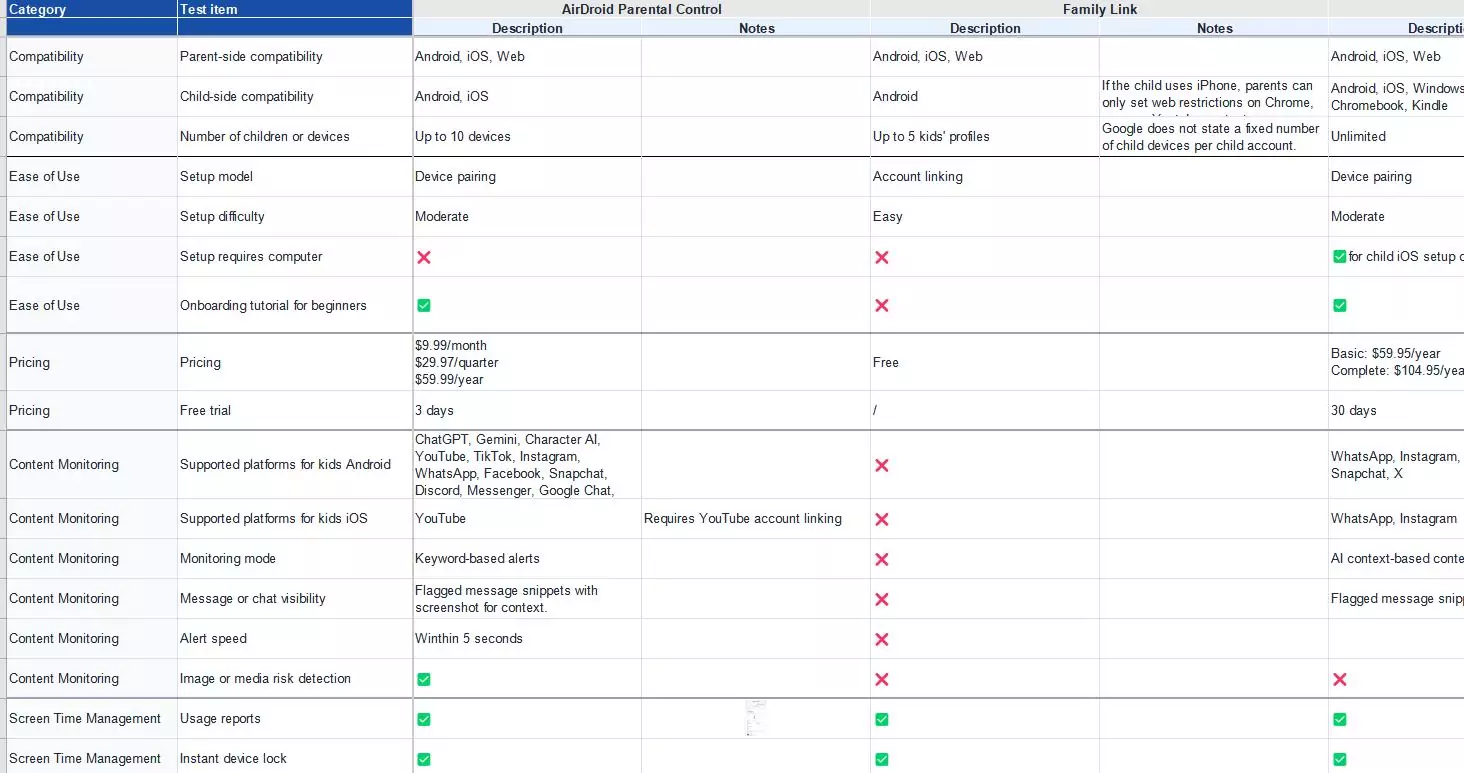
- We log observations, screenshots, strengths, and weaknesses found, to support our evaluations and make findings traceable.
Core Testing Dimensions
To thoroughly evaluate each parental control app, we test it across several key areas:
These weights guide our reviews; we don't always use them to calculate a final score. Also, the weight of criteria varies based on user intent in different articles. For example, when reviewing cross-platform parental control apps, we pay more attention to compatibility.
1Privacy & Transparency
Why it matters
Parental control apps access and handle sensitive family and child data. We look for products that support responsible family safety rather than hidden or excessive monitoring.
How we test it
- Check whether the app is visible on the child's device or not. And if a stealth mode exists, whether it's an optional setting the parent chooses or the app's only mode.
- Check whether parents can easily disable or manage sensitive monitoring features.
- Review collected data and assess whether it extends further than necessary.
- Review privacy policy for child data collection, data sharing, account deletion, COPPA, and GDPR compliance.
- Evaluate the app's marketing position.
Best performance
The app clearly explains what permissions are required, provides transparent privacy policies, and gives parents useful controls without overreach.
Weak performance
The app runs hidden by default with no way to make it visible, overcollects excessive unnecessary child data, makes child privacy and data handling hard to understand, or promotes itself as a spy tool.
2Ease of Setup & Use
Why it matters
A parental control app can have strong features but still fail families if setup is too complicated or daily management is hard to understand.
How we test it
- Record how straightforward the setup is and whether a computer is required.
- Review if the app offers onboarding tutorials for new users.
- Test whether the parent dashboard is intuitive to navigate.
- Check whether the app offers restriction and rule preset based on a child's age.
Best performance
Setup is straightforward with clear instructions, the dashboard is self-explanatory, and it has age-based presets.
Weak performance
Setup is confusing, the app UI is outdated, features are buried in nested menus, or opening the app or editing rules requires relogin.
3Core Features
Why it matters
This is what parents pay for. An app can be easy to use or cheap, but if its features don't work reliably when they're needed, it's useless.
Here are some features we focus on:
*In addition to the feature performance, we also assess the feature availability. Missing features may affect our recommendation, depending on what the article focuses on.
Social & AI content monitoring
How we test it
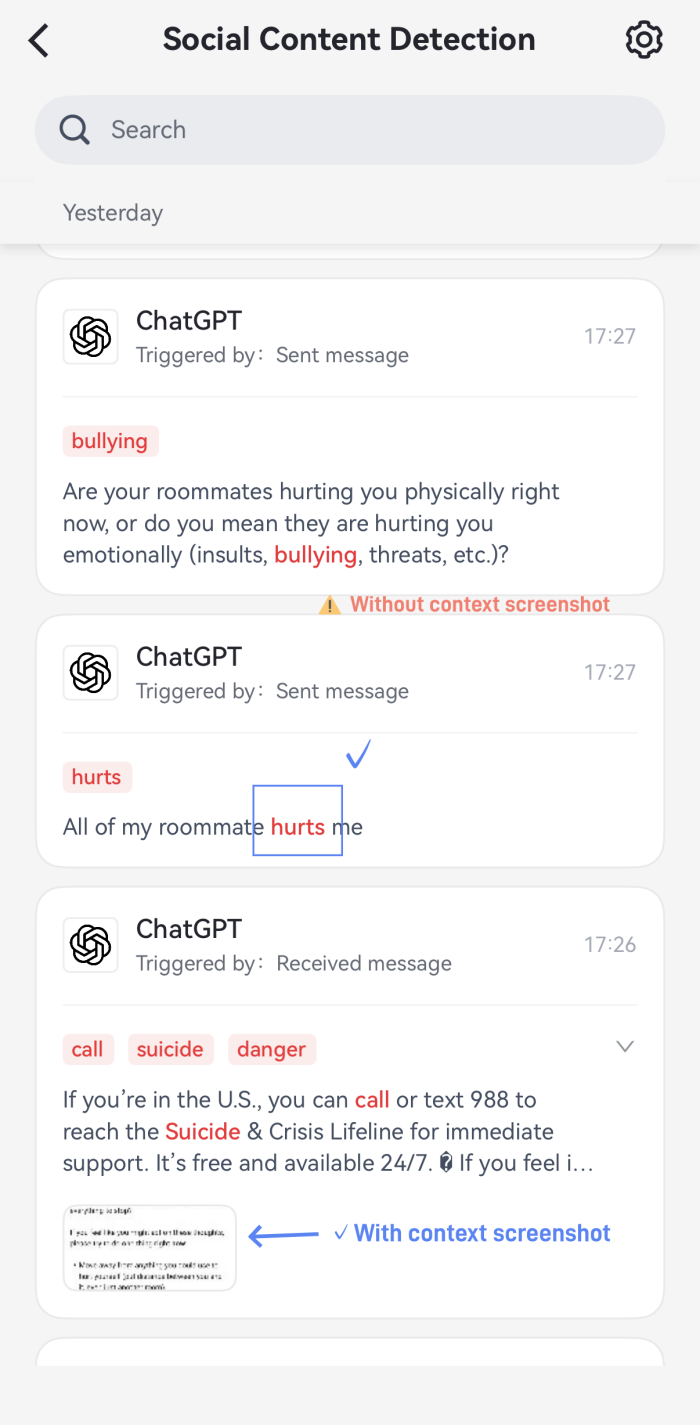
- Check whether the app supports risk detection and content alerts.
- Review coverage: Does the app cover common platforms kids used? Can it identify serious risks like cyberbullying, self-harm, etc?
- Use inappropriate keywords or images to test the alert speed and the rate of false positives.
Best performance
The app detects high-risk content accurately, sends timely alerts, explains the risk clearly, and keeps false positives or missed alerts low.
Weak performance
The app misses obvious risks, sends alerts late, or produces too many false positives.
Screen time management
How we test it
- Create daily limits, schedules, and temporary usage approvals.
- Check whether rules sync and take effect immediately on the child's device.
Best performance
The app applies screen time rules promptly and reliably, and gives parents flexible controls for different routines or children.
Weak performance
Rules are difficult to understand, fail to apply immediately, or are easy to bypass.
Call & SMS monitoring
How we test it
- Verify whether the app supports call logs, number blocking, SMS records, or risky message content alerts.
- Call and send texts to the child's device. Then, check whether calls and texts log accurately on the parent dashboard.
- Block a number and confirm calls or texts from it are actually blocked.
- Review contact and message visibility.
Best performance
Calls and texts are logged accurately, blacklisted numbers are genuinely blocked, and risky messages can trigger an immediate alert.
Weak performance
Logged calls or texts don't match what actually happened on the child's device, or number‑blocking fails to work.
App & web blocking
How we test it
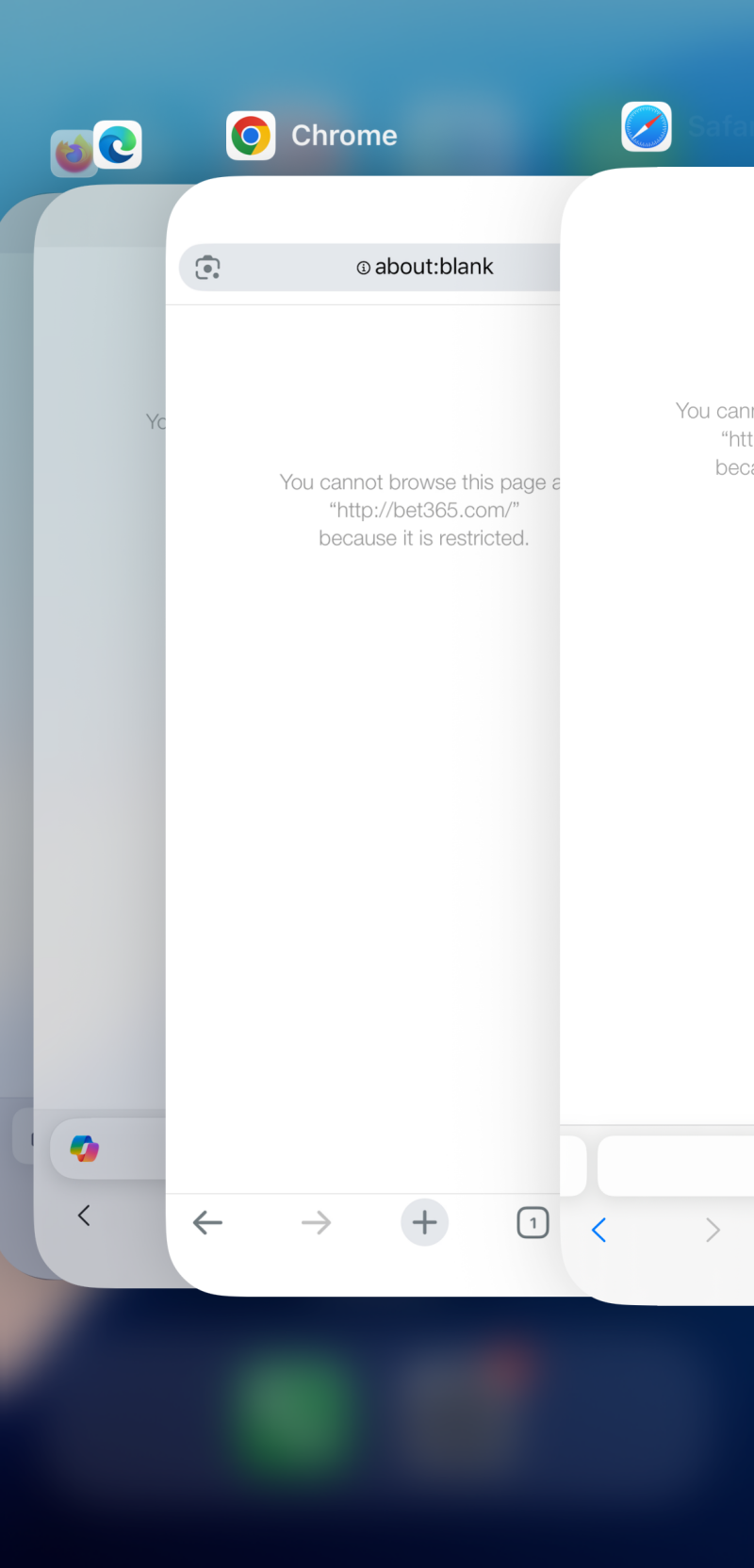
- Block a specific app or site from the parent dashboard, then try to open it from the child device.
- Repeat the test in every browser installed on the device.
- Try common bypass methods to look for bypass loopholes.
Best performance
The app blocks selected apps and websites consistently.
Weak performance
Filtering only works in limited browsers, fails to apply immediately, or is easy to bypass.
Location tracking
How we test it
- Compare the app's reported location against the device's actual GPS position to see the accuracy.
- Set up geofence zones and test whether entry and exit alerts arrive on time.
- Check how far back the location history goes.
Best performance
The app provides accurate location data, stores useful location history, and sends geofence alerts within a minute or two.
The app offers extra features like driving reports, check-ins, and SOS.
Weak performance
Location data is inaccurate or outdated, geofence alerts are delayed, or location history is too limited to review recent routes.
The app lacks geofencing or location history features.
Activity reports
How we test it
- Review report clarity.
- Check if the app can generate accurate activity data from app use and web visits.
- Test whether reports can be filtered by time range.
Best performance
Reports are timely, easy to read, and organized in a way that helps parents quickly understand device activity.
Weak performance
Reports are delayed, inaccurate, hard to read, or offer little to no filtering.
4Compatibility
Why it matters
Most families use multiple operating systems. An app that works iPhone-to-iPhone but breaks on Android-to-iOS leaves half of families unprotected.
How we test it
- Check supported parent and child platforms, including Android, iOS, Windows, Mac, web dashboards, and other devices.
- Compare and note whether core features work differently across platforms.
- Review whether the app clearly explains these differences before purchase.
Best performance
The app supports major devices and explains any feature differences between systems.
Weak performance
The app is limited to one major platform (e.g., Android-only).
5Bypass Protection
Why it matters
Today's children are tech-savvy and may try to bypass parental controls. Strong tamper resistance keeps safety rules active and hard to disable.
How we test it
- See whether the app offers uninstall protection, one-time code, or other extra layers.
- Test common bypass tactics (e.g., VPNs, uninstalling, settings changes, etc.) to look for loopholes.
- Check if parents get alerts when restrictions are bypassed or removed.
Best performance
Common bypass attempts fail. Parents can receive alerts when important protections are changed.
Weak performance
The app is easily uninstalled. Simple tricks disable monitoring without alerts.
6Value
Why it matters
Families compare parental control apps not only by price, but also by what each plan actually includes and how many children or devices it covers.
How we test it
- Compare the paid plan against similar products and evaluate whether it is reasonably priced.
- Check whether a free tier or trial exists and how long it lasts.
- See the number of supported children and devices.
- Verify whether unique features are included or locked behind higher-priced plans or extra fees.
Best performance
The app offers clear subscription tiers, with standard plans that meet most families' needs, a low-barrier free trial, and family plans that cover multiple devices.
Weak performance
The app offers multiple confusing pricing plans, is relatively expensive for the features and coverage provided, doesn't offer a free trial, supports only one child's device, or charges extra for key features.
7Customer Support
Why it matters
Parents may need help during setup, permission troubleshooting, billing, or refund requests. Support quality matters in practice.
How we test it
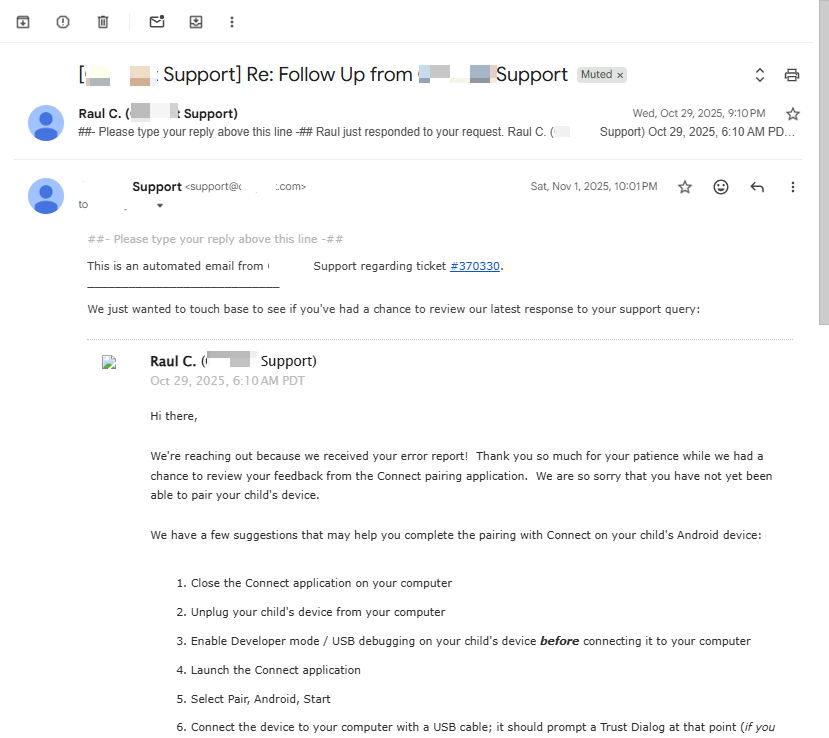
- Test available support channels, such as live chat, email, or help center.
- Measure response speed and solution quality.
- Assess the policy for money-back guarantees.
Best performance
Support is easy to reach, answers are useful, and refund or cancellation terms are clear.
Weak performance
Support channels are unresponsive, or agent replies are slow, generic, and ineffective.
Other Research
Hands-on testing is our primary source, but we also draw on external information, for instance:
✔️ Official product pages, pricing pages, feature documentation, and help center articles.
✔️ Publicly available product updates and release notes.
✔️ Users' reviews from the App Store, Google Play, and Reddit, especially common complaints about setup, app performance, billing, data sharing, etc.
We use these sources to support and cross‑verify our hands‑on findings; they never replace hands‑on product testing. If there is a gap between an app claim and our test results, we prioritize what we observed during testing in the review.
Limitations Notes
No testing process is perfect. So, a few limitations worth knowing before you rely on our review:
- Testing results and app performance may vary by device, operating system, app version, permissions, and regions.
- Our testing cannot replicate every possible device or family usage scenario.
- App features and pricing may change after our review is published.
- iOS limits what any parental controls can do at the system level. So some monitoring features on Android (like social content monitoring) may be unavailable on iOS regardless of the app.
- Our reviews may include the editorial team's subjective judgment, especially for usability, report clarity, and support quality.
- We do not test every parental control app on the market.
Update Policy
- We schedule periodic retests for parental control apps. But we do not guarantee identical update cadence across articles.
- If a parental control app releases a major feature update, stops supporting certain devices, or becomes unavailable in app stores, we prioritize retesting and updating.
- You can always check the "Last updated" date at the top of any article to see when it was last verified.
Help Us Keep Reviews Updated
If you find outdated or inaccurate information in one of our reviews, feel free to use the feedback form at the bottom of the affected article to tell us. We review feedback and update our content when verified.
Our Review Team
Our review process is handled by a small team of AirDroid reviewers with backgrounds in technology and family digital safety. They have years of experience testing mobile apps, parental controls, and device security tools.
Who is involved:
- Product reviewers who test parental control apps, record findings, and translate technical results into practical reviews.
- Content reviewers who cross-check whether the article matches the test results and product evidence.
- Technology specialists who help interpret technical limitations and device permissions when needed.





Leave a Reply.