Netsanity Review 2026: Features, Status, Pros and Cons
Netsanity was a cloud-based parental-control service designed to manage internet access on Apple mobile devices and selected Samsung Android devices. Its documented tools included category-based web filtering, website and app blocking, scheduled internet access, immediate internet pauses, and removal protection.
Netsanity does not appear to be a practical choice for a new family in 2026. On October 19, 2026, its public website and parent-dashboard address did not load in our checks. Its separate support portal still displayed older documentation, but we could not confirm a working registration route, current subscription, active product download, modern compatibility list, or current privacy policy.
Netsanity Review: Quick Verdict
Netsanity had a focused design for its time. Rather than promising complete access to a child's private communications, it mainly controlled whether websites, internet-connected apps, and the wider internet could be reached. Its web filtering and remote access rules could once help families create clear device boundaries.
The problem is current availability. The accessible first-party support materials we found were written for older iOS versions and Samsung devices running Android versions as old as Android 6 through 9. A cancellation guide was last modified in December 2020. Historical documentation cannot establish that the service, dashboard, filtering servers, or device-management profiles work on current devices.
| Review Area | What We Found |
|---|---|
| Current status | Appears inactive and unavailable for a dependable new setup |
| Hands-on tested for this review | No; this is a documentation-based review |
| Historically supported child devices | Apple iPhone and iPad, plus selected Samsung Android devices |
| Core documented strengths | Web filtering, app connection blocking, schedules, internet pauses, and profile protection |
| Major 2026 limitation | No verified working official website, dashboard, signup route, current pricing, or modern compatibility information |
| Current price | Not verifiable; older prices should not be treated as a current offer |
| Recommendation | Choose a maintained parental-control service with current support and privacy documentation |
Note: Documented features describe Netsanity's historical design. They do not confirm that those features still operate in 2026.
What Was Netsanity and How Did It Work?
Netsanity was introduced as a remote mobile-device access-management service. The company originally launched it for Apple devices in 2014 and later documented support for selected Samsung Android phones. Parents managed rules from a web dashboard, while configuration profiles, VPN-based filtering, device administration, or Samsung Knox applied controls to the child's device.
1Apple Devices Used Management and Filtering Profiles
On iPhone and iPad, Netsanity used installed configuration profiles rather than relying only on a normal child-side app. Historical descriptions say these profiles could apply web filtering, app restrictions, scheduled internet access, and other device rules.
This design depended on Apple's device-management behavior and Netsanity's servers. It should not be assumed compatible with current iOS or iPadOS releases without a working first-party compatibility statement.
2Samsung Android Support Used a Device Agent
For supported Samsung phones, older Netsanity documentation describes a device agent using administrator privileges, VPN filtering, and Samsung Knox. An archived Netsanity removal-protection guide shows examples from a Galaxy S6 and says its instructions generally covered versions through Android 9.
That evidence does not establish support for other Android brands or current Samsung and Android releases.
3The Main Focus Was Access Control
Netsanity's documented purpose was to allow or deny network access, not to provide a complete archive of a child's texts, social-media conversations, or on-screen activity. It could block access to selected services, but blocking an app's internet connection is different from understanding what happened inside the app.
How We Reviewed Netsanity Without Hands-On Testing
We did not hands-on test Netsanity for this review. We could not responsibly report installation speed, filtering accuracy, bypass resistance, reliability, or ease of use because the public website and parent dashboard were unavailable during our October 19, 2026 checks.
We attempted to open netsanity.net and my.netsanity.net. Both addresses returned connection-closed errors, so we could not create an account, access a trial, confirm a current plan, or open the parent dashboard.
We reviewed surviving first-party support articles, older posts attributed to Netsanity, the company's 2014 launch announcement, and independent coverage discussing the service's later status. We treated these materials as historical evidence rather than proof of current operation.
We did not install an Apple configuration profile or Samsung device agent, connect a child device, trigger Catblocker, Appblocker, Timeblocker, or Timeout, attempt removal, or measure how quickly a rule took effect.
We also could not verify current privacy terms, data retention, account deletion, customer support, server security, compatibility with current operating systems, or whether existing customers can still use the service.
For these reasons, the article does not assign performance scores. Any statement about how a feature worked is attributed to surviving documentation and should not be read as a 2026 test result.
Netsanity Features We Could Verify
The following functions appear consistently in historical first-party or contemporary product records. Their inclusion here explains Netsanity's design; it does not confirm present-day availability.
1Catblocker and Siteblocker
Catblocker was Netsanity's category-based web filter. At launch, the company described more than 30 content categories, while Siteblocker let a parent allow or block specific web addresses. Older materials also describe SafeSearch enforcement and filtering across supported browsers and internet connections.
The original evidence supports content-category filtering, not a complete anti-malware or phishing scanner. Claims that Netsanity could detect every dangerous link, new threat, or harmful page would go beyond the documentation we could verify.
2Appblocker and Gameblocker
Appblocker restricted selected internet-connected apps by interrupting their network communication. An older Netsanity-authored explanation says the app icon could remain visible even though the service could no longer load online content. Samsung controls could also disable selected icons under supported configurations.
This was not the same as measuring precise daily app use or recording what a child did inside the app. Offline functions could also remain available when only the network connection was blocked.
3Timeblocker and Timeout
Timeblocker scheduled periods when the child's device could not access the internet. Historical descriptions say the schedule relied on server time, which was intended to reduce bypasses based on changing the device clock or time zone.
Timeout, also described in older materials as Netblocker, provided a broader on-demand internet pause. It could support agreed homework, bedtime, meal, or family periods, but it was not a substitute for a detailed per-app usage report.
4Removal and Tamper Protection
Netsanity used parent-controlled profiles on Apple devices and administrative controls on supported Samsung phones. The Samsung guide says removing the agent required the enrollment code and that a parent could restrict factory reset under the documented setup.
We did not test those protections. Modern operating-system changes, VPN conflicts, factory resets, expired certificates, or unavailable servers could affect an older profile or agent.
5Dashboard Management but Limited Reporting Evidence
The parent dashboard was designed to apply rules remotely. However, the surviving evidence does not support describing Netsanity as a detailed activity-analysis service with complete browsing records, precise per-app screen-time reports, or private-message archives.
Its 2014 launch announcement listed Appblocker, Netblocker, Catblocker, Timeblocker, and Siteblocker and advertised plans starting at $5.95 per month for one device. That is historical pricing only; no current Netsanity price could be verified.
Netsanity Pros and Cons
Because Netsanity was not available for hands-on testing, these are design-level advantages and current practical limitations, not scored performance results.
1Documented Advantages
- Clear access-control focus. The feature set centered on blocking unwanted sites, apps, and internet access rather than collecting complete private conversations.
- Remote rule changes. Parents could historically manage supported devices through a web dashboard.
- Scheduled boundaries. Timeblocker was designed for recurring offline periods such as bedtime or homework.
- System-level enforcement. Profiles, VPN filtering, device administration, and Samsung Knox were intended to make rules harder to remove than a standard app setting.
- Separate category and site controls. Families could apply broad filtering categories while also handling individual websites.
2Major Limitations in 2026
- Apparent service inactivity. We could not reach the official website or parent dashboard.
- No verified current setup. There was no working first-party registration, trial, download, or enrollment route that we could confirm.
- Outdated compatibility evidence. Available guides discuss old iOS behavior and Samsung Android devices through Android 9.
- No current privacy documentation. We could not verify present data collection, retention, encryption, deletion, or support practices.
- Limited reporting evidence. The documented design emphasized access control rather than detailed app-use analytics or contextual safety alerts.
- Network-level limits. Blocking an app connection does not necessarily disable offline features or explain why a child attempted to use the app.
Is Netsanity Safe, Private, and Still Available?
We cannot confirm that Netsanity is safe, supported, or usable in 2026. The public website and dashboard were inaccessible, and we found no current first-party privacy policy, security statement, compatibility page, or active sales route.
1Netsanity Appears to Be Inactive
The Netsanity support portal remains online, but an accessible support page about cancelling Apple and Android plans was last modified in December 2020. Independent digital-safety organization The White Hatter describes Netsanity as out of business. We did not find a first-party discontinuation notice, so the most precise conclusion is that the service appears inactive and should be treated as unavailable for new users.
2Do Not Install an Unverified Profile or Agent
A configuration profile, VPN certificate, or device-administrator agent can affect network traffic and device settings. Families should not install an old package or profile from an unofficial source when the publisher, server destination, certificate status, removal process, and data practices cannot be confirmed.
3Use Parental Controls Transparently
Any family-safety tool should be used on a device the parent is authorized to manage. Explain which websites, apps, or times are restricted, connect each rule to a specific safety or digital-habit goal, and revisit the arrangement as the child becomes more responsible.
A blocked connection or attempted app launch does not prove harmful intent. It may need context and a calm conversation rather than automatic punishment.
Netsanity Alternative: AirDroid Parental Control
Families looking for a currently maintained child-safety and digital-habit tool can consider AirDroid Parental Control. Unlike Netsanity's older network-access design, AirDroid documents a broader combination of app and web rules, activity summaries, location safety, family communication, and supported online-risk signals.
- Rules that can adapt. Activity summaries give families a starting point for reviewing device habits, while time requests allow a child to ask for an exception instead of treating every limit as inflexible.
- Support beyond the screen. Device location, recent routes, geofence notifications, and SOS tools can help families coordinate arrivals, independent outings, or a child's request for assistance.
- More precise app boundaries. A parent can choose a limit for one app, create a shared allowance across selected apps, schedule Downtime, or temporarily restrict access when the family needs a focused break.
- Focused signs of online risk. Depending on the child's platform and setup, selected content or notification alerts can highlight a possible concern without being presented as a complete record or proof of wrongdoing.
- Web controls that complement app rules. Website restrictions, Safe Search, and supported browsing information address browser access separately, which matters when blocking an app alone does not close every route to the same service.


AirDroid's screen-time documentation describes app limits, shared allowances, Downtime, and blocking tools. Exact capabilities differ between a child's Android device and iPhone or iPad and can depend on operating system, permissions, setup mode, network connection, region, and current app version.
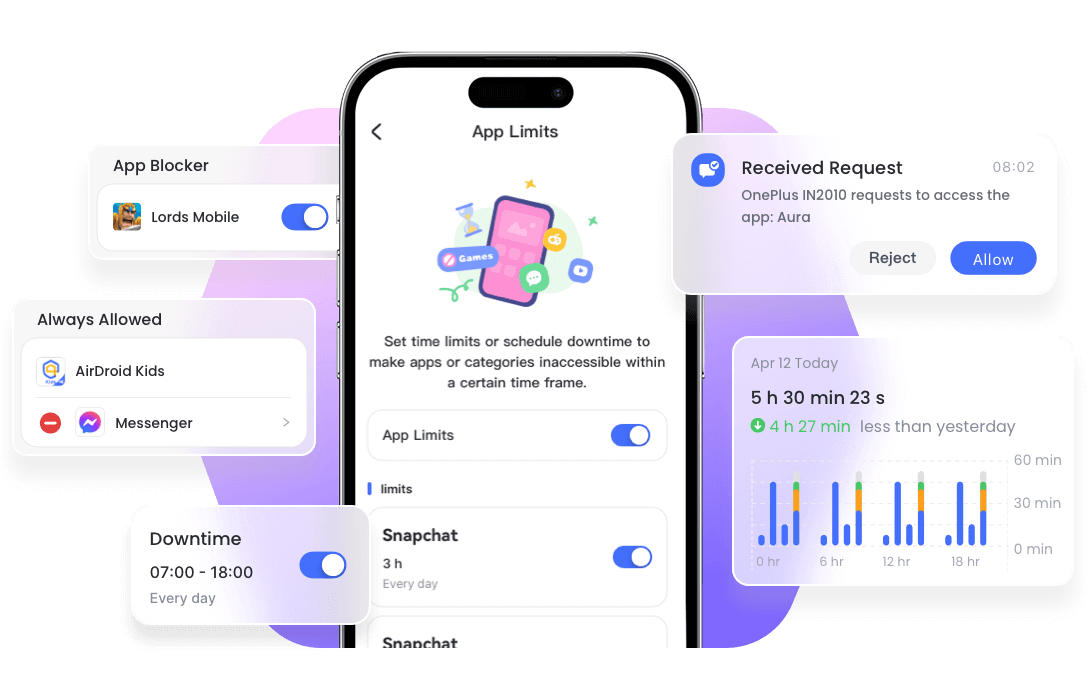
Use only the features needed for the family's safety goal. Alerts can lack context and should not be treated as proof of wrongdoing, while Android-only capabilities should never be presented as equivalent iPhone features.
Final Verdict: Is Netsanity Worth Using in 2026?
Netsanity had a coherent historical feature set. Catblocker, Siteblocker, Appblocker, Timeblocker, Timeout, and removal protection gave families several ways to manage mobile internet access without claiming to record every private conversation.
That historical value does not make it a sound choice today. We could not access its official website or parent dashboard, verify a current plan, review current privacy terms, or test compatibility with a modern iPhone, iPad, or Samsung phone. The remaining support documentation largely reflects systems used several years ago.
Netsanity is not recommended for a new family setup in 2026. Choose a maintained product distributed through a verifiable first-party source, confirm the exact child-device support, and use the least intrusive features that address the family's real safety or digital-habit needs.
Netsanity Review FAQs











Leave a Reply.