AirDroid vs Bark vs Qustodio for Snapchat Monitoring (2026): Which Fits Your Family?
If you need a child safety app that covers Snapchat usage, start with the child's phone and the type of support your family needs. AirDroid Parental Control is a strong fit for Android families that want customizable Snapchat safety alerts, time limits, and app controls, with transparent setup and clearly documented limits.
Bark focuses on broad automated risk detection, while Qustodio combines concerning-topic alerts with strong screen-time and routine controls. None of these apps provides a guaranteed archive of every Snap or private conversation.
On a child's iPhone, Snapchat-specific content monitoring is more limited. Families should combine suitable device controls with Snapchat Family Center. Parents should use the least intrusive feature that reasonably addresses the safety concern and explain the family rules in an age-appropriate way.
Transparency note: This comparison is published by AirDroid Parental Control. We tested AirDroid, Bark, and Qustodio with controlled accounts and harmless sample content. We distinguish child-Android capabilities from child-iPhone capabilities throughout the article. No real child data or private conversations were used.
Quick Verdict: AirDroid vs Bark vs Qustodio for Snapchat
AirDroid Parental Control, Bark, and Qustodio address different parts of Snapchat safety. AirDroid is best suited to an Android family that wants to define safety keywords connected to known concerns and combine those alerts with time limits and app controls.
Bark is better suited to parents who want broad, automated risk-category detection. Qustodio is a balanced choice for families prioritizing routines, screen time, app control, and concerning-topic alerts.
| Features | AirDroid Parental Control | Bark | Qustodio |
|---|---|---|---|
| Best for | Android families wanting customizable Snapchat safety alerts plus device controls | Families wanting broad automated risk detection | Families wanting balanced screen-time controls and concerning-topic alerts |
| Child's Android | Selected-keyword safety alerts, limited alert context where available, time limits, schedules, and app blocking | Supported Snapchat content analysis, automated risk alerts, screen-time schedules, and blocking | Social Monitoring, concerning-topic alerts, routines, time limits, and app controls |
| Child's iPhone | Usage management, app restrictions, location, and general device controls; Snapchat keyword alerts are child-Android features | Can manage or block access, but Snapchat content monitoring is currently limited to a child's Android device | Snapchat conversation alerts are not currently supported on a child's iPhone; other supported iOS social-monitoring features may require computer-assisted setup |
| Snapchat risk detection | Safety alerts triggered by selected keywords in supported Snapchat activity on a child's Android device | Automated analysis of supported Snapchat activity on a child's Android device | Concerning-topic detection through Social Monitoring on a child's Android device |
| Custom keywords | Yes, on a child's Android device | No family-defined Snapchat keyword workflow; Bark emphasizes automated risk categories | No family-defined Snapchat keyword workflow; Qustodio emphasizes automated concerning-topic detection |
| Automated risk categories | More parent-directed through selected safety keywords | Strong emphasis on broad automated categories | Yes, through concerning-topic detection |
| Alert context | Supported alerts may include limited context to help a parent understand why a safety check-in may be needed | Alerts may include the supported portion connected to a detected concern | Alerts may include information about a detected concerning topic |
| Snapchat time limits | Yes, with app limits, schedules, and downtime controls | Yes, through screen-time schedules and access controls | Yes, with strong daily limits and routines |
| App blocking | Yes | Yes | Yes |
| Complete Snapchat archive | No | No | No |
| Setup requirements | Install the parent app and AirDroid Kids, connect the child's Android device, and enable the permissions required for the selected safety features | Snapchat content monitoring requires the applicable setup on a child's Android device. Bark's separate iOS setup options do not add Snapchat content scanning on a child's iPhone. | Parent and child-device setup is required. Other supported iOS social-monitoring features may require a computer, but this does not add Snapchat conversation alerts on a child's iPhone. |
| Pricing | $9.99 monthly, $19.99 quarterly, or $59.99 yearly; the annual plan works out to about $4.99 per month and supports up to 10 devices | Bark Premium costs $14 monthly or $99 yearly; Bark Jr does not include social-content monitoring | Free basics for one device; Basic starts at $59.95 yearly and Complete at $104.95 yearly |
| Best family/use case | Parents of Android users who want alerts tied to specific, known safety concerns | Parents who want software to screen for a wider range of possible risks | Parents who want Snapchat-related alerts within a broader routine and screen-time system |
Bottom line: Choose AirDroid for customizable Android safety alerts and device controls, Bark for broad automated risk detection, or Qustodio for a balance of concerning-topic alerts and structured screen-time management.
Whichever app you select, use Snapchat Family Center as an additional native safety layer and explain the family rules to your child.
On August 24, 2026, we tested AirDroid Parental Control, Bark, and Qustodio with controlled parent and child accounts. We used a Google Pixel 7 running Android 16 as the parent phone, plus a Samsung Galaxy S20+ running Android 13 and an iPhone 14 running iOS 26.6 as child devices. We enabled the permissions required for each feature we tested.
In our controlled checks on the Samsung Android child device, AirDroid, Bark, and Qustodio delivered supported Snapchat safety alerts promptly, generally within about one minute of the harmless test scenario.
The main difference was how each app identified a possible safety concern. AirDroid let us select the keywords connected to the scenario. Bark applied broader automated risk categories. Qustodio combined concerning-topic alerts with screen-time, routine, and app-control tools.
We also tested setup, Snapchat time limits, schedules, app blocking, available alert context, and Android-versus-iPhone differences. Our test used AirDroid Parental Control 2.7.7.0, Bark 6.4.1, and Qustodio 182.39.2. Each app took approximately 6 to 7 minutes to set up in our controlled test environment.
We used the iPhone to evaluate supported usage controls, restrictions, setup requirements, and platform limitations. We did not treat child-Android Snapchat alert features as child-iPhone capabilities.
We used test accounts and harmless sample content only. No real child data or private conversations were involved. Results may vary with network conditions, permissions, subscription level, operating-system restrictions, Snapchat changes, and app updates. Alerts are safety signals for a parent-child conversation, not a complete record of Snapchat activity.
What Can Parental Control Apps Actually See on Snapchat?
Snapchat parental control does not mean receiving a permanent copy of everything a child sends or sees. In a child safety context, it can include risk alerts, age-appropriate usage rules, app limits, blocking, and information that helps a parent decide when a supportive conversation may be needed.
Available features depend on the child's phone, operating-system permissions, Snapchat's design, and whether the required service remains active.
1AirDroid Parental Control
AirDroid Parental Control is best for Android families that want customizable Snapchat risk alerts plus screen-time and app controls, with transparent setup and limited context where supported.
Its Snapchat-specific alert features are focused on a child's Android device and should not be presented as equivalent child-iPhone capabilities.
AirDroid lets parents configure safety alerts around concerns that are relevant to their child's circumstances. A family can enable relevant categories, add selected terms, or use the AI Keyword Assistant to suggest related words connected to cyberbullying, harassment, self-harm, drugs, sexual coercion, threats, or requests to meet offline.
- Preset and customizable safety keywords: Parents can select relevant risk categories and create a focused keyword list based on a known concern. A short, specific list is usually more useful than a large list of ordinary words.
- Early-warning safety alerts: When a selected keyword appears in supported Snapchat activity on the child's Android device, AirDroid can send an alert so the parent knows that a timely check-in may be needed. A keyword match is a signal to review the situation, not proof that a conversation is harmful.
- Limited alert context where supported: An alert or supported notification may provide enough context to explain why a safety check-in may be appropriate. It does not provide a complete or chronological Snapchat conversation history.
- Optional context for a specific safety concern: On a supported child's Android device, a parent may use available current-screen context when a time-sensitive concern requires clarification. Families should agree in advance on when this feature may be used and avoid reviewing unrelated activity.
- Saved-image safety detection: AirDroid can check supported adult or violent images after they are saved to the child's internal storage or Photos app. It does not guarantee detection of disappearing Snapchat images that are never saved to the device.
- Usage reports and app controls: Parents can review Snapchat usage patterns and use app limits, downtime schedules, or blocking rules to protect homework, sleep, and family time.


For example, a family concerned about repeated bullying could add a small set of relevant terms and use an alert as a prompt for a calm conversation.
If the concern is excessive late-night Snapchat use, an agreed downtime schedule may be enough. Families do not need to enable every available feature.
AirDroid's Snapchat keyword alerts and supported alert context currently apply to a child's Android device. On a child's iPhone, AirDroid can still support app usage reports, time limits, blocking, location features, geofencing, and other device-management functions, depending on the setup.
Important limitation: AirDroid Parental Control does not create a complete archive of every Snap, image, video, or conversation. Notification settings, app permissions, operating-system restrictions, disappearing content, connectivity, and product updates can affect what information is available.
Privacy-minded use: Parents should explain which features are enabled, identify the safety concern each feature addresses, and agree on when additional context may be reviewed. Alerts should support conversation, guidance, and timely intervention.
2Bark
Bark takes a more automated, context-based approach to Snapchat safety. Instead of asking parents to predict every keyword that may indicate a problem, Bark analyzes supported activity for broader concerns such as cyberbullying, depression, self-harm, sexting, violence, and contact with a potential online predator.
For Snapchat, content monitoring is currently available on a child's Android device. Where supported, Bark can scan Stories, user profiles or biographies, private text direct messages, group text direct messages, and searches. Parents should not expect the same coverage for Snapchat images or videos.
When Bark detects a potential concern, it sends the parent an alert with the supported portion connected to the issue. The alert may also include an explanation, suggested next steps, conversation starters, and guidance.
This approach is useful for parents who want broader safety signals without building their own keyword list. Automated analysis can still miss context or produce a false positive, so an alert should be treated as a reason for a calm check-in, not automatic proof that the child has done something wrong.
Bark also provides screen-time management and app-blocking tools. Parents can limit or block access to Snapchat on supported devices, including iPhones, but this is different from Snapchat content monitoring. Bark's current Snapchat content scanning is available on Android, not iOS.
Important limitation: Bark does not create a complete Snapchat archive. Text-only monitoring, disappearing content, platform restrictions, and processing time can affect what is detected.
3Qustodio
Qustodio is best suited to families whose main concern is excessive Snapchat use and the need for predictable screen-time routines. It combines usage reports, daily app limits, scheduled routines, blocking rules, and supported social-risk alerts.
On a child's Android device, Qustodio includes Snapchat within its Social Monitoring system. The feature can analyze supported text for potentially concerning topics such as bullying, self-harm, school absence, health worries, or other situations that may require parental attention.
If Qustodio detects a supported concern, it can notify the parent and may provide a relevant conversation snippet and information about who the child was chatting with. The snippet may still lack the tone, history, or surrounding messages needed to understand the situation.
Qustodio also helps families manage Snapchat use. Parents can review app usage, set an individual daily limit, block access, or create routines that restrict social apps during homework, school hours, bedtime, or other agreed periods.
Platform limitation: Snapchat conversation alerts through Qustodio Social Monitoring are currently focused on a child's Android device. Qustodio's broader iOS social-monitoring setup may require a Mac or Windows computer, but this does not add Snapchat conversation alerts on a child's iPhone.
Important limitation: Qustodio does not create a complete Snapchat archive. Its Snapchat Social Monitoring focuses on supported risk-related text and contextual snippets, and it may not detect every concern.
Snapchat Monitoring Comparison by Child's Device
The child's operating system is one of the most important deciding factors. A service may support Android and iPhone generally while offering a particular Snapchat safety feature on only one platform.
| Service | Child's Android Device | Child's iPhone | Practical Takeaway |
|---|---|---|---|
| AirDroid Parental Control | Selected-keyword safety alerts, limited alert context where supported, app limits, schedules, blocking, and location tools | Usage management, app restrictions, location, and general device controls; no equivalent Snapchat keyword-alert capability | Best evaluated as an Android-first child safety option for customizable Snapchat alerts and usage rules |
| Bark | Supported Snapchat content analysis for Stories, profiles, text direct messages, group text direct messages, and searches | Can help manage or block access, but current Snapchat content monitoring is Android-only | Best when the child uses Android and the parent wants broad automated risk categories |
| Qustodio | Social Monitoring, concerning-topic alerts, time limits, routines, and app controls | Snapchat conversation alerts are not currently supported; other supported iOS social-monitoring features may require a computer | Best for routines and app controls, with Snapchat concerning-topic alerts on a child's Android device |
| Snapchat Family Center | Native connection visibility and safety tools | Native connection visibility and safety tools | Useful on either platform, but it does not let parents read private messages |
Parents should ask, "What can this app do on my child's phone?" instead of relying only on a general "Android and iOS supported" statement.
Which Parental Control Apps Can Alert Parents to Risky Snapchat Activity?
On a child's Android device, AirDroid Parental Control, Bark, and Qustodio can all provide supported Snapchat risk alerts, but they identify concerns differently.
AirDroid uses customizable selected keywords, Bark applies broad automated risk detection, and Qustodio combines concerning-topic alerts with routines and device controls. Snapchat-specific content alerts are more limited on iPhone, and none of these apps guarantees access to every Snap or private conversation.
1Best for Customizable Alerts: AirDroid
AirDroid's main advantage is that parents can define selected safety keywords based on a specific concern, rather than relying only on preset risk categories. This approach can be useful when a family is responding to bullying, self-harm, sexual coercion, drugs, dangerous challenges, unwanted contact, or pressure to meet offline.
For example, parents can create a focused list of terms connected to the situation and receive a supported alert when one of those terms appears in Snapchat activity available through the child's Android setup.
The alert can help parents decide whether a calm conversation, additional guidance, or immediate safety action is appropriate.
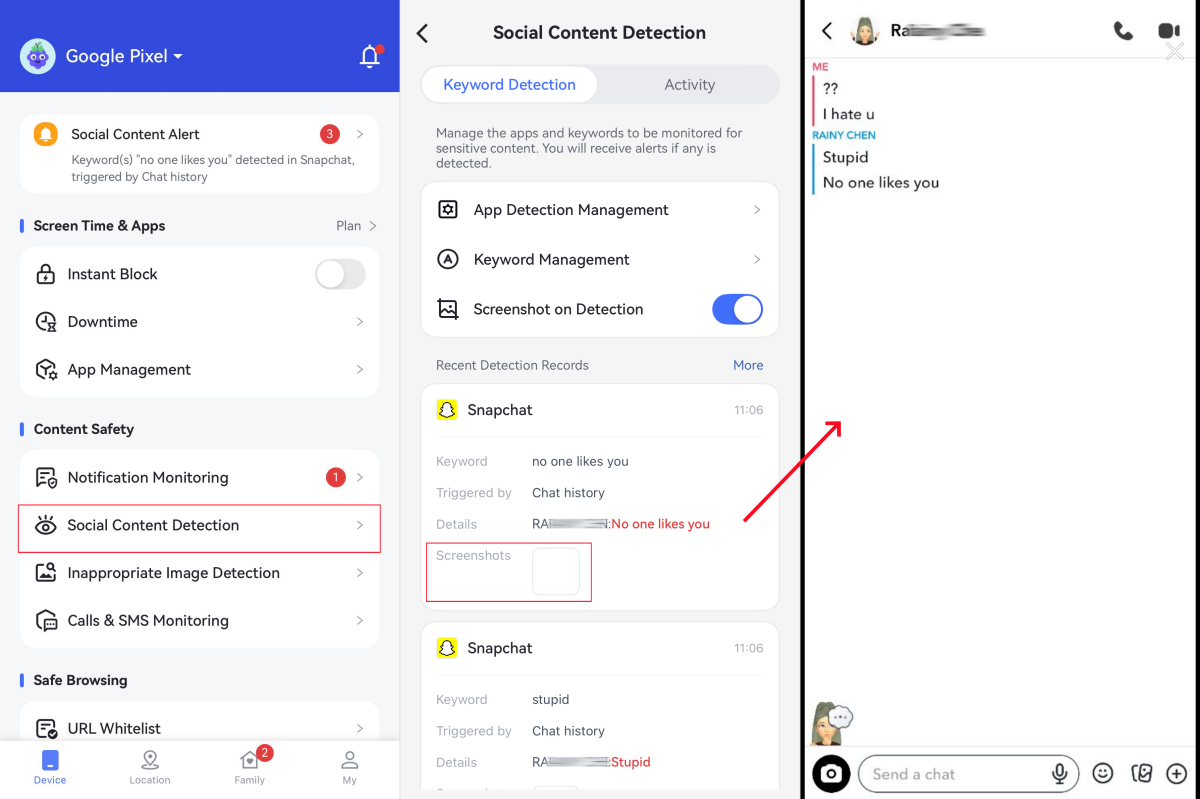
AirDroid does not provide a complete Snapchat chat history or a record of every conversation. It is designed to surface supported safety signals when selected keywords appear, with limited context where available, so parents can recognize when a supportive check-in may be needed.
Keyword alerts still require parental judgment. Ordinary words may have harmless meanings, slang changes quickly, and not every Snapchat interaction produces accessible text.
Families should explain which safety alerts are enabled whenever appropriate. A keyword match should be treated as an early-warning signal for discussion and support, not as proof that harmful activity has occurred.
2Best for Broad Automated Detection: Bark
Bark uses predefined automated risk categories instead of asking parents to create a Snapchat keyword list. On a child's Android device, it can analyze supported Snapchat activity for possible concerns such as bullying, sexual content, self-harm, threats, violence, or predatory contact.
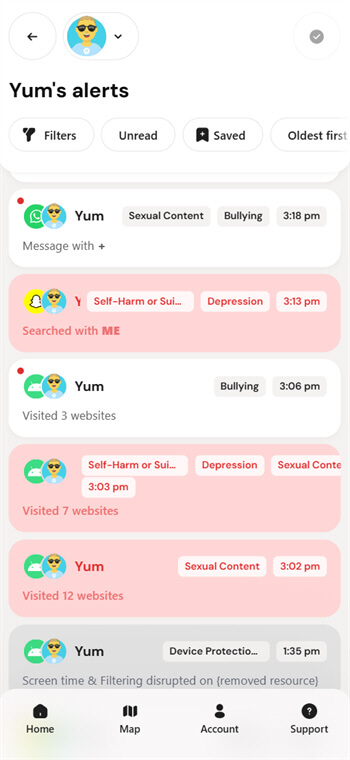
This broader approach may identify a concern that the family did not anticipate in advance. It is particularly useful for parents who want software to screen for multiple types of risk without routinely reviewing ordinary conversations.
Automated detection can still misunderstand jokes, slang, quoted messages, or incomplete context. Bark alerts should be reviewed carefully and used to guide a supportive conversation rather than treated as a complete account of what happened.
3Best Balanced Alert System: Qustodio
Qustodio integrates concerning-topic alerts with a broader parental-control system for routines, app rules, and screen-time management.
On a child's Android device, its Social Monitoring feature can identify supported Snapchat conversations that may involve topics such as bullying, self-harm, violence, or other wellbeing concerns.
When a supported concern is detected, the alert may include limited conversation context to help the parent understand why attention may be needed.
Qustodio is especially relevant when Snapchat is only one part of the family's concern and parents also want consistent rules across social apps, games, browsers, homework time, and bedtime.
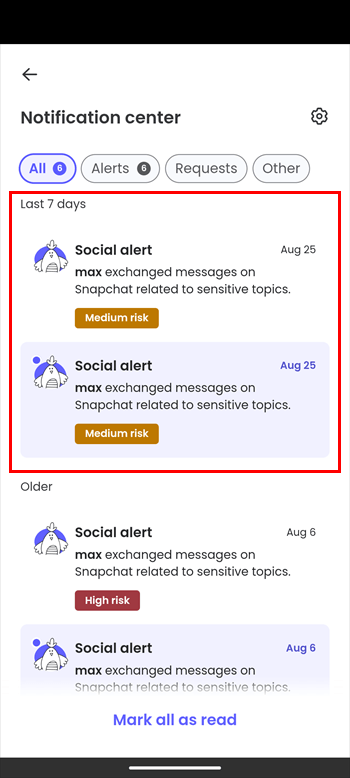
Snapchat conversation alerts do not provide a complete message history and may not capture every risk. Parents should review the available context, speak with the child calmly, and use app restrictions or routine changes only when they reasonably address the situation.
Best for Snapchat Screen Time and App Blocking
Content-related alerts are only one way to manage Snapchat. For many families, limiting when and how long the app can be used may be more predictable and less intrusive.
- AirDroid: Supports app limits, schedules, downtime, and app blocking. It is a strong option when an Android family wants customizable safety alerts and practical usage controls in one service.
- Qustodio: Stands out for structured screen-time rules, routines, and app controls. It is well suited to families that want consistent daily boundaries.
- Bark: Provides screen-time schedules and the ability to block access. Its main differentiator remains automated risk detection.
A reasonable starting rule is to keep Snapchat unavailable during sleep, schoolwork, and family time. Parents can then adjust the limit based on the child's age, responsibilities, and response to the initial boundary.
Best Affordable Option
The most affordable approach is to begin with Snapchat Family Center and the built-in parental controls available on the child's phone. These tools do not provide the same risk-alert capabilities as a paid service, but they may be enough for families primarily concerned with contacts, screen time, downloads, and app access.
AirDroid is an affordable Snapchat parental-control option for Android families that want customizable risk alerts and device controls. Its annual plan costs $59.99, works out to about $4.99 per month, and supports up to 10 devices. Snapchat keyword alerts and supported alert context remain focused on a child's Android device.
| Service | Listed Annual Price | Best Value Scenario | Important Snapchat Limitation |
|---|---|---|---|
| AirDroid Parental Control | $59.99 per year, or about $4.99 per month | Android families wanting customizable alerts and device controls for up to 10 devices | Snapchat keyword alerts are focused on a child's Android device |
| Bark Premium | $99 per year | Families wanting broad automated risk detection across supported services | Snapchat content monitoring is currently Android-only |
| Qustodio Complete | $104.95 per year | Families wanting routines, app controls, and concerning-topic alerts | Snapchat conversation alerts are currently focused on a child's Android device |
These plans differ materially in annual cost, device coverage, alert method, and supported Snapchat features. Families should compare the complete use case rather than price alone. Bark Jr costs less than Bark Premium, but it does not include social-content monitoring and should not be compared as a complete Snapchat risk-alert option.
Pricing note: These are listed US prices checked in August 2026. Promotions, taxes, renewal prices, supported devices, and plan features can change.
Best Choice for an Android Child Device
For a child using Android, AirDroid has the clearest use-case advantage when parents want to define Snapchat safety keywords connected to known concerns and combine those alerts with healthy-use controls.
AirDroid is especially relevant if the family wants to:
- Create focused safety keywords based on concerns such as bullying, coercion, self-harm, or unwanted contact.
- Receive supported safety alerts that may help the parent decide when a check-in is appropriate.
- Set Snapchat limits and schedules from the same parental-control service.
- Block Snapchat temporarily when app access is interfering with sleep, school, or family responsibilities.
That does not make AirDroid the automatic winner for every Android family. Bark may be better if the parent wants broad automated risk detection without maintaining keywords. Qustodio may be better if structured routines and balanced device management are the main priorities.
Parents should explain how each safety feature works, what may trigger an alert, and when additional context may be reviewed. This keeps the focus on support, safer Snapchat use, and timely intervention.
What About a Child's iPhone?
Parents should approach claims about Snapchat monitoring on iPhone carefully. Apple's platform restrictions and Snapchat's disappearing-message design limit what third-party parental-control apps can reliably access.
- AirDroid on a child's iPhone: Use it primarily for app usage management, restrictions, location, and general device safety. AirDroid's selected-keyword Snapchat alerts are child-Android capabilities.
- Bark on a child's iPhone: Bark can help control access, but its current Snapchat content monitoring is limited to Android.
- Qustodio on a child's iPhone: Snapchat conversation alerts are not currently supported. Other supported iOS social-monitoring features may require computer-assisted setup.
- Snapchat Family Center: Use it as a native complement for recent contact visibility, friendship information, and supported safety settings.
For an iPhone family, the most realistic strategy is usually a combination of Snapchat Family Center, Apple Screen Time, clear family rules, and whichever third-party device-management service best fits the family's wider needs.
Snapchat Family Center vs Third-Party Parental Controls
Snapchat Family Center and parental-control apps are not direct substitutes. They provide different kinds of information and work best as complementary layers.
| Capability | Snapchat Family Center | Third-Party Parental Controls |
|---|---|---|
| Recent contact visibility | Can show who the teen has recently communicated with, subject to Snapchat's current features | Varies by service; some supported risk alerts may identify a sender or include limited context |
| Friend information | Can provide supported friend and new-connection information | Generally not the primary purpose |
| Read every private message | No | No service in this comparison guarantees access to every private message |
| Custom risk keywords | No | Available through AirDroid on a supported child's Android device; Bark and Qustodio primarily use automated categories |
| Automated risk categories | Not its primary purpose | Available through services such as Bark and Qustodio for supported activity |
| App time limits | Not a complete cross-device time-management system | Available through AirDroid, Bark, and Qustodio |
| App blocking | Not its primary function | Available through AirDroid, Bark, and Qustodio |
| Best role | Native complement for connection visibility | Risk alerts, device routines, usage limits, and broader parental controls |
Family Center can help a parent understand who is in the child's Snapchat circle without revealing private message contents. A third-party child safety service can add app schedules, blocking, and, on supported devices, risk-related alerts.
What None of These Apps Can Guarantee
No parental-control service should be presented as a perfect Snapchat recorder. AirDroid, Bark, and Qustodio cannot guarantee that parents will receive a complete, permanent copy of every activity within the app.
- No guaranteed archive of every Snap: Disappearing photos and videos may not be captured or stored.
- No guaranteed copy of every conversation: Supported monitoring depends on the device, operating system, permissions, and available data.
- No perfect interpretation: Keywords and automated detection can misunderstand jokes, slang, quoted text, or harmless conversations.
- No permanent connection guarantee: Permissions, background services, connectivity, software updates, or device changes can affect monitoring.
- No substitute for communication: An alert can identify a reason to talk, but it cannot determine the full context or replace parental judgment.
The appropriate expectation is targeted early-warning support. Parents should use the least intrusive feature that reasonably addresses the concern and combine alerts with regular, age-appropriate conversations about unwanted contact, sextortion, bullying, location sharing, disappearing content, and how to ask for help.
Which App Fits Your Family?
Choose according to the child's device and the problem you are trying to solve.
- Choose AirDroid if your child uses Android and you want customizable safety alerts, healthy-use rules, and app controls in one service.
- Choose Bark if your child uses Android and you prefer broad automated risk detection across Snapchat and other supported services.
- Choose Qustodio if you want a balanced system for routines, screen time, app blocking, and concerning-topic alerts.
- Use Snapchat Family Center if you want Snapchat's native connection and safety visibility without reading private messages.
- Combine tools on iPhone because Snapchat-specific content monitoring is more limited than it is on a supported Android setup.
Our recommendation for the clearest AirDroid use case: AirDroid Parental Control is best for Android families looking to support their child's digital safety with customizable Snapchat risk alerts and device controls, with transparent use and clearly documented limits. Its child-Android Snapchat alert features should not be presented as equivalent child-iPhone capabilities.
For broad automated detection, Bark may fit better. For structured screen-time routines and concerning-topic alerts, consider Qustodio. In every case, add Snapchat Family Center and establish family rules that the child understands.
FAQs










Leave a Reply.