AirDroid vs Bark: Which Is Better for Monitoring AI Conversations?
AI chatbots have become daily tools for kids, from asking for homework help to getting support. Because of this, knowing how much time our kids spend on an AI app isn't enough anymore.
Unlike traditional parental controls that only track screen time on AI chatbots, AirDroid and Bark are the few that can help parents identify and receive alerts for potentially risky content in their child's AI chats.
In this guide, we'll compare how each one handles AI chat monitoring so you can choose what fits your family.
Quick Verdict: AirDroid or Bark?
Both AirDroid and Bark offer content detection and risk alerts for AI chatbots, but they approach in different ways:
| Comparison | AirDroid | Bark |
|---|---|---|
| AI apps monitored | ChatGPT, Gemini, Character AI | ChatGPT, Gemini, Snapchat My AI |
| Monitoring method | Keyword-based detection | AI-powered analysis of conversation context |
| Risky content alerts |  | |
| Risky chat context | | |
| Alert speed | Real-time push (3-5 seconds) | Vary by AI analysis |
| Other AI app controls | App blocking, app time limits, usage tracking | App blocking, usage tracking |
| Starting price | $9.99/month, $59.99/year | $14/month, $99/year |
| Compatibility | Android only | Android, Bark Phone |
In Short:
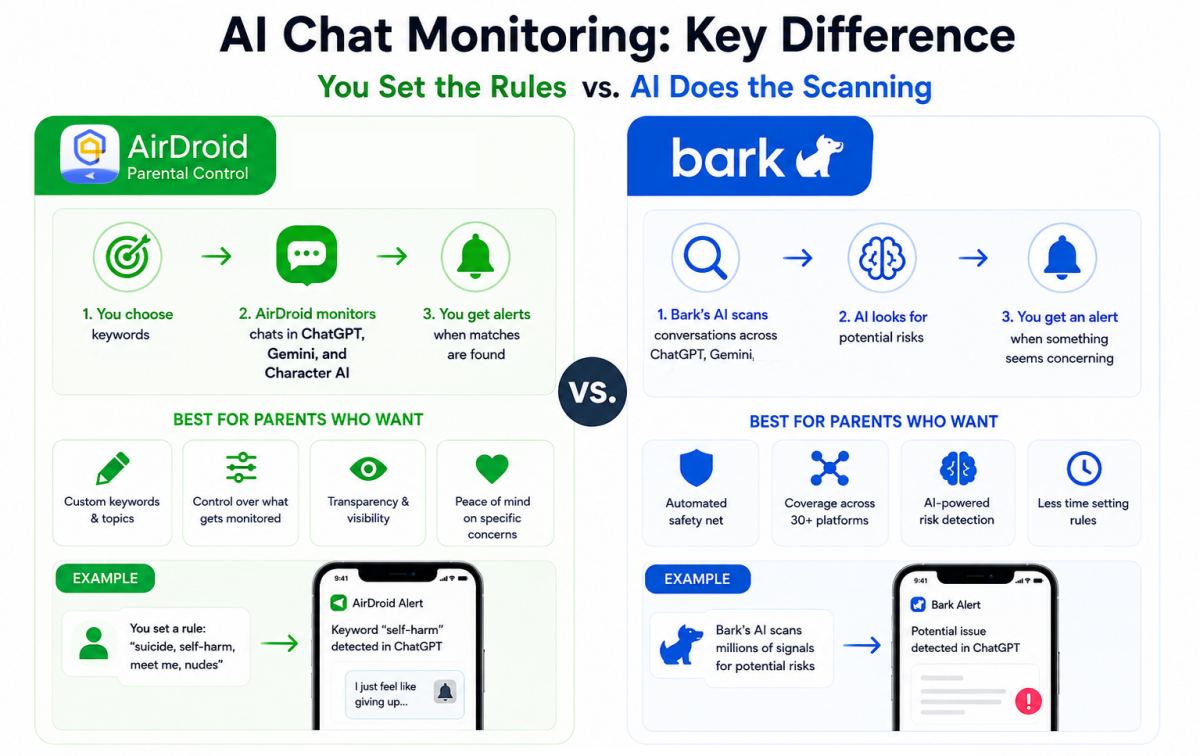
- AirDroid is better suited for parents who want custom ChatGPT, Gemini, and Character AI chatbot monitoring by targeted keywords or concerns. You set the rules, you get the alerts
- Bark is stronger for parents who want an automated safety alert system across ChatGPT, Gemini, and 30+ more social media platforms. Bark sets the rules and buzzes you when something seems off.
Deep Dive: AirDroid vs Bark in AI Content Detection
Below is a detailed comparison of how AirDroid and Bark approach AI chat monitoring, based on our hands-on and publicly available product information.
We break this down across 5 dimensions that matter most to parents:
- How each app detects risky AI content
- What risks it catches
- How fast it alerts parents
- What you actually see as a parent
- Which offers better value
1How Each App Monitors AI Chats
AirDroid Keyword-based alerts, your call | Bark AI scans and flags what it thinks matters |
- AirDroid Parental Control:
AirDroid takes a straightforward approach for monitoring AI and social content: you tell it what to look for, and it watches for those specific words.
When a keyword you've set or AirDroid presets, like "hurt," "suicide," or anything else that worries you, pops up in your kid's ChatGPT, Gemini, or Character AI conversation, AirDroid captures a screenshot of the conversation and sends a push notification to your phone.

- Bark:
Bark works the other way around. It uses contextual NLP semantic analysis to evaluate the full tone and context of AI conversations, rather than keyword matching.
Then, it looks for content related to 29+ risk categories and sends alerts after analyzing the context.
For some apps, it needs to connect to your child's accounts before scanning messages, emails, and social media posts.
2What AI Risks Parents Can Detect
AirDroid Gives you 11 preset risk categories but unlimited flexibility. | Bark Identifies 29+ risky patterns grounded out of the box. |
- AirDroid Parental Control:
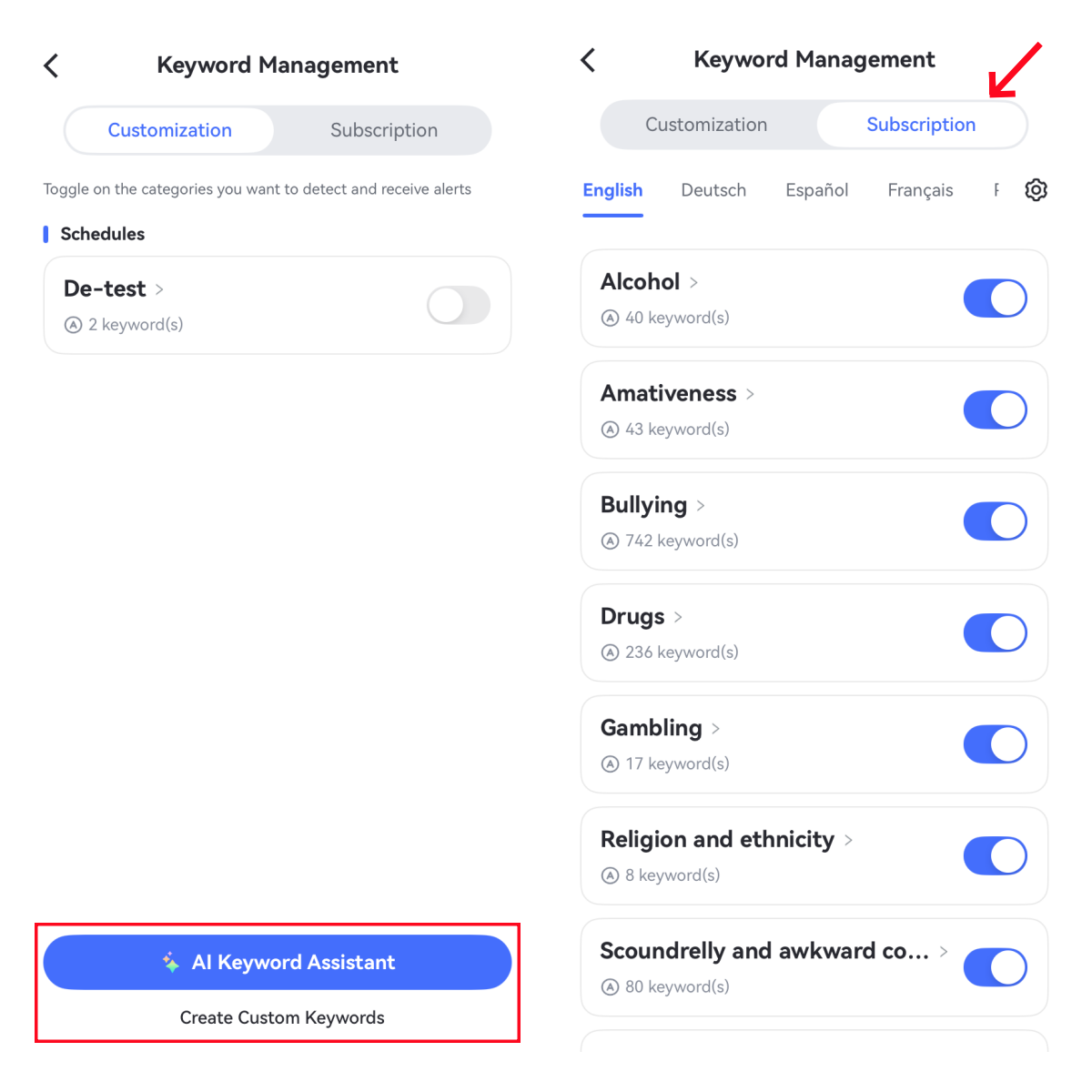
AirDroid gives you 11 preset risk categories (bullying, self-harm, violence, drugs, etc.) that you can toggle on with one tap.
But the real win? You can add your own custom keywords based on your concerns, anything from trend challenges to slang you don't recognize.
Because it uses a keyword-based system, AirDroid is better for detecting clear and hard risks in supported AI apps.
- Bark:
Bark covers 29+ risk categories, including depression, body image, eating disorders, predatory behavior, and more. According to its official document, these categories were developed in collaboration with child psychologists, youth advisors, digital media experts, and law enforcement professionals.
But here's the catch: you can't add custom keywords, which means you're stuck with what Bark decides to flag.
Of course, due to AI scanning, Bark is intelligent for identifying subtle, non-obvious threats in AI chats.
3How Fast Do You Get Alerts?
AirDroid Real time and reacts the moment a keyword is hit. | Bark Not real time. You get alerts only when its AI finishes the scan and context analysis. |
See how we tested the alert speed and accuracy →
Tested AirDroid on iPhone 14 and Bark on the web dashboard, with a Samsung Galaxy S20+ as the child device, Aug 10–25.
As the AirDroid brand, we tested our paid plan and Bark's free trial. Both were run through the same testing process:
We sent the safety-related test messages (focusing on self-harm and bullying) on the child's ChatGPT, checked whether they triggered alerts with context, and measured how long the alert arrived. We also noted missed alerts, delayed alerts, and false positives.
- AirDroid
AirDroid sends alerts in near real time. In hands-on testing, the notification arrived at the parent's phone within 5 seconds under a stable Internet connection.
This speed is possible because the detection happens locally on the device and does not need to be uploaded to a server or AI models for analysis first (like Bark).
- Bark
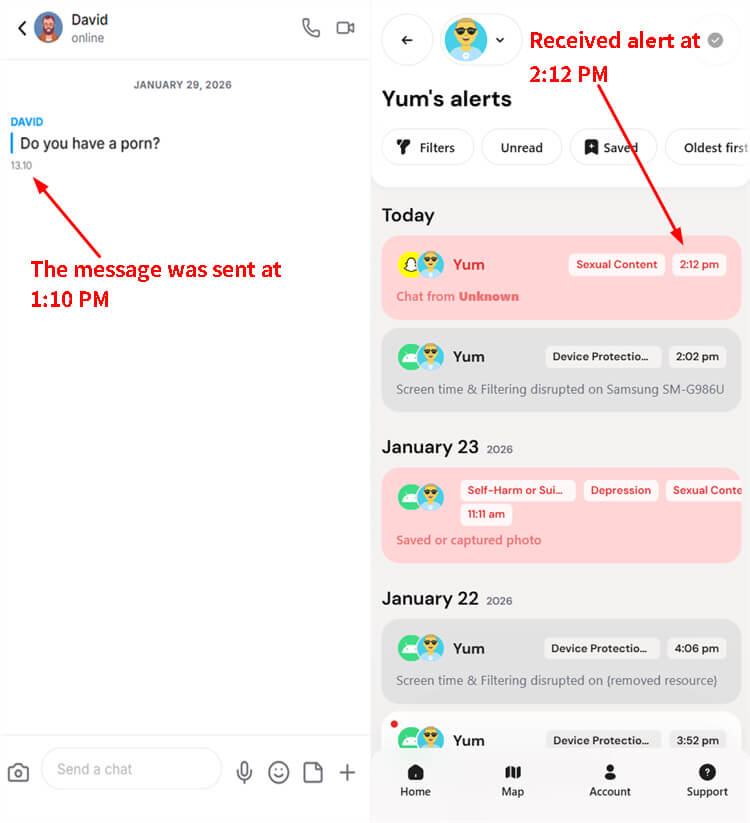
Bark is not instant in the same way. Instead, the alert speed depends on when the AI finishes scanning and analyzing the full context. This is why Bark officially noted that its alerts are not sent in real time.
In our previous tests, Bark's content alerts were even delayed by 1 hour.
- Bottom Line:
For urgent situations, such as a child typing self-harm keywords into ChatGPT at 11 PM, AirDroid's real-time speed may offer a faster path to intervention.
4What You Actually See for Risky AI Chats
AirDroid Shows you text snippets and screenshots. | Bark Gives you just the text snippets. |
- AirDroid Parental Control:
When AirDroid catches a risky keyword in AI chats, you get:
✔️a push notification
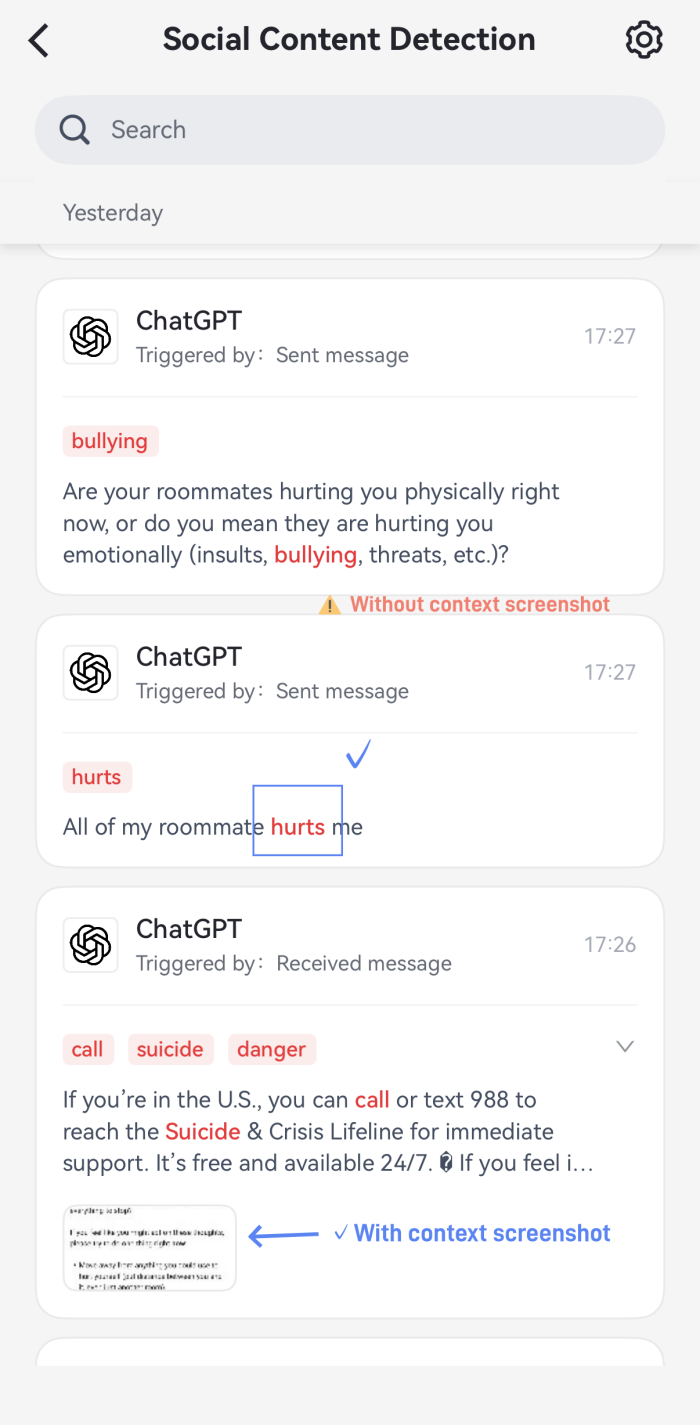
✔️the exact message with the keyword highlighted
✔️the screenshot of the flagged conversation
How about the accuracy and completeness?
One thing we noticed during testing: if the GPT response was long, the text snippet could be cut off, so we couldn't see the full picture. But thankfully, the screenshot filled in the gaps.
You could see exactly what happened before, during, and after the flagged moment through the context screenshot. However, we also found that AirDroid doesn't capture every risky conversation; a few got missed.
- Bark:
With Bark, when your child interacts with risky content, you receive:
✔️a text-based alert summarizing what was detected
✔️a snippet of the conversation
How about the accuracy and completeness?
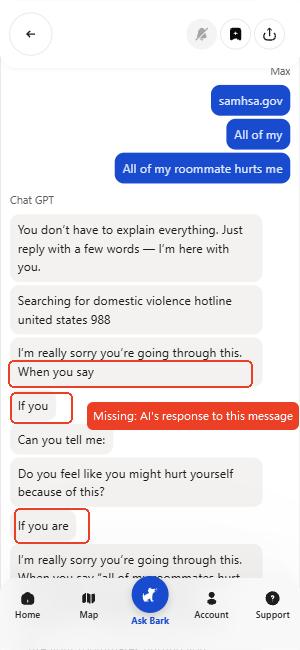
Powered by AI, Bark comes with fewer false positives, but the snippets it provides are often incomplete and jumbled. For example: Here's what we found in testing:
Sometimes they'd include random timestamps or unrelated ads (this is what we found when testing its content monitoring for Snapchat).
Plus, continuous AI conversations were broken into incomplete and disconnected segments, making it hard to follow what was actually said.
5Pricing
| Plan | AirDroid Parental Control | Bark |
|---|---|---|
| Monthly | $9.99 | $14 |
| Annual | $59.99 (≈$5/month) | $99 (≈$8.25/month) |
| Free Trial | 3 days | 7 days |
Which is the better value?
- Choose AirDroid if you want the most budget-friendly way to monitor ChatGPT, Gemini, and Character AI conversations and you do not need email monitoring.
- Choose Bark if you want one subscription to cover AI chats, social media, texts, and emails, and the higher cost fits your budget.
Pros & Cons: AirDroid vs Bark for Keeping AI Safe
Based on the deep-dive above, each tool carries strengths and limitations when supervising children's AI conversations.
*The following pros and cons focus exclusively on AI chat monitoring performance, excluding unrelated device features, to help parents quickly evaluate.
AirDroid Parental Control
Pros:
- Custom content for risk alerts: Add any keyword that worries you for content detection and risk alerts.
- Real-time push: Sends instant alerts to parents at the moment a risky keyword appears.
- Full conversation context: When an alert triggers, you get a screenshot and snippet of the actual chat.
- Character AI support: AirDroid covers Character AI monitoring that Bark lacks.
- More affordable: $5/month on the yearly plan, covering up to 10 family members.
Cons:
- Android focused: AI chat monitoring works only if your kids use Android.
- Not automated: Requires manual setup for keywords and apps.
Bark:
Pros
- Broader and automated risk monitoring: Covers 29+ risk categories for content monitoring without setup required.
- AI-powered context analysis: Looks at patterns and meaning, not just keywords.
- Snapchat My AI coverage: It is the only mainstream parental tool that monitors Snapchat My AI's content.
- 7-day free trial: Gives you a full week to test it out.
Cons
- No custom keywords: You can't add your targeted concerns for monitoring.
- Severely fragmented context: The flagged AI chat snippet is often disjointed, incomplete, and mixed with irrelevant items.
- Delayed alerts: Because alerts are sent after context analysis, it might be delayed by hours.
- Pricier: The monthly and annual plans are generally more expensive than most parental control tools.
Final Recommendation: Who Should Choose Which?
| If you ... | Choose |
| Want to set your own rules for AI chat monitoring | AirDroid |
| Want a hands-off content detection | Bark |
| Require the fastest alerts when risky content appears in AI apps | AirDroid |
| Your child actively uses Character AI | AirDroid |
| Need broad monitoring across social media, email, texts, in addition to AI chats | Bark |
| Are on a tight budget | AirDroid |
| Have younger kids or preteens who require strict online supervision | AirDroid |
| Are parenting teenagers and want minimal intrusive monitoring | Bark |
Bonus: AirDroid vs Bark in AI App Blocking
So we've compared AI chat monitoring pretty thoroughly. But here's a bonus round beyond that. Since both AirDroid and Bark let you manage your child's access to AI apps, what are the differences?
AirDroid Parental Control
Instant block: Flip a switch and block all apps except the ones on your "Always Allowed" list. You can set it for 1 hour, 2 hours, or keep it on until you manually turn it off.
No one-tap AI app blocking: Though AirDroid offers category-level bulk blocking, it does not have a pre-defined "AI category." That means parents need to manually select individual AI apps for blocking.
Alerts: Get notified when your child tries to open a blocked AI app or install a new one.
Bark
One-tap AI category blocking: Bark comes with a built-in predefined AI app and website category. Parents can block all AI chat tools with a single tap, without manually selecting each app. This is far more convenient.
No time limits for apps: Bark doesn't support a daily app time limit feature on kids' Android or iPhones.
Related Articles:










Leave a Reply.