AirDroid vs Bark: Two Different Ways to Stay Involved
AirDroid Parental Control and Bark both help parents manage screen time, monitor supported online activity, and keep track of a child's location. But they keep parents involved in different ways.
AirDroid combines direct parental controls with layered safety visibility. Parents can set device rules, customize monitoring, and decide when they need more context. Bark centers more on alert-first monitoring, where parents choose concern settings and Bark decides which supported activity may warrant an alert.
Our Android testing looked at how those differences played out in content alerts, blocking, location, driving, and everyday reliability. The more useful question is not which app has more features, but which way of staying involved fits your family better.
Disclosure: AirDroid publishes this comparison and offers one of the products reviewed here. We distinguish product capabilities, hands-on observations, and self-selected user reviews throughout the page.
1. AirDroid vs Bark at a Glance
| AirDroid Parental Control | Bark | |
|---|---|---|
| How parents stay involved | Set rules, customize monitoring, and choose how much context to check | Choose concern settings and rely more on Bark to decide what activity to surface |
| Best described as | Direct parental controls + layered safety visibility | Alert-first automated risk monitoring |
| Content monitoring | Default monitoring, customizable apps/risk types/keywords, plus contextual detection | System-led contextual detection across selected concern categories |
| Alert result in our Android tests | Keyword-triggered alerts: ≈2–10 sec | Snapchat/WhatsApp: ≈35–40 min; repeated Instagram tests produced no alert |
| Daily app limits | Yes | Not on standard Android; available on Bark Phone |
| Blocking in our tests | Restrictions enforced in the scenarios we tested | Enforcement was inconsistent in repeated Android tests |
| Location and safety | Automatic updates + manual refresh, route history, geofence, driving alerts, and optional Android context tools | Auto-updating map, Favorite Locations, trip history, and reported top speed |
| Annual price | $59.99, up to 10 child devices | Bark Premium: $99, unlimited children and devices |
| Trial | 3 days for new users; annual plan adds a 14-day trial before the annual charge | 7 days after adding a debit or credit card |
Neither approach is inherently more protective. AirDroid lets parents move from routine rules to alerts and, when needed, additional context. Bark concentrates more of the parent's involvement around automated detection and the alerts it surfaces.
2. How We Compared AirDroid and Bark
We focused our direct comparison on child Android devices: a Samsung Galaxy S20+ 5G running Android 11 and a Google Pixel 7 running Android 16. We tested the products separately so overlapping Android permissions, background services, or Bark's VPN would not add another variable.
Our tests covered controlled Snapchat, WhatsApp, and Instagram conversations; alert timing and context; app and website blocking; daily limits and schedules; network changes; restarts and reconnects; Battery Saver; Accessibility interruptions; current location; repeated geofence tests; and driving features.
For content monitoring, we used controlled test conversations rather than real child safety incidents. An alert means the product detected our test condition, not that an actual bullying, substance use, sexual-content, self-harm, or other safety event occurred.
For our broader evidence standards, test principles, and update policy, see how we test parental control apps. For the complete Bark-only test log and product-level findings, see our hands-on Bark review.
How We Used Google Play Reviews
We also analyzed recent Google Play reviews to identify issues worth stress-testing. We did not use average star ratings to declare a winner: AirDroid has many short high-star comments alongside detailed problem reports, while Bark's listing mixes standard App, Bark Phone, and Bark Watch experiences.
We use reviews to answer “What should parents test before paying?”, not to estimate how often every customer will experience a problem.
3. Screen Time, App Blocking, and Web Controls
1. Daily App Limits vs Bark Routines
AirDroid can control both when an app is available and how long it can be used, with individual/shared limits, Downtime, App Blocker, Instant Block, and website restrictions.
Bark's standard Android app centers on Routines. It can support rules such as “No social media during school,” but not a daily budget such as “Roblox gets 45 minutes today.” Bark confirms that daily app time limits are a Bark Phone feature.
In short: AirDroid manages both time allowance and schedule; standard Bark mainly manages when internet access is available.
2. What Happened When We Actually Blocked Apps and Websites?
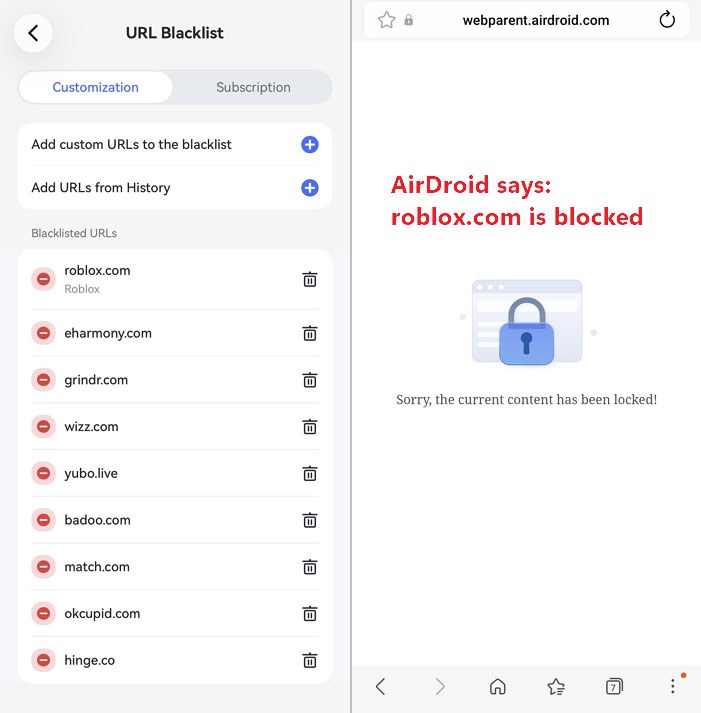
On our Samsung, AirDroid's Instant Block took roughly 20 seconds. Blocking Snapchat made the app unavailable, Downtime and time-limit restrictions applied as expected, a custom-blacklisted website immediately showed a blocked page, and the rule remained active after switching from Wi-Fi to mobile data.
Bark was less consistent. Pause Internet showed as active while Snapchat still worked; Default Rules showed social apps blocked while Snapchat and Instagram remained usable; and custom-blocked websites still loaded in our browsers. We saw the same general enforcement problem on the Pixel.
| Test | AirDroid | Bark |
|---|---|---|
| Instant/Pause Internet | Instant Block took ≈20 sec on Samsung | Pause showed active, but Snapchat remained usable in some tests |
| Block Snapchat | Snapchat became unavailable | Snapchat remained usable in repeated tests |
| Website blacklist | Blocked-access page appeared immediately | Blocked sites remained accessible in our tests |
| Downtime / scheduled rule | Restriction applied in our test | Routines were available, but broader enforcement was inconsistent |
| Wi-Fi → mobile data | Rule remained active | Not used as a matched comparison because Bark had broader filtering disruption |
Bark's Android filtering relies on the Bark Kids VPN, and we repeatedly received Screen Time & Filtering disrupted warnings. Bark's screen-time and filtering troubleshooting guidance explains how connection or device settings can interrupt this protection, so network or VPN conditions may have contributed to some failures.
Parent takeaway: AirDroid's restrictions enforced consistently in the scenarios we tested. We had more difficulty keeping Bark's rules consistently enforced, so test the apps, websites, Wi-Fi, and mobile-data conditions your family actually relies on before paying.
4. Content Monitoring and Safety Alerts
Content monitoring is important in both products, but it is only one part of this comparison. Both use AI; the more useful difference is how much control parents have over what gets monitored and how much of the individual alert decision is left to the system.
1. How AirDroid Decides What to Monitor
AirDroid starts with supported apps and selected higher-risk categories monitored by default. Parents can turn individual apps or categories off, add custom keywords, subscribe to keyword categories, and use AI Keyword Assistant to expand related brands, slang, and phrases.
It also uses context analysis as an additional detection path, so potentially risky content can be surfaced without relying only on a custom keyword. However, contextual analysis does not suppress a keyword alert: if a monitored word appears, the keyword alert can still be sent even when the surrounding context is benign.
In practice, AirDroid combines two paths: explicit triggers parents choose and additional risk discovery through AI context analysis.
2. How Bark Decides What to Monitor
Bark asks parents to choose concern categories and sensitivity levels, then relies more heavily on its own AI to analyze supported activity and decide which conversations may warrant an alert.
The practical difference: AirDroid starts with a safety baseline and gives parents more control over what must be watched or can be turned off. Bark requires less rule-building and gives its detection system more authority over individual alert decisions.
3. How Fast Did Alerts Arrive in Our Tests?
For AirDroid, the timings below are specifically for keyword-triggered alerts.
| Platform | AirDroid Pixel 7 | AirDroid Samsung | Bark Pixel 7 | Bark Samsung |
|---|---|---|---|---|
| Snapchat | ≈8 sec | ≈3 sec | ≈40 min | ≈35 min |
| ≈3 sec | ≈10 sec | ≈40 min | ≈40 min | |
| ≈5 sec | ≈2 sec | No alert | No alert across repeated tests |
AirDroid's keyword-triggered alerts reached us in roughly 2–10 seconds, while Bark's successful Snapchat and WhatsApp alerts took roughly 35–40 minutes. Bark's alert guidance says alerts are not sent in real time because it analyzes context rather than only matching keywords.
These are results from our devices and scenarios, not guaranteed delivery times. We also did not use the AirDroid results above to benchmark the speed of its context-only AI detection.
4. What Happened When the System Had to Interpret Content?
Bark detected our controlled Snapchat and WhatsApp conversations on both phones, but repeated Instagram conversations produced no alert even though both devices were reporting normally, Accessibility was enabled, sensitivity was set to All, and the child actively opened the DM thread.
Bark officially lists Instagram text DMs and searches as supported on Android. We therefore describe our result as officially supported, but with no alert observed in our test environment. We also found that some Bark alerts did not fully represent the complete conversation we had tested.
AirDroid has a different trade-off: an explicit keyword can still alert even in harmless context. AirDroid gives parents more certainty that chosen terms will surface; Bark gives its contextual model more authority to decide what deserves attention. Both models can still produce alerts that need human review.
5. How Parents Can Review Context After an Alert
Bark generally shows flagged content and a limited amount of surrounding context rather than routine access to every conversation.
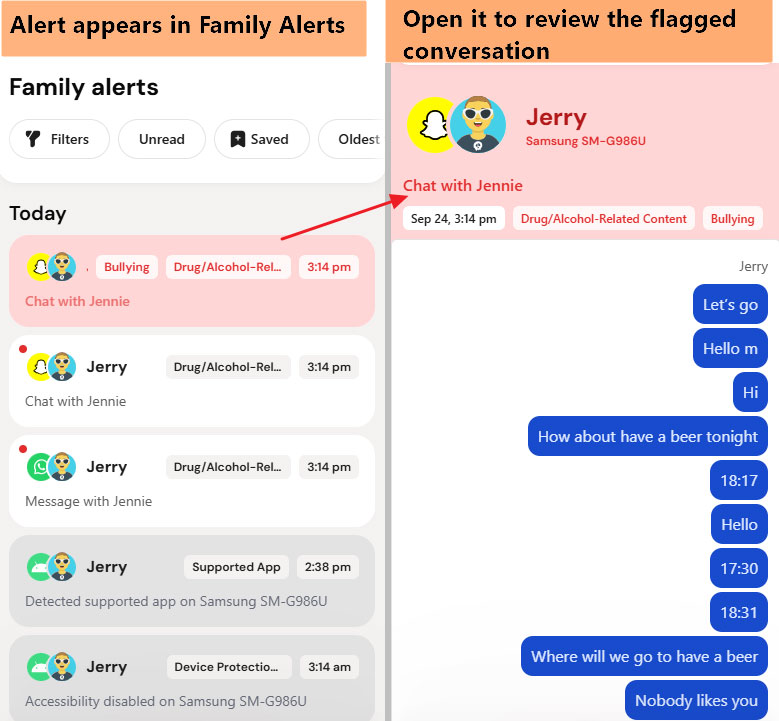
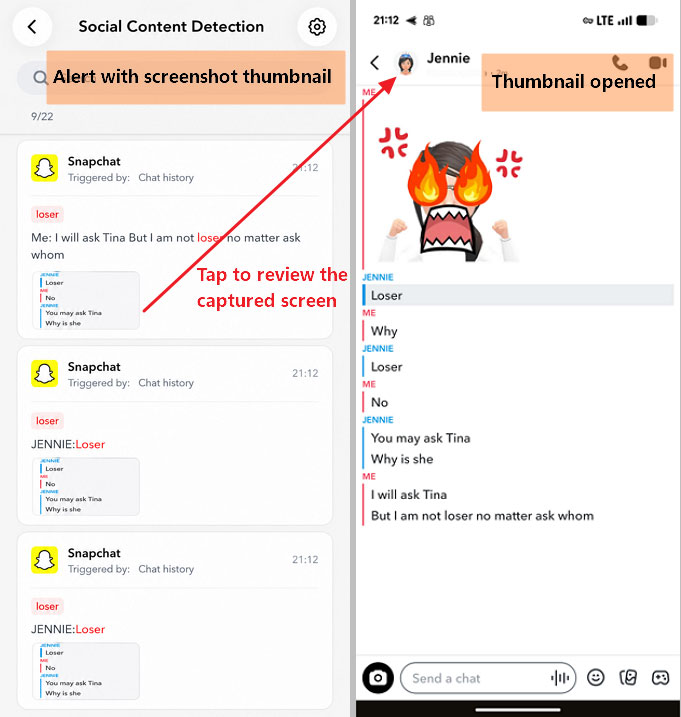
AirDroid's content detection is also alert-oriented. When screenshot capture is enabled, an AirDroid alert can include a thumbnail of the child's screen at the time of detection. Parents can tap the thumbnail to open the full screenshot and review more of the surrounding context before deciding whether they need another tool.
If more digital context is needed on a supported Android device, AirDroid also offers Notification Monitoring and Screen Mirroring. For situations involving a genuine offline safety concern, Remote Camera and One-Way Audio can provide information about the phone's physical surroundings.
Those last two tools are substantially more privacy-sensitive. We recommend using the least intrusive tool that reasonably answers the safety question.
6. The Privacy Trade-Off
Bark reduces routine parent-directed access to a child's communications. AirDroid offers more direct visibility and more control over what is monitored. Neither model automatically creates trust.
Recent Bark child and teen reviews include concerns about feeling watched or changing how they communicate. Those experiences do not prove Bark harms parent-child relationships, but they reinforce a principle that applies to both products: monitoring should be transparent, proportional, and reviewed as the child becomes more independent.
Parent takeaway: Both apps can surface risky content. AirDroid gives parents more ways to customize what must trigger attention, while Bark asks its own detection system to make more of those individual decisions.
5. Location, Geofencing, and Driving
1. Current Location and Location History
Both maps were generally accurate in our Android tests. AirDroid updates location automatically as well as on demand. In our tests, a phone that stayed in the same place refreshed roughly every 40 minutes; when the device moved by about 100 meters or more, the current location updated as it moved. A manual refresh returned the latest position in roughly two seconds.
AirDroid's Location History also recorded a detailed, easy-to-follow route rather than only isolated location points.
Bark updated its map automatically every few minutes in our tests, but we did not find an equivalent manual Locate Now control. The useful distinction is therefore not simply automatic vs manual updating: both update automatically, while AirDroid also gave us an on-demand refresh and more detailed route history in our test.
2. Geofence Alerts
We tested AirDroid geofencing across more than three entry-and-exit rounds. In most rounds, when the child phone had power and was reporting normally, both arrival and departure alerts reached the parent promptly.
We also tested what happened when the child phone had no power. While the phone was dead, no geofence alert arrived. After we charged and powered it back on, the delayed alerts were delivered. That is an important limit for any phone-based geofence: the device still needs power and connectivity to report the event.
With Bark, we tested the same Favorite Location in three independent rounds. Location permission was active, Bark's map knew where the phone was, the parent device received other Bark notifications, and the route moved well beyond the boundary. Bark sent no arrival or departure alert in any round, even though Bark supports Favorite Location arrival and departure alerts.
Our test result: AirDroid's geofence alerts arrived promptly in most powered-on entry/exit tests, with delayed alerts after a dead phone came back online. Bark's Favorite Location alerts did not trigger in our three rounds.
| Test condition | AirDroid | Bark |
|---|---|---|
| Phone online, leaves place | Alert received promptly in most rounds | No alert in 3 rounds |
| Phone online, returns | Alert received promptly in most rounds | No alert in 3 rounds |
| Phone powered off | No immediate alert | — |
| Phone reconnects | Delayed alert received | — |
3. Driving Safety
Both apps detected driving, but they emphasized different information.
AirDroid showed Driving status and immediately alerted when we exceeded our configured speed threshold. We received one speeding alert during a trip rather than repeated alerts every time the threshold was exceeded, while rapid acceleration and hard braking appeared after the drive instead of generating real-time alerts.
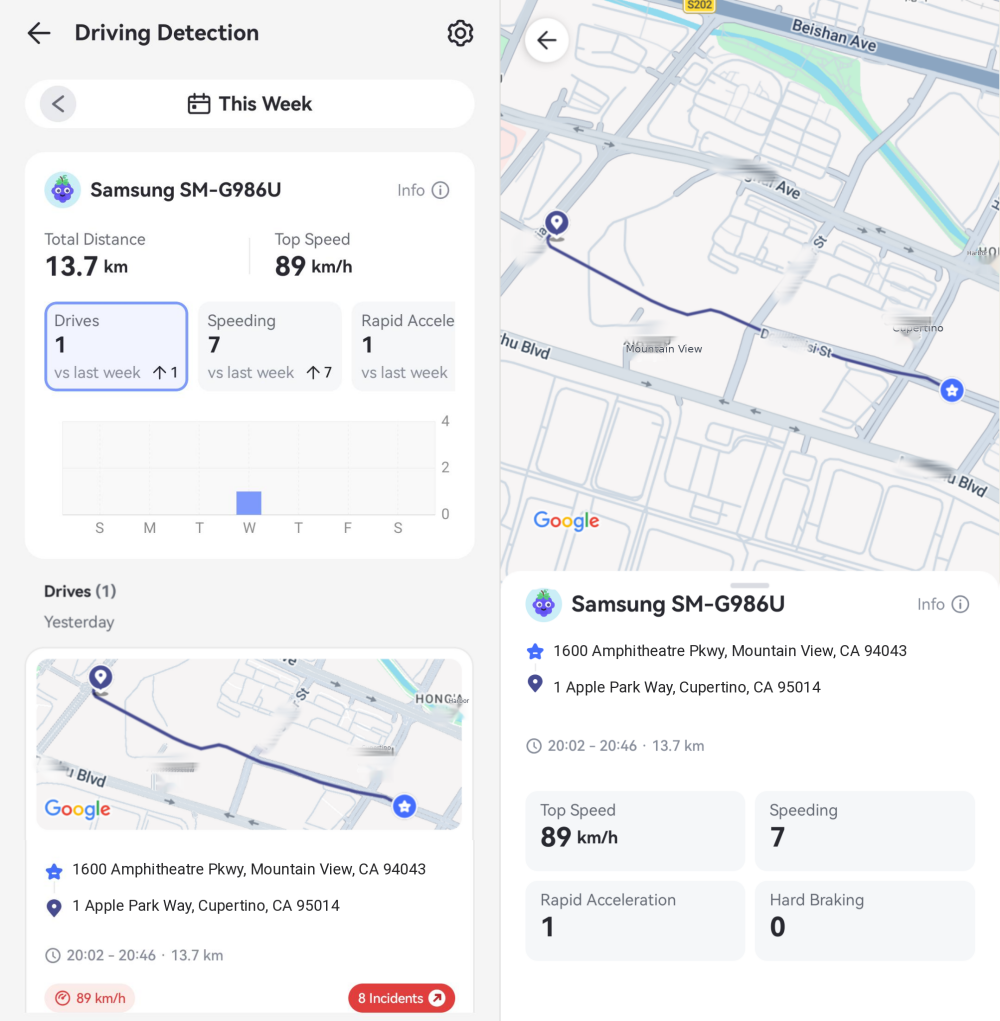
AirDroid also provides a separate Driving Report. In our test account, the overall report summarized total distance, highest speed, number of drives, speeding events, rapid accelerations, and hard braking events. Each trip included the full route, departure and arrival times, mileage, top speed, and a safe-driving assessment.
Bark produced route, distance, duration, start/end, and top-speed history. On two highway trips where we observed roughly 60 mph, Bark reported 52 mph and 49 mph. We did not find a configurable speeding threshold in the standard Bark app.
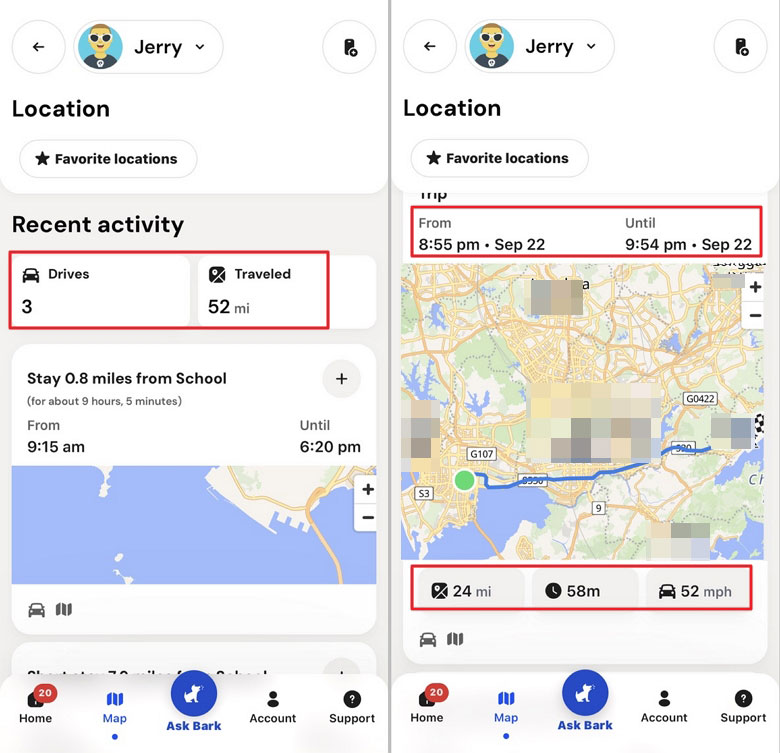
In our tests, AirDroid provided both in-trip speeding alerts and more detailed driving reports, while Bark provided a useful post-trip record of where and when the device traveled.
4. When Location Alone Is Not Enough
If a child is away from home, unexpectedly stops responding, and there is a genuine reason for concern, AirDroid's Remote Camera and One-Way Audio can provide additional information about the phone's physical surroundings on supported Android devices.
These tools are substantially more privacy-sensitive than ordinary location sharing, so we would reserve them for genuine safety concerns rather than routine monitoring and discuss those boundaries with the child in advance.
Bark's standard app takes a less direct approach, centering offline tools on location, Favorite Locations, activity history, and driving data.
6. Setup, Reliability, Compatibility, and Cost
1. Setup and Ongoing Maintenance
Neither product is completely maintenance-free on Android. AirDroid relies on child-device permissions and background access; recent reviews mention connection failures, Accessibility issues, notification delays, and individual microphone or remote-feature problems.
For families that want stronger protection against Android permissions being changed or the child app being removed, AirDroid also provides Augmented Supervision Mode. This optional setup adds stronger permission and uninstall protection, but it requires extra setup rather than working as a one-tap switch. If you need it, follow the Augmented Supervision Mode setup steps.
Bark has a different setup burden. On a regular Android child phone, Bark Kids is installed outside Google Play. Newer Android versions can require Restricted Settings steps, mobile filtering depends on its VPN, and manual updates can require renewed attention.
For either product, the more useful setup question is not only “How hard was it to install?” but “How much attention does it need to keep working?”
2. Reliability and Recovery
| Stress Test | AirDroid | Bark |
|---|---|---|
| Restart child phone | Rules recovered | Recovered normally in our test |
| Wi-Fi → mobile data | Active rule remained enforced | Filtering had broader disruption issues during repeated use |
| 10 minutes offline → reconnect | Rules recovered after reconnect | Protection could recover, though disruption warnings recurred |
| Battery Saver | Blocking still enforced | Location continued updating in our test |
| Accessibility disabled | Parent notification arrived quickly | We did not receive the specific expected warning in one test |
| Child begins uninstall attempt | No dedicated attempt alert observed | Not treated as a useful differentiator by itself |
We did not consistently receive dedicated uninstall-attempt alerts from several parental-control apps, so we would not treat that alone as an AirDroid-specific weakness. The more useful question is whether protection can be removed without authorization and whether the parent knows when protection is no longer healthy.
3. Android vs. iPhone
Our matched tests were Android-only, so we rely on current product capability boundaries for iPhone rather than assuming the Android results transfer directly.
AirDroid's broader social monitoring, Notification Monitoring, Screen Mirroring, Remote Camera, and One-Way Audio are primarily Android-oriented. Bark also changes significantly on iPhone: its iOS monitoring setup explains that deeper monitoring can use Bark Sync, the Bark Desktop App, or Bark Home rather than relying only on the Bark Kids app.
The child's operating system matters more than the parent's phone. A simple “Android ✓ / iOS ✓” table does not show what either product can actually do.
4. Pricing, Trials, and Family Size
| AirDroid | Bark Premium | |
|---|---|---|
| Monthly price | $9.99 | $14 |
| Annual price | $59.99 | $99 |
| Annual device allowance | Up to 10 child devices | Unlimited children and devices |
| Initial trial | 3 days for all new users | 7 days |
| Payment card required to begin initial trial | No | Yes |
| Annual-plan trial | Another 14 days before the annual charge | Subscription follows the initial 7-day trial |
AirDroid has the lower annual price; Bark has the broader device allowance. Bark currently lists Premium at $99 per year, and its signup flow requires adding a payment card for the seven-day trial. AirDroid's trial lets new users start before entering payment details.
5. What Recent Google Play Reviews Add
Recent reviews show that both products have friction that a feature checklist can hide. AirDroid's detailed complaints commonly involve pricing/billing, connection or device availability, permissions, notification/remote-feature reliability, and some location issues.
Bark's commonly involve setup, repeated updates, connection loss, VPN/filtering problems, false or delayed alerts, and location accuracy. Child and teen comments also raise privacy and autonomy concerns.
These are self-selected experiences, not comparative failure rates. We use them to identify where a product deserves extra testing.
7. Which Approach Fits Your Family?
There is no useful overall winner without first defining how you want to stay involved. The quickest way to decide is to focus on the differences that change the parent's day-to-day role.
| If your priority is... | Start by looking at... |
|---|---|
| Daily app time budgets plus detailed device and web rules | AirDroid |
| Customizing monitored apps, risk types, and keywords while keeping AI context detection | AirDroid |
| Layered safety context through alert screenshots, location, driving data, and optional Android context tools | AirDroid |
| Choosing broad concern categories and letting the system decide more of what deserves an alert | Bark |
| Less routine parent-directed access to conversation and device context | Bark |
| One subscription covering unlimited children and devices | Bark |
| Only app approvals, basic schedules, and simple location | Consider whether a free built-in option already meets your needs |
1. AirDroid May Fit Better If...
AirDroid is the closer fit if you want more direct control over device rules and the option to move through different layers of safety context when needed. In our Android tests, its keyword alerts arrived within seconds, blocking rules enforced consistently in the scenarios we tested, location could be refreshed on demand, geofence alerts generally arrived promptly while the phone was reporting, and driving tools included both alerts and detailed reports.
The trade-off is greater parent visibility. Features such as alert screenshots, Screen Mirroring, Remote Camera, and One-Way Audio make clear privacy boundaries especially important.
2. Bark May Fit Better If...
Bark is more aligned with families who want their involvement to begin more often with an alert rather than with direct rule-setting or routine checking. Parents choose concern categories and sensitivity, while Bark's AI decides which supported activity may deserve attention and generally exposes less routine conversation detail.
The trade-off is greater dependence on Bark's classifications. In our tests, successful alerts took longer, Instagram produced no alert, some context was incomplete, and filtering and Favorite Location alerts were less consistent.
3. One More Option: You May Not Need Either
If your family mainly needs app approvals, bedtime schedules, basic screen-time limits, and ordinary location sharing, built-in tools such as Google Family Link or Apple Screen Time may already cover much of the job. Our guide to free parental control apps compares what free and built-in options can realistically handle and where their limits start. A paid product makes more sense when you can identify a specific gap those tools do not solve.
Whichever approach you choose, use the trial to verify the few features your family would actually rely on. A feature that works reliably on your child's own phone is more useful than a long list of supported features.
8. AirDroid vs Bark FAQs











Leave a Reply.