FamilyKeeper Review 2026: Is It Still Available and Worth Using?
FamilyKeeper promises the features many parents look for in one place: location tracking, geofences, screen-time schedules, app and website blocking, and alerts for risky online activity. On paper, it sounds like a capable parental control app for Android and iOS.
Our test reached a more basic problem: we could not install it.
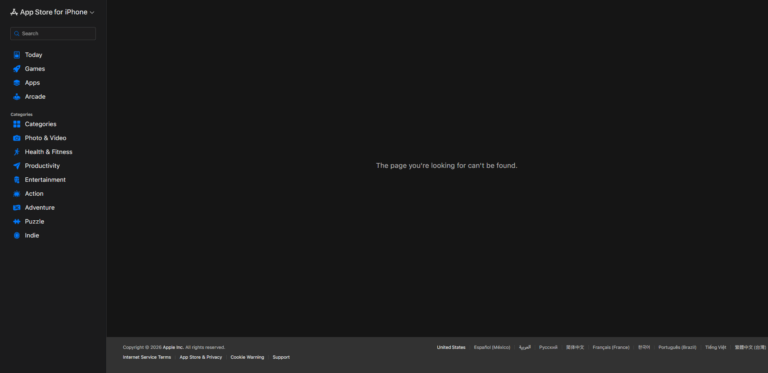
We used a Google Pixel 7 running Android 17. FamilyKeeper did not appear when we searched Google Play directly. When we followed the Google Play button from its official website, the store said the app had been made for an older version of Android and was unavailable for our device. The linked Apple App Store page also returned: “The page you're looking for can't be found.”
That makes this review different from a conventional feature test. We can verify FamilyKeeper’s current download and compatibility problems firsthand, but we cannot honestly claim to have tested its controls inside the app on this device. For those features, we cross-checked its official claims against current store data, user reviews, public social-media comments, and independent hands-on testing.
- Part 1: FamilyKeeper Review: The Short Answer
- Part 2: What Is FamilyKeeper Supposed to Do?
- Part 3: Our Installation Test: The Main Problem Appeared Before Setup
- Part 4: Can We Still Judge FamilyKeeper’s Features?
- Part 5: What Do FamilyKeeper Users Say?
- Part 6: Signs of Limited Maintenance
- Part 7: FamilyKeeper Pros and Cons
- Part 8: FamilyKeeper vs. AirDroid Parental Control
FamilyKeeper Review: The Short Answer
We do not recommend FamilyKeeper to new users in its current state. Its feature concept remains useful, and some existing users have praised its basic location and device-management tools. But a parental control app has to be obtainable, compatible, and supportable before its feature list matters.
At the time of our test:
- The official website claimed support for both Android and iOS.
- FamilyKeeper required parent and child devices to use the same operating system.
- Its active calls to action led to Google Play, with no working App Store download path.
- The App Store listing we checked returned a 404 error.
- Google Play would not let us install the app on a Pixel 7 running Android 17.
- Its Google Play listing showed a 2.9-star rating, 256 reviews, 100K+ downloads, and a last update of March 13, 2025.
- Repeated user complaints concerned unreliable controls, inaccurate or delayed alerts, cancellation and refund difficulties, and slow support.
FamilyKeeper may still work for some people who already have it installed on supported older devices. For a family choosing a parental control app today, however, its uncertain availability is a decisive drawback.
Our normal review process includes installing the parent and child apps, pairing devices, testing blocking and screen-time rules, checking location accuracy, and trying common bypasses. In this case, Google Play blocked installation on the test device. We therefore stopped short of presenting any unperformed feature test as firsthand evidence.
Test setup
- Device: Google Pixel 7 running Android 17
- Test date: September 2026
- Sources checked: FamilyKeeper’s official website, Google Play, Apple App Store, public Facebook page, app-store review aggregators, Reddit, and independent reviewers
AirDroid, the publisher of this article, develops AirDroid Parental Control. We review competing products because parents need practical comparisons, but that relationship can create an incentive to favor our own product. To keep the review auditable, we separate direct observations from outside evidence and link the sources behind material claims.
What Is FamilyKeeper Supposed to Do?
FamilyKeeper is a parental control service from Reason Labs. Its official product page advertises:
- Real-time location tracking and geofence alerts
- App and harmful-content blocking
- Social-media monitoring
- Screen-time schedules
- Alerts for cyberbullying and other online risks
The official FAQ says FamilyKeeper is built for Android and iOS. It also states an important limitation: an iOS parent device can only pair with an iOS child device, and an Android parent device can only pair with an Android child device. Android-to-iPhone and iPhone-to-Android pairings are not supported.
This is a meaningful constraint for mixed-device households. A parent using an Android phone cannot use FamilyKeeper to manage a child’s iPhone, even though both operating systems are listed as supported.
Our Installation Test: The Main Problem Appeared Before Setup
1The website says Android and iOS, but only the Google Play path worked
FamilyKeeper’s website displays Android and Apple availability icons and says setup only takes a few minutes. In the same page’s FAQ, it instructs parents to install a parent app and a child app.
However, every visible “Activate Protection” link we checked led to the Google Play listing. We did not find a working Apple App Store download route on the product page.
This creates a trust and usability gap. A compatibility claim should lead users to a valid download for every advertised platform—especially before they are asked to consider a subscription.
2The Apple App Store listing returned a 404
When we searched and opened the linked FamilyKeeper App Store page, Apple displayed: “The page you’re looking for can’t be found.” We independently received a 404 from the US App Store URL during our September 2026 check.
Older review mirrors show that FamilyKeeper previously had an iOS listing, so the product did exist on Apple’s store. The problem is its current availability, not whether it ever launched.
We cannot determine from a missing listing alone whether the removal is temporary, regional, or permanent. What a prospective user can conclude is simpler: the iOS app was not obtainable through the route we tested.
3Google Play would not install it on Android 17
Searching Google Play directly on our Pixel 7 did not return FamilyKeeper. Following the website link opened the listing, but Google Play said the app had been made for an older version of Android and could not be downloaded on the device.
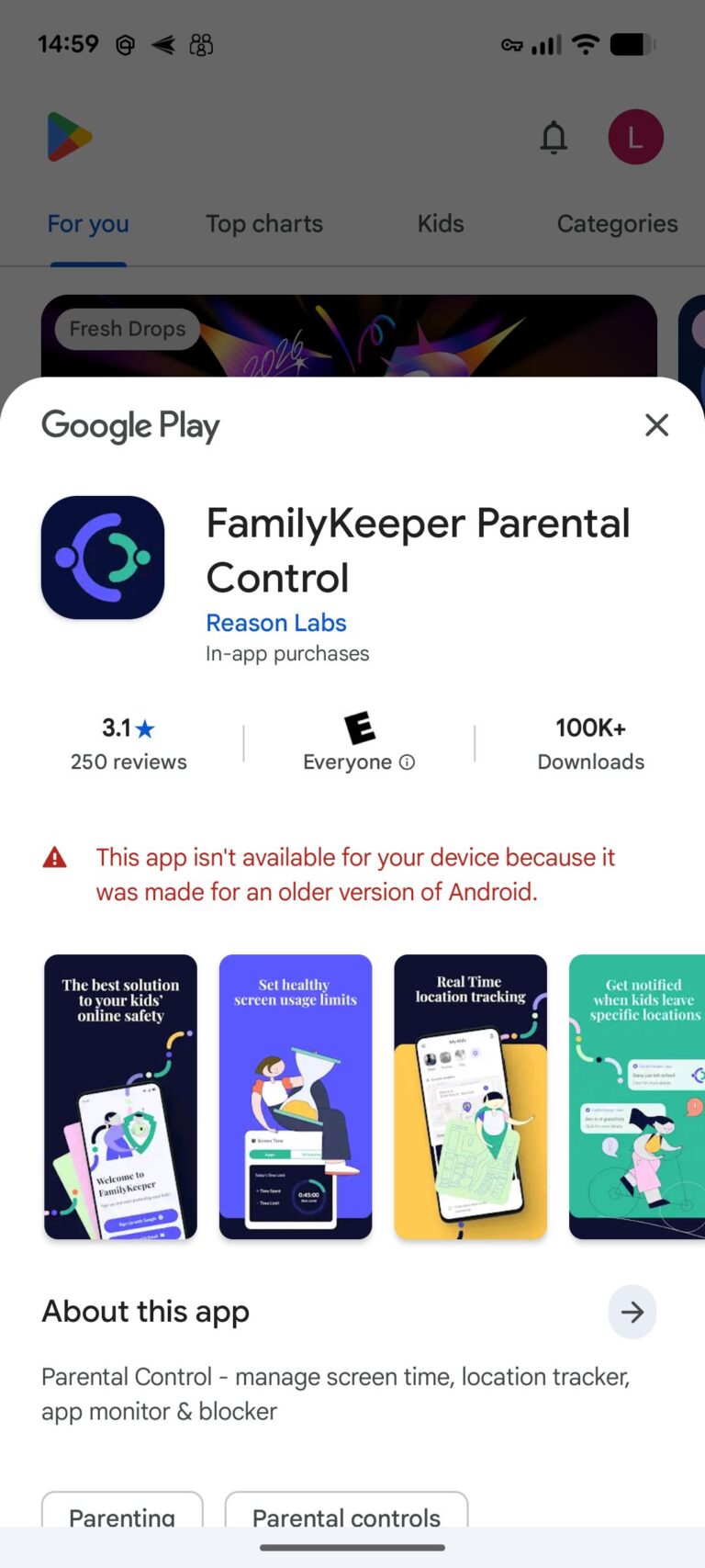
The web version of Google Play still showed FamilyKeeper with 100K+ downloads, a 3.1-star rating, and an update date of March 13, 2025. A store page existing on the web does not guarantee that a current phone can install the app.
Device and regional availability can vary, so this test does not prove that FamilyKeeper is unavailable on every Android phone. It does show that a relatively mainstream Google phone on the latest Android release could not use it—the exact situation in which an actively maintained parental control app should provide a clear compatibility answer.
Can We Still Judge FamilyKeeper’s Features?
Only with an important qualification. Because we could not install the app, the following assessment combines official claims with external evidence. It is not presented as our own in-app test.
Screen Time and App Blocking
FamilyKeeper advertises schedules, app limits, and harmful-content blocking. Some users say these basic tools are useful. AppBrain preserves positive comments praising remote management, app blocking, restrictions, and activity reports.
The reliability complaints are more detailed, however. One Google Play reviewer summarized the split well: “Great for letting me know when an app is being used. NOT GREAT with actually blocking apps.” The same review said blocked apps could still open in pop-up or split-screen mode and sometimes unlocked despite a schedule. Another reviewer said a child could change device settings, while an iOS user reported that changing an iPad’s time zone bypassed the restriction within minutes. See the Google Play reviews and archived iOS reviews.
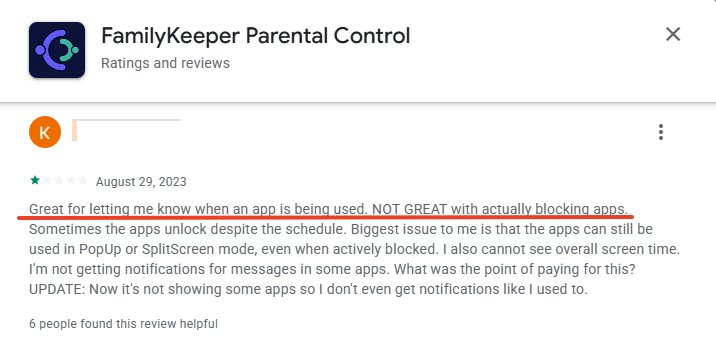
These are individual reports, not controlled lab results. But they identify the right risk to consider: a blocking feature is only valuable if rules apply consistently and resist simple workarounds.
Location Tracking and Alerts
Location is one of FamilyKeeper’s more promising use cases. A review of the child companion app describes a parent using its location feature to recover a phone left on a bus. Independent tester All About Cookies also found the core location tools useful in its test.
Other users reported stale or incorrect positions, delayed notifications, and false “left home” alerts. One reviewer said the child’s phone stayed on a bedside table while FamilyKeeper reported inappropriate activity and two departures from home. See the FamilyKeeper reviews collected by AppBrain.

The balanced conclusion is not that location never works. It is that user experiences vary enough that parents should test position accuracy and geofence timing before relying on the app for a safety-critical routine.
Social Media and Risk Detection
FamilyKeeper’s Google Play description says it can monitor online behavior, social interactions, texts, saved images, and offensive language across major platforms. These claims set a high expectation.
In an independent test, All About Cookies(source: https://allaboutcookies.org/familykeeper-review) found setup straightforward and screen-time management usable, but test phrases sent through Discord, Messenger, and iMessage did not trigger the expected offensive-language alerts. Its reviewers also found the activity reporting basic rather than deeply investigative.
That evidence suggests FamilyKeeper is better understood as a basic phone-management tool than a dependable, comprehensive social-content monitoring system. Platform restrictions matter here: iOS limits how deeply any third-party parental control app can inspect activity inside other apps.
What Do FamilyKeeper Users Say?
The ratings are mixed—and polarized
During our check, Google Play displayed a 2.9 out of 5 rating. AppBrain’s snapshot put it at roughly 3.14. Its visible rating histogram had many five-star and one-star ratings, with relatively few scores in the middle. An AppRecs analysis of the iOS review sample showed a similar shape: 45% five-star and 42% one-star.
That distribution tells us more than the average alone. Some families appear satisfied with basic management and location functions. When compatibility, control reliability, or billing goes wrong, the experience often becomes a one-star problem.
We manually categorized 28 complete, deduplicated review texts available through the stores and public review mirrors. Among the 25 parent-app reviews in that qualitative sample:
- 15 mentioned functional reliability problems.
- 13 mentioned cancellation, charging, or refund problems.
- 12 mentioned customer-support problems.
- 9 mentioned missing features or regression from an older version.
- 6 mentioned inaccurate or delayed location/alert behavior.
These figures describe themes in an accessible sample; they are not percentages of all FamilyKeeper users. Storefronts and search engines tend to surface recent, popular, or strongly worded reviews.
Cancellation, refunds, and support deserve attention
Billing and support complaints appeared on both Android and iOS. Users described difficulty canceling trials, continued charges, refund refusals or delays, and support tickets that did not resolve the issue. The Chrome-Stats review archive contains several examples. A recent Google Play reviewer also said the app locked a child’s phone after one day and that support eventually stopped responding during a refund request.
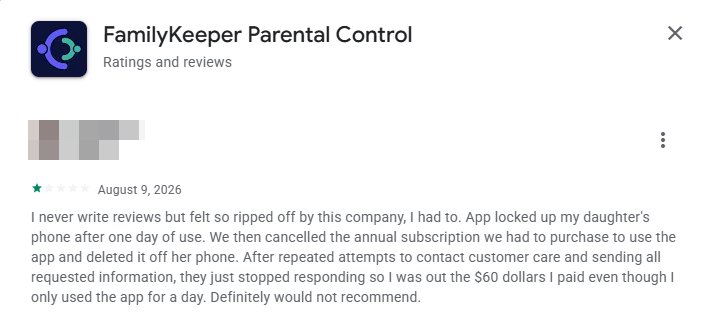
This does not prove that every cancellation fails. It does justify a practical precaution: if you can still subscribe, confirm who processes the payment, locate the cancellation route first, record the renewal date, and retain screenshots of any cancellation or refund request.
The public Facebook page raises another maintenance question
The latest visible post on the FamilyKeeper Facebook page in our check was dated July 28, 2024. Under that post, one commenter asked whether the app was still working and said support had not answered emails. Another replied that she had been unable to cancel and continued to be charged.
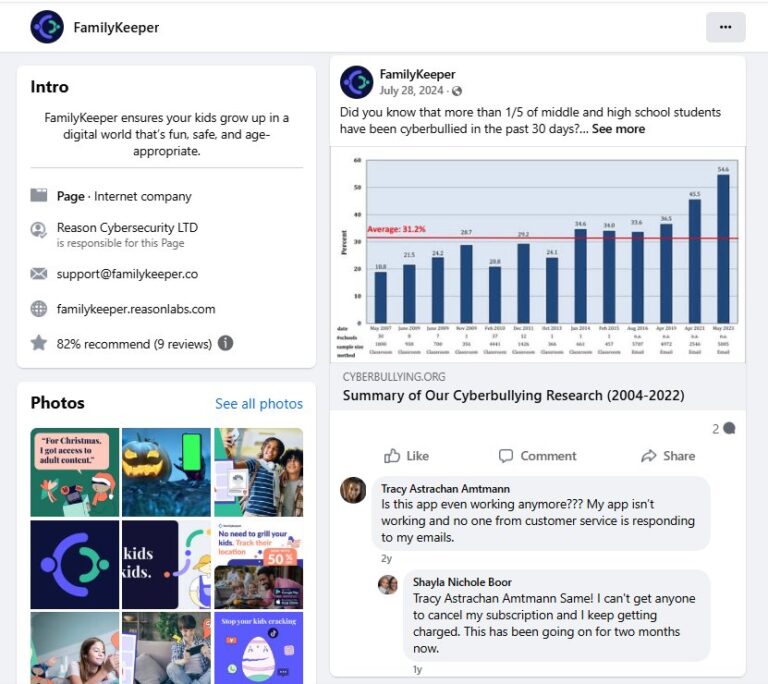
Social-media comments are anecdotal and cannot establish a general failure rate. Their value is corroborative: they repeat the same support and cancellation themes found in app-store reviews.
What about Reddit?
We found almost no verifiable Reddit discussion specifically about FamilyKeeper. Exact searches for “FamilyKeeper,” the full product name, Reason Labs, its website, and its Android package did not surface a meaningful product-review thread.
That absence should not be turned into a positive or negative conclusion. It simply means there is not enough FamilyKeeper-specific Reddit evidence to claim a community consensus. General Reddit discussions about parental control apps focus on cross-platform limitations, privacy, bypasses, and parent-child trust, but those conversations are not reviews of FamilyKeeper itself.
Signs of Limited Maintenance
No single signal proves that FamilyKeeper has been abandoned. Together, however, the following observations suggest prospective users should verify its status before paying:
- The Google Play listing’s last recorded update was March 13, 2025.
- The iOS listing returned a 404 during our check.
- The Android app was unavailable on our Pixel 7 running Android 17.
- The official product page advertised iOS and Android but routed its active protection links to Google Play.
- The latest visible FamilyKeeper Facebook post we found was from July 28, 2024.
- Recent store and Facebook comments continued to mention unresolved access, billing, and support issues.
We would update this conclusion if Reason Labs restores its iOS listing, publishes current Android compatibility information, or releases a version that installs on current Pixel devices.
FamilyKeeper Pros and Cons
Pros
- Useful combination of location, geofencing, screen time, app blocking, and web controls on paper
- Some users report that remote management and basic restrictions worked well for their families
- At least one specific user report credits the child app’s location function with recovering a lost phone
- The Google Play listing says data is encrypted in transit and users can request data deletion
Cons
- Could not be installed on our Pixel 7 running Android 17
- Apple App Store listing was unavailable in our test
- No mixed-OS parent/child pairing
- Repeated reports of blocking failures, false or delayed alerts, and simple bypasses
- Repeated cancellation, refund, and support complaints
- Current pricing and the complete iOS feature set are difficult to verify without a working listing
- Public update signals appear limited
FamilyKeeper vs. AirDroid Parental Control
Because AirDroid publishes this comparison, readers should verify both products’ current store listings and feature documentation. The table below focuses on observable availability and documented platform support.
| Area | FamilyKeeper | AirDroid Parental Control |
|---|---|---|
| Availability in our test | Not installable on Pixel 7 / Android 17; tested App Store link returned 404 | Parent app available for Android and iOS; a browser-based parent dashboard is also documented |
| Parent/child platform pairing | Same-OS only: Android-to-Android or iOS-to-iOS | Supports selected cross-platform management, including an Android parent managing a child’s iPhone or iPad |
| Core tools | Advertises screen time, app/web blocking, location, geofences, and risk alerts | Documents screen time, app management, web restrictions, location, route history, geofences, and activity reports |
| Deeper Android visibility | Advertises social-media and risky-content alerts; user and independent results are mixed | Documents Android notification monitoring, social-content detection, call/SMS tools, inappropriate-image detection, live screen and remote camera; individual features have platform limits |
| iOS limitations | Current listing unavailable in our test; official FAQ requires iOS-to-iOS pairing | iOS has fewer device-level monitoring features than Android, but supported screen-time, web, location, and safety features can be managed cross-platform |
| Current documentation | Product page remains online, but download paths and platform availability conflict | Active product documentation explains feature and platform differences |


AirDroid Parental Control’s official compatibility information says the parent app supports Android 8.0+, iOS 16+, and a web dashboard. AirDroid Kids supports children’s Android 8.0+ devices, iPhones on iOS 15+, and iPads on iPadOS 15+. It also states plainly that iPhone monitoring is more limited because of Apple’s platform restrictions.
If your priority is a parental control service you can currently obtain, with documented cross-platform pairing and an active help center, try AirDroid Parental Control. Check the Android and iOS feature lists first so you know exactly what your family’s device combination supports.
Final Verdict: Is FamilyKeeper Worth It in 2026?
FamilyKeeper’s original idea still makes sense. Parents want one place to see location, set screen-time rules, block unsuitable apps, and receive warnings about possible online risks. Some past and current users say those basics helped them.
But our recommendation has to reflect what a new user encounters now. We could not find the app through Google Play search on a Pixel 7, could not install it from the official link on Android 17, and could not open a working Apple App Store listing. Its same-OS pairing rule also excludes many mixed-device families. Store and social-media feedback add recurring concerns about reliability, cancellation, refunds, and support.
Verdict: existing users on a supported device may have reason to keep using FamilyKeeper if it remains stable for them. New users should not subscribe until they have confirmed that both required apps are downloadable, compatible with both family devices, and covered by a clear cancellation route. For most families starting from scratch, a currently maintained alternative with documented cross-platform support is the safer choice.
Frequently Asked Questions










Leave a Reply.