Introducing AirDroid Parental Control's AI Content Detection
AI chatbots like ChatGPT, Gemini, and Character AI are now part of daily life for many US teens. While these tools can help with homework and creativity, they also introduce new risks, like unsafe advice or emotional dependency.
To better help parents protect their kids from potential dangers in AI chats, AirDroid Parental Control's content detection has expanded to AI apps, which detects risky ChatGPT, Gemini, and Character AI activity with custom keywords.
How Does AI Content Detection Work in AirDroid?
AirDroid Parental Control detects and alerts risky AI chat activity through keyword-based monitoring in supported AI chatbots for kids' Android.
It does not track every normal conversation. Instead, it helps surface warning signs that may need a parent's attention. Here's how it works:
Real-time keyword alerts: Sends a push notification immediately to parents when preset and monitored words appear in ChatGPT, Gemini, and Character AI.
Screenshot context: The alert includes snippets containing the keywords and screenshot context, helping parents understand whether it was a serious situation or a false positive.
📢We generally announce new features on our official site and YouTube channel. If you'd like a quick overview, watch our video below:
Risk Categories Parents Can Monitor with AirDroid
Informed by research from leading child safety organizations, AirDroid's AI Content Detection automatically scans AI conversations across 11 evidence-based risk categories:
- Alcohol
- Amativeness
- Bullying
- Drugs
- Gambling
- Religion and ethnicity
- Scoundrelly and awkward content
- Sex
- Self-harm or threaten
- Tobacco
- Violent and aggressive
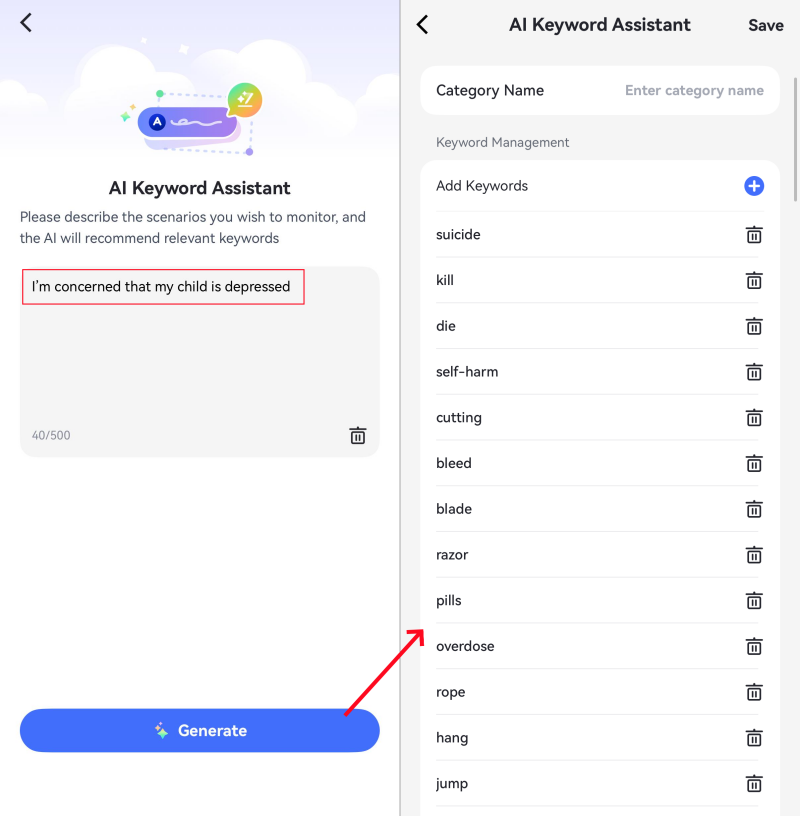
In addition to these typical types, parents can create their own custom keyword list based on their child's AI use habits and family safety rules. Its AI Keyword Assistant can also suggest related terms so parents do not have to think of every possible phrase manually.
Which AI Apps Can AirDroid Monitor?
AirDroid's AI Content Detection currently works on kids' Android devices, scanning conversations inside the apps without account linking. Here's what's supported:
| AI Apps | What AirDroid Can Detect |
|---|---|
| ChatGPT | Sent messages and received responses |
| Gemini | Sent messages and received responses |
| Character AI | Sent messages, received responses, and AI characters |
Note: AirDroid does not provide full visibility into every AI conversation. For privacy, it only shows flagged message context.
How to Set Up AI Content Detection in AirDroid
Before you start, make sure you have:
✅Your phone (Android or iOS) with the AirDroid Parental Control app installed.
✅Your child's Android phone with the AirDroid Kids app installed.
✅AirDroid premium or free trial account.
- Step 1.Link Parent's and Kid's Devices
- Open the AirDroid Parental Control app, follow the instructions to bind the child's device with a 9-digit code, and grant the necessary permissions on your child's phone.
- Step 2.Enable AI Content Detection
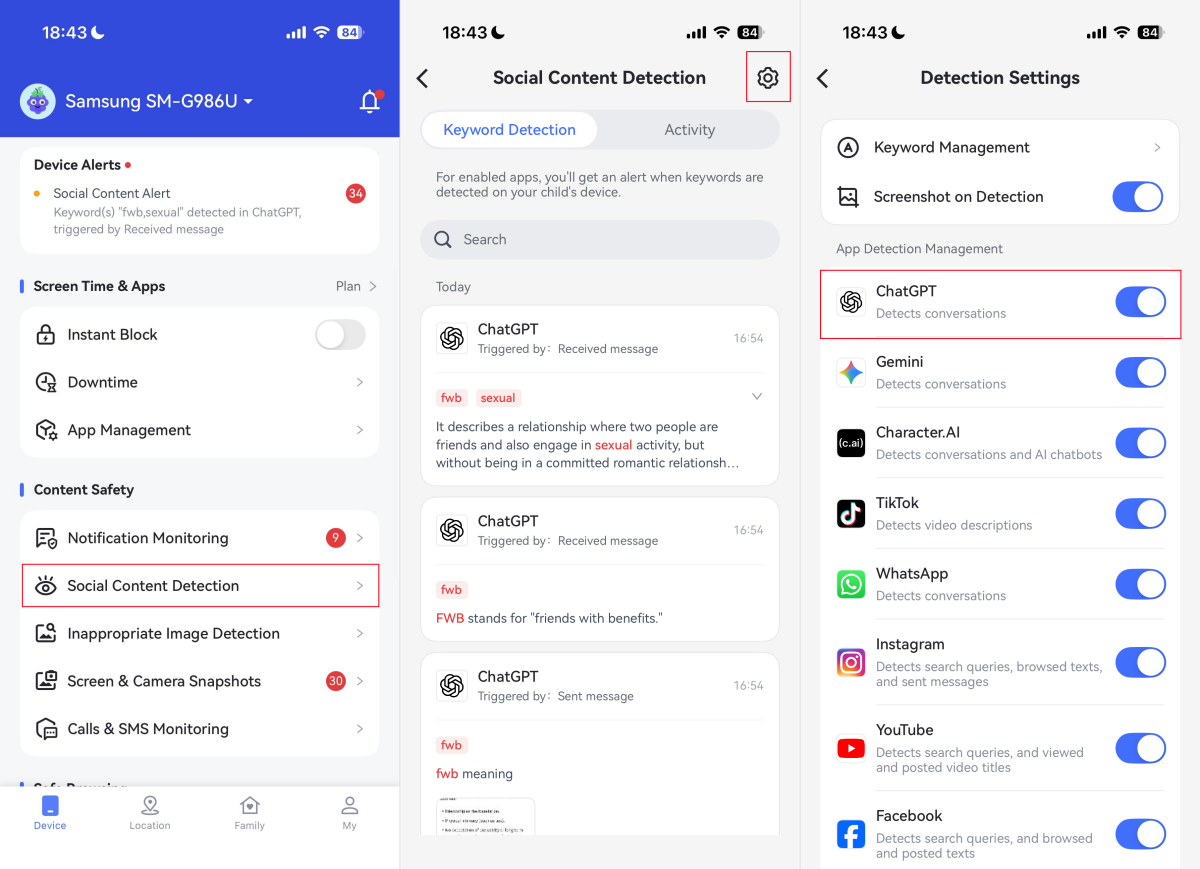
- 1) In the parent app, go to "Social Content Detection." Tap on the "Settings" icon.
- 2) Toggle on the AI apps your child uses, such as ChatGPT, Gemini, or Character AI.
- Step 3.Configure Keywords and Alerts
- 1) Tap "Keyword Management > Customization" to customize your keyword list for content monitoring.
- 2) Under "Subscription," AirDroid includes a default set of keyword categories (such as "bullying," "drugs," etc.), but you can add, remove, or edit words to match your family's needs.
- 3) Then, enable "Screenshot on Detection." This ensures that when a keyword is triggered, you'll receive not just a snippet, but a screenshot of the conversation for full context.
Once set up, AirDroid runs quietly in the background on your child's device. When your child interacts with risky keywords in AI chatbots, AirDroid instantly notifies you and captures the screen at that moment.
Limitations to Know
Though AirDroid AI Chat Monitoring can help parents detect warning signs in supported AI chatbot activity, here are a few limitations to keep in mind:
- Android Only
- Keyword-Based Monitoring
- AI Apps Coverage
Due to iOS system restrictions, AirDroid and most parental control apps cannot monitor AI or social conversations inside apps on an iPhone or iPad.
If your child uses an iPhone, you can still use AirDroid to view and manage AI chatbot usage.
Since AirDroid detects risky AI activity by keywords and phrases, if a conversation is concerning but uses language that doesn't match your keyword list, it won't trigger an alert.
AirDroid can help monitor supported AI apps such as ChatGPT, Gemini, and Character AI, but it may not cover every new or lesser-known AI chatbot.
FAQs
What is the AI Keyword Assistant in AirDroid Parental Control?
AirDroid's AI Keyword Assistant helps parents create better keyword lists for AI chat monitoring. Instead of manually adding every risky phrase, parents can enter a concern, such as "I'm concerned that my child is depressed," and the assistant suggests related keywords or phrases to monitor.
How do I know if my child interacts with risky AI content?
Use an AI chat monitoring tool with content detection and risk alerts, such as AirDroid and Bark. See our review on AI chat monitoring apps for families >>>
Can I monitor AI chatbots without installing a third-party app?
Yes. If your child uses ChatGPT, its built-in safety notifications help parents monitor and know when self-harm signs appear in conversations.
What risky AI chat topics can parents monitor?
According to the International Child and Youth Care, parents can monitor topics such as suicidal language, sexual content, bullying, violence, emotional outbursts, privacy sharing, etc.
Can parents see what their child types in AI chatbots like ChatGPT?
Not always. Most AI chat monitoring apps only provide context details when monitored content is triggered in supported AI apps. There is no app that can read every AI conversation from your child's devices.
Related Articles:










Leave a Reply.