Best Snapchat Monitoring Apps in 2026: Prices, Features & iPhone Limits
Quick Guide
The best Snapchat monitoring app depends on what you need it to do and which phone your child uses. Use this quick guide to match your main parenting goal with the product that supports it best:
- Need a child safety app that combines customizable Snapchat risk alerts with usage reports, app limits, notification visibility, and broader Android oversight? → AirDroid Parental Control
- Prefer preset risk detection and expert-informed response guidance instead of reading every message? → Bark
- Need direct reports of supported sent and received Snapchat text messages on a child's Android phone? → MMGuardian
- Require preset risk categories, custom keywords, and AI-assisted keyword expansion on Android? → FamiSafe
- Want to build healthier Snapchat habits through daily limits, schedules, and app blocking? → Qustodio
- Want protection from explicit visual content without reading private chats? → Canopy
The sections below test each recommendation against the same questions: what parents can actually see or control, how the feature works in a Snapchat-related scenario, which device platforms support it, and what limitations to expect.
Top Snapchat Monitoring Apps
1. AirDroid Parental Control — Best for Custom Snapchat Safety Alerts on Android
Quick Answer: AirDroid Parental Control is a strong fit for Android families, including those protecting teenagers, that want customizable Snapchat risk alerts, app-use rules, and device controls with transparent setup and clearly documented limits. On supported child Android devices, selected-keyword alerts and limited notification context can help parents identify a specific safety concern. AirDroid does not provide a complete archive of Snaps or private conversations. Optional current-screen context should be used transparently and only for a specific, time-sensitive safety concern.
For a practical example, a parent can enable preset risk categories and add family-specific terms related to bullying, harassment, self-harm, drugs, or sexual content. AirDroid can alert the parent when a monitored keyword appears in content sent or received on the child's Android device. Parents can also use the AI Keyword Assistant to expand a custom list with related terms.
Notification sync provides additional context by showing Snapchat notifications received on the Android phone, while optional current-screen mirroring lets a parent check what is currently displayed. These tools can provide additional context when parents need to understand current activity, but notification previews do not always contain the full Snapchat message.
Important Limitation: AirDroid's inappropriate-image detection checks images saved in the child's Photos app and can alert the parent when adult or violent images are detected. It should not be described as guaranteed access to every disappearing Snap because saved-image detection and live screen monitoring are different from maintaining a complete Snapchat archive.
Platform Note: On a child's iPhone, AirDroid can still provide app usage reports, time limits, app blocking, location tracking, and geofencing. However, Snapchat keyword detection, notification sync, and optional current-screen mirroring are Android-focused features. This makes AirDroid more comprehensive on Android than on iOS.
Why AirDroid Stands Out: AirDroid combines family-defined Snapchat risk alerts with app limits, usage controls, and limited notification context on supported child Android devices. This makes it a practical choice for families that want adjustable safeguards and clearly documented limits.
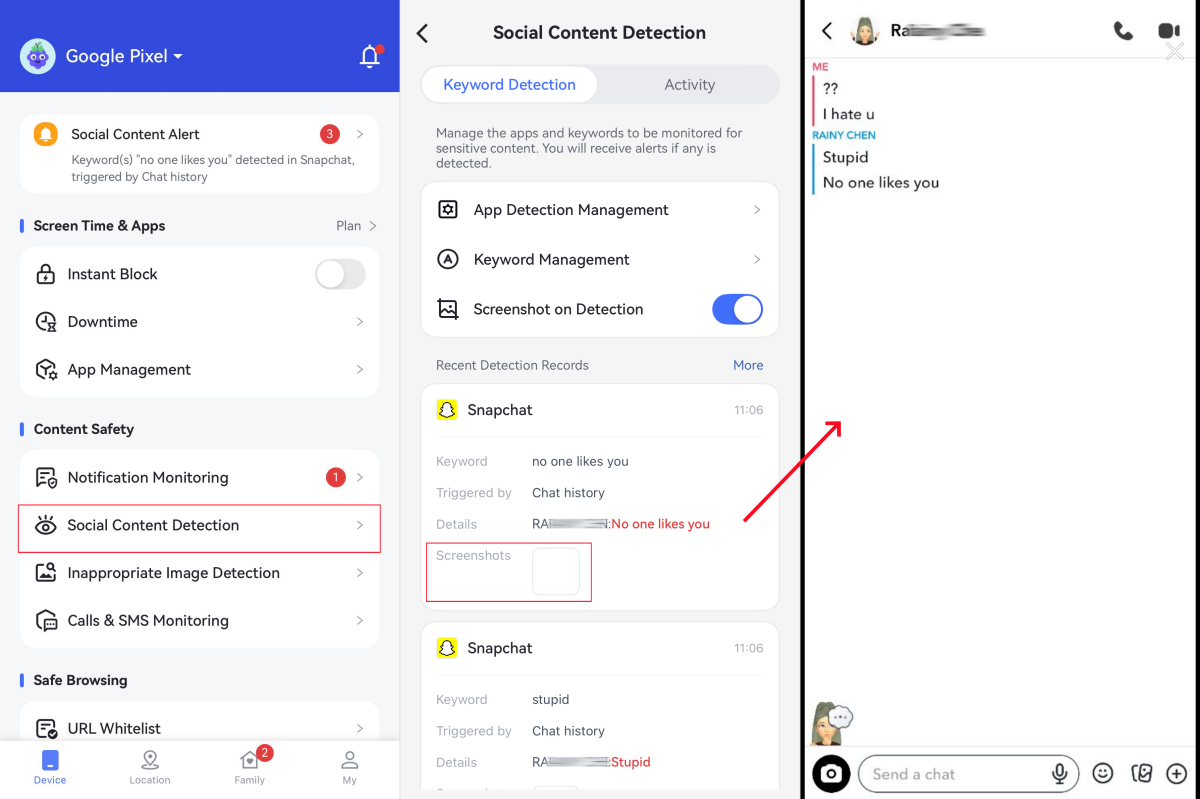




Best For: Parents who want customizable Snapchat safety alerts and flexible parental controls on a child's Android phone.
Key Features for Snapchat Monitoring:
- Preset and customizable safety keywords: Help parents identify potential concerns by using preset categories or creating family-specific keyword lists with optional AI assistance.
- Real-time safety alerts: Help parents stay informed about potential concerns in Snapchat conversations when selected keywords appear in supported Snapchat text activity available through the child's Android setup, so they can provide timely guidance when needed.
- Notification sync: Help parents stay aware of relevant Snapchat notifications received on the child's Android phone for better family communication.
- Live screen sharing: Allow parents to check the Android screen in real time when additional context is needed for a safety concern.
- Healthy usage controls: Support balanced device habits with app limits and blocking settings on Android and iOS, while content-level Snapchat support remains more limited on iOS.
For a more detailed look at what AirDroid Parental Control can and cannot cover on Snapchat, see our detailed guide. You can also compare parental control apps that alert parents to risky Snapchat activity to see how AirDroid compares with other options.
Pricing: $4.99/month, billed annually
Product Compatibility: Android, iOS, Web
Broader Android Safety Feature Support: Child's Android device
Pros
- Combines customizable keyword detection with real-time alerts
- Offers notification sync and optional current-screen mirroring on Android
- Includes screen time, app blocking, location, and other parental controls
- Lets parents use preset categories or create family-specific keyword lists
Cons
- Snapchat content detection, notification sync, and optional current-screen mirroring are more limited on iOS
2. Bark
Bark is best for families that prefer automated risk-category detection and contextual alert snippets. It analyzes supported activity for potential concerns and provides guidance when an alert is generated.
When Bark flags an issue such as bullying, depression, sexting, self-harm, violence, or contact with a potential predator, the alert identifies what was detected and provides a conversation snippet.
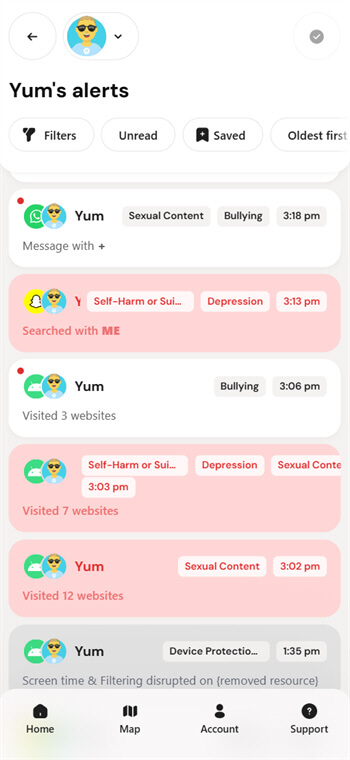
Snapchat content monitoring is available on Android, not iOS. Parents can still block Snapchat on supported devices, including iPhones, but blocking an app is different from scanning its conversations.
Best For: Parents who prefer automatic risk detection, contextual alert snippets, and practical guidance over full message access.
Key Features for Snapchat Monitoring:
- Context-based risk detection: Analyze supported Snapchat text activity for concerning topics instead of matching only exact keywords.
- Alert snippets: Show the portion of a conversation connected to a detected concern rather than every message.
- Response guidance: Provide an explanation, suggested next steps, conversation starters, and guidance on recognizing patterns.
- Android Snapchat coverage: Detect potential risks in Snapchat conversations and activities, including text from private and group chats, Stories, profiles, and searches where supported.
- App management: Manage Snapchat access by setting app usage limits or blocking access when needed.
Pricing: $8.25/month, billed annually
Compatibility: Android, iOS, Windows, Chromebook, Amazon Fire
Editor's Summary:
Pros
- Surfaces potentially serious risks without requiring parents to read every conversation
- Covers Snapchat and over 30+ other social platforms
Cons
- Snapchat content scanning is limited to Android
- Snapchat DMs are monitored as text only, not images
- Disappearing conversations may be captured only partially
3. MMGuardian
MMGuardian is a strong option for parents who want access to supported Snapchat text message reports on a child's Android phone. Unlike alert-only parental control apps, MMGuardian can provide detailed reports of supported text conversations, allowing parents to review available messages even when no safety alert has been triggered.
For Snapchat, MMGuardian supports reporting of text messages sent and received on supported Android devices. Parents can tap a contact to review available reported conversations or disable detailed reports and rely only on Safety Alerts for potential risks such as cyberbullying, drugs, suicidal thoughts, violence, sexting, or online predators.
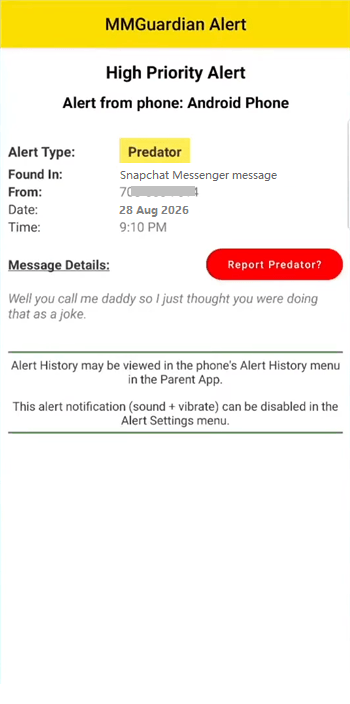
The limitation is important: MMGuardian's social media monitoring focuses on text messages only. Snapchat images, videos, and other media are not included in these social-media message reports. In addition, because Snapchat content can disappear or change availability, MMGuardian should not be described as a guaranteed archive of all Snapchat activity.
Snapchat message reporting is available on Android child devices. While MMGuardian supports child iPhones, Snapchat is not included in its current iPhone social-app monitoring list. Therefore, parents looking specifically for Snapchat chat access on an iPhone child device may need to consider other solutions.
Best For: Parents who need direct access to supported sent and received Snapchat text-message reports on a child's Android phone.
Key Features for Snapchat Monitoring:
- Detailed Android text reports: Review supported sent and received Snapchat text messages instead of seeing only risk-triggered snippets.
- Optional alert-only approach: Turn off full message reports and rely on Safety Alerts when greater conversational privacy is preferred.
- AI-powered Safety Alerts: Receive warnings when supported text suggests bullying, drugs, suicide, violence, sexting, or predatory behavior.
- Multi-app monitoring: Review supported text activity from Snapchat and several other messaging or social apps on Android.
Pricing: $4.16/month for 1 device or $8.33/month for 5 devices; all plans billed annually
Compatibility: Android, iOS
Editor's Summary:
Pros
- Provides direct reports of supported Snapchat text messages on Android
- Lets parents choose between full text reports and alert-only monitoring
- Sends Safety Alerts for potentially harmful conversations
Cons
- Snapchat message monitoring is not supported on a child's iPhone
- Pictures are not included in social-media message reports
- Does not guarantee the capture of every disappearing Snapchat message
4. FamiSafe
FamiSafe is best for parents who want keyword-based risk monitoring that combines built-in categories with family-specific watchlists. Its Social Apps Detection feature lets parents choose relevant suspicious-word categories, add custom terms, and use AI-assisted expansion to improve coverage.
For example, a parent concerned about cyberbullying can enable the appropriate preset category and add a child's nickname, a school-specific insult, or evolving slang to the keyword base. FamiSafe can then alert the parent when supported Android social-app content contains the selected terms. Its AI-assisted system can expand and optimize explicit-word coverage for topics such as cyber violence, drugs, and sexual content.
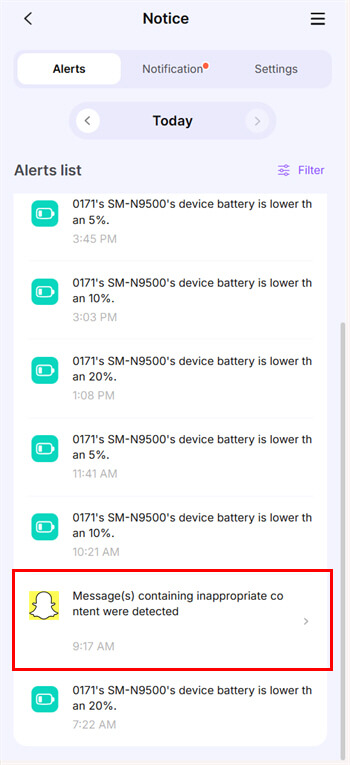
This approach is more flexible than relying only on fixed risk categories, but it is not the same as receiving a complete Snapchat conversation archive. Keyword systems can miss coded language, images without detectable text, and risks that do not match the selected categories or custom terms.
FamiSafe is available across multiple operating systems, but its official feature page states that Social Apps Detection on a child's iOS device is temporarily unsupported. Therefore, the general Android and iOS compatibility list should not be interpreted as Snapchat keyword monitoring on both platforms.
Best For: Parents who want preset suspicious-word categories, custom keyword lists, and AI-assisted expansion on a child's Android phone.
Key Features for Snapchat Monitoring:
- Preset risk categories: Enable or disable built-in suspicious-word groups based on the family's concerns.
- Custom keyword lists: Add specific slang, names, threats, or other terms relevant to the child.
- AI-assisted expansion: Expand and optimize related explicit or risky words to improve detection coverage.
- Real-time alerts: Notify parents when supported content on the child's Android device matches monitored risks.
Pricing: $4.99/month, billed annually
Compatibility: Android, iOS, Windows, Chromebook, macOS
Editor's Summary:
Pros
- Combines preset categories with customizable keyword lists
- Uses AI assistance to expand related risk terms
- Supports broader parental controls across multiple device platforms
Cons
- Social Apps Detection is temporarily unsupported on a child's iOS device
- Keyword monitoring cannot identify every type of risk
- Does not provide complete Snapchat conversation visibility
5. Qustodio
Qustodio is best for parents who want to reduce Snapchat overuse and build healthier routines. Its main advantage is not direct access to every chat; it is the combination of app-specific daily limits, scheduled routines, blocking rules, and activity reports.
A parent can set a daily time limit for Snapchat, create routines that restrict social apps during homework or bedtime, or block Snapchat entirely. When an individual app is blocked on Android, Qustodio displays a blocking screen over the app and prevents access. On iOS, it restricts the app's internet connection, although previously cached content may remain visible until it has been exhausted.
Qustodio can also show when Snapchat was used and how much time the child spent on it. This gives parents evidence for adjusting a limit rather than applying the same rule indefinitely. When a broader daily device allowance is nearly exhausted, the child receives advance notices before the selected lock action takes effect.
Social Monitoring is separate from screen time control. Qustodio can use AI to flag concerning topics in Snapchat conversations on Android and provide a snippet showing who the child was talking to. However, Snapchat conversation monitoring is available on Android; Qustodio's current iOS setup supports WhatsApp and LINE alerts rather than Snapchat alerts.
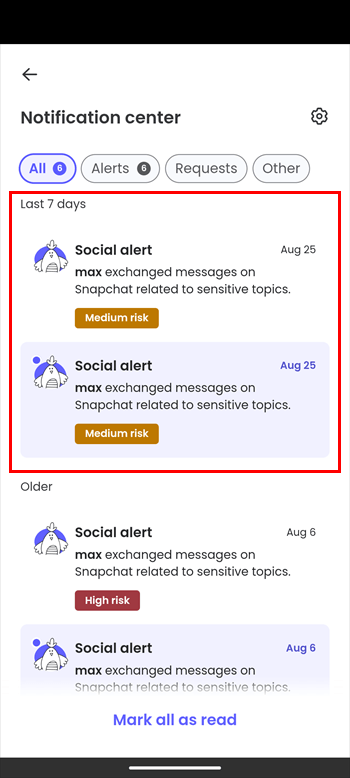
Best For: Parents who want to reduce Snapchat overuse through measurable limits, scheduled routines, and predictable blocking behavior.
Key Features for Snapchat Monitoring:
- App-specific daily limits: Set the amount of time a child can use Snapchat each day.
- Scheduled routines: Restrict Snapchat or social apps during schoolwork, family time, or bedtime.
- Defined blocking behavior: Prevent app access with a blocking screen on Android or restrict the app's internet connection on iOS.
- Usage reports: Review when Snapchat was used and how much time was spent in the app.
- Android Social Monitoring: Receive alerts and contextual snippets when supported Snapchat text contains concerning topics.
Pricing: $8.75/month(complete plan), billed annually
Compatibility: Android, iOS, Windows, Mac, Chromebook, Kindle
Editor's Summary:
Pros
- Connects usage reports with daily limits and scheduled routines
- Supports individual app rules as well as broader screen time controls
- Offers Snapchat risk alerts and contextual snippets on supported Android devices
Cons
- Snapchat Social Monitoring is not currently included in Qustodio's iOS social-alert setup
6. Canopy
Canopy is best for parents who want protection from explicit visual content without reading ordinary Snapchat conversations. Rather than providing chat transcripts, it focuses on real-time filtering and sexting deterrence.
Canopy's Smart Filter is designed to detect and block pornographic visual content before it reaches the protected screen, including content loaded through supported apps and websites. Its sexting tools separately examine inappropriate photos saved on the device, whether the photo was taken by the child or received from someone else.
The exact behavior differs by platform. On Android, Canopy describes the feature as Sexting Prevention: a risky photo taken or saved on the device can be deleted or sent to the parent for review before the child shares it. On iPhone and iPad, Canopy provides Sexting Alerts; detection generally depends on the image being saved to the device, so it should not be presented as guaranteed prevention of every image sent or received inside Snapchat.
Canopy states that it can "block porn and nudity" on Snapchat to support safer browsing across apps and websites. However, during our testing on Android, we found limitations in Snapchat-specific protection: it did not block explicit text or image exchanges within Snapchat on the child device, and no related alerts were received on the parent device. That said, it sometimes performed well when blocking pornographic images on blocked websites.
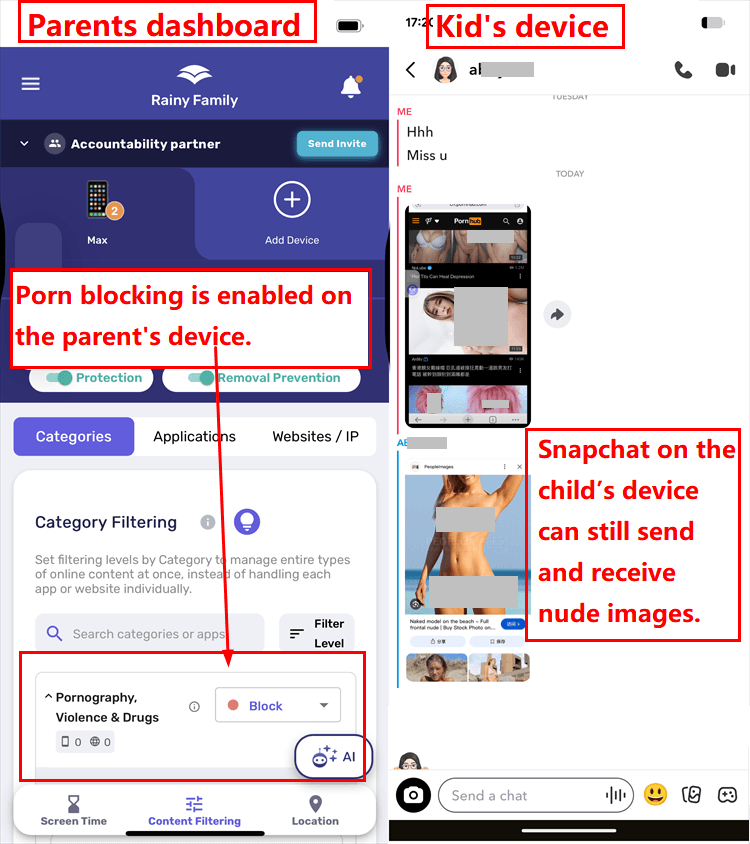
Best For: Parents who prioritize explicit-image protection and conversational privacy.
Key Features for Snapchat Monitoring:
- Real-time visual filtering: Detect and block supported pornographic content before it is displayed (works best on a browser).
- Android Sexting Prevention: Detect risky photos taken or saved on the Android device and allow deletion or parental review.
- iOS Sexting Alerts: Alert parents when supported inappropriate images are detected after being saved on an iPhone or iPad.
- Privacy-focused protection: Protect against explicit visual content without giving parents routine access to private chat text.
Pricing: $8.33/month for 1 devices or $9.99/month for 3 devices; all plans billed annually
Compatibility: Android, iOS, Windows, Chromebook
Editor's Summary:
Pros
- Protects against explicit visual content without reading private chats
- Can detect photos taken by the child or received and saved on the device
- Provides stronger preventive controls on Android
- Includes removal protection or removal alerts, depending on the platform
Cons
- Does not provide Snapchat chat transcripts or broad conversation-risk monitoring
Why Snapchat Needs Special Monitoring
Snapchat creates several challenges that ordinary device-usage reports cannot fully explain:
Disappearing messages and media: Chats, images, and videos may disappear after they are viewed or after a set period. Monitoring tools may have only a brief opportunity to analyze the content, so parents should be cautious of any product that implies it can preserve everything.
Limited built-in visibility: Snapchat's Family Center can help parents understand who their teen communicates with and manage selected safety settings, but it does not provide the full content of private conversations.
Different types of risk: A family concerned about explicit images needs a different tool from a family concerned about bullying language, direct chat visibility, or excessive screen time.
Android and iOS differences: Many third-party apps can scan Snapchat content only on Android. On iOS, the same product may provide app limits or blocking without access to Snapchat conversations.
These differences are why the best choice should be based on a specific parenting goal and the child's device, not on the longest general feature list.
How We Test and Rank Snapchat Monitoring Apps
We take a hands-on approach to testing every Snapchat monitoring app featured in this guide. Rather than relying solely on app descriptions or marketing claims, we install and test each app to see how its Snapchat-related features work in practical family scenarios.
Our testing covers both iOS and Android devices, including an iPhone 16 Pro, iPhone 14, Google Pixel 7, and Samsung Galaxy S20+. We use these devices to identify platform differences and distinguish general device compatibility from actual Snapchat content-monitoring support.
See how we test parental control apps for our complete testing principles, scoring framework, research sources, limitations, and update policy.
For each app, we focus on its practical Snapchat monitoring and parental-control capabilities, including:
- Snapchat activity monitoring: What types of Snapchat activity the app can actually detect, record, or report.
- Message monitoring: Whether supported Snapchat messages or conversations can be detected and how reliably the available information appears in the parent dashboard.
- Media and content detection: Whether the app can detect, filter, or flag relevant images, videos, or other potentially risky content where the feature is supported.
- Keyword and risk alerts: Whether parents can receive alerts for custom keywords, preset risk categories, or other potentially concerning Snapchat activity.
- Alert speed and context: How quickly an alert reaches the parent device and whether it includes enough information to understand why the activity was flagged.
- App controls: Whether the app can block Snapchat, limit daily use, apply schedules, or otherwise restrict access.
- Platform compatibility: Whether Snapchat-related features work on a child's Android phone, iPhone, or both, and whether the same app provides different capabilities on each platform.
- Setup and usability: How easily a parent can install the app, connect the child's device, grant the required permissions, configure Snapchat-related features, and understand the resulting reports.
- Privacy and transparency: Whether the app focuses on risk alerts, direct message reports, image detection, or broader screen visibility, and whether its level of access is clearly explained to families.
- Value: Subscription price, number of covered devices, trial availability, and whether the advertised plan includes the specific Snapchat feature being evaluated.
When evaluating monitoring and alerts, we use controlled test accounts and harmless sample activity. We do not use real child data or private conversations. We also avoid treating app usage reports, notification previews, saved-image scanning, or current-screen viewing as proof that an app can preserve every disappearing Snap.
We compare the tested experience with each provider's stated capabilities. If a feature is advertised but does not work as expected in our test, we report the observed limitation instead of treating the marketing claim as a verified result. If a feature cannot be fully tested because of platform, region, account, or subscription restrictions, we identify the information as coming from the provider's current documentation.
Because Snapchat features, mobile operating-system permissions, and parental-control apps change over time, these rankings reflect the capabilities and test results available when this guide was reviewed. Results can also vary with device model, permissions, subscription level, network conditions, region, and later app updates.
How Much Do Snapchat Monitoring Apps Cost in 2026?
Quick answer: Yes, there are affordable apps for monitoring a child's Snapchat use. The paid options in this comparison cost about $4.16–$8.75 per month when billed annually. AirDroid Parental Control stands out at $4.99 per month for up to 10 devices, combining customizable Snapchat keyword alerts with notification syncing, optional current-screen context for a specific safety concern, app limits, and other parental controls on Android.
For families using several phones or tablets, AirDroid works out to about $0.50 per protected device per month when all 10 device slots are used. Free tools such as Google Family Link and Apple Screen Time cost less, but they cannot monitor Snapchat conversations or alert parents to risky content.
The prices below were checked in August 2026. Providers may change their plans, supported devices, and Snapchat features, so confirm the current details before subscribing.
| App | Monthly Equivalent | Approx. Annual Cost | Best For | Important Snapchat Limitation |
|---|---|---|---|---|
| AirDroid Parental Control | $4.99/month for 10 devices | About $59.99/year | Custom keyword alerts, notification syncing, screen-time limits, and broader Android oversight | Snapchat keyword detection, notification syncing, and optional current-screen mirroring are mainly available on a child's Android phone |
| MMGuardian | $4.16/month for 1 device | About $49.98/year | Supported Snapchat text-message reports and safety alerts on Android | Snapchat message monitoring is supported on a child's Android, not iPhone |
| Qustodio | $8.75/month for complete plan, Unlimited devices | About $104.95/year | Daily limits, scheduled routines, app blocking, and usage reports | Snapchat conversation monitoring is Android-focused; iOS support is better suited to limits and blocking |
| FamiSafe | $4.99/month for 10 devices | About $59.99/year | Preset risk categories, custom keywords, and AI-assisted keyword expansion | Social Apps Detection is not currently supported on a child's iPhone |
| Canopy | $8.33/month for 1 devices | About $99.96/year | Explicit-image protection without routinely reading private conversations | It does not provide complete Snapchat chat transcripts or guarantee detection of every disappearing image |
| Bark | $8.25/month, Unlimited devices | About $99/year | Context-based alerts for bullying, grooming, self-harm, sexual content, and other risks | Snapchat content scanning is mainly available on Android, not iphone |
| Google Family Link or Apple Screen Time | Free | $0 | Basic app approvals, screen-time limits, and device-use rules | These built-in tools cannot monitor Snapchat conversations or generate content-based safety alerts |
Is AirDroid an Affordable App for Monitoring Snapchat?
Yes. AirDroid Parental Control is one of the strongest affordable options for families that need Snapchat safety tools across several devices. Its annual plan costs about $59.99, or a listed monthly equivalent of $4.99, and supports up to 10 devices.
MMGuardian has a lower advertised monthly equivalent at $4.16, but that price covers only one device. AirDroid's plan can protect up to 10 devices and includes more than basic Snapchat oversight. Parents can combine customizable keyword detection with real-time alerts, notification syncing, optional current-screen context for a specific safety concern, app limits, blocking controls, location tracking, and device-usage reports.
For example, parents can create keyword lists related to bullying, harassment, drugs, sexual content, threats, or self-harm. When a monitored term appears in supported Snapchat activity on the child's Android phone, AirDroid can send an alert so the parent can review the situation and respond.
AirDroid also provides notification syncing and optional current-screen mirroring on Android. These features can give parents more context than an app that only reports how long Snapchat was used. However, notification previews may not show the complete message, and no parental control app can guarantee access to every disappearing Snap.
Which Affordable Option Is Best for Your Family?
- Choose AirDroid if you want affordable Snapchat keyword alerts, notification syncing, screen monitoring, and broader parental controls for up to 10 devices.
- Choose MMGuardian if you only need to protect one Android device and prioritize supported Snapchat text-message reports.
- Choose FamiSafe if you want preset risk categories and AI-assisted keyword expansion across up to 10 devices.
- Choose Qustodio if unlimited device coverage and structured screen-time routines matter more than the lowest annual price.
- Use Google Family Link or Apple Screen Time if you only need free app limits and do not require Snapchat content alerts.
For families with a child using Android, AirDroid offers a strong balance of price, device coverage, and Snapchat-focused safety features. On a child's iPhone, AirDroid can still provide usage reports, app limits, blocking controls, location tracking, and geofencing, but keyword detection, notification syncing, and live screen monitoring are more limited.
Parents should use Snapchat monitoring tools for authorized child safety supervision and combine them with clear, age-appropriate conversations about privacy and online risks.
How to Choose the Right Snapchat Monitoring App
Use the following steps to narrow the list without comparing unrelated features:
- Step 1. Start with the child's device
- If the child uses Android, all six products can offer some relevant protection, although their approaches differ. If the child uses an iPhone, do not assume that general iOS compatibility includes Snapchat conversation monitoring. Check the exact feature before subscribing.
- Step 2. Choose the primary parenting goal
- Choose AirDroid for customizable Android alerts and broader oversight, Bark for contextual risk alerts and response guidance, Canopy for explicit-image protection without reading chats, MMGuardian for direct Android Snapchat text reports, FamiSafe for preset and custom Android keyword filters, or Qustodio for screen time limits and routines.
- Step 3. Verify what happens in the real scenario
- Ask whether the product reports all supported text or only risky snippets, whether images are blocked or merely detected, what happens when a time limit is reached, and whether the feature works on the child's operating system.
- Step 4. Compare price and device coverage
- Consider the annual cost, number of protected devices, supported parent and child platforms, and whether the plan includes the exact feature you need. A lower price is not useful if the Snapchat capability is unavailable on the child's phone.
- Step 5. Review privacy and data handling
- Parental control apps may process sensitive information about a child's communications and device use. Review what data is collected, how it is protected, how long it is retained, and whether full-message access is necessary for your family's goal.
Summary
There is no single best Snapchat monitoring app for every family. The strongest choice depends on the protection goal and the child's device.
For customizable Android alerts, digital safety insights, and flexible device management tools, AirDroid is the most complete option in this list. Bark is better for parents who want contextual risk detection and guidance without reading every message. Canopy focuses on explicit visual content and privacy, while MMGuardian offers the clearest direct access to supported Snapchat text reports on Android.
FamiSafe is suitable for Android families that want preset categories and custom keyword lists. Qustodio is the most relevant choice when the main problem is excessive Snapchat use because it connects usage reports, daily limits, schedules, and defined blocking behavior.
Whichever product you choose, confirm the exact Android or iOS capability before subscribing and combine technical controls with open, age-appropriate conversations about online safety and privacy.
FAQ










Leave a Reply.