Life360 vs. Bark: Location Tracking vs. Online Safety
Life360 is the better fit for families focused on continuous location sharing, place alerts, driving insights, and emergency features. Bark is better suited to families that want online-risk alerts, screen-time routines, website filtering, and app controls. Neither app is universally better. The right choice depends on whether physical-location safety or digital activity management is the family's primary need.
Quick Verdict: Life360 vs Bark
- Choose Life360 for Location and Driving Safety
- Life360 is the stronger choice when you want a family map, place alerts, location history, driving reports, crash detection, and plan-dependent emergency services.
- Choose Bark for Online Safety and Device Rules
- Bark is the stronger choice when you want alerts for supported online risks, screen-time routines, website and app blocking, and location features in the same parental-control service.
Our Main Findings:
Life360 vs Bark at a Glance
| Feature | Life360 | Bark |
|---|---|---|
| Primary Purpose | Family location, driving, and emergency safety | Online-risk alerts, parental controls, and location features |
| Live Location | Supported. A central Life360 feature | Supported. Reliability depends on the child device, permissions, background access, and connectivity |
| Location History | Supported. 2, 7, or 30 days, depending on the Life360 membership | Supported. Available location history depends on the Bark product, device, and current plan |
| Place or Geofence Alerts | Supported. Available through Life360 Places; notification timing can vary | Supported. Available through Bark location alerts and check-ins |
| Driving Safety | Supported. Includes Crash Detection, driving summaries, and plan-dependent driver reports and emergency services | Limited. Driving safety is not a core Bark feature; available driving features depend on the Bark product and child device |
| Crash or Emergency Support | Supported. SOS is available; emergency dispatch and assistance depend on the plan, region, settings, detection event, and connectivity | Limited. Does not provide Life360's automated crash detection and roadside emergency dispatch |
| Content-Risk Alerts | Not supported. Life360 is not designed to monitor content for online risks | Supported with Bark Premium. Not included in Bark Jr; coverage varies by platform, connected account, and setup. |
| Screen-Time Schedules | Not supported. | Supported. Available on compatible devices; controls depend on the Bark product |
| App Blocking | Not supported. | Supported. Available on compatible devices; behavior varies by product and platform |
| Web Filtering | Not supported. | Supported. Available on compatible devices; setup and enforcement vary by product and platform |
| Child Android | Supported. Location sharing, Places, and compatible driving features are available; background location permission is required | Supported. Location, alerts, content monitoring, screen-time routines, and blocking are available; exact coverage depends on the Bark product and setup |
| Child iPhone | Supported. Location sharing and compatible driving features are available; Always Allow location access is important | Supported. Location and device controls are available, while deeper content monitoring requires additional Bark setup |
| Setup Requirements | Install Life360, join a Circle, and allow background location access | Install the relevant Bark child app; deeper iPhone monitoring requires additional setup |
| Free Version | Available. Ongoing free membership is available | No ongoing free plan. The Bark App offers a trial instead |
| Pricing | Free; paid plans from $9.99/mo (Silver) to $24.99/mo (Platinum) | 7-day free trial; paid plans from $5/mo (Jr.) to $14/mo (Premium) |
| Best Family or Use Case | Families prioritizing location coordination, teen driving, and emergency features | Families prioritizing online-risk alerts, screen-time routines, and device rules |
The simplest difference is this: Life360 mainly answers, "Where does my family member's phone appear to be, and did it reach a saved place?" Bark mainly answers, "Is there a supported online risk, and what device rules should apply?"
How We Tested Life360 and Bark
This comparison's hands-on testing focused on the location-related functions that Life360 and Bark have in common. We checked setup and permissions, current-location visibility, refresh reliability, arrival and departure alerts, available location history or trip context, check-ins, and driving-related location information where available.
See how we test parental control apps for our broader standards, evidence rules, limitations, and update process.
Test setup: We tested Life360 and Bark on an iPhone 14, Google Pixel 7, and Samsung Galaxy S20+. Our hands-on testing focused on the features most relevant to each app, including location sharing, location history, alerts, and family-safety tools in Life360 and Bark. The screenshots below were captured during our testing. Since these tests reflect real-world use rather than controlled laboratory conditions, performance may vary by device, app version, network, and settings.
- Setup and permissions: We created or connected family accounts, granted the location and background permissions needed for tracking, and checked whether location remained available during ordinary use.
- Current location: We compared whether the parent could see the child's current position and whether the displayed location refreshed without repeated child action.
- Place alerts: We checked whether departure and arrival notifications appeared for saved locations and recorded delays or missing alerts.
- History and trip context: We reviewed available route, location-history, check-in, and trip information without assuming that both products use the same history period or presentation.
- Driving-related context: For Life360, we reviewed routes, speed, mileage, braking, and phone-use reporting. We did not simulate a real collision to test emergency dispatch.
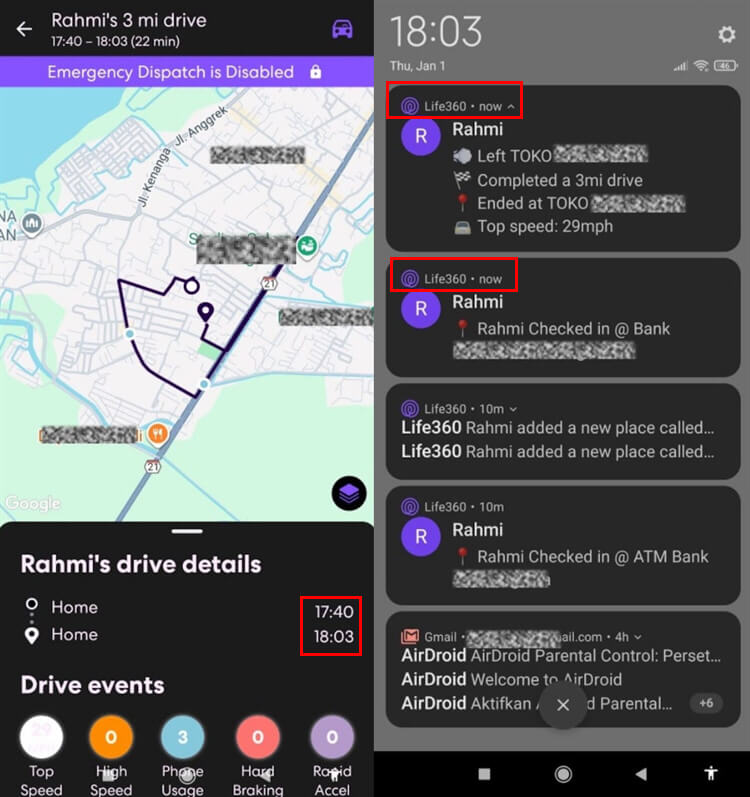
Life360 location observation: The map coordinates were generally accurate, but the automatic alerts were less consistent. On one test trip, the device left home at 5:40 PM and the departure alert arrived about 20 minutes late, close to the return notification at 6:03 PM. On another trip, the driving report showed a 2:19 PM departure and the parent alert arrived at 2:21 PM, while the 2:27 PM return did not generate an alert.
Life360 driving observation: The driving report provided useful route and behavior context, but it also marked phone use while the vehicle was stopped. We treat driving events as conversation-starting safety context, not proof that a child used a phone while driving.
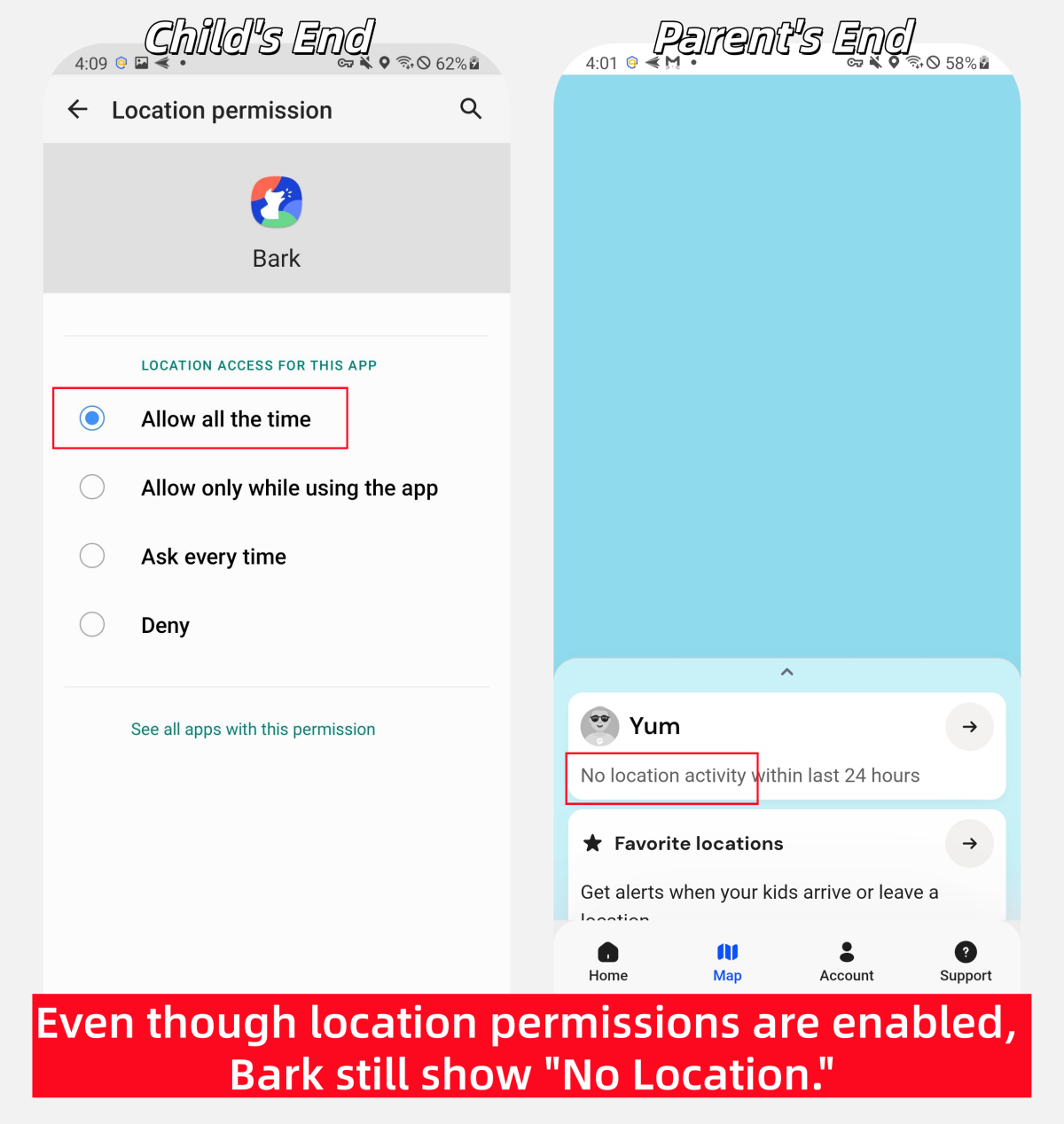
Bark location observation: Bark's location did not update consistently in our test environment, and we sometimes could not confirm a fresh location without additional action. This is one observed result, not a claim that Bark location fails for every family.
Documentation-only checks: Bark's content-risk alerts, screen-time schedules, website and app blocking, current pricing, device-specific monitoring, and some iPhone setup requirements were verified from current Bark information rather than scored as part of this location test. Life360 plan limits, location-history periods, and emergency-service availability were also checked against current public information.
Results can vary with the phone, operating system, permissions, background and battery settings, GPS conditions, network connection, subscription, region, and later app updates.
Location Tracking, History, and Place Alerts
Life360 was more dependable for viewing current location and reviewing trip context in our test, although its automatic Place alerts were not always immediate. This distinction matters: an accurate map position does not guarantee that every arrival or departure notification will arrive on time.
Bark also supports live location, location alerts, and check-ins, but its location did not update as consistently in our test environment. At times, we could not confirm a fresh location without additional action.
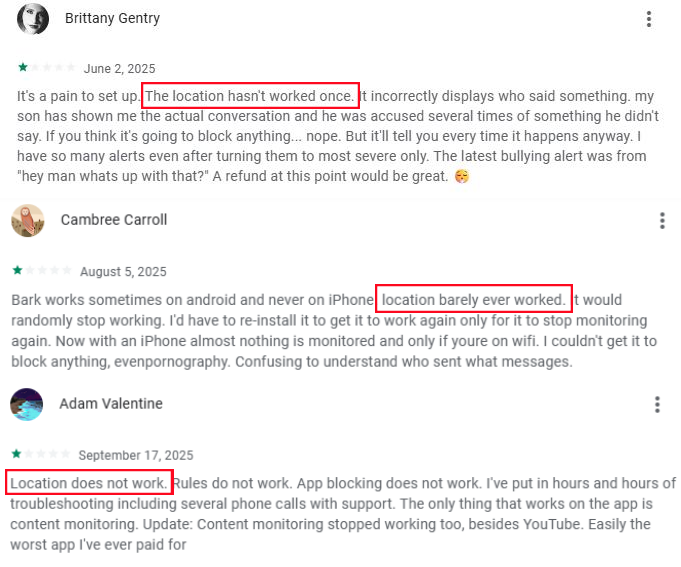
Some parents have also described Bark location reliability issues in Google Play reviews. Individual reviews are supporting context, not proof that every user will have the same result.
In our Life360 test, map coordinates were generally accurate and trips were presented clearly. However, Place notifications were delayed or missing in two test trips. One departure alert arrived about 20 minutes late, another arrived about 2 minutes late, and one return alert did not appear.
Life360 supports different history periods by membership: 2 days on the free tier, 7 days on Silver, and 30 days on Gold or Platinum. Bark's available history and trip context depend on the Bark product, child device, and current plan, so families should not assume that the two services retain identical data.
Driving Safety and Emergency Features
Life360 is the stronger fit for families with a teen driver. Depending on the membership, region, permissions, settings, detection event, and connectivity, its features can include Crash Detection, emergency dispatch, roadside assistance, driving summaries, and individual driver reports.
Crash Detection should not be described as a guaranteed automatic ambulance call. If a supported collision is detected, Life360 can start its configured notification or emergency-response process. We did not create a real crash to test emergency dispatch.
We did review Life360 driving reports. They included routes and behavior information, but our test found inaccurate phone-use events: the app recorded phone use while the vehicle was fully stopped. Parents should use these reports to start a calm safety discussion, not as automatic proof of unsafe driving.
Bark's main strength is online safety rather than specialized teen-driving support. Any available trip or driving feature should be checked against the family's specific Bark product and child device instead of being treated as equivalent to Life360's driving and emergency membership features.
Content Monitoring and Risk Alerts
Bark is the better choice when parents want alerts about supported online risks. According to Bark's current product information, it analyzes supported content and connected accounts for potential concerns and sends parents alerts with available context.
- Risk categories: Bark can alert parents to supported concerns such as cyberbullying, self-harm, sexual content, violence, drugs, and online predators.
- Alert-led approach: Bark generally surfaces detected risk context instead of promising parents a complete archive of every conversation.
- Platform limits: Coverage varies by the child's device, connected account, permissions, Bark product, and setup. Deeper iPhone content monitoring requires additional Bark setup.
- Interpretation: An alert can be a useful early warning, but it is not proof of what happened and can miss context or produce a false positive.
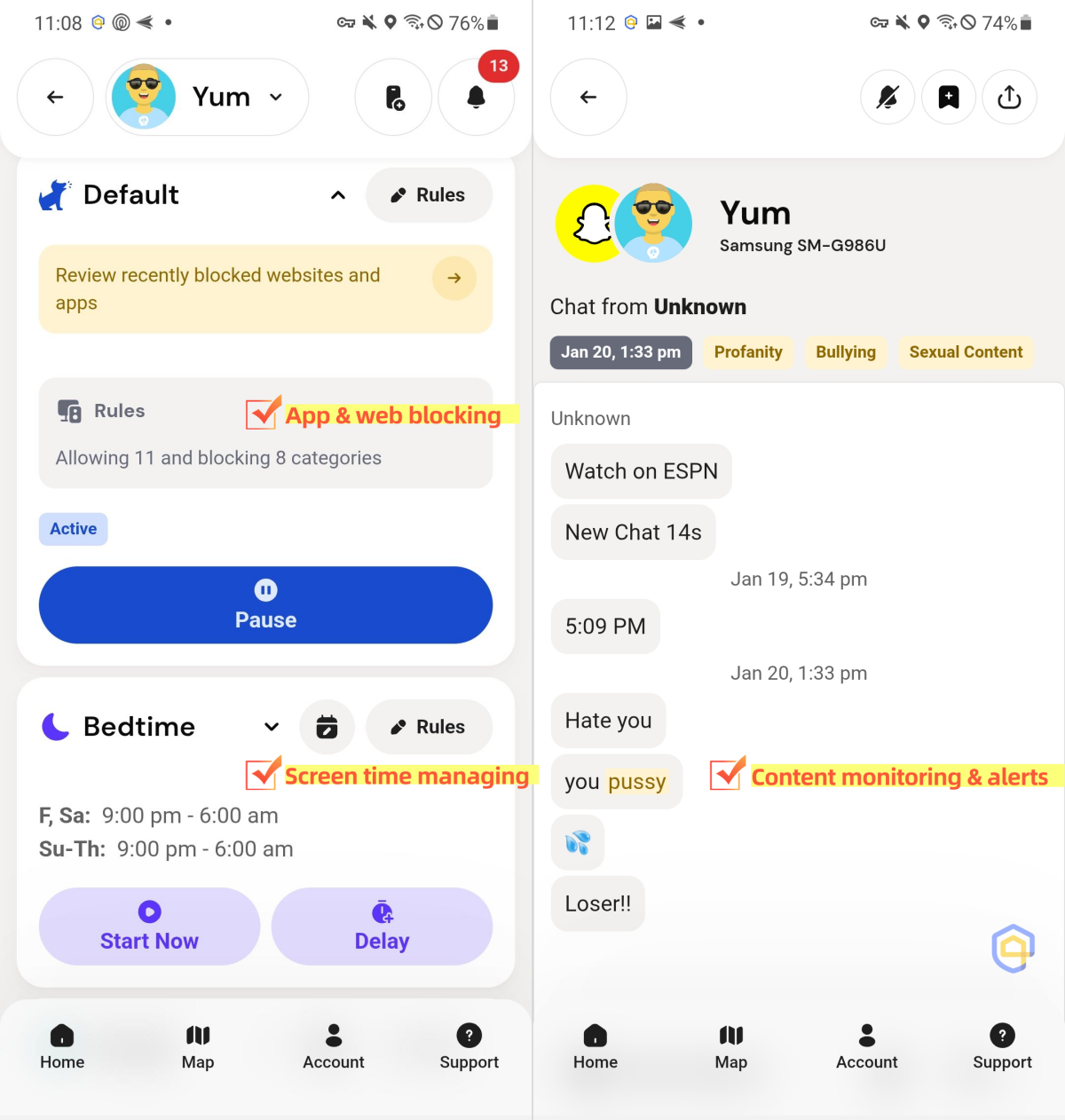
Life360 does not provide an equivalent system for supported text, photo, video, email, or social-platform risk alerts. This section reflects current Bark documentation and our dedicated Bark review; it was not scored as part of the location-focused test described above.
Screen Time, App Blocking, and Web Filtering
Bark is the more suitable option for managing when and how a child uses a compatible device. Depending on the Bark product and platform, parents can create screen-time routines and manage access to supported websites and apps.
- Screen-time routines: Parents can create rules for school time, bedtime, and other parts of the day on compatible devices.
- App blocking: Bark can block supported apps, although the available controls and enforcement differ by product and platform.
- Web filtering: Bark can restrict supported websites and content categories on compatible devices.
- iPhone limitation: Ordinary device controls and deeper content monitoring have different setup requirements. Families should verify the exact iPhone workflow they need.
Life360 is primarily a family-location and driving-safety service. It does not provide an equivalent set of screen-time schedules, app blocking, or web filtering controls.
Setup and Android vs iPhone Differences
Life360 has a similar setup process on Android and iPhone for basic location sharing. Install the app, create or join a private Circle, invite family members, and allow the required permissions. However, the location and background settings needed for reliable tracking differ between the two operating systems.
On iPhone: Life360 recommends setting Location access to Always and turning on Precise Location. Wi-Fi, Physical Activity, and notifications should also be enabled, while Low Power Mode can affect location updates.
On Android: Life360 recommends setting Location access to Allow all the time and turning on Use precise location. Depending on the device, parents may also need to check battery optimization, Data Saver, Physical Activity, Bluetooth, and Nearby Devices permissions. Settings can vary between manufacturers such as Google Pixel and Samsung.
On both platforms, location updates can become unreliable if location sharing, required permissions, connectivity, or background activity settings are disabled. Parents should check these settings before assuming that a missing location update is intentional.
Bark has more noticeable Android vs iPhone differences because feature availability depends more heavily on the child device and the features being used:
- Child Android: The relevant Bark child app supports location, alerts, content monitoring, screen-time routines, and blocking, subject to permissions and product support.
- Child iPhone: Location and compatible device controls are supported, but deeper monitoring of texts, photos, videos, and some apps requires additional Bark setup.
- Feature-specific setup: Families should evaluate location, blocking, screen time, and content monitoring separately rather than assuming one installation step enables every feature.
Pricing and Plans
Life360 has the advantage for families that want an ongoing free location plan. At the time of our review, its free membership included:
- Current location sharing
- 2 Place alerts
- 2 days of location history
- Family driving summary
- Basic crash detection
For extra protection and driving features, Life360 offers three paid membership tiers in the US:
- Silver ($9.99/mo or $99.99/yr): Adds 7 days of location history, 5 Places with unlimited alerts, and additional paid-plan benefits.
- Gold ($16.99/mo or $169.99/yr): Adds 24/7 Roadside Assistance, Emergency Dispatch, Individual Driver Reports, and 30 days of location history.
- Platinum ($24.99/mo or $249.99/yr): Adds up to 50 miles of free towing, Disaster Response, Medical Assistance, and $1M Identity Theft Protection.
Bark does not offer an equivalent ongoing free plan. The Bark App is priced at $14 per month (or $99 per year) following a 7-day free trial. While Bark requires a paid subscription, Bark Premium's $14/month price includes digital-safety monitoring features that Life360 lacks, such as:
- Content monitoring across 30+ social media platforms and apps
- Web filtering and safe search controls
- Screen time schedules and app blocking
- AI alerts for cyberbullying, online predators, and explicit content
Note: Bark Jr is a lower-tier Bark App subscription priced at $5/month, while Bark Phone and Bark Watch are separate hardware products with their own pricing and features.
Privacy, Transparency, and Family Communication
Life360 is designed around visible family location sharing. Circle members can see shared locations, and a member can stop future updates by turning off location sharing. Life360 also provides Bubbles, which can temporarily show an approximate area instead of a precise point.
Bark uses an alert-led approach for supported online risks. Instead of giving parents a guaranteed archive of every conversation, it analyzes supported content and sends alerts when it detects a potential concern. Available context and coverage vary by platform, connected account, and setup.
Neither design removes the need for transparency. Parents should explain what the app can access, agree on when location or safety information will be reviewed, and use the minimum level of access needed for the child's age and situation.
Which App Fits Your Family?
- Choose Life360 if your main questions are where family members are, whether they arrived at a saved place, and whether a teen driver may need roadside or emergency support.
- Choose Bark if your main questions are whether supported online activity contains a potential risk and when apps, websites, or internet access should be limited.
- Consider complementary tools if your family needs both specialized driving and emergency features and deeper digital-safety controls. Before adding more software, decide whether the extra access is proportionate and useful.
A location pin cannot explain the whole situation. It can help a parent confirm where a phone appears to be, but it cannot prove who is holding the device, why the child is there, or whether the child needs help.
Risk alerts cannot prevent every harmful interaction. No parental-control app can understand every conversation, eliminate false positives, or guarantee that a child never sees harmful content.
No app can replace an open conversation. Location, driving, and risk alerts should help a parent decide when to check in calmly. They should not be treated as automatic proof of misconduct.
What If You Need Both Location and Device Controls?
Life360 focuses mainly on location and driving safety, while Bark emphasizes online-risk alerts and device rules. Families that want these areas connected in one solution can consider AirDroid Parental Control, which combines digital-habit management with online and real-world child-safety tools.
- Granular app management. Set individual or shared app limits, schedule Downtime, instantly restrict selected apps, keep essential apps available, and respond to a child's extra-time request.
- Supported safety alerts. On compatible child devices, AirDroid can surface selected risk signals from social content, AI chats, notifications, images, calls, or SMS. Coverage is broader on Android.
- Location and driving safety. Live device location, route history, geofences, SOS, and Driving Safety can provide trip details, speeding alerts, and post-trip events such as hard braking or rapid acceleration.


Available features depend on the child's device, operating system, permissions, network, and setup. Alerts and travel data should support calm family conversations—not be treated as a complete activity record or proof that the child was driving.
Life360 vs Bark FAQs
List of Sources
- Quick Verdict
- Life360 Official Website (https://www.life360.com )
- Bark Official Website (https://www.bark.us )
- My Take on Life360 and Bark:
- eSafety Commissioner - Life360 Review (https://www.esafety.gov.au/key-topics/esafety-guide/life-360 )
- MocPOGO - Life360 Location Tracking Guide (https://mocpogo.com/social-app/does-life360-tell-you-when-someone-checks-your-location/ )
- Life360 Is Better for Location Tracking
- Life360 - Location Features (https://www.life360.com )
- Bark Offers More Parental Control Features
- Bark - Content Monitoring (https://www.bark.us )
- Life360 Gives Peace of Mind If You Have a Teen Driver
- Life360 - Driver Safety (https://www.life360.com )
- Life360 Is a More Budget Friendly Option
- Trustpilot - Life360 Reviews (https://www.trustpilot.com/review/life360.com )
- Life360 Is Much Easier to Set Up
- Life360 - Setup Guide (https://www.life360.com )
- Bark Offers a "Privacy-First" Approach
- Bark - Privacy Policy (https://www.bark.us/privacy/ )










Leave a Reply.