Bark Review 2026: What We Found Testing It on Android
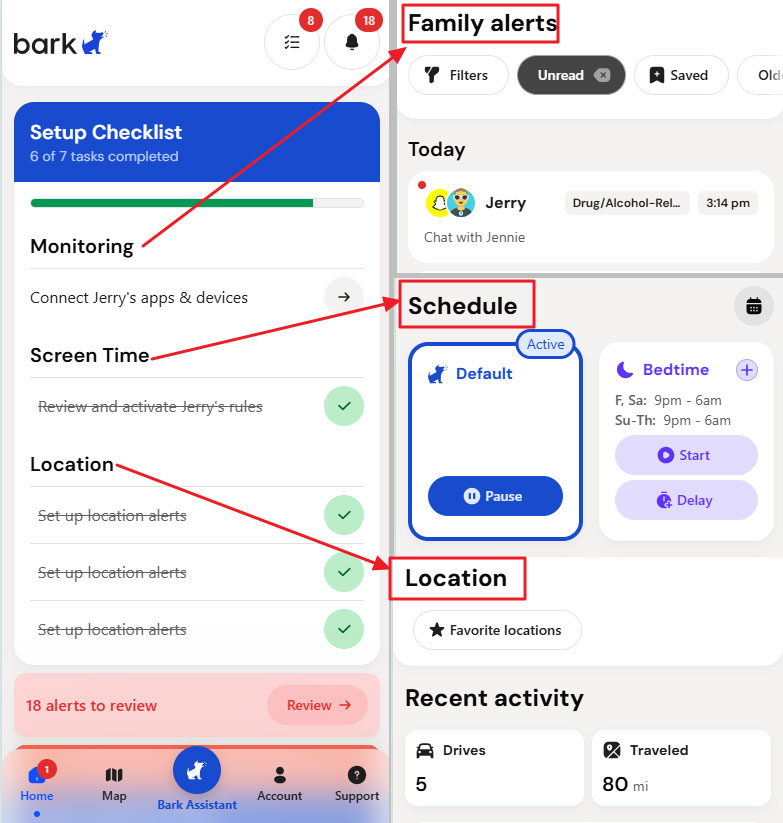
Bark stands out from most parental control apps because its main job is not to show parents everything a child does. Instead, it scans supported messages, social apps, searches, photos, and other activity for potentially concerning content, then alerts parents when something may need attention.
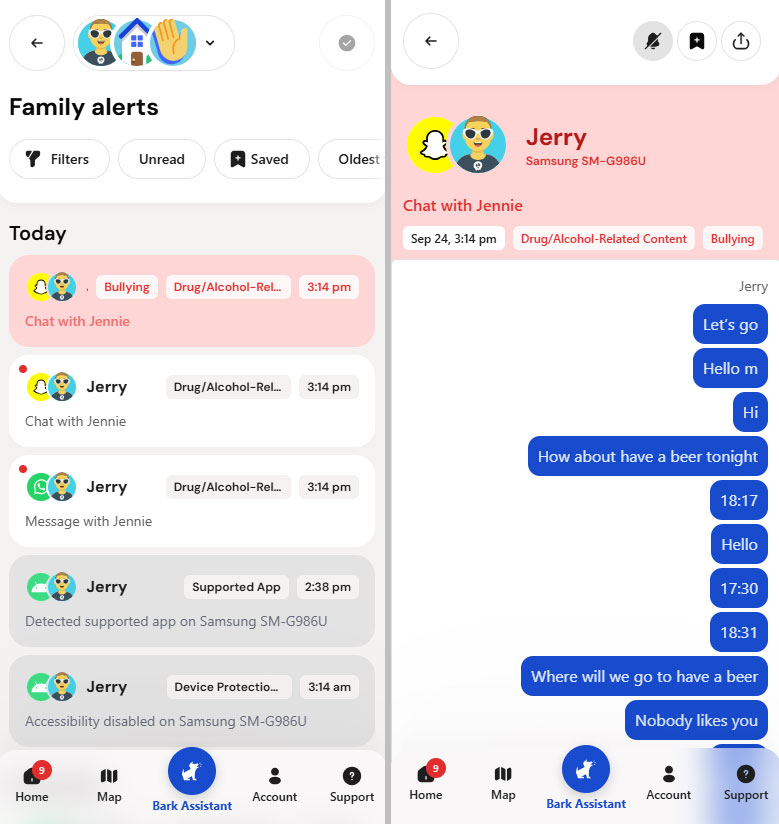
That alert-based approach worked repeatedly on Snapchat and WhatsApp in our Android tests. Bark does not promise real-time alerts, and our successful test alerts arrived roughly 35 to 40 minutes after the conversations took place.
The more important limitations were consistency and context: some alerts did not fully reflect the conversation we tested, repeated Instagram conversations produced no alert, and Bark's other parental controls were more mixed.
Its location map was generally accurate, but Favorite Location alerts failed in three separate test rounds, while app and website rules worked inconsistently. Bark itself notes that alerts are not sent in real time because it analyzes context before notifying parents.
Our bottom line: Bark makes the most sense as an alert-focused monitoring tool with additional parental controls, rather than as a precise screen time or location alert system.
Disclosure: AirDroid offers a competing parental control product. We tested Bark using the devices and scenarios described below and separate our hands-on findings from Bark's official claims and user-reported experiences.
1. Bark Review at a Glance
| Our Take | |
|---|---|
| Best for | Parents who want alerts about potentially concerning messages and online activity without routinely reading every conversation |
| What stood out | Broad Android monitoring across supported messaging and social apps |
| Biggest limitation | Alert delivery took roughly 35–40 minutes in our tests, while filtering and Favorite Location alerts were inconsistent |
| Screen time approach | Scheduled internet access through Routines rather than daily minute budgets |
| Tested on | Samsung Galaxy S20+ 5G running Android 11 and Google Pixel 7 running Android 16 |
| Android support | Android 8.0 or later |
| Price | Bark Premium: $14/month or $99/year |
| Free trial | 7 days; debit or credit card required to start |
| Family coverage | One subscription supports unlimited kids and devices |
Bark Premium currently includes monitoring, alerts, screen time schedules, app and website blocking, and location features. A Premium subscription can cover unlimited accounts and devices. Bark also offers the lower-priced Bark Jr plan, which includes screen time, filtering, and location but not Premium's monitoring alerts. Bark currently lists Premium at $14/month or $99/year and Bark Jr at $5/month or $49/year.
Parent takeaway: Bark's $99 annual Premium plan makes the most sense if you actually want its monitoring alerts. If your main goal is simply scheduling internet access or checking location, monitoring is much less central to the value you are paying for.
2. How We Tested Bark
We tested Bark Premium on two child Android phones: a Samsung Galaxy S20+ 5G running Android 11 and a Google Pixel 7 running Android 16.
Rather than checking whether a setting merely existed, we focused on whether Bark performed the jobs parents are likely to depend on.
Last tested: September 2026
- controlled conversations designed to test Bark's published alert categories;
- Snapchat, WhatsApp, and Instagram monitoring;
- alert timing and the context shown to parents;
- Routines, Pause Internet, app and website rules, and custom block lists;
- repeated location and Favorite Location tests;
- location history and driving detection;
- Android installation and permissions;
- restarts, network changes, Battery Saver, and protection interruptions;
- ordinary uninstall and settings protections.
For risk alert tests, we used controlled test conversations, not genuine child safety incidents. An alert in these tests means Bark classified the test content as potentially related to one of its monitoring categories; it does not establish that an actual bullying, substance use, self-harm, or other safety event occurred.
For our repeated Instagram tests, both Android phones showed that they were reporting normally to Bark, Accessibility was enabled, and Alcohol-Related Content sensitivity was set to All. The child account also actively opened and participated in the Instagram DM conversation.
For Favorite Location testing, location permissions were active, Bark could correctly identify the child's current location on its map, and the parent device was successfully receiving other Bark push notifications. You can read more about how we test parental control apps and keep our reviews transparent.
3. How Well Does Bark Monitor Messages and Social Apps?
Monitoring is the clearest reason to choose Bark Premium over its cheaper Bark Jr plan.
Bark says it scans activity across more than 30 apps and platforms. Coverage is not identical across every service. On Android, for example, Bark officially supports text-based Instagram DMs and searches, Snapchat private and group DMs plus searches and Stories, and WhatsApp direct and group messages. Bark also supports monitoring across other Android activities and apps, including Discord, TikTok, Roblox, YouTube activity, and Spotify.
That distinction matters. A platform appearing on Bark's supported list does not mean Bark sees every type of content on that platform or will flag every potentially concerning conversation.
What Happened in Our Snapchat, WhatsApp, and Instagram Tests
We tested alcohol-related content and other controlled safety scenarios on both Android phones.
| Platform | Pixel 7 | Samsung Galaxy S20+ 5G | What We Observed |
|---|---|---|---|
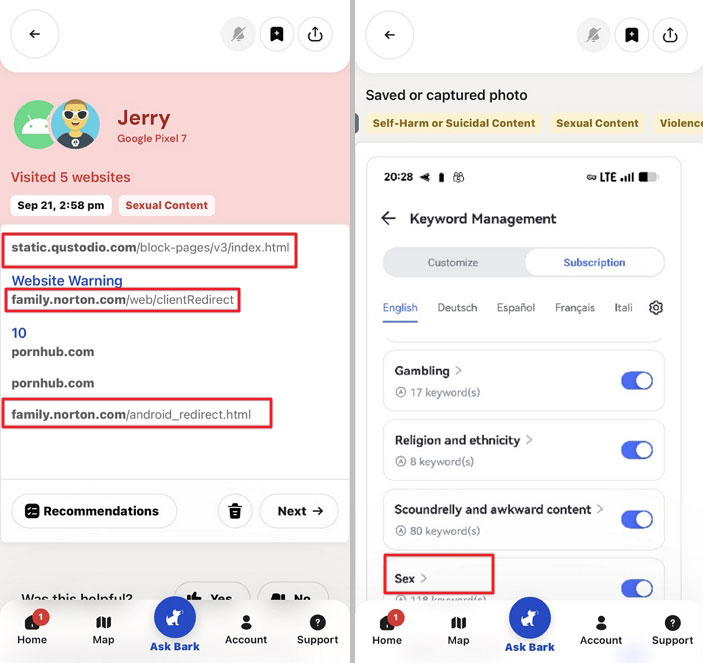
| Snapchat | Alert received in about 40 minutes | Alert received in about 35 minutes | Bark identified test content, but the context shown to the parent differed from the full conversation |
| Alert received in about 40 minutes | Alert received in about 40 minutes | Monitoring worked on both devices, again with limited context | |
| No alert | No alerts across repeated tests | Bark officially supports Android text DMs, but our test conversations did not trigger an alert |
Instagram was therefore the weakest of the three messaging platforms in our test.
This does not mean Bark cannot monitor Instagram. Bark officially supports text-based Instagram DMs and searches on Android, and its troubleshooting documentation confirms that the Bark Kids app can monitor Instagram DMs without requiring the child's login credentials.
Our result is better understood as a missed alert in our test environment rather than evidence that Instagram monitoring never works. Bark itself acknowledges that both false positives and missed alerts can occur.
How Long Did Bark Alerts Take in Our Tests?
Bark explicitly says its alerts are not sent in real time because it analyzes context rather than only matching keywords.
In our tests, that translated into a wait of roughly 35 to 40 minutes for the Snapchat and WhatsApp alerts that successfully triggered.
We would not treat 35 to 40 minutes as Bark's standard delivery time. Our sample is small, and processing or network conditions can vary. But the result gives parents a more concrete sense of what "not real time" looked like in our Android testing.
Recent Google Play reviews suggest that delayed alerts are not something only we encountered. Some reviewers reported critical alerts arriving hours after the underlying activity, while others specifically described alerts as arriving late.
Bark alerts are better treated as a way to surface issues for follow-up, not as an immediate safety alarm.
How Much Context Can Parents Trust?
Bark's model is intentionally different from tools that let parents browse an entire conversation history. Parents generally receive flagged content and a snippet of surrounding context rather than continuous access to every message. Bark likewise says parents do not receive access to all of a child's photos and videos, only content associated with alerts.
We like the principle behind that approach because it can reduce routine surveillance. But the tradeoff is that the alert itself may not tell the whole story.
In our tests, Bark sometimes presented a different impression from the full conversation. We also saw:
- a Norton Family website incorrectly categorized as sexual content;
- a screenshot containing the word "sex" flagged as sexual content;
- an Instagram alcohol-related conversation that did not trigger at all.
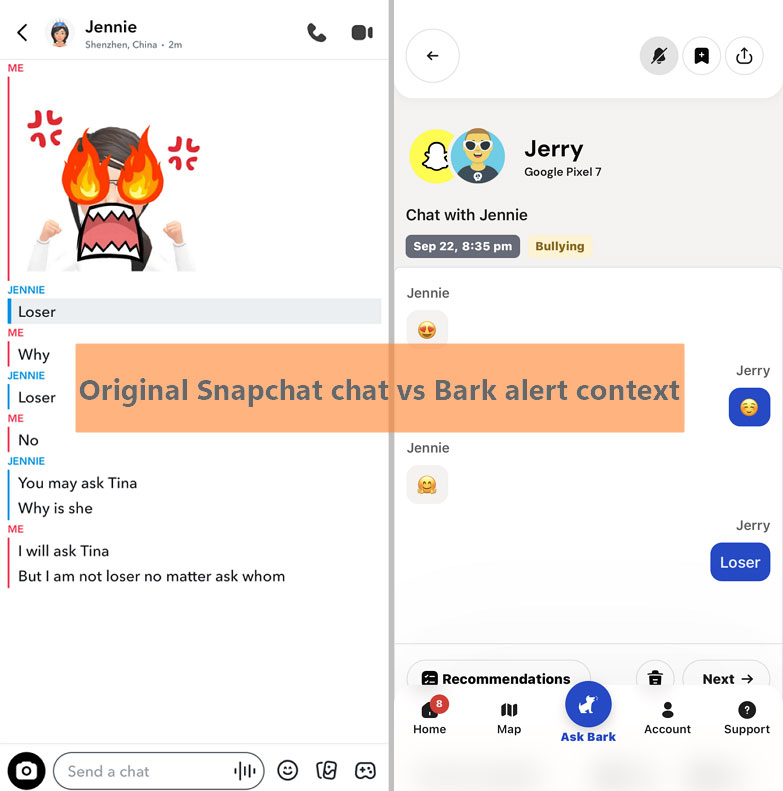
Bark itself acknowledges that false positives and missed alerts can happen and lets parents adjust sensitivity by concern category.
Similar complaints appear in recent user reviews. Reviewers described harmless phrases or images being classified as bullying or sexual content, while others said content they considered concerning was not flagged.
That makes the most useful interpretation of a Bark notification:
"Something here may deserve my attention," rather than "Bark has definitively determined what happened."
Before confronting a child based on an alert, look for context and start with a conversation where possible.
4. Bark Rules, App Blocking, and Screen Time
Bark uses the term screen time, but its standard Android controls work differently from tools built around daily minute budgets.
On a normal Android phone with Bark Kids installed, Bark uses Routines to change which apps and websites can access the internet at different times of day. Parents can create School Time, Free Time, Bedtime, and Default Rules, then change the app and website categories allowed during each Routine.
You can also block individual apps, categories, and websites and add custom allow or block rules.
What you cannot do with the standard Bark Android app is set something like:
"Instagram gets 30 minutes today."
Bark confirms that daily app time limits are a Bark Phone feature. Standard Android and iPhone installations use Routines to schedule access instead.
Bark's Routines Are About When Apps Get Internet, Not How Long They Are Used
This distinction can easily be missed when comparing parental control apps.
For example, you can create a School Time Routine that blocks social media and games while allowing education and collaboration tools. A Bedtime Routine can restrict almost everything except selected categories. Free Time can be much more permissive.
But one Routine applies to that time period. You cannot independently give several apps different daily minute allowances on a standard Android phone.
That makes Bark more suitable for rules such as: "No social media during school" than "TikTok gets 30 minutes per day and Roblox gets one hour."
If daily app budgets are more important to your family, other Android parental controls use a different model. AirDroid Parental Control, for example, supports app usage limits and scheduled downtime on a child's Android device, so parents can manage both how long selected apps can be used and when access is available.
That makes it more directly aligned with families whose main goal is granular time management rather than Bark's alert-first monitoring model.
Blocking Was Inconsistent in Our Android Tests
This was one of Bark's weakest areas in our testing.
When we used Pause Internet on the Samsung, Bark Kids immediately changed its status to "Internet paused." However, Snapchat conversations continued to work.
When we returned to Default Rules, Bark showed Social Media Websites & Apps, including Snapchat and Instagram, as blocked. Both apps could still be used.
We saw the same general behavior on the Pixel.
We also added snapchat.com and roblox.com to Custom Content block lists, then opened them in Samsung Internet and Chrome. The websites remained accessible in those tests.
Across repeated tests, failed blocks occurred more often than successful ones.
| Test | Samsung | Pixel |
|---|---|---|
| Pause Internet | Failed in some repeated tests | Failed in some repeated tests |
| Block Snapchat | App remained usable in repeated tests | App remained usable in repeated tests |
| Block snapchat.com | Site remained accessible | Site remained accessible |
| Protection disruption warning | Observed repeatedly | Observed repeatedly |
There is an important limitation to this finding. Bark's mobile filtering relies on the Bark Kids VPN, and we frequently received "Screen Time & Filtering disrupted" warnings on both phones.
Bark's own troubleshooting documentation says disrupted screen time protection can require the VPN to reconnect and notes that Private DNS, Secure DNS, third-party VPNs, or other settings can interfere with filtering.
Because of that, we cannot conclude that Bark filtering will fail in every Android environment. Network or VPN conditions may have contributed to some of our failures.
What we can say is:
We had difficulty keeping Bark's filtering rules consistently enforced across repeated use on both of our Android test phones.
Recent Google Play feedback contains similar experiences. Some parents reported that Bedtime or School Time appeared active without actually enforcing the intended restrictions, while others said apps or websites remained available despite being blocked.
Again, these reviews do not tell us Bark's overall failure rate. They do show that rule execution and connection health are reasonable things for parents to watch closely during the free trial.
Parent takeaway: If screen time is your main reason for buying a parental control app, test Bark's Rules on your child's actual phone, Wi-Fi network, and most important apps before committing to an annual plan.
5. Bark Location and Driving
Bark's current Map provides current location, Favorite Location alerts, family activity, and driving information. The older child-initiated Check-In feature is now considered a legacy feature for users who had already been using it.
Current Location Was Generally Accurate
Unlike some parental control tools with a manual locate or refresh button, Bark did not give us a way to request an immediate location refresh.
Instead, location updated automatically every few minutes in our testing.
Most location readings on both devices were close to the phone's actual location. Movement status such as walking or driving also updated with only a short delay.
For families that mainly want to open a map and see roughly where a child's phone is, this part of Bark worked reasonably well in our tests.
Recent Activity Gave Useful Trip History
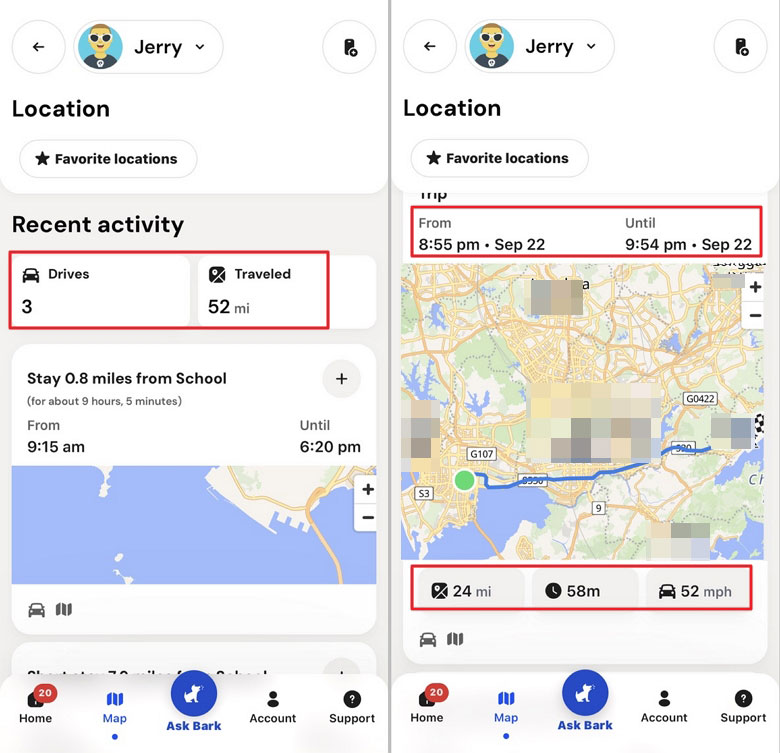
Bark's Family Activity view can show trips, miles traveled, and the top speed reported for each drive.
Our recorded trips generally matched:
- the route taken;
- travel distance;
- trip duration;
- start and finish times.
Driving detection also worked.
The biggest discrepancy was top speed.
On two highway trips where we observed the vehicle reaching roughly 60 mph, Bark reported top speeds of 52 mph and 49 mph. Those readings were lower than the peak speeds we observed during the trips.
We therefore found Bark's travel history more useful for answering: "Where did this device travel and for roughly how long?" than for treating maximum speed as a precise driving measurement.
Favorite Location Alerts Failed in All Three Test Rounds
This was the most significant problem in our location testing.
We enabled Location Alerts for a Favorite Location and confirmed that:
- Bark Kids had the required location permission;
- Bark Parent could receive other Bark alerts and push notifications;
- Bark's Map correctly recognized when the child phone was at the Favorite Location;
- the test route moved roughly 19 miles away rather than hovering around the geofence boundary.
We then tested leaving and returning to the Favorite Location in three independent rounds, spaced roughly two to three days apart.
Bark did not send an arrival or departure alert in any round.
Bark officially supports push notifications when a child arrives at or leaves a Favorite Location, including adjustable location boundaries, so we classify our result as:
Officially supported, but failed in our test environment.
Recent Google Play reviews show both sides of this problem. Some users describe location failing to update or not sending the notifications they expected, while others report false arrival and departure alerts even when their child remained at home.
We did not reproduce the false-arrival pattern. Our problem was the opposite: Bark knew where the phone was on its map but did not send the automatic Favorite Location notification.
Parent takeaway: Bark's map was much more dependable in our tests than its automatic geofence alerts. If arrival and departure notifications are an important part of your family's offline safety plan, verify them repeatedly before relying on them.
Location also has an inherent limit: knowing where a phone is does not always tell you whether a child is okay. If a child with an Android phone is away from home and unexpectedly stops answering calls or messages, AirDroid Parental Control offers Remote Camera and One-Way Audio features that can give a parent additional context about the phone's surroundings. These tools are more privacy-sensitive than ordinary location sharing, so we would reserve them for situations involving a genuine safety concern and discuss their use with the child in advance.
6. What Parents Should Know Before Choosing Bark
1 Android Setup Takes More Work Than a Play Store App
Bark supports phones and tablets running Android 8.0 or later, but Bark Kids is not downloaded from Google Play on a regular Android child's phone.
Instead, the child app is downloaded from Bark's website as an APK. Android therefore requires the parent to allow installation from an unknown source. Android 13 and newer devices can also require an additional Allow restricted settings step before Bark can obtain permissions such as Accessibility.
Our Pixel setup required more manual trips into Android Settings than our Samsung running Android 11.
| Test Device | Android Version | What Was Different |
|---|---|---|
| Samsung Galaxy S20+ 5G | Android 11 | Accessibility could be enabled without the newer Restricted Settings step |
| Google Pixel 7 | Android 16 | Required an additional Restricted Settings step before enabling Accessibility |
The setup process also asks parents to configure monitoring sensitivity, identify apps the child uses, install Bark Kids, enter a device code, and approve permissions such as Accessibility and background location.
It is guided, but it is not lightweight.
There is another ongoing Android difference worth knowing: Bark says regular Android installations require manual Bark Kids updates through a browser, while Bark Phone and Bark Watch updates happen automatically.
That helps explain why setup and maintenance appear so often in recent Google Play complaints. Parents report difficult initial setup, repeated manual updates, lost permissions, and having to reconnect child devices.
2 Reliability and Tamper Protection
Bark recovered normally after restarting both test phones, and we continued to receive location updates while Battery Saver was enabled.
Bark also has meaningful anti-tamper protections on Android. Current versions use a device code to protect the Bark Kids app and Bark VPN, as well as settings such as Accessibility. Bark separately advises parents to disable Android's Multiple Users feature because another user profile may not have Bark's protections.
These protections are useful, but they do not eliminate reliability concerns.
We repeatedly received Bark protection disruption warnings on both Android devices. In one Accessibility test, we did not receive the specific warning we expected after Accessibility was disabled, even though Bark generated broader protection warnings under other conditions.
For this reason, we would not describe standard Android Bark as impossible to bypass or maintenance-free.
A better way to think about it is:
Bark has anti-tamper controls, but parents still need to watch its device health and connection status.
Recent Google Play reviews repeatedly mention devices disconnecting, monitoring stopping, or updates and permissions needing attention.
We also observed faster battery consumption while conducting intensive Bark tests, but those sessions included GPS, messaging, driving, monitoring, web access, and repeated rule testing. They were not controlled battery experiments, so we do not use them to claim Bark causes heavy battery drain.
3 Privacy and Transparency
Bark takes a different approach from parental controls that give parents routine access to complete message histories.
Parents generally see content Bark flags rather than every message a child sends. Bark's own alert documentation describes notifications as including a snippet of the conversation or media for review.
That can support a less surveillance-focused approach when families use alerts as a starting point for conversation rather than treating every classification as evidence of wrongdoing.
But there are two separate privacy questions here.
Parent-child privacy: Bark limits what the parent routinely sees.
Data privacy: Bark itself still processes sensitive child data to provide monitoring. Its current privacy policy says that this can include messages, email, chat and social media content, location information, metadata, device telemetry, and other account data.
Parents should understand both sides before deciding whether Bark fits their family's expectations.
Child and teen Google Play reviews also show why communication matters. Some reviewers describe feeling constantly watched or changing how they communicate because they know Bark may flag messages.
Those reviews do not prove that Bark harms parent-child relationships. They do show that children can experience monitoring very differently from parents.
For older kids especially, we would explain:
- what Bark monitors;
- what parents can and cannot see;
- what will happen when an alert appears;
- which categories the family has chosen to monitor;
- when those rules will be reviewed as the child becomes more independent.
Technology works better here as a parenting tool than as a substitute for communication.
4 Bark Pricing and Value
As of our September 2026 check, Bark Premium costs $14 per month or $99 per year, while Bark Jr costs $5 per month or $49 per year. Bark Premium adds content monitoring and alerts on top of Bark Jr's screen time, filtering, and location tools.
Bark offers a 7-day free trial, but you need to add a debit or credit card during signup. Bark says the payment method is used to provide verifiable parental consent, and the subscription is not billed until the trial ends. Its billing documentation also notes that a temporary $1 preauthorization hold may appear while the card is verified.
The value question therefore depends heavily on why you want Bark.
If you specifically want risk-focused monitoring of texts, supported social apps, searches, and saved media, Premium offers capabilities that free built-in Android controls generally do not.
If you mainly want:
- daily app time budgets;
- highly granular app management;
- basic schedules;
- simple location sharing;
then Bark Premium's monitoring system may be more than you need, while its standard Android time-control model may still be less precise than you expect.
5 What Recent Bark Users Say
Our analysis of Google Play reviews from 2025 onward found three recurring low-rating themes worth stress testing:
- pricing and subscription concerns: 28.7%;
- setup and permission issues: 21.0%;
- reliability, connectivity, or performance issues: 20.3%.
Reliability showed a particularly strong association with low ratings in the review analysis.
The high-rating evidence was much thinner. Only 72 high-star reviews contained enough detail for the positive theme analysis, with four explicitly praising ease of use and four praising reliability. That is not enough to treat either as a clear comparative advantage.
We also saw a more recent increase in child and teen comments about privacy and autonomy.
These Google Play reviews are self-selected user experiences. Their percentages describe themes in the reviewed sample, not how often every Bark customer will experience a problem.
They are most useful as a way to identify what deserves testing. In this case, the themes aligned with several areas where our own hands-on testing found the most friction: Android setup, connection health, filtering reliability, alert quality, and location notifications.
7. Is Bark Right for Your Family?
Bark is unusual because its strongest feature is neither strict app control nor full conversation access.
Its strongest case is:
Helping parents notice potentially concerning digital activity without requiring them to routinely read everything a child says.
Bark May Be a Good Fit If:
- you want risk-focused alerts across supported messages and social apps;
- you prefer alerts over routine access to a child's complete conversations;
- your child uses Android, where Bark has broad monitoring coverage across supported apps;
- you want to adjust monitoring sensitivity by concern;
- you have several children or devices and value broad account and device coverage;
- you are willing to spend some time configuring and maintaining Android permissions.
Bark May Be a Weaker Fit If:
- you need alerts to arrive almost immediately;
- you want precise daily minute limits for individual apps on a normal Android phone;
- dependable app and website blocking is your highest priority;
- you intend to rely heavily on automatic geofence alerts;
- you want a child app that installs and updates entirely through Google Play;
- you expect to read a complete message history from the parent dashboard.
For us, Bark's monitoring concept was more convincing than its broader parental control execution.
Snapchat and WhatsApp monitoring repeatedly worked across our two Android phones, and Bark's alert-first approach can give families a useful middle ground between no visibility and reading everything.
But parents should go in knowing that supported does not mean complete, alerts do not mean instant, and an AI classification is not the same thing as understanding the full context of a child's conversation.
If your priorities are different, compare the control model rather than simply counting features. AirDroid Parental Control, for example, is more focused on granular Android device management, including app usage limits, scheduled downtime, location tools, and parent-initiated Remote Camera and One-Way Audio on supported Android child devices. Bark remains more distinctive if your priority is its alert-based monitoring across supported messages and online activity.
Bark's 7-day trial is therefore especially useful for testing fit. Check the platforms your child actually uses, see how quickly alerts reach you, verify Rules on your own network, and test Favorite Location alerts before deciding whether Bark is dependable enough for the jobs that matter most in your family.
8. Bark FAQs
In our tests, Bark successfully flagged controlled Snapchat conversations on both the Pixel 7 and Galaxy S20+ 5G, with alerts arriving roughly 35 to 40 minutes later. The context shown in the alert did not always match the full conversation we tested.
For a closer look at exactly what Bark can and cannot see on Snapchat, including the differences between Android and iPhone, see our Does Bark Monitor Snapchat? guide.
List of Sources
- What Bark Monitors on Social Media — Bark (https://support.bark.us/en/articles/13461056-what-bark-monitors-on-social-media)
- Reviewing Alerts — Bark (https://support.bark.us/en/articles/13460975-reviewing-alerts)
- Alert Accuracy — Bark (https://support.bark.us/en/articles/13461074-alert-accuracy)
- Pricing — Bark (https://support.bark.us/en/articles/13460996-pricing)
- Get Started With Bark — Bark (https://support.bark.us/en/articles/13460971-get-started-with-bark)
- Compatibility — Bark (https://support.bark.us/en/articles/13461008-compatibility)
- Location Alerts and Tracking — Bark (https://support.bark.us/en/articles/13461093-location-alerts-and-tracking)
- Check-ins (Legacy Feature) — Bark (https://support.bark.us/en/articles/13461096-check-ins-legacy-feature)
- Screen Time Protection Has Been Disrupted on Android — Bark (https://support.bark.us/en/articles/13461410-screen-time-protection-has-been-disrupted-on-android)
- Update the Bark Kids App on Android — Bark (https://support.bark.us/en/articles/13461180-update-the-bark-kids-app-on-android)
- How to Prevent Your Kid From Deleting Bark — Bark (https://support.bark.us/en/articles/13461508-how-to-prevent-your-kid-from-deleting-bark)
- Bark Privacy Policy — Bark (https://www.bark.us/privacy/)










Leave a Reply.