Eyezy Review 2026: Features, Pricing, Pros and Cons
- Eyezy Review: Quick Verdict
- What Is Eyezy and How Does It Work?
- Our Research Scope and Its Limits
- Eyezy Features Explained
- Eyezy Pricing and Plans
- What Eyezy and Findio Users Say
- Eyezy Pros and Cons
- Is Eyezy Safe, Legal, and Private?
- Best Eyezy Alternative: AirDroid Parental Control
- Final Verdict: Is Eyezy Worth It?
Eyezy is a monitoring-focused parental control service for Android and iPhone. It can bring supported messages, calls, typed text, locations, browsing records, saved files, calendar entries, and alerts into an online dashboard. That is a broader feature list than the one in many basic screen-time apps, but it comes with a catch: the exact coverage depends heavily on the child device, installation route, permissions, subscription, and any separately purchased feature.
This review is based on Eyezy's current public feature pages, FAQ, pricing guide, compatibility information, plan pages, and visible Google Play and App Store feedback. We did not install Eyezy or run a hands-on test, so provider claims and individual user reports are identified as such. No setup, speed, accuracy, or reliability result is presented as personally verified.
Eyezy Review: Quick Verdict
Eyezy is most relevant to families that want detailed activity records for a specific safety concern and are willing to confirm a more complicated setup before paying. Its official catalog covers social messages, call and contact data, keylogging, AI-chat history, locations, geofences, browsing, files, calendars, screen viewing, and blocking tools. Premium covers one monitored device, while Family Kit is designed for up to three.
What Is Eyezy and How Does It Work?
Eyezy is a paid parental monitoring service for Android phones and tablets, iPhones, and iPads. After a supported child device is linked, available data is sent to an online account. The parent can open the Eyezy dashboard in a browser on a phone or computer, so a separate parent app is not required for browser access.
The child-side setup is not identical across devices. Eyezy lists direct Android installation, an iOS app, iCloud synchronization, local Wi-Fi synchronization, and other guided installation paths. Its FAQ says physical access to the child device is still required, while the installation steps and accessible data depend on the operating system and chosen method.
This is the first practical question to settle: not "Does Eyezy support iPhone or Android?" but "Does Eyezy support this feature on this exact phone with this installation method?" Eyezy's own Compatibility Policy warns that even a compatible device is not guaranteed to run every subscribed feature correctly.
Our Research Scope and Its Limits
We did not install Eyezy on a parent or child device for this review. The assessment is a documentation-based review of Eyezy's public pages checked on September 23, 2026. It explains what the company currently advertises, where its pages add conditions, and where those pages contradict one another.
Eyezy Features Explained
1Dashboard, Friendly Installer, and Setup Options
The browser-based dashboard is Eyezy's main control center. According to the company, it organizes the supported location, message, call, browser, file, calendar, and alert data collected from the linked device. A parent can sign in from an internet-connected phone or computer.
Friendly Installer is the umbrella name for Eyezy's setup choices, which can include direct Android installation, iCloud synchronization, local Wi-Fi synchronization, or a mobile-device route. This flexibility sounds reassuring, but different routes can expose different data. Eyezy also says physical access is required, so "remote installation" should not be understood as permission-free installation on a phone you cannot access.
2Social Spotlight, Text Messages, iMessage, and Email
Social Spotlight is Eyezy's communication hub. Across its official pages, Eyezy names SMS, iMessage, email, WhatsApp, Instagram, Snapchat, Facebook, Telegram, TikTok, Kik, Skype, Tinder, Viber, and other services.
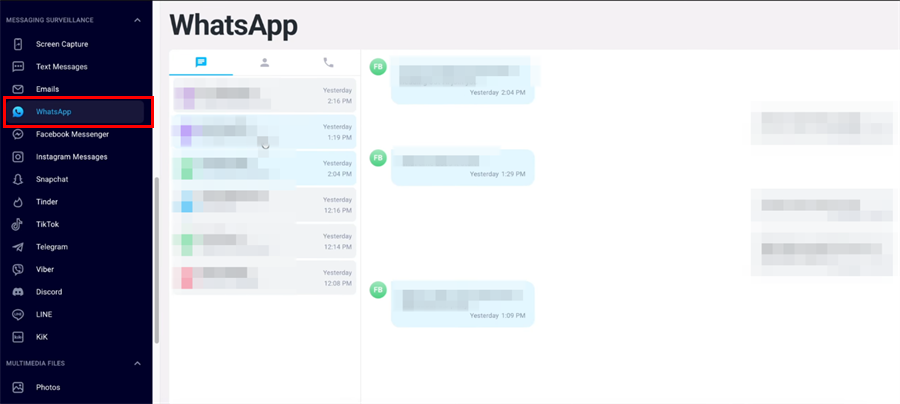
Deleted-message access is conditional. Eyezy says an Android text message may remain in the dashboard if Eyezy collected it before deletion. For deleted social messages, on iPhone, the relevant message must have existed in an enabled iCloud backup before it was deleted. That is not the same as recovering every deleted conversation on demand.
3Phone Analyzer and Android Call Recorder
Phone Analyzer covers supported contacts and call logs, including who called, whether the call was incoming or outgoing, when it happened, and how long it lasted. This is metadata, not the conversation itself.
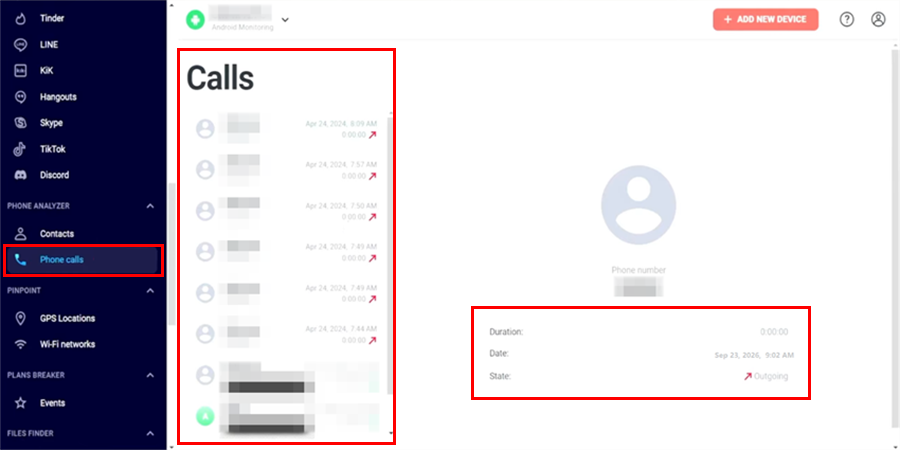
Eyezy separately advertises Call Recorder. Its 2026 guidance says full call recording is supported on Android, while iPhone coverage is limited to call details because of iOS restrictions. Recording a call can trigger consent and wiretapping laws, so this is a feature to verify legally as well as technically.
4Keystroke Capture, AI Chatbot Monitoring, and Magic Alerts
Keystroke Capture is designed to record supported text typed on the child device and organize it by time or app. Eyezy presents it as a way to see searches, messages, and other inputs. Because raw typing can include passwords, health questions, drafts, and conversations with people who did not consent to monitoring, it is one of the service's most privacy-sensitive tools.
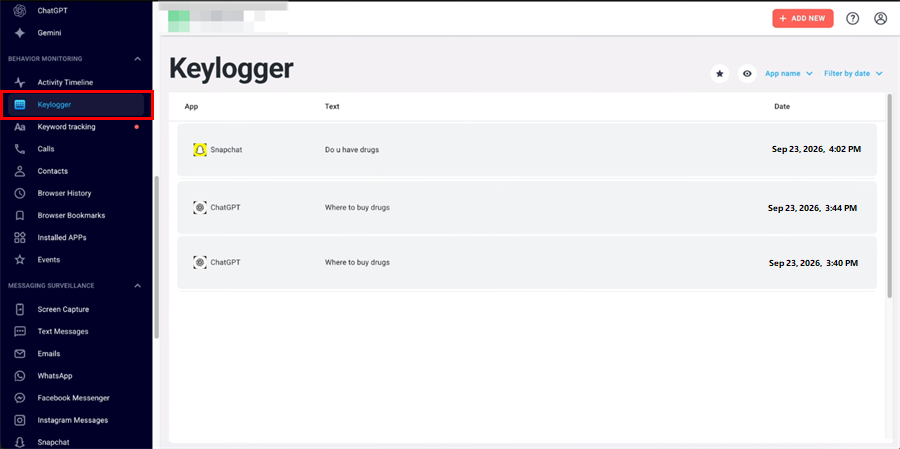
The newer AI Chatbot Monitoring page says Eyezy can show conversations with ChatGPT, Gemini, and other assistants.
Magic Alerts adds keyword rules. Instead of reading every record, a parent can choose terms and receive an alert when supported activity matches them. That can be useful for a narrow concern, but spelling changes, jokes, quotations, and missing context can all create false or misleading signals. An alert is a reason for a calm check-in, not proof of intent or misconduct.
5Pinpoint, Wi-Fi Records, Geofences, and Link Location Tracking
Pinpoint is Eyezy's installed-device location group. It covers the device's current GPS position, previous locations, and Wi-Fi network information. Magic Alerts adds geofences so a parent can receive a notice when the device enters or leaves an agreed area such as home or school.
Remote Location Tracking is a separate link-based tool. A parent sends a generated link, and Eyezy returns a location after the recipient taps it. It is useful to distinguish this from continuous background location: a link does not reveal a new location until it is opened, and a transparent message is more appropriate than disguising the link.
6Web Magnifier and Connection Blocker
Web Magnifier covers supported web searches, browser history, and bookmarks. It can provide context about recurring interests or a website that may need discussion, but a browser record alone cannot show who used the phone or why a page was opened.
Connection Blocker is Eyezy's control layer for supported websites, apps, and Wi-Fi networks. The company also describes seeing which apps are used and for how long.
7Files Finder and Plans Breaker
Files Finder can display supported photos, videos, saved media, files, and installed apps. This is one of the features missing from many short Eyezy reviews: it is not only a gallery viewer, because Eyezy also places installed-app information in this group.
Plans Breaker is another often-overlooked feature. Eyezy says it can show calendar events, including names, descriptions, locations, and times, as well as saved notes. This may help a parent notice an agreed appointment or upcoming plan, but a calendar entry is still context rather than proof that an event will happen.
8Screen Recorder and Live Screen Streaming
Eyezy uses similar names for two different screen features. Screen Recorder captures screenshots for later review. Live Screen Streaming is marketed as a live view of the phone screen, including open apps and visible notifications.
9Ambient Recording and the Remote Camera Contradiction
The current Eyezy FAQ says ambient recording is available by contacting the sales team. The Ultra page also promotes microphone activation and ambient recording. Neither page provides a clear public matrix of supported devices, price, recording duration, or consent requirements, so buyers should request those details before treating it as part of their plan.
Remote Camera is not a feature we would count as confirmed. Eyezy's current FAQ says the company does not currently provide Remote Camera. However, the still-live Ultra page advertises Remote Camera and describes activating the phone's camera. Because the provider's own pages conflict, the responsible conclusion is not "yes" or "no" for every buyer: do not purchase Eyezy on the assumption that Remote Camera is included unless Eyezy confirms availability for the exact device and plan in writing.
10Invisible Shield, Family Kit, Ultra, and Update Frequency
Invisible Shield is Eyezy's icon-hiding feature. The company says the icon is automatically hidden after setup. Hiding an icon may reduce tampering, but it should not replace a clear family conversation about what the software collects and why.
Premium is the standard one-device subscription. Family Kit covers up to three monitored devices and can mix Android and iPhone. Ultra is marketed as a higher-access package with social monitoring, keylogging, location, ambient audio, screen capture, remote assistance, and other tools.
Eyezy Pricing and Plans
Eyezy's official 2026 pricing guide lists one-, three-, and twelve-month Premium terms for Android and iOS. The current displayed rates are $47.99 per month for one month, $27.99 per month for three months, and $9.90 per month for twelve months.
The lower monthly rate on the longer plans does not mean Eyezy charges that amount one month at a time. The three-month plan costs $83.97 upfront, while the twelve-month plan costs $118.80 upfront. Premium monitors one device. Eyezy's separate Family Kit is intended for families that need to monitor up to three devices.
| Subscription term | Displayed monthly price | Amount billed upfront | What to consider |
|---|---|---|---|
| 1 month | $47.99/month | $47.99 | The smallest commitment, but the highest monthly price |
| 3 months | $27.99/month | $83.97 | A lower monthly rate, with three months charged in one payment |
| 12 months | $9.90/month | $118.80 | The lowest monthly rate, but the longest commitment and largest upfront payment |
Pricing note: These figures describe the displayed Premium subscription rates. Eyezy does not offer a free trial, although an interactive demo is available. Taxes, currency conversion, renewal pricing, Family Kit, Ultra, installation assistance, and separately purchased features may change the final amount.
What Findio Users Say About the Former Eyezy App
The name change needs to be clear before looking at the reviews. Eyezy's mobile apps on both Google Play and Apple's App Store have been renamed Findio. The listings are still published by Fortunex Limited, and the existing ratings and reviews were carried over from the period when the apps used the Eyezy name. In other words, the comments below include reviews of the former Eyezy app as well as feedback shown under the current Findio branding.
The rebrand currently applies to the mobile apps, not the web service: the browser-based monitoring product continues to use the Eyezy name. Findio and the Eyezy web service should therefore not be treated as interchangeable products. The store app is presented as a consent-based family locator installed on the participating devices, while the Eyezy website advertises a much broader monitoring service. Developer responses on the App Store also state that the iOS app and Eyezy web service use separate subscriptions and billing channels. This distinction helps explain why some reviewers expected web-service features that were not available in the mobile app they downloaded.
| Store listing | Rating shown on September 23, 2026 | What the visible feedback suggests |
|---|---|---|
| Google Play: Findio, formerly Eyezy | 3.8/5 from about 7.1K reviews; 1M+ downloads | The visible review sample is strongly negative about add-on costs, feature expectations, phone-number tracking claims, upgrades, refunds, and support |
| Apple App Store: Findio - GPS Phone Tracker, formerly Eyezy | 4.7/5 from about 4.7K ratings | Positive reviews praise location features and ease of use; visible negative reviews focus on billing, limited iPhone results, web-service confusion, refunds, and support |
Review note: The Findio listings retain ratings and comments posted under the former Eyezy branding. Store scores, counts, displayed reviews, and sorting can change by date, country, and device. The comments below summarize the visible English-language sample, not every review or the experience of most users.
1What Users Like
- Location at a glance. Positive reviews posted under the former Eyezy name and current Findio branding describe the GPS map as a convenient way to check where family members are without repeatedly calling them.
- Geozones and arrival alerts. Reviewers specifically praise the ability to mark places such as home or school and receive an alert when a family member enters or leaves the area.
- Location history and check-ins. Some users like having previous locations and family check-ins together on one map when coordinating everyday plans.
- Simple onboarding. Positive comments mention an approachable interface, easy family-member invitations, and convenient Google or Apple sign-in.
- Notifications and family communication. A few reviewers value the combination of location notices, help alerts, and in-app communication for staying connected.
These positive comments mainly describe the mobile location app now called Findio, including feedback left when that same listing was branded Eyezy. They should not be used as evidence that Social Spotlight, keylogging, deleted messages, call recording, or other features of the separate Eyezy web service work reliably.
2What Users Dislike
- Unexpected add-ons or unclear totals. Multiple visible reviewers say they paid for a subscription and then encountered additional upgrades, support charges, or separately priced capabilities. Some felt optional items or plan boundaries were not clear enough before checkout.
- Features did not match expectations. Complaints mention missing message or social-media data, upgrades not appearing, limited app or web history, and location-by-number advertising that ultimately required a link tap or installation.
- Confusion between the app and web service. Developer responses repeatedly tell reviewers that they may have purchased the Eyezy web service rather than the iOS app. Even if the purchases are technically separate, the shared Eyezy, Findio, Fortunex, and support branding can be difficult for a buyer to untangle.
- iPhone limitations and synchronization complaints. Some reviewers report that iCloud or Wi-Fi synchronization stopped, produced less data than expected, or required a setup that was not useful away from the same network. These are individual reports, not independently reproduced results.
- Refund and customer-support frustration. Several reviewers describe slow, repetitive, or unhelpful responses and say refund requests were rejected. The developer commonly asks users to contact support and, in some cases, says the review concerns a different Eyezy product.
Eyezy Pros and Cons
1Eyezy Pros
- Broad documented feature catalog. Messages, calls, typed text, AI chats, locations, browsing, files, calendars, alerts, and blocking tools are covered across Eyezy's official pages.
- Browser access from a phone or computer. Parents can use the online account without relying on a separate parent app for dashboard access.
- More than one installation route. Eyezy documents Android, iOS, iCloud, and local Wi-Fi approaches, which can give families options when one setup is unsuitable.
- Automated signals. Keyword rules and geofences can narrow attention to a defined concern instead of requiring constant manual review.
- Single- and multi-device plans. Premium covers one device, while Family Kit supports up to three.
2Eyezy Cons
- Official pages are not fully consistent. Remote Camera and Android rooting requirements are described differently across current and older Eyezy pages.
- No free trial. The demo shows an interface, but it cannot prove that a family's own phone and chosen installation method will support the required feature.
- Some advanced features may cost extra. Eyezy describes Live Screen Streaming as a separate purchase and directs ambient-audio buyers to sales.
- Store reviews raise billing and support concerns. Visible Google Play and App Store complaints repeatedly mention confusing product boundaries, add-ons, refund disputes, and difficulty getting useful help.
- High privacy impact. Keylogging, message access, screenshots, call audio, and ambient sound can collect sensitive information about the child and other people.
Is Eyezy Safe, Legal, and Private?
Eyezy is a commercial monitoring service, but purchasing it does not make every use legal or appropriate. Eyezy's own disclaimer says the software is intended for legal use, should be installed only on a device the purchaser owns, and generally requires the device owner to be notified. Laws vary by country and state, especially for call recording, microphone access, location tracking, and monitoring another person's messages.
Eyezy says it uses advanced encryption and that monitored data is visible only to the account holder. That is a provider claim, not a security audit performed for this review. Before subscribing, read the current privacy policy, data-processing terms, retention and deletion procedures, account-recovery process, and refund conditions. Use a unique password and protect the parent account as carefully as the child device.
The provider promotes Invisible Shield, but a hidden icon is a technical setting, not a parenting strategy. The healthier default is to tell the child what is collected, why a specific feature is necessary, what will trigger a parent response, and when the arrangement will be reviewed. Higher-access tools should be the exception, not the starting point.
Best Eyezy Alternative: AirDroid Parental Control
Eyezy is built around detailed activity collection. AirDroid Parental Control is a broader child-safety and digital-habit option for families that want app rules, web safety, supported online-risk signals, location tools, emergency support, and teen-driving context in one parent app.
- Granular app and screen-time management. The app covers individual app limits, a shared allowance across selected apps, Downtime, Instant Block, Always Allowed apps, and supported child time requests.
- Website safety and healthier browsing. Website categories, URL rules, Safe Search, supported browsing history, blocked-site alerts, and web-use limits help families create clearer boundaries.
- Focused online-safety signals. On supported child devices, AirDroid's content-safety tools can surface selected keyword, AI-chat, notification, SMS, call, or inappropriate-image signals. These alerts are context for a conversation, not a complete archive or proof of misconduct.
- Location, geofences, and emergency support. Live device location, route history, and agreed-place alerts, together with Family Chat and SOS, can help families confirm arrivals and respond when a child asks for help.


Final Verdict: Is Eyezy Worth It?
What holds Eyezy back is not a short feature list. It is uncertainty at the boundaries: Android and iPhone do not expose the same data, some tools are separate purchases or sales-assisted options, prices change, there is no free trial, and the official pages disagree about Remote Camera and some rooting requirements. Visible store complaints about unexpected add-ons, missing expected features, refunds, and confusion between the mobile app and web service reinforce the need to verify the exact product before paying.
Our practical verdict is therefore conditional. Do not buy Eyezy because a marketing page promises total visibility. Buy it only if one clearly defined feature addresses a real safety need, Eyezy confirms that feature for the exact device and plan, and the family is comfortable with the legal and privacy implications. Families that mainly need collaborative screen-time rules, web boundaries, location support, and risk alerts may find AirDroid Parental Control the more balanced fit.
Eyezy Review FAQs











Leave a Reply.