SecureTeen Review: Features, Pricing, Pros & Cons [2026]
SecureTeen is a parental control app with screen-time rules, app blocking, web filtering, location reporting, and selected activity records. In this SecureTeen review, we separate features documented by the company from results observed in our Android hands-on test.
Our verdict: SecureTeen delivered fast screen-time and app-blocking changes on our Google Pixel 7, but its web filter was inconsistent and its app-management tools were less flexible than some alternatives. Android has the clearest feature coverage; SecureTeen's public iPhone and iPad documentation lists a narrower set of controls.
SecureTeen Review: Quick Verdict
We rate SecureTeen 3.0 out of 5. Five equally weighted areas make up the score: setup and installation, screen-time and app management, website filtering, location tools, and activity monitoring. Each area is scored from 1 (poor) to 5 (excellent), and the overall rating is the average. The table below shows why this result is 3 rather than 2 or 4.
It is best suited to families that want Android-focused device schedules, app blocking, location check-ins, web controls, and selected activity records in a remote dashboard. It is less compelling for families that need reliable category filtering, app-specific time limits, an Always Allowed App list, or clearly documented feature parity between Android and iPhone.
The strongest result in our test was enforcement speed: Time Controls, Daily Quota, and app blocking took effect within seconds. The biggest limitation was web filtering, because some sites in restricted categories still opened. The product also requires sensitive Android permissions, so families should use only the features needed for a clear safety purpose and explain the setup to the child.
| Scoring Area | Score | Evidence Behind the Score |
|---|---|---|
| Setup and installation | 3.0/5 | Account creation and parent-side setup were quick, but the child app required an APK installation, triggered a Play Protect warning in our test, and requested sensitive permissions. |
| Screen-time and app management | 3.5/5 | Time Controls, Daily Quota, and app blocking synced within seconds, but we did not find individual app time limits or an Always Allowed list in the tested interface. |
| Website filtering | 2.0/5 | Direct URL blocking worked more reliably, but several sites still opened after we enabled relevant restricted categories. |
| Location tools | 3.0/5 | On-demand location was adequate for a general check, while history navigation was basic and we did not find a live route view or a clearly surfaced geofence workflow. |
| Activity monitoring | 3.5/5 | The dashboard displayed selected picture, messenger, notification, and keystroke records in our controlled test, but the records were partial, highly sensitive, and dependent on platform and plan. |
Calculation: (3.0 + 3.5 + 2.0 + 3.0 + 3.5) ÷ 5 = 3.0. This is an editorial score from one Android device test, not a long-term reliability rating or an iPhone test.
| Item | Review Finding |
|---|---|
| Documented platforms | Android, iPhone and iPad, and Windows, with different features by platform |
| Premium price | $39.99 per year for 3 devices |
| Premium Plus price | $69.99 per year for 3 devices |
| Hands-on test platform | Google Pixel 7 running Android |
| Best for | Families seeking Android-focused schedules, app blocking, location check-ins, web controls, and selected activity records |
| Main limitations | Inconsistent category filtering, basic app management, and unclear platform requirements for some features |
| Hands-on rating | 3.0 out of 5, based on the equal-weight average of five test areas |
Note: Prices and public product pages were checked on September 22, 2026. See SecureTeen's official package page. Taxes, currency, promotions, app-store billing, and package contents may differ at checkout.
What Is SecureTeen and How Much Does It Cost?
SecureTeen is a parental control service from Infoweise. Parents can create child profiles, install the child app on a supported device, and manage rules or review available reports through the SecureTeen Parent app or web dashboard.
As checked on September 22, 2026, SecureTeen's official package page lists two annual plans. Both cover three devices, but Premium Plus documents more communication and picture-logging features. The package page does not clearly identify the operating-system requirements for every Premium Plus feature.
| Plan | Price and Devices | Selected Documented Features |
|---|---|---|
| Premium | $39.99 per year for 3 devices | Internet filtering, app blocking, time-based controls, location tracking, Safe Search, remote management, and selected Android communication or web-history features |
| Premium Plus | $69.99 per year for 3 devices | Premium-level controls plus additional documented messenger, call, SMS, MMS, and picture-logging capabilities |
Note: Prices and plan contents come from SecureTeen's official package page. Confirm the required operating system, plan, app version, and setup method with SecureTeen before purchasing for a specific feature.
How We Tested SecureTeen
We tested SecureTeen on a Google Pixel 7 as the child device, using the parent app and web dashboard to apply rules and review results. We focused on the tasks families are most likely to rely on: setup, screen-time enforcement, app blocking, web filtering, location check-ins, and selected activity records. No real child's private data was used.
The Android test is the basis for every statement labeled as our finding. We did not perform an iPhone or iPad hands-on test, so the iOS column below summarizes SecureTeen's current public iPhone and iPad documentation. Our broader scoring and review standards are explained in how we test parental control apps.
1SecureTeen Android and iOS Feature Comparison
| Feature | Android | iPhone and iPad |
|---|---|---|
| Internet filtering and Safe Search | Supported | Supported |
| Time-based controls | Supported | Supported |
| App blocking | Supported | Not listed on the iPhone and iPad product page |
| Location tracking | Supported | Supported |
| Web history | Supported | Supported |
| SMS, MMS, and call records | Documented for selected plans | Not listed on the iPhone and iPad product page |
| Social messenger or picture logging | Documented for selected plans | Not listed on the iPhone and iPad product page |
| Remote Management | Supported | Supported |
Source boundary: Android findings combine our Pixel 7 test with SecureTeen's plan documentation. The iPhone and iPad column is documentation-only and uses SecureTeen's official iOS product page. "Not listed" does not mean technically impossible; it means the feature was not documented on that page when checked on September 22, 2026.
2Test Scenarios and Evidence Standards
We used controlled profiles, harmless websites, test messages, and sample photos. For each completed test, we recorded the change made in the parent interface, what appeared on the Pixel 7, whether the rule took effect, and any visible delay or limitation.
Setup: We created a new account and child profile, downloaded the Android child app from SecureTeen's installation flow, linked the Pixel 7, and granted the permissions required by the tested features.
Screen time and apps: We created Time Control schedules, changed Daily Quota values, blocked an installed app, and observed how quickly each change reached the child device.
Website filtering: We enabled categories including adult content, dating, gambling, and violence, then tried a selection of sites. We also added specific URLs to the blocklist to compare category rules with direct URL blocking.
Location: We requested an on-demand location refresh and reviewed how the dashboard presented the latest location and earlier records.
Activity records: We checked picture access and used controlled Facebook Messenger and Snapchat activity to see what the dashboard captured. We treated screenshots, notifications, and keystroke records as partial context, not a complete conversation archive.
Billing: We reviewed SecureTeen's published renewal terms and compared them with recent Google Play complaints. We did not experience an unexpected charge in our own test.
This was a single-device Android test, not a long-term reliability study. We did not test iPhone, iPad, Windows, every supported browser, every messaging app, or every mobile network condition.
We did not complete a systematic restart, offline, permission-revocation, or operating-system-update test. We therefore do not claim that the controls remain reliable under those conditions.
Google Play comments were used only to identify billing concerns worth checking. Generic praise such as "good" or "great" does not provide enough detail to verify a feature, and individual complaints do not establish how common a problem is.
SecureTeen Hands-On Review: What We Found
1Setup and Installation
We began with a new account and followed the complete Android setup path: creating a child profile, installing the child app, granting the requested permissions, and connecting the device to the parent dashboard.
Creating the parent account was quick in our test. The child-device setup required more care because SecureTeen's official Android installation page directs parents to download an APK from its website and allow installation from outside Google Play.
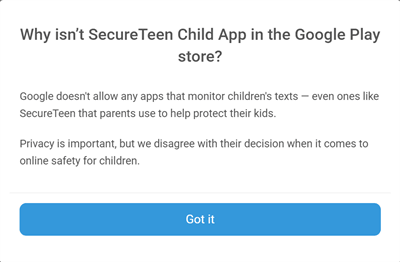
Google Play Protect displayed a warning during our APK installation. Google says Play Protect checks apps from outside Google Play for potentially harmful behavior and recommends keeping it turned on. A warning should therefore be treated as a security decision, not as a setup step to bypass.
Overall, the parent account was easy to create, but the sideloaded child-app installation, security warning, and sensitive permission requests make setup a meaningful consideration rather than a minor hurdle.
2Screen Time and App Management
SecureTeen provides two screen-time tools: Time Controls and Daily Quota.
Time Controls let parents schedule periods such as School Time, Bedtime, or Family Time. In the tested Android interface, a schedule could block phone access or restrict selected apps and websites. Website rules could use categories, such as Adult Content, Dating, and Gambling, or specific URLs.
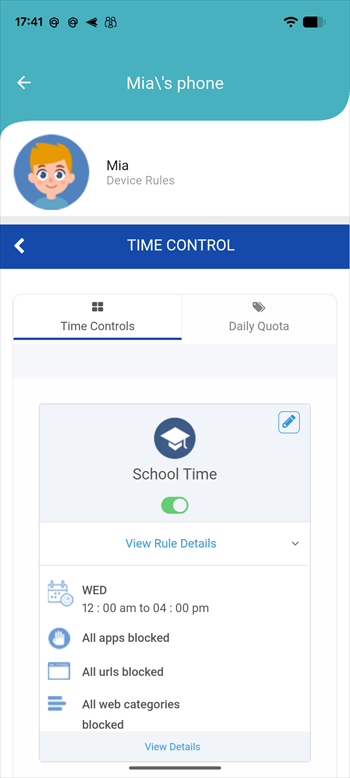
Daily Quota works as an overall daily device-use limit. In our test, changes to Time Controls and Daily Quota reached the Pixel 7 within a few seconds.
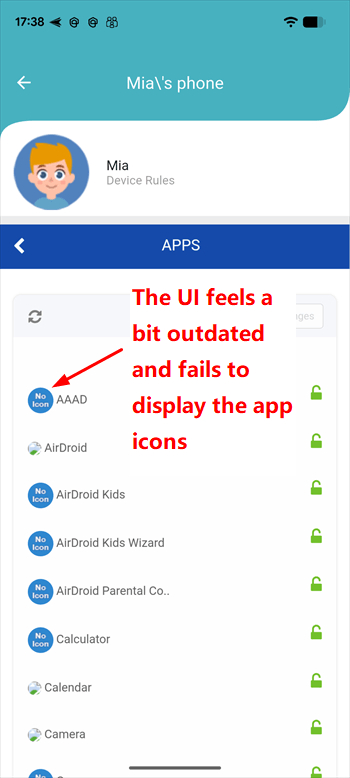
App Management was more basic in the interface we tested. We could block an app and the restriction took effect immediately, but we did not find app-specific time limits or an Always Allowed list. SecureTeen's wider website makes broader app-quota claims, so families should confirm which controls appear in the current app and plan.
The App Block screen also looked dated and did not display icons for the apps installed on the Pixel 7, making a long app list harder to scan.
3Website Filtering
SecureTeen's tested Android interface offered URL blocking and 37 website categories. We attempted to open sites associated with restricted categories including adult content, dating, gambling, and violence. Some were blocked, while others still opened.
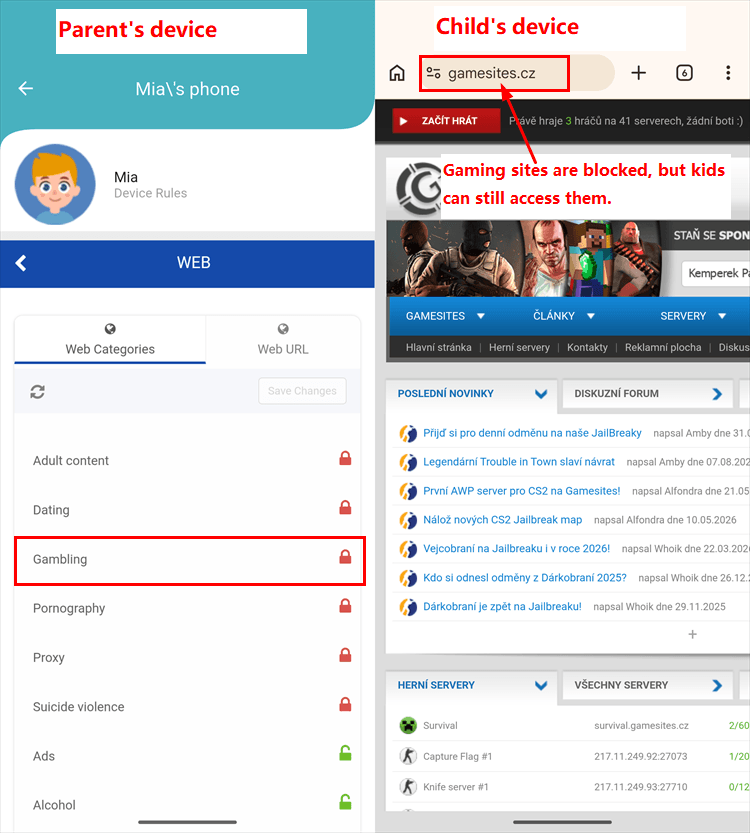
Category filters can be affected by site classification, browser behavior, permissions, and product updates. Regardless of the cause, direct URL blocking was more reliable than category blocking in our test. Parents should test must-block sites on the child's actual browser and avoid treating any filter as complete protection.
SecureTeen also showed a basic history of allowed and blocked sites.
4Location Tracking
SecureTeen's location tracking uses scheduled and on-demand updates. When we tapped refresh in the web dashboard or parent app, the system requested the Pixel 7's latest location.
The returned location was sufficient for a general location check during our spot test. The history interface, however, lacked a single-date filter, so we had to page through older records manually.
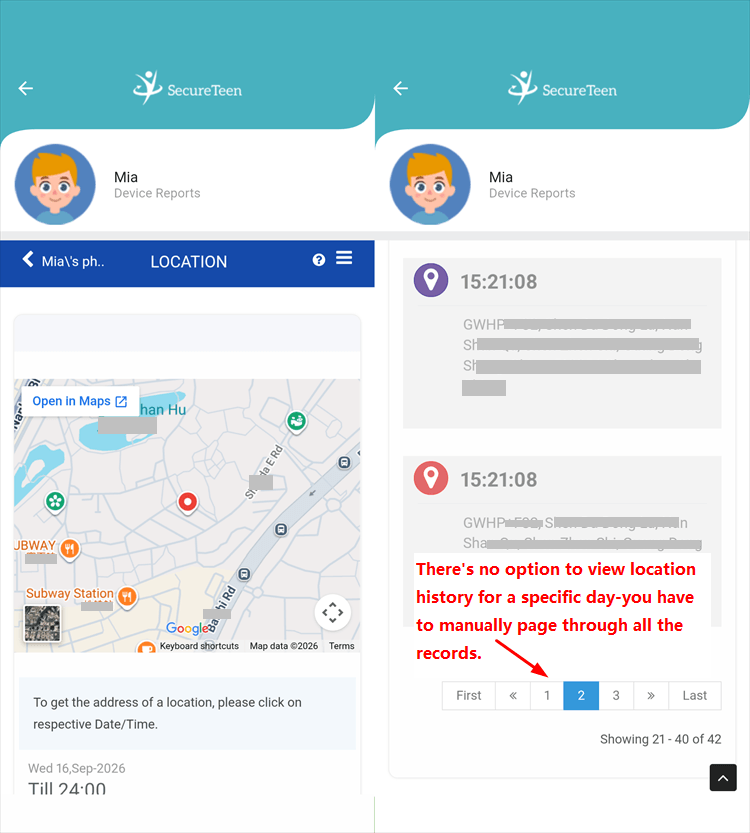
SecureTeen's tools were adequate for a basic device-location check, but we did not find the kind of live route view or clearly surfaced geofence workflow offered by some alternatives.
5Activity Monitoring and Alerts
Pictures Monitor: The test account displayed the first 3 photos stored on the Pixel 7 and then required an upgraded plan for broader gallery access. Photo access is highly sensitive, so it should be used only for a specific safety concern, with transparent family rules, rather than as routine privacy monitoring.
SMS and Call Monitor: SecureTeen's package page documents SMS, MMS, and call records for selected plans. The interface can map phone numbers to saved contacts. We did not test enough devices, carriers, or message types to claim complete capture.
Chat Messengers Monitor: SecureTeen's package page lists logging or monitoring for services including Facebook Messenger, Snapchat, WhatsApp, Skype, and Viber, with coverage varying by plan. In our controlled tests with Facebook Messenger and Snapchat, we observed outgoing keystrokes, periodic screenshots, and system notifications appearing in the dashboard. These records provided partial activity context, not a complete conversation archive.
6Subscription Terms and Google Play Billing Complaints
We found several recent Google Play reviews reporting unexpected subscriptions or charges associated with SecureTeen. Some users said they were subscribed without realizing it, while others reported continued charges after trying to cancel. These are user-reported experiences and have not been independently verified, so the reviews alone do not establish whether the issue resulted from an unauthorized subscription, an unclear subscription process, or another billing issue.
Several reviewers on the SecureTeen Google Play listing described unexpected subscriptions, renewals, charges, or cancellation difficulty. We use these comments only as user reports, not as proof of SecureTeen's billing behavior.
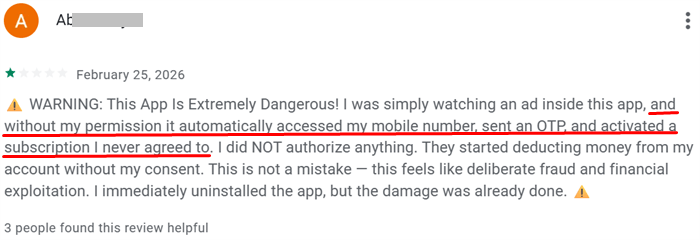
SecureTeen's Google Play listing states that subscriptions renew automatically unless canceled before the subscription ends and that subscriptions can be purchased through the parent app. Parents should review the price, billing period, renewal setting, and cancellation route shown at checkout before completing a purchase.
We did not encounter any unexpected subscription or unauthorized charge during our own testing. However, when we sorted the Google Play reviews by recent activity, we found more than a dozen users reporting similar concerns about unexpected subscriptions or charges. While these reports do not by themselves confirm a systematic billing issue, the recurring nature of the complaints is something parents may want to keep in mind when signing up for SecureTeen.
SecureTeen Pros and Cons
1Pros
- Fast rule syncing in our test. Time Controls, Daily Quota, and app blocking reached the Pixel 7 within seconds.
- Broad Android toolset. SecureTeen combines schedules, app blocking, web controls, location check-ins, and selected activity records.
- Remote access. Parents can manage child profiles and supported rules through the parent app or a web dashboard.
2Cons
- Category filtering was inconsistent. Some sites in restricted categories still opened during our test.
- App management felt basic. The tested interface lacked app-specific time limits and an Always Allowed list.
- Android installation requires extra caution. The child app was installed from an APK and triggered a Play Protect warning in our test.
- Sensitive data may be processed. SecureTeen's privacy policy says the service may transfer device identifiers, contacts, browsing details, installed apps, location, and app-usage information to its servers.
- Billing complaints deserve attention. Recent Google Play comments included repeated reports of unexpected charges or cancellation difficulty, although we did not reproduce an unauthorized charge.
Hands-on conclusion: SecureTeen delivered quick Android rule changes and useful basic controls, but inconsistent web filtering, a more involved APK setup, and limited app-management options produced an equal-weight average of 3.0 out of 5 across our five scoring areas.
Before enabling activity records, parents should read the SecureTeen privacy policy, review the permissions on the child device, and use only the access needed for a clear safety purpose. An alert or partial record is a reason to check context calmly, not proof that a child did something wrong.
SecureTeen Alternative: AirDroid Parental Control
SecureTeen may suit families that prioritize selected Android activity records and basic remote controls. AirDroid Parental Control offers a broader child-safety approach that connects healthy digital habits, supported online-risk signals, location and emergency support, family communication, and teen-driving safety. The better fit depends on the child's device and the family's specific safety needs.
- Granular app and screen-time management. Families can use Individual App Limits, shared Total Time Limits, Downtime, Instant Block, Always Allowed apps, Focus Mode, and extra-time requests to create flexible, age-appropriate routines.
- Website safety tools. Supported features include website categories, blacklists, whitelists, Safe Search, browsing history, blocked-site alerts, and platform-dependent website time limits.
- Supported online-safety alerts. On compatible setups, AirDroid can surface selected keyword, social-content, AI-chat, notification, inappropriate-image, call, or SMS risk signals. Deeper coverage is primarily available on a child's Android device.
- Location and emergency support. Live device location, route history, geofences, SOS, and Family Chat can help families confirm agreed arrivals and respond when a child actively requests assistance.
- Teen-driving safety insights. Supported trip information can include routes, start and end points, speed, distance, duration, speeding alerts, and post-trip events such as hard braking or rapid acceleration.
Important: Feature availability depends on the child's operating system, permissions, network, setup, plan, region, and current app version. Alerts and device data are safety signals that may require context—not complete private-activity records or proof that the child did something wrong. Driving data may also reflect cycling or traveling as a passenger.
- Consider SecureTeen. It may fit families that verify its Android controls and need the specific activity records included in their chosen plan, while accepting the APK setup and the limitations found in our test.
- Consider AirDroid Parental Control. It may fit families that need its documented combination of granular app rules, child time requests, supported safety alerts, location tools, SOS, family communication, or teen-driving insights and are willing to complete any platform-specific setup.


Whichever product a family chooses, the goal should be to support the child's safety and healthier digital habits, not to collect unrelated private information. Explain the rules, use the least intrusive feature that addresses the concern, and reduce oversight as the child develops greater responsibility.
SecureTeen Review FAQ
SecureTeen's value depends on how reliably its selected controls work in the family's real setup. Test the must-have feature on the child's device, confirm the current plan and renewal terms, and choose the least intrusive tool that addresses the family's actual safety need.










Leave a Reply.