MMGuardian Review: Is It a Good Parental Control App?
MMGuardian is a good fit for families that want strict Android app blocking, scheduled device locks, web filtering, and detailed activity reports. In our hands-on test, these controls generally responded quickly and enforced the rules we configured.
Its weaker areas were background location updates, regular SMS keyword detection, incoming-call blocking, and emergency support. These findings describe our stated Android test environment, not every phone, plan, or future app version.
This MMGuardian review separates our observed results from features documented by MMGuardian. That makes it easier to see what worked in our test, what did not, and what still depends on the child's device, permissions, subscription, browser, and operating system.
MMGuardian Review: Quick Verdict
Quick answer: MMGuardian performed best in our test at app blocking, app schedules, device locking, web filtering, and usage reporting. It was less dependable for families that need automatic place alerts, consistent background location updates, or a child-initiated SOS alert that reaches the parent with location context.
MMGuardian officially supports Android and iPhone, but its features and setup requirements differ substantially. This review's hands-on findings apply to a child's Android device; they should not be presented as iPhone test results.
| Area | Our Test Result | Main Limitation |
|---|---|---|
| Location tracking | Accurate current-location results and useful route history when updates completed | No geofence option was available in our setup, and background updates sometimes stalled |
| Message alerts and contact blocking | WhatsApp keyword alerts and blocked-number SMS rejection worked | Regular SMS keyword monitoring and incoming-call blocking did not work in our test |
| Web filtering | Blocked test URLs and selected searches effectively | Browser behavior depended on the configured filtering setup |
| App controls | App blocking and scheduled restrictions activated promptly | Results can change if required permissions, background access, or tamper protection are removed |
| Device lock | Manual and scheduled locks worked at the configured times | The lock screen preserves emergency calling rather than operating as a parent-alert SOS system |
| Reports | App usage and other available activity records were clearly organized | Reports depend on supported data, permissions, connectivity, and manual or scheduled syncing |
Bottom line: MMGuardian is strongest as a rules-and-reporting tool for a child's Android phone. Families prioritizing proactive location boundaries or a broader emergency workflow should compare alternatives.
The current MMGuardian pricing page lists a 14-day trial, a single-phone plan at $4.99 monthly or $49.98 annually, and a family plan covering up to five child devices at $9.99 monthly or $99.98 annually. These prices were checked on September 22, 2026 and may change by region, tax, store, or promotion.
How We Tested MMGuardian
We tested MMGuardian using an iPhone 14 as the parent device and a Google Pixel 7 as the child device. Our test covered app blocking, screen-time schedules, device locking, web filtering, safety alerts, location tracking, activity reports, contact controls, and emergency access. Learn more about how we test parental control apps.
- Whether app blocks, scheduled restrictions, and device locks took effect as configured
- Whether web filters blocked the harmless websites and search scenarios used in our test
- Whether WhatsApp and SMS test keywords generated alerts on the parent device
- Whether blocked contacts could still send messages or place calls
- What activity reports and emergency options were available to the parent and child
We used controlled accounts, harmless sample content, test contacts, and non-sensitive messages. No real child's private communications or location history were used. Results may vary with permissions, network conditions, subscription, operating-system version, and app updates.
MMGuardian Hands-On Test Results
1Location Tracking
Our result: MMGuardian returned accurate device coordinates and useful location history when a location update completed. However, the dashboard sometimes remained on the location-search message even when the child's phone was online and location permissions were enabled. Completed requests were accurate, but background retrieval was not consistently dependable when the device screen was locked.
MMGuardian's official Android guide documents on-demand location requests and scheduled tracking at selected intervals. In our test, scheduled updates could be configured for intervals such as 15 or 30 minutes.
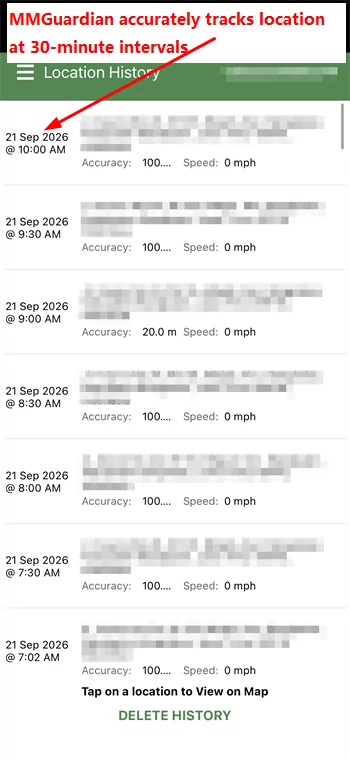
We also did not find a geofence feature that automatically alerted the parent when the device entered or left an agreed location. Families can use scheduled location retrieval, but that is different from an arrival or departure alert.
2Message Monitoring and Contact Blocking
Our result: Keyword alerts worked in WhatsApp for test terms such as "love" and "dating," with notifications appearing promptly on the parent device. However, the same workflow failed to detect the keywords in regular SMS messages, even after MMGuardian's messaging app was configured as the default SMS app on the child's phone.
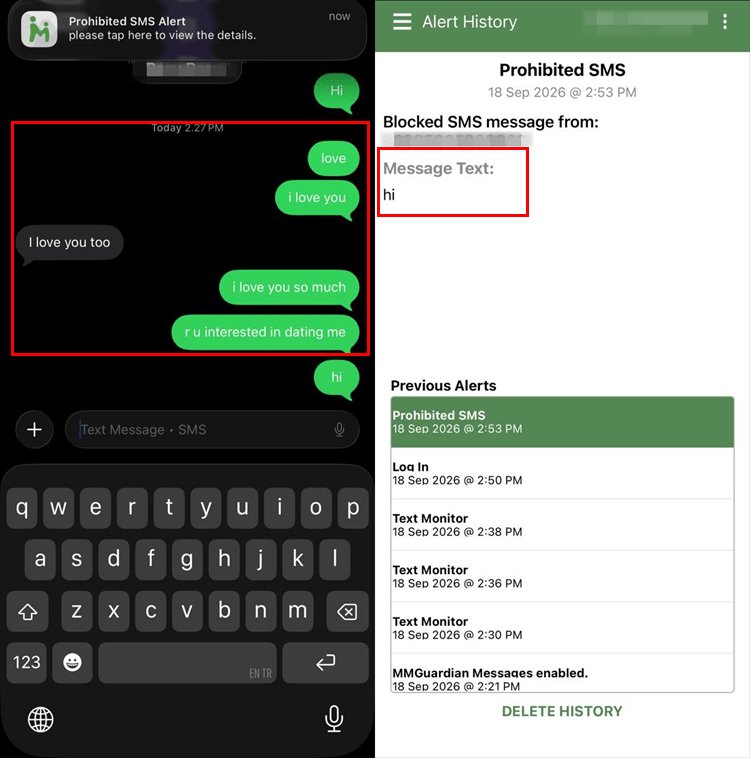
Contact blocking produced contrasting results. SMS blocking worked effectively, rejecting messages from restricted numbers and sending alert notifications to the parent device. Conversely, incoming-call blocking did not work reliably in our test environment; calls from a blacklisted number still reached the child's phone. Device model, default dialer, carrier, and permissions may influence call-blocking performance.
Overall, MMGuardian provided useful alerts in supported scenarios, but its failure to detect regular SMS keywords and reject incoming calls in our test was an important reliability limitation.
3Web Filtering and Blocking
Our result: MMGuardian blocked the harmless test destinations added to the blacklist. Instead of displaying a blocking warning, it redirected the child to the browser's homepage. In our image-search test, restricted content was also prevented from loading, and the child was returned to the text-results page.
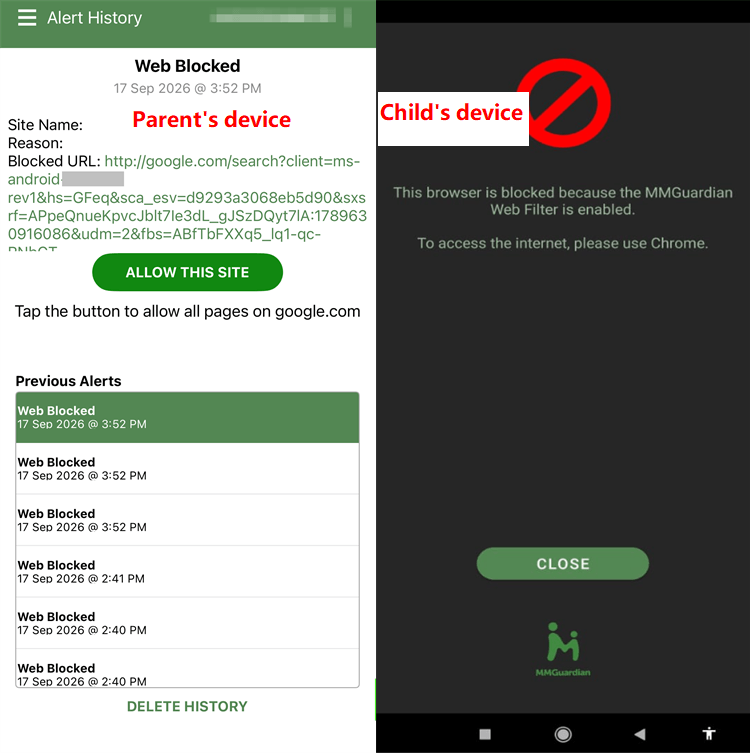
MMGuardian officially documents category rules, URL overrides, search-term restrictions, and browsing reports. In our test, the phone's built-in browser could not be opened while filtering was active, so searches had to be performed through Google Chrome. Browser coverage may vary by child app, filtering mode, device, and browser version.
This behavior supported enforcement but reduced browser choice. Families should test the browsers their child actually uses and should not assume that every in-app browser, private mode, encrypted connection, or future browser version will behave identically.
4App Blocking and Screen-Time Limits
Our result: App blocking was one of MMGuardian's strongest features. When we blocked TikTok from the parent dashboard, the restriction appeared promptly on the child phone and the app could not be opened without authorized access.
A scheduled fifteen-minute TikTok restriction, configured from 3:00 PM to 3:15 PM local time, also activated at the configured time in our test. MMGuardian officially allows parents to block individual apps and place apps into groups with shared daily limits or block schedules.
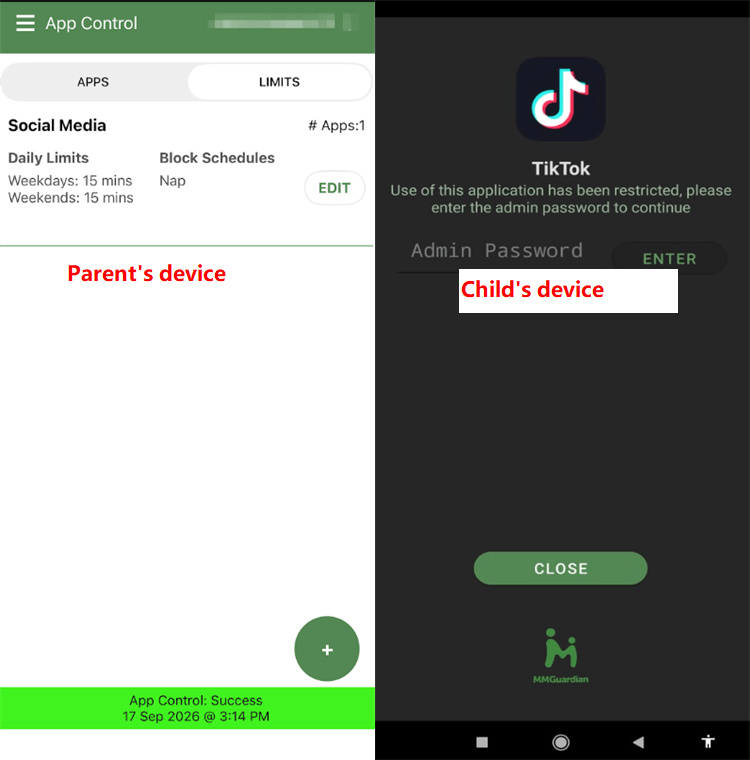
These controls can support homework, sleep, and family routines, but they work best when the rules are explained to the child and reviewed as the child becomes more responsible. We would not call any app restriction completely impossible to bypass across every Android version or device configuration.
5Device Lock and Usage Reports
Our result: The manual device lock responded quickly, and the scheduled lock activated at the configured time. While locked, the phone preserved access to emergency calling and parent or administrator contact options documented by MMGuardian.
The parent dashboard presents phone activity records under its dedicated Phone Usage reporting hub, covering four primary areas:
- App usage and screen time: Tracks specific app launch times, usage frequencies, and total duration across the day.
- Web browsing history: Logs visited URLs, search queries, and blocked domain attempts when Web Filter is enabled.
- Message reporting: Displays incoming/outgoing SMS text messages alongside chat logs from supported social messaging apps (including WhatsApp, Facebook Messenger, Snapchat, Instagram, TikTok, Discord, and Kik).
- Call history: Records incoming, outgoing, and missed phone calls with contact details, timestamps, and call durations.
To optimize battery and background data, MMGuardian automatically syncs report data once per day by default. However, tapping the "Get Reports" button on the parent dashboard triggers an immediate background fetch, allowing parents to request live updates on demand rather than waiting for the routine daily report.
Reports describe device activity, not necessarily the child's intent or emotional state. A high usage total or message count should lead to a discussion about context rather than an automatic punishment.
6Safety Alerts and Emergency Access
Our result: MMGuardian successfully detected test keywords such as "love" and "dating" in WhatsApp, sending alert notifications to the parent device. It also generated alerts for blocked-site attempts, selected app installations, blocked-contact SMS activity, and some location updates.
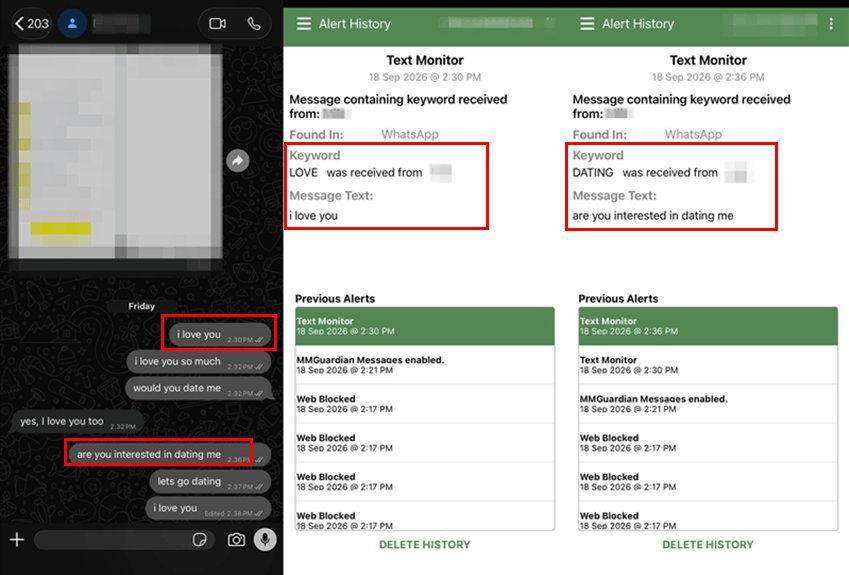
Coverage was not complete. The same keyword-alert workflow did not work for regular SMS in our test, so families should check every communication channel that matters to them instead of assuming one successful WhatsApp alert proves universal coverage.
MMGuardian's Android lock screen includes an Emergency button that gives the child access to the emergency-call dialer and an option to contact the parent or administrator. This preserves essential contact options while the device is locked, but it is not the same as a child-initiated SOS workflow that automatically sends the parent an alert with location and situational context.
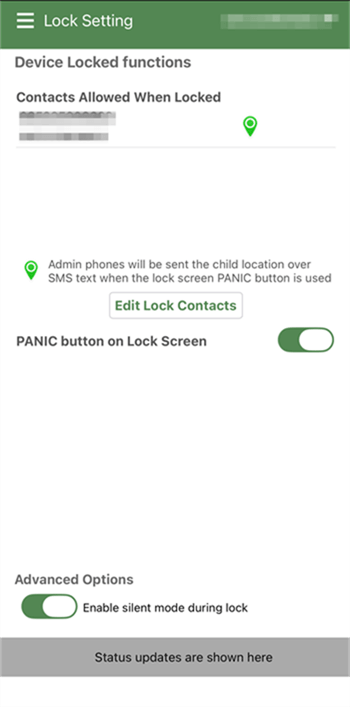
Families that need a dedicated parent-alert SOS workflow should compare how competing services handle child-initiated requests, location context, follow-up communication, platform support, and emergency limitations.
MMGuardian Pros and Cons
1Pros
- Responsive app controls. App blocking and scheduled restrictions worked promptly in our Android test.
- Effective device schedules. Manual and scheduled phone locks activated at the configured times.
- Useful web rules. Blacklisted destinations and selected search content were restricted in our test.
- Accurate completed location checks. Current-location results and available route history were useful when synchronization succeeded.
- Clear usage reports. The dashboard organized available app, call, web, and message data in a practical format.
- Supported social-app alerts. WhatsApp keyword detection responded quickly in our controlled scenario.
2Cons
- No geofence workflow was available in our setup. Scheduled tracking is not the same as automatic arrival and departure alerts.
- Background location updates sometimes stalled. A valid connection and permission did not always produce a prompt dashboard update.
- SMS keyword monitoring failed in our test. The problem continued after configuring MMGuardian's messaging component.
- Incoming-call blocking was inconsistent. Calls from a blocked test number still reached the phone.
Who Should Use MMGuardian?
MMGuardian is best suited to families using a child's Android phone who prioritize strict app rules, scheduled device locks, web filtering, and detailed reports. It may be particularly useful when parents are comfortable reviewing settings directly and testing each required permission on the child's actual device.
- Choose MMGuardian for firm device routines. Its app blocking, shared app-group limits, schedules, and device locks performed well in our test.
- Choose it for configurable web restrictions. Category rules, specific URLs, and search terms provide multiple ways to shape safer browsing.
- Consider another option for proactive location boundaries. Families that need automatic geofence alerts may find scheduled retrieval too limited.
- Test communication features before relying on them. Our WhatsApp result was positive, but regular SMS monitoring and incoming-call blocking were inconsistent.
MMGuardian Alternative: AirDroid Parental Control
MMGuardian performed well in our test for firm Android app blocking, device schedules, web filtering, and activity reports. AirDroid Parental Control may be a stronger alternative when a family wants these digital-habit controls combined with proactive location safety, supported online-risk alerts, emergency requests, and teen-driving insights.
- More flexible app management. AirDroid documents Individual App Limits, shared Total Time Limits, Downtime, Instant Block, Always Allowed apps, Focus Mode, and extra-time requests. These options let families create adjustable rules instead of relying only on fixed restrictions.
- Supported online-safety signals. On compatible child devices, AirDroid can provide selected-keyword, social-content, AI-chat, notification, inappropriate-image, call, or SMS alerts. Broader notification and communication coverage is primarily available on a child's Android device.
- Proactive location safety. Live device location, route history, and geofences can help families confirm agreed arrivals and receive alerts when the device enters or leaves places such as home or school.
- Child-initiated emergency support. AirDroid's SOS feature allows the child to request help, while the parent can receive a distinct alert, review the device's location, and follow up through Family Chat. SOS does not replace local emergency services.
- Teen-driving safety insights. Supported trip information can include routes, start and end points, speed, distance, duration, speeding alerts, and post-trip events such as hard braking or rapid acceleration.


AirDroid's advantage is the way these safety layers work together. A family can agree on an app limit, receive a supported risk signal, use a geofence for an agreed location, or respond when the child actively asks for help, all within one child-safety service.
Important: Features depend on the child's operating system, permissions, network, setup, plan, region, and app version. Alerts and location records should support calm family conversations, not be treated as complete private-activity records or proof that a child did something wrong. Driving data may also reflect cycling or traveling as a passenger.
Final Verdict: Is MMGuardian Worth It?
MMGuardian is worth considering for Android families that primarily need strict app controls, schedules, device locks, web filtering, and detailed reports. Those were the product's most convincing areas in our hands-on test.
It is harder to recommend when automatic place alerts, consistently refreshed background location, dependable regular-SMS keyword alerts, or a parent-facing SOS workflow are essential. The failed SMS and call-blocking checks should be retested on the family's specific phone before those features are treated as safety-critical.
No parental-control app should be chosen solely because it collects more information. The better choice is the one that addresses the family's actual concern with clear rules, transparent use, age-appropriate privacy, and the fewest intrusive features necessary.
MMGuardian Review FAQ
Before choosing either product, verify the exact child-device support, permissions, subscription, and features your family needs. Then explain the rules to the child and review them regularly as independence and responsibility grow.











Leave a Reply.