Best Apps That Limit Screen Time on AI Chatbots (Guide for Parents)
AI chatbots like ChatGPT, Gemini, and more are becoming part of children's daily routines. But as kids spend more time chatting with AI, parents may want to set time limits or get kids off AI chatbots.
The good news is that parental control apps make this task easier. This guide compares 5 apps for managing children's AI usage, including their features and limitations.

Quick Pick: Choose the App for Limiting AI Time
| If you want ... | Choose | Why |
|---|---|---|
| A free time limit option | Family Link, Screen Time | Built into Android and iOS |
| Flexible individual app limits or shared time limits | AirDroid, Qustodio | Set a limit for each AI app, or one shared allowance across them |
| Apply one rule for all AI apps without picking them one by one | Qustodio | Group ChatGPT, Gemini and others under one AI category |
| Stop AI use during homework or bedtime | AirDroid, Screen Time, Qustodio, OurPact | Support scheduled restrictions for selected apps. |
| Your child to be in charge of their own AI time | OurPact | Kids choose when to start and pause their allowance, so the limit feels like their choice. |
| Prevent switching to the AI website when the app is blocked | Screen Time, Family Link, Qustodio | Block both the app and website once time runs out. |
| Your child asks for more time, and you decide | AirDroid, Screen Time | Kids can request more time, and you approve or refuse. |
How We Tested These Apps
To find the best apps for managing children's AI usage, we didn't just compare advertised features. We tested how each parental control tool works in real-world situations.
Our Test Setup
We installed each parental control app on a parent device and a child's device, then connected them according to the app's setup instructions.
- Testing devices: iPhone 11 and Samsung Galaxy S20+
- Testing period: 2026/11/10 - 2026/11/12
What We Tested
During testing, we focused on the following areas to see how well it helps parents track and manage children's AI usage:
- AI usage reports: Does the app record how much time a child spends in an AI chatbot app?
- Flexible time limits: Do they set a separate daily limit for each AI app or apply one shared time allowance to multiple AI apps?
- Scheduled app downtime: Can they pause AI access during homework, bedtime, or other set hours?
- Access blocker: Can they restrict an AI app or its website?
- Effectiveness: We set the shortest available time limit for ChatGPT (such as one minute or five minutes) and checked whether it became inaccessible when the time was up.
We ran the same testing scenarios across the apps whenever their supported platforms allowed it. When a feature was unavailable, we recorded that limitation. Here it is:
| Apps | App usage reports | Individual app limits | Combined time limits | App downtime | App blocker |
|---|---|---|---|---|---|
| AirDroid | ✅ | ✅ | ✅ | ✅ | ✅ |
| Family Link | ✅ | ✅ | ❌ | ❌ | ✅ |
| Screen Time | ✅ | ✅ | ✅ | ✅ | ✅ (iOS27) |
| Qustodio | ✅ | ✅ | ✅ | ✅ | ✅ |
| OurPact | ❌ | ❌ | ✅ | ✅ | ✅ |
Best 5 Apps That Limit Screen Time on AI
The five tools below take different approaches to setting limits and blocking access. Compare what each controls you need for your family.
1AirDroid Parental Control: Best for Flexible AI Time Limits
AirDroid offers two ways to limit selected apps:
- Individual App Limits: Set a separate limit for each selected app. If you select ChatGPT and Character AI and set 30 minutes, your child can use each app for 30 minutes.
- Total Time Limits: Set one shared limit across the selected apps. If you set 30 minutes, time spent in ChatGPT and Character AI counts toward the same 30-minute allowance.
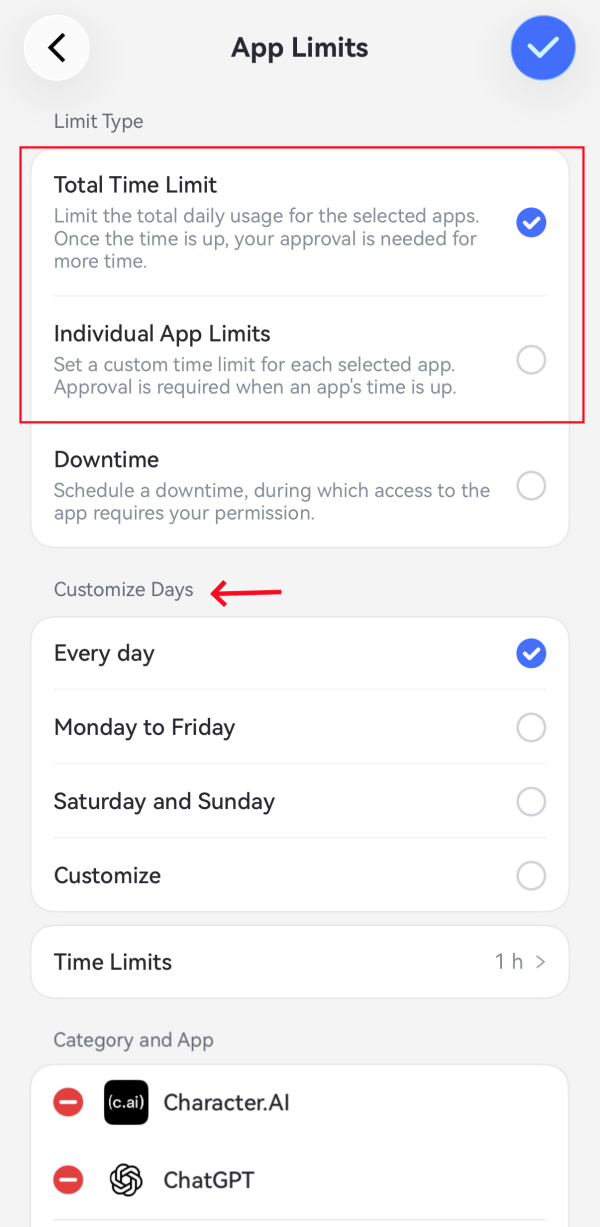
Parents can also schedule when AI apps cannot be used or set different time limits for AI apps on different days. If your child uses an iOS device, it supports setting time limits for specific websites, which is useful if your child moves between an AI app and its browser version.
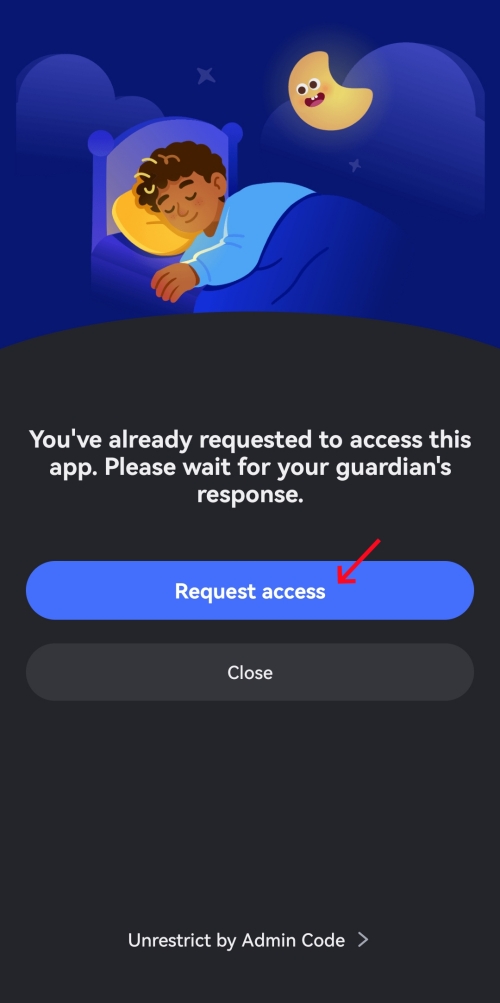
⌛When the limit is reached: In our Android test, when ChatGPT's allowance ran out, the app couldn't be used anymore, and AirDroid showed a blocked page. The child can request more time or enter an admin code to remove the restriction. The parent then receives a notification and can extend the time or refuse the request.
2Family Link: Best Free Option for Android AI App Limits
Family Link lets parents limit time spent in individual apps or on the whole device on a supervised Android or Chromebook.
Compared with AirDroid, Family Link is less flexible for limiting AI screen time: parents have to set a time limit for each AI app separately; they cannot give multiple apps one shared allowance or set different limits for the same app on different days.
Family Link does, however, let parents set different device limits or device downtime for different days.
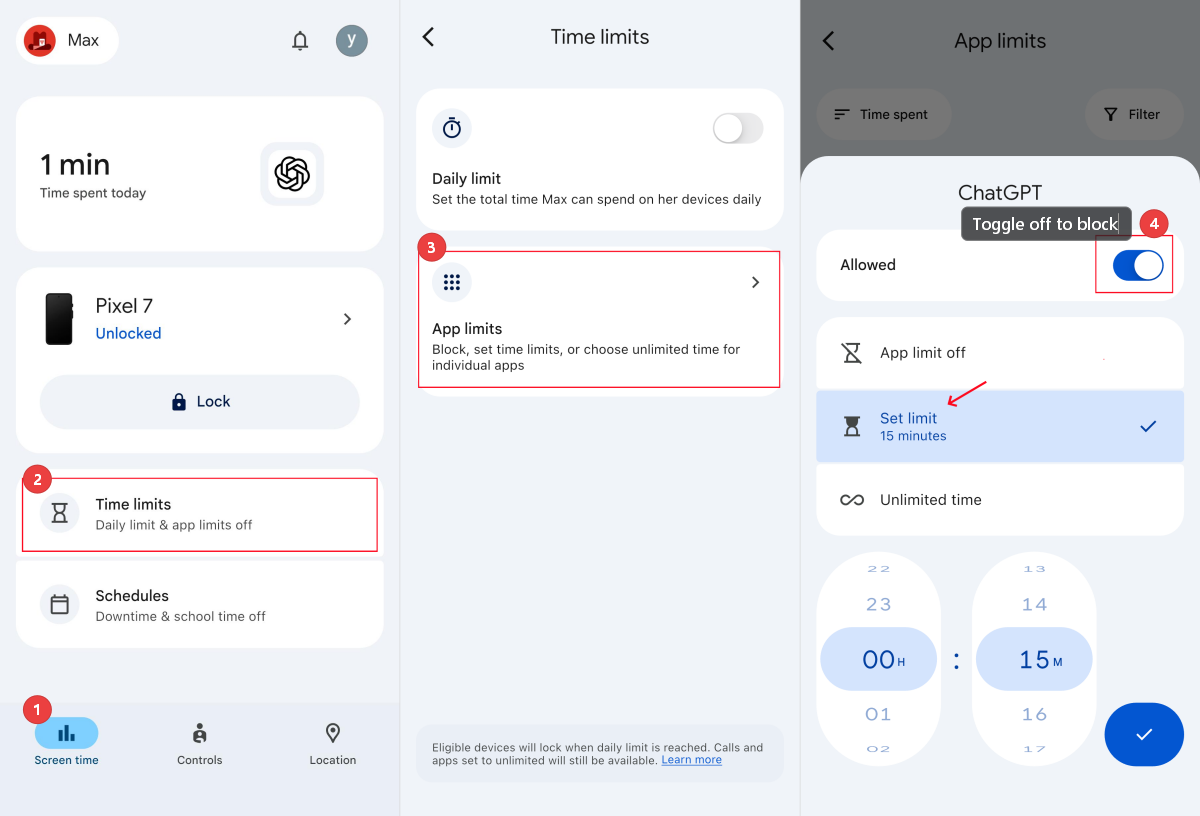
⌛When the limit is reached: In our Samsung test, the ChatGPT app icon turned gray, and the child could no longer open it once the limit was reached. On the child's end, there is no option to request more time for that app; the parent had to adjust its limit in Family Link.
3Apple Screen Time: Best Free and Built-In Option for iPhone and iPad
Screen Time is part of iOS, making it a sensible first option if you and your child already use Apple devices.
Screen Time lets parents view screen usage and set limits for individual apps or app categories. Though it doesn't offer an AI app category (Qustodio does), iOS 27 supports creating a category for apps such as ChatGPT and Character AI, and then giving those apps a shared daily allowance or schedule when that category is available.
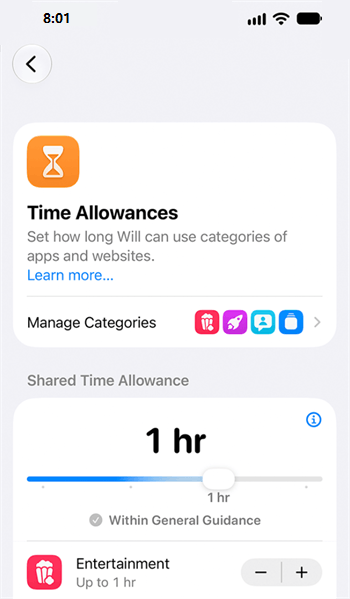
⌛When the limit is reached: On the child's iPhone running iOS 27, the ChatGPT app and website were blocked immediately when the one-minute timer was up. However, the child could tap "Ignore Limit" and continue using the app.
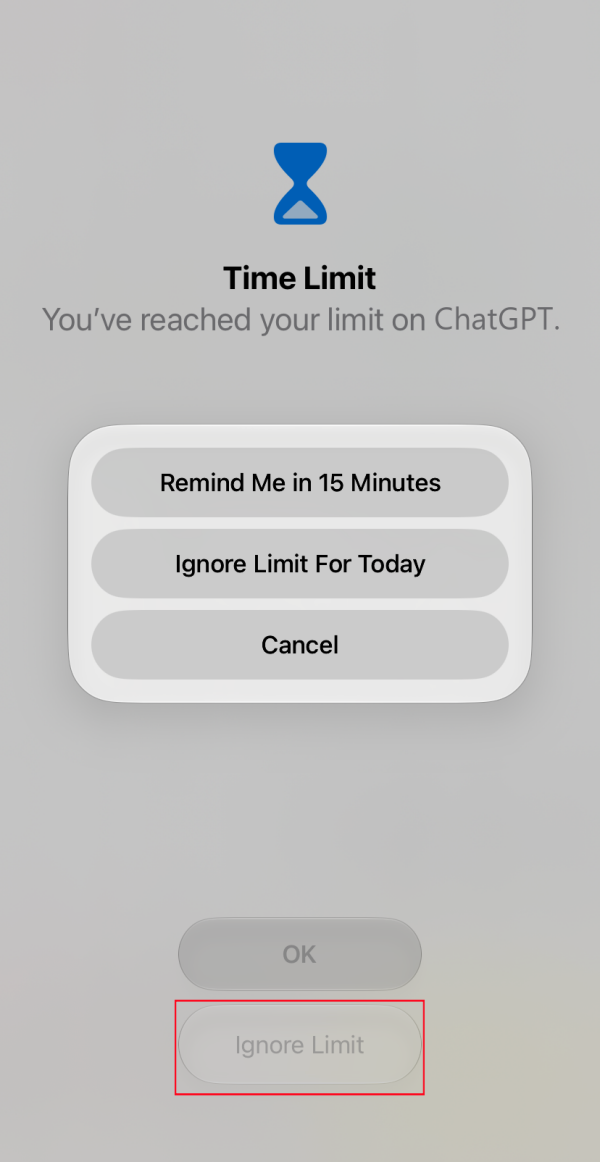
We spent some time figuring out why before finding "Block at End of Limit." Once we turned it on, the child had to request more time or enter the Screen Time passcode to use the restricted app.
4Qustodio: Best for Managing AI Apps as a Category
Qustodio lets parents set a time limit for an individual app, such as ChatGPT, or block it. What's surprising, it groups apps by type and offers a dedicated AI category.
With Qustodio's Routines, parents can block or allow the AI app category during Study, Focus, and Bedtime routines. Additionally, before setting an app rule, Qustodio has a section to let parents review its potential risks and get conversation prompts.
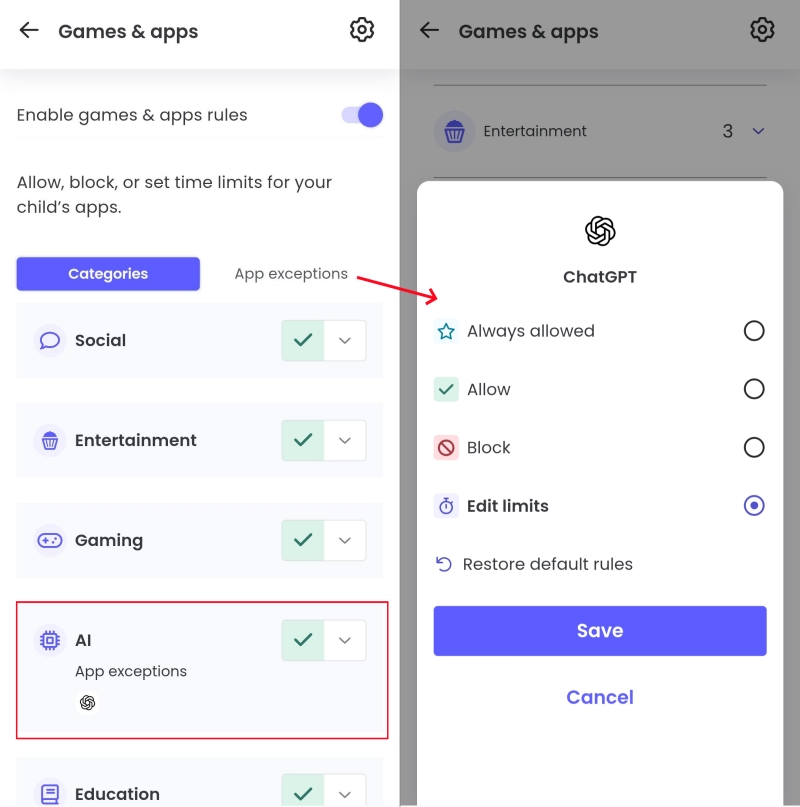
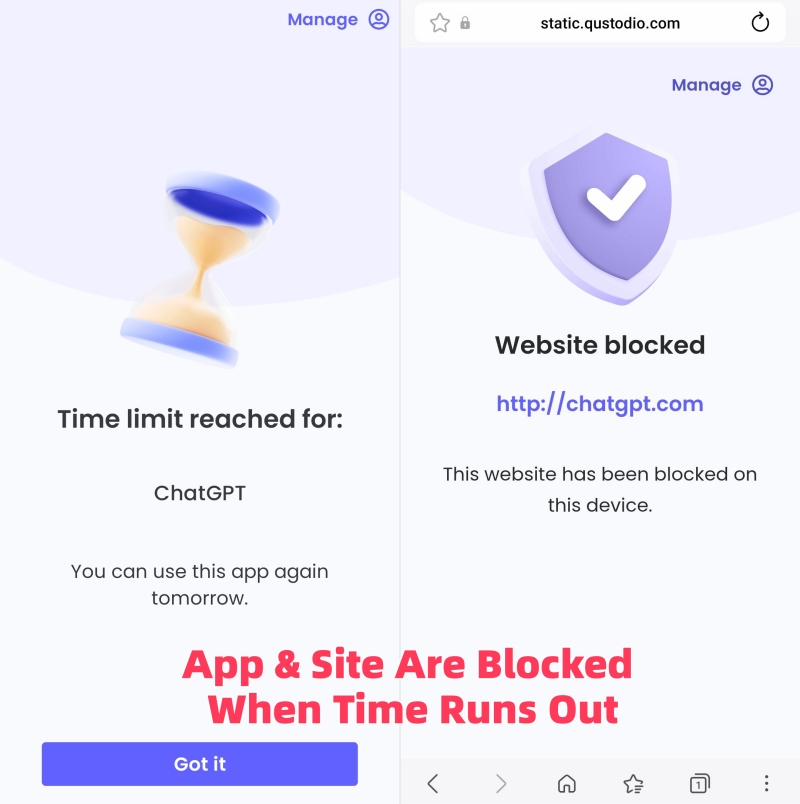
⌛When the limit is reached: In our test, we set a 5-minute timer for ChatGPT on the child's Samsung Galaxy. Qustodio sent notifications to the child's device when the app had 5, 3, and 1 minutes left, helping them better manage their remaining time. Once time ran out, Qustodio blocked both the app and website, and kids couldn't extend time until the next day.
5OurPact: Best for Letting Kids Budget Their Own AI Time
OurPact works differently from other apps on this list. It works more like a timer the child starts. Parents set a daily allowance and choose which apps follow the rules, such as ChatGPT and Character AI.
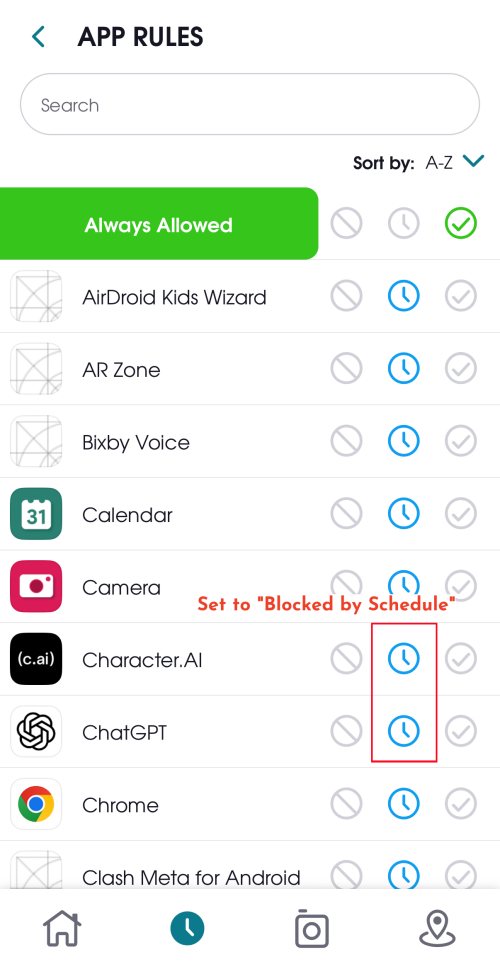
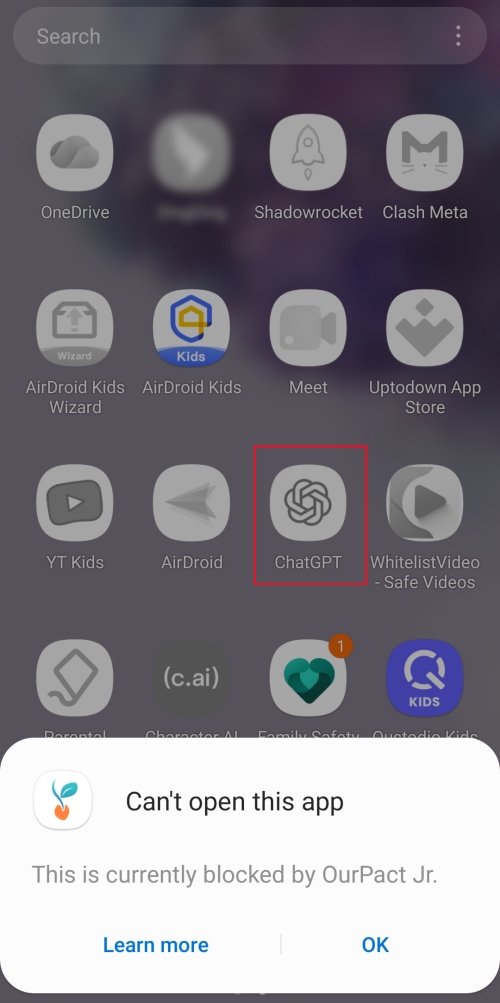
With allowance enabled, OurPact automatically locks these apps on kids' devices. To use them, the child has to open OurPact Jr and tap "Play," which starts the daily timer. If parents also set downtime hours, the apps stay locked during those hours even when there is allowance left.
⌛When the limit is reached: During testing, we set a 30-minute daily allowance and marked ChatGPT and other apps as "Blocked by Schedule." Then, these apps' icons were greyed out and couldn't be opened on the child's Android device before tapping "Play." When the allowance ran out, ChatGPT locked again. Extra time can only be granted from the parent app.
What Parents Should Know Before Using an AI Screen-Time App
Agree on AI Limits Before Applying Anything
Choosing the app is only half the job. Whether a limit holds depends just as much on how you introduce it and how you set it up.
If you set time limits without a conversation, the tool becomes the bad guy and your child learns to route around it.
Therefore, start by explaining why you are using parental controls or setting a limit. From here, discuss and agree on when AI tools can be used and how long the time limits will be. Also, leave some room to negotiate, which makes the rules easier to keep.
Set Limits Based on Real AI Usage
Do not guess or pick a random time limit. Instead, check your child's current usage for a week or two first. Some teens spend 90 minutes a day chatting with AI companions, and heavy users can lose track entirely.
Then, set the limit slightly below what they use now and lower it gradually. Starting with a very low limit usually leads to arguments.
App Limits May Not Cover AI Websites
Children may use chat with AI through both mobile apps and web browsers. Setting a time limit for the ChatGPT app, for example, doesn't necessarily restrict chatgpt.com when the child opens it in a browser. Hence, after setting a limit, you'd better check browser access or restrict the website as well.
FAQs












Leave a Reply.