Which AI Chat Apps Offer Parental Controls? 2026 Comparison
AI chatbots are becoming part of everyday life for teens, but parental controls vary widely from one app to another. Some offer dedicated teen protections, while others provide little to no safety features. So, which AI chat apps actually offer parental controls?
In this comparison, we look at the AI chatbots U.S. teens ages 13-17 use most, including ChatGPT, Gemini, Meta AI, Copilot, Character AI, and Claude. (*Data from Pew Research Center)
We'll compare what parents can control and where built-in protections still fall short.
Comparison Table: Which AI Chatbots Offer Parental Controls
| Platforms | Parental Controls? | What parents can do | Min. Age |
|---|---|---|---|
| ChatGPT |  | Manage teens' settings, limit usage time, and receive safety alerts. | 13+ |
| Gemini | | Approve or block Gemini access. | 13+ |
| Meta AI | | Review chat topics, restrict inappropriate responses, and receive safety alerts. | 13+ |
| Copilot | | Manage teens' settings, block access, and limit usage time. | 13+ |
| Character AI | | View teens' weekly usage report. | 13+ |
| Claude |  | / | 18+ |
*Last checked: September, 2026.
AI Chat Apps With Built-In Parental Controls
Among the 6 platforms covered in this comparison, only Claude does not offer parental controls.
However, not every "parental control" claim carries the same weight. Here's how the major AI chat apps stack up as of 2026.
1ChatGPT
ChatGPT was the first major AI platform to ship a parental control system, rolling out in September 2025. As of 2026, it still offers the most comprehensive set of parental controls among AI chatbots.
How control works: Parents need to link their ChatGPT account to their teen's account. Once linked, the parent can manage parental control settings from their own settings dashboard.
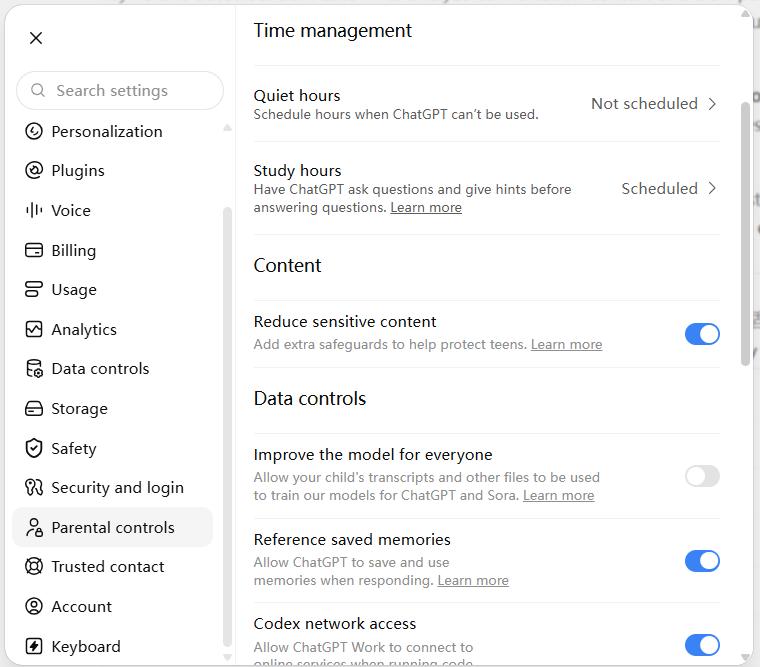
Available parental controls:
- Set quiet hours when the teen cannot use ChatGPT.
- Allow or block features of ChatGPT, such as voice mode, image generation, saved memory, etc.
- Adjust sensitive-content safeguards.
- Set study hours so new chats automatically use "Study Mode," which guides teens through problems with questions and step-by-step explanations instead of giving answers.
- Get in-app or email notifications for identified self-harm, eating disorder, or violence signals.
Other built-in safety protections:
- ChatGPT applies the Under-18 Principles to users ages 13-17.
- Uses age prediction to help identify under-18 users and automatically enable the ChatGPT for Teens experience.
- Warns teens against uploading private or sensitive images.
❌ Limitations:
- Parents cannot read their teen's ChatGPT conversations.
- Safety alerts only cover three types of serious concerns.
- Teens can unlink their account at any time, though parents are notified.
- Parents cannot see how much time their teens spent on ChatGPT.
2Gemini
Every major AI chatbot sets its minimum age at 13, but none of them verifies age. This means users under 13 can still access them.
And Gemini takes a different approach: in our test with a supervised child account under 13, opening Gemini shows a message that requires a parent's approval.
⚠️According to Google, the applicable age and access may vary by country. For example, parents who live in the European Economic Area, Switzerland, and the United Kingdom cannot manage the Gemini app in Family Link.
How control works: Gemini doesn't offer an in-app parental control panel. All control works through Google Family Link under the supervised child account.
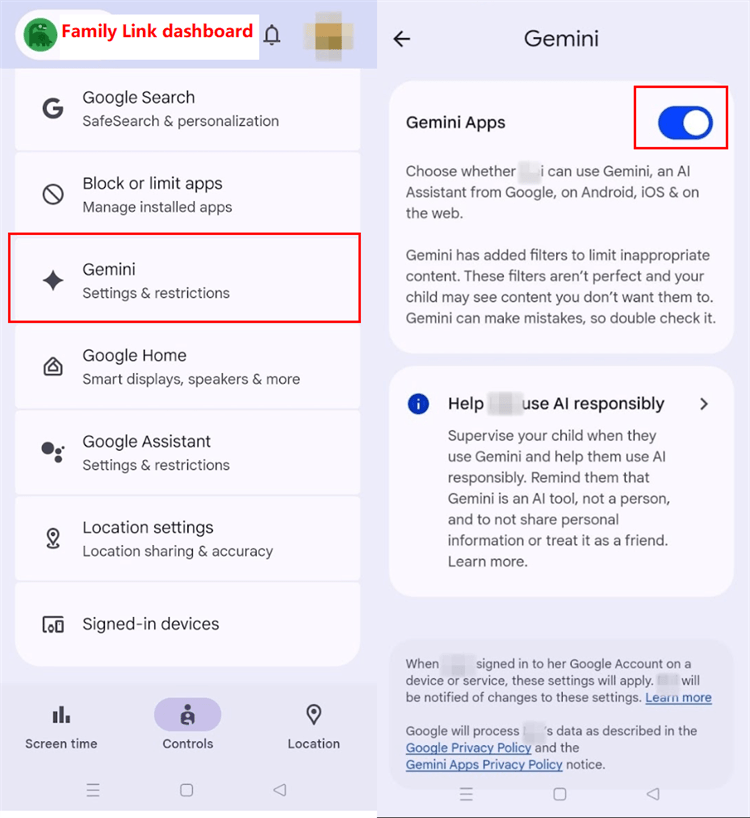
Available parental controls:
- Allow Gemini access through Family Link for children under 13.
- View how much time Gemini was used, and set time limits or block it.
- Receive a first-use notification by email when the child first activates Gemini.
Other built-in safety protections:
- Content filters are automatically enabled for signed-in minors.
❌ Limitations:
- No conversation visibility or conversation-risk alerts.
- Gemini availability depends on countries.
- Family Link supervision ends at 13, which means teens on their own Gemini accounts have zero parental controls available.
- No Gemini-specific time limits.
3Meta AI
Unlike other AI services on this list, teens can access Meta AI inside social messaging apps like Instagram, Messenger, WhatsApp, and Facebook without downloading a separate app.
How control works: Meta AI parental controls are embedded in Meta's existing supervision tools on Facebook, Messenger, and Instagram. Parents who already use supervision tools for their teen's social accounts can extend it to Meta AI.
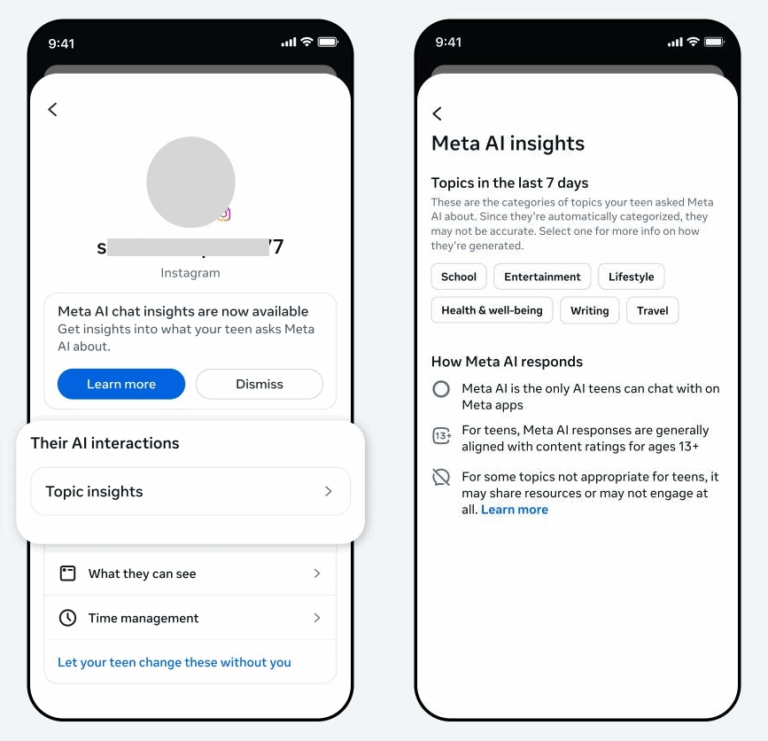
Available parental controls:
- View the topic categories (e.g., entertainment) the teen asked Meta AI about over the past 7 days in Instagram, Facebook, and Messenger.
- Enable Instagram's Limited Content setting to restrict age-inappropriate AI responses.
- Receive alerts if Instagram's Meta AI chats indicate potential suicide risk (this feature is currently available in the US, UK, Australia, and Canada).
- Set app-level time limits and scheduled breaks through supervision.
❌ Limitations:
- Topic insights show broad subjects rather than the exact prompt content.
- Time limits affect the whole app, not the separate Meta AI service.
- Safety alerts are narrowed to self-harm concerns only.
- Features and controls vary by app and country.
4Copilot
Copilot is the simplest entry on this list to explain.
How control works: Similar to Gemini, Microsoft ships no parental controls inside Copilot itself. Everything depends on Microsoft Family Safety. As such, parents have to add their child's Microsoft account to a family group and connect a supported device to Family Safety.
Available parental controls:
- Block access to the Copilot app or website.
- Set app usage limits and allowed hours on supported devices.
- Manage access to Copilot features such as image generation, voice mode, group chats, or AI companions.
Other built-in safety protections:
- For under-18 users, responses to sensitive topics (e.g., mental health) are age-tailored, such as providing general guidance and redirection to safer sources.
❌ Limitations:
- No conversation visibility.
- Every control runs through Family Safety.
- During testing, we blocked the Copilot website, but it only worked on Microsoft Edge. On Chrome, the web version still loaded normally.
5Character AI
Character AI offers "Parental Insights" for parents rather than controls. Because it's an AI companion platform and has faced a lot of lawsuits about teen suicides, users under 18 are blocked from open-ended character chats since November 2025.
How control works: Teens need to send parents an email invitation. Then, parents have to accept and complete adult verification. However, in our test, we sent the invitation four times before it showed up.
Plus, unlike ChatGPT, where the invitation pops up in-app, Character AI's invitation arrived by email, making it easy for parents to miss if they don’t check their inbox.
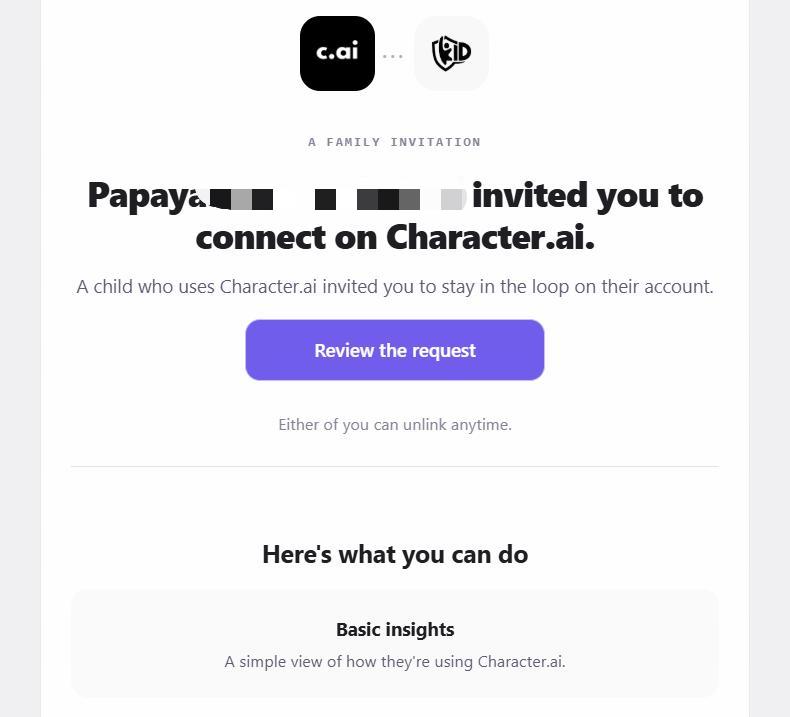
Available parental controls:
- Receive weekly email summaries of the teen's Character AI screen time.
- See the top characters teens interact with weekly and for how long.
Other built-in safety protections:
- For users under 18, Character AI imposes 2-hour daily chat limits and restricts open-ended chat.
- Uses age estimation and, when needed, selfie or ID verification to check whether users are adults.
- Detects self-harm signals in conversations and directs users toward support resources.
❌ Limitations:
- No access to conversation content or other in-app activity.
- Limited to no controls for parents; it does not even let parents set time limits.
- Your teen must invite you first and can disconnect at any time.
When Native Controls Aren't Enough: Third-Party Monitoring
Built-in controls are a useful starting point to control AI usage, manage AI settings, or detect self-harm signals, but the coverage is inconsistent from one app to the next: ChatGPT lets parents set time limits, while Character AI can only show how much time was spent, with no way to set a limit at all.
Additionally, none of them show what's actually happening inside a risky conversation. This is the gap third-party parental control tools like AirDroid are built to close.
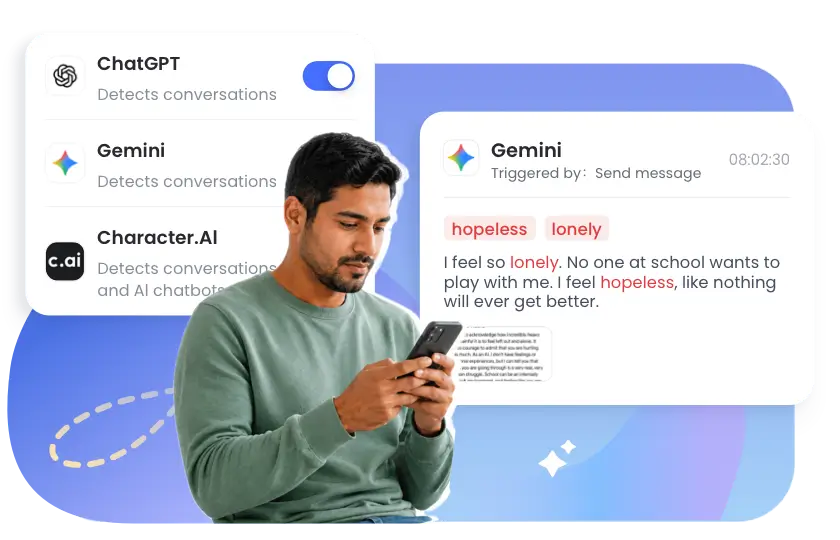
Here's what AirDroid adds that native controls don't:
- Cross-platform coverage: one dashboard to set up monitoring for ChatGPT, Gemini, and Character AI, without linking each account separately.
- Content alerts with context: rather than a single safety notification, it provides snippets and screenshots to better understand what triggered an alert.
- Broader risk coverage: detection isn't limited to self-harm signals. It supports customizing keywords to monitor risks related to bullying, drugs, and more based on your family's concerns.
- Unified time controls: set daily usage limits or downtime for AI platforms, including those without built-in time controls.
Notes:
- Though these AI monitoring tools add a layer of safety, tools alone don't replace talking to your kid, especially if you decide to use them.
- Also, because of iOS' strict restrictions, the AI chat content detection feature is usually not available for children's iPhones. So, never loosen native AI safeguards.
Alternatives: AI Apps Designed for Children
If the six major AI platforms feel like a compromise, purpose-built children's AI apps offer a different trade-off: less capability but safer. For families of younger children, these kid-friendly tools deserve a look for learning and exploration.
PinwheelGPT
It's a child-focused chatbot for everyday questions, with content filtering and a parent dashboard. It lets parents review the child's conversation history so parents can understand the patterns and even clarify answers. It even blocks images, videos, and web links entirely.
Askie
This is a voice-first chatbot best for preschool children, who may not be able to type comfortably yet. In addition to voice chat, it supports text conversations, homework help, storytelling, and AI image creation. It uses age-adapted responses and content filtering with PIN-protected parent settings.
Khanmigo
Khanmigo, from Khan Academy, is a tutoring tool rather than a chatbot. Instead of simply supplying answers, it uses a Socratic approach, prompting a student to work through the problem step by step. For a parent whose main worry is homework shortcuts or cheating, this is the most direct fit.
FAQs
List of Sources
- ChatGPT
- OpenAI — Strong Safety Protections with ChatGPT for Teens (https://chatgpt.com/parent-resources/safety-protections/)
- PCMag — ChatGPT's New Teen Mode Includes Safeguards for 'Healthy Use' (https://www.pcmag.com/news/chatgpts-new-teen-mode-includes-safeguards-for-healthy-use#1)
- Character AI
- k-ID — Age Assurance on Character AI: Parental Insights FAQ (https://k-id.com/news-posts/character-ai-parental-insights-faq)
- Character AI Support — Important Changes for Teens on Character AI (https://support.character.ai/hc/en-us/articles/42645561782555-Important-Changes-for-Teens-on-Character-ai)
- Google Gemini
- Google Support — Guide Your Child's Gemini Apps Experience (https://support.google.com/gemini/answer/16109150)
- Microsoft Copilot
- Microsoft Support — Microsoft Copilot for Young People (https://support.microsoft.com/en-us/microsoft-copilot/microsoft-copilot-young-people)
- Meta AI
- Meta Help Center — Parents Can See Insights about What Their Teens Ask Meta AI (https://www.meta.com/help/supervision/2435688513558104/)
- Meta Newsroom — Instagram Expands Teen Accounts Inspired by 13+ Content Ratings (https://about.fb.com/news/2026/04/instagram-expands-teen-accounts-inspired-by-13-content-ratings/)
- Meta Newsroom — Helping Parents Understand the Conversations Their Teens Are Having With AI (https://about.fb.com/news/2026/04/helping-parents-understand-conversations-their-teens-are-having-with-ai/)
- Research Data
- Pew Research Center — Teens, Social Media and AI Chatbots 2025 (https://www.pewresearch.org/wp-content/uploads/sites/20/2025/12/PI_2025.12.09_Teens-Social-Media-AI_REPORT.pdf)










Leave a Reply.