Character AI Parental Controls Only Show Screen Time? What About the Rest?
Does Character AI Have Parental Controls?
Yes, Character AI has a parental control feature called "Parental Insights." As its name suggests, it provides insights for parents rather than controls. In this guide, we'll cover what parents can and can't do with Parental Insights, and what has changed in 2026.
What Character AI Parental Insights Can Do
Parental Insights is an optional feature that lets a teen link a parent or other trusted adult to their account. Once connected, the adult can:
- Receive a weekly screen time summary via email.
- View the teen's daily time on Character AI and number of sessions.
- Unlink the teen's account to remove the family connection.
Why do some guides say parents can see their teen's top Characters?
Indeed, Character AI's own guides on this feature are also inconsistent. Its March 2025 launch announcement said the weekly report included the Characters a teen interacted with most and the time spent with each one. Yet the Help Center update in August 2026 states the linked adult can see only screen time.
In our October 2026 setup and review, the Family Connect dashboard showed the time spent and the number of sessions (here is the screenshot). No top-Characters list appeared in this view.
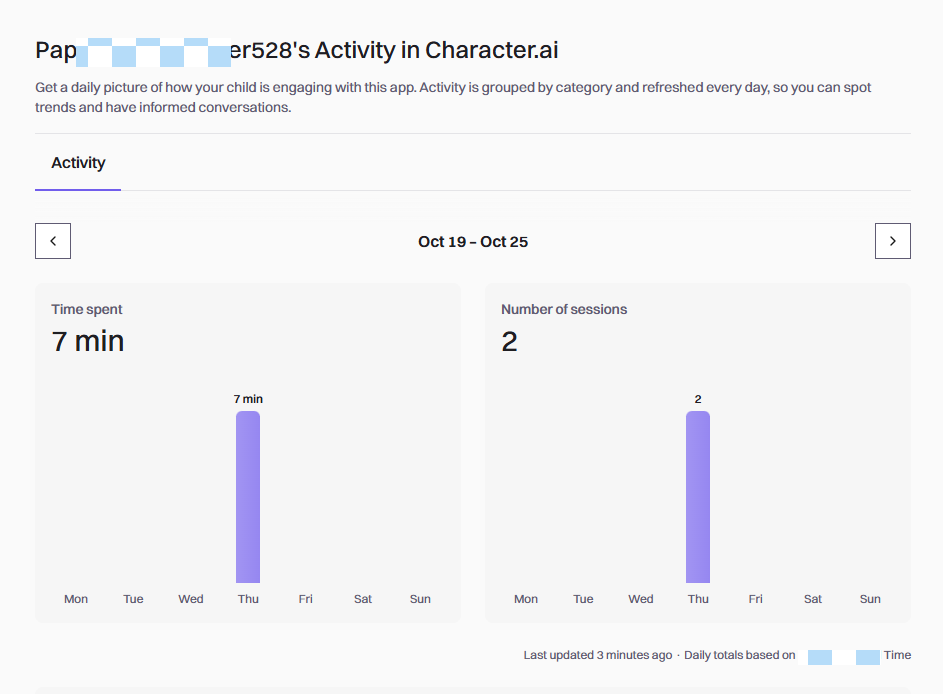
Here is a comparison of Character AI's Parental Insights at its 2025 launch and what we observed in the parent dashboard in October 2026:
| Now (October 2026) | At launch (March 2025) | |
|---|---|---|
| How parents access Parental Insights | Family Connect dashboard or weekly email report | Weekly email report |
| What Parental Insights shows |
|
What Changed for Teen Accounts on Character AI in 2026
In addition to Parental Insights, Character AI also has several safety measures for users under 18. For instance:
1Reading Mode
Character AI has begun removing open-ended Character chats for users under 18 since October 2025. Currently, open-ended chat is removed for minors. Instead, these users enter Reading Mode.
Reading Mode is the experience Character AI gives users it has verified as under 18. In Reading Mode, chat features are not available. But teens can still:
- Revisit their past and saved chats
- Browse characters and watch content
- Create characters, scenes, and videos
- Use features like Imagine Chat, AvatarFX, and parts of the Feed.
Why does my child's Character AI account still show chat features?
If your teen's account still shows chat-related features, first, check whether they can actually chat with a character. Sometimes, teens just view the chats instead of messaging.
If your teen can start an open-ended Character chat, one of reasons is that the account has been verified as 18 or older. So, you need to check which account is signed in or whether they bypassed the age verification. Is it the same account connected to Parental Insights, or another account, such as a shared adult account?
2Age Assurance
Well, then how does Character AI decide an account should get an under-18 experience? Age assurance.
Character AI looks at signals such as login information, activity on the platform, and information from third parties. Once a user is identified as under 18, they are required to verify their age to regain adult experience, such as full access to open-ended chats.
How to Set Up Character AI Parental Insights
The setup starts from the teen's account; here's how:
- Step 1.Go to your teen's account settings.
- Step 2.Select "Parental Insights" and enter your email address to send an invitation.
- Step 3.Open the invitation email and complete the adult verification via K-ID.
- Step 4.Once the connection is active, you can view screen time in Family Connect and receive weekly updates.
What Character AI Parental Controls Can't Do
Now that you know, Character AI's Parental Insights is primarily an information tool. And its limitations are obvious:
- No time limit. Parents can only see screen time, but cannot set a daily allowance on Character AI through Parental Insights.
- No alerts for risky conversations. There are no notifications sent to parents about self-harm or other concerning topics, like ChatGPT's safety notifications.
- No access to messages. Character AI clearly explains that the connected adult cannot read the teen's messages or other activities other than screen time.
- Easy to unlink or remove. The teen can unlink the parent's account without any approval.
- Limited controls for parents. Though Character AI restricts open-ended chats for under-18 accounts, it is the platform rule, and parents cannot switch it on for teens.
Catch Risky Character AI Chats Before They Escalate
AirDroid's AI Chat Monitor can send you a real-time alert when risky keywords or phrases appear in your child's Character AI chats on Android.
Do You Need a Third-Party Parental Control App?
It depends. Now, select what protections you need for Character AI and choose the right tool:
| If you want to... | Consider... |
|---|---|
| Know how long your teen uses Character AI. | Character AI Parental Insights might be enough. |
| Set a time limit, prevent late-night use, or block Character AI for younger kids | Device-level controls, such as Family Link for kids' Android or Screen Time for kids' iPhone. |
| Know when Character AI conversations turn risky. | AirDroid Parental Control that supports scanning Character AI chats on kids' Android and alerts parents. |
FAQs
Does Character AI still have a filter?
Yes. Character AI says it still applies content filters at the platform level, but users cannot adjust those filters themselves. For accounts verified as under 18, there is a separate restriction: Reading Mode does not allow open-ended chats with Characters.
What Is the minimum age to use Character AI?
According to Character AI's official document, users must be at least 13 years old, or at least 16 in Europe, to create an account. But note that Character AI doesn't verify users' age for the first signup unless it identifies that they're under 18 during use.
Can parents read their child's Character AI chats?
No. The connected adults cannot see messages or in-app content of their linked teens. Its Parental Insights feature shows screen time only.











Leave a Reply.