AirDroid Parental Control
24/7 Kids' Guardian via App & Web
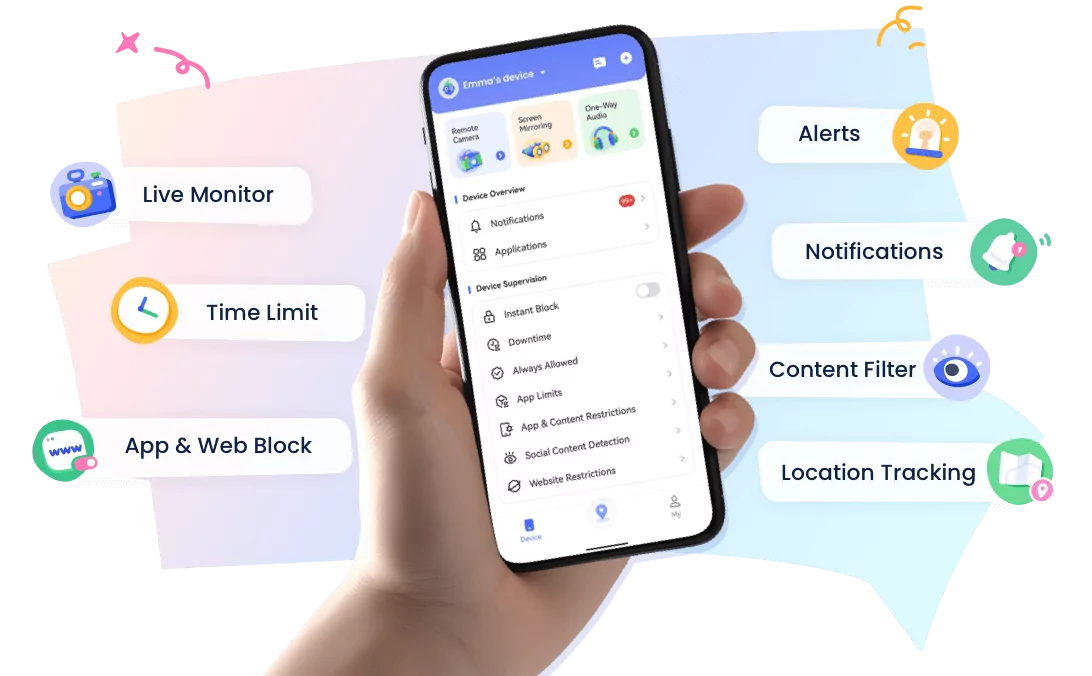
- 👀Live surroundings and location tracking
- 🔞Content Monitoring and App/Web Blocking
- ⚠Instant alerts for online risks and geofences
- ⌛Screen time control and monitor
Back-to-School Routine Reset: A 7-Day Plan for Sleep, Screens & School Mornings
Late summer often means later bedtimes, longer screen sessions, slower mornings, and fewer fixed schedules. Then the first school day appears on the calendar, and the whole family is expected to switch back overnight.
That sudden change can turn a normal morning into a cycle of repeated reminders, missing shoes, unfinished breakfasts, and arguments about phones. Fortunately, a smoother transition does not require changing everything at once.
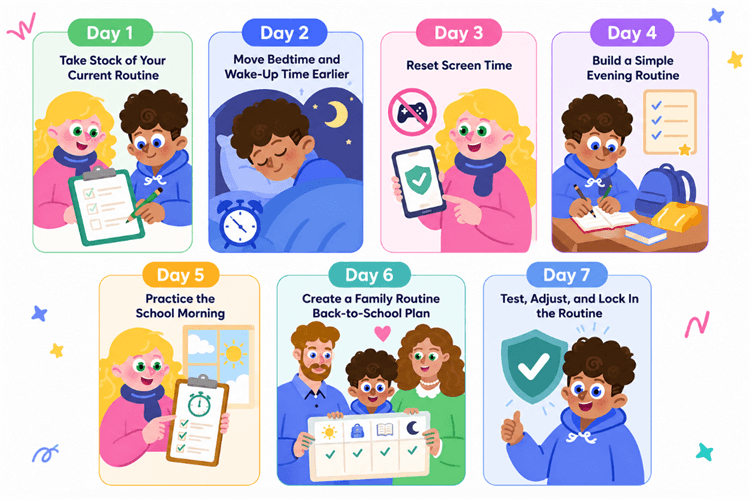
A seven-day back-to-school routine reset can help your child gradually adjust sleep, screens, morning tasks, and school preparation.
This guide gives you a realistic day-by-day plan, plus practical ways to create a family routine back to school that can survive busy weekdays. Adjust the examples to your child's age, school start time, transportation, and after-school commitments.
Why Reset Your Child's Routine Before School Starts?
1Summer schedules can make school mornings harder
A relaxed summer schedule is not automatically a bad one. Children need downtime, and families often enjoy the freedom. The problem comes when a late-summer routine no longer matches the demands of a school day.
- Sleep shifts later: Your child goes to bed and wakes up well after the times required for school.
- Morning steps disappear: Breakfast, dressing, hygiene, and packing happen at different times each day.
- Screens become the default: A phone, tablet, TV, or game is the first activity after waking and the last one before sleep.
- Family schedules drift apart: Parents, children, and siblings eat, sleep, and prepare at different times.
A back to school routine restores predictable cues. When your child knows what happens next, the morning requires less negotiation and fewer last-minute decisions.
2Gradual changes are easier to maintain
A dramatic announcement such as "Starting tomorrow, no screens after 8 p.m. and bedtime is one hour earlier" may be clear, but it is also a lot to absorb at once. Your child may not feel sleepy at the new bedtime, and a rule introduced under pressure can quickly become a source of conflict.
Instead, move the schedule in small steps and give each new habit a chance to settle. A gradual reset also gives you time to discover whether the real problem is sleep, slow transitions, an unrealistic departure time, or too many tasks left for the morning.
3The whole family should be involved
A child will struggle to follow a new schedule if everyone else continues with the summer routine. The strongest family routine back to school is built around a few shared anchors, not a minute-by-minute plan for every person.
- Dinner time: A dependable point when the family reconnects and discusses the next day.
- Screen-off time: A shared boundary that is easier to respect when adults model it too.
- Preparation time: A short evening window for bags, clothes, forms, lunches, and devices.
- Bedtime and wake-up time: Age-appropriate targets that protect enough sleep.
- Departure time: The time everyone must be ready, with a small buffer for surprises.
7-Day Back-to-School Routine Reset
Start this plan one week before school if possible. If you have two weeks, repeat the sleep adjustments more slowly. If school has already started, use the same steps without trying to "catch up" by changing several days at once.
1Day 1 — Take Stock of Your Current Routine
Do not change anything yet. Observe one normal day and record what actually happens, rather than what you think should happen. Note bedtime, wake-up time, meal times, screen use, the school or bus schedule, and how long your child needs to get ready.
| Routine | Current Summer Schedule | School-Day Planning Rule | Example First Adjustment |
|---|---|---|---|
| Bedtime | 11:00 p.m. | Work backward from wake-up time based on your child's age and sleep needs | 10:30 p.m. |
| Wake-up | 9:00 a.m. | Allow enough time for the morning routine, commute, or school-bus pickup | 8:30 a.m. |
| Entertainment screen-off | 10:30 p.m. | About 30–60 minutes before bedtime | 10:00 p.m. |
| Time needed to get ready | Unknown | Based on a timed practice morning | Time each step without rushing |
There is no single wake-up time that works for every U.S. student. School start times, bus pickups, commutes, and family schedules vary widely. Confirm your child's actual departure time first, then work backward to set the wake-up time and an age-appropriate bedtime.
As a general sleep target, children ages 6–12 usually need 9–12 hours per 24 hours, while teenagers ages 13–18 usually need 8–10 hours. If a child needs to wake at 6:30 a.m., bedtime may need to be earlier than 9:30 p.m., especially for a younger student.
2Day 2 — Move Bedtime and Wake-Up Time Earlier
Move bedtime and wake-up time earlier by about 15 to 30 minutes. Continue shifting them in small increments until they match the school schedule. Avoid asking your child to lie awake in bed far earlier than usual; pair the earlier bedtime with an earlier wake-up, daytime activity, and a calmer evening.
Pay special attention to wake-up time. A consistent morning cue helps the body adjust, while sleeping very late can make an earlier bedtime difficult. Open the curtains, turn on lights, offer breakfast, and begin the day even if there is no formal plan.
According to the CDC's guidance on sleep and student health, children ages 6–12 generally need 9–12 hours of sleep per 24 hours, while teens ages 13–18 generally need 8–10 hours. Use those ranges to calculate a suitable target, and consult a healthcare professional if your child regularly cannot fall asleep, is unusually hard to wake, snores heavily, or remains very sleepy during the day.
3Day 3 — Reset Screen Time
Do not frame the reset as taking technology away. Move screen time into predictable parts of the day so your child knows when entertainment is available and when the device needs to rest.
- Before school: Keep entertainment apps off until dressing, breakfast, hygiene, and packing are complete—or make the entire morning screen-free.
- During meals: Put phones away so eating and conversation have a clear place in the routine.
- During homework: Allow only the tools needed for schoolwork and pause distracting games or social apps.
- Before bedtime: Choose a consistent screen-off point and replace scrolling with a low-stimulation activity.
This approach is consistent with the American Academy of Pediatrics' Family Media Plan guidance, which recommends creating family-specific rules and establishing screen-free zones around activities such as meals, homework, and bedtime.
If reminders repeatedly turn into arguments, a parental-control tool such as AirDroid Parental Control can help schedule downtime and set limits for distracting apps around study, family, and bedtime hours. Tell your child what the settings do and why you are using them. The tool should support a family agreement, not replace the conversation.
4Day 4 — Build a Simple Evening Routine
Create a short sequence that starts after dinner and ends with lights out. Keep the order stable even when the exact time shifts slightly.
- Finish essential work: Complete homework, reading, or any school form that cannot wait.
- Prepare for tomorrow: Pack the backpack, refill the water bottle, choose clothes, and place shoes by the door.
- Complete hygiene: Shower if needed, brush teeth, and change into pajamas.
- Wind down: Read, draw, stretch, listen to quiet music, or talk about the day.
- Turn out the lights: End with the same simple cue each night.
The goal is consistency, not a perfect routine. If an evening is busy, keep the smallest workable version: pack the bag, prepare clothes, brush teeth, and go to bed.
💡Real-World Case Study: Move Decisions to the Night Before
In a r/Mommit discussion about difficult school mornings, a parent of an eight-year-old and a five-year-old described giving constant reminders while also trying to prepare breakfast and lunches. Parents in the discussion repeatedly recommended packing lunches, filling backpacks, and choosing clothes the night before. They also shared visual checklists, timed reminders, music cues, and simpler breakfasts. These are individual family experiences, but they illustrate a useful principle: remove as many choices and competing tasks from the morning as possible.
5Day 5 — Practice the School Morning
Run a complete school-morning rehearsal. Wake your child at the planned time and complete every real step: get dressed, eat breakfast, brush teeth, pack any last items, put on shoes, and be ready at the door.
Time the routine without turning it into a race. Then ask, "Could we leave now without rushing?" The result reveals where the routine is breaking down. Your child may not be slow at waking up; the delay may come from choosing clothes, deciding on breakfast, locating a charger, or returning to a screen between tasks.
6Day 6 — Create a Family Routine Back-to-School Plan
Now connect the child's routine to the rest of the household. Put the plan where everyone can see it, and give each person clear responsibilities. The CDC's guidance on routines and rules emphasizes consistency, predictability, and follow-through so children know what to expect. Younger children may need pictures; older children may prefer a short checklist on the refrigerator or in a shared family app.
| Part of the Day | Family Anchor | Child's Responsibilities | Parent's Responsibilities |
|---|---|---|---|
| Morning | Ready at the door by 7:30 | Dress, eat, complete hygiene, check bag | Prepare breakfast, confirm transport, handle medication if needed |
| After school | Snack and decompression | Put belongings away and review assignments | Check messages and clarify the evening plan |
| Evening | Dinner, preparation, wind-down | Pack bag, choose clothes, charge device outside the bedroom | Sign forms, prepare food, model screen-off time |
Keep the division of work age-appropriate. Doing every task for an older child may make the morning faster today but prevent independence later. Instead, teach one responsibility at a time and use a visible prompt until it becomes familiar.
💡Real-World Case Study: Make the Routine Visible
Parents in a r/ParentingInBulk school-morning discussion shared ways to streamline mornings with several young children. Common suggestions included preparing clothes and bags the night before, using picture-based checklists, and serving familiar breakfasts with very few decisions. The lesson is not that every family needs the same system. It is that a visible routine can carry some of the reminder burden that otherwise falls on the parent.
7Day 7 — Test, Adjust, and Lock In the Routine
Repeat the full evening and morning routine, but do not add new rules. Review what happened with your child and make the smallest useful adjustments.
- What worked without reminders? Preserve those steps exactly as they are.
- What caused arguments? Clarify the expectation, offer a limited choice, or change the timing.
- Is bedtime realistic? Check whether the schedule provides age-appropriate sleep and enough wind-down time.
- Where did the morning slow down? Move that task to the evening or simplify it.
- Did screens interrupt transitions? Narrow the screen window or use a scheduled restriction.
Write down the final school-day version. A routine becomes easier to follow when it is visible, predictable, and short enough to remember.
Think of these seven days as a reset plan, not a promise that every child's sleep schedule will fully change within one week.
What Should a Back-to-School Routine Include?
1A consistent sleep schedule
Choose a wake-up time based on school and travel requirements, then work backward to allow enough sleep.
2A predictable morning routine
Use the same short order each day: wake up, get dressed, eat breakfast, complete hygiene, check the bag, put on shoes, and leave. Reduce choices by selecting clothes and breakfast options in advance.
3Regular meal and snack times
A dependable breakfast and after-school snack can serve as transition cues. Prepare easy options ahead of time so food does not become the morning's biggest decision.
4Homework and study time
Some children work best after a short break; others prefer to finish homework immediately. Test both approaches and choose a consistent window that also leaves room for movement, dinner, and sleep.
5Screen-free periods
Protect the moments when screens are most likely to disrupt the day: getting ready, family meals, homework, and bedtime. Make exceptions clear, especially when a device is required for schoolwork.
6Family time and next-day preparation
Family time does not need to be elaborate. A shared meal, a short walk, or ten minutes of conversation can become a reliable anchor. Follow it with a quick preparation check so tomorrow's essentials are ready.
How to Reset Screen Time Before School Starts
1Set screen-free periods
Begin with situations rather than a single daily number. "No entertainment apps during homework" is easier to understand than a vague promise to use the phone less. Choose two or three high-impact periods and apply them consistently.
2Create predictable screen-time windows
Connect recreational screen time to a time or sequence: after homework and chores, before the evening wind-down, or during an agreed weekend block. Predictability reduces repeated asking because your child already knows when access begins and ends.
Give a warning before the window closes and name the next activity. A ten-minute warning followed by "save your game, then choose clothes for tomorrow" is more actionable than suddenly removing the device.
3Use parental controls to support the routine
Verbal reminders are still important, but they should not be the only system. AirDroid Parental Control offers daily limits, scheduled downtime, app management, and activity reports. Parents can use those features to reduce access to distracting apps during homework, family time, or bedtime while keeping necessary tools available.
Start with the least restrictive setting that supports the agreement. For example, schedule entertainment-app downtime during the morning routine rather than blocking the entire device all day. Review the settings with your child after the first school week, and adjust for homework platforms, sports schedules, weekends, and age. Consistent boundaries work best when they are transparent and flexible enough for real life.
If your family wants a practical way to automate the screen-time boundaries you have already discussed, you can download AirDroid Parental Control below.
For a back-to-school routine reset, AirDroid Parental Control can help parents turn agreed screen-time rules into repeatable schedules instead of relying on constant verbal reminders.
- Schedule school-day downtime.
- Set limits for distracting apps.
- Block selected apps when necessary.
- Review daily and weekly activity reports.
- Adjust rules for different days.
Start with one or two high-impact boundaries rather than restricting everything at once. For example, schedule entertainment-app downtime before school and during bedtime, then review the routine after the first week and adjust it with your child.


What If Your Child Doesn't Want to Change Their Routine?
1Explain the reason behind the change
Replace "Because I said so" with a concrete reason: "We are moving bedtime earlier so the first week of school does not feel exhausting." This does not guarantee agreement, but it helps your child understand that the routine solves a problem rather than serving as a punishment.
2Give your child limited choices
Keep the boundary firm while offering control inside it. Your child might choose which breakfast to prepare, whether to shower before or after dinner, which clothes to wear, or whether to read or draw during wind-down time.
3Change one thing at a time
If sleep is the biggest problem, start there. If mornings collapse because nothing is packed, establish evening preparation first. A small routine that works is more useful than a complete routine nobody can follow.
4Expect imperfect days
Children may resist, forget, or move slowly, especially when they are tired or anxious about school. Treat a difficult morning as information. Shorten the checklist, move a task, or add a transition cue instead of abandoning the whole plan.
If school refusal, severe anxiety, persistent sleep trouble, or intense conflict continues, talk with your child's school or a qualified healthcare professional. A routine can reduce ordinary friction, but it cannot solve every underlying concern.
How to Keep the Routine After School Starts
1Keep sleep and wake-up times consistent
Protect the schedule during the first few weeks, when novelty and fatigue are both high. Avoid large weekend shifts that make Monday feel like another reset.
2Review the routine every weekend
Spend ten minutes asking what worked and what felt difficult. Check upcoming activities, transport changes, assignments, and meals. Make one adjustment for the next week instead of rebuilding the plan.
3Adjust screen time around real responsibilities
Homework loads and activity schedules change. Review app limits and downtime instead of leaving them on autopilot. AirDroid's activity reports can show daily or weekly usage patterns, while app limits and scheduled downtime can help maintain the agreed boundaries. Use the information to start a conversation, not to judge your child by one unusually busy day.
4Keep family routines simple
Choose one or two anchors that remain even during a difficult week: bags packed before bed, devices out of bedrooms, breakfast together, or a fixed departure time. Do not try to create a perfect schedule. Create one your family can actually maintain.
Back-to-School Routine FAQs
A successful back-to-school routine reset is not measured by a flawless first morning. It is measured by whether your family knows what happens next, can recover from a difficult day, and needs fewer reminders over time. Start small, keep the plan visible, and adjust the routine to the family you actually have.











Leave a Reply.