School Phone Bans in the U.S.: How Parents Can Handle Contact, Commutes, and Phone Rules
California families are heading into the 2026–27 school year under new smartphone rules. By July 1, 2026, every school district, county office of education, and charter school in the state had to adopt a policy limiting or prohibiting student smartphone use at school.
If your child's school has tightened its rules too, the bigger challenge may be figuring out how your family handles contact, transportation, and changing plans when your child can't simply check their phone.
School-First Principle: State policies (like California AB 3216) mandate campus-level phone restrictions; family routines must adapt to school rules, not bypass them.
Two-Channel Communication: Route time-sensitive school-day emergencies through official school lines; reserve cell phone contact for before/after school transitions.
Role of Technology: Parental controls (e.g., Geofencing, Focus Mode) should assist boundary habits outside school hours rather than conflict with classroom policies.
Can Your Child Still Bring a Phone to School?
As of July 15, 2026, NCSL reports that 42 states, the District of Columbia, and Puerto Rico have enacted legislation related to cellphone use in schools, although the scope and requirements vary widely. Some schools, including NYC Public Schools, allow students to bring phones but require them to stay powered off or stored during the school day; others don't allow personal devices on campus at all.
For your child, the school's current written policy is what matters.
What Your School's Rule Means for Your Family
| If Your School Says... | Plan For... |
|---|---|
| Personal devices cannot be brought onto campus | Leave the phone home and make another contact plan |
| Phones may be brought but must stay powered off or stored | No direct phone access during the school day |
| The school is phone-free “bell to bell” | No phone access until the school-day restriction ends |
| Phones are restricted only during class | Check when access is allowed outside class |
Policy Checked: August 20, 2026. School and district rules can change, so always verify your child's current written policy.
Why the Phone May Still Matter Before and After School
You may agree that your child doesn't need a phone during class. But they may still need one to check in after getting off the bus, handle a changed pickup, reach you after practice, or stay connected on the way home.
Those concerns also came up repeatedly in the public parent discussions and reporting we reviewed, especially around transportation, pickup changes, after-school activities, and staying in touch after dismissal.
The question, then, isn't whether your child needs unrestricted phone access at school. It's what the phone still needs to do before and after school. And how your family will handle the hours when it isn't available.
Those needs don't override the school's policy. The goal is to build your family routine around the access your child's school actually allows.
Make a School-Day Phone Plan Before the First Day
School rules govern the school day. Your family still needs to connect everything around it.
| Part of the day | What to decide before school starts |
|---|---|
| Before school | Does your child need the phone for the bus, carpool, commute, or a morning check-in? |
| During school | Where must the phone stay? Must it be powered off? Can your child access it at all? |
| If plans change | How should you get a time-sensitive message to your child? |
| Dismissal | Exactly when does phone access resume? |
| After school | How will pickup, sports, clubs, work, or other activities be coordinated? |
| At home | When do your normal homework, gaming, social media, and bedtime rules resume? |
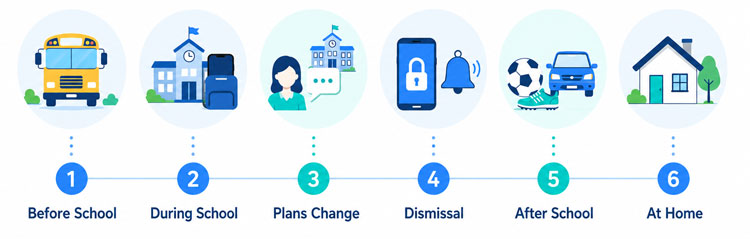
Don't assume that “after school” means the same thing everywhere. Plano ISD, for example, says students may use personal devices once they have exited the school building and are in the parking lot or off campus. In NYC, the citywide school-day restriction does not automatically govern every after-school activity, although individual schools may set additional rules.
The goal isn't to keep your child reachable every minute. It's to make sure both of you know when the phone is available, when it isn't, and what happens in between.
How Should Parents Stay in Touch During a Phone-Free School Day?
For many families, the hardest adjustment may not be the phone rule itself. It's losing the expectation that a child is always one text away.
A 2026 U.S. study of 2,502 parents of smartphone-owning 12- to 17-year-olds found that 25% contacted their child once during the school day and 38.5% did so multiple times a day. More frequent parent contact was also associated with more parent-reported phone-policy violations, although the study cannot show that parent texting caused those violations.
The practical lesson is simple: your family needs a communication plan that doesn't depend on your child checking their phone during school.
What Parents Worry About and What Schools Ask Families to Do
In the public parent discussions we reviewed, the same questions came up repeatedly: How will I reach my child? What if pickup changes? What if there's an emergency? What if they need the phone after school?
When we compared those concerns with current school guidance, a consistent pattern emerged:
| Parents are asking... | Schools commonly direct families to... | What to decide before school starts |
|---|---|---|
| How will I reach my child? | Use the school's designated contact channel | Save the right number or messaging process |
| What if pickup changes? | Send time-sensitive changes through the school | Have a normal plan and a backup |
| What about an emergency? | Follow the school's emergency communication process | Know how urgent contact works in both directions |
| My child needs the phone after school | Check when phone access resumes | Agree on the first after-school check-in |
| Can I keep texting them? | Keep non-urgent communication outside the school day | Stop expecting an immediate reply |
Fairfax County Public Schools, for example, tells parents to route urgent messages through the front office and keep non-urgent communication to before or after school. Plano ISD similarly directs parents who need to reach a student during the day to the campus front office.
Should You Contact the School or Can It Wait?
Your school's procedures come first, but one simple rule helps: separate something that needs action today from something that can wait until dismissal.
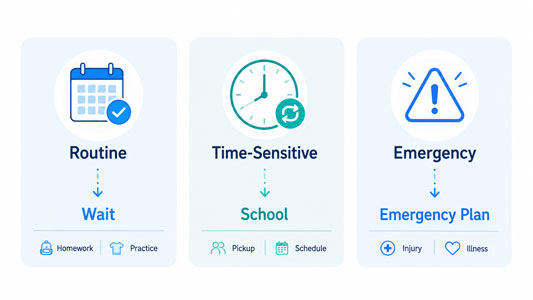
| Situation | A reasonable first step |
|---|---|
| Reminder about tonight or the weekend | Wait until after school |
| Forgotten homework or another nonessential item | Usually wait |
| Pickup changed unexpectedly | Use the school's designated process |
| Appointment during the school day | Follow the school's attendance procedure |
| Your child becomes sick | School nurse or office |
| Urgent family situation | Use the school's urgent contact route |
| Emergency at school | Follow the school's emergency communication plan |
The American Academy of Pediatrics takes a similar approach: reduce unnecessary school-day texting, plan transportation ahead when possible, use school channels for time-sensitive issues, and know the school's emergency communication plan.
The goal isn't to stop communicating with your child. It's to stop making immediate phone access the only way your family knows how to communicate.
Reset the Phone Rules for Kids and Parents
A school phone policy changes more than your child's habits. Parents may need to change theirs, too. Especially if everyone has become used to texting during the school day and expecting an immediate reply.
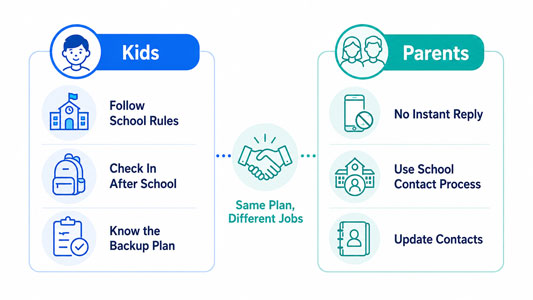
Rather than adding a long list of new restrictions, agree on a few rules that make the school-day routine easier for both sides.
School Rules Come First
If the school requires phones to stay powered off, stored, handed in, or left at home, your family rules don't override that requirement.
Neither Side Expects an Instant Reply
Your child shouldn't feel responsible for checking family messages from class, and parents shouldn't assume a delayed response means something is wrong.
Have a Plan for Changes
Decide what happens if a ride changes, practice is canceled, or an after-school plan falls through. Whenever possible, make those arrangements before the school day rather than relying on a last-minute text. Fairfax explicitly asks families to keep non-urgent communication outside the school day, while other schools similarly encourage families to arrange before- and after-school plans ahead of time.
Know When Phone Access Resumes
Depending on the school, that might mean the dismissal bell, leaving the building, or leaving campus. Make sure both you and your child know the actual transition point.
Family Rules Resume after School
Once the school's restriction ends, decisions about homework, gaming, social media, and bedtime return to the family. The school phone policy doesn't replace the broader phone boundaries you've agreed on at home.
Before the First Day: School-Day Phone Checklist
Use this before the first day under a new phone policy:
- Read the actual school or district device policy
- Save the number or channel used to contact your child during school
- Update your emergency contact information with the school
- Make sure your child knows at least one important family phone number without checking their phone
- Agree on what your family considers urgent enough to interrupt the school day
- Decide how pickup or after-school changes will be handled
- Confirm exactly when phone access resumes
- Check whether smartwatches or other connected devices are covered
- Confirm any IEP, 504 Plan, or medical accommodation directly with the school
- Agree on the phone rules that apply before school and after dismissal
Plano ISD specifically asks families to keep emergency contact information current and make sure children know important phone numbers. Two small steps that become more useful when a phone isn't immediately accessible.
This checklist is intentionally more about communication readiness than app settings. A phone-free school day is easier to manage when the backup plan exists before anyone needs it.
The Role of Parental Control Apps: What Technology Can and Cannot Solve
Parental controls can support a family phone plan, but they shouldn't be used to work around a school's rules.
The starting point is still a conversation with your child and the school's actual policy. Technology can then help reinforce the boundaries you have already agreed on where the device is allowed to remain available.
| Family situation | Where AirDroid may help | Important boundary |
|---|---|---|
| Your child wants help avoiding distracting apps where phone access is allowed | Focus Mode | It doesn't replace a school's storage, power-off, or no-use requirement |
| Your family wants different limits for homework, evenings, or bedtime | App Limits / Downtime | These are family rules, not permission to use a phone at school |
| You want fewer “Did you get there?” messages before or after school | Geofencing | Alerts depend on the child's device, connectivity, location settings, and permissions |
| Your child needs a quick way to alert you when they feel unsafe before or after school | SOS Alerts | The phone must be accessible; this isn't a substitute for a school's emergency procedures |
For the school-day scenario, the boundary matters more than the feature list: Parental controls can support the rules your family and school already have. They don't replace the school's rules.
If the school requires a locked pouch, a powered-off device, device hand-in, or no phone on campus, follow that requirement first.
Practical Questions You May Still Have
Stay Connected Without Constant Access
A stricter school phone policy can change a routine your family has relied on for years. Quick texts about rides, forgotten gear, practice, or changing plans may no longer work the same way.
That doesn't mean parents have to choose between constant access and no connection at all.
Start with the school's actual rule. Then make a plan for the parts of the day the rule doesn't solve for you: getting to school, time-sensitive messages, dismissal, after-school activities, the trip home, and your normal family phone boundaries.
When everyone knows what to expect before the first day, your child can follow the school's rules without feeling responsible for staying constantly available—and you can stay connected without turning every school-day change into a phone problem.
Looking for a reliable way to automate after-school check-ins?
AirDroid Parental Control helps parents receive automated arrival/departure notifications (Geofencing) and scheduled focus downtime—supporting school rules without constant mid-day messaging.
How We Researched This Guide
We reviewed current U.S. state policy information, official school and district phone guidance, national parent research, American Academy of Pediatrics guidance, and public reporting and discussions about families adjusting to school phone restrictions. Public parent sources were used qualitatively to identify recurring practical concerns; they are not a representative survey of U.S. parents.
Policy examples in this guide were last checked on August 20, 2026. Because school phone rules are changing quickly and implementation varies locally, families should always verify their child's current school or district policy.
Sources & References
California Legislature — Education Code §48901.7
https://leginfo.legislature.ca.gov/faces/codes_displaySection.xhtml?lawCode=EDC§ionNum=48901.7
National Conference of State Legislatures — Enacted State Legislation: Cellphone Use in Schools
https://www.ncsl.org/education/enacted-state-legislation-cellphone-use-in-schools
Journal of Adolescent Health — Parent-Reported School Phone Policies: Prevalence, Components, and Violations
https://www.sciencedirect.com/science/article/pii/S1054139X26000017
American Academy of Pediatrics — School Smartphone Policies: How Parents Can Help
https://www.aap.org/en/patient-care/media-and-children/center-of-excellence-on-social-media-and-youth-mental-health/school-smartphone-policies-how-parents-can-help/
Fairfax County Public Schools — Cellphone Policy
https://www.fcps.edu/cellphone-policy
Plano Independent School District — Telecommunication Devices Prohibited During School
https://www.pisd.edu/students-families-a6/telecommunication-devices-prohibited-during-school
New York City Public Schools — Cell Phone and Electronic Device Policy
https://www.schools.nyc.gov/about-us/policies/cell-phone-and-electronic-device-policy
KPRC 2 / Click2Houston — Parent Reactions to Texas School Cellphone Restrictions
https://www.click2houston.com/news/local/2025/08/08/i-want-to-be-able-to-speak-to-our-child-parents-respond-to-texas-statewide-cellphone-ban-ahead-of-new-school-year/











Leave a Reply.