Why Are AI Chatbots Harder for Parents to Monitor?
As children increasingly turn to AI chatbots for homework help, advice, and even emotional support, parents' safety concerns are shifting.
More parents now want to understand how their children use AI chatbots: what they ask, what AI says to them, and whether the conversations are harmful.
Yet, while many parental control apps can track how long AI apps were used or limit the usage, few can actually monitor AI conversations.
5 Reasons AI Conversations Can Be Hard to Monitor
So, why is it becoming harder for parents to monitor AI conversations? Here are the main reasons:
1AI responses are generated in real time
When a child is already chatting with a chatbot, the answer appears directly in the chat window without a separate notification generating. A monitoring tool relying on notification access would therefore have no notification text to collect and check for concerning content.
2Risks are hidden in context
That's the core difficulty: the risk isn't sitting in one turn; it's spread across multiple conversations. A single prompt or message may look harmless, but the messages before or after it can reveal a very different situation.
For example, a child asking, "How many should I take to feel it?" is an ambiguous question. But if they just told the AI they got pills, drugs, or alcohol, that question becomes a serious red flag.
So, even when a monitoring tool can capture risky words, a flagged phrase is not the same as a confirmed concern. Keyword-based content detection won't trigger an alert for a concerning conversation that doesn't contain a matching word.
However, even tools that use AI to analyze context can miss a risk spread subtly or misread an innocent one as concerning. In short, no detection method can promise to catch every risk.
3AI chats can happen inside websites and different apps
AI services come thick and fast. A kid can start a conversation on a mainstream AI platform (like ChatGPT) today and switch to a different niche one (e.g., Replika) tomorrow, let alone most of them offer web versions.
Additionally, more AI tools or features keep showing up inside study tools, games, and social apps that weren't built as "AI chatbots," like Snapchat My AI and Meta AI (it has entry points in WhatsApp, Instagram, etc).
The result is that there is no single door for parents to check, and they might not even know where to look because conversations are scattered across dozens of apps and websites.
4iOS makes monitoring harder
Here's a frustrating reality many parents may discover: parental control software works reasonably well on Android, but the moment a child uses an iPhone, parents generally have much less visibility into app's content.
This is the direct result of Apple's design philosophy:
- Firstly, third-party apps on iPhone and iPad are sandboxed. That is, they cannot freely access other apps' stored information. So, installing a parental-control app does not give it access to another app's chats, including AI apps.
- Secondly, Apple strictly limits what parental controls are allowed to do. On Android, some parental control apps can read notifications, access social content, and even mirror the screen. On iOS, most of these permissions are banned.
As such, monitoring or detecting a child's risky AI conversations is more difficult on an iPhone.
5Native and third-party parental controls limit the visibility
Some visibility gaps come from what an app is designed to be, rather than a failure to capture data. ChatGPT parental controls, for example, do not give parents access to a teen's chat history; meanwhile, its safety notifications only work as an alert, providing limited information.
Even though a few tools (such as AirDroid and Bark that we tested) can flag and show messages their content detection system thinks are "risky," they typically don't show a complete conversation history.
This is because AI chats contain highly private information. Giving parents unrestricted access to every conversation may create privacy and trust concerns. It's also a privacy boundary AI platform and third-party parental control companies choose to keep in place.
As a result, many AI platforms and parental control tools focus on usage controls and risk alerts instead of full surveillance.
So How Parents Can Monitor Risky AI Chats?
Given all of this, monitoring risky AI chats is not easy. But that doesn't mean you have to give up; instead, it means finding a smarter way to stay informed. Here are 3 practical tips:
Know what AI tools they're actually using
As we stated above, AI isn't limited to one app or platform. Your child may use ChatGPT, Character AI, or AI features that are embedded into their favorite apps.
Knowing which tools they use can help you understand where potential risks may come from and what you should focus on.
You can also read our app-specific guides to better understand risks and get safety advice:
Look at what AI use is replacing
Now you know which AI apps are on the device. Usage time and pattern also matter.
But instead of treating one hour as safe or two hours as harmful, observe whether your kids' AI use is interfering with sleep, schoolwork, family time, or other activities.
Just like the AAP's 5C guidance, it considers the child, content, calming habits, activities being crowded out, and communication. For AI use, that means discussing both the purpose of using an AI and its effect on everyday life.
Keep an eye on risky AI chats
Usage patterns can tell you something might be up, while content alerts tell you what it is.
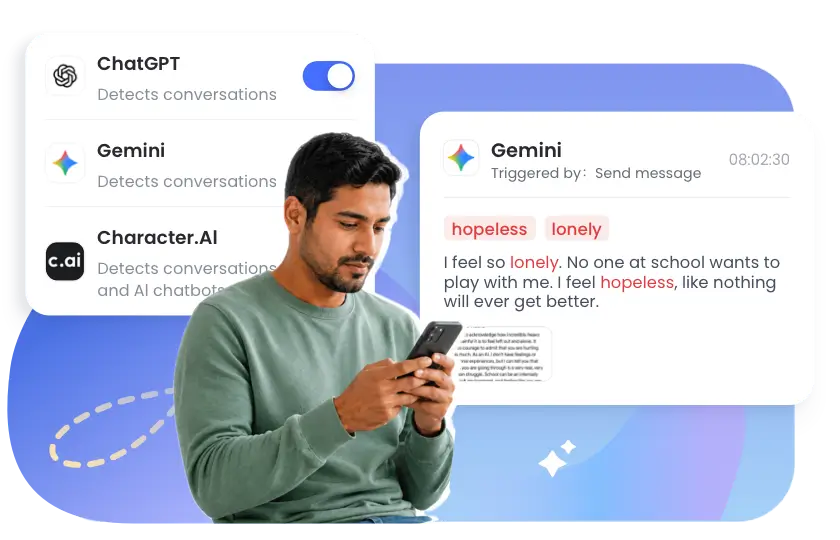
This is where AirDroid's AI Content Detection comes in. It scans risky keywords and phrases inside ChatGPT, Gemini, and Character AI conversations. When something concerning shows up, you get an alert within seconds, with a screenshot of the conversation at that moment.
The Bottom Line
In short, AI conversations are harder to monitor because they are generated in real time, constantly changing, spread across different apps and websites, and often require the full context to understand risks.
Though parents can use AI chat monitoring tools to stay aware of potential risks, they shouldn't rely on tools alone. After all, monitoring can only catch some risks; family communication and parental guidance help reduce risks that monitoring tools may miss.










Leave a Reply.