WhatsApp Live Location: A Parent's Guide to Knowing Where Your Kids Are
Let's be real: the first time our kid heads out solo, goes off to summer camp, or goes out at night, our minds can't help but race with worry. Are they okay? Did they get there safely?
The good news? If your kid uses WhatsApp, you don't need to send "where are you" texts to confirm if they are safe. The WhatsApp Live Location feature lets you see their shared real-time location straight in your chat. WhatsApp explains in its official Live Location announcement that users can share real-time location in an individual or group chat for a limited time, and they remain in control of who they share with and when sharing stops.
In this guide, we'll show you how to use it in a way that respects your child's space while giving you peace of mind.
Understanding WhatsApp Live Location
WhatsApp Live Location is a feature that lets users share their real-time location with others in a chat, and it updates as they move. According to WhatsApp's Help Center guide to using Live Location, users choose a chat, select Location, tap Share Live Location, choose a duration, and can stop sharing when needed. This means parents can only view a child's Live Location after the child actively shares it.
Additionally, the location data shared through this feature is protected by end-to-end encryption. WhatsApp also says in its Live Location announcement that the feature is end-to-end encrypted and lets users control who they share with and for how long. This means the location is private to the chat where it is shared, but everyone in that chat can still see it during the sharing session.
Live Location vs Current Location on WhatsApp
WhatsApp has two ways to share location, and it's easy to mix them up. Live Location is for real-time movement, while Current Location is a one-time pinned point. WhatsApp's official Live Location materials highlight the key difference: Live Location continues updating for a selected duration, while a static location does not update after it is sent. Here are the differences:
| Features | Live Location | Current Location |
|---|---|---|
| Type of Location | Real-time (continuously updated) | Static (fixed pin) |
| Duration | 15 min / 1 hour / 8 hours | Sent once, stay forever |
| Best for | Tracking movement or staying connected during a trip | Sending a one-time location |
For parents, Live Location is almost always the one you want for a trip or check-in because it shows movement, not just a static point that may become outdated.
Limitations Parents Should Know:
WhatsApp Live Location is useful, but it is not the same as a full-time family locator. The official WhatsApp Live Location feature is built around active sharing, limited duration, and user control, so parents should understand these limits before relying on it for safety check-ins.
- You cannot view live location unless your child actively starts sharing.
- Your child can easily stop sharing with one tap.
- Live location can be shared for up to 8 hours.
- Once the time's up, sharing stops automatically, and there's no record of where they've been.
- Sharing and seeing live location works only on the primary device.
How to Ask Your Child to Share Their Live Location on WhatsApp
As we mentioned earlier, WhatsApp location tracking only works if your child chooses to share it with you. WhatsApp's Live Location instructions are based on the sender actively choosing a chat, selecting a duration, and sending the location, which is why consent is part of the feature's practical design.
So, before anything else, have an open conversation with your child and get their consent.
And Teodora Pavkovic, a digital wellness expert and parenting coach also highlighted in Parents, "I think it (location tracking concern) boils down to communication and collaboration."
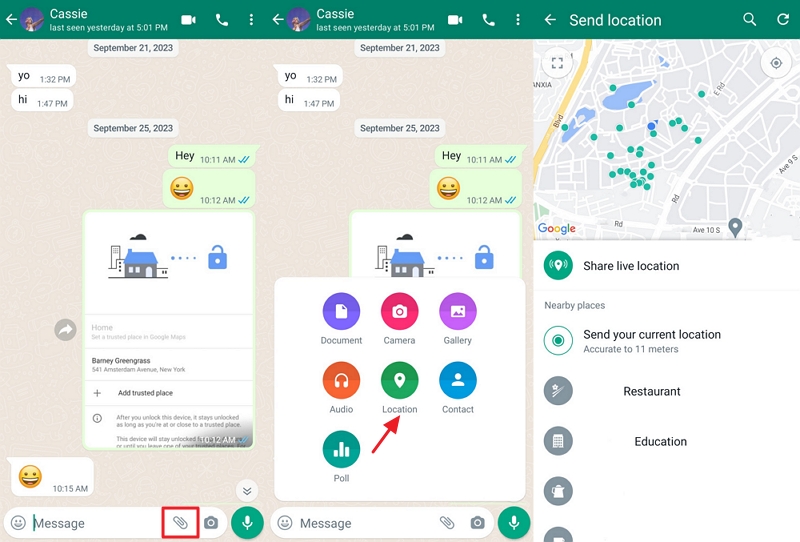
Once your child agrees, walk through these steps with them to share live location in WhatsApp whenever needed:
- Step 1.Open WhatsApp and go to the chat or the family group.
- Step 2.Tap the "+" icon (iPhone) or the "attachment" icon (Android).
- Step 3.Select "Location > Share Live Location."
- Step 4.Choose a duration, including 15 minutes, 1 hour, or 8 hours.
- Step 5.Hit "Send."
How to View Your Child's Live Location on WhatsApp
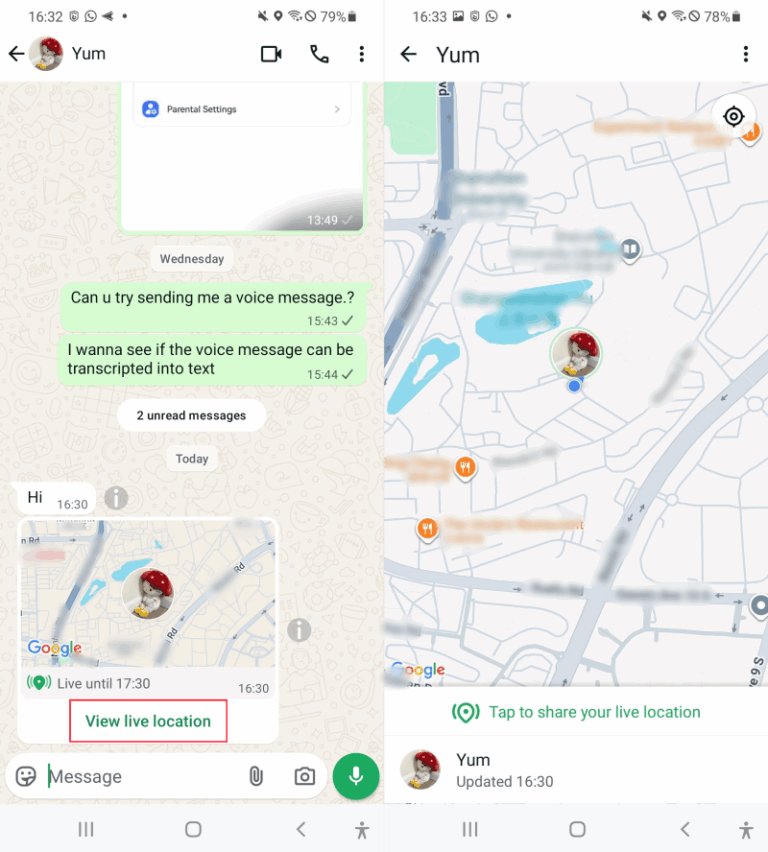
Once your child shares their live location, you'll get a notification in your chat. WhatsApp's location-sharing guidance explains that Live Location is shared inside the chosen individual or group chat, so you view it from the same conversation where your child sent it. To see the live location on WhatsApp:
- Step 1.Open the conversation, and you'll see a map card right there.
- Step 2.Tap on the map to expand it. Then, you can track your child's real-time location, along with how much time is left on the sharing session.
- Step 3.Once the location sharing ends, you’ll see their last known location only.
Tips:
- You can also share your live location back with your child too. Many parents on Reddit say going mutual actually made their kids way more comfortable with the location tracking.
- If you see an error saying "This message can't be displayed here" for your child's shared location, it is because you're now using WhatsApp on a linked device. To fix it, just switch to your primary phone.
Why Is WhatsApp Live Location Not Updating? Fixes
So your kid shared their live location on WhatsApp, but the dot isn't moving, or the location stops working. Don't panic; here are the most common reasons and how to fix them. Because Live Location depends on both WhatsApp and the phone's system-level location permissions, the first things to check are network access, location permissions, background activity, and app updates.
1 Poor internet connection
This is the most common culprit. Live Location needs a stable connection to keep updating. If the phone has poor mobile data or weak Wi-Fi, the location card may stop refreshing even though sharing is still active.
Solutions: Ask your child (the sender) to reconnect their WiFi or switch to mobile data, which helps reset the connection quickly.
2Location permissions are off
For frequent updates, WhatsApp needs phone GPS permission. On iPhone, Apple Support explains that Location Services and Precise Location control whether apps can access accurate location data. On Android, Google's Android Help explains that users can manage whether an app can access location and whether it can use precise location. So, if the location access for WhatsApp isn't set correctly, you may only see outdated or inaccurate location info.
Solutions: Re-enable location services on your child's devices.
- iPhone: "Settings > Apps > WhatsApp > Location > Always, and enable Precise Location."
- Android: "Settings > Apps > WhatsApp > Permissions > Location > Allow while using the app."
3WhatsApp isn't running in the background
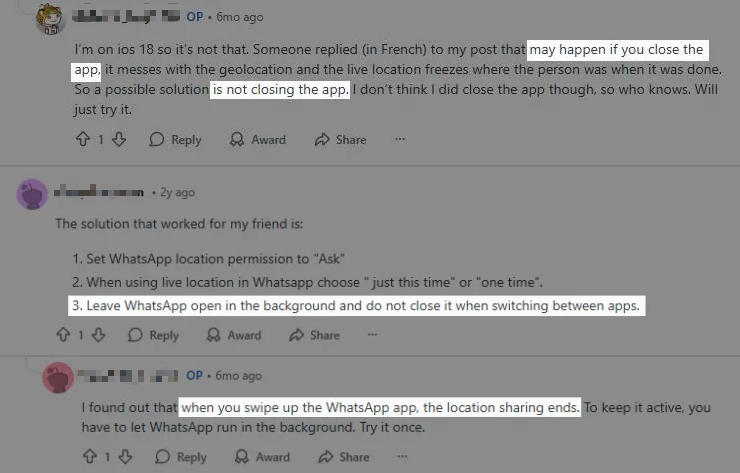
Several Reddit users shared that when WhatsApp was closed, the app stopped running in the background, which prevents WhatsApp from updating the live location.
Solutions: Ask your child to keep WhatsApp active. Avoid closing the app even when switching to other apps.
4WhatsApp is outdated
An old version of the app can cause all sorts of glitches. Since Live Location relies on WhatsApp, device permissions, and location services working together, updating the app can help fix bugs or compatibility issues.
Solutions: A quick update from the App Store or Google Play often fixes the issue.
Better Alternatives If WhatsApp Location Isn't Enough
As you can see, WhatsApp location tracking has its limits: the 8-hour location sharing limit, the fact that your child can stop sharing at any time, and the live location not working.
All make it not always the most reliable option for parents. If you're looking for something more robust, here are two alternatives with their pros and cons.
1Google Maps Location Sharing
Google Maps offers a robust and widely used feature for sharing your real-time location. It's an excellent option for coordinating with friends, letting family know you've arrived safely, or keeping an eye on loved ones (with their consent). Google explains in its Location Sharing Help that users can choose who sees their location and for how long, and they can stop sharing at any time. That makes it more flexible than WhatsApp for longer sharing sessions, while still requiring user permission.
Pros
- Shares real-time location indefinitely.
- Completely free to use.
- Secure and reliable, backed by Google's privacy standards.
- Has an online dashboard.
Cons
- Sharing can be stopped at any time.
- A Google account is required.
Here are the steps for using Google Maps to share and view locations with mutual consent:
- Step 1.On your kid's phone (with their permission), open Google Maps.
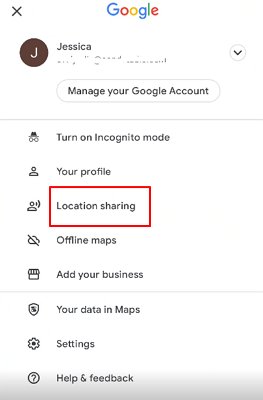
- Step 2.Tap on the profile icon at the top right of the screen. From the profile menu, select "Location sharing."
- Step 3.Choose "Share location" and then select the duration for sharing (e.g., 1 hour, until you turn it off). Select the contact (e.g., yourself) to share their location, often via a messaging app like WhatsApp.
- Step 4.Once the link is sent and accepted, you will be able to see their location on your Google Maps.
2AirDroid Family Locator
For parents seeking to ensure their child's safety, AirDroid Parental Control offers a comprehensive and responsible solution.
With its companion app installed on your child's device, you can view where your child is, where your child has been, and receive alerts when your child enters or exits certain places. Compared with WhatsApp's temporary, child-started sharing session, a parent-managed family safety tool can provide more consistent location awareness when both parent and child have agreed to use it for safety.
Pros
- Shares real-time location indefinitely.
- Offers location history for up to 30 days.
- Allows setting specific location alerts.
- Can view and hear surroundings.
- Instant SOS alerts when they need you most.
Cons
- Requires installation on both parent and child devices.
To use AirDroid Parental Control to see your kid's live location even without WhatsApp:
- Step 1.Download the AirDroid Family Locator app from the Google Play Store or Apple App Store on your own device.
- Step 2.Follow the on-screen instructions to connect your child's device.
- Step 3.On your dashboard, tap on the "location" icon to see their live location.


Making Location Sharing a Family Agreement
Location sharing works best when everyone's on the same page. Used well, it gives everyone peace of mind. Used poorly, it can damage the very relationship you're trying to protect.
Just like child safety experts at Internet Matters point out, the key to successful usage is openness and collaboration. Parents.com also notes that location-sharing apps can give parents peace of mind, but the healthiest use depends on communication rather than silent surveillance. So, how to make location tracking a mutual agreement in your family?
First, ask yourself:
- Am I using this because I need control or because there's real risk?
- Would I be okay with them tracking me the same way?
- Are we setting clear boundaries together, like when it's necessary?
- If my child says no, am I ready to let them go instead of forcing it?
- Have I explained to my child why I want to do this, not just that I'm doing it?
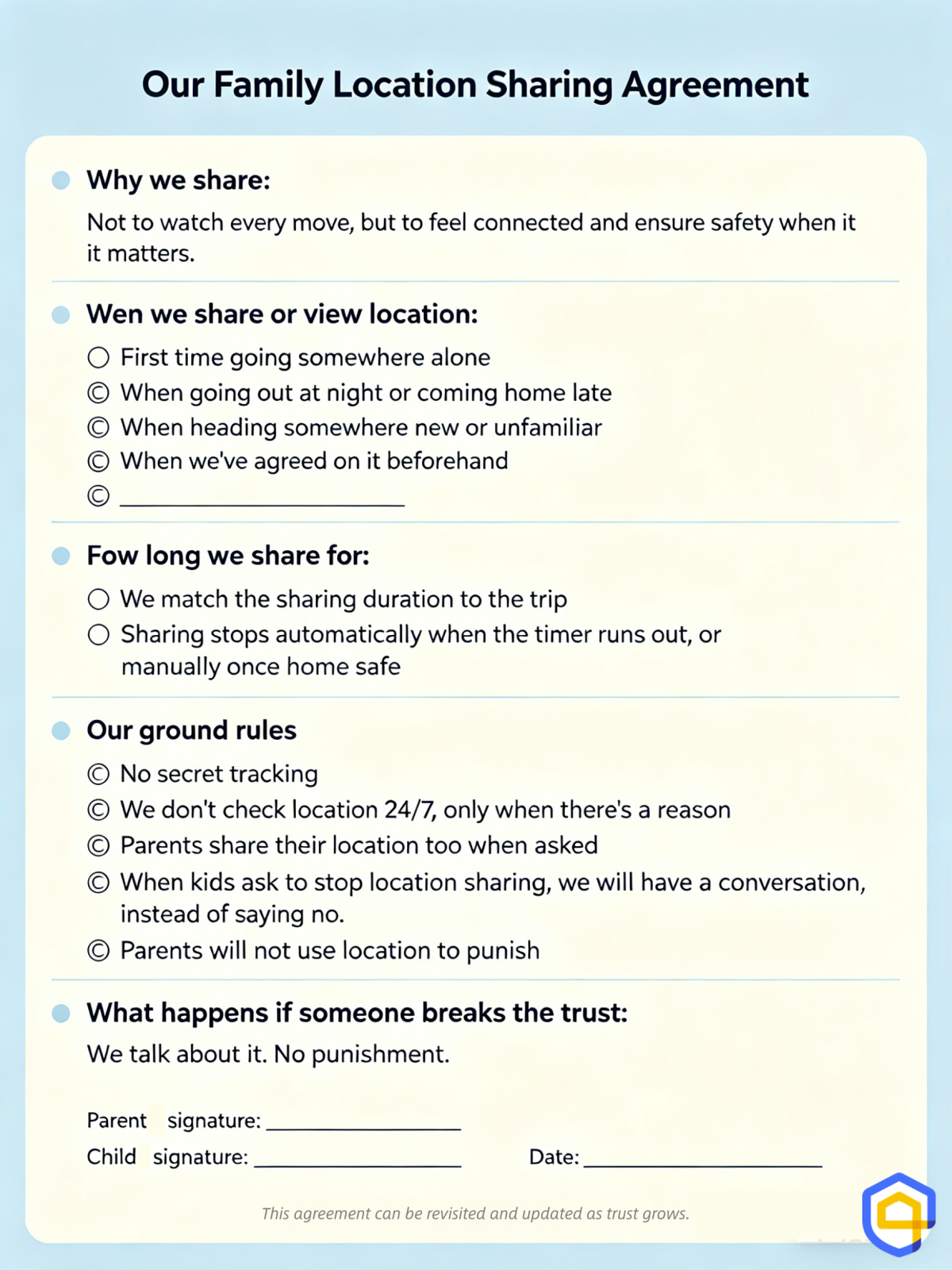
Now, let's turn those answers into a simple agreement you can actually use. Here's a template to get you started:
List of Sources
- WhatsApp Live Location Basics
- WhatsApp Blog – Share Your Live Location (https://blog.whatsapp.com/share-your-live-location?lang=en)
- WhatsApp Help Center – How to Use Live Location (https://faq.whatsapp.com/480865177351335)
- WhatsApp Help Center – About Sharing Your Device's Location (https://faq.whatsapp.com/6780014865351544)
- Privacy, Encryption, and Location Permissions
- WhatsApp Security – End-to-End Encryption (https://www.whatsapp.com/security/)
- WhatsApp Privacy Policy (https://www.whatsapp.com/legal/privacy-policy)
- Apple Support – Location Services and Precise Location (https://support.apple.com/en-us/102647)
- Google Android Help – Manage App Location Permissions (https://support.google.com/android/answer/3467281)
- Family Location Sharing and Communication
- Internet Matters – How to Use Location Tracking Apps in Your Family (https://www.internetmatters.org/hub/expert-opinion/how-to-use-location-tracking-apps-in-your-family/)
- Parents – Gen Alpha Parents Allow Kids More Freedoms By Using Location-Sharing Apps (https://www.parents.com/location-sharing-apps-give-parents-peace-of-mind-8597928)
- Google Maps Help – Share Your Real-Time Location with Others (https://support.google.com/maps/answer/7326816)
FAQs about WhatsApp Location










Leave a Reply.