AirDroid Parental Control
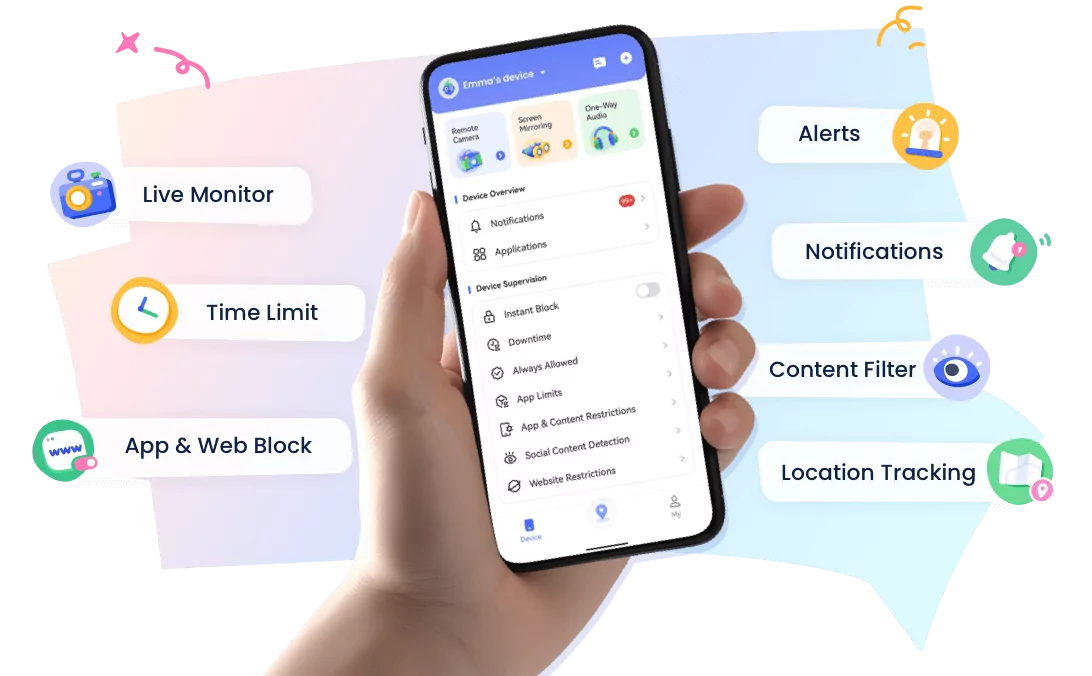
24/7 Kids' Guardian via App & Web
- 👀Live surroundings and location tracking
- 🔞Content Monitoring and App/Web Blocking
- ⚠Instant alerts for online risks and geofences
- ⌛Screen time control and monitor
Tested & Ranked: Best Parental Control Apps for Android Parents with iPhone Kids (2026)
Yes, Android parents can manage an iPhone child's device without switching to Apple. The key is choosing a cross-platform parental control app designed for mixed Android and iOS families.
This is a common situation for many families: parents use a Samsung Galaxy or another Android phone, while their child uses an iPhone.
Instead of switching devices or purchasing an extra iPhone just for parental controls, parents can choose a cross-platform parental control app that works across Android and iOS.
In this guide, we tested and compared the top parental control apps based on how well they work for Android parents with iPhone kids, not just their overall feature lists.
Quick Comparison Table
After testing these apps on mixed-device families, we ranked them based on Android-to-iPhone compatibility, iOS control capabilities, screen time management, location features, and overall value.
| Rank | App | Best For | Overall Score | Key Strength | Main Limitation |
|---|---|---|---|---|---|
| #1 | AirDroid Parental Control | Best Overall for Android Parents with iPhone Kids | 9.5/10 | Excellent Android-to-iPhone management, screen time controls, location tracking, and web protection | Social media monitoring currently supports YouTube only |
| #2 | Qustodio | Best for Web Filtering & Screen Time Management | 8.8/10 | Strong web filtering, flexible schedules, and reliable activity reports | Limited control over iOS native apps and browsers |
| #3 | Bark | Best for Social Media Safety | 8.5/10 | AI-powered alerts for online risks across multiple platforms | Full iOS monitoring features require additional setup and cost |
| #4 | OurPact | Best for Screen Time Scheduling | 8.2/10 | Strong iOS app blocking and screenshot-based monitoring features | Limited web filtering and social media protection |
| #5 | Kidslox | Best Simple Parental Control App | 7.8/10 | Easy setup, app blocking, and reward-based screen time features | Requires more child cooperation for some monitoring features |
How We Tested These Android-to-iOS Parental Control Apps
We evaluated each parental control app based on:
- Cross-platform compatibility
- Ease of setup
- App blocking
- Location tracking
- Web filtering
- Social media monitor
- Value for money
AirDroid Parental Control — Best Overall for Android Parents with iPhone Kids
Unlike Apple Screen Time, which works best within Apple's ecosystem, AirDroid Parental Control provides a more flexible solution for families where parents use Android devices and children use iPhones.
Among the apps we tested, AirDroid Parental Control provided one of the most complete experiences for Android parents managing an iPhone child's device.
| Features | Rating | Notes |
|---|---|---|
| Cross-platform compatibility | 4/5 (Good) | Works across Android/iOS/Web |
| iOS native management capabilities | 5/5 (Excellent) | Supports iOS app purchase controls and system-level management features |
| Screen time limits | 5/5 (Excellent) | Offers flexible schedules and customizable daily screen time limits |
| App blocking | 4/5 (Good) | Provides effective app usage control and blocking options(includes iOS apps) |
| Web restrictions | 5/5 (Excellent) | Includes web filtering, browsing history tracking, website whitelist/blacklist, and time-based website restrictions |
| Inappropriate image detection | 5/5 (Excellent) | Reliably detects inappropriate images and helps identify potential online risks |
| Location tracking | 4/5 (Good) | Provides accurate location tracking, geofencing, and 30-day location history |
| Social media monitoring | 2/5 (Limited) | Supports monitoring only for YouTube activity |
| SOS alerts | 4/5 (Good) | Receive emergency alerts with the child's location and surrounding audio |
| Ease of setup | 4/5 (Good) | Setup is straightforward but requires granting multiple device permissions |
| Price | 5/5 (Good) | Best value! $59.99/yearly |
Our Hands-On Experience: AirDroid Parental Control on iOS
During our hands-on test, we used AirDroid Parental Control on an Android parent device to manage an iOS child device.
The experience was smooth and seamless, with commands executed almost instantly. For example, when we blocked an app from the Android parent side, the restriction was applied on the iPhone within seconds.
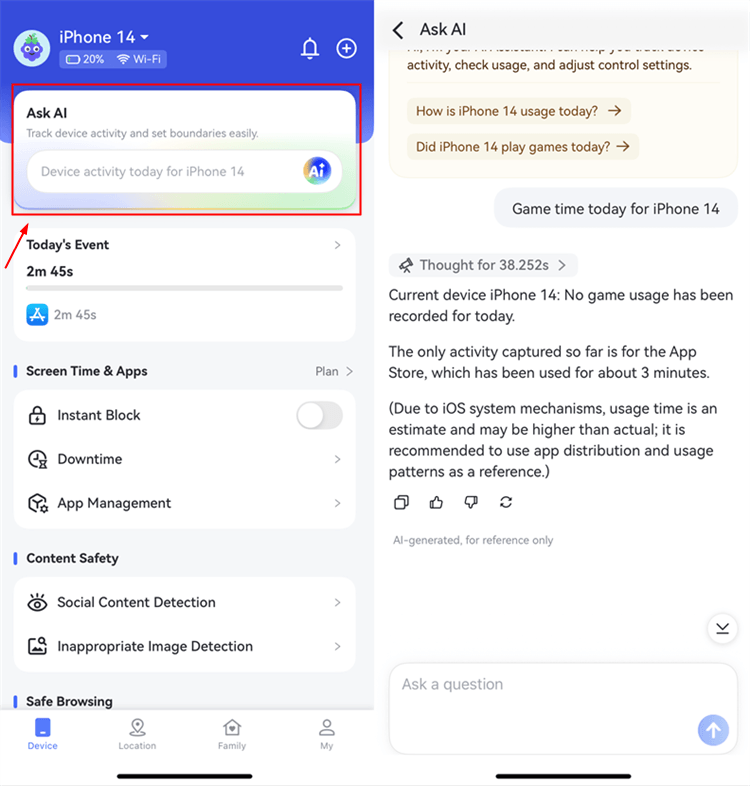
One feature that surprised us the most was "Ask AI", which allows parents to ask questions about their child's phone activity and quickly get insights without manually checking everything.
It is also worth mentioning that the $59.99/year subscription offers excellent value among parental control apps that allow Android parents to manage iOS devices.


Pros
- Smooth Android-to-iOS management experience
- Excellent iOS system controls
- Great value at $59.99/year
Cons
- Social media monitoring is currently limited to YouTube only
Qustodio — Best for Web Filtering & Screen Time Management
Qustodio is one of the most established parental control apps, offering screen time management, location tracking, web filtering, and activity monitoring across Android and iOS devices.
| Features | Rating | Notes |
|---|---|---|
| Cross-platform compatibility | 5/5 (Excellent) | Works across Android/iOS/Windows/Chromebook/Kindle |
| Call & SMS monitoring | 4/5 (Good) | Supports call and SMS tracking, but setup requires linking the phone with a computer, and data updates have delays |
| Screen time limits | 5/5 (Excellent) | Provides flexible schedules and routine-based screen time management |
| App blocking | 3/5 (Average) | Limited iOS app control; native apps like Safari and third-party browsers cannot be fully blocked or time-limited |
| Web restrictions | 5/5 (Excellent) | Filters websites based on 30 content categories for safer browsing |
| Location tracking | 4/5 (Good) | Includes accurate location tracking, geofencing, and 30-day location history |
| Social media monitoring | 2/5 (Limited) | Supports only WhatsApp and LINE; requires phone-computer linking and alerts delays |
| Ease of setup | 5/5 (Excellent) | Smooth setup process with guided permissions |
| Price | 4/5 (Good) | Basic plan: $69.99/year (quite limited); Complete plan: $124.99/year |
Our Hands-On Experience: Qustodio on iOS
During our hands-on test, Qustodio left the strongest impression with its smooth and straightforward setup process. Even for advanced features like SMS and social media monitoring, which require installing Qustodio on a computer to complete the setup, the entire process was well-guided and easy to follow.
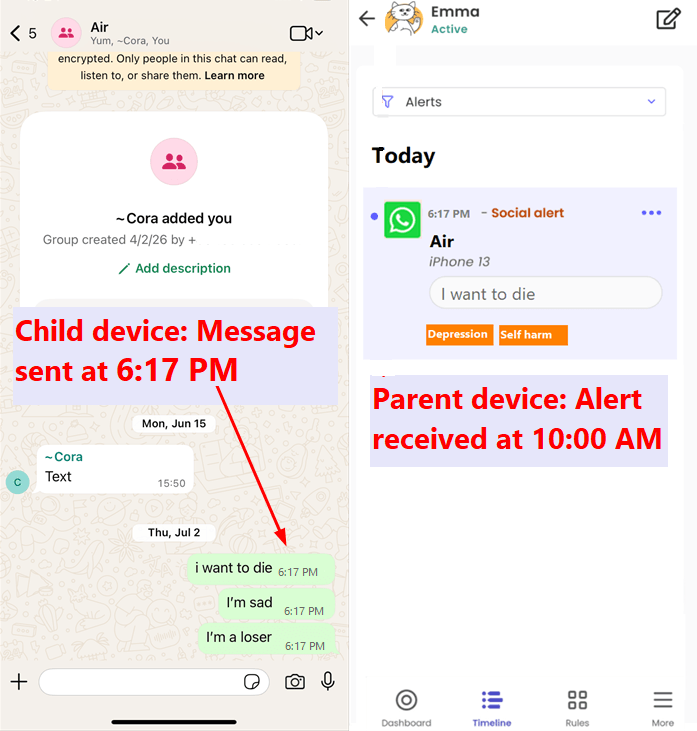
However, our testing also revealed some limitations. When monitoring apps like LINE and WhatsApp, we experienced noticeable delays, with some alerts taking up to 17 hours to appear.
In addition, Qustodio cannot block or set time limits for popular iOS browsers such as Safari, Chrome, and Firefox, which limits web usage control on iPhones.
Pricing is another consideration. While the Basic plan ($69.99/year) is available, its features are quite limited, meaning most families will likely need the Complete plan ($124.99/year) to access the full parental control experience. Compared with some competitors, this makes Qustodio a relatively expensive option for iOS monitoring.
Pros
- Flexible screen time management
- Call & SMS monitoring
Cons
- Slightly expensive
- Limited iOS native app control
- Can't block or set time limits on browsers
Bark — Best for Social Media Safety
With its powerful AI-driven content monitoring, Bark is a great choice for parents concerned about online safety. Keep in mind, though, that its capabilities are slightly limited on iOS.
| Features | Rating | Notes |
|---|---|---|
| Cross-platform compatibility | 5/5 (Excellent) | Works across Android/iOS/Windows/Chromebook/Amazon Fire |
| AI-powered safety alerts | 3/5 (Average) | Covers over 16 apps, but AI safety features are limited on iOS devices |
| SMS monitoring | 4/5 (Good) | Supports monitoring of iMessage conversations on iOS |
| App blocking | 3/5 (Average) | Apps can only be restricted based on predefined routines |
| Screen time limits | 5/5 (Excellent) | Provides reliable screen time management |
| Location tracking | 4/5 (Good) | Includes geofencing and 7-day location history |
| Ease of setup | 4/5 (Good) | Setup is straightforward, but some features have platform limitations |
| Price | 2/5 (Expensive) | $148/year with an additional $50/year charge for extra features |
Our Hands-On Experience: Bark on iOS
During our hands-on test, we found that Bark remains one of the strongest parental control apps for social media safety. However, its iOS monitoring experience is more limited compared with Android. Bark relies on three methods for iOS monitoring: the Bark Desktop app, Bark Sync Charger and Analyzer, or Bark Home.
The desktop method comes with several limitations — the child's iPhone needs to be on the same Wi-Fi network as the computer, and each scan requires the child's device passcode. As a result, many parents may need Bark Sync or Bark Home, but these options require an additional $49/year fee. This means full iOS social media monitoring can cost around $197/year.
We also noticed some reported issues with Bark's VPN-based filtering, including false alerts, delayed notifications, and connection problems, which may affect the overall user experience.
Pros
- AI alerts across 16+ iOS apps
- Strong focus on online safety
Cons
- Expensive: full AI alerts require $197/year
- Available only in select regions
OurPact — Best for Overall Screen Time Control
OurPact is great for low-maintenance control: set rules without constant monitoring, and easily manage your kid's iPhone straight from your Android.
| Features | Rating | Notes |
|---|---|---|
| Cross-platform compatibility | 3/5 (Average) | Supports Android/iOS |
| iOS native management capabilities | 5/5 (Excellent) | Provides advanced iOS system controls |
| App blocking | 5/5 (Excellent) | Can block iOS native apps and manage app access effectively |
| Web restrictions | 3/5 (Average) | Supports website whitelist and blacklist, but only provides one filtering category for adult content |
| Screen time limits | 3/5 (Average) | Allows daily screen time limits but does not support individual app time schedules |
| Live screenshots | 4/5 (Good) | Allows parents to view children's live screens through screenshots, with images stored for up to 2 weeks |
| Location tracking | 5/5 (Excellent) | Includes accurate location tracking, geofencing, and 30-day location history |
| Ease of setup | 4/5 (Good) | Setup is straightforward, but full protection requires completing additional setup on a computer |
| Price | 4/5 (Good) | Full Plan: $99.99/year |
Our Hands-On Experience: OurPact on iOS
During our hands-on test, OurPact performed impressively in managing iOS native apps and system restrictions.
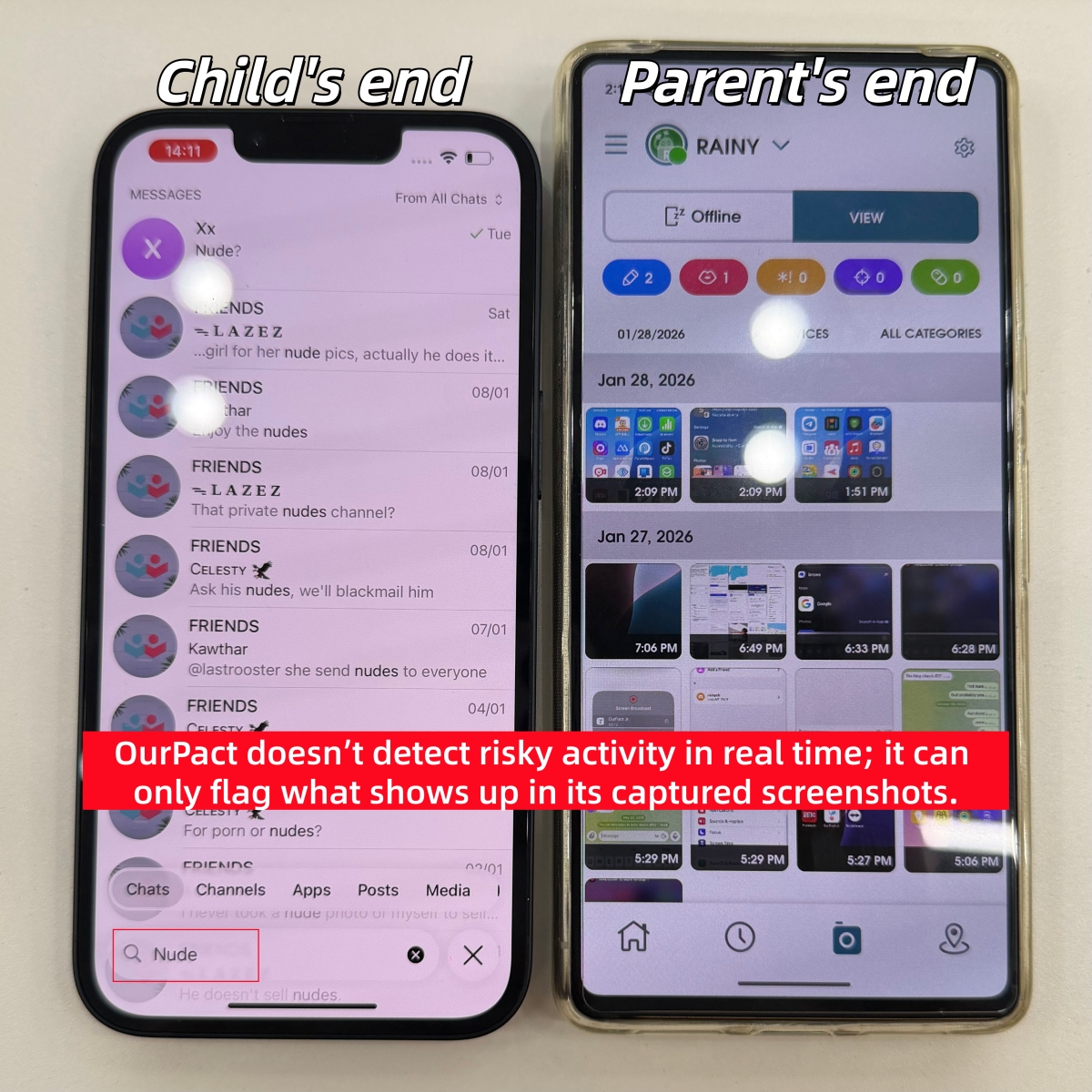
One feature that surprised us the most was View Screenshots. Parents can capture their child's iPhone screen in real time or set automatic screenshot intervals every few minutes.
The screenshots are saved directly in the parent app, and the feature worked smoothly during our testing, providing a clear view of children's device activity.
It is worth noting that OurPact's screenshot-based monitoring does not detect risky keywords in real time. Instead, it captures screenshots first and then analyzes the context within those images to identify potential concerns.
Pros
- Advanced iOS system controls
- Powerful app blocking
- Live screenshot monitoring
Cons
- Limited web filtering
- No app-specific time limits
- No real-time keyword detection
- Limited social media protection
Kidslox — Best Simple Parental Control App
Kidslox is a cross-platform parental control app that helps parents manage screen time, block apps, filter websites, and keep kids safer online.
| Features | Rating | Notes |
|---|---|---|
| Cross-platform compatibility | 3/5 (Average) | Works across Android/iOS/Web |
| iOS native management capabilities | 2/5 (Limited) | Supports limited iOS controls |
| Social media monitoring | 2/5 (Limited) | Monitors Instagram activity and YouTube uploads, but offers limited social media coverage |
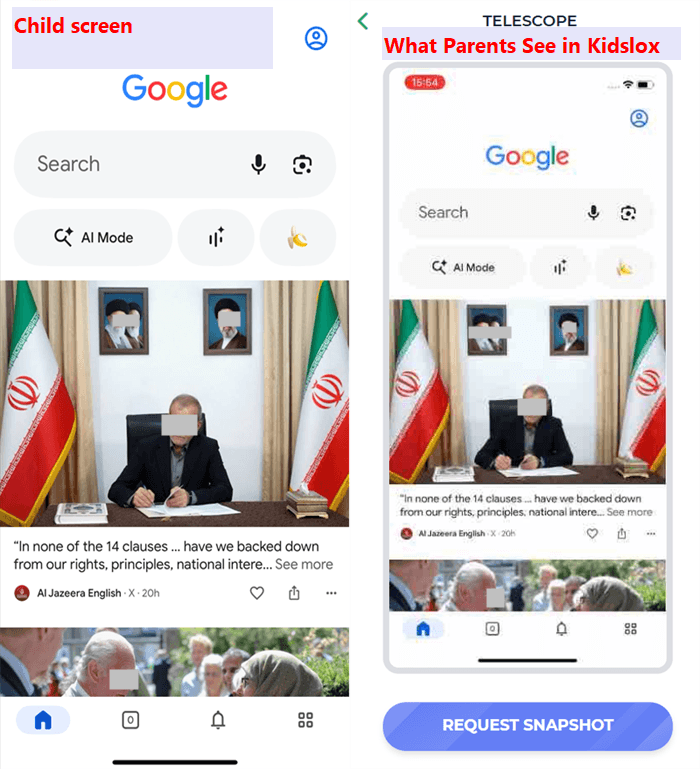
| Telescope | 4/5 (Good) | Allows parents to view the child's screen remotely, but may have some delay |
| App blocking | 5/5 (Excellent) | Can block iOS native apps and manage app access effectively |
| Nudity scanner | 4/5 (Good) | Scans photos in the child's gallery for potential nudity risks |
| Web restrictions | 4/5 (Good) | Supports website blocking, but does not provide category-based web filtering |
| Location tracking | 5/5 (Excellent) | Includes geofencing and 7-day location history |
| Screen time limits | 3/5 (Average) | Allows daily screen time limits but does not support individual app time schedules |
| Ease of setup | 5/5 (Excellent) | Quick setup process using a simple pairing code |
| Price | 4/5 (Good) | Basic plan: $49.27/year (limited features); Guardian plan: $105.59/year |
Our Hands-On Experience: Kidslox on iOS
During our hands-on test, Kidslox delivered a solid overall experience with smooth performance and an intuitive setup process. What impressed us most was its approach to screen time management — instead of simply limiting device usage, Kidslox encourages children to complete learning activities or household tasks in exchange for additional screen time.
This reward-based approach makes digital limits feel more collaborative and motivating for kids.
We also tested the Telescope feature, which allows parents to remotely view the child's screen. While the feature worked as expected, we noticed some delays during use.
In addition, Telescope requires approval and cooperation from the child's device, meaning the overall experience can be affected by how willing the child is to participate.
Pros
- Batch block apps by category or custom groups
- Real-time screen viewing to monitor activity
- Reward screen time for completing assigned tasks
Cons
- Lacks website blocking by category or topic
- Requires a high level of cooperation from your child
FAQ for Android Parents with iPhone Kids











Leave a Reply.