How to Find Out What Social Networks Someone Is On
Trying to find someone's social media profiles? Whether you're reconnecting with an old friend, verifying fake accounts, or making sure your young child isn't using apps they shouldn't, there are legitimate ways to see their public social networks.
However, not every method works on every platform, and privacy settings can limit what you find. In this guide, you'll learn:
- which methods are most effective
- what information you need to get started
- and why some accounts can't be found
Before You Search: Know What's Actually Possible
Before trying any tools or methods, it's important to understand one thing: whether you can find someone's social networks depends on how searchable the platform is and what info about the person you can have.
For example, finding someone's LinkedIn profile using their real name is often straightforward. Finding a WhatsApp account with just a username is rarely possible.
So, What Do You Already Have?
| What You Already Have | Recommended Method |
|---|---|
| Phone number or email | Sync contacts |
| Their name or username | Reverse search |
| Profile photo | Reverse search |
| Their device | Check app list |
| None of the above | Your chances are limited |
Methods to See What Social Media Someone Is On
Here's how to actually run each method. We tested each of these methods firsthand to see which ones actually find social media profiles.
1Use the Built-in Contacts Syncing Feature
👍Works on: Facebook, Instagram, WhatsApp, TikTok, Snapchat, LinkedIn, and X.
Many social media apps require phone numbers or email during signup. That phone number later gets used to suggest new friends and secure the account.
That means, by allowing the platform to access and sync your phone contacts, you can discover if the person is on this social network in the "People You May Know" section.
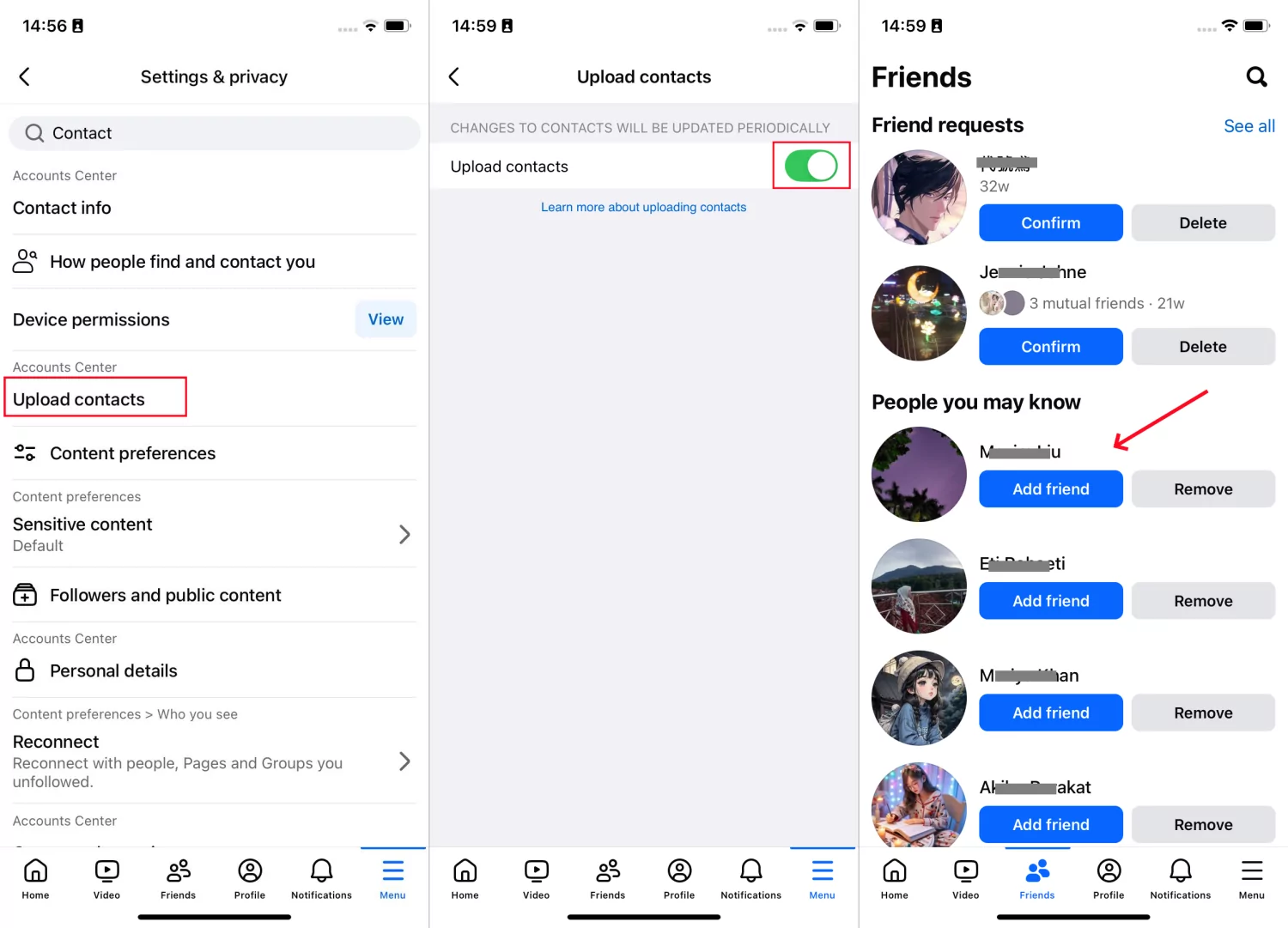
Here's how to find someone’s social media with a phone number (using Facebook as an example):
- Step 1. Make sure you've saved the person's phone number.
- Step 2.Open Facebook and go to its Settings menu.
- Step 3.Search for contact and tap on Upload contacts. Turn it ON.
- Step 4.After that, select Friends from the bottom menu.
- Step 5.Refresh to see if someone you're looking for shows up in the suggested friends list.
When it works:
- You already have the person's phone number.
- They registered the account with that number.
- They haven't turned off contact discoverability.
When it doesn't:
- They signed up with an email or a different phone number.
- They disabled contact syncing or account discoverability.
- They kept their account private.
- The platform limits contact-based account suggestions.
2Reverse Search by Username or Profile
Some people reuse the same handle or the same profile photo across multiple platforms out of habit or because picking a new identity for every app is friction.
Search engines and reverse-lookup tools exploit that consistency. You give them a single input (a handle, a name, or an image), and they check it against many platforms at once, reporting back actual profiles if they find a match.
💡This method is efficient if you need to find someone on all social media. But note that not every tool is accurate.
🔍Username or name reverse search:
- Search their known or preferred handle directly in each platform's search bar.
- Or you can use the format like this on Google: [their username] site: [URL of the social platform you need to search].
- Also, some reverse lookup tools can check dozens of platforms at once for a match.
⚠ We don't recommend third-party lookup tools
The FTC has warned about inaccurate and outdated results from these tools.
I tested this myself: both Dialaxy Social Media Checker and Social Catfish returned no results for phone numbers I used to sign up for Facebook and Instagram accounts.
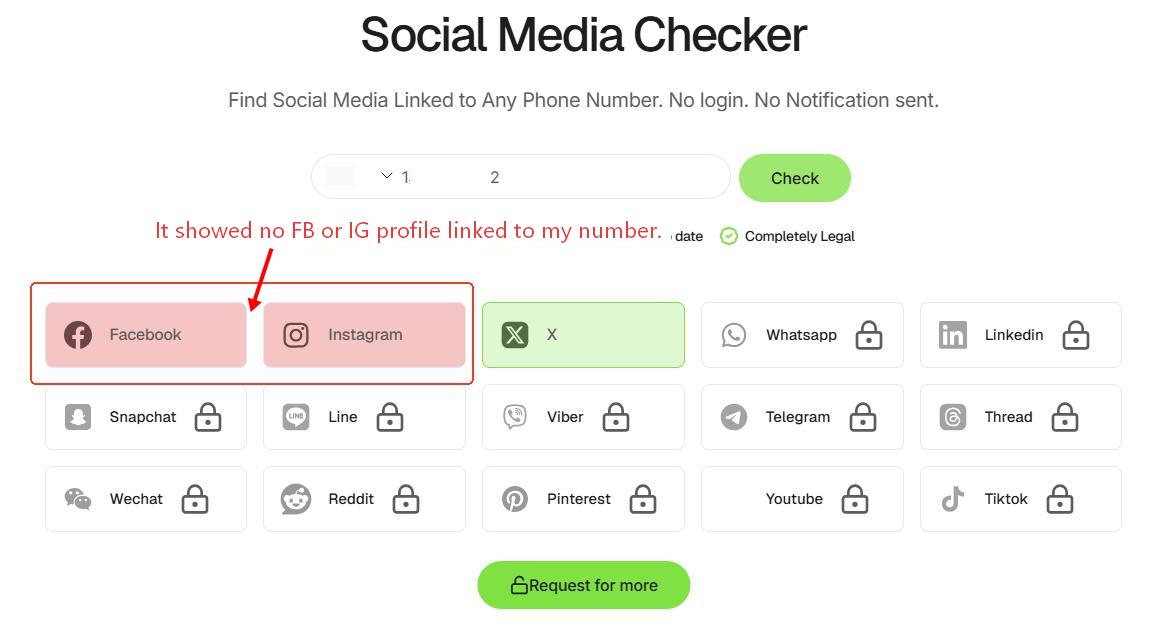
Screenshot: Dialaxy Social Media Checker's search results for a phone number linked to a known, active account
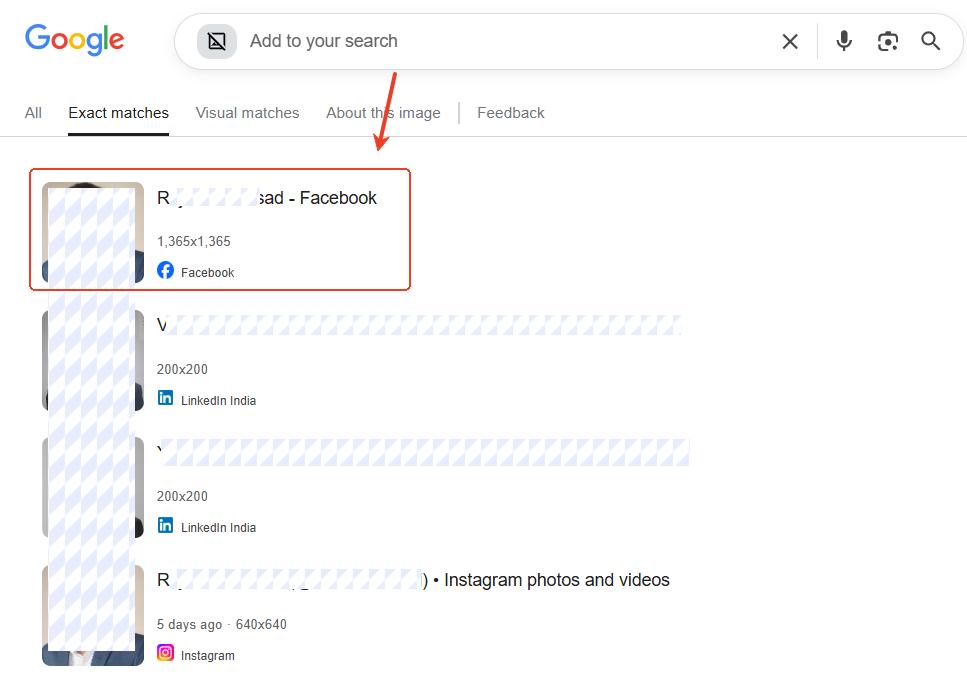
🔍Reverse image search:
Upload the person's profile photo to Google Images, TinEye, or a similar reverse image search tool. Then, the matching results may surface profile links on the matched platform.
When it works:
- The person's profiles are public.
- They reuse the same username across multiple platforms.
- Their profile photos are uncommon, or they're their own selfies.
When it doesn't:
- They use different usernames for every platform.
- Their accounts are private.
- They use different profile photos or aliases.
3Check What Social Apps They Installed
Sometimes you don't need to find someone's social media accounts; you simply need to know which social platforms they're using.
Since AAP unveiled 38% of tweens (aged 8 to 12) report social media use, many parents also want to know if their children bypass the age restriction to use social media.
In this case, checking the apps installed on the device is often faster and more accurate than searching online.
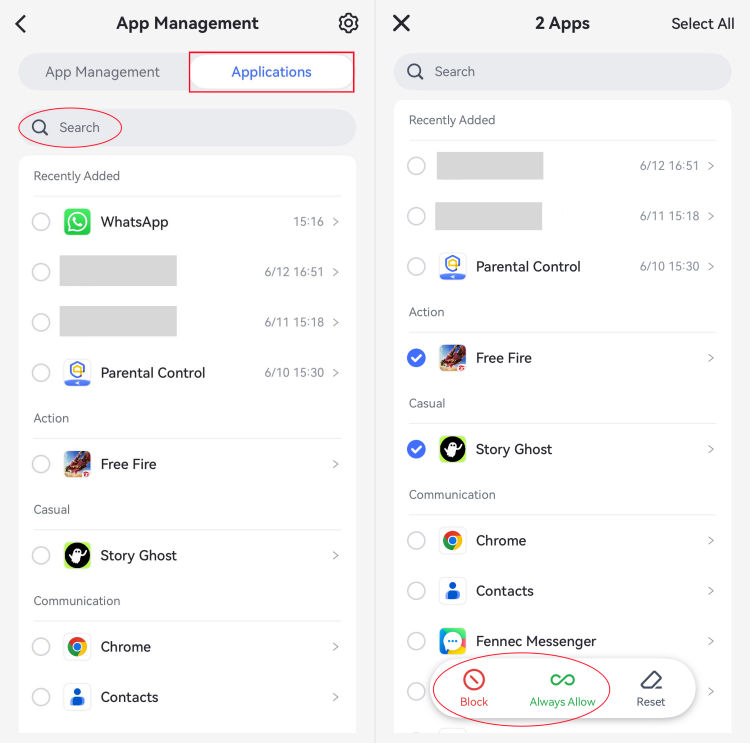
You can review apps after accessing their phone or remotely check installed apps through parental control apps like AirDroid. To use AirDroid:
- Step 1.Download AirDroid Parental Control on your device or open the web portal.
- Step 2.Launch it and connect your child's Android or iPhone.
- Step 3.Go to App Management > Applications.
- Step 4.Then, you can view or search for what social apps they are having and using.
When it works:
- You have permission to access that device.
- You only want to know which social platforms are installed, not exactly the profile.
When it doesn't:
- The person uses web versions instead of apps.
- The social app has been deleted before you check.
Why You Still Can't Find Someone
If you've tried the methods above and come up empty, it's usually not because you did something wrong or the person doesn't use social apps. Instead, it's because of the following:
Their account is private or not searchable
Many social platforms limit what appears in search results when an account is private. So, you may find nothing even if you entered the correct username in the search bar or reverse lookup tools.
While you may find that an account exists, you might not be able to view the profile details, their posts, or message them.
The Info You Have Might Be Outdated or Just Wrong
Think of it like trying to call a friend using a phone number from five years ago. It probably won't work, right? The same thing happens when you find out what social networks someone is on.
- Old email or phone number: They may have changed their mobile number and updated it on their social accounts. If you search with the old info, you'll find nothing.
- Real name vs. online name: Most people don't use their real name on social media. They go by nicknames or random handles. If you don't have that handle, you're looking for a needle in a haystack.
- Too many people with the same username. If you're searching for "Mike Johnson," you'll get dozens or even hundreds of profiles. How do you know which one is the right account you're looking for?
FAQs










Leave a Reply.