AirDroid Parental Control
24/7 Kids' Guardian via App & Web
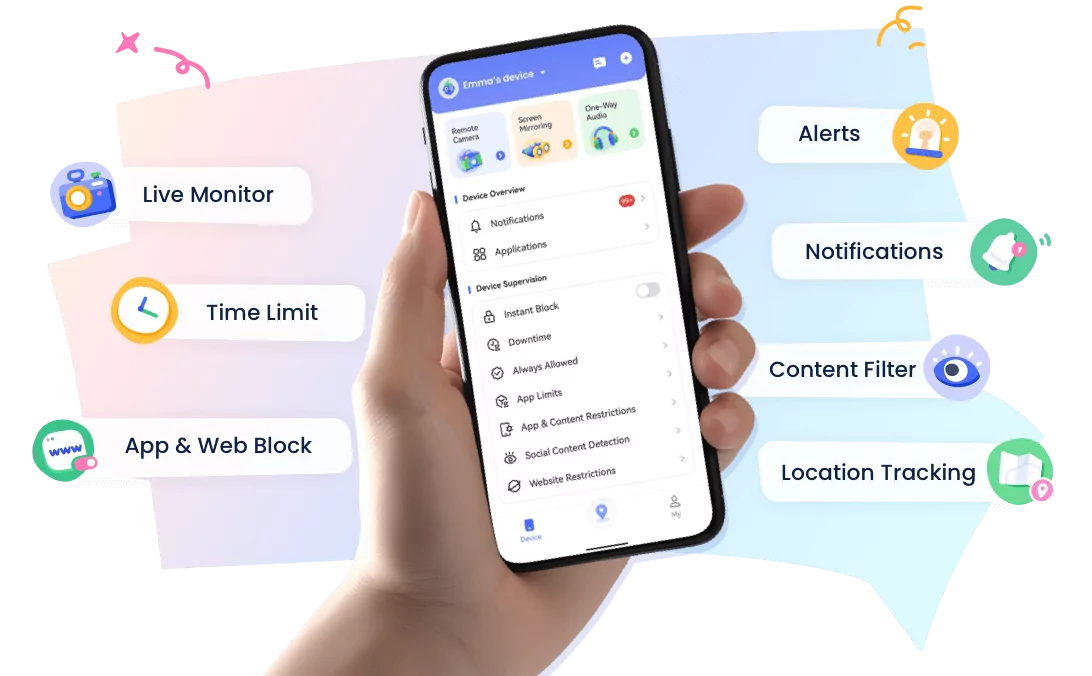
- 👀Live surroundings and location tracking
- 🔞Content Monitoring and App/Web Blocking
- ⚠Instant alerts for online risks and geofences
- ⌛Screen time control and monitor
AirDroid vs OurPact: Which Is Better for Android Parents with iPhone Kids?
Quick Recommendation
For Android parents managing iPhone children, choosing a parental control app depends on device compatibility and family needs:
- Choose AirDroid Parental Control if you need a cross-platform solution to manage screen habits, location safety, and online wellbeing across Android and iOS devices.
- Choose OurPact if you mainly need iOS-focused screen time scheduling and app management.
- The Real Challenge: Managing an iPhone Child's Device from Android
- AirDroid vs OurPact: Different Approaches to Parental Control
- AirDroid Parental Control: Best Fit for Android Parents with iPhone Kids
- OurPact: When Does It Make Sense?
- AirDroid Prental Control vs OurPact Comparison
- Which Should Android Parents Choose?
A common question among parents is: "Can an Android parent manage an iPhone child's device without using another iPhone?"
In today's multi-device households, parents and children often use different operating systems—such as an Android phone for the parent and an iPhone for the child.
Consequently, effective screen time management requires a cross-platform parental control solution. AirDroid Parental Control and OurPact are two leading multi-platform options parents frequently compare.
The Real Challenge: Managing an iPhone Child's Device from Android
Apple's parental control features, such as Screen Time and Family Sharing, work best when parents and children are both using Apple devices. For Android parents, managing an iPhone child's device may require a cross-platform solution.
Many families today use different devices across generations. A common situation is that parents use Android phones while their children use iPhones.
In these mixed-device families, parents often look for a way to support their children's digital habits, including:
- Managing screen time and encouraging healthy device routines
- Setting appropriate digital boundaries
- Staying informed about a child's location for family safety
- Supporting safer online experiences
However, managing an iPhone from an Android phone can be challenging. Apple's built-in parental control tools are mainly designed for families within the Apple ecosystem, which may be less convenient when parents and children use different operating systems.
For families with mixed devices, cross-platform parental control apps can provide a more practical way to support children's digital wellbeing while helping parents stay connected and informed.
AirDroid vs OurPact: Different Approaches to Parental Control
Both AirDroid Parental Control and OurPact help families create healthier digital habits, but they are designed with different family needs in mind.
| App | Best For | Designed For |
|---|---|---|
| OurPact | iOS-focused families | Screen time management and device scheduling |
| AirDroid Parental Control | Android parents with iPhone children | Cross-platform family safety across Android and iOS devices |
The best choice depends on each family's situation. For households using different mobile platforms, cross-platform compatibility can be an important factor when choosing a parental control solution.
AirDroid Parental Control: Best Fit for Android Parents with iPhone Kids
AirDroid Parental Control is designed for mixed-device families, especially situations where parents use Android phones while children use iPhones.
1. Designed for Cross-Platform Families
Unlike Apple-only parental control solutions, AirDroid Parental Control helps bridge Android and iOS devices, making it a practical option for families who do not share the same mobile ecosystem.
One of the biggest challenges for modern families is managing digital experiences across different operating systems.
As a cross-platform parental control solution, AirDroid Parental Control is especially suitable for families where parents and children use different operating systems, such as Android parents managing iPhone children. It helps bridge the gap between Android and iOS devices, allowing families to build healthier digital routines without everyone needing to use the same type of device.
2. Helps Parents Guide Healthy Screen Habits
Healthy technology use is not only about limiting screen time. It is also about helping children develop balanced digital habits and making thoughtful choices about how they use their devices.
AirDroid Parental Control helps parents create healthy screen routines through features such as app management, flexible schedules, instant blocking, and downtime settings. These tools allow parents to set age-appropriate boundaries while respecting children's growing independence.
3. Family Safety Beyond Screen Time
Digital wellbeing also includes helping families stay connected when children are away from home. Beyond screen time management, AirDroid Parental Control provides family safety features such as location sharing, location history, and geofence alerts.
These features are designed to help parents stay informed when children are commuting, traveling, or participating in outdoor activities. Rather than simply tracking a child's location, they provide parents with greater awareness and peace of mind in everyday family situations.
4. Online Safety Support
As children spend more time online, parents may want to better understand their digital experiences and support safer internet habits.
AirDroid Parental Control includes online safety features such as YouTube safety support, keyword alerts, websites blocking, web time limits, and inappropriate image detection. These tools can help parents identify potential concerns and create opportunities for meaningful conversations about responsible online behavior.
OurPact: When Does It Make Sense?
OurPact is a parental control solution that focuses on helping parents manage children's device usage, especially within Apple-focused families. It provides tools for managing screen time, apps, web access, and location awareness.
1. Designed for iOS-Focused Families
OurPact can be a suitable choice for families looking for parental controls within the iOS ecosystem. It provides iOS device management features that help parents create healthy technology routines and set appropriate boundaries for children's device usage.
For parents who mainly use Apple devices or prefer an iOS-focused approach, OurPact provides a straightforward way to manage children's screen habits.
2. App Management and Screen Time Scheduling
One of OurPact's main focuses is helping parents manage how children use their devices. Parents can use features such as app blocking and screen time scheduling to create balanced device routines.
These tools are useful for families who want a simple way to set limits around app usage and encourage healthier screen habits.
3. Web Restrictions and Digital Boundaries
OurPact also provides web restriction features that allow parents to help manage children's online access. This can be useful for families who want to create a safer browsing environment and establish appropriate digital boundaries.
4. Screen Viewing and Location Awareness
OurPact includes features such as live screenshots and location tracking to help parents stay informed about their children's digital activities and whereabouts.
The live screenshots feature allows parents to view children's screens through captured images, which are stored for a limited period. Location tracking can also help parents stay connected during daily activities such as school commutes or family trips.
AirDroid Prental Control vs OurPact Comparison
| Family Situation | Recommended Choice |
|---|---|
| Parent uses Android, child uses iPhone | AirDroid Parental Control |
| Parent and child both use Apple devices | Apple tools/ OurPact / AirDroid Parental Control |
| Need cross-platform family management | AirDroid Parental Control |
| Need iOS-focused app scheduling | OurPact |
| Need location safety features | AirDroid Parental Control / OurPact |
Which Should Android Parents Choose?
For families already using Apple devices, OurPact provides a convenient way to manage screen time and app usage.
However, families with Android parents and iPhone children may need to place more importance on cross-platform compatibility.
FAQ










Leave a Reply.