Every Kid Wants an iPhone, But Is It the Right Choice?
Already decided your child is ready for their first phone? Now comes another harder question many parents google: which phone is better for them?
With 87% of teens using iPhones, many parents assume Apple is the best choice. However, the popular doesn't always mean safe and appropriate.
In this guide, we'll walk you through the real pros, the often-missed risks, and how an iPhone stacks up against Android.
Why So Many Parents Prefer iPhone as a First Phone?
When parents start searching for their child's first smartphone or kids demand it, the iPhone almost always ends up at the top of the consideration list. Then, why iPhones often come as the first choice:
1 iPhone Makes Communication More Seamless
For many parents and kids, buying a phone is mainly about communication and safety. And iPhone offers a major practical advantage.
iPhones and other Apple devices come with FaceTime, Find My, and iMessage, making it easy to stay connected just through Apple Family Sharing or Apple accounts.
Additionally, with around 60% of smartphone users in the US using iPhones, many parents are already part of the Apple ecosystem themselves. As such, adding an iPhone for their child becomes a natural option.
2 Apple Has Parental Controls for Families
Since 2018, Apple has introduced the Screen Time tool. This parental control feature is baked into iOS and forced for children under 13.
Without extra apps or subscriptions, many parents feel the iPhone's built-in parental controls are more secure and reliable.
Besides, compared with Android devices, Apple's parental controls are deeply integrated into the Apple ecosystem, making it much easier for parents to manage their child's device with other family members.
3 iOS Is Recognized as Secure and Clean
Security is another reason many parents trust iPhones.
On the one hand, App Store moderation is famously strict and privacy-focused. Low-quality, violent, sexually explicit, or privacy-invasive apps face a high chance of removal.
Take OmeTV, a video chat app that was warned by the eSafety Commissioner for child grooming and exploitation. Then, Apple immediately restricted the app, while it still remains available on Google Play currently.
On the other hand, scam apps, hidden malware, and risky third-party app stores are far less common on iPhones. This is mainly because iPhones don't support sideloading, the primary way Android devices get infected.
4 Outstanding Durability and Resale Value
It has to be admitted that iPhones maintain smooth long-term operation and have extremely low lag probability, even for second-hand or old models.
And more importantly, Apple supports iPhones with iOS updates for five to six years after release. Put it more plainly, a child using an iPhone 12 in 2026 can still receive security patches in iOS 26. That's why some UK and US parents consider preowned iPhones for back-to-school needs, especially under the impact of inflation.
5 Apple Takes Users' and Kids' Privacy Seriously
For general users, Apple goes further than just basic permission management.
Since iOS 14.5, App Tracking Transparency (ATT) requires every app to explicitly ask for permission before tracking a user's activity across apps and websites. This significantly prevents users' data from being used for advertising sharing with data brokers.
For children, Apple was among the first major tech companies to publicly align with COPPA. Its privacy policy also stated that apps are prohibited from running advertising or analytics tools for children under 13.
Common Misconceptions Parents Have About iPhone
Well, you may think getting your child an iPhone feels like a safe choice, right? Many parents assumed the same. But some of these misconceptions may create risks:
❌ iPhone is safer than Android for kids.
❌ Screen Time is enough to keep my child protected.
❌ The App Store means every app is safe to use.
❌ iMessage is just for texting; how risky can it be?
❌ Age ratings on the App Store are reliable.
❌ AirDrop is just for sharing photos with family.
❌ Older kids don't need extra limits or supervision.
Sound familiar? You have the same assumption? That's exactly the problem and where the risk begins.
Potential Risks of an iPhone that Parents Can't Miss
Even after you spot and correct those misconceptions, there are real risks baked into the iPhone that you should watch out for:
1 iMessage and Airdrop Can Expose Kids to Unexpected Content
Most parents worry about mainstream social media like Instagram or TikTok, but ignore native Apple features.
iMessage allows unknown numbers (scam included) to send your child texts, photos, or links. And AirDrop can receive anonymous explicit images in public places. This isn't a rare occurrence.
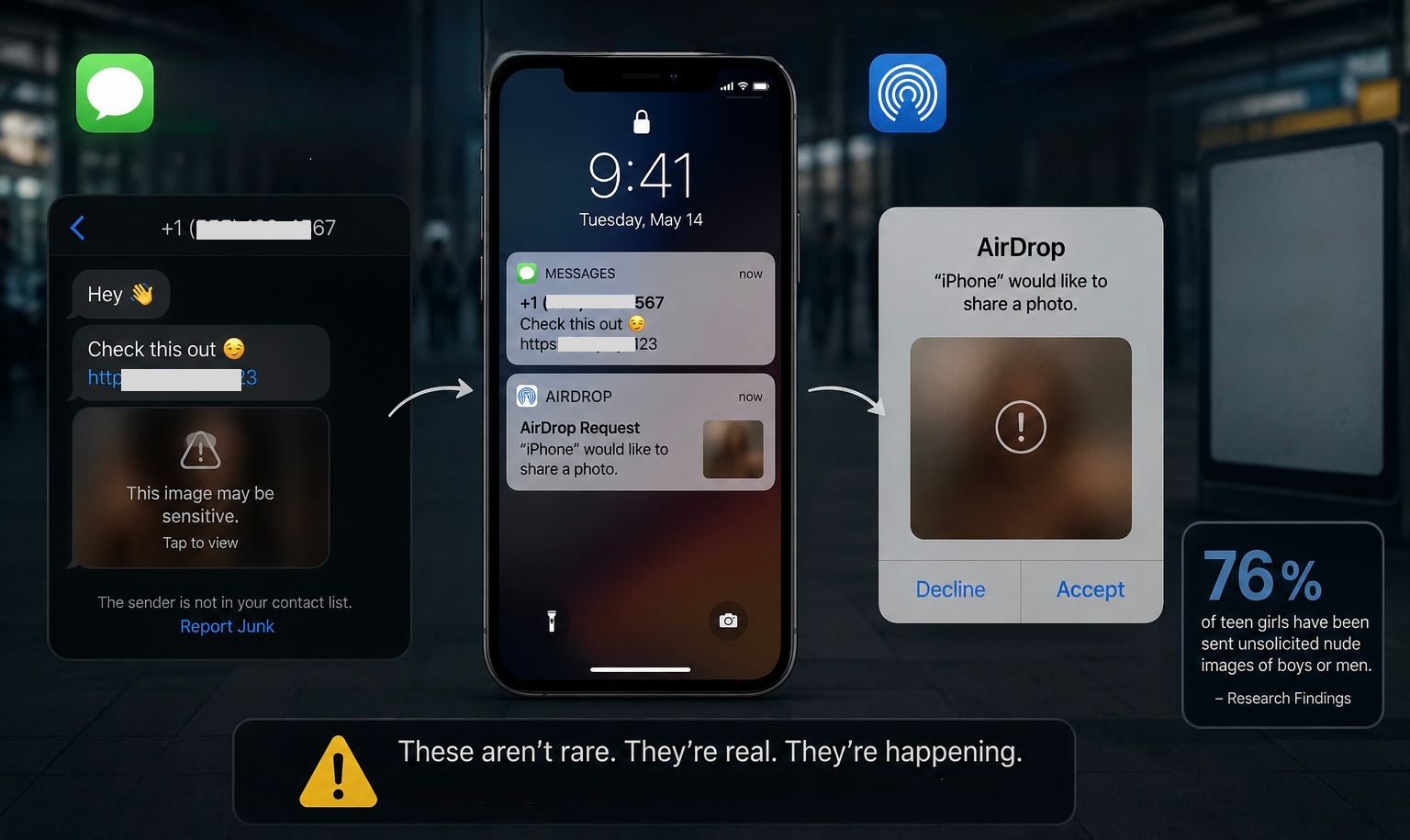
As early as 2019, online safety experts warned that AirDrop was being misused for "cyber flashing," the phenomenon of sending unsolicited explicit images to strangers in public spaces. The victims were often minors. Later research also proved that 76% of teen girls have been sent unsolicited nude images of boys or men.
2 Photo Metadata Can Reveal the Precise Location
iPhones tag photos with GPS location data, which can reveal where your child was when he or she took them. Fortunately, many messaging and social media apps currently strip the metadata when the photo is shared.
However, if your child sends it through files, messages, emails, or AirDrop, they may be sharing their home address, school location, or daily routine without realizing it.
3 Screen Time Restrictions Are Easier to Bypass Than You Think
Many parents assume that once Screen Time is enabled, their child's phone usage is fully under control. But the fact is, tech-savvy kids always find ways to work around restrictions and share them with peers.
Since Screen Time is also designed for individuals who want healthier device habits, it still leaves room for flexibility and workarounds.
Worried this may happen to you?
Read our detailed guide to identify these bypass tricks and stop them. Or 10 million parents choose a more foolproof solution because AirDroid offers a supervised mode that's harder to bypass.
4 Apple's Seamless Experience Can Cause Screen Addiction
Apple devices' interfaces are fluid, responsive, and almost frictionless. The smooth experience makes iPhones so hard to put down, whether for adults or children.
Additionally, the pull-to-refresh gesture, autoplay, infinite scroll, and algorithm-driven curated feed in apps like TikTok, Instagram, and Snapchat are intentionally designed to keep users engaged for as long as possible.
And they work. According to Pew Research data, around 20% of teens aged 13-17 said they use YouTube and TikTok almost constantly.
5 The Social Pressure of the Latest iPhone Is Real
Apple releases new iPhone models every year. For children and teenagers, it has also become a social status symbol.
This creates a recurring pressure cycle that doesn't end at the first purchase. They may keep up with other classmates to upgrade to newer devices. This is why the UK's back-to-school survey also found that 74% of kids push their parents to buy the latest iPhone because other parents are buying one for their children too.
iPhone vs Android for Kids: Which One Is Better
By now, you've been thinking, if the iPhone has this many hidden dangers, should I just buy my kid an Android instead? It's a fair consideration. Here's how the two systems actually compare across key dimensions:
Parental Controls: Android Wins
The reason is simple: Android's built-in Google Family Link enforces restrictions at the system level that are significantly harder for children to get around.
During our testing, Family Link automatically locks account changes and forbids device resetting for the child's account. That means it is impossible for kids to uninstall or disable it without parental approval. While iPhone's Screen Time has known workarounds.
Additionally, Android allows for far deeper device monitoring than iOS does, whereas iOS comes with many more restrictions.
For example, SafeWise's testing found that many parental control features available on Android don't exist on iPhone, such as SMS or social media monitoring, uninstall prevention, etc.
Ease of Use: iPhone Wins
Though Android has become more user-friendly over the years, iPhone's "polished" user experience still shines.
The iOS interface is highly consistent across all iPhones and iPads: the same layout, settings structure, and navigation. For young users who already use an iPad at home or at school, this simplicity reduces the iPhone's learning curve.
Android, by contrast, varies by manufacturer. For instance, Samsung's One UI runs a totally different interface from a Motorola or a Google Pixel.
Value & Durability: iPhone Wins
While Android phones are generally cheaper than iPhones upfront, iPhones retain their value far better in the long term. A 2025 report shows that after 12 months, an iPhone still holds around 69% of its original price, while a comparable Android retains just 43%.
And this cuts costs for families. You can start with a hand-me-down model for your child, and when your child needs to upgrade it, you can recover more from resale than you would with an Android device.
The Verdict: Is iPhone a Good First Phone for Kids?
The real answer to "Is the iPhone safe or right?" has never lived inside the device. No phone is childproof by default.
To make an iPhone safe for kids, you, as a parent, should treat the iPhone setup seriously based on your child's age and maturity level. Just take 20 minutes to lock down some iPhone settings, such as AirDrop, Ask to Buy, adult content, etc. Then keep open communication.
Also, AAP suggests creating a Family Media Plan to set boundaries around digital media for your child, in line with your family's values and routines.











Leave a Reply.