A: Acknowledge the peer pressure: "I understand it feels like everyone is doing it." Then explain: "But just because something is popular doesn't make it safe. My job is to keep you safe, even when it's not popular." Offer alternatives that meet their social needs.
Is OmeTV Safe for Kids? No. Here's What to Do If Your Child Is Using It
Quick Answer
OmeTV is not safe for kids. If you've just discovered OmeTV on your child's phone, you're right to be concerned. In 2025, Australia's online safety regulator warned that OmeTV exposes children to grooming and sexual exploitation risks — and the app was removed from local app stores following the investigation.
In addition, a 2024 investigation by BBC found that minors on OmeTV were repeatedly exposed to sexually explicit behavior, harassment, and attempts by adults to move conversations to private messaging apps. Reporters creating teen profiles quickly received inappropriate requests from strangers, confirming these risks are real.
This isn't just a harmless social app. It connects children with strangers in real time, often without effective safeguards.
>>>Here's what you should do right now.
⏱️ 5-Minute Emergency Plan
⚠️ This is for immediate damage control — do this before reading anything else.
❌ Don't confront your child first — this will push them to hide better
❌ Don't delete evidence — you may need it later
If you just discovered OmeTV on your child's device, do this RIGHT NOW:
- Take screenshots of everything you found.
- Uninstall the OmeTV app immediately.
- Check for similar apps (Monkey, Chatroulette, Holla, Yubo.)
- Enable airplane mode to cut connections.
- Read the full guide below when you have 10 minutes.
Signs Your Child May Be Using OmeTV (or Similar Apps)
Many kids hide apps like OmeTV. Watch for these warning signs:
| Behavioral Sign | What to Look For |
|---|---|
| Hides their screen | Quickly switches apps or turns off screen when you walk in |
| Stays up late | Video chatting in their room late at night |
| Talks to unknown people | Mentions "friends" you've never heard of |
| Secretive about phone | Keeps device face-down, won't let you see it |
| New apps appear | Apps you didn't install show up on their device |
| Mood changes | Withdrawn, anxious, or defensive about online activities |
| Receives gifts/money | Mentions someone sent them something online |
⚠️ If you notice 3 or more of these signs, it's time to check their device.
The Parent's 3-Step Action Plan
If you've confirmed your child is using OmeTV, here's your roadmap:
STEP 1: BLOCK & LIMIT
Immediate damage control. Remove access to OmeTV and similar apps.
- 1. Uninstall OmeTV from your child's device.
- 2. Block the app from being reinstalled (App Store/Google Play restrictions.)
- 3. Check for similar apps: Monkey, Chatroulette, Holla, Yubo.
- 4. Set up downtime/focus mode during risky hours (evenings, late night.)
STEP 2: COMMUNICATE
Talk to your child about why OmeTV is dangerous. Don't just forbid—educate.
- 1. Ask: "What do you like about talking to strangers online?"
- 2. Explain: "Not everyone online is who they say they are."
- 3. Share real examples (see case studies below.)
- 4. Create a family agreement about online safety.
STEP 3: MONITOR & PROTECT
Set up ongoing safeguards to prevent future risks.
- 1. Use parental controls to monitor app installations.
- 2. Enable content filtering for inappropriate material.
- 3. Set up location alerts and SOS features for emergencies.
- 4. Schedule regular check-ins about online activities.
Feeling overwhelmed? That's completely normal. You don't need to fix everything at once—just start with Step 1 today. The rest can follow.
💙 If this feels overwhelming, you're not alone — many parents only discover apps like this after their child is already using them. The important thing is that you found it and you're taking action now.
What Is OmeTV? (And Why Kids Are Drawn to It)
OmeTV is a random video chat app that pairs users with strangers for live video conversations. Think of it as Omegle's mobile successor—the platform that shut down in 2023 after 14 years of lawsuits alleging child abuse and predatory behavior.
Why kids use it:
- They've seen YouTubers or TikTokers using it for "funny reactions."
- They want to make new friends or practice English with foreigners.
- They're curious about talking to strangers—it feels exciting and "grown up."
- It's free and easy to access (just need a Facebook or VK account.)
The problem: OmeTV has virtually no meaningful age verification. Users simply click "I am 18+"—no ID, no parental consent, no verification. This makes it trivial for children to access, and equally easy for predators to find them.
The 5 Real Risks: What Actually Happens on OmeTV
1. Your Child Taps 'Start'—and Sees Nudity Within Seconds
OmeTV has no content filtering. The moment your child starts a chat, they could be exposed to:
- Nudity and sexual acts (extremely common on these platforms)
- Graphic violence or disturbing imagery
- Hate speech and extremist content
- Drug use and illegal activities
📌 Case Study: The Oregon Coercion Case
In a lawsuit filed by parents, an 11-year-old girl was matched with an adult who threatened to hack her device and expose her location unless she complied with his demands on camera. The encounter was recorded without her consent, highlighting how quickly these interactions can escalate into coercion.
Source: Courthouse News
Moreover, Europol has reported multiple cases where offenders used random video-chat apps like OmeTV to identify minors, build trust, and move conversations to encrypted channels for further exploitation.
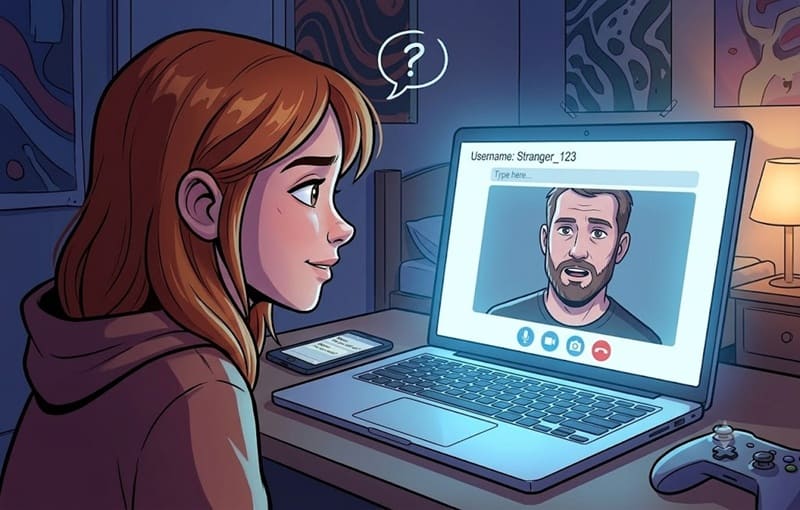
2. A 'Teenager' Asks for Their Social Media Account—but It's a 31-Year-Old Predator
The anonymity of OmeTV attracts sexual predators who specifically target children. Grooming tactics include:
- Pretending to be another child or teenager
- Asking seemingly innocent questions to build trust
- Requesting personal information (school, location, social media accounts)
- Pressuring children to share photos or perform acts on camera
- Attempting to move the conversation to private messaging apps
📌 Case Study: The Florida Predator
In 2023, 31-year-old Gabriel Amador of Florida was arrested for using Omegle and Instagram to target underage girls. He sent explicit images to a 16-year-old girl and attempted to meet her in a parking lot. Amador faced multiple charges including transmission of harmful material to a minor and attempted sexual misconduct, carrying a potential sentence of life in prison.
Source: Source: FOX 35 Orlando, 2023
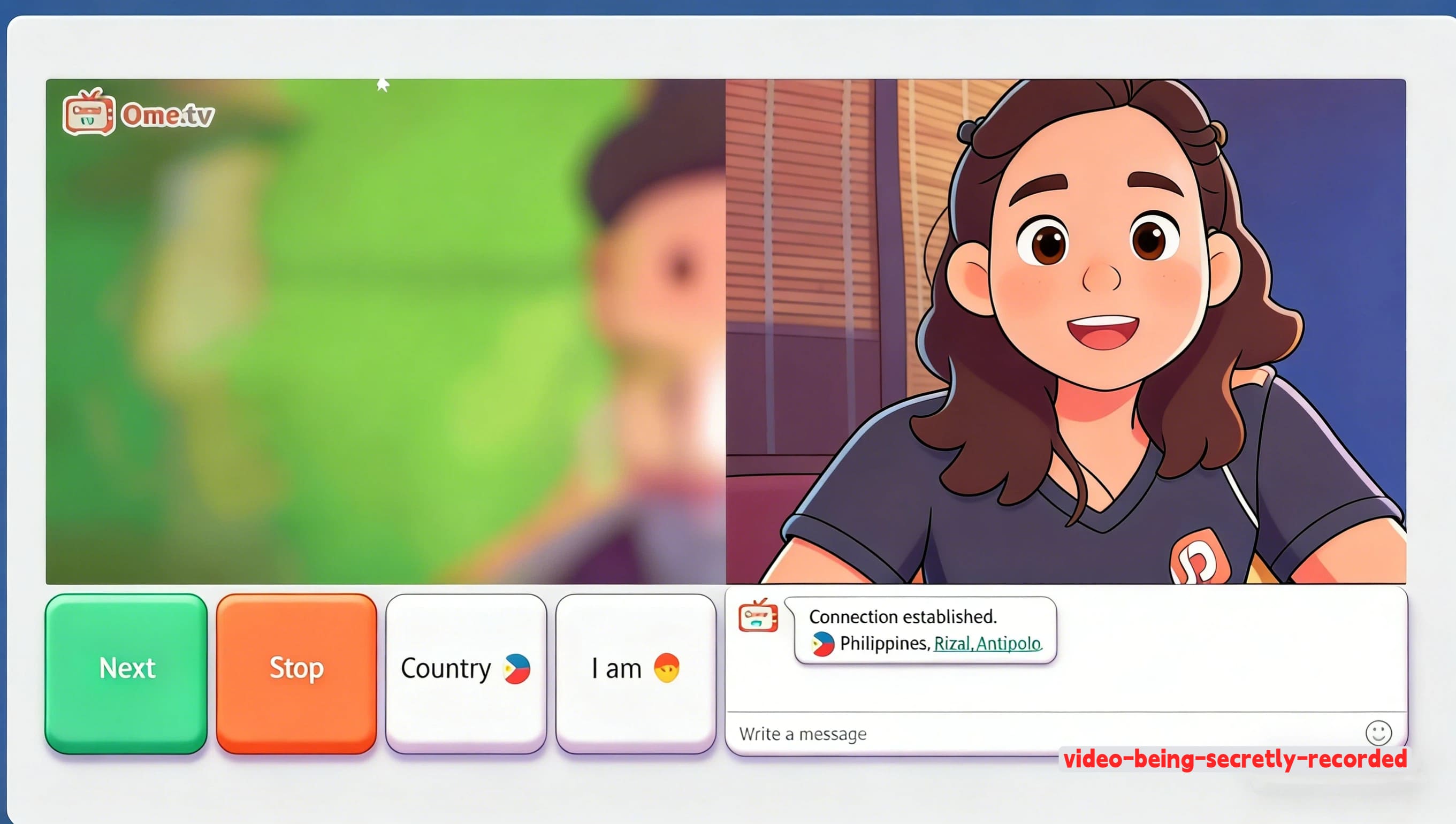
3. Someone Records Your Child—and Shares It Online Forever
Every video chat on OmeTV can be recorded without your child's knowledge. These recordings can:
- Be shared on social media or adult websites
- Used for blackmail or sextortion
- Remain online indefinitely, affecting future opportunities
📌 Case Study: The Virginia Predator
In 2023, a Manassas, Virginia man was sentenced to 16 years in prison for using Omegle to sexually exploit approximately 1,000 girls as young as 7 years old. The offender engaged in sexual video chats with minors aged 7 to 17, secretly recorded more than 70 of them undressing, and distributed the content online.
Source: FOX 5 DC, 2023
4. Your Child Is Called 'Ugly' by a Stranger—and Can't Stop Thinking About It
In the U.S., there have been reports of teens being extorted using screenshots or recordings from OmeTV chats. One teenager described being threatened to share private content unless she complied with demands, showing how quickly emotional harm can escalate into sextortion.
The anonymous nature of OmeTV brings out the worst in people. Users report:
- Verbal abuse about appearance, voice, or background
- Racist, sexist, or homophobic slurs
- Threats and intimidation
- Recording and sharing embarrassing moments without consent
A Quora user shared: "People call me ugly on OMETV and I can't stop thinking about it. What should I do?"
5. It's Getting Harder to Know Who You're Really Talking To
Emerging technologies like AI-generated faces are making it harder to verify who you're talking to—adding another layer of uncertainty to these platforms. Predators can now:
- Generate realistic video of a teenager's face in real-time
- Mimic voices to sound like a peer
- Create convincing fake backgrounds and environments
This is why "video chat" is no longer a safety guarantee. Even if your child sees someone's face, they may not be seeing who they actually are.
Apps Similar to OmeTV Parents Should Know
OmeTV isn't the only app that connects users with strangers through random video chat. In fact, there are many similar platforms — and they often come with the same risks.
Even if you remove OmeTV, some children may simply switch to another app without telling you. That's why it's important for parents to understand the broader landscape.
Here are some apps that work in a similar way:
- Monkey – A random video chat app popular among teens, often used to meet strangers quickly.
- Chatroulette – One of the earliest random video chat platforms, known for minimal moderation.
- Holla – A swipe-based video chat app that connects users instantly with strangers worldwide.
- Yubo – A social discovery app that includes live streaming and friend-matching features.
While these apps may look different, they share the same core issue: they allow children to interact with strangers in real time, often without effective safeguards.
That means the risks — such as exposure to inappropriate content, grooming, or pressure to move conversations to other platforms — don't disappear just because one app is removed.
What matters isn't blocking a single app — it's making sure your child is protected across all similar platforms.
In the next section, we'll show you how to protect your child — not just from OmeTV, but from this entire category of apps.
How to Block OmeTV on Your Child's Device
Android Devices
- Step 1. Open Google Play Store on your child's device.
- Step 2. Tap the profile icon → Settings → Family → Parental controls.
- Step 3. Turn on parental controls and create a PIN.
- Step 4. Under "Apps & games," select the age rating you want to allow (choose "Rated for 12+" to block apps like OmeTV.)
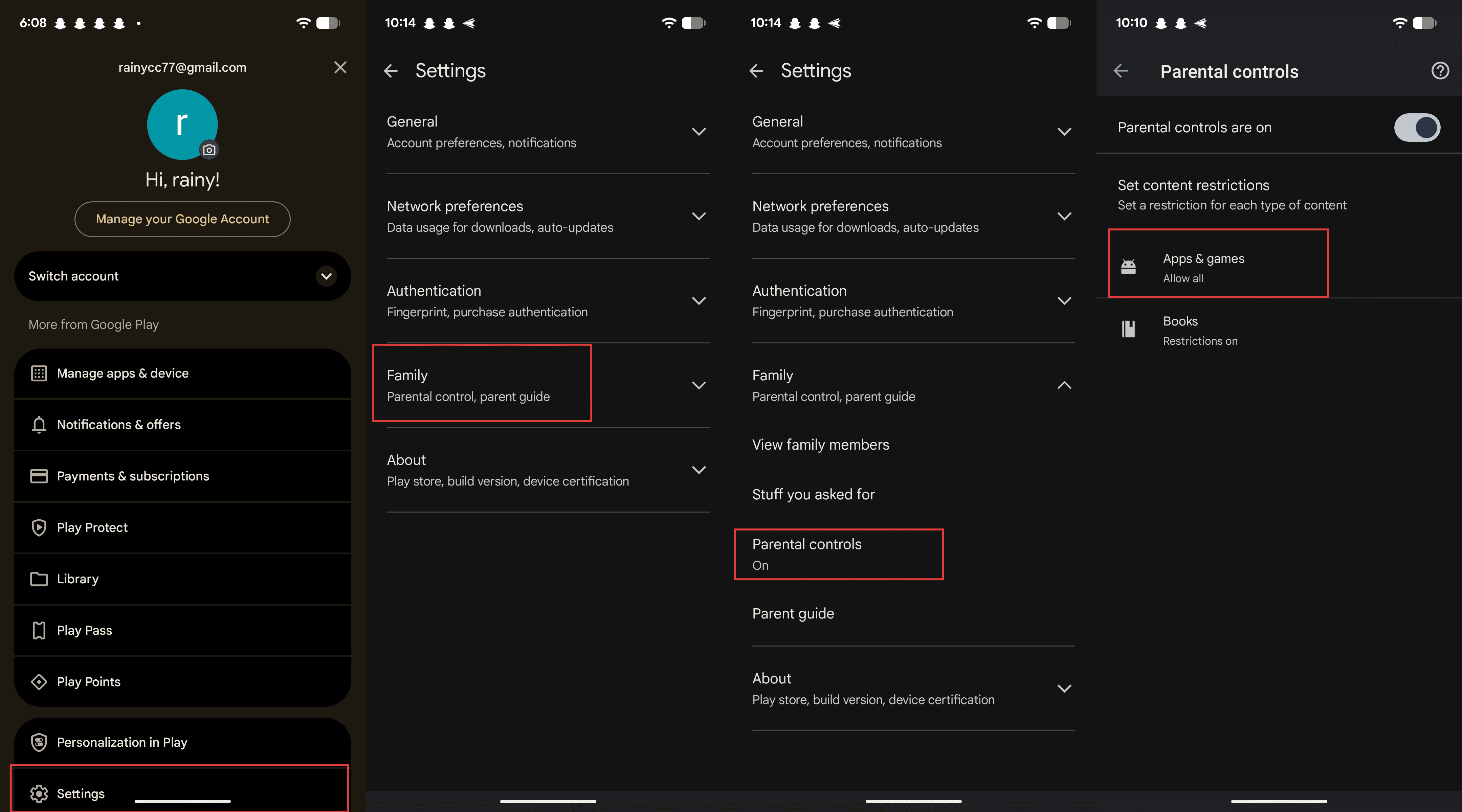
Limitation: Built-in controls can be bypassed if your child knows the PIN or uses a different account. For stronger protection, see the section below on comprehensive parental control tools.
iPhone/iPad
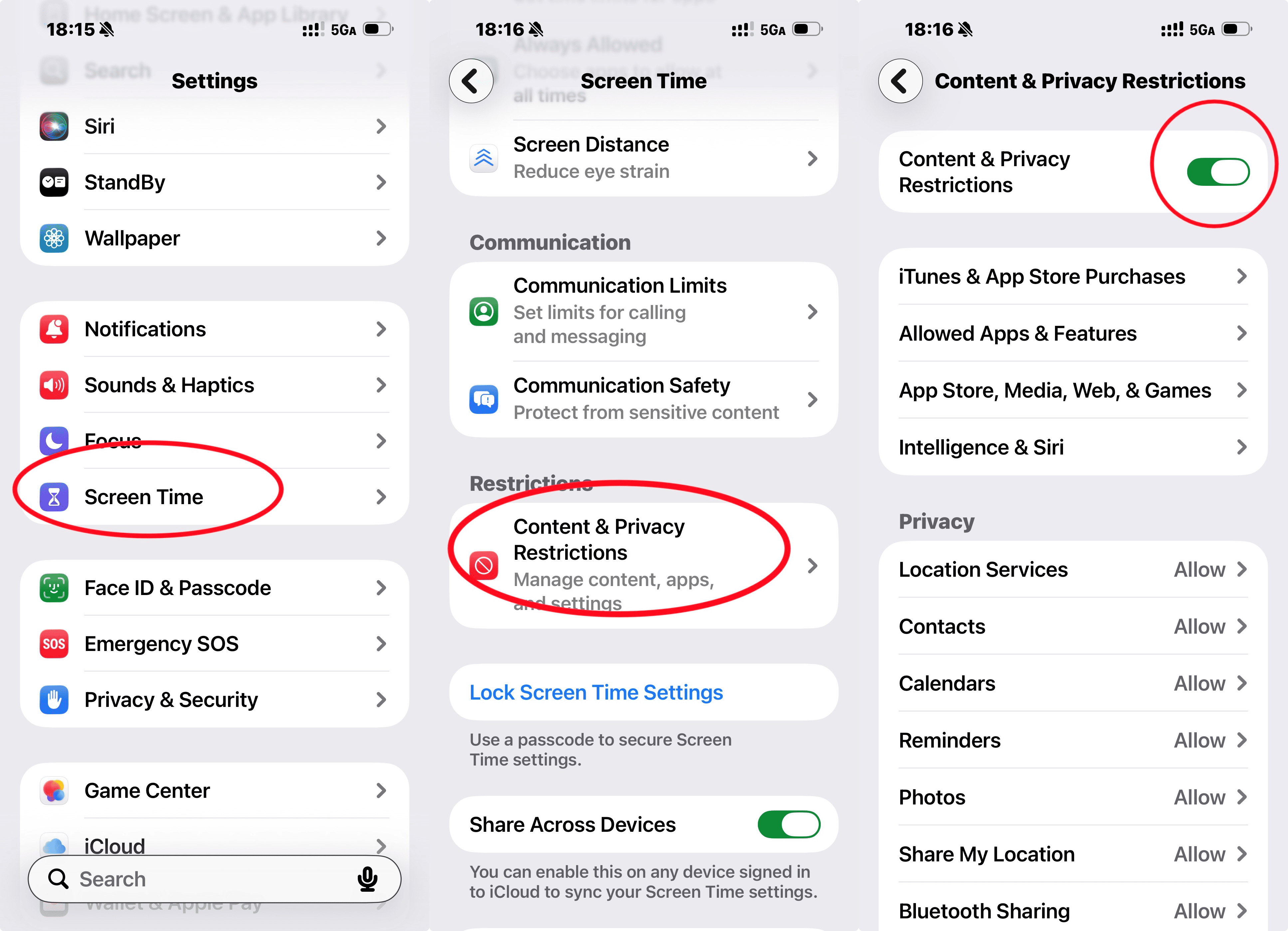
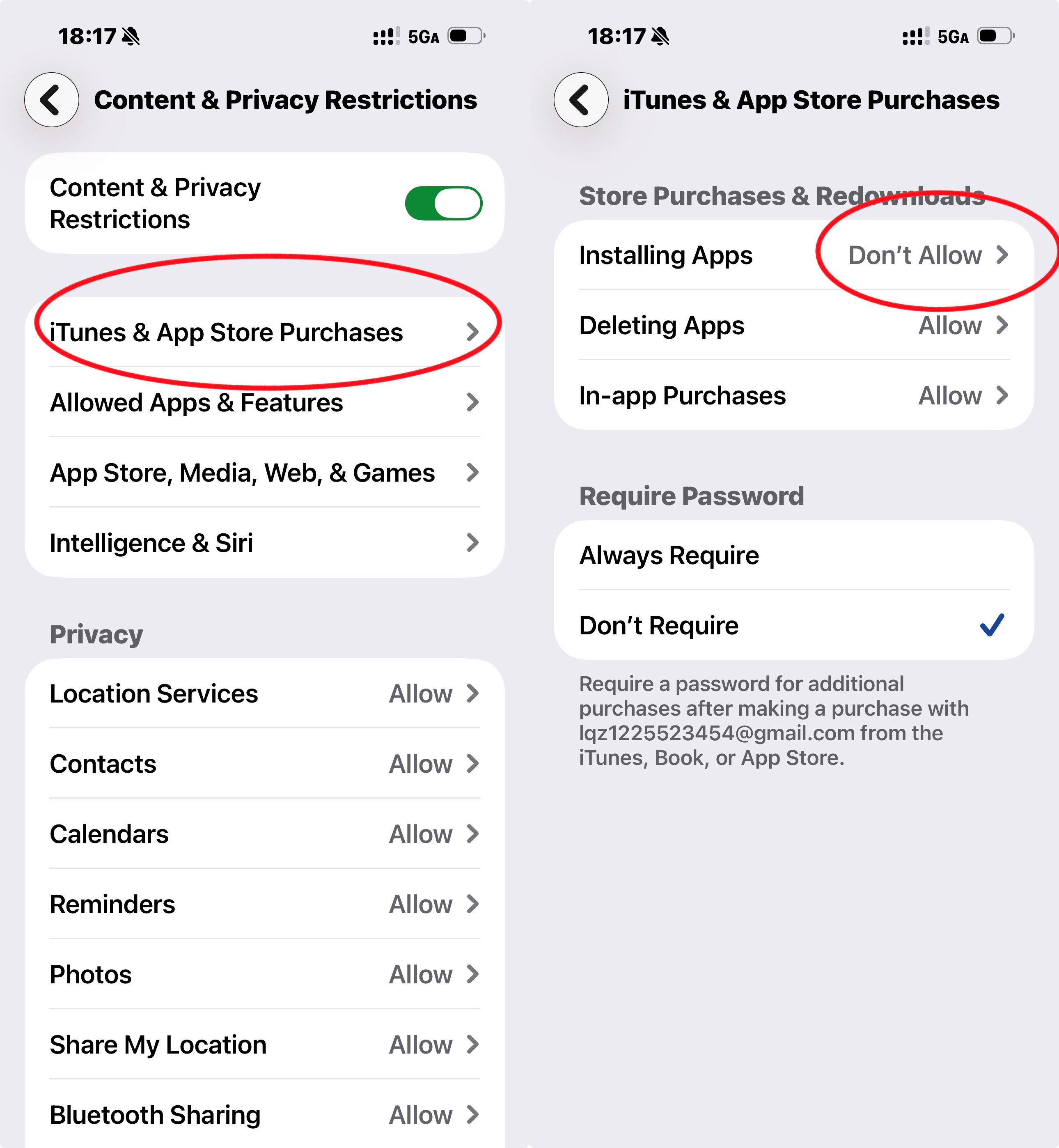
- Step 1. Open Settings → Screen Time → Content & Privacy Restrictions.
- Step 2. Turn on Content & Privacy Restrictions.
- Step 3.
- Option A - Block all new apps: Tap "iTunes & App Store Purchases" → Set "Installing Apps" to "Don't Allow."
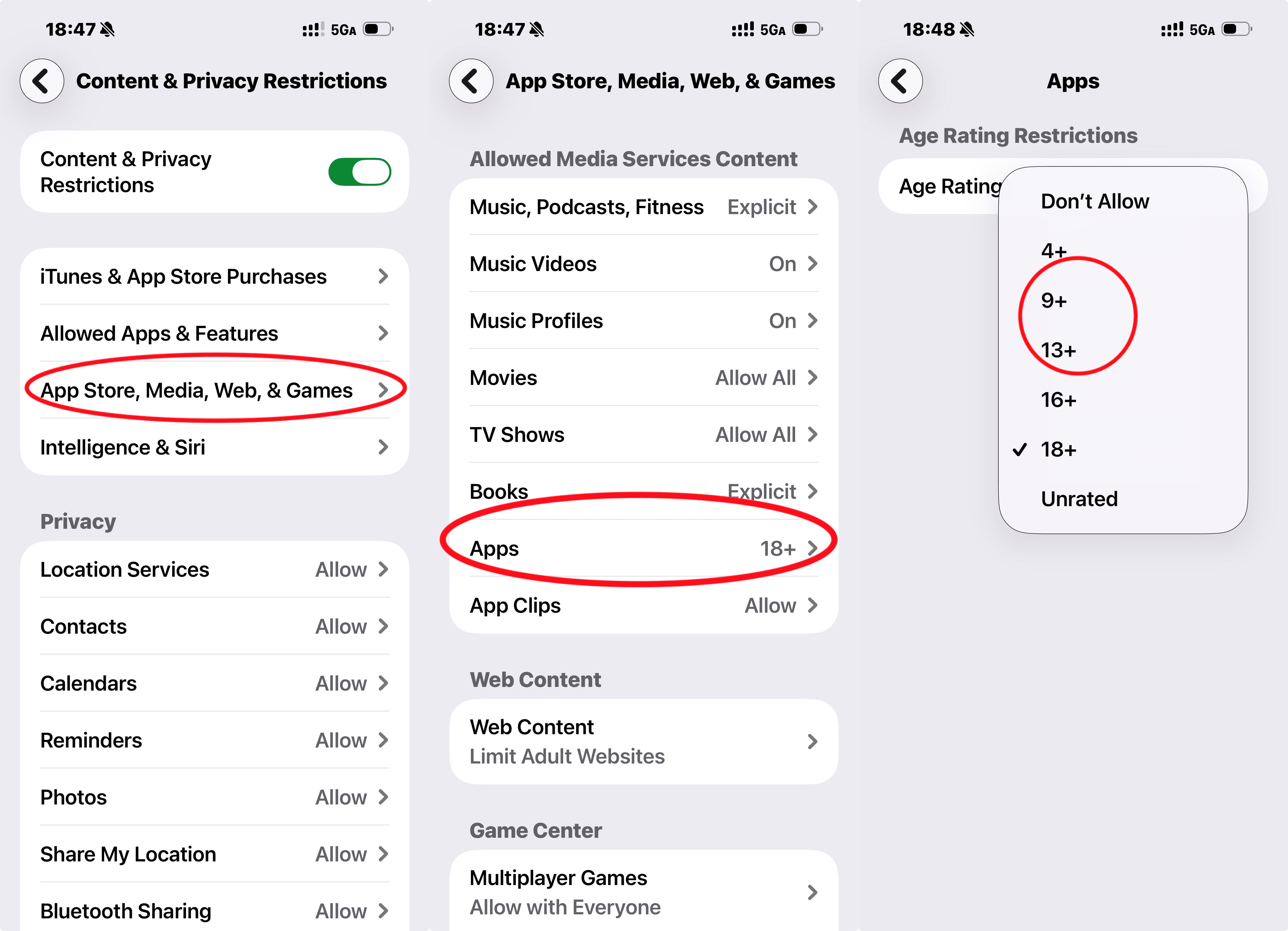
- Option B - Filter by age rating: Under Content & Privacy Restrictions, tap "APP Store, Media, Web & Games" → Tap "Apps" → Select the maximum age rating you want to allow (choose 9+ or 13+ to block apps rated 17+ like OmeTV.)
To remove OmeTV: Long-press the app → Tap "Remove App" → "Delete App."
Note: The age rating options are: 4+, 9+, 13+, 17+, and Allow All Apps. Selecting 9+ or 13+ will block apps rated 17+ including OmeTV.
If Something Already Happened: Emergency Response
🚨 IF YOUR CHILD SHARED INTIMATE IMAGES OR WAS GROOMED
This is a potential crime. Here's what to do:
- PRESERVE ALL EVIDENCE — Don't delete anything
- CONTACT LAW ENFORCEMENT — File a report with your local police
- REPORT TO CYBERTIPLINE — 1-800-843-5678 or cybertipline.org
- DOCUMENT EVERYTHING — Screenshots, dates, usernames, conversations
- SEEK SUPPORT — Contact a child psychologist or counselor
- NOTIFY THE SCHOOL — If the predator may be local or another student
🚨 IF SOMEONE THREATENS TO SHARE IMAGES (SEXTORTION)
- DO NOT PAY OR COMPLY — This only escalates the situation
- STOP ALL COMMUNICATION — Block the person immediately
- DOCUMENT THE THREATS — Screenshot everything before blocking
- REPORT TO FBI — ic3.gov(Internet Crime Complaint Center)
- CONTACT LOCAL POLICE — File a report immediately
- NOTIFY THE PLATFORM — Report the user to OmeTV or other platforms involved
When Built-In Controls Aren't Enough
In many cases, parents find that built-in device controls aren't enough—especially when kids reinstall apps or hide activity. That's where more advanced parental control tool AirDroid App Blocker can help.
Here's what comprehensive protection looks like:
- 1. If your child tries to reinstall OmeTV, you can block it instantly and receive alerts about the attempt.
- 2. If something feels off, you'll receive alerts about suspicious activity in their messages and apps.
- 3. In urgent situations, you can quickly check what's happening through screen mirroring or remote access (with prior consent and appropriate legal compliance).
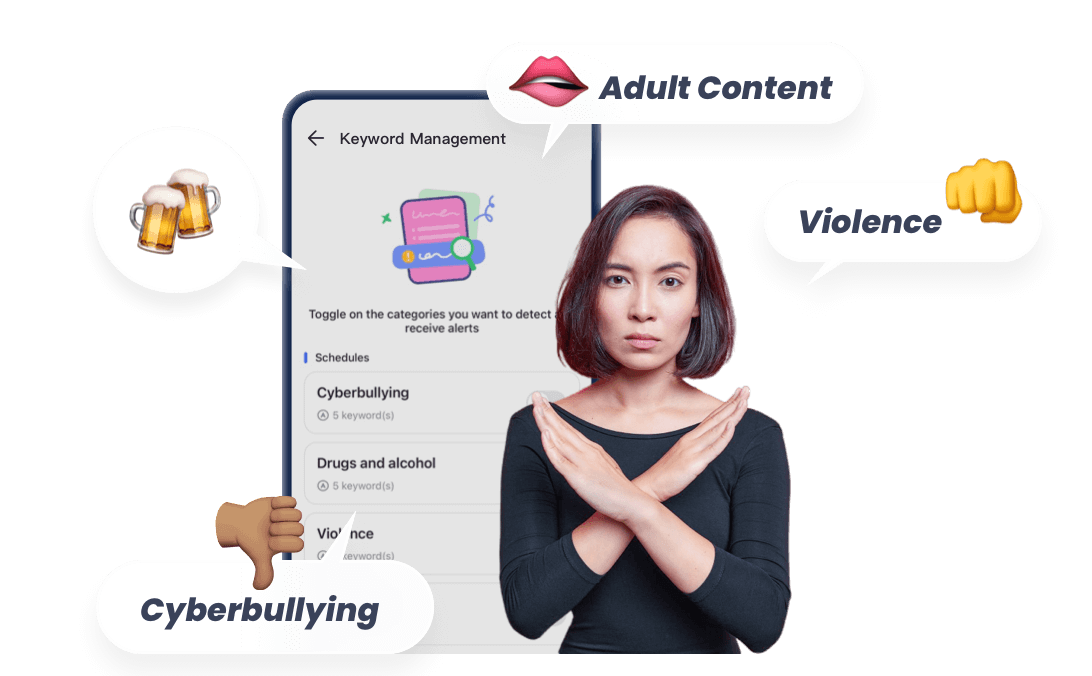
On Android devices, AirDroid Parental Control adds an extra layer of protection by detecting sensitive or sexual content across SMS, social media apps, and AI chat tools like ChatGPT, Gemini, and Character AI, and sending real-time alerts when concerning activity is detected.


Safer Alternatives for Kids Who Want to Connect
If your child is using OmeTV to make friends or socialize, offer these safer alternatives:
| If Your Child Wants... | Try This Instead | Why It's Safer |
|---|---|---|
| To make new friends | Supervised Discord servers, school clubs, sports teams | Known communities with adult supervision |
| To practice languages | HelloTalk (with parental monitoring), language exchange programs | Profiles verified, report systems in place |
| Entertainment/Fun | Roblox (with chat disabled), Minecraft, age-appropriate YouTube | Moderated content, no random video chat |
| Attention/Feeling seen | Family activities, hobbies, creative outlets | Positive reinforcement from trusted adults |
Frequently Asked Questions
Q: My child says 'everyone uses it'—how do I respond?
Q: Should I tell my child I'm monitoring their device?
A: Yes. Secret monitoring destroys trust when discovered. Frame it as: "I'm not spying on you—I'm protecting you from people who might hurt you. As you get older and show good judgment, we'll adjust the level of monitoring."
Q: What if my child is over 18?
A: Adults have the right to privacy. However, if they're living at home or you're supporting them, you can set house rules about device use. Focus on education rather than control. If you have serious concerns, consider family counseling.
Q: How do I know if monitoring is working?
A: Look for these signs: Your child comes to you with problems, they make good digital choices even when unsupervised, they question suspicious online interactions, they understand why certain apps are blocked. The goal is raising a digitally literate adult, not just controlling a child.
Conclusion
Here's the truth: OmeTV is just one app in an endless stream of risky platforms. Even if we shut down OmeTV today, three more would appear tomorrow.
Regulators and platforms are under increasing pressure. In 2025, Australia's eSafety Commissioner removed OmeTV from local app stores after warnings about child exploitation risks. Similarly, companies like Meta are taking action against apps that expose minors to sexualized content, highlighting that industry-wide safeguards are becoming more stringent.
What matters isn't blocking every app. It's building a system that protects your child, not just today, but for the long term.
That system includes:
- Technical controls that adapt as new threats emerge
- Open communication that keeps you in the loop
- Digital literacy that helps your child protect themselves
- A relationship of trust where they come to you first
Start with the 5-minute plan above. Then build from there. You've got this.
Legal Notice by Region
- 🇺🇸 United States: Parental monitoring of minor children is generally legal with appropriate disclosure. Remote camera/audio features should be used only for safety verification in emergencies.
- 🇪🇺 European Union (GDPR): Parents have legitimate interest to monitor children under 16. Children 16+ have enhanced privacy rights. Always inform children of monitoring.
- 🌍 Other regions: Consult local laws regarding parental monitoring and children's privacy rights. This guide is for informational purposes and does not constitute legal advice.
List of Sources
- Quick Answer
- Australia's online safety regulator - eSafety warning on OmeTV (https://commsroom.co/popular-video-chat-app-warned-by-esafety-for-failing-to-protect-children-online/ )
- The Parent's 3-Step Action Plan
- Common Sense Media - Parent Guide to Online Safety (https://www.commonsensemedia.org/ )
- Internet Matters - Family Agreement Templates (https://www.internetmatters.org/ )
- What Is OmeTV? (And Why Kids Are Drawn to It)
- OmeTV Official Website (https://www.ometv.com )
- Omegle Shutdown Announcement 2023 (https://www.nytimes.com/2023/11/09/style/omegle-shutdown.html )
- Real Risks on OmeTV
- FOX 35 Orlando - Florida Predator Case: Gabriel Amador Arrest (https://www.chitchat.gg/blog/best-free-omegle-alternatives-2025/)
- FOX 5 DC - Virginia Predator Case: 16 Years Prison Sentence (https://www.fox5dc.com/news/virginia-man-sentenced-16-years-prison-sexual-exploitation-minors-omegle)
- Quora - User Experience on OmeTV (https://www.quora.com/ )
- BBC found that minors on OmeTV were repeatedly exposed to sexually explicit behavior (https://www.bbc.com/news/technology-66078395)
- Courthouse News (https://www.savagelawyer.com/blog/2022/11/panel-urged-to-hold-chat-site-omegle-liable-for-sexual-exploitation-of-kids/)
- eSafety Australia (https://commsroom.co/popular-video-chat-app-warned-by-esafety-for-failing-to-protect-children-online/)
- How to Block OmeTV on Your Child's Device
- Google Play Store - Parental Controls Guide (https://support.google.com/googleplay/answer/1075738?hl=en )
- Apple Support - Screen Time and Content Restrictions (https://support.apple.com/en-us/105121 )
- If Something Already Happened: Emergency Response
- CyberTipline - National Center for Missing & Exploited Children (https://www.cybertipline.org/ )
- FBI Internet Crime Complaint Center (IC3) (https://www.ic3.gov/ )
- Child Mind Institute - Supporting Children After Online Exploitation (https://childmind.org/ )
- Safer Alternatives for Kids Who Want to Connect
- Discord - Safety Center for Parents (https://discord.com/safety/parents )
- HelloTalk - Language Learning App Safety (https://www.hellotalk.com/ )
- Common Sense Media - Age-Appropriate Apps for Kids (https://www.commonsensemedia.org/ )
- Frequently Asked Questions
- American Academy of Pediatrics - Media and Children (https://www.aap.org/en/patient-care/media-and-children/ )
- Legal Notice by Region
- GDPR - Children's Privacy Rights in the EU (https://gdpr.eu/ )
- Electronic Frontier Foundation - Parental Monitoring Laws (https://www.eff.org/ )










Leave a Reply.