Kids Place Reviews 2026: Is It a Good Parental Control App?
To find out how well Kids Place works outside its product description, we installed it on an Android device and evaluated its setup process, approved-app restrictions, screen-time tools, Safe Browser integration, selected remote-management actions, and standard PIN-protected exit flow. We also reviewed recent Google Play feedback to identify issues worth checking rather than treating individual comments as proven facts.
Kids Place Review—Quick Verdict
Kids Place takes a focused approach: it replaces the usual Android home screen with a child-friendly launcher that shows approved apps. This makes it most relevant to younger children and shared Android devices.
| Item | Listing Information |
|---|---|
| Google Play rating | 4.1/5 |
| Google Play reviews | 47.6K |
| Downloads | 5M+ |
| Platform | Android phones, tablets, and supported Chromebooks |
| Free features | Child-friendly launcher and blocking of unapproved apps |
| Premium features | Multiple profiles, app and device time controls, Background Mode, and restart protection |
| Premium price | $4.99/month, $24.99/year, or $69 one-time payment; prices may vary by region and purchase channel |
| Best for | Younger children or families sharing an Android tablet |
| Main concern to test | Setup clarity, device-specific restriction behavior, timer behavior, and exit protection |
Note: Rating, review count, downloads, and listing details were checked on Google Play on September 15, 2026. Displayed values can change and may vary by region, device type, or Google Play view.
Quick verdict: Kids Place worked well in our test as a focused Android launcher for younger children, with straightforward setup and an approved-app environment. Its main limitation is scope: protection depends on the device configuration, while families needing broader location, online-safety, or cross-platform tools may require a different solution.
What Is Kids Place and How Does It Work?
1A Child-Friendly Android Launcher
Kids Place is not simply an app timer. It creates a separate child-facing launcher that displays only apps approved by the parent. A PIN protects access to parental settings and the normal exit process.
- Approved-app space. Parents choose which installed apps appear in the child's launcher.
- App blocking. Unapproved apps can be hidden or made unavailable inside Kids Place.
- Purchase protection. Settings can help prevent children from downloading apps or making accidental purchases.
- Time management. Supported Premium controls can limit the device or individual apps.
Kids Place states that its app blocking is based on Android package names and does not read content inside approved apps. Parents still need to review the content and privacy practices of every app they allow.
2Permissions Parents Should Understand
Some protective features require optional Android permissions. Each permission should be enabled only when it supports a feature the family intends to use.
- Device Administrator. Makes it more difficult for a child to uninstall Kids Place without parental permission.
- Accessibility Service. Helps lock the notification bar and reduce routes out of Kids Mode.
- VPN Service. Creates an on-device local firewall for restricting selected apps or domains.
How We Test Kids Place
We installed Kids Place on an Android device and evaluated it as a parent would: configuring the child-facing launcher, selecting approved apps, creating a parent PIN, setting up the features included in our test, and checking selected results from both the parent and child sides.
Because Kids Place is primarily an Android launcher rather than a complete family-monitoring service, our hands-on testing focused on setup, approved-app access, the standard PIN-protected exit flow, selected screen-time controls, Safe Browser filtering, and several Remote Control actions. Features that we only reviewed through the interface or product documentation are identified separately.
For our broader standards, evidence requirements, and update policy, see our parental control app testing process.
We evaluated Kids Place in the following areas:
- Setup and app selection. We reviewed installation, PIN creation, permission prompts, and the steps required to add, remove, and organize approved apps.
- Child-facing launcher. We checked whether the normal Android home screen was replaced by an environment containing the apps selected by the parent.
- App restrictions. We attempted to open selected unapproved apps from the child-facing environment.
- Standard exit protection. We checked whether the tested exit route and protected settings required the correct parent PIN.
- Screen-time controls. We tested the Temporary Timer and reviewed the Premium scheduling options available in the Advanced Timer interface.
- Safe Browser integration. We tested selected adult sites, content categories, and custom blacklist and whitelist rules.
- Remote management. We tested selected remote actions, including changing approved apps, adjusting timer settings, and viewing usage information, and observed how quickly those changes appeared on the child device.
Where available, we recorded the action taken, the behavior observed on the child device, and supporting screenshots from our test session.
We also reviewed recent Google Play feedback to identify setup, timer, connection, exit, and stability issues worth checking. Public reviews were used to select test scenarios and identify recurring concerns; they were not treated as proof that the same issue would occur on every device.
Results can vary depending on the Android version, device manufacturer, Kids Place version, subscription plan, enabled permissions, system settings, network connection, and later product updates. Parents should test app access, timers, web rules, navigation buttons, uninstall protection, and restart behavior on the child's actual device after setup and after major app or operating-system updates.
Kids Place Hands-on Test Results
1Setup and App Selection
What we tested: Installation, PIN creation, permission explanations, adding or removing approved apps, and launcher organization.
What happened: The setup process was one of the things that stood out most in our testing. It was quick and straightforward, taking only a few main steps before we could start trying the app. Kids Place guided us through the key setup tasks, including granting permissions, creating a PIN, and adding approved apps, without making the process feel complicated or time-consuming.
2Kids Mode Launcher and Available Controls
What we tested: Whether Kids Place displayed only parent-approved apps and required the parent PIN to open protected settings or use the standard exit option. We also inspected the timer controls and Premium safeguard options shown in the app.
What happened: After we selected the approved apps and started Kids Place on our Android test device, the regular home screen was replaced by a simplified child environment containing only those apps. The unapproved apps included in our test remained unavailable from the child-facing launcher. Opening protected settings or using the standard exit option required the correct four-digit parent PIN.
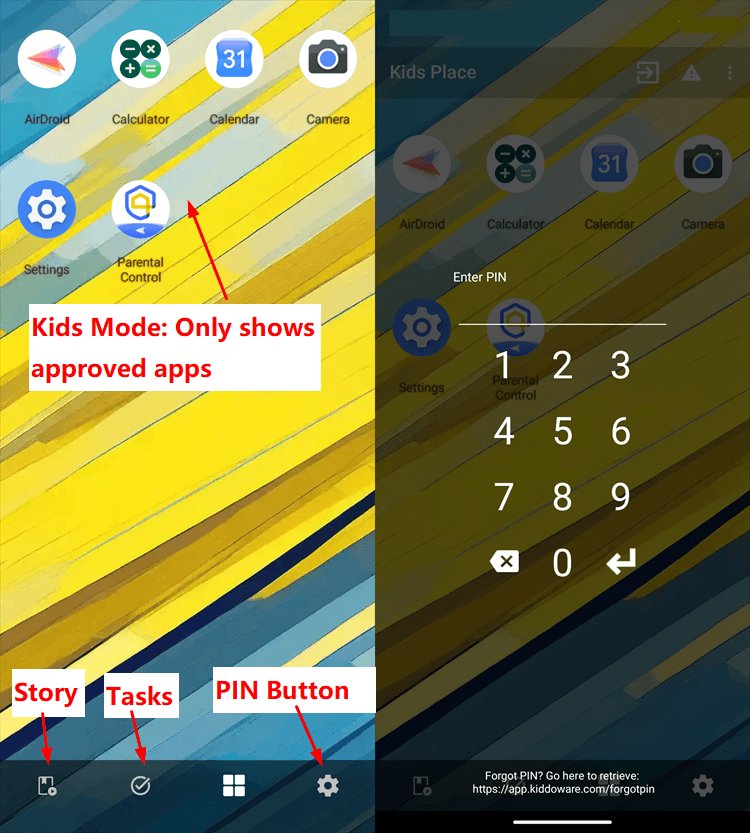
Alongside the Approved-app launcher, the app also contains the features below.
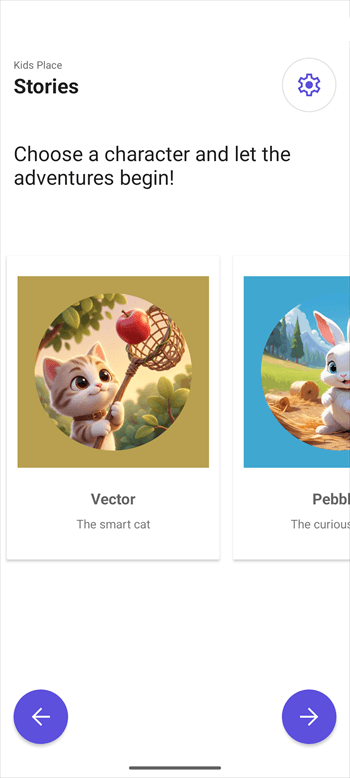
- Story. The version available on our test device included a story-driven adventure feature in which children could select a character and take part in quests.

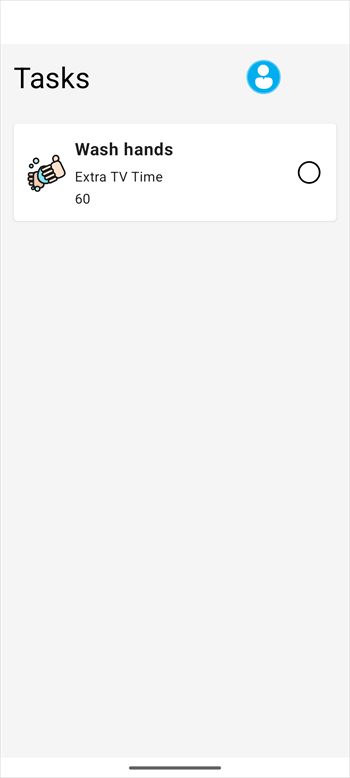
- Tasks. The tested version displayed a task feature for setting chores or homework and associating completed tasks with rewards such as additional screen time or pocket money.
- Temporary Timer. Parents can set a one-time device limit in minutes or choose a specific ending time. A countdown is displayed on the Kids Place home screen.
- Advanced Timer. The Premium interface provides daily limits and schedules at the device, app-category, and individual-app levels. It also includes profiles for different schedules and half-hour time slots.
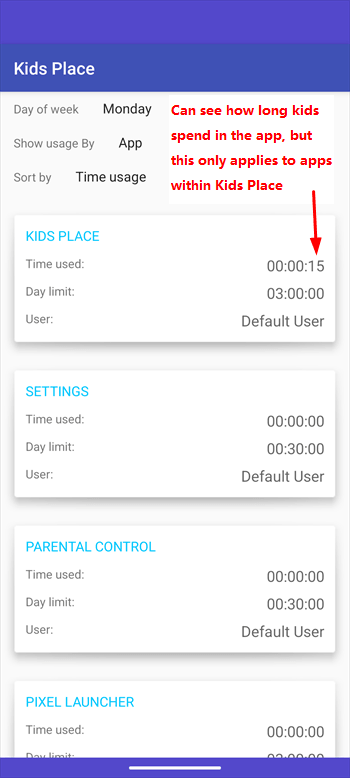
- Time usage. The usage screen shows how long apps inside Kids Place have been used. On our test device, the interface accurately displayed app usage data covering the previous seven days.
- PIN and device protection. Kiddoware lists Premium safeguards that can temporarily disable the PIN prompt after three failed attempts, remove the Kids Place uninstall option, and lock the device if someone tries to disable administrator privileges.
- Background Mode. Kiddoware lists Background Mode as a Premium option that can apply Kids Place controls without displaying its child-facing launcher.
Timer limitation: A device-level limit applies across Kids Place, while a category limit is shared by all apps in that category. Parents must select an individual app if they want to give that app its own separate daily limit.
Setup matters: Launcher and exit protection depend on the required Android permissions and home-button settings being configured correctly. Kiddoware recommends enabling the home-button lock because, without it, the regular Android home screen may briefly appear before Kids Place redirects the child back.
Overall, Kids Place worked well in our test as a child-friendly Android launcher for younger children. It created a simpler space for approved games and learning apps while keeping parental settings behind a PIN.
3Safe Browser
Safe Browser. Kids Place integrates with Kiddoware's Safe Browser, giving children a more controlled browsing environment. Parents can add the Safe Browser to the approved apps in Kids Place and use its web-filtering features to restrict access to inappropriate content.
What we tested: We tested whether the Safe Browser could block selected adult websites, apply selected content-category filters, and enforce custom blacklist and whitelist rules.
What happened: The setup was straightforward. After installing the Safe Browser plugin and signing in to our account, we added it to the approved apps in Kids Place. The adult sites included in our limited test were blocked, and the selected category filters were applied as expected. The custom blacklist and whitelist rules included in our test also worked. These results apply only to the sites and rules we tested and do not mean that every inappropriate website will always be blocked.
4Kids Safe Video Player and YouTube Safe Search
Kids-friendly video controls. Kids Place can work with Kiddoware's separate Kids Safe Video Player plugin. The plugin supports Safe Search videos, parent-selected playlists, video URLs, locally stored videos, and child-lock controls based on Kids Place settings.
What we tested: Our hands-on test focused specifically on the YouTube Safe Search function. We used it to search for YouTube content and reviewed whether the results generally matched the child-friendly intent of the searches.
What happened: The YouTube Safe Search feature worked as expected in the searches included in our test. The overall experience was positive: it provided a more controlled way to find YouTube videos and can help parents check that platforms such as YouTube are being used appropriately while guiding children toward content that is suitable for their age.
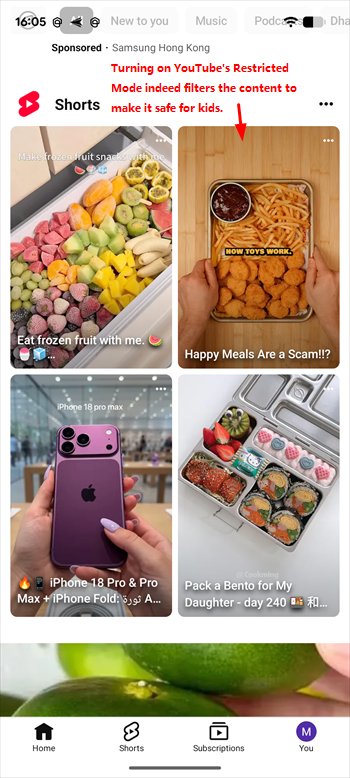
Limitation: Safe Search adds a useful filtering layer, but it cannot guarantee that every search result, recommendation, advertisement, external link, or individual video will be appropriate. Parents should review the available videos, explain the family's viewing rules, and periodically repeat searches from the child's side.
Verdict: Pass for the YouTube Safe Search scenarios included in our test. It is a useful optional companion to Kids Place for families that want more control over video discovery, but it should support rather than replace parental review and age-appropriate guidance.
5Kids Place Remote Control
What we tested: Whether parents could complete selected management actions from the parent or administrator side, including adding or removing approved apps, changing app categories, adjusting Kids Place settings and Advanced Timer options, and viewing app usage information.
What happened: Kids Place Remote Control worked during our test session. After connecting the child device to the same Kiddoware account, we could complete the selected actions through the parent or administrator interface. Changes generally took about one to two seconds to appear on the child device in our test environment. We were able to add or remove apps, adjust selected Kids Place and timer settings, and review app usage information without encountering a connection problem during the session.
The interface also displayed options to lock, unlock, or start Kids Place remotely. Overall, the actions included in our test were responsive, but this limited session should not be treated as proof of long-term stability on every device or network.
Kids Place Pros and Cons
1Pros
- Focused child interface. The launcher can reduce an Android device to approved apps.
- Direct app selection. Parents can add, remove, and organize apps shown to the child.
- Useful for shared devices. The approach suits younger children using a family tablet.
- Basic free protection. The free tier includes the child launcher and unapproved-app blocking.
- Optional advanced controls. Premium adds profiles, time controls, Background Mode, and restart protection.
2Cons
- Best suited for young children. Its simpler feature set makes it ideal for early childhood, but less appropriate for teenagers.
- Key features missing. It lacks built-in location tracking and social media safety alerts.
- Several practical tools require Premium. Flexible timers, multiple profiles, and additional tamper protection are paid features.
What Google Play Users Say About Kids Place
Hands-on testing shows how Kids Place worked in our environment, while Google Play feedback helps identify experiences worth checking on other Android devices. We reviewed a limited selection of positive, mixed, and critical comments displayed on Google Play. These comments are individual experiences rather than proof that the same results will occur for every family.
| Feedback Type | What Displayed Users Reported |
|---|---|
| Positive feedback | Positive parts of the displayed feedback highlighted the ability to organize approved apps and quickly change which apps a child can access. Other displayed users described Kids Place as straightforward or easy to use when it worked correctly on their device. |
| Mixed feedback | Some comments praised the approved-app organization and ease of use while reporting problems elsewhere. One displayed reviewer, for example, liked how easily apps could be organized but said the child could sometimes leave Kids Mode through an advertisement, Google Play, or the Back button. |
| Critical feedback | Recent criticism in the displayed sample included difficulty connecting Remote Control, confusion during setup, and protected settings not being blocked as expected. Some earlier comments also described unexpected exits, freezing, or timer problems. |
What this means for parents: The displayed feedback suggests that Kids Place's approved-app launcher can be convenient when it is configured correctly, but protection may be sensitive to the Android version, device manufacturer, permissions, home-button settings, and app version.
Parents should therefore test app access, Settings, notifications, advertisements, external links, the Home and Back buttons, timers, and reboot behavior on the child's actual device.
Who Should Use Kids Place?
1Choose Kids Place If...
- Your child is young and benefits from a simple interface.
- The child mainly uses an Android phone or tablet.
- Your priority is allowing only a small group of approved apps.
- You are setting up a shared family tablet or a dedicated child device.
2Consider an Alternative If...
- Your family needs to manage both Android and iPhone child devices.
- You need live location, route history, or geofence alerts.
- You want broader remote management and device-usage reporting.
- You need broader website restrictions, schedules, or safety alerts outside a dedicated child browser.
- Your older child has outgrown a launcher designed for a simplified kids space.
Kids Place Alternative
Kids Place and AirDroid Parental Control serve different family needs. Kids Place primarily turns an Android phone or tablet into a restricted child environment containing parent-approved apps. Its Premium Advanced Timer can also apply schedules and daily limits at the device, app-category, or individual-app level.
AirDroid Parental Control offers broader support as children begin using their own devices more independently. It combines app and screen-time management with website safety, location features, online risk alerts, emergency support, and teen-driving insights. These tools are designed to help families set age-appropriate boundaries and respond to safety concerns through open communication.
| Category | Kids Place | AirDroid Parental Control |
|---|---|---|
| Core approach | A child-friendly launcher that restricts an Android device to approved apps | A broader family safety and healthy-device-use solution managed from a parent app or web dashboard |
| Best for | Younger children using a shared or dedicated Android device | Families supporting children who carry their own Android or iPhone |
| Child platforms | Primarily Android | Android and iPhone, with important feature differences |
| App access | Approved-app launcher, PIN-protected settings, app categories, and supported blocking controls | Specific app blocking, protection against newly installed apps on supported Android devices, Instant Block, and an Always Allowed list |
| Time management | A device-level Temporary Timer and Premium schedules or daily limits for devices, app categories, and individual apps | Individual App Limits, a shared Total Time Limit, Downtime, and different rules for individual days |
| Child participation | A parent can enter the PIN to grant temporary time after the timer expires | A child can request more time for a restricted app, while the parent can approve a specific extension; Focus Mode also lets the child start a distraction-free period |
| Web safety | Optional Kids Place Safe Browser integration for managed browsing | Website category filtering, custom blacklists and whitelists, browsing history, blocked-site alerts, and supported web-use limits |
| Online risk signals | Not supported | Selected-keyword alerts and inappropriate-image detection on supported setups; Android provides broader coverage for supported social and AI apps, while iPhone coverage is more limited |
| Location and emergency safety | Not supported | Live device location, route history, geofence alerts, Family Chat, and an SOS feature the child can use to request help |
| Teen-driving safety | Not supported | Driving Detection can report trip routes, speed, distance, and duration, send real-time speeding alerts, and review hard-braking or rapid-acceleration events after a trip |
| Additional Android safety tools | PIN protection, optional uninstall protection, and device-administrator safeguards | Supported Android child devices can also provide notification syncing, Screen Mirroring, Calls and SMS safety controls, and limited camera or surrounding-sound context for a specific safety need |
| Main limitation | Focused mainly on controlling the local Android environment rather than providing a cross-platform family safety system | Features are not identical across Android and iPhone, and some deeper safety tools require an Android child device and specific permissions |
Note: Availability depends on the child's operating system, permissions, network connection, setup method, plan, region, and current app version. Driving and location data describe the movement of the child's device and do not by themselves prove that the child was driving or explain what happened during a trip.
- Choose Kids Place. It is the more focused option when the main goal is to create a simple, PIN-protected Android kids space containing only approved apps.
- Consider AirDroid Parental Control. Its Android and iOS support may make it more suitable for families that need app and web rules alongside location safety, SOS support, flexible time requests, online risk signals, or teen-driving reports. Available features still depend on the child's operating system and setup method.


AirDroid's alerts, location information, and driving events should be treated as safety signals rather than proof of wrongdoing. Parents should explain which features are enabled, use only the tools needed for a clear safety purpose, and review the rules with the child as their maturity and independence grow.
Final Verdict
Kids Place is worth considering for younger children who use an Android phone or shared tablet and need access to only a limited selection of apps. Its launcher-based approach is straightforward, while the free tier covers the basic child space and unapproved-app blocking.
In our testing, its standout strength was straightforward setup and ease of use. However, its primary limitation is that it caters mainly to younger children. Before relying on the app, parents should thoroughly configure and test permissions, timers, web-filtering rules, navigation behavior, and exit protection directly on the child's device.
Families that need broader remote management, location safety, website controls, and support for both Android and iOS may find AirDroid Parental Control more suitable. The better choice depends on whether the goal is a simple Android launcher or a wider family-safety toolkit.
FAQs










Leave a Reply.