Best Apps to Limit Snapchat Screen Time (2026): AirDroid vs Qustodio vs OurPact
- Quick Verdict: Which App Limits Snapchat Screen Time Best?
- Can AirDroid, Qustodio, or OurPact Set a Separate Snapchat Time Limit?
- How We Tested Snapchat Screen-Time Limits
- Best for a Separate Daily Snapchat Limit: AirDroid
- Best for App Rules and Routines: Qustodio
- Best for Schedule-Based Boundaries: OurPact
- When Bark Makes More Sense for Snapchat Safety Alerts
- Snapchat Limits for School, Homework, Bedtime, and Family Time
- What Happens at the Limit, and Can a Child Request More Time?
- What Are the Best Apps to Restrict Snapchat on an iPhone?
- Free Alternatives: Apple Screen Time and Google Family Link
- Which App Fits Your Family?
The best way to limit Snapchat depends on whether a family needs a separate daily limit, a shared allowance, or a schedule for school and bedtime. The child's phone and the process for requesting extra time also matter.
AirDroid Parental Control is a strong choice for families that want a separate Snapchat limit, scheduled Downtime, and defined extra-time approvals. Families more concerned about risky Snapchat activity can also compare Snapchat safety and monitoring apps.
Quick Verdict: Which App Limits Snapchat Screen Time Best?
AirDroid Parental Control is the most direct fit when Snapchat needs its own daily allowance and a defined request process. Qustodio also supports individual app limits and routines.
OurPact is better suited to schedules and a shared allowance, while Bark focuses on routines and supported safety alerts; individual daily app timers require Bark Phone.
| Feature | AirDroid Parental Control | Qustodio | OurPact | Bark |
|---|---|---|---|---|
| Best for | A separate Snapchat limit plus defined extra-time approvals | Individual app rules combined with routines | Strict schedules and a shared recreational allowance | Supported safety alerts plus scheduled access rules |
| Child's Android device | Individual and shared limits, Downtime, app blocking, Always Allowed apps, and extra-time requests | Daily device and individual app limits, Routines, app blocking, Always Allowed apps, and internet pausing | Screen Time Allowance, schedules, App Rules, manual blocks, and timed grants | Routines, app and website internet blocking, and web filtering; daily individual-app timers require Bark Phone |
| Supervised child's iPhone | Supported on iOS 16, including individual and shared app limits, Downtime, app blocking, Always Allowed apps, and extra-time requests | Daily device limits, Routines, and compatible-app limits; enforcement restrict internet access rather than reproduce Android blocking | Quick Pair supports allowances and blocks; Full Pair through OurPact Connect adds App Rules and more complete controls | Routines and app or website internet blocking are supported; daily individual-app timers and full app blocking are not standard-iPhone features |
| Separate daily Snapchat limit | Yes. Select Snapchat under Individual App Limits | Yes, when Snapchat appears as a recognized app | No dedicated per-app timer; an allowance can resemble a Snapchat-only budget if Snapchat is the only scheduled app drawing from it | No on a standard existing phone; individual app timers require Bark Phone |
| Shared screen-time allowance | Yes, through Total Time Limit | A daily device allowance is available alongside app rules and routines | Yes. Apps governed by Blocked by Schedule draw from the child's Screen Time Allowance | Scheduled access rules are available; an all-app daily total is a Bark Phone feature |
| School and bedtime schedules | Yes, through Total time limit or Downtime | Yes, through preset or custom Routines | Yes, through recurring schedules and App Rules | Yes, through School time, Bedtime, Free time, and custom rules |
| Child requests more time | Yes. The parent can approve 5, 10, 15, or 30 minutes, one hour, today, or always allowed | Extra-time requests are documented for the child's iOS daily device limit | The parent can send a timed grant | Bonus time or temporary overrides depend on the Bark product |
| What happens at the limit | Android blocks app access; iOS hides the app on the device | Android blocks app access; iOS generally restricts the supported app's internet connection | Scheduled apps return to the blocked state when the shared allowance is depleted | Standard Bark rules block internet access; Bark Phone can gray out an app after its daily timer is used |
| Snapchat risk alerts | Supported selected-keyword safety alerts on a child's Android; not a complete Snapchat record | Supported through Complete-plan Social Monitoring on Android | No dedicated Snapchat alert system; Premium+ View is a separate screen-activity feature | Core strength. Supported Snapchat text activity can trigger potential-risk alerts on Android |
| Main limitation | Snapchat safety-alert coverage is Android-focused | iOS enforcement differs from Android, and Snapchat risk alerts are Android-only | The allowance is shared across scheduled apps rather than tracked as a native per-app daily timer | Precise per-app timers require Bark Phone rather than the standard app on an existing phone |
| Pricing | $9.99/month, $19.99/quarter, or $59.99/year | Basic $59.95/year; Complete $104.95/year | Premium $6.99/month or $69.99/year; Premium+ $9.99/month or $99.99/year | Bark Jr costs $5/month or $49/year. Bark Premium for a child's Android device costs $14/month or $99/year. Bark's iOS package costs $20/month or $148/year and includes Bark Sync. |
Note: Prices and documented features were checked on August 26, 2026, in US dollars before tax. Promotions, regional prices, operating-system support, and interfaces can change. Verify the current plan and device compatibility before subscribing.
Can AirDroid, Qustodio, or OurPact Set a Separate Snapchat Time Limit?
AirDroid Parental Control and Qustodio can give Snapchat its own daily time limit. OurPact manages the same goal differently: it combines app rules and schedules with a shared Screen Time Allowance rather than providing a native per-app daily timer for Snapchat alone.
A separate app limit counts only the time spent in Snapchat. For example, if Snapchat receives 45 minutes and a game receives 30 minutes, using the game does not reduce the Snapchat balance. This is the clearest option when a family's rule is, "Snapchat gets 45 minutes per day."
1AirDroid and Qustodio: Separate Snapchat Daily Limits
AirDroid Parental Control provides Individual App Limits. A parent can select Snapchat, assign a daily duration, and restrict access after Snapchat uses its own allowance. AirDroid can also apply different limits on different days, making it possible to provide more Snapchat time on weekends than on school days.
Qustodio also allows parents to set a daily limit for an individual recognized app. On Android, a blocking screen prevents access after the limit is reached. On iOS, Qustodio generally restricts the supported app's internet connection, so the result may differ from Android app blocking.
2OurPact: Schedule-Based Rules and a Shared Allowance
OurPact can set Snapchat to Always Blocked, Always Allowed, or Blocked by Schedule. Its Screen Time Allowance applies to apps governed by the Blocked by Schedule rule. The child starts or pauses the allowance in OurPact Jr, and the affected apps become unavailable when the shared time is depleted.
If Snapchat is the only app governed by the allowance, the result may resemble a Snapchat-only time budget. When Snapchat, Instagram, TikTok, games, and other scheduled apps are included, however, their use can draw from the same allowance. Parents should therefore distinguish OurPact's shared allowance from a native individual-app timer.
How We Tested Snapchat Screen-Time Limits
We evaluated each product against the same family rules wherever the feature was supported. These included a separate 45-minute Snapchat limit, a 9 PM-to-7 AM bedtime schedule, different weekday and weekend limits, automatic restriction when time expired, and the process for requesting and approving extra time.
We also compared the controls available on the Samsung Android device and supervised iPhone. Where setup or enforcement differed, the platform difference is stated in the results.
| Test Scenario | AirDroid Parental Control | Qustodio | OurPact | Bark |
|---|---|---|---|---|
| How Snapchat access is controlled | Model: Individual App Limits for individual app restrictions, and Total Time Limit for overall app usage. Platform note: Android restricted Snapchat access. In our supervised-iPhone test, Snapchat became hidden after the individual limit synchronized. | Model: Individual app rules or routines. Platform note: Android shows a blocking screen; iOS mainly restricts Snapchat's online access. | Model: Schedules plus a shared Screen Time Allowance. Platform note: Blocks app access on both Android and iOS. The allowance may cover multiple apps on both platforms. | Model: Routine-based internet scheduling. Limitation: The standard Bark setup has no Snapchat-only daily timer. Bark Phone was not tested. |
| Separate 45-minute Snapchat limit, and automatic restriction when the limit expires | Status: Supported. Result: Only Snapchat consumes the allowance; other apps do not reduce it. Response: The restriction activated after the allowance expired. | Status: Supported. Result: Snapchat has a separate daily value that decreases during use. Response: The restriction activated after the allowance expired. | Status: Partially supported. Result: It behaves like a Snapchat-only limit only when Snapchat is the sole scheduled app; otherwise apps share the allowance. Response: The shared-allowance restriction activated after synchronization. | Status: Not supported in the tested setup. Result: Routines can schedule internet access, but cannot create a measured Snapchat-only daily allowance. Response: Not applicable. |
| Bedtime rule from 9 PM to 7 AM | Status: Supported. Result: Snapchat remained restricted throughout the 9 PM-to-7 AM Downtime period. Phone calls and approved apps remained available. | Status: Supported. Result: The configured Routine restricted Snapchat throughout the scheduled period. | Status: Supported. Result: The scheduled restriction remained active throughout the 9 PM-to-7 AM window. | Status: Supported as internet scheduling. Result: New Snapchat content cannot load during the Bedtime Routine. |
| Weekday 30-minute / weekend 60-minute rule for Snapchat | Status: Supported. Result: The configured Snapchat allowance changed from 30 minutes on the selected weekday to 60 minutes on the selected weekend day. Unused time did not carry over. | Status: Supported. Result: The configured Snapchat allowance changed from 30 minutes on the selected weekday to 60 minutes on the selected weekend day. Unused time did not carry over. | Status: Partially supported. Result: The shared allowance changed from 30 minutes on the selected weekday to 60 minutes on the selected weekend day after synchronization. The value applied to the scheduled-app group, not Snapchat alone. | Status: Not supported as a measured allowance. Result: Different weekday and weekend access windows can be scheduled. |
| Child requests more Snapchat time | Status: Supported (App-specific example: Snapchat) Result: The parent receives a request for extra Snapchat time. | Status: Partially supported. Result: Supports time extension requests for total daily limit only, not per app. | Status: Not supported as a child-initiated Snapchat request. Alternative: The parent can issue a timed Grant, which unlocks all allowed apps globally rather than granting time for Snapchat alone. | Status: Not supported as a Snapchat-specific request. Alternative: The parent can manually unblock Snapchat or adjust the active Screen Time Routine. |
| Parent grants 15 additional minutes | Status: Supported (App-specific example: Snapchat) Result: The parent approved a child-initiated 15-minute Snapchat extension. Snapchat became available again, and the recurring daily limit remained configured. | Status: Partially supported. Alternative: The parent can add 15 minutes to the child's total daily device time, but the extension is not Snapchat-specific. | Status: Partially supported. Alternative: The parent can issue a 15-minute Grant for broader device access, but the extension is not Snapchat-specific. | Status: Not supported as a Snapchat-specific request. Alternative: The parent can temporarily unblock the device or adjust the active Routine, but the change is not Snapchat-specific. |
| Device restart | Status: Rule persisted. | Status: Rule persisted. | Status: Rules persisted. | Status: Routine persisted. |
Overall finding: AirDroid Parental Control provided the clearest combination of a separate Snapchat daily limit and an app-specific extra-time request flow. Qustodio also supported a separate Snapchat limit and combined individual limits with broader scheduling options.
OurPact was better suited to shared recreational-time allowances and schedules than to measuring Snapchat independently. Bark was more suitable for supported safety alerts and scheduled internet access than for a precise Snapchat-only timer on an existing phone.
Best for a Separate Daily Snapchat Limit: AirDroid Parental Control
AirDroid Parental Control has the most direct fit for the narrow task in this comparison: give Snapchat a separate daily allowance, preserve a different shared budget for other apps, and let the child ask for more time when circumstances change.


- 1. On the parents' dashboard, open App Management.
Go to App Limits, then select Add a New Limit.
- 2. Select Snapchat.
Choose the individual Snapchat app, not a general social-media category.
- 3. Set an Individual App Limit.
Set Snapchat's daily allowance to 45 minutes on the child's device.
Example: If the child uses Snapchat for 30 minutes before school and another 15 minutes after school, the 45-minute Snapchat allowance is fully used for that day, while the separate shared allowance for other apps remains unaffected.
Important: Do not select Total Time Limit if the goal is to give Snapchat its own separate daily allowance, because a Total Time Limit may be shared by multiple selected apps or app categories.
Category controls: AirDroid Parental Control can also apply screen-time rules to one or more app categories, such as Social Networking or Games. With Individual App Limits, each selected category receives its own allowance, which is shared by the apps within that category.
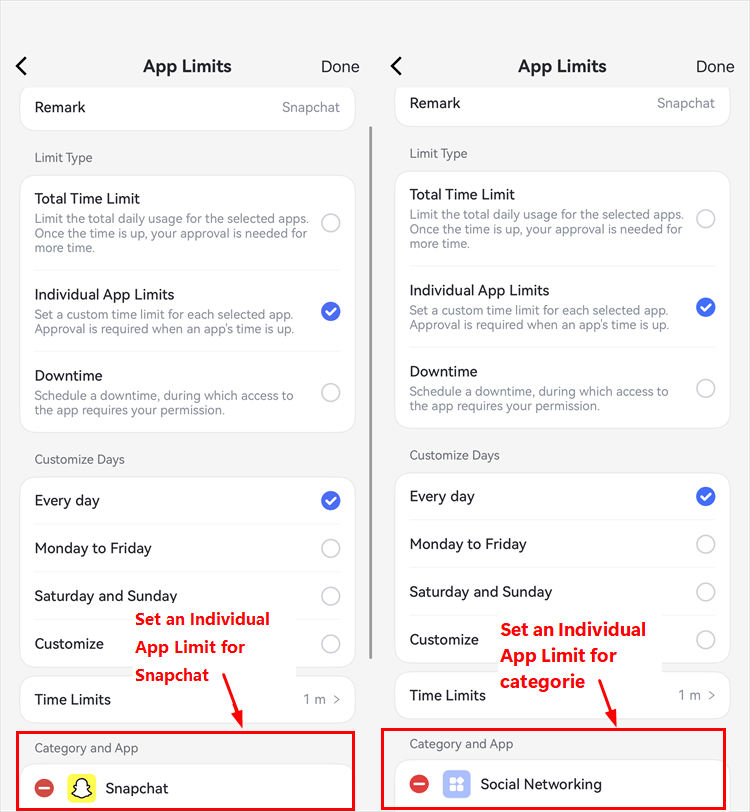
With a Total Time Limit, apps across all selected categories draw from one combined allowance. Parents can also use Downtime to make selected app categories unavailable during scheduled periods.
- 4. Customize the Weekly Schedule.
Assign different Snapchat limits for school days and weekends if needed.
Example: Set Snapchat to 45 minutes Monday through Friday and 60 minutes on Saturday and Sunday. This lets the child have a longer Snapchat allowance on weekends without changing the limits for other apps.
- 5. Add Downtime Rules.
Create agreed no-access periods for bedtime, school, homework, or family time.
Example: Set Downtime from 9 PM to 7 AM so Snapchat is restricted during the agreed overnight period, even if the child has not used the full daily allowance.
When Snapchat reached its individual limit, the Android child device restricted app access. In our supervised-iPhone test, Snapchat became hidden after the restriction synchronized. For example, after the child used the full 45-minute allowance, attempting to open Snapchat triggered the configured restriction.
If the child needs access for a valid reason, the parent can review a request and approve 5, 10, 15, or 30 minutes, one hour, the rest of the day, or permanent access without deleting the recurring limit.
Platform limitation: Advanced controls on a child's iPhone require iOS 16 or later and Supervision Mode. Families should confirm that Snapchat appears in App Management and test the limit, downtime, request, and reporting flow on the specific child device.
A practical verification scenario is to set a short Snapchat limit, use the app until the limit is reached, then confirm that Snapchat is restricted and that an additional-time request can be submitted and reviewed.
See AirDroid's Snapchat child-safety guide for supported Android safety features, screen-time controls, and documented platform limits.
Best for App Rules and Routine Management: Qustodio
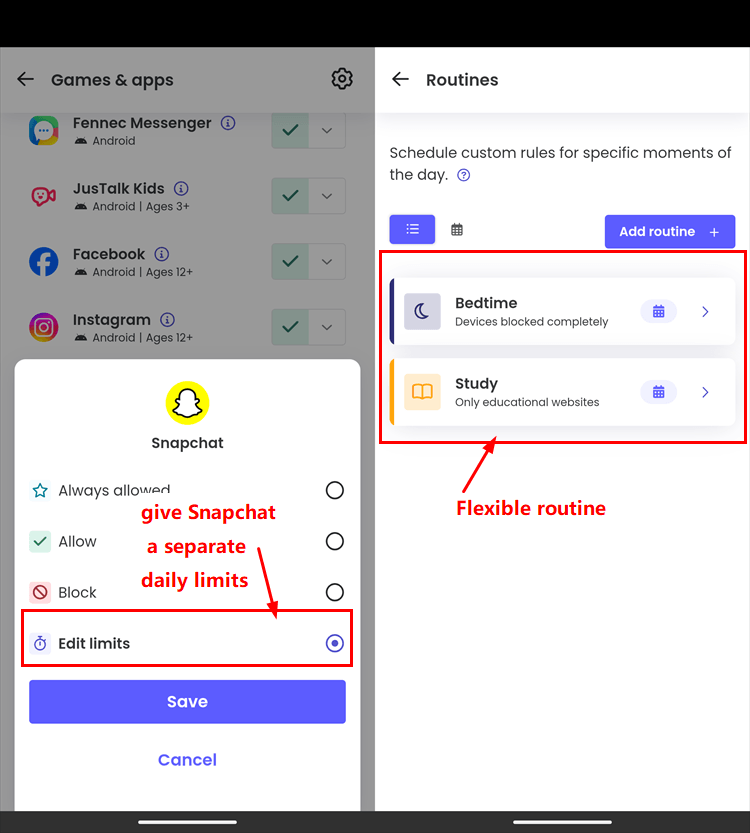
Qustodio is a strong alternative when a family wants to combine individual app rules with structured routines. After Snapchat appears in Games & Apps, a parent can allow it, block it, or assign a daily limit. Different daily values can support a 30-minute weekday and 60-minute weekend plan.
Routines add a second layer. Bedtime can restrict device use overnight, while School and Study routines can preserve access to educational tools and restrict Snapchat. Custom routines can apply different app and website rules at selected times and on selected days.
Best for Schedule-Based Boundaries: OurPact
OurPact is most compelling when the family rule is based on when Snapchat may be available. App Rules can set Snapchat to Always Blocked, Always Allowed, or Blocked by Schedule. Recurring schedules can then keep scheduled apps unavailable during school, homework, dinner, or bedtime.
Screen Time Allowance works differently from a native Snapchat-only limit. The child presses Play in OurPact Jr to start access to apps governed by Blocked by Schedule and presses Pause when finished. OurPact states that the timer does not pause automatically. When the allowance reaches zero, those apps return to the blocked state.
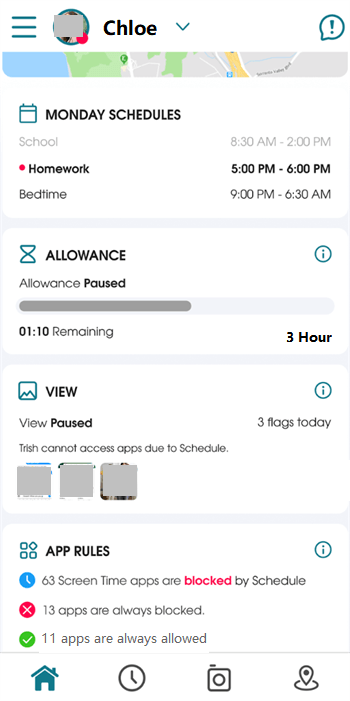
If Snapchat is the only app drawing from the allowance, the result can resemble a Snapchat-only budget. If several scheduled apps draw from the same pool, however, the parent cannot treat the total as a precise record of Snapchat time.
When Bark Makes More Sense for Snapchat Safety Alerts
Bark deserves consideration when the central concern is not, "Did Snapchat reach 45 minutes?" but, "Is there a supported signal of bullying, self-harm, sexual content, predatory behavior, violence, or another safety risk?" Bark analyzes supported activity and alerts the parent when its system identifies a potential concern.
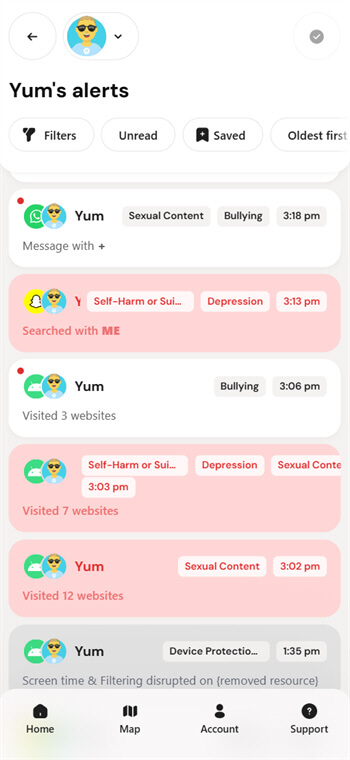
Bark's current Snapchat content monitoring is limited to a child's Android device. It does not promise a complete copy of every Snap, image, video, disappearing message, or conversation.
On existing Android and iOS phones, Bark also provides screen-time routines and app or website internet blocking. Its support center documents precise daily limits for individual apps as a Bark Phone feature.
Bark is the stronger fit when selective safety alerts matter more than minute-by-minute precision. An alert should lead to a calm check-in and appropriate support. It should not be treated as proof or used to justify reviewing unrelated private activity.
For a deeper comparison of the three alert methods, see AirDroid vs Bark vs Qustodio for Snapchat safety.
Snapchat Limits for School, Homework, Bedtime, and Family Time
A daily limit controls how long Snapchat can be used, while a schedule controls when it is available. Many families need both. For example, a child may receive 45 minutes of Snapchat each day while the app remains unavailable during school, homework, dinner, and bedtime.
- School and homework: Restrict Snapchat during classes or a defined homework period while keeping approved learning and communication apps available.
- Bedtime: Use a predictable rule, such as 9 PM to 7 AM, so unused Snapchat time does not remain available overnight.
- Family time: Create short, consistent device-free periods for dinner or family activities instead of relying on an unpredictable manual block.
Explain each rule to the child and provide a clear exception process. A scheduled boundary is more sustainable when the child knows when Snapchat will become available again and how to request temporary access for a reasonable need.
What Happens at the Limit, and Can a Child Request More Time?
AirDroid Parental Control provides the clearest app-specific exception flow in this comparison. When Snapchat reaches its Individual App Limit, the child can submit a request. The parent can approve 5, 10, 15, or 30 additional minutes, one hour, the rest of the day, or permanent access without deleting the recurring limit.
Qustodio documents additional-time requests for the child's daily device limit on iPhone, but this should not automatically be described as a Snapchat-only extension.
OurPact allows the parent to issue a timed Grant, which may restore multiple scheduled apps. Bark can provide bonus time or a temporary Routine override depending on the Bark product, but this is broader than a dedicated Snapchat request.
An exception should support communication rather than remove the boundary. Parents can ask why more time is needed, approve a small extension when appropriate, and leave the normal daily limit or bedtime schedule in place.
What Are the Best Apps to Restrict Snapchat on an iPhone?
For a supervised child's iPhone, AirDroid Parental Control is a strong choice when the family wants a separate Snapchat limit, scheduled Downtime, and an app-specific process for requesting more time. Apple Screen Time is the best free starting point, OurPact focuses on schedules and shared allowances, and Qustodio combines compatible-app limits with broader routines.
On iPhone, setup and enforcement depend more heavily on Apple's supervision and networking rules. In our supervised-iPhone test, AirDroid hide Snapchat after the individual limit synchronized. These controls restrict when Snapchat can be used. Qustodio generally restricts a compatible app's online connection instead of reproducing its Android blocking screen.
OurPact requires the appropriate pairing method for its full App Rules, while Bark supports scheduled internet controls but does not provide the same Snapchat alert coverage available on Android.
Before relying on any product, confirm that Snapchat appears in the parent dashboard and test the daily limit, bedtime schedule, request flow, and restored access on the child's actual device.
Free Alternatives: Apple Screen Time and Google Family Link
Families that do not need a cross-platform dashboard or Snapchat safety alerts may already have suitable controls on the child's device.
- Apple Screen Time: Parents can assign Snapchat an individual App Limit, customize limits by day, schedule Downtime, and approve a child's request for more time through Family Sharing.
- Google Family Link: Parents can set an individual Snapchat limit, block the app, create Downtime or School time schedules, and provide bonus time on a supervised Android device.
See Apple's Screen Time guide for children and Google's Family Link screen-time guide.
Which App Fits Your Family?
- Choose AirDroid Parental Control for a separate Snapchat daily limit, an optional shared limit, scheduled Downtime, and defined app-specific extra-time approvals.
- Choose Qustodio for individual app limits combined with Routines and broader device-usage reporting.
- Choose OurPact for recurring schedules and a shared recreational allowance across selected apps rather than a native Snapchat-only timer.
- Choose Bark when supported Snapchat safety alerts on Android and scheduled internet access matter more than a precise Snapchat timer on an existing phone.
- Choose Apple Screen Time or Google Family Link when basic app limits, schedules, and extensions are sufficient and a paid cross-platform service is unnecessary.
Whichever option you choose, explain what the rule does, what it does not do, and how the child can request an exception. Review the limit as school demands, sleep needs, and the child's maturity change.
FAQs
Bottom line: AirDroid Parental Control has the clearest advantage for a separate Snapchat allowance with defined extra-time approvals. Qustodio competes closely on app limits and Routines, OurPact is better suited to schedules and a shared allowance, and Bark is most relevant when supported Snapchat safety alerts are the deciding factor.










