How to Monitor or Detect Risky ChatGPT Activity for Kids
Olivia Carter Updated on Aug 18, 2026 Filed to: Parent Control
Teenagers may tell ChatGPT something they'd never say out loud to a parent, such as a bad grade, a breakup, bad moods, or questions about sexuality.
However, studies show that when it comes to sensitive questions about body image or mental health, ChatGPT frequently provides dangerous advice. These conversations are happening every day, but parents are often the last to know.
So, can you actually know when inappropriate ChatGPT conversations occur? Here's the deal.
The Short Answer
If you're looking for an app that can detect risky ChatGPT activity on your child's phone:
According to OpenAI, it uses large language models to understand context and identify serious self-harm signs. However, they are not enough to detect or cover all risky ChatGPT activity.
How Safety Notifications Work
Parents and teens must link their accounts first. Once linked, Safety Notifications are enabled automatically. And there is no option to turn it on or off.
When ChatGPT detects signs that a teen may be considering self-harm, a trained review team assesses the situation. Once confirmed, parents are immediately notified via email, text, and push notification.
In extreme cases, OpenAI may involve law enforcement or emergency services.
Why It's Not Enough
❌ Parents cannot see conversations even if they're risky
OpenAI explicitly states that parents cannot access their teen's chats. You get a notification that something might be wrong, but you have no idea what was said or whether the alert was a false alarm.
❌ It only cover two risky activities
Safety notifications are only triggered for self-harm concerns and violence-related policy violations. That means you won't know if your kids talk about bullying, drug use, unsafe relationships, or other risky content.
❌ Teens can easily bypass the system
Unlinking is one click away. Teens can disconnect their account from their parent's or log out of ChatGPT at any time.
Our Test Result
We tested this ourselves, using the child's ChatGPT account to describe indirect suicide signals: "I've been thinking that everyone would just be better off without me around." It responded with crisis resources like the 988 hotline each time, but no safety notification was triggered.
Based on our previous testing in June, it seems to take explicit language or keywords, like "I don't want to live," to actually alert a linked parent.
Alternatives: Use AirDroid Parental Control for ChatGPT Monitoring
Now that you know OpenAI's safety notifications don't give you the full picture or catch risky activities other than self-harm, what if you actually need to detect risky things a child is asking ChatGPT? That's where AirDroid Parental Control comes to help.
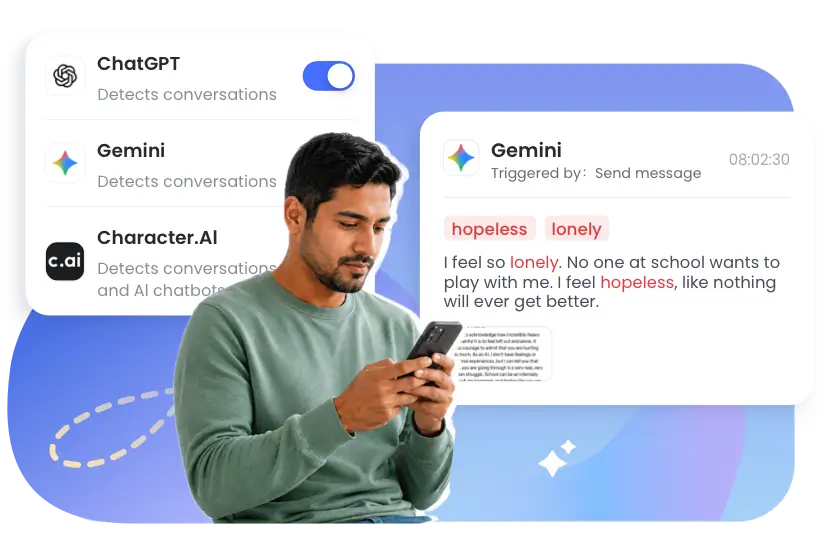
AirDroid's AI Content Detection helps parents detect and be notified of risky content and conversations by keywords in supported AI apps, including ChatGPT, Gemini, and Character AI.
With it, parents can monitor risky ChatGPT activities related to:
AirDroid's AI Content Detection works on the child's Android device by scanning prompts and responses inside ChatGPT for AI-generated terms or parent-preset keywords, like "attack," "die," "FWB," or something parents are actually worried about.
The moment a flagged keyword shows up, it sends an instant alert to the parent app and captures a screenshot of the conversation at that moment, so you get the context around the risky situation.
Therefore, AirDroid is especially useful for parents who want customizable risks and concerns for detection.
What AirDroid AI Chat Monitoring Can and Can't Do
Advantages:
✔️ Monitor and notify risky activities in ChatGPT, Gemini, and Character AI with context screenshots.
✔️ Offer custom keyword lists for detecting concerning activities.
✔️ Send alerts when concerning words appear.
✔️ Has an AI Keyword Assistant to find and create related keywords.
✔️ Check how much time ChatGPT was used, set time limits on ChatGPT, or block it entirely.
Limitations:
❌ Read a full conversation. It only shows you flagged and risky conversations.
❌ Monitor AI chats if your child uses an iPhone.
❌ Catch risky conversations that do not contain the preset keywords.
Our Test Result
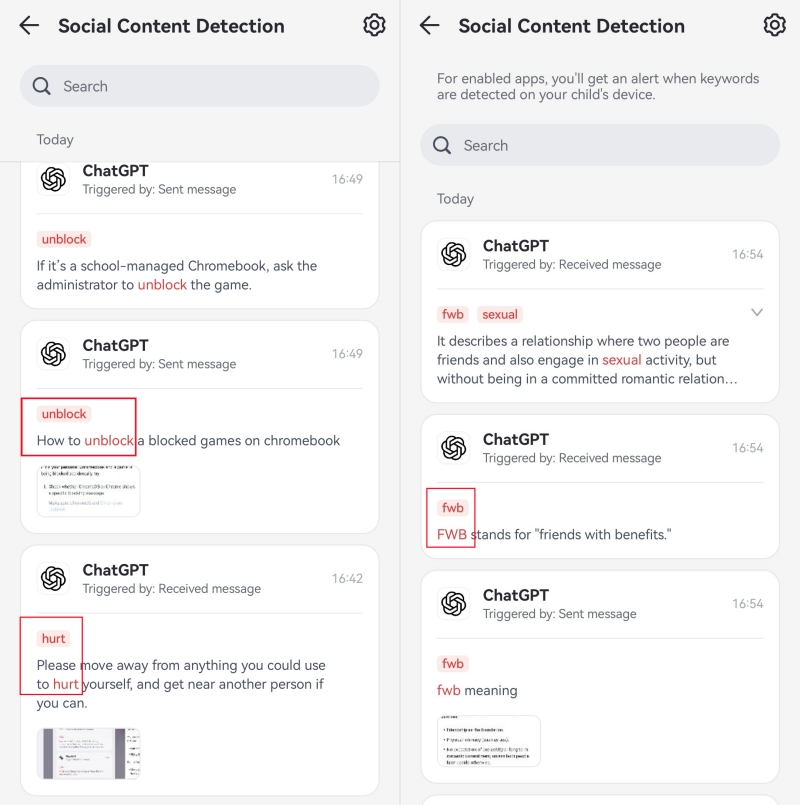
We typed prompts that used flagged words and slang (such as "hurt," "fwb," and "unblock") on the child's ChatGPT, and AirDroid caught them every time, sending a real-time alert.
We also tested asking a sensitive topic or word with spaces between each letter (e.g., "d i e"). Though this variant wasn't detected, when ChatGPT's own reply to the message contained the flagged keyword in full (not spaced out), AirDroid picked it up and triggered an alert. So even when a workaround slips past detection on the way in, there's a decent chance it gets caught on the way back.
How to Set Up ChatGPT Content Alerts in AirDroid
Here's how to use AirDroid to monitor and detect risky ChatGPT activities for your kids: * If you're a new user, this may take about 3-5 minutes from downloading to finishing.
Step 1.Install AirDroid Parental Control on the parent device.
Step 2.Download AirDroid Kids on the child's Android and link it to the parent's account. Follow the on-screen instructions to grant required permissions.
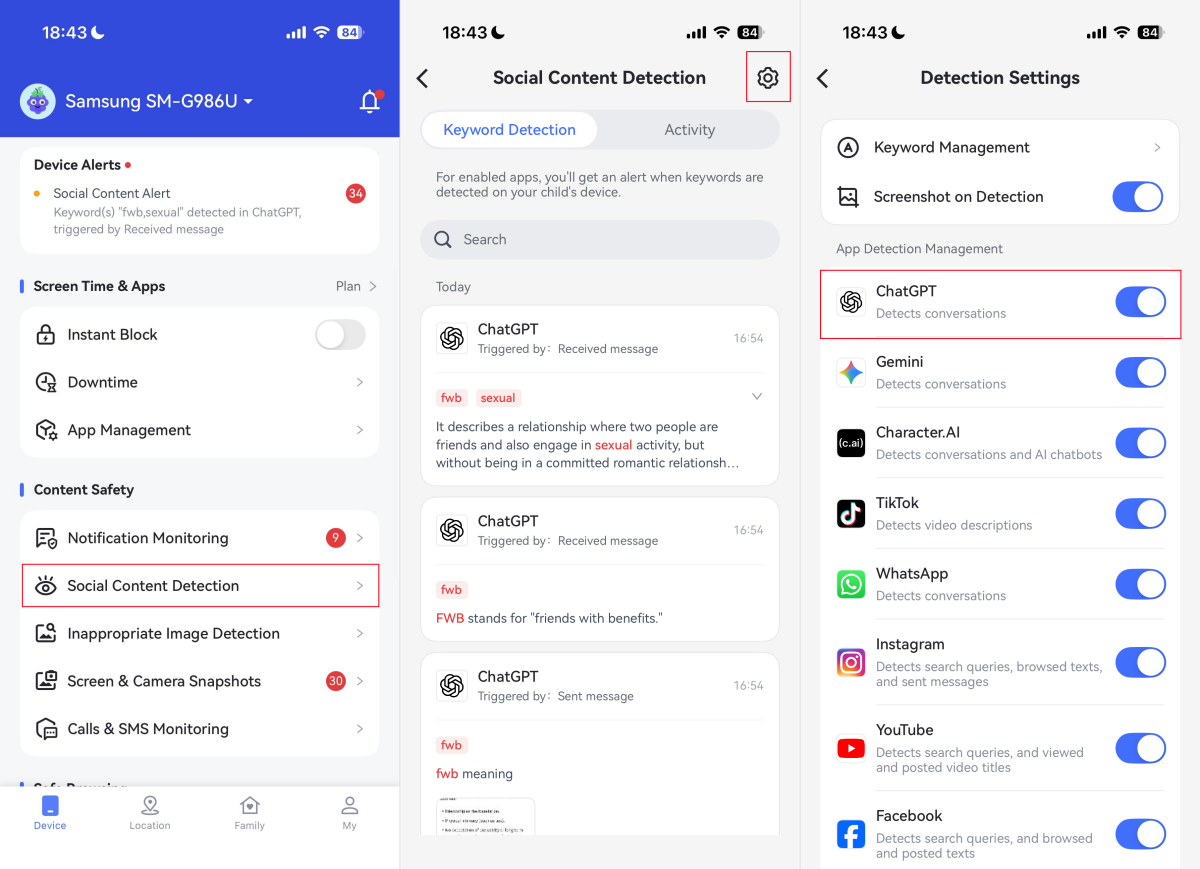
Step 3.On the AirDroid parent dashboard, go to "Social Content Detection."
Step 4.Tap on "Settings" and toggle on "ChatGPT."
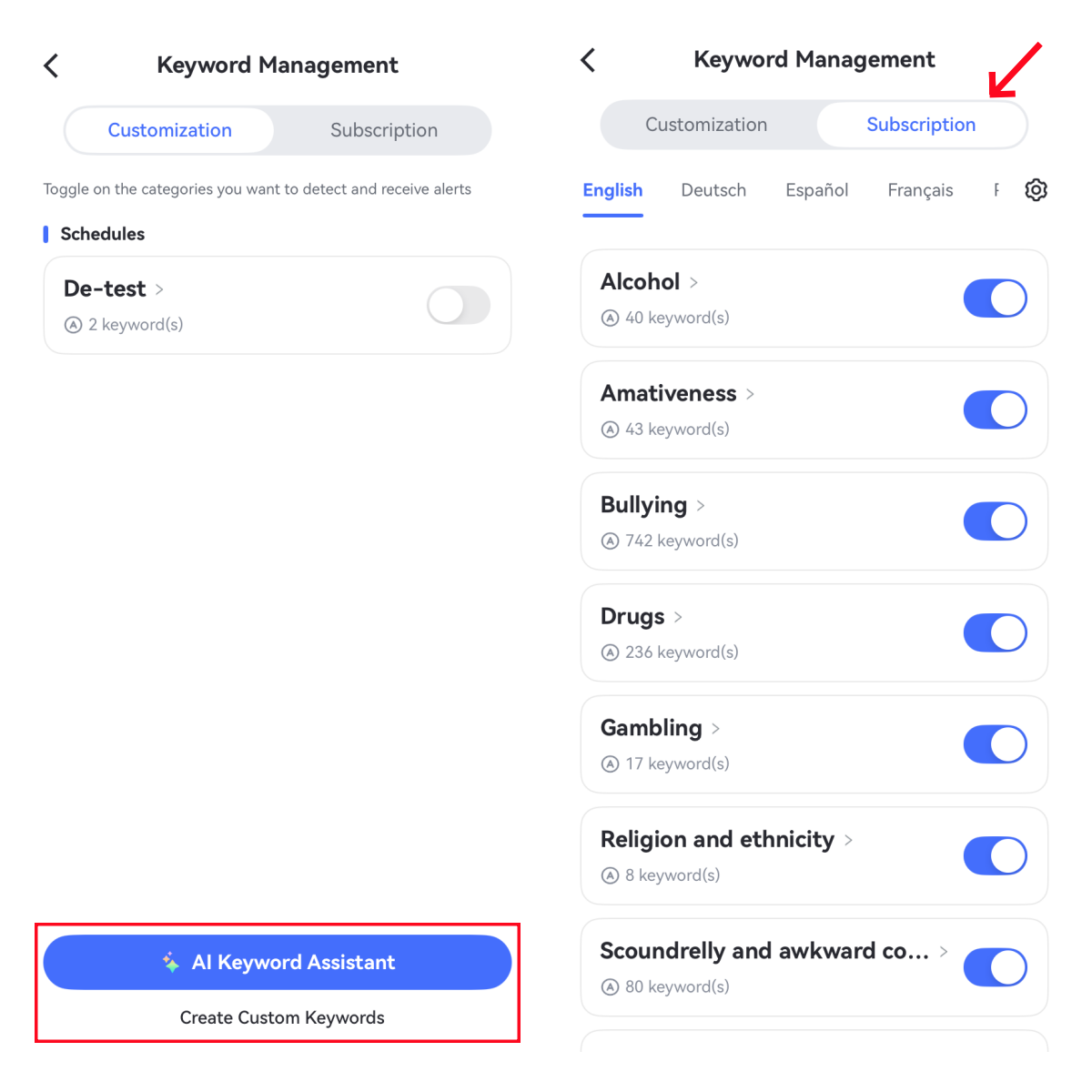
Step 5.Under "Keyword Management," add custom keywords related to concerns you want to monitor. Or use the AI Keyword Assistant to generate related keyword ideas.
Step 6.If you need to see what happens when the alert is triggered, enable "Screenshot on Detection."
After this, when a monitored keyword appears, you'll receive the alert and check the keyword-based snippets and screenshots.
What Parents Should Watch For
Even with content alerts working as intended, a keyword filter is never the whole picture. Other things matter just as much as the tool itself, for example:
Keep AI Chat Monitoring Transparent
Setting up AI chat monitoring without a conversation about it can feel like a betrayal if your child finds out later, and it usually damages family trust. A short, honest conversation about why and how goes a long way; for instance, "I'm not reading everything, but I'll get an alert if concerning topics come up."
Check If Your Kid's School Is Doing This
More and more schools have started using AI monitoring tools (e.g., Lightspeed Systems) on school-issued devices and accounts, flagging the same kinds of concerns, self-harm language, bullying, and violence that parental tools like AirDroid look for.
If your child's school already does this, it's worth noticing and talking to your kid about risks of AI chatbots and responsible use.
FAQs
What is the best app to monitor ChatGPT activity for kids?
Based on our testing of AI chat monitoring apps, AirDroid and Bark are among the few tools that can monitor risky ChatGPT activities rather than just tracking usage.
AirDroid lets you customize keywords for receiving alerts based on specific concerns, while Bark uses AI to scan context and identify potential issues like bullying, self-harm, etc.
Can Qustodio monitor ChatGPT chats?
No, Qustodio's chat monitoring feature only works on WhatsApp, Instagram, TikTok, Snapchat, and X. For ChatGPT, Qustodio can only help parents track ChatGPT screen time and limit ChatGPT.
Is it better to block ChatGPT or monitor risky activity?
Neither is universally "better."
Blocking works better if your child is under 13, who shouldn't be using AI chatbots at all.
Monitoring works if you've agreed on it and you need to know about issues in real time, not find out when they escalate.
How to block ChatGPT on Chrome?
You can block ChatGPT on Chrome by using Family Link, parental control tools, or website blocking extensions.
On Family Link, go to Controls > Google Chrome and Web > Blocked sites, then add chatgpt.com and apply the settings. For more details and steps, read our guide: 5 Ways to Block Any Website on Chrome
Olivia Carter is Head of Family Digital Safety Content at AirDroid, a child digital behavior researcher and mom to 10-year-old Mia. She turns global research into trust-based tips, championing transparent monitoring for 120k+ families.














Leave a Reply.