✨Short on Time? Here's the Best AI Chatbot Monitoring App
AirDroid: Best for parents who want to receive alerts when custom keywords appear in AI chats.
Bark: Best for parents who need automated, context-aware alerts for risky AI conversations.
Qustodio: Best for those who want to monitor AI chatbot time usage and limit access.
Family Link: Best if you want a free basic way to restrict AI app downloads or usage time.
Canopy: Best for filtering explicit content in browser-based AI chatbot platforms.
AI chatbots like ChatGPT, Gemini, and CharacterAI are becoming increasingly popular among teenagers. However, this rapid adoption comes with real dangers.
As early as 2024, Character AI faced a series of lawsuits from parents who alleged that the platform exposed their teenagers to conversations related to self-harm and emotional dependency.
Due to this, many parents are looking for ways or apps to monitor AI usage or get alerts about risky AI conversations. In this guide, we tested 5 parental control apps for monitoring AI chatbots. Whether you need light-touch oversight or deep visibility, we've got you covered.
Filters explicit content on the browser version of AI chatbots.
The content filter is not always effective.
Review of Parental Control Apps for Monitoring AI Chatbots
Here's a look at the 5 parental control apps with dedicated AI chatbot monitoring features.
How we tested these AI chatbot monitoring apps:
AI chatbot monitoring is still a relatively new feature, and different parental control apps offer very different levels of control. To compare these tools fairly, we evaluated each app based on its available features for AI chat apps. Here's how it works.
Testing setup:
Parent devices: iPhone 14 or Web dashboard.
Child device: Samsung Galaxy S20+ (Android).
Apps tested using their free or trial versions.
Our testing focused on:
AI chatbot coverage: Whether the app can detect activity from popular AI platforms.
AI monitoring capabilities: Whether the app can view kids' AI messages, flag sensitive AI conversations, or just manage AI apps' usage.
Alert system: If the app can detect risky AI topics, how quickly parents are notified.
Platform support: Whether AI monitoring features work on Android, iPhone, or both.
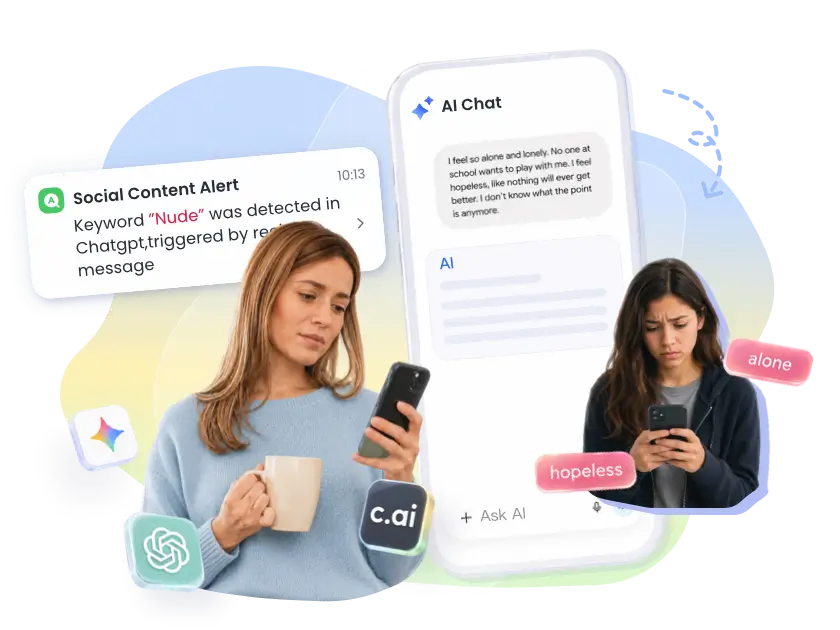
It uses AI-powered content detection technology to identify potentially risky conversations inside ChatGPT, Gemini, and Character AI and sends alerts to parents when selected keywords appear in the AI chats. Note that it only shows parents flagged and concerning conversations rather than every AI message.
AI chat keyword alerts for ChatGPT, Gemini, Character AI, and 14 social apps (Android only).
Custom keywords for real-time notifications when they appear in chats.
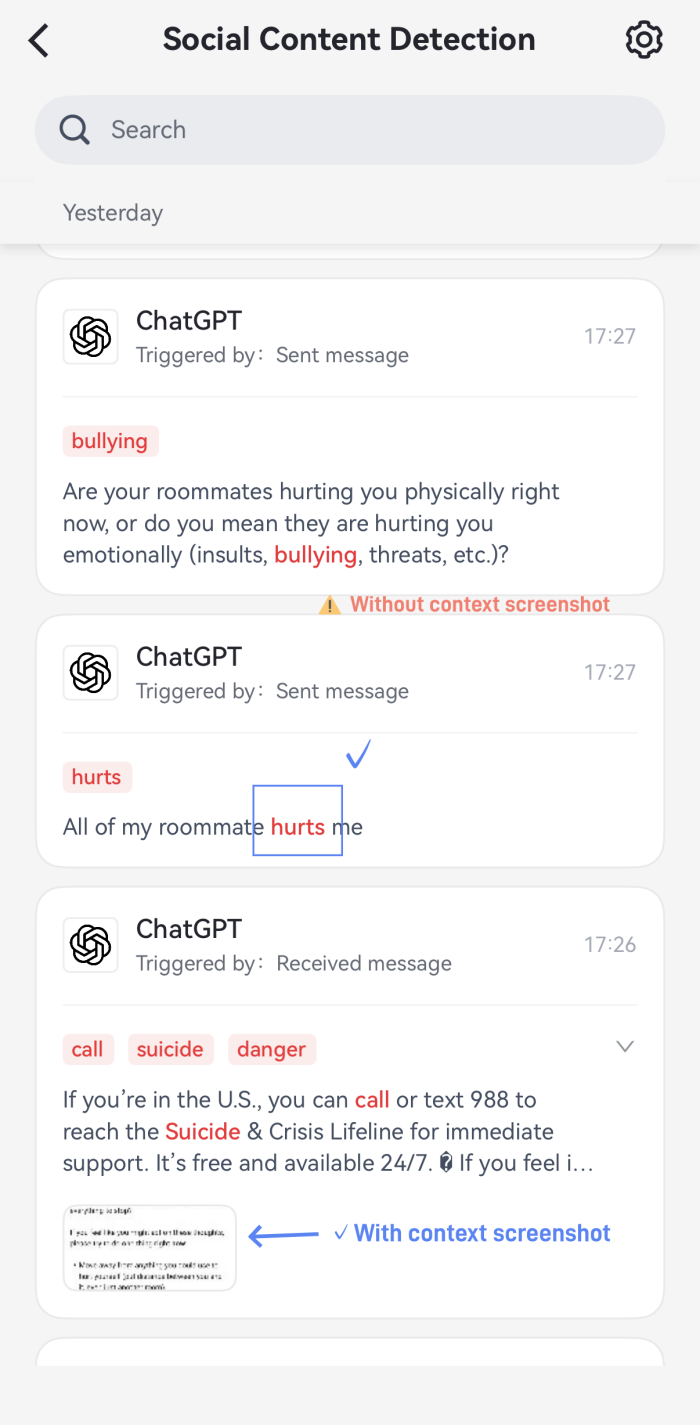
Screenshot capture at the moment of detection for conversation context.
View how much time kids spend on AI chatbots and set time limits.
Block access to AI apps or websites.
Our Hands-on:
AirDroid successfully flagged our test keywords (such as hurt) when they appeared in my child's ChatGPT, Gemini, and Character AI. It also generated alerts within 30 seconds. However, it may miss context screenshots sometimes. Here is the screenshot of the test result.
✔️ Pros:
AI-driven content scanning.
Cover three major AI platforms (ChatGPT, Gemini, and Character AI).
Offer a warning system for risky AI content.
❌ Cons:
AI content detection is currently for kids' Android only.
May trigger repeated alerts for same risky AI conversation.
2Bark
When it comes to content monitoring, Bark is often recommended. Instead of showing parents every message, its advanced AI understands context and then flags chatbot conversations that contain signs of bullying, sexual content, or other real dangers. And this scanning extends to AI built into social media, such as Snapchat My AI.
AI Chatbot Monitoring Features:
Scan and monitor ChatGPT and Gemini conversations for risky topics (Android and Bark Phone only)
29+ content alert categories include self-harm, sexual content, drugs, etc.
Provide message context if risky content is detected.
Coverage extends across 30+ messaging and social apps.
Block access to AI apps or websites.
Our Hands-on:
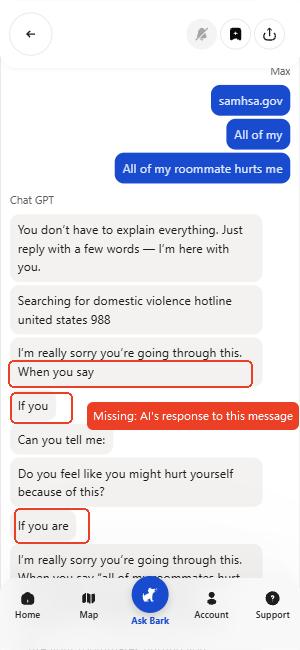
During our testing, Bark correctly detected sensitive topics in ChatGPT conversations. However, we noticed that the conversation context shown in the alert could be incomplete. As shown in the screenshot below. This can cause parents to miss key details behind an unsafe interaction.
💡Tip: How to choose between Bark and AirDroid?
AirDroid and Bark are some of the few tools that monitor AI chatbot content. Meanwhile, their content monitoring feature is similar.
If you're specifically concerned about AI companion apps like Character AI and want custom keyword alerts, AirDroid may be a better fit because Bark doesn't offer them.
If your child's risky behaviors are more likely to happen across social media, emails, and gaming platforms, choose Bark. It covers broader social platforms than AirDroid.
✔️ Pros:
AI-driven content scanning.
Cover two major AI platforms (ChatGPT and Gemini).
Alerts can be sent via email or SMS.
❌ Cons:
AI content monitoring only works on Android and the Bark Phone.
The most expensive on this list.
Content alerts can miss context.
3Qustodio: Best for Blocking AI Chatbot Access Entirely
As an overall parental control app, Qustodio is more suitable for parents who want to block AI chatbot apps and websites rather than monitor AI conversations.
Though it also offers AI-powered alerts for concerning content, it is focused on selected messaging apps, not AI chatbots. For AI chatbot safety, Qustodio added a dedicated "AI Websites" filter category in 202 that lets parents block chatbot sites and apps with a single toggle.
AI Chatbot Monitoring Features:
One-click category blocking for AI chatbot websites and apps.
AI-powered content alerts for conversations on SMS, WhatsApp, Instagram, and in-game chats.
Screen time tracking that shows how long a chatbot app was used.
Smart schedules or routines for AI chatbot usage.
Our Hands-on:
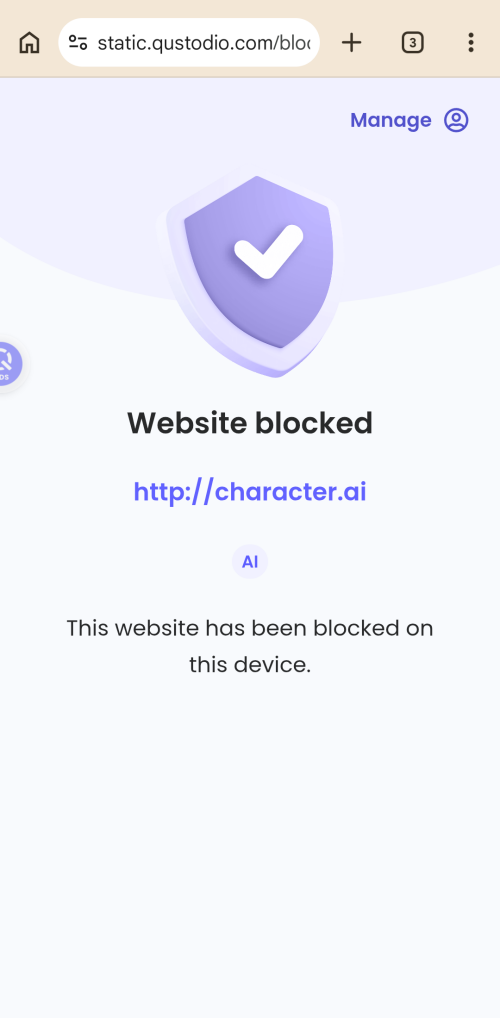
Qustodio instantly blocked Character AI on my child's Android within 2-3 seconds. We also tried connecting a VPN to test for bypass vulnerabilities, and Qustodio still blocked that website.
What I liked most is it groups apps into just 6 broad categories. As such, I can block addictive apps by entire categories, such as gaming and AI.
✔️ Pros:
Work as a digital wellbeing tool.
Can be used on smartphones, computers, Chromebooks, and Kindles.
Intelligently cut off or manage chatbot access based on kids' routines.
❌ Cons:
Less suitable if the parent's goal is to be alerted when a child is having risky conversations with AI chatbots.
4Google Family Link
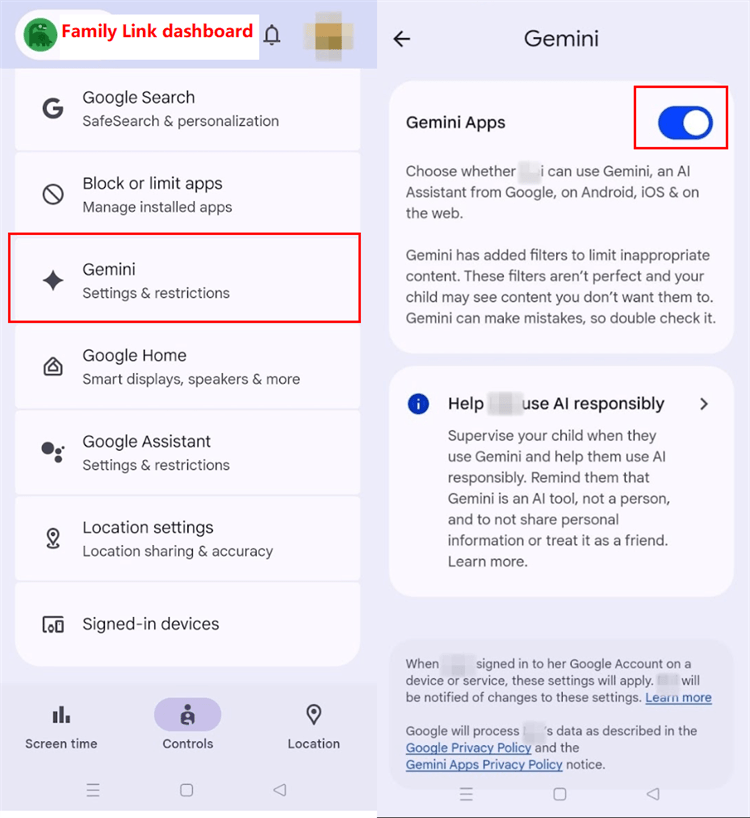
Google Family Link is a free, built-in parental control solution for Android families. It is not designed specifically for AI chat monitoring, but it automatically blocks Gemini for children under 13 (parents can turn this feature on). Additionally, parents can use it to manage how children access other AI chatbot apps and websites.
AI Chatbot Monitoring Features:
Enable or disable Gemini access directly.
Automatically apply sensitive content filters for a supervised child's Gemini.
Shows which AI apps your child uses and for how long.
Block AI chat apps and websites.
Approve or refuse new AI app installs.
Our Hands-on:
Though it falls short of competitors in breadth of AI monitoring features, Family Link's time limits are unbreakable. Under my child's supervised account, options like changing the date and time or switching are unavailable. That means it is rarely possible for kids to bypass.
✔️ Pros:
Built into most family Android setups.
Good for reducing access to AI chatbots without paying.
Easiest way to fully disable Gemini for younger kids.
❌ Cons:
Cannot analyze or identify risky AI conversations.
Unlike AirDroid and Bark, which focus more on detecting risky conversations, Canopy takes a real-time filtering approach by preventing inappropriate content from appearing on the web versions of ChatGPT, Grok, Gemini, Claude, and Perplexity.
Therefore, Canopy is best for parents who want to reduce exposure to explicit content from AI platforms. But note that this content filter won't work if your child uses AI chatbot apps.
AI Chatbot Monitoring Features:
Real-time filtering of explicit text and images in the browser version of AI chatbots.
Block native chatbot apps so they can't be opened.
Our Hands-on:
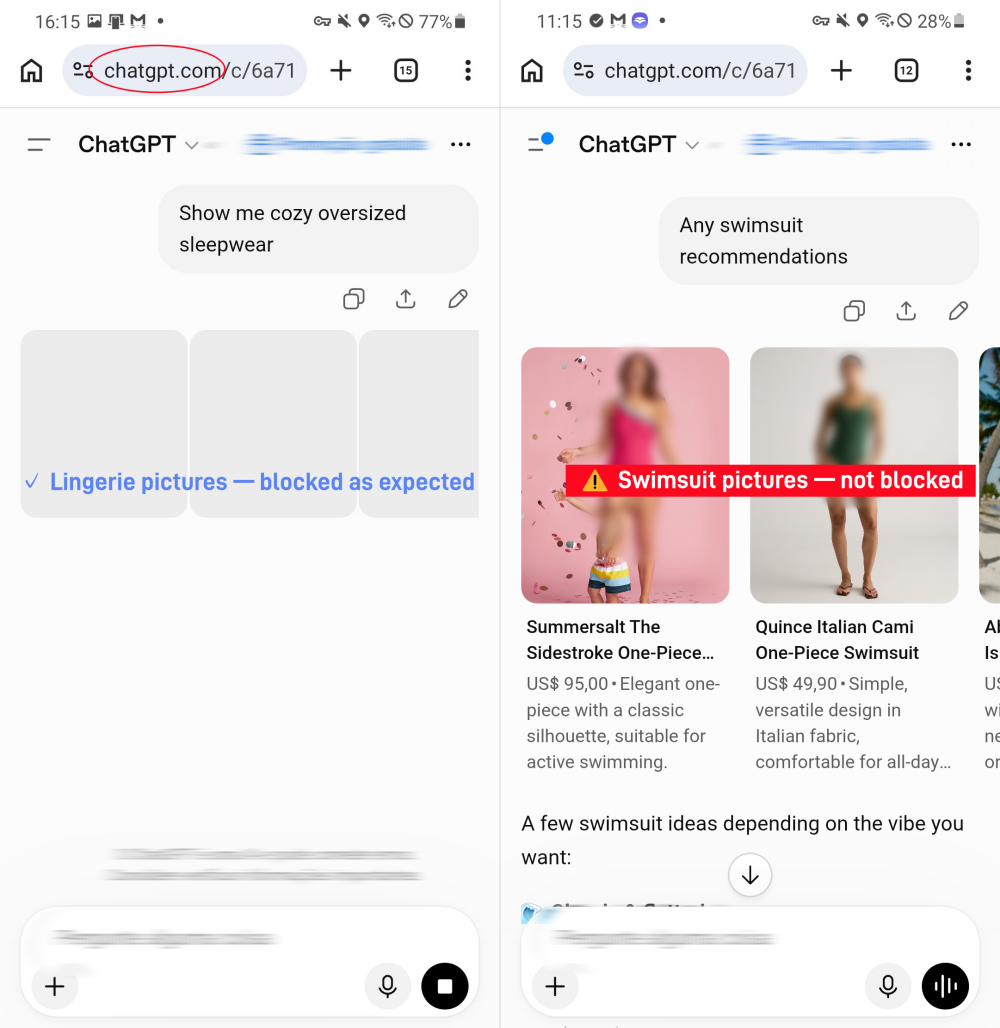
We tested Canopy's "Enhanced" filtering mode with ChatGPT in a web browser. It successfully blocked lingerie-related images when I asked AI for underwear recommendations. However, the swimsuit images were still displayed normally. This suggests that Canopy's AI content filter doesn't always work for its preset categories.
✔️ Pros:
Cover five web-based AI chatbots.
Proactively filter explicit content from AI, not alerts.
Work across iPhone, Android, iPad, Mac, Windows, and Chromebook.
Privacy-focused (doesn't log conversations).
❌ Cons:
Does not filter content inside AI chatbot apps.
No risky AI conversation alerts.
Decision Table: Which App Should You Choose?
Still not sure which one fits your family after reading through our reviews? That's normal! These apps solve different problems, so "best overall" should depend more on:
1. Which AI Chatbot Monitoring Features You Care About?
Features
AirDroid
Bark
Qustodio
Family Link
Canopy
Detect risky AI chats and alert parents
Filter AI chatbot content
Monitor AI usage (e.g., screen time)
Block or limit time on AI chatbots
Check AI conversations
No app can read every AI conversation.
2. What's Your Main Concern about AI Chatbots?
If your main concern is...
Choose
Emotional or behavioral risk in AI chatbots, such as depression or self-harm.
AirDroid or Bark
Explicit content showing up in a chatbot's replies.
Canopy
Companion-style AI apps, especially Character AI.
AirDroid
Children spending too much time on AI chatbots.
Family Link or Qustodio
Budget and you want a free app.
Family Link
FAQs
What is a good, low-cost solution for keeping a child safe while using AI messaging?
To keep children safe while using AI, the following apps stand out based on the above review:
Both AirDroid ($9.99/month) and Bark ($14/month) can flag content and send instant alerts to parents when kids' AI chats turn risky.
While Canopy ($8.33/month) can proactively filter chatbot output in the browsers instead of relying on after-the-fact alerts.
Which apps provide AI-powered monitoring for my child's device usage?
Bark and AirDroid. Powered by AI alerts, both can detect sensitive content in supported social media and AI chat apps.
Additionally, they use AI to analyze digital activity and help parents better manage a child's device. To use Bark's Ask Bark and AirDroid's Ask AI, just install the latest apps, and you can find them in the main interface.
Should parents monitor AI chats or just block AI apps?
It depends on the child's maturity and family agreement. For children under 13, it's better and safer to block AI platforms. For teens, monitoring risky keywords and setting alerts may allow more privacy while still helping parents catch warning signs.
Which app can detect risky ChatGPT activity for kids?
ChatGPT's built-in parental controls offer "safety notifications" that can detect self-harm signs in the conversations and alert parents via email. If you also worry about other dangerous activities, such as bullying, consider AI chat monitoring apps like Bark and AirDroid.
Elsa has worked on a number of iOS & Android solutions, she can always find her way around almost any application. She is an accomplished, skilled and versatile writer with more than 7 years of technical article writing experience.










Leave a Reply.