Norton Family Review 2026: What Parents Should Know Before Buying
Norton Family is best suited to parents who mainly want strong web filtering, straightforward app blocking, device-wide screen-time rules, search activity, and location tools. In our Android tests, web restrictions were the standout feature: blocked sites were restricted quickly across the browsers we tried, including private browsing, and most controls recovered normally after restarts or temporary network loss.
There are important limits, though. Norton does not let parents assign a separate daily time allowance to an individual Android app, School Time does not automatically stop apps that remain allowed under App Supervision, and location performance differed substantially between our Samsung and Pixel test phones. We also found that alerts for a disabled Accessibility permission were inconsistent.
For this review, our hands-on testing focused on children's Android devices, using a Samsung Galaxy S20+ 5G and Google Pixel 7. Norton Family also supports iPhone, iPad, and Windows, but features differ by platform.
1. Norton Family Review at a Glance
| Norton Family | |
|---|---|
| Best for | Web filtering, straightforward Android rules, search and activity oversight |
| Less suited for | Individual app time limits and broader content or safety alerts across social and messaging activity |
| Hands-on test devices | Samsung Galaxy S20+ 5G and Google Pixel 7 |
| Strongest feature in our test | Web Supervision |
| Main limitation | App and time controls are less flexible than its web controls |
| Current U.S. price | $49.99/year |
| Free trial | 30 days |
| Current Android requirement | Android 10+ |
| Device allowance | Check before purchase; the information we found was inconsistent |
Norton currently lists Norton Family at $49.99 per year, and Norton offers a 30-day trial. We found inconsistent information about how many devices that subscription covers, so families managing several phones should check the allowance displayed at purchase. We explain what we found in the pricing section below.
What we liked
Web filtering was the clearest strength. Restricted sites were blocked quickly in our tests, rules continued to work across the browsers we tried, and the parent account received alerts after attempts to visit blocked pages.
We also liked that core controls such as app blocking and Instant Lock generally took effect without much friction once setup was complete. After restarts, temporary network loss, and network changes, the rules we tested recovered automatically.
Norton also makes the supervision visible to the child. Changes to family rules generated notifications on the child device, rather than relying on hidden monitoring.
What we would change
Norton's Web, Time, and App controls operate more separately than some parents may expect. For example, School Time can block Snapchat's website while the Snapchat app remains available if it is still allowed under App Supervision.
Time controls also lack separate daily allowances for individual apps, and Search and Video Supervision have reporting and coverage limits that become important if those are your main reasons for choosing the product.
2. How We Tested Norton Family
We installed and tested Norton Family on two child Android phones:
| Test device | Environment |
|---|---|
| Samsung Galaxy S20+ 5G | Android 11 |
| Google Pixel 7 | Android 16 |
We tested setup and permissions, Web Supervision, School Time, Instant School Time, Instant Lock, Time Supervision, App Supervision, Location Supervision, Search Supervision, Video Supervision, restarts, network changes, temporary offline use, Battery Saver, permission changes, tamper resistance, and battery behavior.
When results differed between devices or appeared inconsistent, we repeated selected tests rather than treating the first result as conclusive. Norton requires several Android permissions for features such as app, time, web, and location supervision.
Its setup documentation includes Device Administrator, Accessibility, App Usage Access, Location, Display over other apps, Phone, and related permissions. In our setup, we went through eight permission or configuration steps.
Some Android settings were less obvious to find, and after enabling one permission we generally had to return to Norton's permission screen before continuing with the next.
We also reviewed recent Google Play feedback
Hands-on testing remains the primary evidence for this review, but we also reviewed Google Play feedback from January 2025 onward to identify recurring user pain points worth checking ourselves.
Reliability and rule consistency came up repeatedly in those reviews, which is one reason we tested restarts, network interruptions, Battery Saver, and permission loss instead of checking each feature only once.
We also found user reports involving location delays, web filtering, search reporting, and time controls. We use those comments as individual user observations, not as proof that a problem affects Norton users generally. When a Google Play report differs from what we reproduced ourselves, we say so.
3. How Core Features Performed in Our Test
- Web Filtering Was the Strongest Part of Norton Family in Our Test
- Screen Time and App Controls Work, but Per-App Time Limits Are Missing
- Location Refresh Was Faster and More Consistent on Samsung
- Search and Video Supervision Have Important Limits
1Web Filtering Was the Strongest Part of Norton Family in Our Test
When we created a child profile in the 8–11 age range, Norton automatically applied age-based Web Supervision rules, including restrictions for categories such as social media, gaming, and adult content. Parents can change those categories and add individual websites to Allowed or Restricted lists.
Blocking worked quickly across the browsers we tried
When we added a URL to the restricted list, Norton blocked it almost immediately on the child phone. We tried the restriction through:
- Chrome
- Samsung Internet
- the Google app
- private or incognito browsing
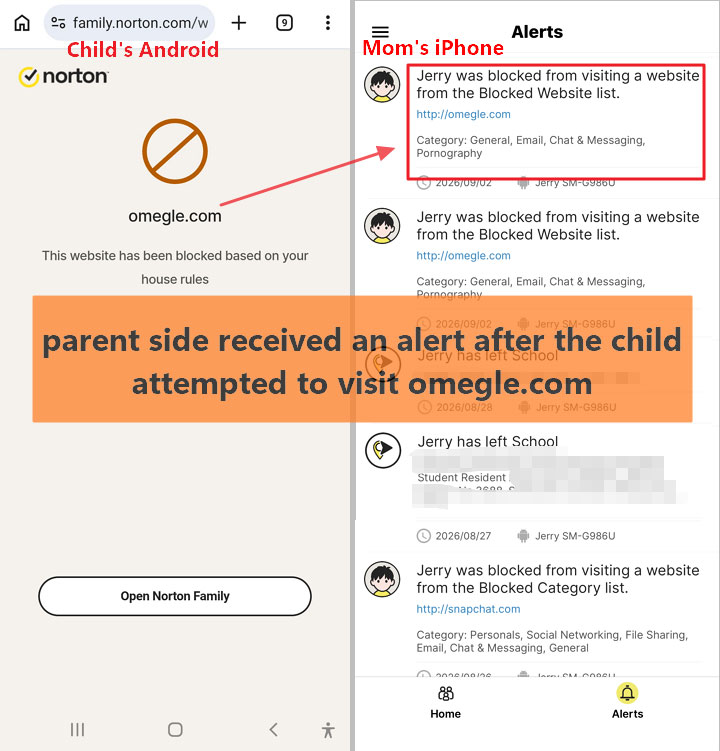
The restricted page remained blocked in our tests, and the parent side received an alert after the child attempted to visit it. This is useful because a web filter loses much of its value if switching browsers is enough to get around the rule.
Our result was strong, but user experiences are not uniformly positive
Some of the recent Google Play feedback we reviewed was consistent with our result. One five-star reviewer specifically singled out web filtering and alerts as Norton's standout capabilities. Other feedback described a different problem: legitimate sites, including school or news websites, being placed in categories the reviewer considered incorrect.
We did not reproduce that category-classification problem ourselves. That distinction matters. Our testing supports the conclusion that Norton's blocking worked reliably on the sites and browsers we tested; it does not prove that Norton's category database will classify every website correctly.
For families that depend on specific school portals, research sites, or news sites, the practical step is to test those sites during the free trial and use Allowed Websites for any exceptions you need.
School Time is more limited than its name may suggest
Norton describes School Time as a way to restrict online activities during study periods. On Android, the settings center on web categories and allowed or restricted websites. By default, only educational web categories and websites are allowed, although parents can customize the rules.
In our Android test, however, School Time did not automatically override App Supervision. For example: Snapchat's website could be blocked by the School Time web rules while the Snapchat Android app remained usable because it was still set to Allowed under App Supervision. This changes how we would use the feature.
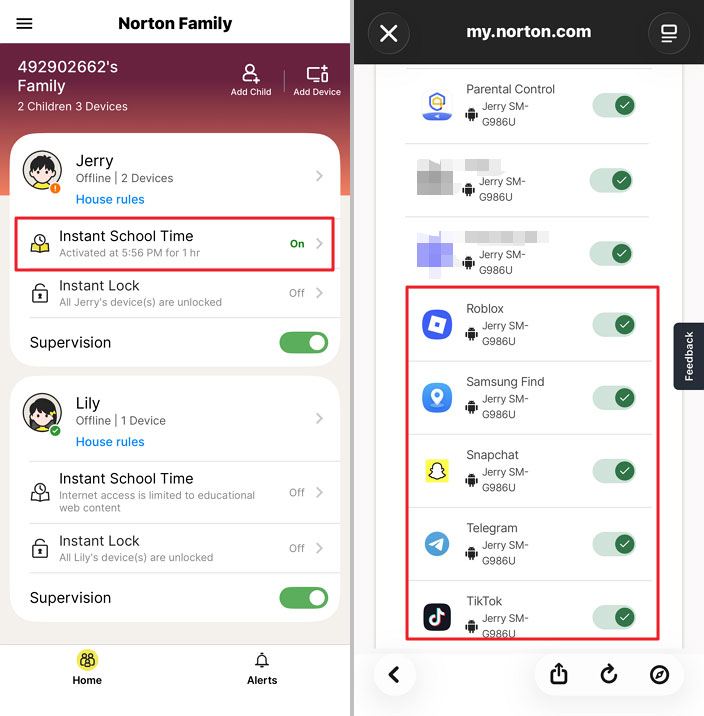
School Time can help reduce web browsing distractions, but parents should not assume that turning it on creates a distraction-free phone. If TikTok, Snapchat, Discord, or another app is allowed under App Supervision, it may still be available during School Time. So if your goal is: “No distracting apps while homework is being done,” you need to review the App Supervision rules separately.
2Screen Time and App Controls Work, but Per-App Time Limits Are Missing
Norton's Time Supervision focuses on total device use and scheduled allowed or blocked periods rather than creating a separate usage budget for every app. Norton officially supports daily time allowances and blocked periods on Android.
Instant Lock worked on both phones, but not at the same speed
Here is what we observed:
| Device | Time until Instant Lock took effect |
|---|---|
| Samsung Galaxy S20+ 5G | Under 5 seconds |
| Google Pixel 7 | About 1 minute |
Once the lock took effect, the child phone clearly displayed that the device had been locked by the parent. After we unlocked it, both phones became usable again almost immediately. Norton also required a PIN and emergency-contact setup before we could use the locking feature.
Time Supervision has a bypass limitation parents should know about
Norton lets parents choose both:
- how long a child can use the device;
- the hours when use is blocked.
But in our Samsung and Pixel tests, we found that changing the device clock could defeat the scheduled blocked period we tested. We are deliberately not publishing step-by-step bypass instructions, and this test does not establish that every Norton time rule on every Android phone behaves the same way. It does establish a narrower finding:
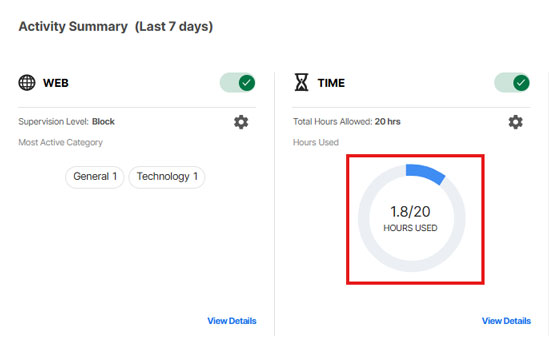
The downtime schedule we tested was not resistant to device-time changes on either of our Android test phones. Another dashboard detail is easy to misread. The Activity Summary defaults to a seven-day view, so the Time panel can show weekly usage and allowance information rather than simply today's screen time.
App blocking was fast, but we couldn't give TikTok “30 minutes a day”
When we changed apps such as Snapchat, TikTok, YouTube, and Discord to Blocked, opening them on the child phone immediately produced a blocked message in our tests. What we could not do was assign an individual daily allowance such as: TikTok: 30 minutes, YouTube: 60 minutes. We also could not create a separate downtime period for an individual app.
So Norton's App Supervision answers: Can my child use this app or not? better than: How long can my child use this particular app today?
If app-by-app limits are a priority, Google Family Link, Qustodio, and AirDroid Parental Control all currently provide ways to set time limits for individual Android apps.
Family Link supports daily limits for individual apps on supported Android devices, Qustodio supports individual app time limits, and AirDroid provides individual app limits and app-specific downtime. That does not make one of those products universally better than Norton. It simply matters if separate app allowances are one of your main reasons for installing parental controls.
3Location Refresh Was Faster and More Consistent on Samsung
Norton Family supports child location monitoring, Favorite Locations, scheduled Alert Me checks, and arrival or departure notifications for saved locations where the feature is available. The feature existed on both of our test phones. Its performance did not look the same.
Locate Now showed the biggest Samsung–Pixel difference in our test
| Test device | Locate Now result |
|---|---|
| Samsung Galaxy S20+ 5G | One update took about 5 seconds; repeated attempts usually refreshed within 10 seconds |
| Google Pixel 7 | Manual refresh frequently failed to update immediately; the newer location generally appeared in history around 2–3 minutes later |
That is why we would not describe Norton location simply as either “real time” or “slow.” Our more defensible finding is: Location responsiveness varied significantly between our two Android test phones.
Google Play feedback shows why this is worth testing on your own phone
Location delays also appeared in the recent Google Play reviews we examined. Some users described intermittent updates, and one reviewer reported much longer Locate Now delays than anything we reproduced. Our Pixel did not remain stale for hours.
In our tests, the delayed location generally appeared in history within around two to three minutes. So those user reports do not prove that Norton's location feature is broadly unreliable. They do show that the type of responsiveness issue we encountered on Pixel is not unique to our test session.
The practical takeaway is simple: Use the 30-day trial to test Locate Now on the actual Android phone your child carries before relying on it for time-sensitive check-ins. That is especially important if location is one of your main reasons for buying Norton Family.
Alert Me is not the same as a no-show alert
Norton's Alert Me lets parents request a child's location at a chosen day and time. That can be useful around school pickup or arrival time, but the parent still needs to look at the location and decide whether the child is where expected. We would therefore describe it as a scheduled location check, not an automatic determination that a child failed to arrive at a destination.
4Search and Video Supervision Have Important Limits
Norton provides more activity history than a basic screen-time utility, but its monitoring is still centered on specific supported activities rather than giving parents visibility into everything happening inside social or messaging apps.
Search reporting was much smoother on Samsung
On our Samsung phone, the searches we performed through the tested browsers appeared accurately, including repeated searches. Private browsing did not prevent the searches we tested from being recorded. Pixel was less consistent.
Before 6:00 PM, we searched for terms including Snapchat and Gemini. Gemini appeared in the dashboard first, while Snapchat initially did not. The Snapchat record eventually appeared at around 6:40 PM, and Norton displayed a 6:37 PM timestamp.
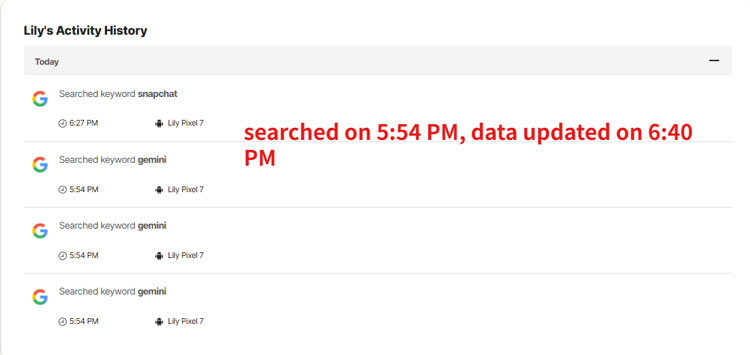
Because the record eventually appeared, we classify this as: delayed reporting, not a confirmed missed search. A recent Google Play reviewer reported missing search records altogether. We did not reproduce that more serious outcome. This distinction is important: a community report can identify a problem worth testing, but it should not replace what we actually observed.
Video Supervision does not give you a complete YouTube App history
Norton's support documentation describes Android Video Supervision around supported browser-based YouTube activity and notes browser-specific limitations. Our testing showed the practical effect. On Pixel, YouTube viewing through Chrome could appear in Video Supervision even sometimes it is delayed.
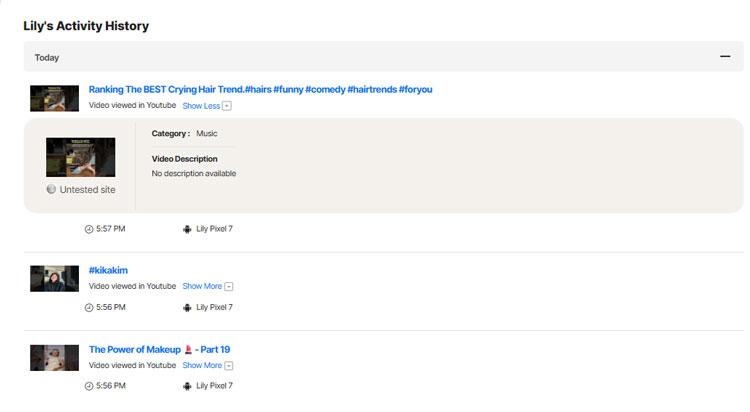
But when YouTube was watched through the YouTube Android app, we did not see those videos in Norton's Video Supervision history. Samsung created a similar problem: opening a YouTube webpage could hand the session over to the installed YouTube app, after which the viewing activity was no longer recorded in our test.
So we would not interpret: “Norton monitors YouTube” as: “Norton gives parents a complete record of everything watched in the YouTube app.” Those are different claims.
It doesn't record watch history on TikTok or Hulu either.
Norton is not designed around broad social and message safety alerts
Norton currently states that Text Message Supervision and Call Blocking are disabled on Android. We also did not find the type of cross-app social or message risk-alert system offered by products built specifically around content signals.
That gives Norton a clearer role: Norton Family is mainly a rules-and-activity parental control rather than a broad social-content risk detection tool. Some parents may prefer that. If your goal is screen time, web rules, app blocking, searches, and location, you may not want broader access to children's communications in the first place.
If a specific safety concern means your family does need broader Android activity visibility, products take different approaches. Bark, for example, is oriented toward risk alerts across supported content, while AirDroid Parental Control offers Android features such as notification syncing, screen mirroring, and additional remote-safety tools.
AirDroid's broader Android visibility also requires access to more sensitive device information, so those features are better used transparently and when the added visibility addresses a real family need.
4. Reliability Was Generally Good in Our Stress Tests, With Some Important Exceptions
This section became more important after we reviewed recent Google Play feedback. Several recent reviews raised concerns about locks, blocks, synchronization, or rules not behaving consistently. User reviews cannot tell us the failure rate, but they gave us a good reason to test Norton beyond the initial setup.
1Rules recovered after restarts and connection changes
We tested several common Android situations.
| Test | Result |
|---|---|
| Restart child phone | Rules recovered automatically |
| Switch networks | Rules recovered |
| Temporary offline period | Rules recovered after connectivity returned |
| Battery Saver | Instant Lock still took effect |
Those are meaningful positive results. A parental control rule that works once immediately after setup is less useful than one that survives normal phone behavior, and Norton handled these particular recovery tests well on our devices.
2Accessibility permission alerts were inconsistent on both phones
This was the clearest reliability exception. Accessibility is one of the Android permissions Norton uses for supervision and uninstall protection. Norton also advises parents to keep the required Android settings enabled. We disabled Accessibility twice on Samsung and twice on Pixel.
| Device | Test result |
|---|---|
| Samsung Galaxy S20+ 5G | One parent alert, one time with no alert |
| Google Pixel 7 | One parent alert, one time with no alert |
So our conclusion is intentionally narrow: Permission-loss alerts were inconsistent in our testing. Four tests are nowhere near enough to claim a 50% failure rate. But the inconsistency matters because a parental control service can lose effectiveness when a critical permission is disabled, and a parent needs to know when that happens.
3Device Admin provided useful resistance to ordinary changes
Norton requires Device Administrator permissions to make unauthorized removal more difficult. In our tests, protected changes such as disabling Accessibility required the parent PIN. Accessing Norton Family's protected settings also made simple attempts to stop supervision less straightforward.
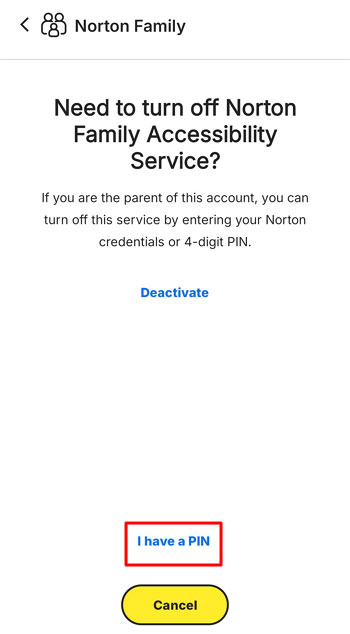
We additionally tried a VPN while testing web controls. The website restrictions and search reporting we checked continued to function. We would not describe Norton Family as unbypassable or tamper-proof. Our test does not justify either claim. What we can say is that Norton resisted several ordinary attempts to interfere with its controls, while the time-schedule test described earlier exposed one meaningful weakness.
4We didn't notice an obvious battery problem, but this was not a battery benchmark
During the Samsung test, battery level went from 95% to 64% over approximately five hours. On Pixel, it went from 45% to 33% over approximately two hours. During those periods we were actively testing location, browsing, locking, app controls, searches, video features, and other functions.
Because normal phone use and our test activity contributed to that drain, these numbers do not measure Norton's battery consumption by itself. We therefore would not label Norton as either a low-drain or high-drain parental control based on this test. What we can reasonably say is: We did not notice an unusual battery problem during our hands-on testing.
5. Norton Is Relatively Transparent With the Child
A parental control tool can technically work while still being a poor fit for how a family wants to handle privacy and independence. Norton takes a relatively visible approach in the Android setup we tested. When parents changed or added house rules, the child phone received notifications.
Instant Lock also made it clear that access had been restricted by the parent. Norton's Android documentation identifies Notifications as a permission used to inform the child about House Rules updates. For many families, that is preferable to supervision designed around being invisible.
The right amount of monitoring still depends on a child's age, maturity, and the specific safety concern. A tool should support family conversations and boundaries rather than substitute for them.
6. Price and Device Support
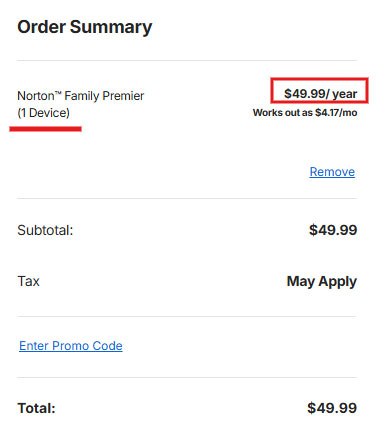
Norton Family currently costs $49.99 per year in the U.S. Norton's current renewal pricing table lists the plan as supporting unlimited devices, while its support documentation states that a single Norton Family account can monitor up to 50 devices. In our 30-day trial, we successfully added at least three devices.
We did see one inconsistency: the checkout screen we reached labeled Norton Family Premier as 1 Device. Based on Norton's current support documentation and our own multi-device trial, we would not interpret that label as meaning parents can monitor only one child device. Norton does not explain the discrepancy on the pages we found.
7. Is Norton Family Right for Your Family?
Norton Family makes the strongest case for families whose priorities are: web filtering, website categories, straightforward app blocking, whole-device screen-time rules, search activity, and basic location oversight.
Its Web Supervision was the strongest feature in our Android tests. Blocking was quick, browser switching did not defeat the rules we tried, and the parent side received useful blocked-site alerts.
It is a less natural fit when your priority is: separate time budgets for individual apps, broad social or messaging safety alerts, or complete visibility into activity inside apps such as YouTube.
And Location deserves testing on the child's actual phone: our Samsung experience was fast, while Pixel was significantly less consistent. Rather than choosing based on which product lists the most features, it helps to start with the specific problem you want to solve.
| If your priority is... | An option worth comparing |
|---|---|
| Basic Android screen time and individual app limits without paying | Google Family Link |
| Flexible app-by-app limits and web controls | Qustodio |
| Risk-focused alerts across supported online activity | Bark |
| Broader Android activity visibility and remote-safety tools | AirDroid Parental Control |
| Strong web filtering with straightforward device-level rules | Norton Family |
The alternatives solve different problems, so this is not a universal ranking. If Norton's strengths line up with what your family actually needs, the 30-day trial is particularly useful.
We would use it to test your child's real browsers, school websites, favorite apps, and Locate Now performance on their actual phone before deciding whether to pay. That is more informative than assuming our Samsung or Pixel results will reproduce exactly on every Android device.
8. Norton Family FAQ
1Does Norton Family work on Android?
Yes. Norton's current system requirements list Android 10.0 or later for Norton Family, with Android Go and multi-user mode not supported. Our current hands-on review tested children's Android phones only. If we later add iPhone testing, we will update this same review rather than treat the Android results as evidence of iOS performance.
2Can Norton Family set a time limit for one Android app?
We could allow or block individual apps, but we did not find a way in the Android version we tested to assign an app its own daily allowance, such as TikTok for 30 minutes per day.
3Does Norton Family work in incognito mode?
In the Android environments we tested, restricted websites remained blocked in private/incognito browsing, and the searches we tested could still appear in Norton activity reporting. That is a description of our tested browsers and devices rather than a promise for every browser and Android version.
4Can Norton Family monitor text messages?
Norton currently states that Text Message Supervision and Call Blocking are disabled on Android.
5Can Norton Family see everything my child watches on YouTube?
No. Browser-based YouTube activity can be reported under supported conditions, but our tests did not record YouTube videos watched inside the Android YouTube app. Norton also documents browser-specific limitations for Android Video Supervision.
6Can a child disable Norton Family?
Norton uses Android permissions including Device Administrator and Accessibility to make ordinary removal or interference more difficult. In our test, some protected changes required the parent PIN. However, we would not describe Norton—or any software parental control based on a limited test—as impossible to bypass. We also found that parent alerts after Accessibility was disabled were inconsistent.
7How many devices does Norton Family cover?
We recommend checking your specific subscription before buying. Our purchase screen showed 1 Device, our trial allowed at least three devices, while Norton's March 2026 U.S. renewal price list currently lists Norton Family as Unlimited devices.











Leave a Reply.