How to See If Someone Has a Hinge Account
Wondering if someone has a Hinge account? You're not alone. Whether it's about curiosity or safety concerns (research revealed that Hinge exposes users' precise location), this article walks you through possible ways and signs to watch out for.
Key Takeaways:
- There's no 100% reliable way to find out if someone has a Hinge account.
- Common methods like using a phone number, changing preferred location, or blocking and unblocking the person can offer clues but come with limitations.
- The most recommended approach is to have an honest conversation or look for behavioral changes.
- And if you're a parent worried about your teen, blocking age-inappropriate dating apps for them is better.
Methods to Find Out If Someone Has A Hinge Account
Before starting, there's no 100% foolproof way to confirm whether someone is on Hinge. However, there are still some methods mentioned and shared online. Here, we listed them and analyzed their limitations.
1Using the "Block Contacts" Feature and Unblocking
This method was shared by a TikTok user and has gained nearly a thousand likes.
According to what she described, Hinge can block someone you know by syncing your phone contacts. Though this feature is better for privacy, Hinge suggests these "previously blocked" contacts on your feed the next day after unblocking. To do so:
- Step 1.On Hinge, go to "Settings > Block List."
- Step 2.Add and block the number of the person you're looking for.
- Step 3.Wait a moment, then unblock them.
- Step 4.Refresh and check your match feed to see if they appear.
Limitations:
- Hinge may not always suggest them immediately.
- They may also block you to prevent their account from appearing on your Hinge.
Worried About Dating Apps on Your Kid's Phone?
AirDroid Parental Control's report can tell you if your teen uses dating apps or sites, and help you spot dangers through keywords, giving you peace of mind.
2Setting Hinge Location to Where the Person Is Based
Hinge encourages users to manually set their location and then uses this info to show potential matches nearby.
That means, by changing your own location to where the person lives or works, you probably come across their profile in your match feed if they have a Hinge account.
- Step 1.Open "Hinge" and tap the "Preferences" button.
- Step 2.Tap "My Neighborhood."
- Step 3.Manually search for or drag the location to where the person is based.
- Step 4.Then, browse your match feed to see if they appear.
Limitations:
- The person may have set their own location to a different city.
- You could go through countless profiles and still not find them.
3Signing in with Phone Number
To have a Hinge account, a phone number is required. This means you can use this to your advantage to check if someone has registered on Hinge.
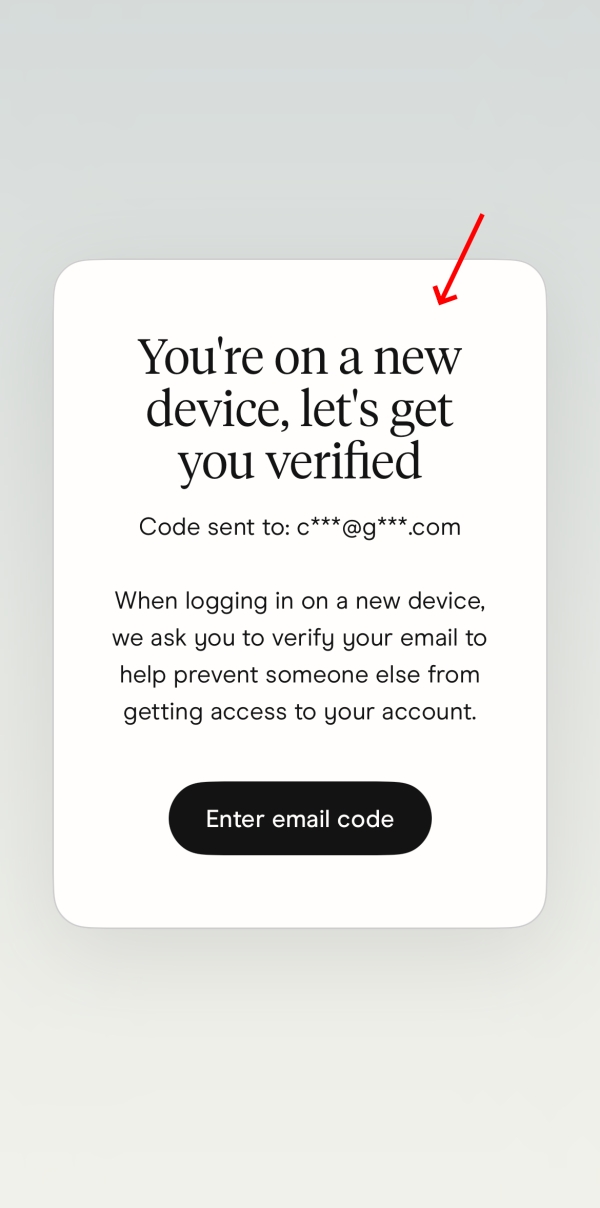
However, note that using this way will send a code to the phone number or linked email whether he has a Hinge account or not. So, we don't recommend it.
And, if the person has an active Hinge account with the phone number, you'll see a "You're on a new device" popup.
Limitations:
- The person will receive a verification code message.
Why It's Hard to Find Someone on Hinge
Now that you know it's not easy to check or confirm if someone has a Hinge account. This is because:
There is no in-app search
Hinge doesn't allow you to search for someone within the app by username, phone number, or email.
Hinge profiles are not public
Additionally, Hinge profiles aren't indexed by Google or any search engine. The only way to find a profile is to be shown through its recommendation system based on algorithms within the app.
It applies one-time code login system
When searching this topic online, some users suggest using "Forgot Password" to tell if someone is on Hinge. However, this trick doesn't work for Hinge.
The Hinge app relies on verification codes to access the account, so you can't use features like "forgot password" to check if an account exists.
Possible Signs Someone Might Be Using Hinge
If none of the methods above gave you a clear answer, try looking for the behavioral clues below, which can hint that they're on Hinge.
- They're spending more time on their device, especially at night.
- They start posting about being open to meeting people on their social media.
- They're becoming more distant or less communicative to you.
- They suddenly start caring about their appearance, taking more photos, and updating profile photos more often.
- They often laugh at the screen without sharing why.
- You spotted Hinge app notifications on their lock screen.
If You're Worried about Your Teen Using Dating Apps
Well, there are a lot of parents searching for this topic because they're worried about their teens accessing dating services so early.
That concern is valid. A study conducted in 2025 has found that 24% of teens have used adult dating apps like Tinder and Hinge.
While Hinge currently requires facial verification to confirm users are 18 and real, tech-savvy teens may bypass the verification using an older sibling's face or AI tools.
Risks of Teen Using Dating Apps
Since most dating apps are designed for adults, risks are especially concerning for younger users:
- Stranger or scam dangers: Teens may match with adults who lie about their age or with bad intentions.
- Sexual predation: This is not theoretical. According to reports, a 12-year-old girl was assaulted by an adult man she met on Wizz, a teen dating app.
- Privacy leaks: Most dating apps ask for locations, real profiles, preferences, or social media handles. Since this displays on the dating profile, it can be used for stalking or doxxing.
- Unwanted explicit content: Dating apps are designed to develop a new relationship and meet up with new partners. So, some conversations can quickly turn explicit.
What You Can Do as a Parent
- Talk to understand why: Ask "Are any of your friends using dating apps?" "Have you ever tried one?" "Why do you use it?" And keep the conversation curious, not confrontational.
- Explain the real dangers: Teens respond better when you explain why. Show them real cases about dating app risks, such as strangers may lie about their age or ask for private photos.
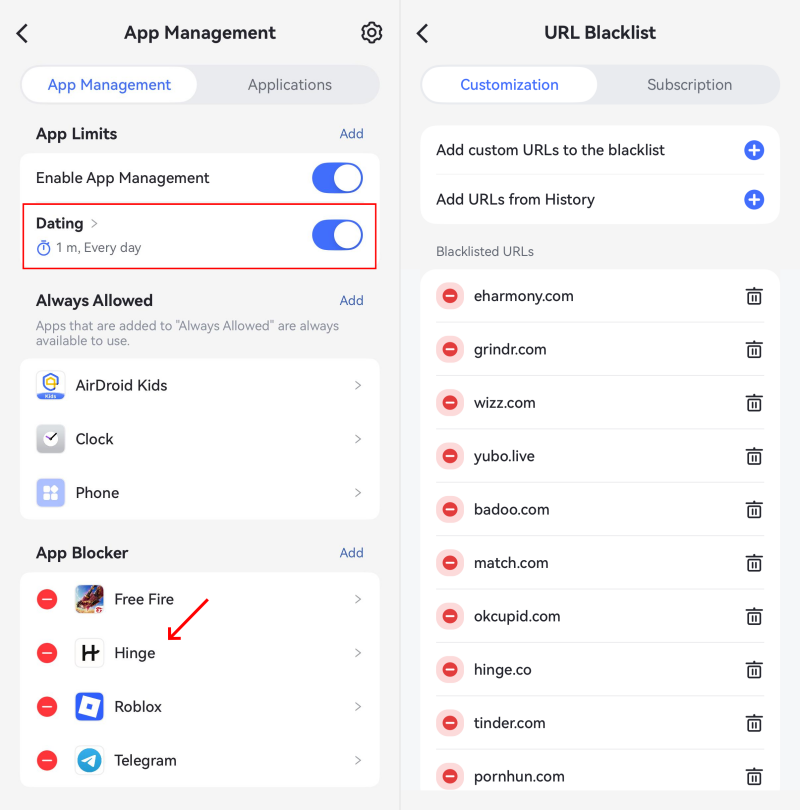
- Set boundaries for age-inappropriate apps: For apps that are not designed for kids and teens, parents should block them. To do so, AirDroid is a comprehensive solution to restrict risky apps and sites for kids.










Leave a Reply.