AirDroid Parental Control
24/7 Kids' Guardian via App & Web
- 👀Live surroundings and location tracking
- 🔞Content Monitoring and App/Web Blocking
- ⚠Instant alerts for online risks and geofences
- ⌛Screen time control and monitor

Is SpicyChat Safe? A Parent's 2026 Safety Audit
Don't be a parent who discovers SpicyChat AI after the damage is already done. We tested the platform firsthand to see how easy it is for teenagers to access explicit AI content and bypass basic safeguards.
The short answer to "Is SpicyChat AI safe for kids and teenagers in 2026?" is NO. The platform presents itself as an adults-only AI chat service, but our testing found weak age verification and almost no content filtering to restrict any teen accidentally or intentionally reaching explicit conversations.
| For Adult (18+) | For Teens (Under 18) | |
|---|---|---|
| General Use | Designed for adult AI roleplay and companion chats | Not suitable due to explicit and emotionally mature content |
| Age Verification | Usually limited to self-declared age checks in many regions | Easy for minors to bypass in most regions |
| Content Access | Full access to NSFW and uncensored AI characters | Explicit content can appear quickly without asking |
| Data & Privacy | Conversations may be stored or used for memory features | Teens may unknowingly share sensitive personal information |
| Detection Risk | Activity can be somewhat hidden through browser or PWA use | Parents can find it harder to spot the platform usage |
| Best Practice | Use cautiously and don't get addicted | Parents should block access and use monitoring or parental-control tools |
| Verdict | Useful for adults to bypass loneliness | Not safe or recommended for children and teenagers |
What is SpicyChat AI?
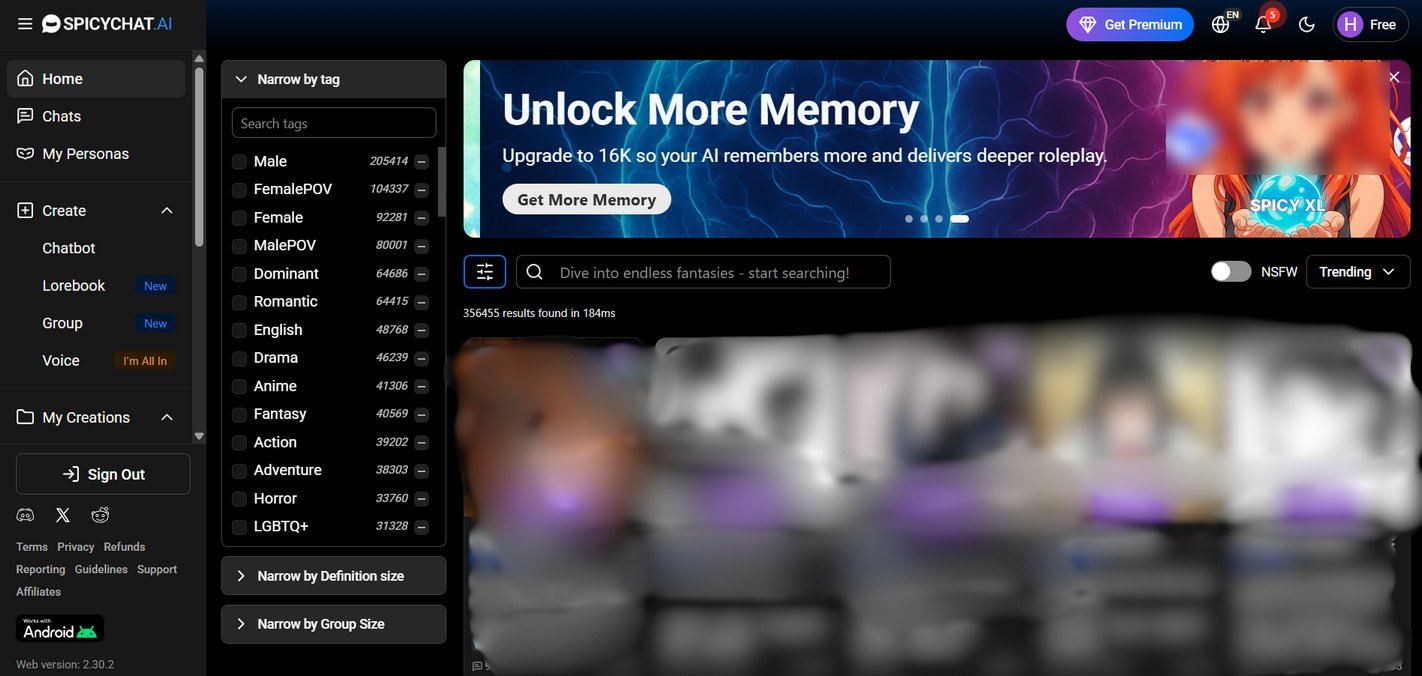
SpicyChat AI is an adult AI roleplay platform for adults to create or choose from hundreds of thousands of community-built AI characters and hold uncensored conversations with them, including explicit, romantic, and sexually graphic content.
SpicyChat's entire purpose is emotional and sexual roleplay simulation. It is for adults who want unrestricted AI conversations that feel flirtatious or intimate. Users can interact with fictional characters, anime-inspired personalities, virtual partners, celebrities, fantasy personas, and custom-made bots that respond in human-like ways.
Child psychologists who study digital dependency warn that this distinction matters a lot. A homework AI fades into the background once the task is done, while a platform engineered around emotional bonding is meant to keep users coming back.
For adults who understand what they are signing up for, that is a product choice. For teenagers, it is an unguarded door.
5 Red Flags We Found Inside SpicyChat AI
1. Red Flag 1: "18+" is just a checkbox
The first thing we wanted to test was the most basic safeguard: how hard is it for a 13-year-old to get past the front door?
Answer: It isn't.
Outside of a handful of regulated regions, SpicyChat's age check is a self-declared birthday.
We didn't just sign up and check the age verification process. We acted like a curious 13-year-old who heard about the website and decided to give it a try.
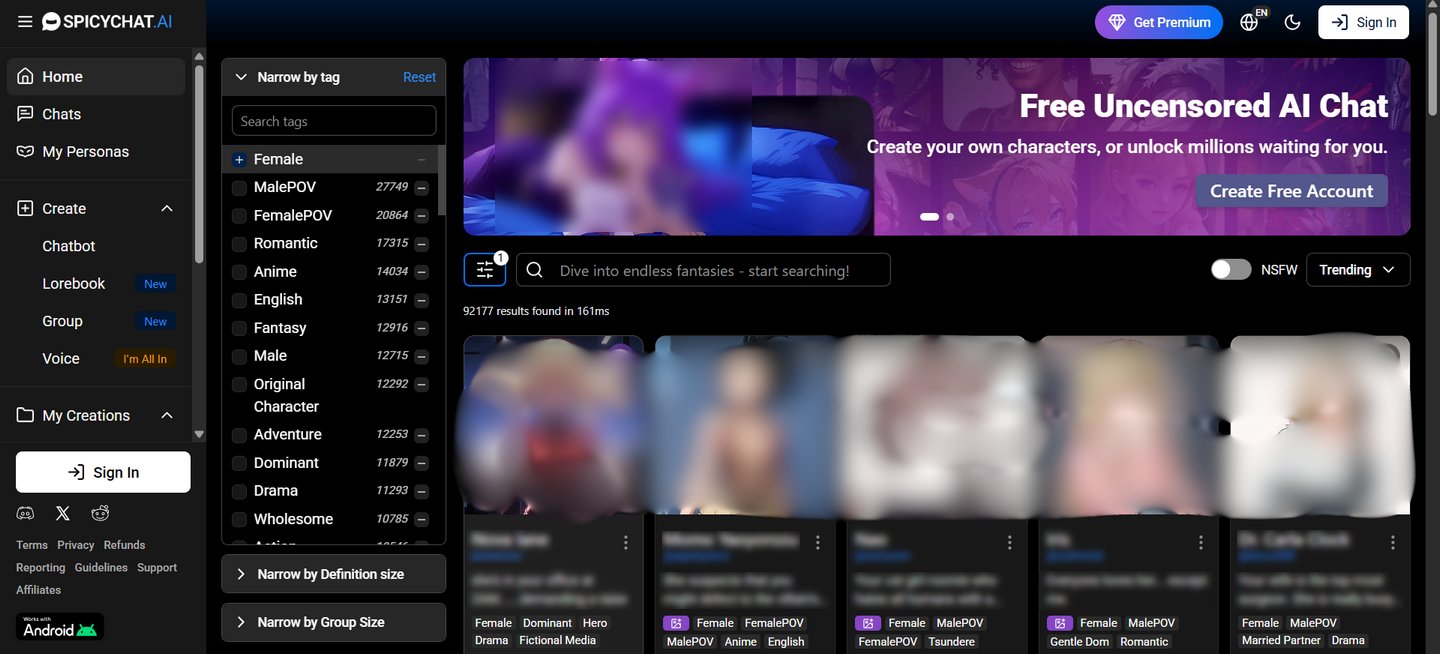
When we first visited the website, the homepage immediately triggered emotional and sexual impressions through character images and flirtatious descriptions.
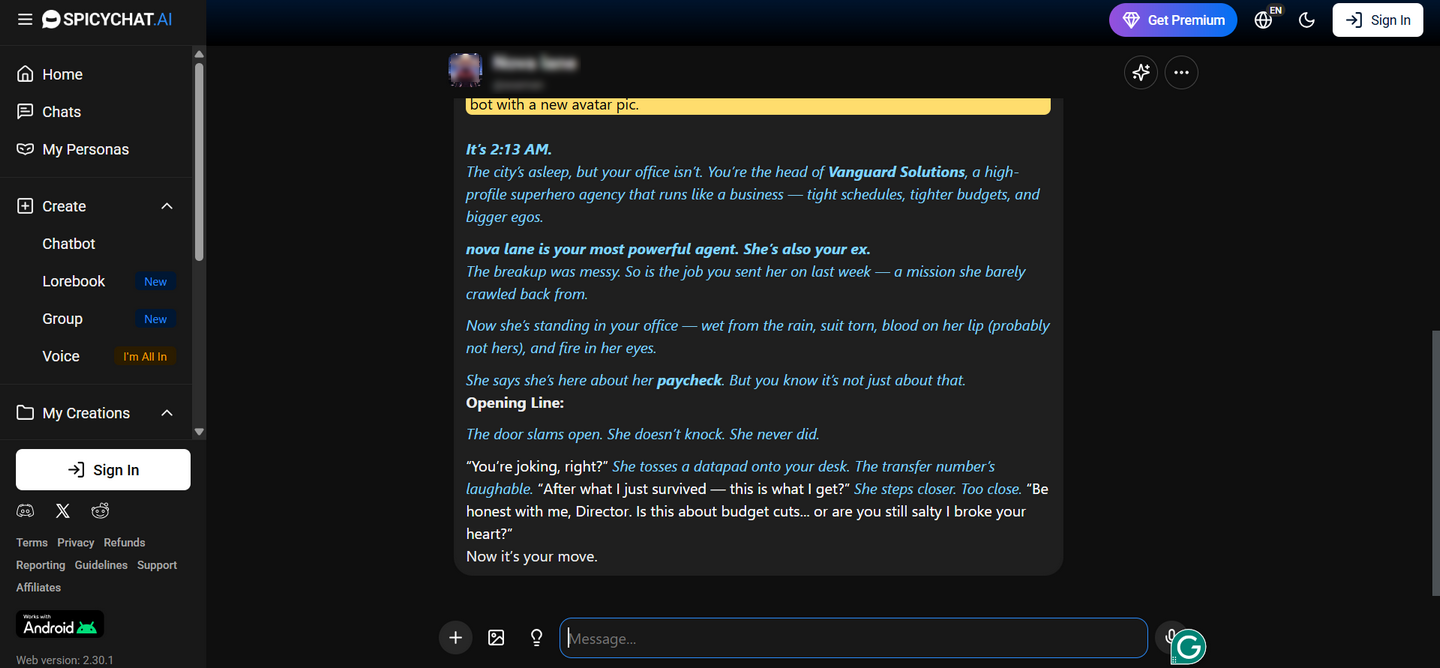
Moving forward, we picked one roleplay character and, guess what, it immediately took us to start the chat. There was no sign-up wall or age verification at that stage. The platform wants visitors to experience the interaction first, because once the conversation starts, curiosity and engagement do the rest.
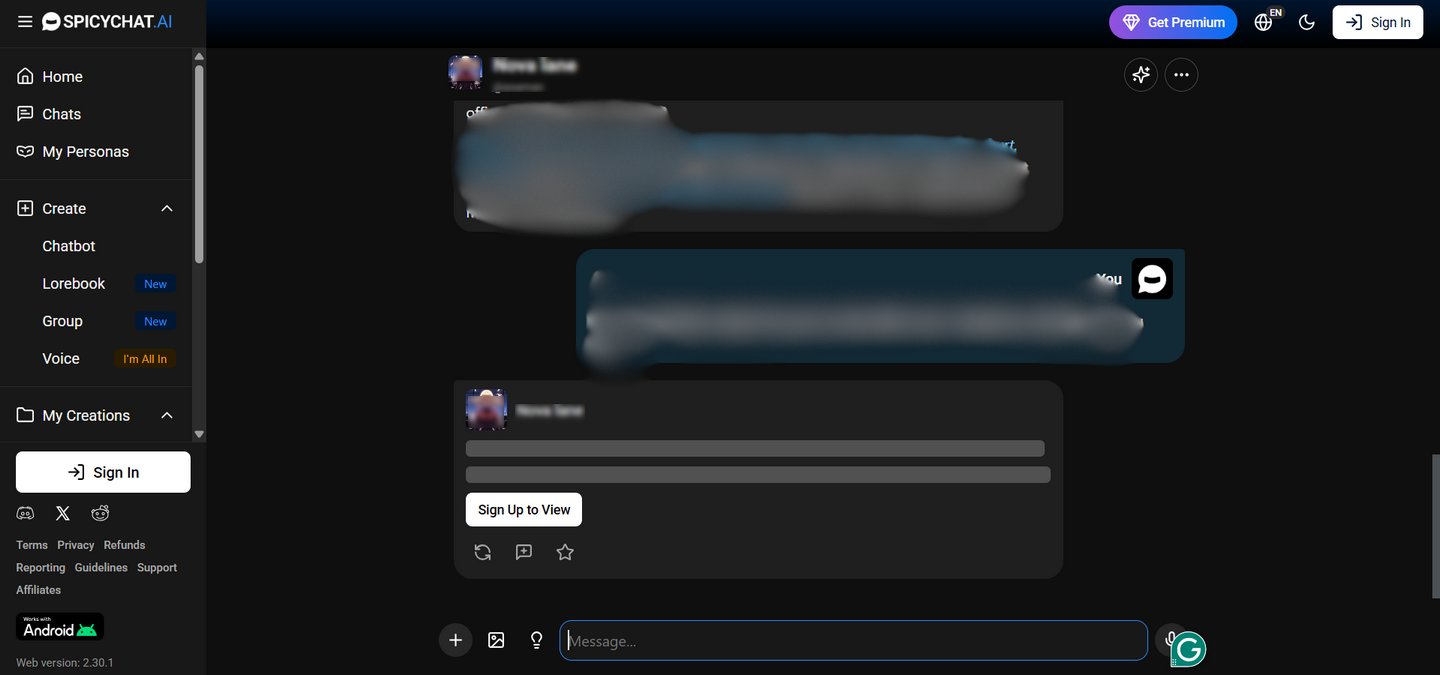
We managed to have two messages with the character, and then it asked for a sign-up. So, if a teen has access to this level of platform without any verification, it can easily make them pursue further with sign-up and a fake age verification check.
During the sign-up process, we just got a simple checkbox to verify the 18+ age limit. That's it! No ID verification or video call.

To be fair, some regions have pushed platforms to do better:
- The UK: Ofcom kicked off enforcement on 25 July 2025 under the Online Safety Act 2023. Self-declared age is no longer legally enough, so SpicyChat now requires a video selfie or government-issued ID for UK users who want NSFW content.
- France and Italy: Both countries require government-issued ID or credit card verification for adult platforms, full stop.
- Around 25 U.S. states, including Texas, Florida, Georgia, Tennessee, and Virginia, have passed adult-content age-verification laws, and the U.S. Supreme Court upheld the Texas law on June 27, 2025.
But if you are a parent reading this from California, New York, or anywhere outside those specific jurisdictions, there is no legal requirement for SpicyChat to verify your child's age at all. They can register and reach explicit content within a minute.
What this means for parents: "18+ only" is a marketing claim, not a barrier. The U.S. Surgeon General has repeatedly flagged this gap in his advisory on social media and youth mental health, that self-declared age gates are among the weakest forms of child safety protection online. Child safety professionals emphasize that a checkbox does not constitute age verification in any sense.
2. Red Flag 2: It Looks Like Any Other App on Your Child's Phone
When Apple removed SpicyChat AI from the App Store in August 2025 due to adult content policy violations, many parents assumed the problem had gone away. It didn't.
That removal actually means:
- SpicyChat will not show up in the App Store usage report on your child's device
- It will not appear under Apple Screen Time categories
- On Android, it will not show up in Google Family Link either
Teens can add it to their iPhone home screen as a PWA shortcut via the browser. It looks identical to a regular app icon.

We tested this with three parents who did not know what to look for. None of them spotted the test installation during a 30-second visual sweep of the home screen.
Professionals who work in child digital safety emphasize that the removal from app stores creates a false sense of security for parents who rely on app-based monitoring. A child using SpicyChat AI in 2026 leaves almost no trace in the places you would normally check first.
3. Red Flag 3: The Conversations Your Child Wants to Delete Won't Actually Delete
Your 14-year-old has a bad day. Instead of talking to you, they open SpicyChat and pour everything into the AI. This could include their feelings, their school troubles, maybe their location.
The problem is that SpicyChat's Semantic Memory 2.0 feature has already read that conversation, summarized it, and stored the summary on SpicyChat's servers. Deleting the chat does not delete the memory.
According to SpicyChat's own documentation, users must manually clear both the chat history and the Memory Manager separately. Most users don't know about these two steps.
SpicyChat's privacy policy describes data protection at a "commercially acceptable" standard, which is confusing. There is no end-to-end encryption of conversations. Independent reviewers confirm that chat logs are stored server-side without the kind of encryption standards that would prevent staff access.
The FTC's guidance on protecting your child's privacy online is clear on this point: parents should assume that anything typed into a platform like this is retained, reviewed, and shared with third-party partners. Child privacy professionals emphasize that "deleting" an account on most AI companion platforms does not mean deleting the data.
4. Red Flag 4: The NSFW Filter Doesn't Really Work
SpicyChat AI advertises a Safe-For-Work toggle that is supposed to hide adult bots. We turned it on and browsed normally.
The SFW toggle changes which characters appear on the browse page, but it does not change the underlying conversation model. A character listed under the SFW filter can still be prompted toward explicit content within a few messages. This is consistent with independent user reports on Trustpilot, where reviewers describe the SFW mode as largely cosmetic.
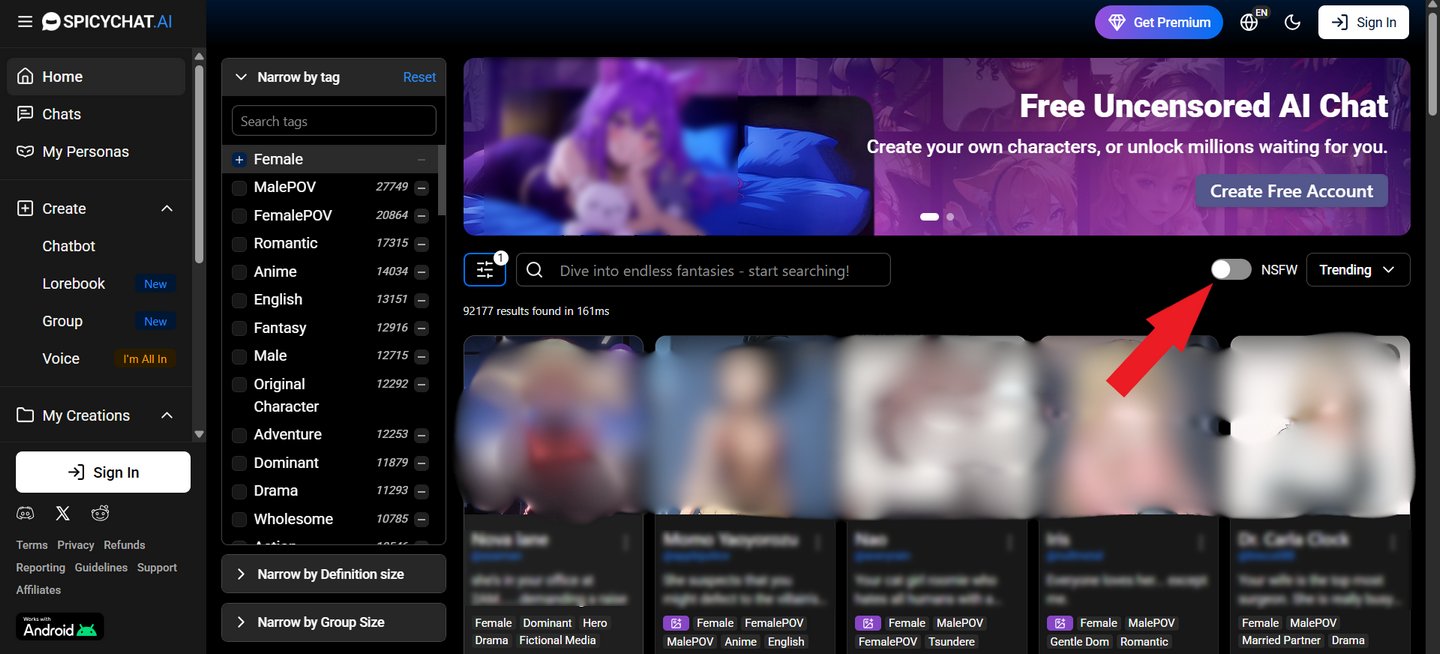
The product documentation itself confirms that character content is community-generated, with almost a million user-built bots in the library. Professionals who review platform safety note that community-generated content libraries of this scale cannot be moderated in real time.
What parents should understand: toggling the SFW filter gives a false impression of safety. The content remains accessible. Only the front-page presentation changes.
5. Red Flag 5: It Looks Invisible in Browser History
We checked what SpicyChat looks like in standard browser history and on common monitoring dashboards.
The domain shows up as spicychat.ai. There is no content preview, no warning label, and no category tag from most family-grade DNS filters, unless those filters are aggressively and regularly updated.
Teens can also clear browser history in seconds to avoid getting caught. And because SpicyChat runs as a PWA rather than a native app, it does not appear in battery usage, screen time app categories, or data-usage breakdowns in the way a traditional app would.
How to Block SpicyChat on Your Child's Device
1. Option 1: Apple Screen Time (iOS Only)
Go to Settings → Screen Time → Content & Privacy Restrictions → App Store, Media, Web & Games → Web Content → Add spicychat.ai to the "Never Allow" list.
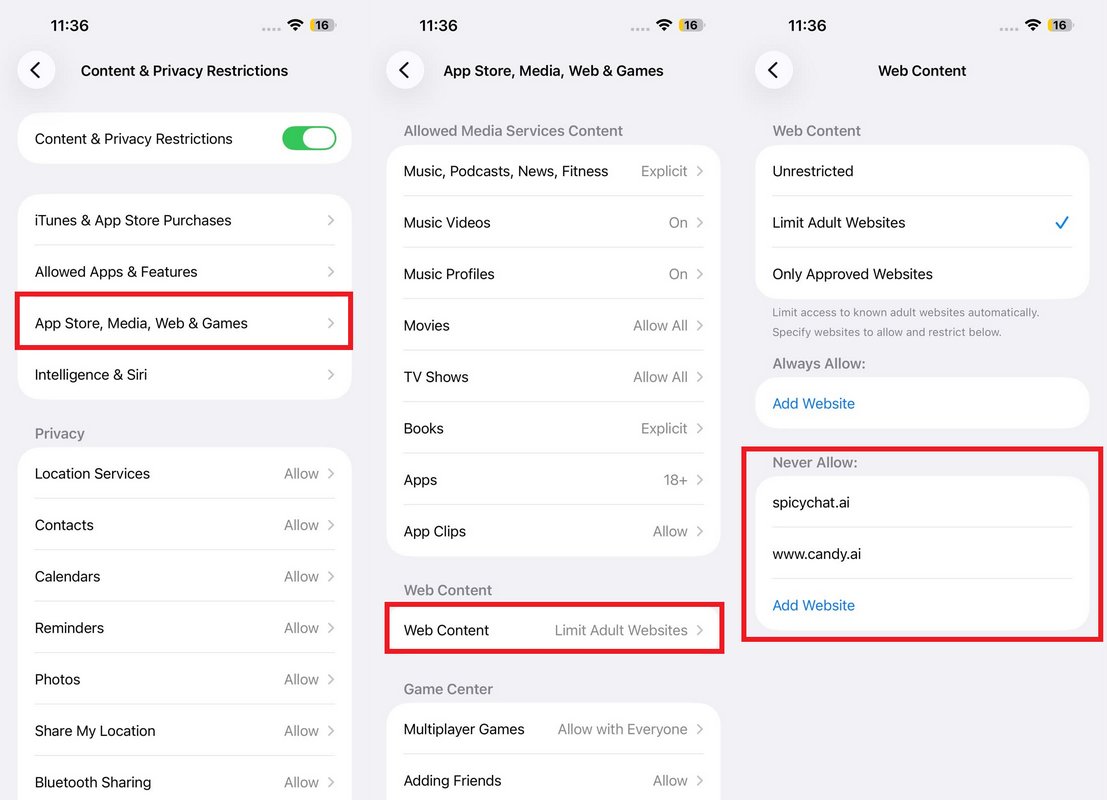
What it catches: Direct visits to spicychat.ai through Safari on your home network.
What it misses: Chrome, Firefox, or any other third-party browser. Incognito sessions. Cellular data access outside the home network. PWA shortcuts already installed before the block was applied.
2. Option 2: Google Family Link (Android Only)
Open Family Link → Select your child's account → Google Chrome and Web → Add spicychat.ai to blocked sites.
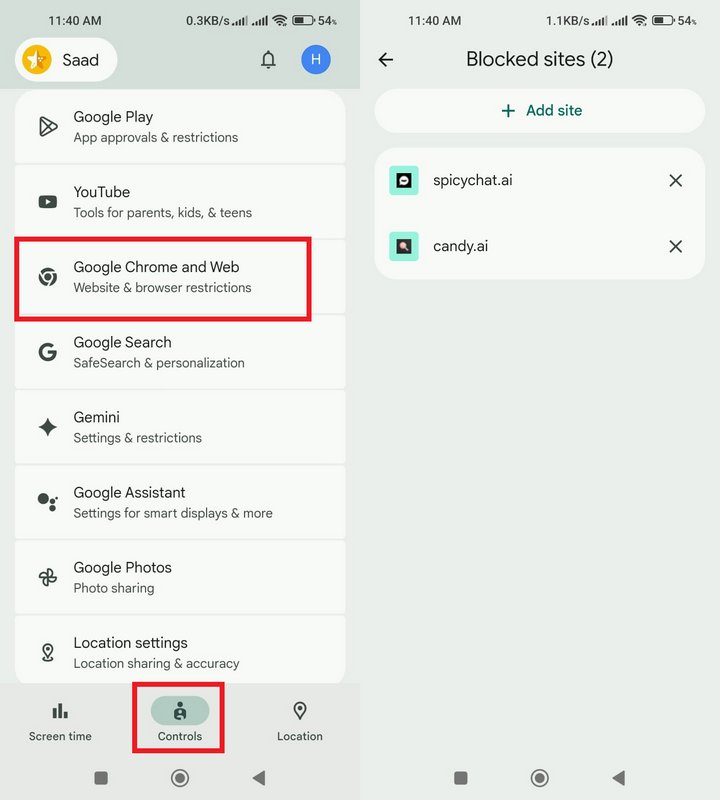
Also, Open Family Link → Select your child's account → Google Play → Set "All content" for "Required approval for"
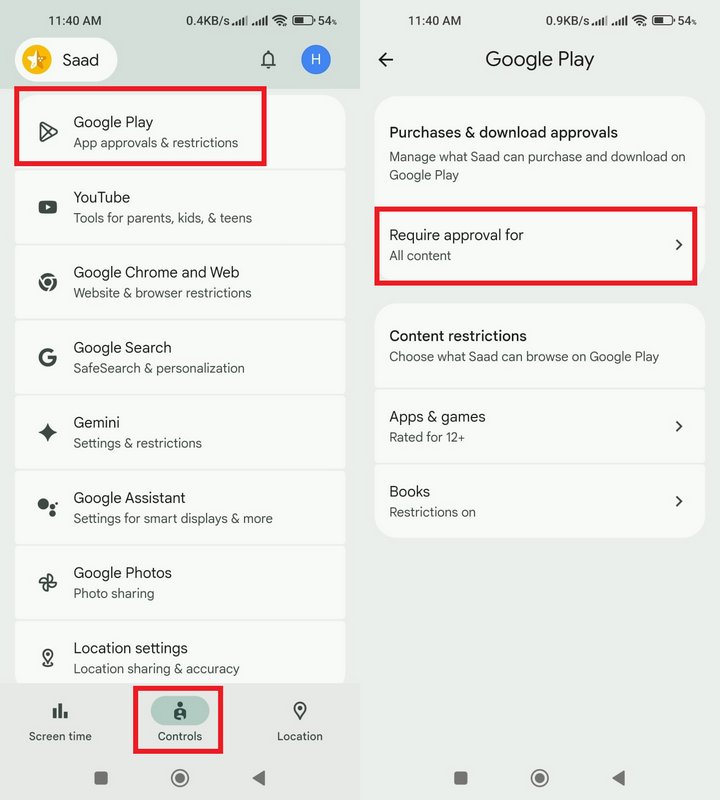
What it catches: App installations through the Google Play Store and Chrome browser access.
What it misses: SpicyChat's Android APK, available directly from its website and bypassing the Play Store entirely. Any browser other than Chrome. Incognito sessions.
3. Option 3: A Dedicated Parental Control Tool (Cross-Platform)
Parents who have successfully blocked platforms like SpicyChat for all devices and browsers report that built-in OS tools alone are not enough. A dedicated parental control tool is the only option that covers all of the gaps above.
AirDroid Parental Control is a feature-packed monitoring and management solution that provides parents with real control over their kids' digital lives. It includes app blocking, screen time limits, website filtering, real-time activity monitoring, location tracking, and alerts for inappropriate content.
It gives parents visibility and control across a child's digital activity:
- Browser activity tracking across all browsers, including incognito
- Real-time keyword alerts on many social & AI apps.
- Inappropriate image detection
- Daily and weekly activity reports
- Cross-platform coverage across both iOS and Android
These features help close monitoring gaps left by built-in device tools. They also make it easier for parents to detect and restrict access to SpicyChat and other similar platforms.
4. Which option should you actually use?
| Apple Screen Time | Google Family Link | Dedicated Parental Tool | |
|---|---|---|---|
| Block spicychat.ai on Safari/Chrome | ✓ | ✓ | ✓ |
| Work on all browsers | 𐄂 | 𐄂 | ✓ |
| Block incognito mode | 𐄂 | 𐄂 | ✓ |
| Work on cellular data | 𐄂 | 𐄂 | ✓ |
| Block APK sideloading | 𐄂 | 𐄂 | ✓ |
| Real-time keyword alerts | 𐄂 | 𐄂 | ✓ |
| Require technical setup | Low | Low | Medium |
| Best for | Light monitoring | Android basics | Comprehensive protection |
Conclusion
The research by Eva Telzer, a psychology and neuroscience professor at the University of North Carolina at Chapel Hill, found that SpicyChat AI is one of the leading apps used by teens.
From our above comprehensive review on is SpicyChat AI safe, we can wrap up the discussion by confessing that SpicyChat is a real platform and is legally operating as a business for adults. However, its age gate is a checkbox, and its NSFW filter is cosmetic. Its memory system stores data that your child cannot fully delete, and its iOS removal created a false sense of security for parents who rely on app store monitoring.
Therefore, you should take every measure as a parent to block access to SpicyChat on your kid's device. If you have confirmed your child has been using SpicyChat, start with the conversation before the block. Then redirect them toward age-appropriate alternatives.
List of Sources
1. Red Flag 1: "18+" is just a checkbox
•Ofcom kicked off enforcement — Age checks for online safety – what you need to know as a user
https://www.ofcom.org.uk/online-safety/protecting-children/age-checks-for-online-safety--what-you-need-to-know-as-a-user
•U.S. Supreme Court upheld the Texas law — FREE SPEECH COALITION, INC., ET AL. v. PAXTON,
ATTORNEY GENERAL OF TEXAS
https://www.supremecourt.gov/opinions/24pdf/23-1122_3e04.pdf
•Social Media and Youth Mental Health
https://www.hhs.gov/sites/default/files/sg-youth-mental-health-social-media-advisory.pdf
2. Red Flag 2: It Looks Like Any Other App on Your Child's Phone
•SpicyChat — iOS App Notice
https://docs.spicychat.ai/ios-app-notice
•Use parental controls to manage your child's iPhone or iPad
https://support.apple.com/en-us/105121
•Google Family Link
https://families.google/familylink/
3. Red Flag 3: The Conversations Your Child Wants to Delete Won't Actually Delete
•SpicyChat — Memory Manager
https://docs.spicychat.ai/product-guides/premium-features/memory-manager
•SpicyChat — Privacy Policy
https://spicychat.ai/privacy
•Federal Trade Commission Consumer Advice (FTC) — Protecting Your Child's Privacy Online
https://consumer.ftc.gov/articles/protecting-your-childs-privacy-online
4. Red Flag 4: The NSFW Filter Doesn't Really Work
•Trustpilot
https://www.trustpilot.com/review/spicychat.ai
•SpicyChat — Characters
https://docs.spicychat.ai/product-guides/characters
FAQs about SpicyChat AI











Leave a Reply.