AirDroid Parental Control
24/7 Kids' Guardian via App & Web
- 👀Live surroundings and location tracking
- 🔞Content Monitoring and App/Web Blocking
- ⚠Instant alerts for online risks and geofences
- ⌛Screen time control and monitor

Instagram Suspicious Login Attempts: Causes, Risks, and How to Stop Them
Got an "Instagram suspicious login attempt" alert? Don't panic—but don't ignore it either.
This warning usually means Instagram detected a login from a new device, location, or unusual behavior. In some cases, it's harmless (like using a VPN or logging in on a new phone). But in others, it could mean someone is trying to access your account.
Here's exactly what to do right now to secure your account.
Quick Answer
An Instagram suspicious login attempt means Instagram detected unusual login activity (such as a new device or location). It does not always mean your account is hacked, but you should immediately verify the login and secure your account.
What to Do If You Get an Instagram Suspicious Login Attempt
Immediate Steps to Take
- Step 1. Open the official Instagram app (do not click email links)
- Step 2. Check "Login Activity" in your account settings
- Step 3. Select "This was me" or "This wasn't me"
- Step 4. Change your password immediately
- Step 5. Enable Two-Factor Authentication (2FA)
What Does "Instagram Suspicious Login Attempt" Mean?
This automated notification is sent by the system after detecting unauthorized access to your account from a new device or location you have not used before. The warning is meant to confirm and verify that the person trying to access the account is actually the account owner, not an unauthorized user.
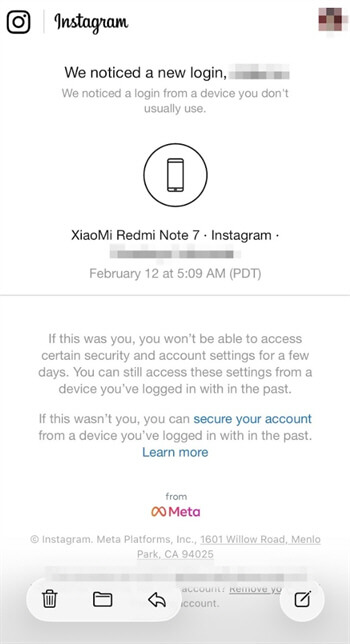
Here are other reasons Instagram might trigger this notification:
- unusual region or VPN
- access via third-party app
- automated login behavior
Additionally, this warning differs from a "Wrong password" message; it does not imply your account has been compromised, but it indicates a security risk that requires immediate verification.
How to Tell If the Instagram Alert Is Real or Fake
- Check sender email: official emails usually come from security@mail.instagram.com
- Avoid clicking suspicious links that redirect to non-instagram domains
- Real alerts will not ask for your password directly via email
- Always open the official app or type instagram.com manually
Should You Be Worried? (Risk Levels Explained)
- ✅Low Risk: You logged in from a new device, browser, or used a VPN
- ⚠️Medium Risk: Unknown device or location appears
- 🚨High Risk: Password changed, verification code received without action, or account details modified
Is It a Hacker or Just You?
Often, security notifications appear simply because the system detects activity that differs from your usual behavior. This is a standard protection mechanism—not always a sign of hacking.
Common "Normal Triggering" Scenarios:
- Changing Phone/Browser: When you log in using a new device or browser, Instagram may flag it because it doesn't recognize the device.
- Traveling Abroad or Using Public Wi-Fi: A sudden change in location or IP address can trigger alerts, especially on unsecured networks.
- Using a VPN: VPNs can make your location appear to jump between countries quickly, which looks suspicious to the system.
⚠️ Potential Warning Signs of Real Risk:
- Completely Unfamiliar Login Location: If the login comes from a country you've never visited, it may indicate unauthorized access.
- Unexpected Verification Code: Receiving a code without trying to log in could mean someone knows your password. Never share this code.
- Email or Phone Number Changed: If your account details are modified without your permission, this is a strong sign your account has been compromised.
If you're unsure, it's always safer to treat the alert as a potential threat and secure your account immediately.
What Should You Do Immediately After Seeing This Alert?
1Check if it is you logging into the account
Do not open any links in the email; instead, immediately open the official app or go to instagram.com to manually check the account's security.
Additionally, ensure the email address of the sender is security@mail.instagram.com to prevent phishing scams pretending to be an Instagram suspicious login attempt.
2If you made the login attempt
If the login activity was indeed performed by you, please press the "This was me" button to confirm the new device is safe. After that, the system might request additional identity verification via an OTP sent to the registered phone number or email address.
3If it is NOT you
If the notification appears when no family member is accessing the account, immediately select the "This wasn't me" option to block access from the foreign device.
This will automatically block the hacker's Instagram login attempt and require you to change your password to protect your data.
4If your account is compromised
In case a hacker changes your password, immediately visit instagram.com/hacked in a browser to start the official account recovery process.
You should also change the password for your connected personal email, as hackers can use it to restore access to your Instagram.
📅Short-Term Risks
Instagram will automatically freeze access to an account as a defense mechanism if it detects a threat that is not addressed immediately.
Delaying a response to this Instagram suspicious login attempt notification will only prolongthe account lock, preventing the from accessing their profile.
📅Medium to Long-Term Risks
If hackers gain access, they can alter content, steal sensitive personal information, such as phone numbers, and use it to commit identity theft.
The compromised account is mostly used to commit fraud against friends on the follower list.
📅Specific Additional Risks Associated with Youth Accounts
Teenagers tend to ignore security warnings because they often consider them just technical glitches or trivial annoyances that do not need to be reported to parents.
Furthermore, their habit of logging in from multiple devices, such as friends' phones or school computers, increases the likelihood that the account will repeatedly trigger unusual activity detection.
If an account is briefly taken over, intruders may misuse the direct message feature to send malicious links to your entire contact list in bulk.
Additionally, the account might be used secretly to follow thousands of foreign profiles or bots immediately after an illegal Instagram login attempt.
How to Prevent Instagram Suspicious Login Attempts in the Future
The best approach is to prevent a problem rather than fix it. We suggest the following basic security steps to help ensure your account is not accessed without permission.
1Account Level
💡Method 1: Check the "Login Activity" menu regularly to monitor the list of connected devices and immediately remove access if you find unrecognized device names.
➡️Steps: Open Instagram > Profile icon > Menu (Three lines) > Accounts Center > Password and security > Where you're logged in > Select account > Review list & Log out unrecognized devices.
💡Method 2: Enable Two-Factor Authentication (2FA) so that each time you log in to Instagram, a verification code is sent to your phone, making it harder for hackers to compromise your account.
➡️Steps: Open Instagram > Profile icon > Menu (Three lines) > Accounts Center > Password and security > Two-factor authentication > Select account > Choose method (App or SMS) > Follow prompts.
💡Method 3: Create a complicated password combination using a mix of numbers, letters, and unique symbols, and avoid using personal information such as birth dates.
➡️Steps: Open Instagram > Profile icon > Menu (Three lines) > Accounts Center > Password and security > Change password > Select account > Enter current & new complex password > Change Password.
💡Method 4: Open the "Apps and Websites" settings menu to revoke access permissions from suspicious third-party apps because they often contain dangerous security loopholes.
➡️Steps: Open Instagram > Profile icon > Menu (Three lines) > Accounts Center > Your information and permissions > Apps and websites > Active > Select app > Remove.
💡Method 5: Ensure the recovery email and registered phone number are also protected with their own you-step verification to prevent chain hacking that could take over the main account.
➡️Steps: Open Instagram > Profile icon > Menu (Three lines) > Accounts Center > Personal details > Contact info > (Verify your email/phone)
2Usage Environment
💡Method 1: Avoid logging into important accounts while connected to free public Wi-Fi in public places because these open networks are often unencrypted and make it easy for hackers to intercept login data.
💡Method 2: Turn off VPNs before opening social media apps so that sudden digital location changes do not trigger the security system to automatically lock their accounts.
3Behavioral Level
💡Method: Be very selective when granting "Log in with Instagram" permissions to third-party apps because malicious apps can harvest user data secretly in the background.
If Your Child Keeps Getting Suspicious Login Alerts
If your child repeatedly receives these alerts, it may not just be a technical issue—it could reflect risky online behavior or unsafe digital habits.
Why Kids & Teens Are More Vulnerable
- Easier to click phishing links: Teens are more likely to trust fake links that steal account data.
- Frequently switching or sharing devices: Logging in from different phones or browsers can trigger security alerts.
- Using public or unstable Wi-Fi: School or café networks often change IP addresses, which may appear suspicious.
- Connecting multiple third-party apps: Unofficial apps can create security loopholes and expose login data.
- Irregular login behavior: Activity at unusual hours may be flagged as abnormal by the system.
These behaviors can repeatedly trigger Instagram suspicious login attempt alerts—even if no hacker is involved.
How AirDroid Parental Control Helps Reduce These Risks
As highlighted in the 2023 U.S. Surgeon General's Advisory, regular use of platforms such as Instagram exposes children to serious risks, including explicit material, cyberbullying, and self-harm challenges.
Instead of only reacting to alerts, parents can proactively guide safer digital habits on Instagram parental controls.
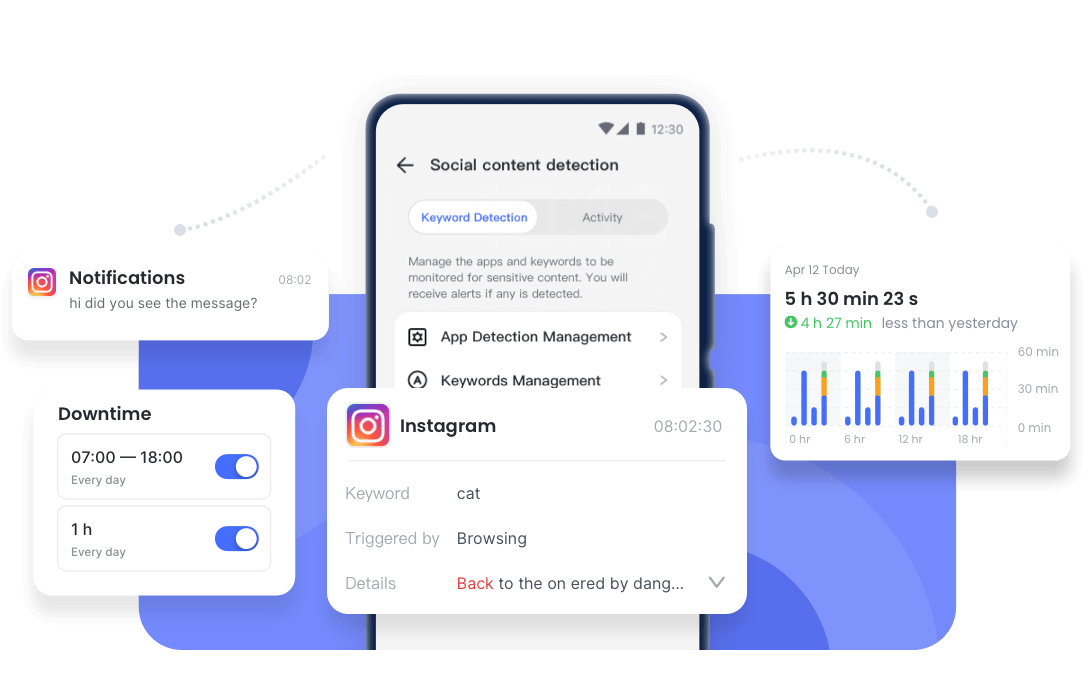
- Social Media Alerts: Detects risky content and suspicious activity across platforms.
- Inappropriate Image Detection: Identifies inappropriate images and send real-time alerts to parents.
- Usage Management: Helps build healthier screen time habits.


FAQs
Conclusion
These alerts are early warnings, not reasons to panic. Always verify login attempts and secure your account promptly.
Long-term safety comes from strong passwords, 2FA, and safe online behavior—especially for younger users.










Leave a Reply.