AirDroid Parental Control
24/7 Kids' Guardian via App & Web
- 👀Live surroundings and location tracking
- 🔞Content Monitoring and App/Web Blocking
- ⚠Instant alerts for online risks and geofences
- ⌛Screen time control and monitor

Bark Alternatives: Top 7 Choices for Comprehensive Parental Control
Bark is a popular parental control app that many parents use to watch for risky messages, social media activity, and online threats. For many families, that kind of alert system feels helpful. But real parenting does not always fit neatly into reports and warnings.
In real life, kids miss calls, come home late, or go places their parents did not expect. That is why many families start looking for Bark alternatives. Not because Bark is bad, but because it does not cover every kind of safety worry.
Some parents are most worried about what their child is saying online. Others worry about what their child is seeing. Many worry about where their child is in the real world. There is no single app that does everything perfectly. The best Bark alternative depends on what kind of problem you are really trying to solve.
- Who Are These Bark Alternatives For?
- AirDroid Parental Control – Best for Real-World Safety
- Canopy – Best for Inappropriate Content Detection
- Net Nanny – Best for Web Filtering
- Qustodio – Best for Balanced Control
- MMGuardian – Best for Text and Message Monitoring
- Google Family Link – Best Free Option for Android
- Apple's built-in Screen Time – Best Free Option for IOS
- Conclusion
Who Are These Bark Alternatives For?
Not all parents worry about the same things. Some care most about what their kids are saying online. Others care more about what their kids are seeing. And many parents worry most about where their kids are in the real world. That's why different parental control apps focus on very different problems.
- AirDroid Parental Control
- If you mostly worry about your child's physical safety, like whether they got home, where they are, or what is happening around them, then you need a tool that can show you real-time location and surroundings. This is where AirDroid Parental Control fits best.
- Canopy
- If your biggest fear is your child seeing porn, nude photos, or other harmful images, then an app that scans and blocks visual content is more useful. That is the kind of problem Canopy is made to solve.
- Net Nanny
- If you want to keep the internet clean and block bad websites before your child ever sees them, then a strong web filter matters more than message alerts. That is why some families choose Net Nanny.
- Qustodio
- If you want a simple, all-around app to manage screen time, apps, websites, and daily phone habits, then something like Qustodio usually makes more sense. It is a good choice for parents who want structure and rules but do not want to feel like they are spying on everything their child does.
- MMGuardian
- If you really want to know what your child is texting and who they are talking to, and you are worried about bullying, dangerous conversations, or strangers contacting their child. Then a message-focused app like MMGuardian is the better choice.
- Google Family Link
- If you just want a basic, free way to manage screen time and apps on Android, Google Family Link can be enough. It is not made for deep monitoring, but it is a good starting point for parents who want basic control without paying for a subscription.
- Apple's built-in Screen Time
- If you want a simple and free way to manage your child's iPhone or iPad. It works well since it is already built into iOS, there is nothing extra to install, and it feels easy and familiar for most parents.
AirDroid Parental Control – Best for Real-World Safety
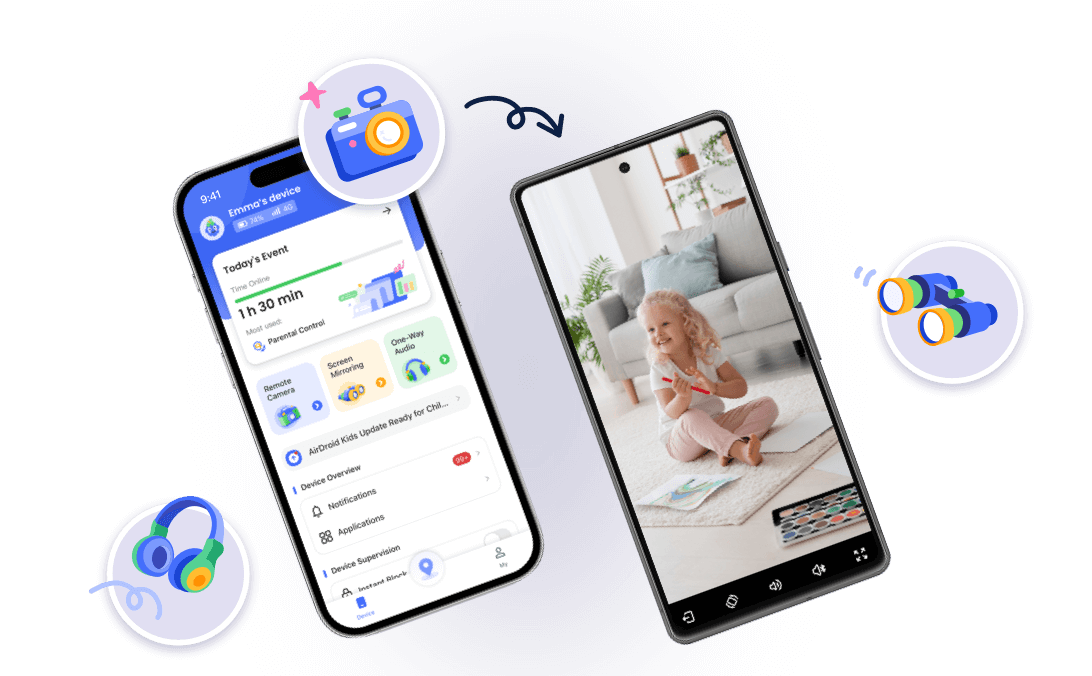
Bark focuses mostly on what kids type and post, but many parents worry more about what is happening around their child in the real world. If a child does not answer the phone or their location looks strange, seeing a message alert later does not help much. This is where AirDroid Parental Control is very different.
AirDroid is built around real-time safety. It lets parents see where their child is, watch their phone screen, and even check what is happening around them through the phone's camera and microphone. Instead of waiting for a risky message to appear, parents can look at what is happening right now. That can make a huge difference when a child is walking home alone, is late getting back, or just feels off.
Bark might tell you that something risky was said earlier. AirDroid helps you understand what is happening in the moment. That makes it feel less like monitoring and more like being able to check in when you really need to. For parents who worry about their child's physical safety and not just their online life, AirDroid is one of the strongest Bark alternatives.




Canopy – Best for Inappropriate Content Detection
Some parents are less worried about messages and more worried about what their kids might accidentally see online. Today, kids are exposed to harmful content through images and videos on social media, websites, and even inside normal apps. Bark mostly looks at text, but Canopy is built to deal with visual content.
Canopy scans what appears on a child's screen. It looks for nudity, sexual content, and other inappropriate images and blocks them before the child even sees them. That means parents do not have to wait for a warning after the damage is done. Canopy tries to stop the problem at the source.
When Canopy finds a photo that looks potentially unsafe, it does not just send a warning. The image is immediately blocked, so your child cannot view it or send it to anyone else. At the same time, you get a notification on your own device. You can then review the photo yourself and decide what should happen. If you think the image is okay, you can allow it. If you think it is not safe, you can delete it, and Canopy will remove it from your child's phone.
For families who are especially worried about porn or explicit visuals, Canopy feels much more protective than Bark. Instead of just telling you that something bad happened, it works to prevent it from happening in the first place.
Read more:
Net Nanny – Best for Web Filtering
Net Nanny is best known for its strong web filtering. It helps parents control what their kids can see when they go online. When a child opens a website, Net Nanny checks the page right away and decides if it is safe or not. It can stop adult content, violent pages, and other unsafe categories before they load. It does not just block whole websites. It looks at what is actually on the page, so it can stop adult or harmful content even if it is hiding inside a normal-looking site.
What makes Net Nanny useful is that it understands context. For example, it knows the difference between a health website and an adult website, even if they use some of the same words. This helps block bad content without blocking things kids need for school or learning. Parents can also choose how strict the filter should be and decide which sites are always allowed or always blocked.
If your child tries to open something unsafe, Net Nanny blocks it and lets you know. You can also see what websites your child visits in the parent dashboard.
Bark focuses on conversations, while Net Nanny focuses on the internet itself. If your biggest worry is what websites your child is visiting or what they might find while browsing, Net Nanny is a much better fit than Bark.
Qustodio – Best for Balanced Control
For many families who want a balanced parental control app, want to manage screen time, block certain apps, filter websites, and see basic activity without going too far into message reading or heavy monitoring, Qustodio is a good choice.
Qustodio helps parents set healthy limits. You can control how long your child uses their phone, which apps they can open, and what kind of websites they can visit. You can also see the location and get activity reports that show how the device is being used.
Qustodio also lets you block or limit certain apps, so if your child spends too much time in games or social media, you can put some rules in place. You can check activity reports to see what apps were used and which websites were visited. There is even a basic location tracking feature so you can see where your child's device has been, though it's not as detailed as some other apps.
Compared to Bark, Qustodio is less focused on risky conversations and more focused on daily habits. It works well for parents who want structure and rules without feeling like they are constantly spying on their child.
Read more:
MMGuardian – Best for Text and Message Monitoring
Some parents want to see exactly what their child is saying, not just get a warning that something might be wrong. For those families, MMGuardian is a strong Bark alternative.
When you set up MMGuardian, it lets you read SMS text messages and chats from certain messaging apps right from your own phone. You can check what was said, and the app can also send you alerts when words or topics you care about appear in the texts. You can even add your own custom keywords and get alerts when certain keywords appear. It is especially useful for spotting bullying, dangerous conversations, or contact with strangers.
While Bark mainly gives you alerts and snippets, MMGuardian gives you more direct access to the messages themselves. This makes MMGuardian a good choice for parents who feel that understanding the full conversation is important for keeping their child safe.
Google Family Link – Best Free Option for Android
Not every family wants to pay for parental control software. For parents who just want something simple and free, Google Family Link is the best option on Android.
Google Family Link is a completely free parental control app from Google that works especially well for families with young kids who use Android phones or Chromebooks.
With Family Link, you can set daily screen time limits, schedule times when the device should be off (like bedtime or study time), and even lock the device instantly when you want to pause phone use. It also lets you manage which apps your kids can download or use, and you can approve or block new apps right from your own phone. It offers basic web filtering through the Chrome browser. While it does not monitor messages or social media like Bark, it covers the basics that many families need.
For parents who are just getting started or who want to manage digital habits without a subscription, Google Family Link is a very practical choice.
Apple's built-in Screen Time – Best Free Option for IOS
Apple's built-in Screen Time is best for parents who just want a simple and free way to manage their child's iPhone or iPad. It's a built-in feature, so you don't have to install an extra app. Screen Time is a good choice if your child is younger and you mostly want to set clear rules, like bedtime limits, app time limits, and content restrictions. It also works well for parents who do not need to read messages or watch what their child is doing in real time, but just want to keep their digital habits healthy.
With Screen Time, you can set limits on apps, schedule downtime when the device can't be used, and block certain content or purchases through settings in the device itself. It also gives you simple daily and weekly reports showing how much time your child spent on different apps, and you can manage these rules remotely if you set up Family Sharing.
Conclusion
Bark is a helpful app, especially for spotting risky messages and online conversations. But as kids grow and start moving around more on their own, many parents realize that online alerts are only part of the picture. What really matters is knowing where your child is, what they are seeing, and what is happening when something feels wrong.
That is why there is no single "best" Bark alternative for every family. Some parents need stronger web filtering. Some need better message monitoring. Others just want an easy way to manage screen time for free. And many parents care most about real-world safety, like location, surroundings, and what is happening right now.
If that sounds like you, AirDroid Parental Control stands out because it helps you stay connected to your child in real time. It allows you to check their location, see their screen, and even understand what is going on around them when they don't answer. That kind of insight can bring real peace of mind.
In the end, the right app is not about having the most features. It is about choosing the one that protects what you care about most.
FAQ's about Parental Controls to Bark Alternatives










Leave a Reply.