Are Traditional Parental Controls Enough for AI Safety?
Keeping kids safe online used to mean managing screen time or blocking inappropriate websites or apps. But what happens when kids start using AI chatbots like ChatGPT or Character AI?
That's where traditional controls fall short. They still matter for AI addiction by blocking an AI app or capping the time spent on it. However, they can't flag risky topics or alert you when something concerning comes up. At this time, many parents may also need AI parental control tools that cover AI use.
Key Differences: Traditional vs AI Parental Controls
| Traditional Parental Control Apps | AI Parental Control Apps | |
|---|---|---|
| Primary focus | Manage device use or restrict app and web access | Offer AI-related safety features depending on the tool |
| What they monitor | Screen time, apps, and websites | Risky content in AI conversations and screen time |
| How they work | Set rules to block or limit access | Use keywords or context to look at or filter AI chats |
| What It tells parents about AI use | How long children use AI services and whether they access restricted ones | Whether potential risks are detected in AI chats |
| Main limitations | May not provide visibility or dedicated features for AI chatbots | Can miss important warning signs |
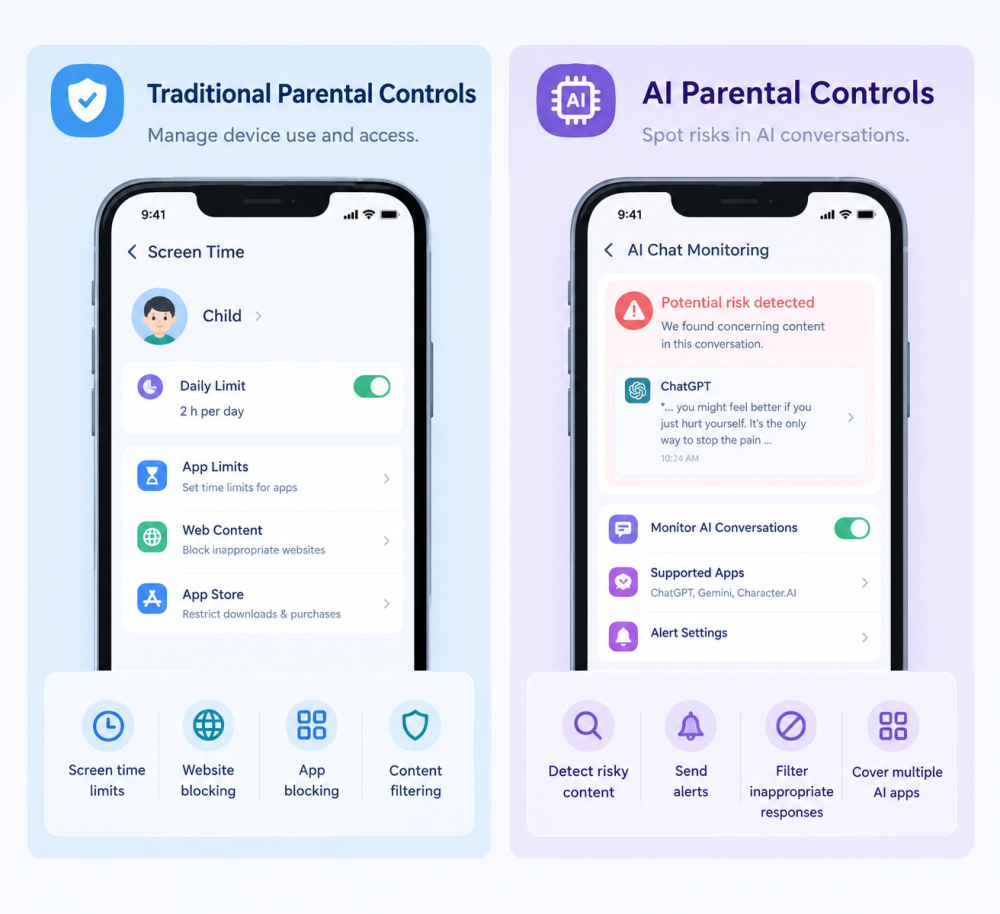
What Traditional Parental Controls Can and Can't Do
Traditional parental control tools are basic parental controls that help parents set boundaries around a child's device use, such as Family Link or Screen Time.
What Traditional Parental Controls Can Do
- Set daily time limits or downtime for the device or specific apps.
- Block specific websites and apps.
- Filter app, web, or media content by age rating or category.
- Restrict downloads, purchases, and contacts.
- Review app usage or website activity.
* Available features vary by tool, just as the FTC's parental control guide explains.
What Traditional Parental Controls May Miss
AI conversations create a different challenge for these tools. If your child uses AI chatbots, traditional parental controls are usually not enough on their own: they don't reveal what happens inside an AI chat, detect risky AI conversations, or let you know how kids use the AI chatbot.
UNICEF identifies inaccurate information, privacy, and interactions with human-like chatbots among the issues families should consider when children use generative AI. Your child might open an AI chatbot to get help with homework or ask it for personal advice or share private information. A basic screen time app generally cannot tell you whether the particular answer was suitable or safe for your child.
How AI Parental Controls May Help
In this article, AI parental controls means tools with features for managing or monitoring kids' AI use. A parental control app described as "AI-powered" does not necessarily offer controls for AI chatbots.
Therefore, AI parental controls give families more relevant information about AI use. Typically, they come in two forms: parental controls built into the AI apps and third-party tools that monitor risky chats across AI apps.
Built-in parental controls inside AI apps
Some well-known AI services offer parental settings for a linked teen's account. Depending on the service, parents have different controls.
Read also: What parental controls are available for the AI your teen uses →
Here, we take ChatGPT as the example: once the accounts are linked, parents can then set quiet hours, reduce sensitive content, etc. ChatGPT can also send a safety notification to a parent when it detects signs a teen may be thinking about self-harm. These alerts come without revealing details of the teen's conversation.
These built-in AI parental controls are worth turning on, but they have limits:
- They only cover that one app.
- They depend on the teen accepting the link, and either side can unlink the accounts to remove controls.
- Safety notifications and alerts are generally limited to high-risk concerns, such as self-harm and suicide.
- They offer limited visibility into risky chats. After receiving the safety alerts, parents know something is wrong, but not what their child said or what led to it.
Third-party tools that cover AI use
Some third-party parental control apps work at the device level, so they may cover several AI apps. Instead of only limiting access, they can also:
- Identify concerning AI interactions (such as content related to self-harm, sexual topics, etc.) through keywords or content.
- Send risk alerts to parents or directly filter inappropriate AI responses.
Some parental control tools that offer dedicated features for AI chatbots include AirDroid Parental Control, Bark, Qustodio, Canopy, and Aura.
AirDroid, Bark, and Qustodio can alert parents to certain risks in supported AI conversations on supported devices.🚩
Canopy filters explicit content in supported browser-based chatbots.🚫
* These findings describe the versions and settings we tested as of October, 2026; And each tool's features and coverage may vary across devices or change over time. For instance, a tool might monitor one chatbot but not another.
Read also: How AirDroid, Bark, Qustodio, and Canopy compare in AI chat monitoring →
Limitations of AI Parental Controls:
AI parental controls fill a real gap in today's AI era, but they aren't perfect, and it's better to know where before you rely on them.
- No parental control tool supports monitoring every AI platform or device.
- Keyword-based content detection may flag harmless conversations, such as a school project on a sensitive topic. AI-powered context detection may distinguish that situation more accurately, but analyzing the context can take longer, and it can still make mistakes.
- Do not expect these tools to read every conversation your child has with AI. Most of them only show flagged and risky snippets.
- AI safety features cannot guarantee that every harmful interaction will be prevented.
How to Choose the Right Approach for Your Family
The right parental control approach depends on what you want to protect your child from and how they use AI. Before choosing a product, ask yourself the following questions:
1. How old is your child?
If your child isn't ready to use AI chatbots independently, or he doesn't meet the AI platform's minimum age requirements, use traditional controls to block AI apps and websites. In this case, you don't need AI monitoring if the apps aren't in use.
But if AI chatbots are part of your child's daily life, talk with them about appropriate use, explain potential risks, and establish clear boundaries. Depending on their maturity and needs, you can also consider setting up AI content risks.
2. What's your main concern?
If your main concern is excessive time or late-night use of AI, or access to inappropriate AI services, traditional parental controls may be enough to set a daily limit or block the app and website.
But if you're concerned about exposure to harmful AI responses or emotional attachment, you may need to set up AI's built-in parental controls where available or add AI-specific safeguards with AI parental control apps, such as AirDroid or Canopy.
3. Which AI apps and devices does your child use?
Not every parental control tool works with every AI platform or operating system. Before choosing a product, check whether it supports your child's actual usage habits.
For example, if your child uses ChatGPT, start with its own parental controls. After that, consider third-party parental control apps, such as AirDroid, Bark, and Qustodio, that support ChatGPT content monitoring and alerts.
If your child also accesses ChatGPT through a browser, Canopy can be a pick to block inappropriate AI response at the browser level.
Lastly, check your child's device compatibility. Most monitoring features may be available on Android but not iOS.
FAQs











Leave a Reply.