How to Block TikTok on a Router: A Guide for Parents
Quick Steps:
- Find and enter your router's IP address in a browser.
- Enter your admin password to log in.
- Look for and go to "Parental Controls" or "Web Filter" settings.
- Add the tiktok.com to your block list.
Notice your teen is glued to TikTok during homework time? Or worried about viral challenges that can lead to self-harm? You're not alone. Many parents find that deleting the app doesn't work since their kids reinstall it.
That's why more families are turning to a smarter approach: blocking TikTok at the network level. By blocking TikTok on router, every device on your home network won't be able to open it. In this guide, we'll walk you through:

When Should You Block TikTok on Router?
In truth, not every family needs to block TikTok on WiFi router. Improper use sometimes leads to conflicts or resistance.
But if you notice any of the following signs, router-level blocking might be the right tool for your household.
- TikTok usage is getting out of control
- TikTok limits or rules are usually ignored
- You need to manage multiple devices at home
- Exam season is coming up
Your child keeps scrolling for over 3 hours, even late at night, and struggles to stop.
They reinstall TikTok or use another device to bypass your rules.
Beyond phones, your child may use a tablet, computer, or even a smart TV to watch TikTok. And managing them individually is time-consuming.
You don't want to block TikTok permanently, just during crunch time, such as exam periods or final weeks.
How to Block TikTok on Router By Brand
Your router acts like the main gateway to your home internet. Every time the TikTok app or website opens, it sends a request to the same domain (tiktok.com).
When you block it on your router, you're simply stopping TikTok from connecting to its server via the internet access. That's why TikTok may still open, but videos and other content won't load.
Most routers have a built-in feature to block websites. Below are instructions for the most common brands:
*If you don't see your brand, go back to the general steps we introduced at the very beginning.
Before you start, make sure you've got your router's admin password and a device connected to the WiFi. The whole process takes about 5 minutes.
TP-Link Router
- Step 1.Log into your TP-Link's web dashboard.
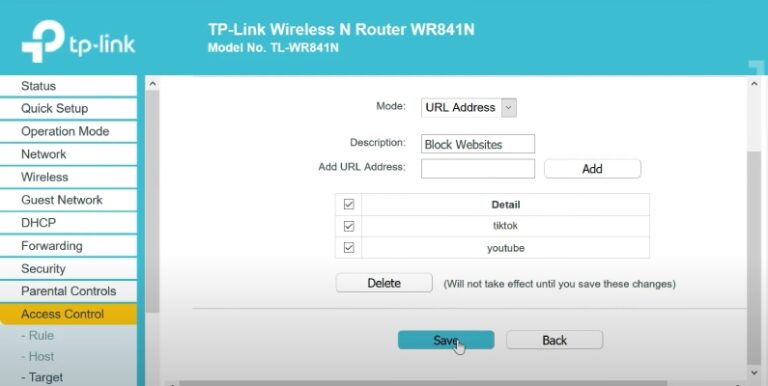
- Step 2.Go to "Access Control > Target."
- Step 3.Click "Add New," select "URL Address" under the mode menu.
- Step 4.Then, enter www.tiktok.com in "Add URL Address," and hit "Add > Save"
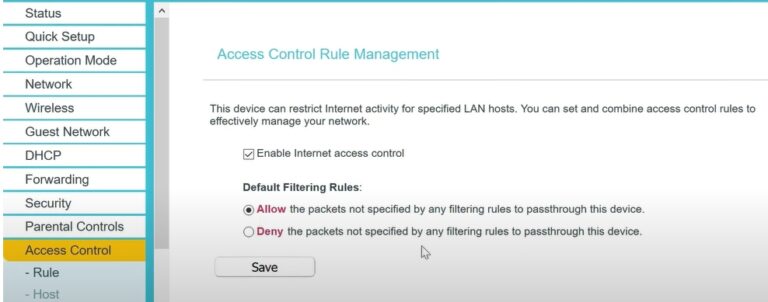
- Step 5.Then, go to "Rule" from the sidebar.
- Step 6.Turn on "Enable Internet access control" and "Allow the packets not specified by any filtering rules to pass through this device."
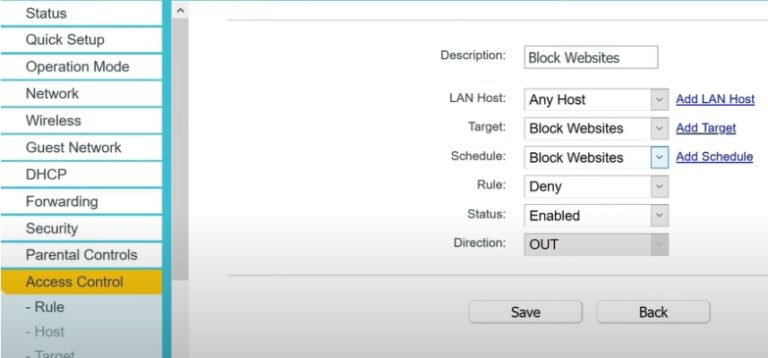
- Step 7.Under the "Rule" menu, choose "Add New," and enter a description for it. In the "Target" section, select the rule you defined earlier, and hit "Save."
ASUS
- Step 1.Visit the ASUS router's settings page and log in with your admin credentials.
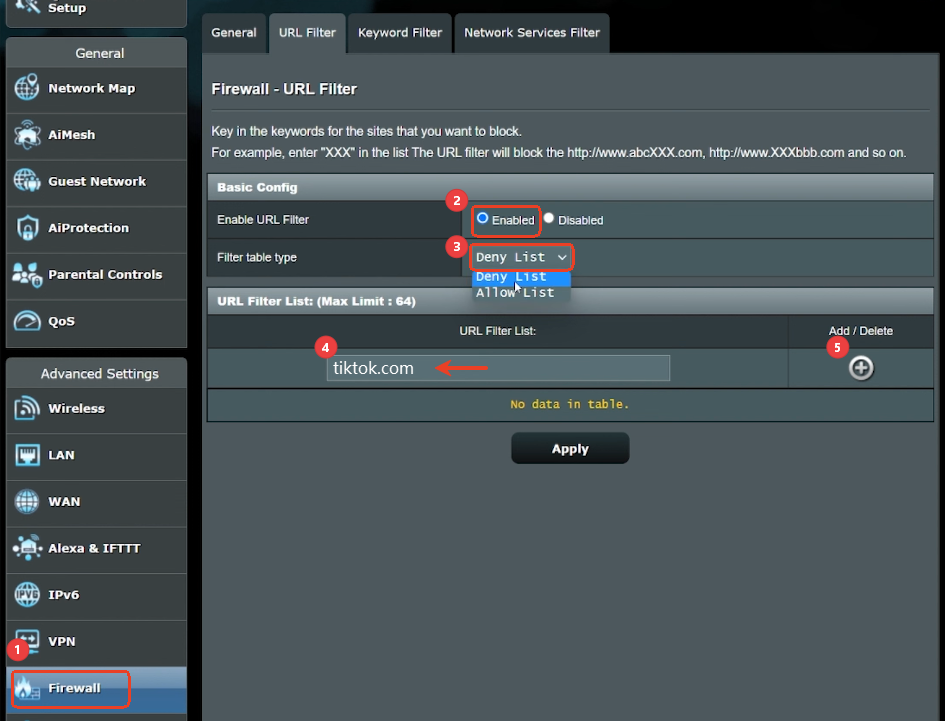
- Step 2.In the left sidebar, click "Firewall," then select the "URL Filter" tab.
- Step 3.Make sure "Enable URL Filter" is on and the filter type is set to "Deny List."
- Step 4.Under "URL Filter List," enter TikTok's domains and add them.
- Step 5.Click "Apply."
Netgear
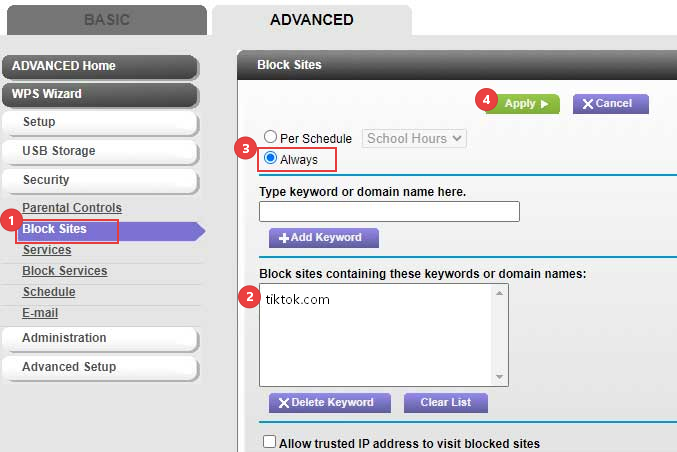
- Step 1.Log in to your Netgear router's web interface with your admin account.
- Step 3.From the sidebar, locate the "Security" section and go to "Block Sites."
- Step 3.Under "Add keyword or domain name," enter TikTok or its domains.
- Step 4.Next, select "Always" for "Keyword Blocking." And click "Apply."
D-Link
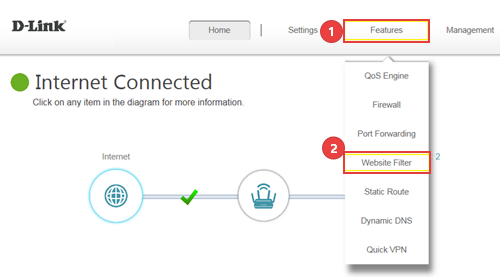
- Step 1.Open a browser and go to D-Link router's web dashboard.
- Step 2.At the top menu, select "Features" > "Web Filter" or "Parental Controls" depending on your router model.
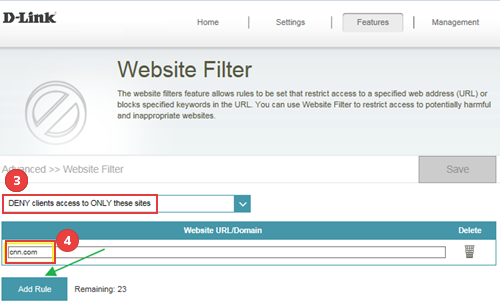
- Step 3.Choose the "Deny computers access to ONLY these sites" option.
- Step 4.Then, type in the TikTok-related URLs to be blocked and tap "Add Rule" to save settings.
List of TikTok URLs to Block on WiFi
Since TikTok uses dozens of subdomains, here is an important list of TikTok-related URLs for the best blocking results. You can directly copy and paste them into your router's filtering settings:
Copy Copied!tiktok.com tiktokcdn.com tiktokv.com muscdn.com musical.ly bytedance.com byteoversea.net bytefcdn-oversea.com tiktokcdn-eu.com v16a.tiktokcdn.com. ib.tiktokv.com v16m.tiktokcdn.com api.tiktokv.com log.tiktokv.com api2-16-h2.musical.ly mon.musical.ly p16-tiktokcdn-com.akamaized.net api-h2.tiktokv.com v19.tiktokcdn.com api2.musical.ly log2.musical.ly api2-21-h2.musical.ly
Limitations: Router Blocking Might Not Be Enough
Blocking TikTok on WiFi router sounds like a quick win. However, it often comes with limitations that parents don't expect. For example:
❌ Tech-savvy kids can bypass it easily
Router filtering applies only when your child's device is connected to your home network. Once they switch to mobile data or use a VPN or are not at home, TikTok becomes accessible again.
❌ Lack of flexibility
Some routers block in an all-or-nothing mode: either full access or complete block. You cannot set flexible rules like "1 hour limit" for TikTok. This can sometimes lead to resistance or conflicts.
❌ Router filtering may not always work
In fact, some users reported on communities that even after following the official instructions, TikTok can still load.
This is usually because TikTok doesn't rely on a single domain or server. Even if you block some domains, the app may still partially work. This is why one Reddit user suggests blocking TikTok at the device level.
A More Flexible Way to Manage or Block TikTok
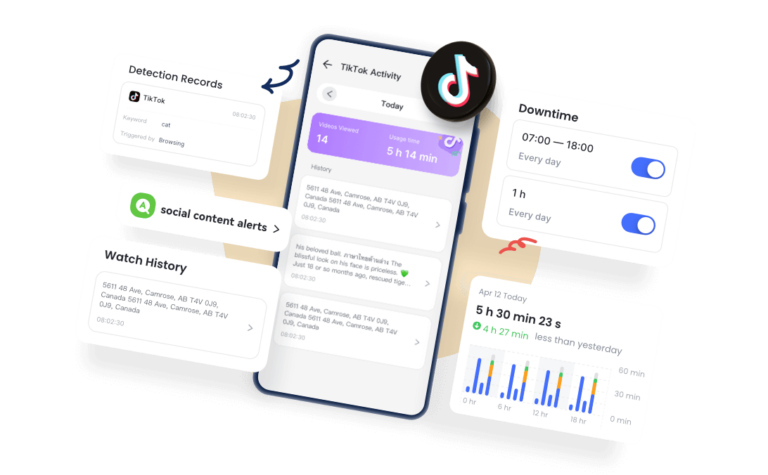
Then, how to block TikTok at the device level? Using a parental control app like AirDroid is a good try.
Though it can completely block the TikTok app and website with one click, child psychology experts point out that screen bans often backfire. Therefore, teaching kids to manage screen time is recommended.
For this, parental control apps make this easier by allowing you to:
- Set TikTok limits and downtime based on kids' routines
- Get notified if your kids search or watch inappropriate videos
- Sync kids' TikTok viewing history (AAP suggests guardians should focus on what children watch and why, rather than just how long)
Final Thoughts
As you can see, blocking TikTok on a router can be a useful way, especially when you need household-wide limits. But in the long term, what tends to work better isn't a strict ban but clearer boundaries and usage habits.
Additionally, having open conversations about why TikTok is limited is the key.










Leave a Reply.