How to Block Websites on a Child's iPhone from Android
When it comes to online safety, the first step many parents choose is to block inappropriate websites. However, the situation becomes more complicated when they use different phone systems; for instance, parents use an Android phone, while their child uses an iPhone.
So, can you block websites on an iPhone from an Android phone? Yes, but the coverage depends on the method.
- Family Link can help block websites in iPhone Chrome when the child uses a supervised Google account.
- AirDroid Cross-Platform Parental Control offers broader web filtering across Chrome, Safari, etc.
- Router-level filtering can restrict websites on all devices connected to your home network (including your child's iPhone). But it will not protect the iPhone on mobile data or other networks.
Which Method Should You Choose
To give you a reliable, practical comparison, we tested each of the feasible methods. The goal was to check whether each method could block websites remotely from an Android, which browsers it covered, and what could bypass the restrictions. Our test followed our test criteria and the setup included:
- Parent device: Samsung Galaxy S20+
- Child device: iPhone 14 running iOS 26
- iPhone browsers tested: Safari, Google Chrome, and Edge
- Bypass resistance: We tried to circumvent each method by switching browsers or networks, browsing in private mode, and using VPNs.
- Ease of setup: How long does it take? Do parents need another device to get started or set up?
| Method | Manage from Android? | Web Filtering Scope | Bypass Possibility |
|---|---|---|---|
| Screen Time |  | Safari + other browsers | Low |
| Google Family Link |  | Google and Chrome only | High |
| Cross-platform Parental Control | | Safari + other browsers | Low |
| Router Filtering | | Safari + other browsers | Medium |
Option 1: Use Google Family Link
👍Best for: If your children mainly use Google Chrome instead of Safari and they're using a supervised Google account.
Developed by Google, Family Link is a built-in parental control solution for Android devices. Since it works by Google account linking, Android parents can use it to block websites for a child's iPhone Chrome or manage other Google account settings.
Here's how to use Family Link to block websites on an iPhone from an Android:
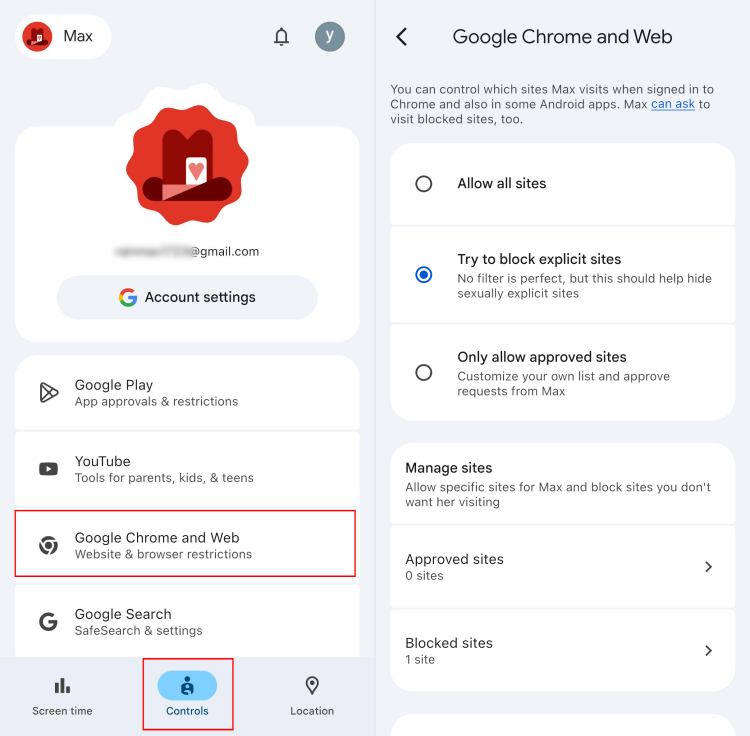
- Step 1.Open the Google Family Link app on your Android phone.
- Step 2.Select your child's account and go to "Controls."
- Step 3.Tap on "Google Chrome and Web."
- Step 4.Select a web filtering rule, such as "Try to block explicit sites" or "Only allow approved sites."
- Step 5.Then, add specific websites under "Approved sites" or "Blocked sites."
Important Note:
- Google support pages describe iOS supervision differently (one states that Family Link can filter websites in Chrome on iPhone, while another lists Chrome website restrictions as unavailable on a child's iPhone).
- Our hands-on testing confirmed this: with the child's supervised Google account signed into Chrome, Family Link's site restrictions applied as expected on an iPhone.
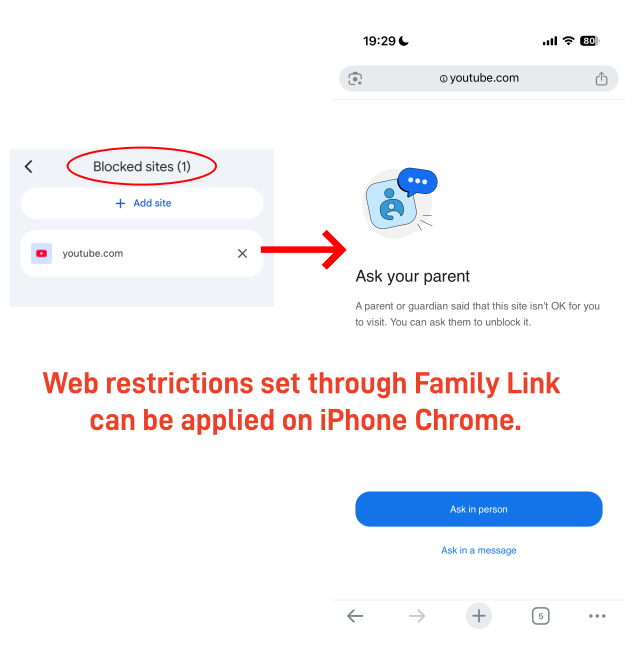
Can Child Bypass It on iPhone? Since it only works with Chrome and Google, the web restrictions can be bypassed when the child browser on Safari or Edge. And kids cannot use incognito mode in Chrome under supervision.
❌Limitations:
- Parents must create and activate the supervised child's Google account using the Android device first.
- If your child uses Safari or other browsers, the web restrictions placed by Family Link will fail.
- It depends heavily on Google services.
- Many parental control features are unavailable for the child's iOS.
Option 2: Use a Cross Platform Parental Control App
👍Best for: Families who want to block websites across Safari, Chrome, and other browsers on their child's iPhone without manually adding URLs one by one.
This is the most direct fix for the Android-parent, iPhone-child combination. Unlike the built-in solutions (Family Link and Screen Time), AirDroid Cross-Platform Parental Control allows parents to manage their child's device remotely regardless of whether they use Android or iOS.
Just install an app on the child's iPhone and enable Supervision Mode through AirDroid Parental Connector, then block websites from your own Android phone. It also blocks inappropriate websites by category and records browsing history.
To use AirDroid for website blocking:
- Step 1.Install AirDroid Parental Control on your Android phone.
- Step 2.Connect your child's iPhone to your parent account.
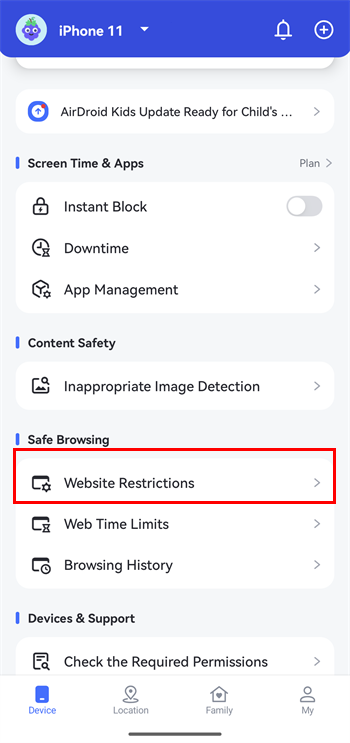
- Step 3.Open "Website Restrictions" and select a restriction mode, such as blacklist mode or whitelist mode.
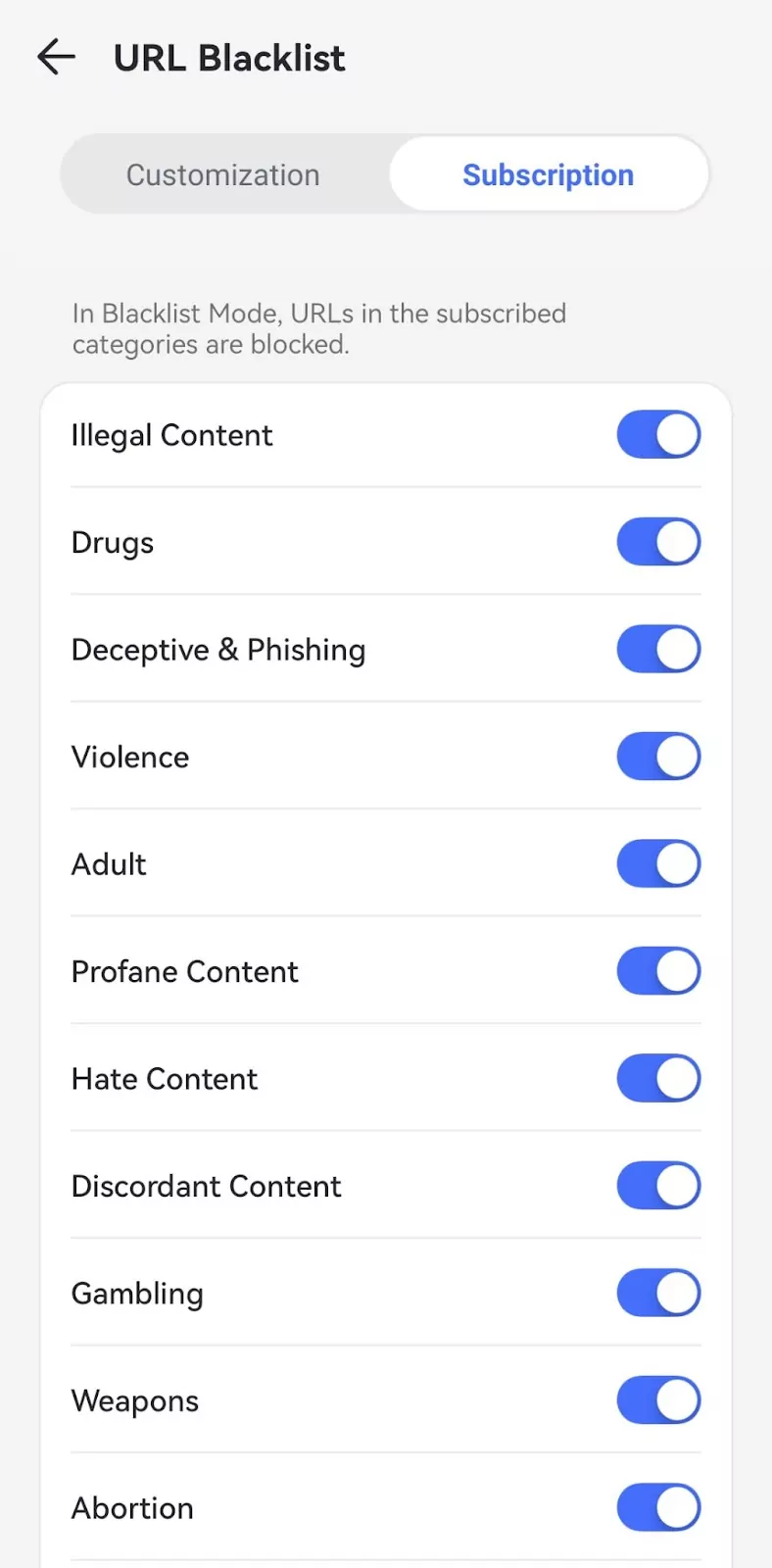
- Step 4.Toggle on the categories for website blocking. Some categories include illegal content, violence, adult, gambling, etc. And you can also add specific URLs to block.


 |  |
Can Child Bypass It on iPhone? During testing, the web filter covers all browsers, including the in-app web browser. We also attempted to bypass it via VPN apps and switching cellular data; the restrictions are still active. Additionally, it can even record private browsing history.
❌Limitations:
- Your child's iPhone has to be iOS 15 and later.
- Unlocking full features for a child's iPhone requires enabling supervision mode via AirDroid Connector.
- This can be an additional cost compared with built-in tools like Family Link.
Option 3: Set Up Router-Level Filtering
👍Best for: Setting web restrictions across mixed-device families at once. Parents who do not want to install another app on the child's iPhone.
This method works well if your goal is to block websites while your child's iPhone is using home WiFi. Router-level filtering lets you block websites from the whole network side.
This means the web filtering rules you set on your home Wi-Fi router will be applied to any device connected to that network, including your child's iPhone.
To use router-level filtering on your Android and block websites on your child's iPhone:
- Step 1.Make sure your Android has connected to the network.
- Step 2.Enter the IP address to open your router admin page from a browser. Or you can open the router app.
- Step 3.Locate the settings menu after logging in with the admin credentials.
- Step 4.Look for the parental controls, security, or content filtering settings.
- Step 5.Add websites, categories, or keywords you want to block.
- Step 6.Apply the rules to the whole home network and save the settings.
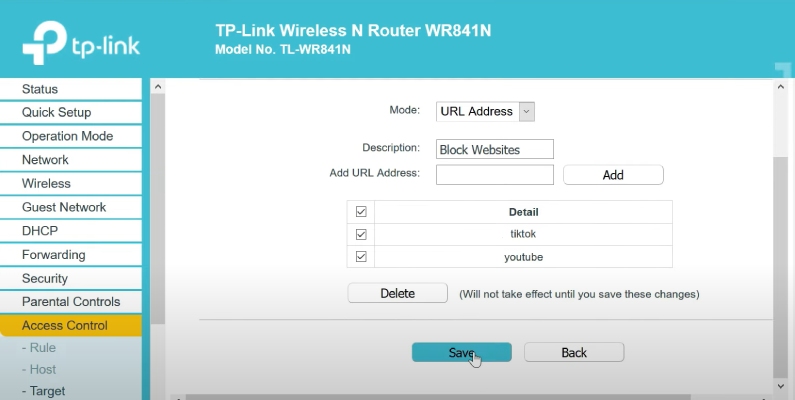
Can Child Bypass It on iPhone? We configured URL filtering on our home TP-Link router and connected the child's iPhone to that network. All browsers were blocked as expected. However, when cellular data were then used, all blocked sites loaded freely.
❌Limitations:
- It may not work when the child's iPhone uses mobile data or another network.
- It generally provides web restrictions only, no screen time management.
- It may block sites for other family members' devices unless your router supports device profiles.
FAQs
If you are an Android parent with an iPhone child, here's my take after testing and using 5 cross-platform parental control apps:
- Qustodio is the top choice for screen time management with smart preset schedules.
- AirDroid Parental Control is better for managing web activities, including tracking web browsing history and blocking websites.
- Bark is recommended if your primary goal is to monitor risky social media content.







Leave a Reply.