Can You Track a Phone by Number? What Really Works and What Is Legal
We have all seen it in the movies: a hacker types in a phone number, hits enter, and instantly pinpoints someone's exact location on a glowing digital map. But can you actually track a phone using just its number in real life?
It is a common question for worried parents and anyone who has ever misplaced their device. Because of this demand, you will often see websites or app-store listings boasting names like "phone tracker by number." Some even boldly suggest that you can type in a number right now and watch a live dot move across your screen.
However, the short answer is no. Regular users cannot find a phone's real-time location with just a phone number. Any method that actually works in the real world requires at least one of these specific conditions:
- You are logged into your own device's cloud account.
- The other person actively chooses to share their location with you.
- You and your child are connected through a family location tracking app.
- Law enforcement obtains network data through a strict legal process.
Real tracking requires permission for a very good reason: your location data is highly sensitive. In the U.S., the FCC strictly requires phone service providers to protect customer network information, and they have heavily fined carriers for illegally sharing customer location data in the past.
Can You Really Track a Phone by Its Number?
Before we dive into the complex tools, let's address the most common question head-on: usually, the answer is no.
In everyday life, a phone number is used to send a location-sharing request, invite someone to a family app, identify a caller, or flag spam. For regular users, there is simply no public, magical database where you can type in a digit string and spy on a phone's movements.
This is exactly why so many "phone tracker by number" tools are misleading. Some use the number just to send an SMS link asking for permission. Others require both people to download an app. Some are merely reverse phone lookup directories that identify unknown callers. While useful, none of these provide secret, live GPS tracking.
1What a Phone Number Can and Cannot Tell You
To understand why tracking by number doesn't work like magic, we need to look at what a phone number actually does.
Think of a phone number as an ID badge, not a tracking beacon. It helps connect a call or verify an account, but it absolutely cannot replace the complex hardware data from GPS, Wi-Fi, and cellular towers.
| What You Want to Know | Can a Phone Number Alone Tell You? | What Actually Works |
|---|---|---|
| Who may be calling | Sometimes | Caller ID or reverse phone lookup tools may show a name, spam label, carrier, or general region. |
| Whether a number may be spam | Sometimes | Spam-blocking and caller ID databases can flag suspicious numbers. |
| A person's real-time GPS location | No | The device must share location through an authorized service, such as Find My, Google Maps Location Sharing, or a family locator app. |
| A child's route history | No | You need a family location app or parental control tool set up in advance, such as AirDroid Parental Control. |
| A lost phone's location | No, not by number alone | You need access to the device owner's Apple, Google, or other device account, with location features already enabled. |
| Carrier-level location data | No | This is highly restricted and requires account-holder action, emergency support, or a police warrant. |
This difference is crucial. A reverse lookup app tells you who is calling, but a phone number by itself will never open a live map.
2Why a Phone Number Is Not the Same as GPS Location
So, if a number just makes connections, where does the actual map location come from?
A phone number is simply assigned to your mobile account. True location comes from the physical phone and its surroundings. Tech giants like Apple and Google explain that devices estimate their position using a mix of cellular network towers, Wi-Fi access points, GPS satellites, and Bluetooth signals.
In short, the phone figures out where it is first. Only then does it allow an authorized app to access that data. The phone number has nothing to do with generating the map coordinates.
3How Phone Location Tracking Actually Works
Now that we know a phone number isn't a GPS tracker, let's look at what actually happens behind the scenes.
Real phone location tracking usually follows this logical flow:
- 1.The phone gathers signals: It connects to multiple technologies like GPS, Wi-Fi networks, and cell towers.
- 2.The phone calculates its position: Using built-in sensors (like accelerometers) and algorithms, it estimates its exact spot.
- 3.The data goes to the cloud: This location is sent securely over the internet to services like Apple iCloud or Google.
- 4.Permission is granted: Another person only sees this location if they have the right access—like owning the account, being in a family group, or using a parental control app.
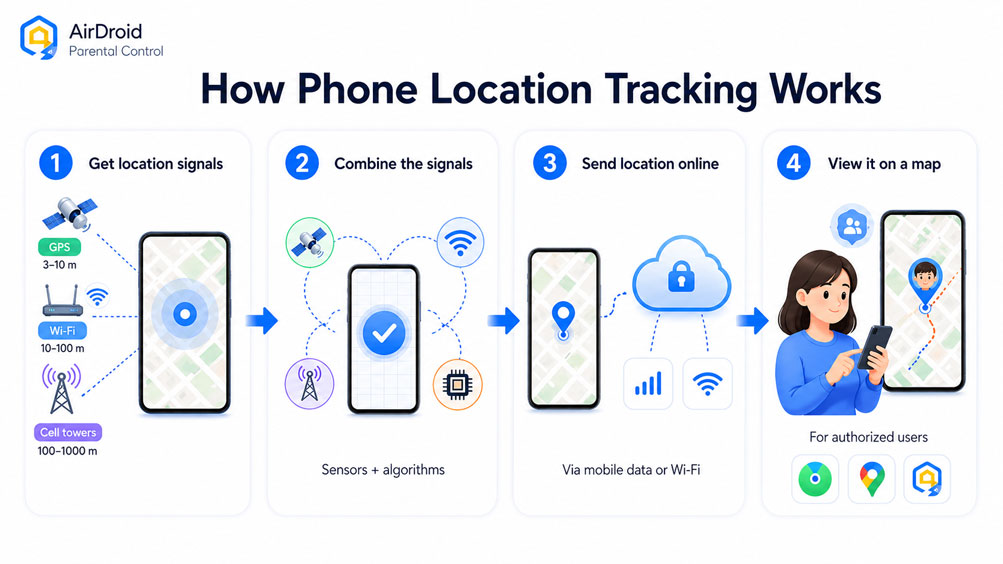
This is why tools like AirDroid Parental Control are classified as family safety apps, not "number trackers." They don't magically turn digits into a map; they establish a secure, permission-based link between a parent's phone and a child's phone to share real-time data.
What We Found When Testing Phone Number Tracker Tools
Despite the facts, the internet is flooded with tools claiming to do the impossible, so we put them to the test.
| Tool Type | What They Usually Claim | What We Actually Found | Safe Takeaway |
|---|---|---|---|
| Online "type a number" sites | Enter a number to find live location instantly. | They use fake maps, demand surveys/payments, or send phishing SMS links. | Avoid completely. They cannot track without permission. |
| "Phone number tracker" Apps | Track a phone secretly by number. | They are just family apps requiring both users to install and grant permissions. | These are fine for families, but the "by number" marketing is deceptive. |
| Reverse phone lookup apps | Find who owns a number or where it is from. | Shows caller ID, spam risk, or a general city/state region. | Great for identifying spam calls, but useless for live GPS tracking. |
Type 1. Online "Type a Number and Locate It" Sites
The most common culprits you will find online are websites promising instant results with zero effort.
In our review of more than 20 of these websites, we found that none provide verifiable real-time GPS location from the phone number itself. They try to hook you with guarantees like "completely anonymous," "no app install needed," and "exact street addresses."
However, the fine print reveals the trick. They don't track a cellular signal. Instead, they send a text message containing a deceptive link to the target device. The person holding the phone must click the link and manually allow location access. Even worse, many of these sites just show a fake loading screen to force you into paying a fee or completing endless surveys.
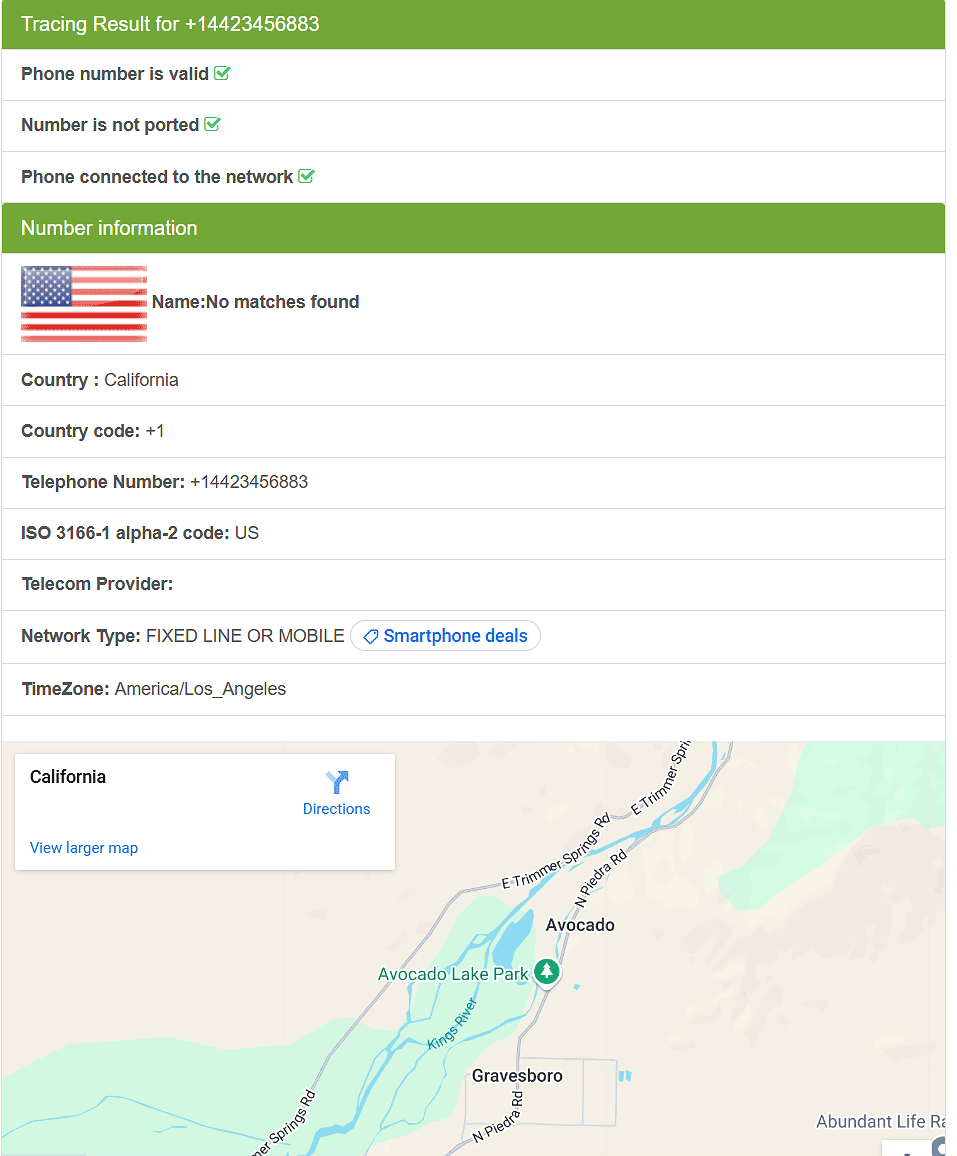
Editor's Verdict
This is a high-risk scam that we strongly advise against. They rely on the myth that numbers equal locations to steal your money or data. If you need reliable tracking, use legitimate software.
Type 2. Phone Tracker Number in Google Play and App Store
If websites are misleading, what about the official app stores? The reality there is slightly different but still confusing.
We found dozens of apps named "phone tracker by number." They boast features like real-time tracking and safe zone alerts. However, in practice, these are not true number-only trackers.
You cannot type in a stranger's number and find them. Instead, both users must download the app, join a private network, and actively accept tracking requests. They are simply collaborative family locators dressed up with misleading marketing.
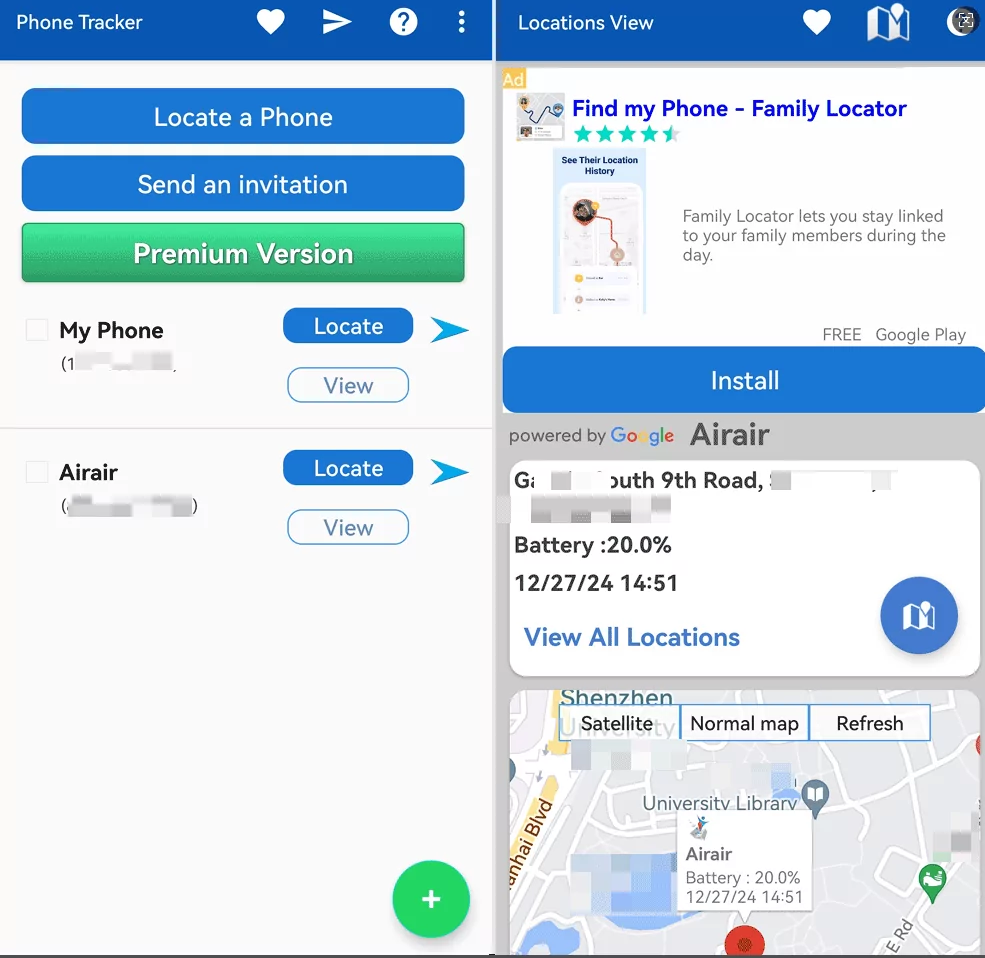
Editor's Verdict
We rate these apps as a Medium Risk. The tracking features usually work and help families, but the risk lies in their deceptive marketing, which tricks users into thinking they are buying a secret spy tool.
Type 3. Reverse Phone Lookup / Caller ID Apps
Finally, there is a category of apps that actually do use phone numbers, but not for live tracking.
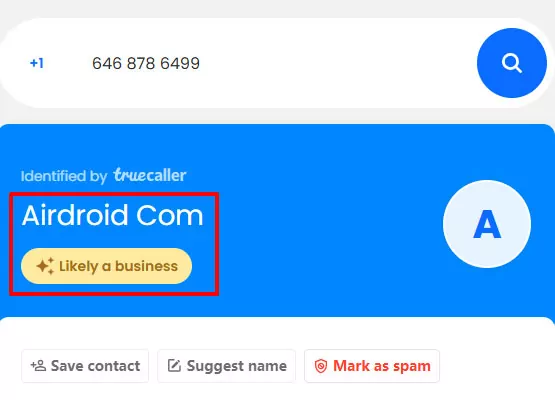
Tools like Truecaller are reverse lookup apps. They are fantastic for identifying an unknown caller, flagging a scammer, or showing the general region a phone number is registered in. However, they will never show you a person's live, step-by-step GPS location.
What Phone Tracking Methods Actually Work and Are Legal?
Since typing a number into a search bar won't work, let's explore the legitimate methods that actually get the job done.
The legal way to locate a phone depends entirely on whose phone it is, your account access, and if sharing was set up beforehand. In most everyday cases, legitimate options fall into three buckets: official device-finding tools, consent-based sharing, and parental controls.
1Official Ways to Find a Device or Share Location
The safest and most reliable tracking methods are the ones built directly into your device's operating system.
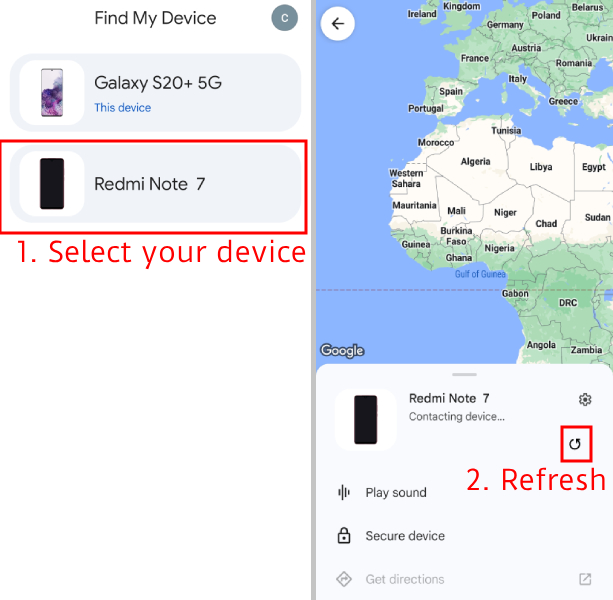
For Android users, Google's "Find My Device" is the go-to tool. It requires the phone to be powered on, connected to the internet, and logged into your Google Account. It is an account recovery feature, not a number lookup tool. Similarly, Google Maps allows users to share their live location with friends, but the owner of the phone must actively turn this feature on and choose who gets to see it.
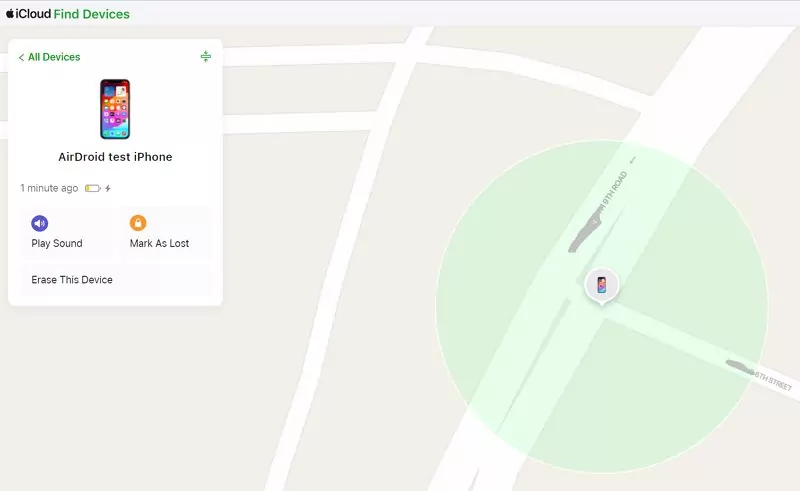
For iPhone users, Apple's "Find My" network is the official standard. It must be set up before the device is lost. Through Apple's Family Sharing, members can see each other's locations and get alerts when someone arrives home, but again, every user has the right to opt-in or out.
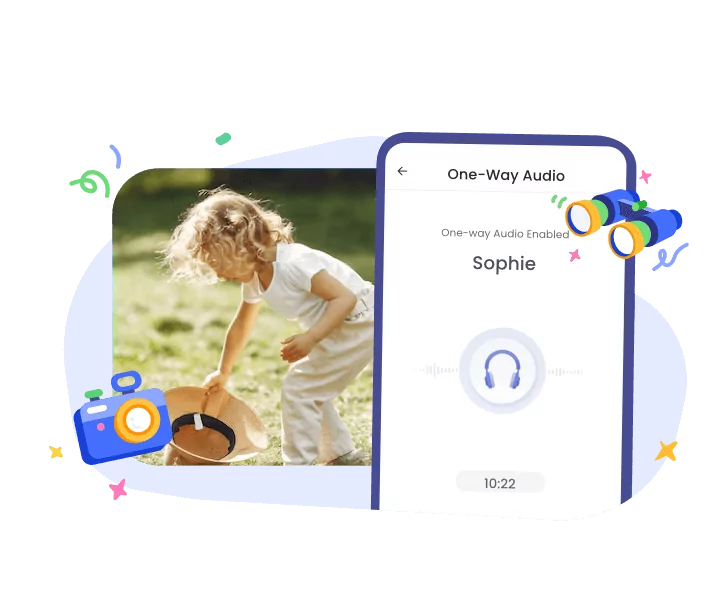
If you need more than basic sharing—like route history and screen time management—a dedicated app like AirDroid Parental Control is the best legal route. It works because parents install it on the child's device with full transparency, ensuring safety without relying on shady number-tracking tricks.
2What Can Your Carrier Actually Do?
If built-in apps fail, many people assume their mobile carrier can just ping the phone, but their power is more limited than you might think.
Major U.S. carriers like AT&T and Verizon focus their support on protecting your account. If you lose a phone, they will advise you to use Apple or Google's built-in tools. If that fails, the carrier can suspend your service or block the device to prevent theft, but they will not act as a personal GPS tracker for you.
Some carriers, like T-Mobile, offer family tracking add-ons (like FamilyWhere) for lines on the same bill. However, strict privacy rules mean that the phone being tracked will receive unblockable text message notifications letting them know their location is being monitored.
3Why "Tracking by Phone Number" Is Strictly Limited
You might be wondering why phone companies and tech giants make it so hard to track a simple number.
The reason is privacy. In the U.S., location data is treated as highly sensitive personal information. The FCC mandates that carriers protect this data, and recently fined major wireless companies nearly $200 million for illegally sharing customer locations with third parties.
Even law enforcement cannot track a phone number on a whim. Under U.S. law and Supreme Court rulings, police generally need a judge to sign a search warrant based on probable cause before they can force a carrier to hand over cell-tower location data. If the police need a warrant, a random website certainly doesn't have access to this data.
How Parents Can Track a Child's Phone Safely
For parents, the motivation behind tracking isn't surveillance; it's peace of mind and safety.
The real question isn't "Can I track by number?" but rather, "How do I know my kid is safe?" The best approach is a transparent family setup. The FTC highly recommends talking to your kids about why location sharing is used—such as making sure they get home from school safely.
1. Start with a Family Conversation
The foundation of any good safety plan isn't technology—it's communication.
Before installing any app, explain to your child that tracking isn't about catching them doing something wrong. You can say: "I'm setting this up so I can help if you get lost or if there's an emergency. I'm not going to watch your every move." This builds trust, especially with teenagers who crave independence.
2Choose the Right Setup for Your Family
Once you are on the same page, the next step is picking the right tool for your specific needs.
| Family Situation | Best Starting Point | Why It Works |
|---|---|---|
| Your child uses an iPhone | Apple Family Sharing + Find My | Great for basic sharing and finding lost devices. |
| Your child uses an Android | Google Family Link | Good for basic location and managing app downloads. |
| You need comprehensive safety | AirDroid Parental Control | Combines live location, geofences, route history, and screen time rules in one app. |
3Set Up Location Tracking Before You Need It
The biggest mistake parents make is waiting for an emergency to figure out how tracking works.
If a phone is already lost or dead, your options are near zero. Set up the tracking app the day you hand the phone to your child. Ensure the accounts are linked, location permissions are set to "Always Allow," and verify that you can see their device on your map.
4Use Geofences for Safety, Not Constant Checking
Once everything is set up, you don't need to stare at a map all day thanks to smart boundaries.
A geofence is a digital boundary around a real-world place, like a school or a grandparent's house. Apps like AirDroid Parental Control let you set these up so you get an automatic alert when your child arrives or leaves. It makes tracking event-based and much less intrusive.
5Use Route History as Context, Not Control
Sometimes, knowing where a child is right now isn't enough, and that is where past location data comes in handy.
If your child is late getting home, looking at their route history can tell you if their bus was detoured or if they stopped at a friend's house. However, use this feature to solve problems, not to interrogate them daily.
6Combine Location Tracking with Communication
Even with the best apps, technology should never replace a simple text or call.
Set basic family rules: text when plans change, keep the phone charged, and call if something feels unsafe. Tracking apps are a safety net, but communication is the primary tool.
7Choose a Tool That Matches Your Child's Age
As your child grows, your approach to tracking should evolve with them.
Children under 10 need strict boundaries and simple routines. Tweens (11-13) need more independence but clear safety checks. Older teens (14-17) require a balance of trust and agreed-upon location sharing for specific scenarios like late-night driving.
Bottom Line for Parents
To sum it all up, effective parental tracking is about preparation, not magic numbers.
Skip the shady "number tracker" websites. Instead, have an honest conversation and install a reliable tool like AirDroid Parental Control. It protects your child's privacy while giving you the exact tools you need to keep them safe.
Phone Number Tracking vs. Real Location Tracking
Let's do a quick recap to clear up any lingering confusion between these two very different concepts.
A phone number helps identify a caller or a carrier. Real-time location, however, comes from the device's internal hardware and requires explicit permission or account access.
| Method | Real-Time Location? | Requires Permission? | Best For |
|---|---|---|---|
| Phone number lookup | No | Usually no | Identifying spam or unknown callers. |
| Google/Apple Built-in apps | Yes | Yes (Account access) | Finding your own lost phone. |
| Family tracking apps | Yes | Yes (Setup required) | Child safety and daily family monitoring. |
| Law enforcement | Sometimes | Yes (Legal warrant) | Severe emergencies and criminal cases. |
If a website claims it can track a live location with just a number, close the tab. For real results, rely on authorized apps and proper account setups.
FAQs About Tracking a Phone by Number
Still have questions? Here are the straightforward answers to the most common queries we receive.
Final Thoughts
At the end of the day, separating tech myths from reality is crucial for your digital safety.
Tracking a phone is not like the movies. You cannot type a phone number into a website and instantly see a glowing dot on a map. Real location tracking depends entirely on the physical phone, its internal settings, and the permissions granted by the user.
If you lose your phone, rely on Apple Find My or Google's Find My Device. If you want to keep your kids safe, skip the shady "number lookup" scams and use a transparent, feature-rich tool like AirDroid Parental Control. It provides real-time tracking, geofencing, and peace of mind—all without breaking the law or relying on impossible tech myths.
List of Sources
- Can You Really Track a Phone by Number?
- Apple Support — About privacy and Location Services in iOS, iPadOS, and watchOS (https://support.apple.com/en-us/ht203033)
- Google Android Help — How Location Accuracy improves location (https://support.google.com/android/answer/15157297)
- FCC Consumer Complaints — Privacy Complaints and CPNI (https://consumercomplaints.fcc.gov/hc/en-us/articles/8824334151572-Privacy-Complaints)
- Truecaller Support — How do I find a person’s current location? (https://support.truecaller.com/support/solutions/articles/81000392593-how-do-i-find-a-person-s-current-location-)
- A Study of Localization Methods on Mobile Platform (https://scispace.com/papers/a-study-of-localization-methods-on-mobile-platform-and-wifi-62iqo0jnop)
- Accuracy of Positioning Data on Smartphones (https://scispace.com/papers/accuracy-of-positioning-data-on-smartphones-hitk68ixu8)
- Energy-Efficient Positioning for Smartphones Using Cell-ID (https://scispace.com/papers/energy-efficient-positioning-for-smartphones-using-cell-id-30puyzq243)
- Accurate and Energy-Efficient Localization System for Smartphones (https://scispace.com/papers/accurate-and-energy-efficient-localization-system-for-xbn0izs9ir)
- Accuracy of iPhone Locations: A Comparison of Assisted GPS, WiFi and Cellular Positioning (Zandbergen, 2009) (https://scispace.com/papers/accuracy-of-iphone-locations-a-comparison-of-assisted-gps-40sc32oe0f)
- What We Found When Testing Phone Number Tracker Tools
- Apple App Store — Phone Tracker by Number app listing example (https://apps.apple.com/us/app/phone-tracker-by-number/id1470943827)
- Google Play — Phone Tracker by Number app listing example (https://play.google.com/store/apps/details?id=mg.locations.track5)
- Apple App Store — LocaRadar Location Finder app listing example (https://apps.apple.com/vn/app/locaradar-location-finder/id6462421949)
- Truecaller on Google Play — Caller ID and spam blocking app example (https://play.google.com/store/apps/details?id=com.truecaller)
- Detectico — Public “phone number tracker” website example reviewed for claims and mechanism (https://detectico.io/)
- Scannero — Public “phone number tracker” website example reviewed for claims and mechanism (https://scannero.com/)
- GeoPhoneTracker — Public “phone number tracker” website example reviewed for claims and mechanism (https://www.geophonetracker.com/)
- What Phone Tracking Methods Actually Work and Are Legal?
- Google Android Help — Find, secure, or erase a lost Android device (https://support.google.com/android/answer/6160491)
- Google Maps Help — Share your real-time location with others (https://support.google.com/maps/answer/15437054)
- Apple Support — Find your lost Apple device or AirTag with Find My (https://support.apple.com/en-us/104978)
- Apple Support — Share your location with your Family Sharing group (https://support.apple.com/en-us/105107)
- Google For Families Help — Find and manage your child’s location (https://support.google.com/families/answer/7103413)
- AT&T Support — Find a lost or stolen device (https://pre-www.att.com/support/article/wireless/KM1086528)
- AT&T Support — Suspend wireless service or block a device (https://www.att.com/support/article/wireless/KM1046747)
- Verizon Support — Lost or stolen phone FAQs (https://www.verizon.com/support/lost-stolen-phone-faqs/)
- T-Mobile Support — T-Mobile FamilyWhere app (https://www.t-mobile.com/support/plans-features/t-mobile-familywhere-app)
- Reuters — FCC fines U.S. wireless carriers nearly $200 million over illegal location data sharing (https://www.reuters.com/business/media-telecom/fcc-fines-us-wireless-carriers-nearly-200-million-over-illegal-location-data-2024-04-29/)
- Legal Information Institute — 47 U.S. Code § 1002, Assistance capability requirements under CALEA (https://www.law.cornell.edu/uscode/text/47/1002)
- Legal Information Institute — Carpenter v. United States (https://www.law.cornell.edu/supremecourt/text/16-402)
- U.S. Department of Justice — Enhanced policy for use of cell-site simulators (https://www.justice.gov/opa/pr/justice-department-announces-enhanced-policy-use-cell-site-simulators)
- Legal Information Institute — 18 U.S. Code § 2702, Voluntary disclosure of customer communications or records (https://www.law.cornell.edu/uscode/text/18/2702)
- Legal Information Institute — 18 U.S. Code § 2703, Required disclosure of customer communications or records (https://www.law.cornell.edu/uscode/text/18/2703)
- How Parents Can Track a Child’s Phone Safely
- FTC Consumer Advice — Kids and Cell Phones (https://consumer.ftc.gov/articles/kids-cell-phones)
- Pew Research Center — How Parents Monitor Their Teens’ Digital Behavior (https://www.pewresearch.org/internet/2016/01/07/how-parents-monitor-their-teens-digital-behavior/)
- Pew Research Center — Parenting Children in the Age of Screens (https://www.pewresearch.org/internet/2020/07/28/parenting-children-in-the-age-of-screens/)
- Pew Research Center — Parents’ Relationship With Their Young Adult Children (https://www.pewresearch.org/social-trends/2024/01/25/parents-relationship-with-their-young-adult-children/)
- Phone Number Tracking vs. Real Location Tracking
- Google Find My Device Official Website (https://www.google.com/android/find/)
- Apple Support — Find My Official Guide (https://support.apple.com/en-my/HT210514)
- FAQs About Tracking a Phone by Number
- FTC Consumer Advice — Stalkerware: What To Know (https://consumer.ftc.gov/articles/stalkerware-what-know)
- 911.gov — Calling 911 (https://www.911.gov/calling-911/)
- The National Domestic Violence Hotline (https://www.thehotline.org/)










Leave a Reply.