How to See Someone’s Activity on Facebook
Ever wondered what your friends, family, or favorite pages are up to on Facebook? Whether you want to keep up with their latest posts, photos, or updates, knowing how to see someone's activity on Facebook can be really handy. In this guide, we'll discuss what activity of someone on Facebook you can see and how to do it.
What Activities Can You See on Facebook?
Facebook's official Help Center states that users can adjust privacy settings at the post and profile level, with options ranging from "Public" to "Private."
That is, viewing someone's Facebook activity depends on their privacy settings. We are sharing some of the situations where it might be possible to see their activity and when it won't be.
Public Activity
If you visit their profile page, you can see anything they've shared publicly. This might include posts, comments, and photos.
Friend-Only Activity
If you're friends with them on Facebook, you'll see more based on their privacy settings for friends. This could include additional posts or content they only share with their friend circle.
Private Activity
You cannot see anything someone has marked as private. This includes posts, messages, and information they choose to keep hidden.
Always respect someone's privacy settings and don't try to access information they haven't chosen to share publicly. A digital literacy guide, based on UNESCO's framework for safe social media behavior, also emphasizes that users should respect others' boundaries and preferences.
How to See Someone's Facebook Activity
If you want to see someone's activity on Facebook, there are three possible options. You can go to their profile page, get access to their notification, or focus on the activity log. So, let's see how to see friend activity on Facebook (don't worry, you can use the same methods for your kids, too!).
On Their Profile Page
This method can be used by anyone because it will share the information that they've kept on public. The public posts (including photos, videos, and status updates) and liked Pages (if publicly visible in their About section).
Remember that you won't see posts shared with friends only or those with privacy restrictions. As far as the steps are concerned, follow these steps;
Step 1. Open your Facebook on a browser.
Step 2. Visit the particular person's profile who you want to keep an eye on.
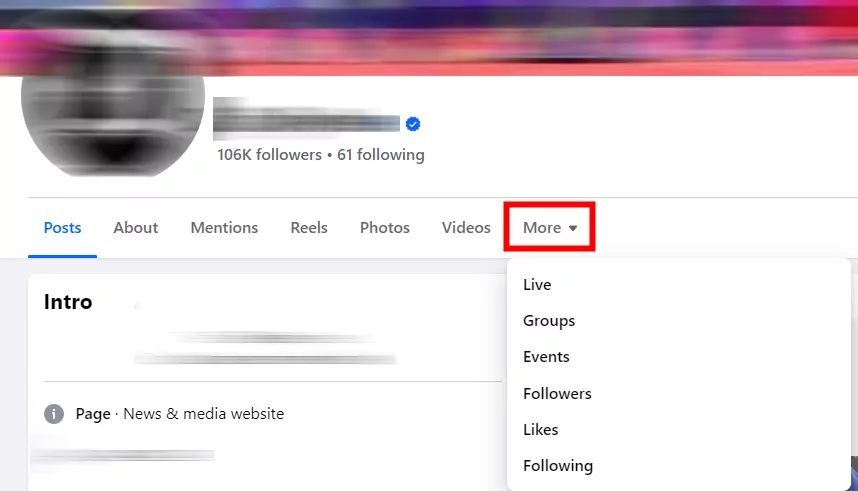
Step 3. Tap "More."
Step 4. Here you can choose to view their public activities.
On Your Notifications
The second method to see someone's Facebook activity is to use notifications. It will work if you want to see when they shared a post, and what they do on posts you've interacted with.
You will be able to see the posts where they liked, commented on, or tagged you.
However, you won't be able to access any activity that doesn't include you. The only step you have to take is that you have to check your Notifications panel for alerts about their interactions with you.
Step 1. Open you Facebook app.
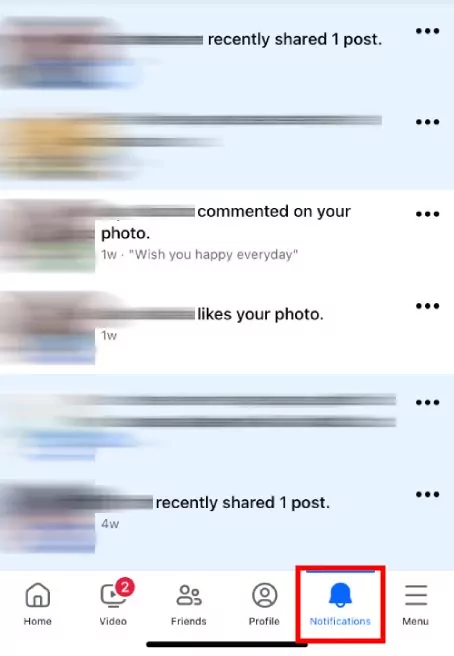
Step 2. Tap the "Notification" button.
Step 3. Here you can see other's activity and their interaction on you.
On Your Activity Log (When You're Tagged by Someone)
The last method to check someone's Facebook activity is to keep an eye on the activity tag. For this method, you've to be tagged by that person. You can see the posts, comments, and places you've been tagged in by them.
However, you won't see their activity where they haven't tagged you. As for the steps, check below:
Step 1. Tap your profile image on Facebook.
Step 2. Click "Settings & privacy" > "Activity Log."
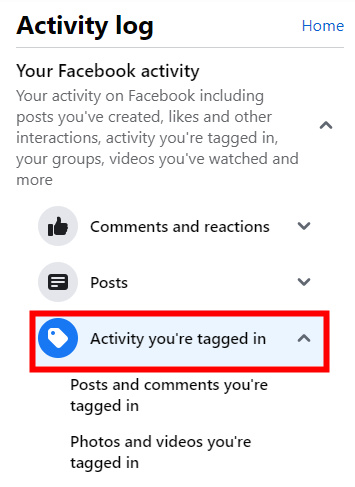
Step 3. On the left-side menu, tap "Your Facebook activity."
Step 4. Select "Activity you're tagged in" to look for entries where they tagged you.
What Facebook Activities of Others Is Invisible to You?
Now that you've a basic overview of how to see someone's Facebook activity, it's time to focus on what you won't be able to see. These things won't be accessible to anyone other than the profile owner for security and privacy purposes.
Private Messages
These are the conversations between other people, and they are private by default. Meta also emphasized that one-on-one chats on Messenger and WhatsApp remain end-to-end encryption, meaning no one—including Meta—can access those private messages.
This means you cannot see them unless you are included in the chat.
Hidden Posts
If someone hides a post, it won't appear on their timeline or in search results. This means that unless they make it publically available, you cannot see it.
Friends-Only Posts
Posts designated "Friends Only" are only visible to the person's friend list. Remember that this excludes you if you're not on it.
Activity Log
While your own activity log shows everything you've done on Facebook, you cannot see the activity logs of other users.
Liked Pages, Interests, and Groups
You can see some of the pages, interests, and groups that your friends have liked, but it depends on their privacy settings. They might choose to keep this information private as well.
Search History
Facebook doesn't share the search history of other users. This means whatever they have searched through their Facebook account won't be accessible to you.
Bonus: Are Your Child's Facebook Searches and Browsing Age-Appropriate?
Social media can be a great way for kids to connect with friends and family. However, a global survey of 600 children aged 10-15 who regularly use Facebook found that 43% have experienced at least one serious problem on the platform, including cyberbullying, account hacking, and unwanted attention from strangers.
Hence, it's important to be aware of what they're seeing and sharing online. There are tools available to help parents monitor their child's online activity, such as AirDroid Parental Control. This app includes a feature called social content monitoring, which allows parents to:
- Monitor their child's Facebook searches, browsing, and posting content.
- Set keywords to receive alerts if posts contain potentially inappropriate content.
The Bottom Line
Staying updated on someone's activity on Facebook is pretty straightforward. Monitoring someone's Facebook activity should only be done with their knowledge and consent (e.g., for parental control purposes, where the child is aware).
It's important to respect the privacy of others and follow applicable data protection laws like the GDPR in the European Union, or the California Consumer Privacy Act (CCPA) in California.
The methods mentioned should not be used for malicious or harmful purposes, such as stalking or harassment.
List of Sources
- Official Platform Privacy & Security
- Facebook Help Center — Privacy & Security Settings (Official Meta Documentation) (https://www.facebook.com/help/1297502253597210)
- BOL News — Is Meta spying on your private chats? Meta clarifies: "We do not read or use those messages for any purpose" (Dec 2025) (https://www.bolnews.com/technology/is-meta-spying-on-your-private-chats-meta-reveals-the-shocking-truth/)
- Child Safety & Online Risk Research
- Global Security Mag — ZoneAlarm Facebook Child Safety Report: 43% of Children Experienced Serious Problems, Late-Night Users Face Double the Risks (May 2026) (https://www.globalsecuritymag.com/ZoneAlarm-survey-reveals-younger,20121127,33949.html)
- Government Guidance on Respecting Privacy
- Victoria State Government — That's Risky Stuff: "If you want your privacy respected, respect the privacy of others" (Mar 2026) (https://www.vic.gov.au/secondary-thats-risky-stuff)
- gori.gov.ge — Safe Social Media Usage: Respecting Others' Boundaries & Obtaining Explicit Consent Before Sharing (Nov 2025) (https://educate.gori.gov.ge/digital-skills-digital-literacy/safe-social-media-usage/)










Leave a Reply.