5 Best Teen Driving Apps to Help Parents Monitor Safer Driving
Getting a driver's license is a huge milestone for teens but sometimes a major source of anxiety for parents.
Did they arrive safely? Were they speeding? Were they on the phone?
Thankfully, teen driving apps can help you keep an eye on their trips and understand their safer habits. In this guide, we compare five teen driving apps of 2026: Life360, AirDroid, Bark, OtoZen, and Bouncie.
How We Choose and Evaluate These Apps
To make this list, we compared and used AirDroid, Life 360, Bark, and OtoZen on our testing devices: a Google Pixel (Android) and an iPhone 14 (iOS).
Our hands-on testing included real driving scenarios, such as daily commutes and highway driving. For each app, we evaluated the following:
- Driving-related features: GPS tracking, driving behavior reports, speed alerts, emergency assistance, and phone usage monitoring.
- Pricing: Is the app free to use and what are the paid tiers?
- Accuracy: How precise location, speed, and trip data are in real conditions.
For apps like Bouncie which requires an OBD2 tracker before working, we reviewed their official documentation, analyzed user reviews on the Google Play, and checked the YouTube review videos.
Quick Comparison Table
| Apps | Hardware Needed? | Risky Driving Behaviors Monitored | Crash Detection | Pricing |
|---|---|---|---|---|
| AirDroid |  | Speeding; hard braking; rapid acceleration | | $9.99/month $59.99/year |
| Life360 | | High speed; hard braking; rapid acceleration; phone use |  | Free basic plan $9.99 for Silver $16.99 for Gold $24.99 for Platinum |
| Bouncie | | Speed; hard braking; rapid acceleration | | $89.99 for the device and $9.65/month |
| OtoZen | | Speeding; phone use | U.S. only | Free plan $49.99/year for Family Plan $64.99/year for Family Plus Plan |
| Bark | | Top speed only | | $14.99/month $99/year |
5 Teen Driving Apps for Families
We'll cover these apps' driving features, costs, strength and limitations so you can choose the right fit for your family.
1AirDroid Parental Control
Best for: Parents who want to review driving behavior and manage their teen's phone use.
AirDroid is a parental control app with a dedicated driving detection feature, tracking driving automatically and recording multiple risky driving behaviors.
Its driving safety features include:
- GPS tracking with location history and geofence alerts.
- Speeding alerts while driving.
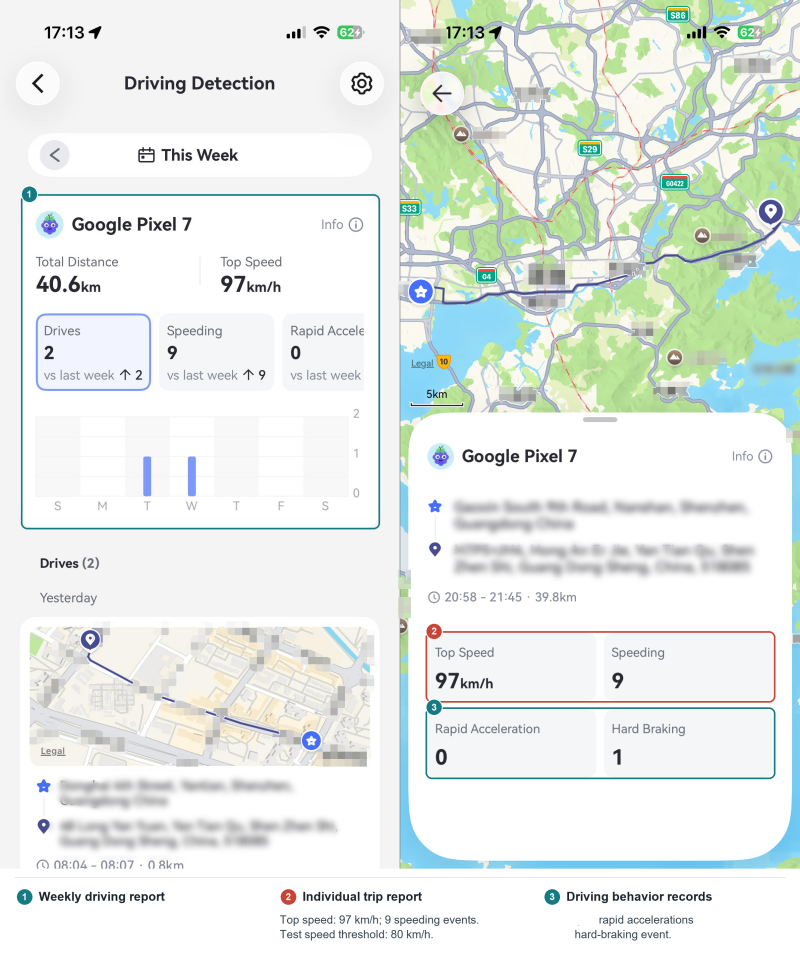
- Detailed driving reports with hard braking, rapid acceleration, total distance, and top speed.
- Child-triggered SOS alerts to parents.
- Remote monitoring and phone management tools.
Real-time driving behavior alert: The first speeding in one trip


Pros:
- It helps reduce distractions while driving: Because it combines driving tracking with full parental controls, you can see if your teen was scrolling social media on the wheel and block them.
- Accurate driving reports: We set an 80 km/h speed limit and took the phone on the highway; AirDroid caught 9 separate speeding events that matched what actually happened.
- Useful context: It can connect a teen's Android camera and microphone so parents can view and hear their surroundings, providing additional context when they are worried.
Cons:
- Driving detection requires manual setup: Parents need to enable the feature before trips can be recorded.
- No phone-use data in driving reports: AirDroid's driving reports don't cover distraction behaviors. To check whether your teen was on their phone behind the wheel, you have to dig into the screen-time report.
2Life 360
Best for: Families who want everyday location sharing alongside driving reports.
As a dedicated location safety app, Life360's location sharing is free to use, but its detailed driving reports require the Gold or Platinum subscription to proceed.
Its driving safety features include:
- Free and real-time location sharing with the whole family.
- Driving reports with top speed, hard braking, rapid acceleration, and phone usage events.
- Automatic crash detection with emergency dispatch and live agent support.
- SOS button with 10-second countdown.
- Place alerts and location history.
Real-time driving behavior alert: Crash
Pros:
- Accuracy is excellent: The location is updated automatically with no lag. Also, every driving route (even riding) and speed were recorded correctly in our test.
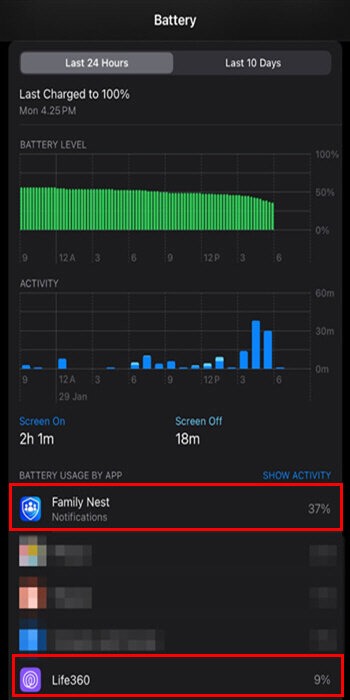
- Battery-friendly: In our testing it drained only about 9% per day.
- It offers a free version, which is genuinely usable for basic location sharing.
Cons:
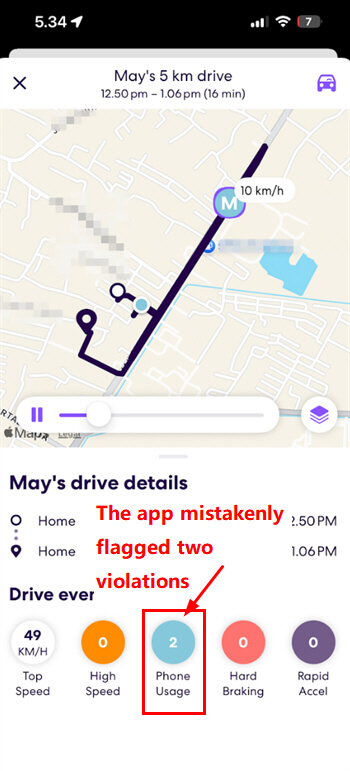
- Distraction detection is too "perfect:" Even though we picked up the phone for navigation on the riding, it showed we used the phone on the road.
- Driving insights need to be improved: Two violations were recorded even though we handled the phone only after the vehicle had stopped.
- Speed alerts aren't customizable: The threshold is locked at a default 128 km/h and can't be changed, which is a highway racing speed. In contrast, AirDroid lets you set a custom limit, so you get alerted based on your teen's patterns.
3Bouncie
Best for: Families who want vehicle-level tracking that doesn't depend on the teen's phone.
Bouncie is structurally different from the other apps here: it requires and combines a plug-in OBD2 tracker with a mobile app, letting parents monitor the car their teen drives.
Its driving safety features include:
- Real-time vehicle location and trip history.
- Speed monitoring, hard-braking records, and rapid-acceleration records.
- Impact detection with app notifications and SMS alerts to designated contacts.
- Vehicle health information, including battery status.
- Severe weather alerts tied to the vehicle's location.
Real-time driving behavior alert: Detected impacts.
Pros:
- Useful vehicle-health warnings: In Family Tech's video review▶️, low-battery notifications repeatedly helped her catch occasions when her daughter left the headlights on at school, before the car battery drained.
- Independent of the teen's phone: The Bouncie device's built-in GPS and cellular connection allow driving tracking without relying on the teen's phone battery or location settings.
- Device-removal notifications: This helps parents know when Bouncie is unplugged, so a tracking gap is less likely to go unnoticed.
Cons:
- Extra hardware and ongoing cost: Bouncie requires a compatible vehicle, a plug-in device, and a subscription.
- Limited to the equipped vehicle: It cannot track your teen when they ride with friends or drive another car.
4OtoZen
Best for: Families who want a dedicated, teen-focused driving safety app
OtoZen is built specifically around teen driver safety, positioning itself against general family locator apps by focusing on driving context rather than just location. It offers a free plan, but speeding and phone-use alerts require Premium.
Its driving safety features include:
- Live location sharing, estimated arrival times, and place alerts.
- Speeding alerts based on road limits or a custom high-speed threshold.
- Phone-use warnings for drivers and real-time notifications for parents.
- Individual trip reports and weekly drive scores.
- Automatic crash detection and professional emergency response in the United States.
Real-time driving behavior alert: Speeding and detected phone use. Crash alerts for U.S.
Pros:
- Helpful speeding warnings: Besides alerts to parents, OtoZen beeps when teen drivers exceed the speed limit and vibrates when it detects phone handling, prompting them to refocus.
- Unique post-trip reports: The reports offer drive scores in addition to speeding and phone-use events, giving families a quick view.
Cons:
- No braking or acceleration monitoring: OtoZen does not currently record hard braking or rapid acceleration, leaving those behaviors out of its driving feedback.
- Emergency coverage is regional limited: Crash detection and professional emergency dispatch are available only within the United States.
5Bark
Best for: U.S. families primarily concerned with online monitoring who also want basic driving visibility.
Similar to AirDroid, Bark is a parental monitoring app, primarily focusing on risky content alerts. But it also layers in driving summaries and location alerts.
Its driving safety features include:
- Location tracking, check-ins, and geofencing alerts.
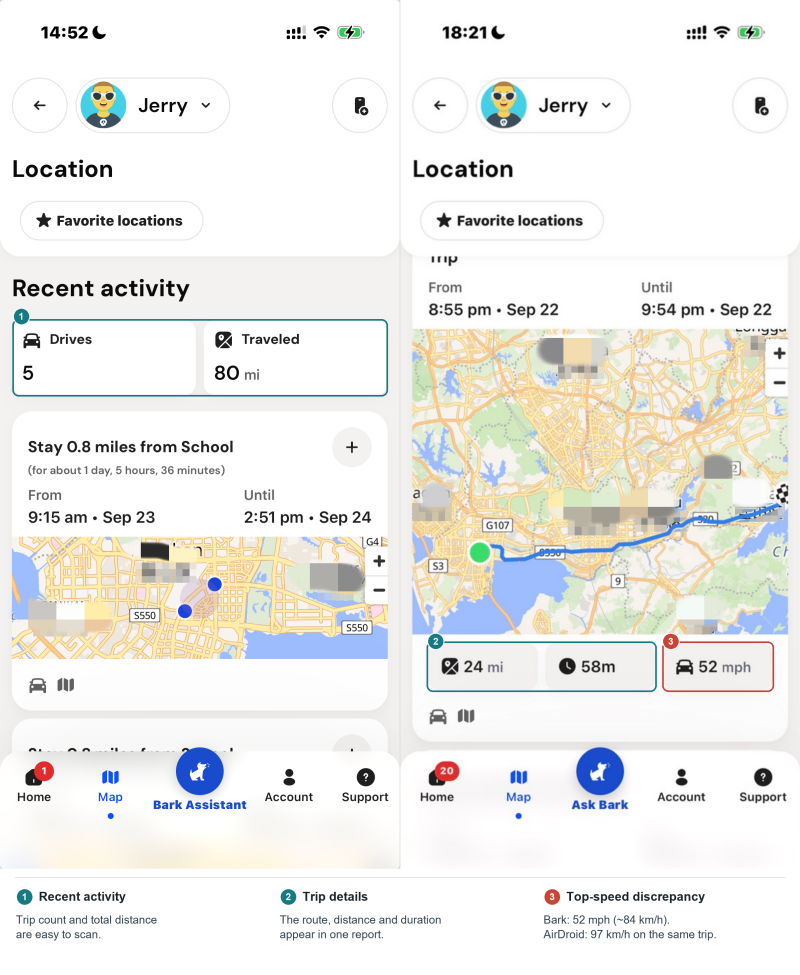
- Driving summaries showing trip distance, routes, and top speed.
- "Lock while driving," which pauses the phone in a moving vehicle (Bark Phone only, and we didn't test).
- Content monitoring across 30+ social media platforms, texts, and email.
Real-time driving behavior alert: No
Pros:
- Clean, concise driving summaries: The post-trip report is easy to scan at a glance, with distance, duration, top speed, and route.
- It also helps reduce distractions while driving: Same as AirDroid, you can block distracted apps before the trip or customize your "driving" schedule routines.
Cons:
- Driving data is limited: No speeding, hard braking, or acceleration detection.
- Geofence alerts arrived with noticeable delays: In our testing, the driving report already showed our teen had arrived at the geofenced location, but the geofence alert itself hadn't come through yet.
- Top speed didn't match reality: On the same trip, AirDroid recorded a top speed of 97 km/h, while Bark's showed 52 mph (≈84 km/h) that didn't line up with what we actually drove.
- No free tier, and the Bark Premium costs $14.99 per month.
How to Choose the Right Teen Driving App
If speeding is your top concern → AirDroid
Lets parents set a custom speed threshold and receive an alert.
If crashes on the road are your top concern → Life360
Detects crashes and adds emergency dispatch.
If distraction while driving is your top concern → OtoZen, Bark, AirDroid
OtoZen warns teens when it detects phone handling. AirDroid and Bark let parents restrict phone use before trips.
If vehicle health & maintenance is your top concern → Bouncie
Flags vehicle issues, including low battery levels.
If arriving safely is your top concern → AirDroid, Life360
Both show your teen's live location and send arrival notifications accurately.
If budget is your top concern → Life360, OtoZen
Both offer a free plan.
Trust Tips for Parents
A driving app should support trust, not replace it. Before using one, talk with your teen about what the app tracks and agree on boundaries together. More importantly, use driving reports to recognize progress and discuss safer habits, not just point out mistakes or 24/7 monitoring.










Leave a Reply.