How to Monitor Teen Driving Without Breaking Trust
According to AAA's review, on average, eight people lose their lives every day in a teen-related crash during the summer months, with distraction and speeding among the leading factors.
When your teenager pulled out of the driveway, you knew the destination, but you didn't know the speed, sudden brakes, or distractions.
Check in constantly and risk resentment, or stay quiet and lose sleep.
So, how can you monitor your teen's driving without them feeling watched? This guide will cover it!
Do You Actually Need to Monitor Your Teen's Driving?
Let's be honest, you probably already have a gut feeling about your teen needing supervision on the road. But sometimes it helps to see it in black and white. After all, every teen driver is different.
This 30-second self-test can help decide whether you need visibility into your teen's driving or simply a few clear rules and regular conversations.
Experience & history
Behavior & rules
What Parents Should and Shouldn't Monitor When Their Teen Drives
This is usually where the teen "spying" feeling comes from. Some types of oversight keep your teen safer. Others quietly erode trust.
When monitoring driving, our parents' goal isn't to see everything our teen does. It's to see the things that actually affect their safety. Here's a practical guide to drawing that line.
What's worth monitoring:
✔️ Risky driving behaviors
Research shows that electronic monitoring can significantly reduce unsafe driving events.
- Speeding: the single most common factor in teen fatal crashes
- Hard braking and rapid acceleration: indicators of aggressive driving or poor hazard perception
- Seatbelt use: 53% of teen passenger vehicle drivers who died in 2023 were unbuckled
- Phone use while driving: distraction plays a major role in teen crashes.
✔️ Trip context, not just location
Location tracking only tells you where your teen went. It doesn't tell you how and why they got there. That's the gap that matters.
- Routes: did they stick to safer roads or unfamiliar ones?
- Purpose and destination: are they driving to school, a friend's house, or just cruising?
- Time of driving: crash risk spikes during late nights.
- Trip duration: long drives may point to fatigue or drowsy driving, both especially dangerous for drivers.
- Passengers: crash risk goes up when teens are distracted by friends or other passengers.
✔️ Driving patterns over time
Weekly driving summaries reveal whether driving habits are improving or deteriorating. This also gives you a clear picture without needing to watch the drive unfold in real time.
What's not worth monitoring
❌ Every turn, every stop, every minute
Avoid real-time and constant checking of the map or questioning every drive. For most teens, that crosses from safety into control and over-monitoring.
❌ In-car audio and private messages
Driving safety does not require listening to private conversations inside the car or reading your teen's personal chats. Stick to driving-related behavior only.
How AirDroid Driving Safety Feature Supports This Approach
You've taken the self-test and thought about what to monitor and what to leave alone. Now comes the practice: how to know and monitor teens' driving behaviors, especially the risky ones.
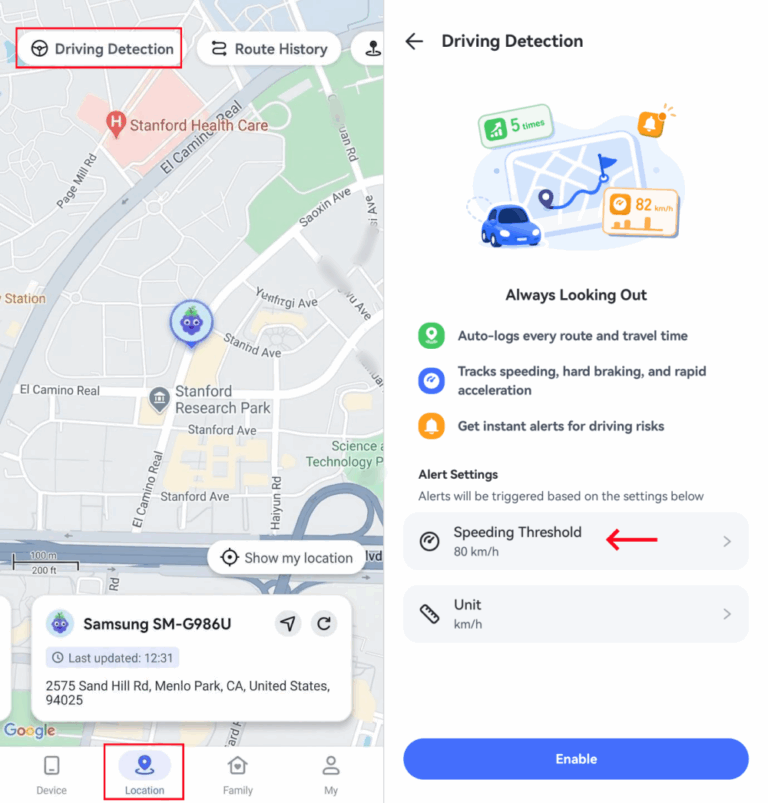
That's what AirDroid's Driving Detection feature does. It watches for behaviors most closely tied to risky driving: speeding, hard braking, rapid acceleration, and phone use.
Here's how it works to support safer driving habits:
When speeding is first detected during a trip, you receive an instant notification. After that, no more pins, even if speeding continues; it is logged in the driving reports.
This single alert per trip design keeps you informed without making your teen feel like every move is being reported in real time.
Hard braking, rapid acceleration, and top speed are recorded and summarized once the trip is done. Because they're more useful as something you review together after a drive than reacting to mid-drive.
Additionally, a post-trip summary gives you trip context, including routes and duration, so you can better understand what happened.
As a parental control app, AirDroid offers a screen activity report letting you know if your teen was scrolling on the screen during driving hours.
If a hard brake or speeding happened at the same time as screen activity, that's a conversation worth having.
How to set up driving detection in AirDroid
- Step 1.Install AirDroid Parental Control and link your teen's Android or iPhone.
- Step 2.Go to "Location > Driving Detection" under your teen's profile.
- Step 3.Pick the speed threshold; this decides how much of a speed deviation counts as "speeding" for alerts.
- Step 4.Tap on "Enable." It'll start recording distance, speeding, hard braking, and rapid acceleration automatically from the next drive.
Steps to Build Trust While Monitoring Driving
Here's a three-step approach that keeps the focus on safety and supports safe driving.
1. Talk before you track
I've seen parents do this: they set up tracking, and a week later the kid spots the app or notices a device in the car. The kids' reaction is always the same: anger, betrayal, and a long argument.
Therefore, what you should do first is to have a calm conversation:
- Show them real teen driving crash statistics or cases, instead of simply saying, "I'm worried about your safety on the road."
- Explain what you'll monitor with which tool when they drive and why you'll do it. For example, "I want to be able to know and help at the moment something happens. This tool doesn't watch your every move. It just gives me a heads-up if there's speeding or hard braking. That's it."
2. Set rules together, not for them
Nobody likes being told what to do. Teens especially. But when they help write the rules, they actually have some stake in following them.
The CDC recommends parents fill out a parent-teen driving agreement and offers a template for families: CDC's Driving Agreement
So, just sit down together and fill it out. Ask your teen what they think is fair or what needs to be revised. When teens feel like they have a say, they're more likely to actually follow them.
Most importantly, update the agreement as they get more experience on drives.
3. Focus on driving patterns, not punishment
This is where most parents mess up. They get a speeding alert and immediately fire off a yell: "Why were you going 15 over at 4:30?"
That feels like an interrogation. It puts your teen on resistance right away. A better approach:
Don't react to every trip. Let the data build up for a week, then sit down and look at the trend together. Is speeding happening less often? Are the hard brakes decreasing? Those trends tell you way more than any one speeding alert.
If you do need to bring up a speeding or other risky driving event, lead with how it made you feel, not what they did wrong:
❌ "You were speeding again."
✅ "I saw you went over the speed limit 7 times, and honestly it scared me a little. What was going on?"











Leave a Reply.