Why Is Snapchat Discover So Inappropriate? What Parents Can Do
And honestly, many users are thinking the same thing — with some calling Snapchat Discover "disgusting" and completely unsuitable for minors. Moreover, Snapchat was sued as early as 2016 for allegedly showing explicit content to minors through its Discover feature.
Snapchat Discover is supposed to be a place for trending stories, but in reality, it's often filled with clickbait headlines, mature or violent content, and other inappropriate content.

So, today, let's break down why Snapchat Discover is so inappropriate — and what you can realistically do to take control.
Why Is Snapchat Discover So Inappropriate?
Snapchat Discover works like TikTok's "For You" page — it's a personalized, endless feed of stories and videos from publishers and creators.
What your child sees on Discover is shaped by their viewing habits, interactions, who they follow, and their age and location. According to Snapchat, all Discover content is reviewed by its moderation team before going live to ensure it meets the platform's community guidelines.
*Source: Snapchat Official Document
1 What Kind of Inappropriate Content Shows Up on Discover?
Despite Snapchat's community guidelines — which prohibit porn, violence, self-harm, and hate speech — kids are still regularly exposed to content on Discover including:
- Sexually suggestive content: stories with revealing thumbnails, clickbait headlines about sex, and even promotions for platforms like OnlyFans.
- Violence and graphic material: disturbing news clips and violent videos that appear even with Snapchat's "Restrict Sensitive Content" setting turned on.
- Body image and diet culture: stories promoting extreme dieting and "ideal" body types, which can be especially harmful for image-conscious teens.
- Clickbait from major publishers: outlets like Cosmopolitan and MTV have published Discover stories they themselves labeled "Not Safe for Work." If it isn't appropriate for a workplace, it certainly isn't appropriate for a 13-year-old.
2 Why Can't Snapchat Filter This Out?
Snapchat Discover's algorithm is designed to maximize engagement, not safety — once content gets likes and watch time, it gets pushed to more users regardless of age.
On top of that, Discover stories are mostly visual with minimal text, making it difficult for automated moderation to detect inappropriate material.
Some creators also deliberately embed explicit content inside otherwise safe-looking stories to bypass review.
How Can Snapchat Discover's Inappropriate Content Affect Your Child?
Your child might just be killing time on Discover — but those sexualized thumbnails, "perfect body" posts, and violent clips don't just vanish after a swipe. They stick. And unlike a Google search, your child isn't choosing to see this content — Discover's algorithm pushes it to them automatically, over and over.
💡 Here's what the data shows:
- Mental Health risks — The U.S. Surgeon General's advisory found that teens spending more than three hours a day on social media face double the risk of anxiety and depression.
- Body Image concerns — 46% of teens say social media makes them feel worse about how they look. A study across 17 countries linked repeated exposure to eating disorders and body dissatisfaction, especially among girls.
Can You Turn Off Discover on Snapchat?
Let's get straight to the point: no, you can't turn off Discover on Snapchat.
There's no setting, no toggle, and no parental control that lets you remove it completely. Snapchat has confirmed this in their own help documentation — you can hide individual stories, but you cannot disable the Discover section itself.
📣 The good news? While you can't remove Discover, you can significantly reduce the amount of inappropriate content your child sees on it. Here are 4 practical ways to take back control, listed from easiest to most involved.
1Turn on Snapchat Family Center
If you haven't done this yet, start here — it is the single most important step in protecting your child. Snapchat offers a built-in parental control tool called Family Center.
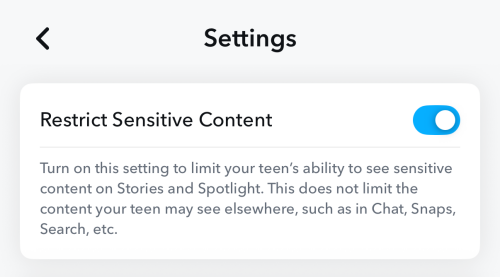
While it doesn't allow you to remove the Discover feed entirely, enabling it gives you the power to restrict sensitive content and monitor who your child is interacting with. Think of it as a necessary filter that cleans up the "noise" on their Discover page. To enable this feature:
- Step 1.Go to your "Avatar" and tap the "Settings."
- Step 2.Locate and select "Family Center."
- Step 3.Select the child account you want to restrict sensitive content and send an invite via DM.
- Step 4.Once the invite is accepted, the "Restrict Sensitive Content" setting is automatically on.
2Hide Inappropriate Stories
This is something you and your child can do every day.
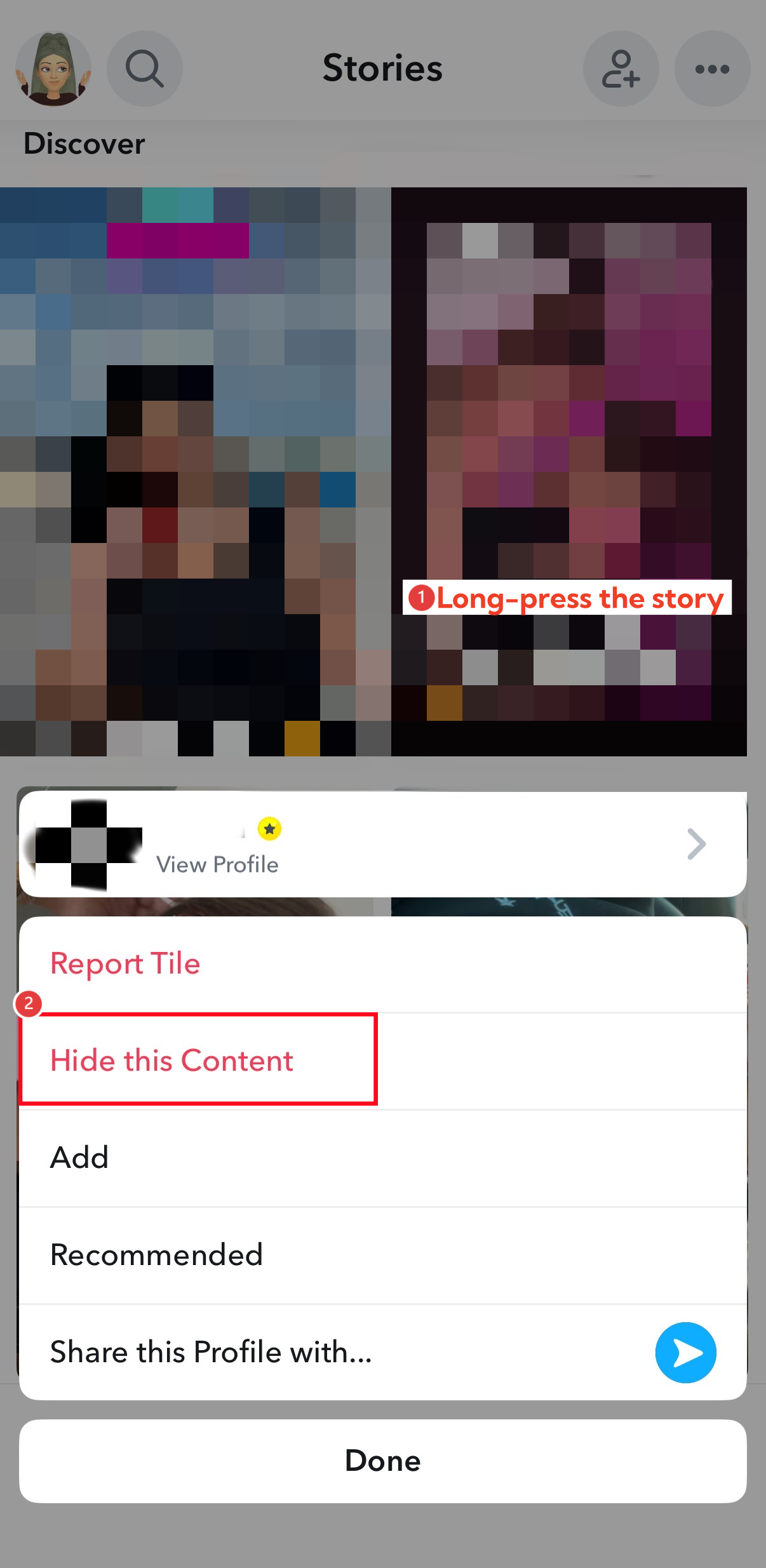
When an inappropriate story shows up on Discover, hiding it tells Snapchat's algorithm to stop recommending that type of content. It won't clean up overnight, but after a week or two of consistent hiding, you'll notice a real difference.
To hide a story:
- Step 1.Press and hold any inappropriate story on Discover.
- Step 2.From the menu list, select "Hide this Content."
3Report Tile — Flag Inappropriate Stories
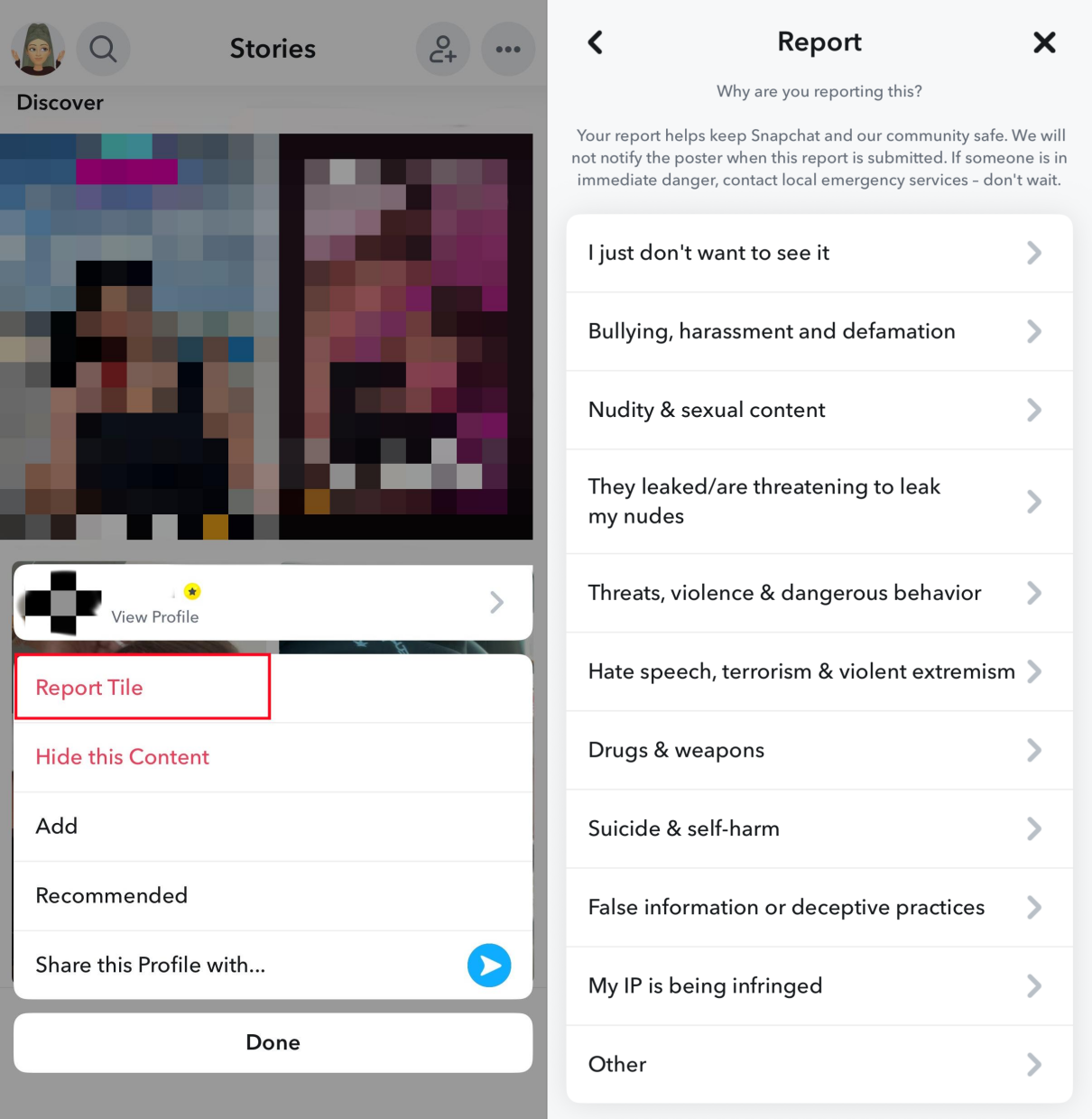
While you're hiding stories, take one extra step — report the worst ones. This doesn't just improve your child's feed, it flags the content for Snapchat's review team and could get it removed for all users.
- Step 1.Press and hold any story you find inappropriate.
- Step 2.From the pop-up menu, select "Report Snap" or "Report Tile."
- Step 3.Choose which part of Snapchat's Community Guidelines the Story violates.
- Step 4.Then, submit your reports.
4Like and Interact with Positive Content
The first three methods are about removing bad content — this one is about replacing it with good.
Snapchat's algorithm doesn't just learn from what you hide, it also learns from what you engage with. So actively liking, commenting on, and sharing positive stories — cooking, DIY, sports, science, art — will gradually reshape what Discover recommends.
Get your child involved: browse Discover together and have them like the kinds of stories you'd both be happy seeing more of. Some users on Reddit have also shared that this approach made a noticeable difference in cleaning up their Discover feed.
💡 Want to put all four methods into action? Try this 14-day plan:
A Parent's Guide to Cleaning Up Snapchat:
- Days 1-3 (Clean Up): Go through Discover with your child. Unsubscribe from unwanted channels, hide and report inappropriate stories as you go.
- Days 4-10 (Retrain): Shift focus to positive content. Have your child like, comment on, and share stories about cooking, DIY, sports, science, or art every day.
- Days 11-14 (Check Progress): Browse Discover together and see how much has changed. If inappropriate content is still showing up, consider adding screen time limits or a third-party parental control tool.
Should You Let Your Child Use Snapchat?
After reading all of this, you might be wondering: should my child even be on Snapchat?
There's no one-size-fits-all answer — but start with age. Snapchat says 13 is fine, but Common Sense Media rates it 16+ because of inappropriate content and how little parents can actually see or control.
Here are some questions to ask yourself before deciding:
- Can my child handle unexpected content? Discover recommends posts automatically. Your child can hide or report content, but can't fully control what appears.
- Will they tell me if something feels wrong? If the honest answer is "probably not," that's a readiness red flag.
- Can I stay involved consistently? Using Family Center, checking settings, and having ongoing conversations takes time—this isn't a "set it once and forget it" app.
If your child is under 16 or you feel they're not ready, that doesn't mean cutting them off from messaging friends entirely. Alternatives like iMessage, Messenger Kids, or Google Chat offer safer ways to stay connected without the risks of an algorithm-driven content feed like Discover.
If you do allow Snapchat, set up protections before they start using it—not after a problem shows up.
Bonus: How to Get Alerts for Inappropriate Content on Snapchat
If you've set up Family Center, tried to "train" the feed, and still worry about what might slip through — you're not alone. One limitation of Snapchat's built-in tools is that they don't give parents direct alerts for what a child views in Discover.
If you want additional signals and routine controls beyond Snapchat, a dedicated parental control tool like AirDroid Parental Control can add an extra layer:
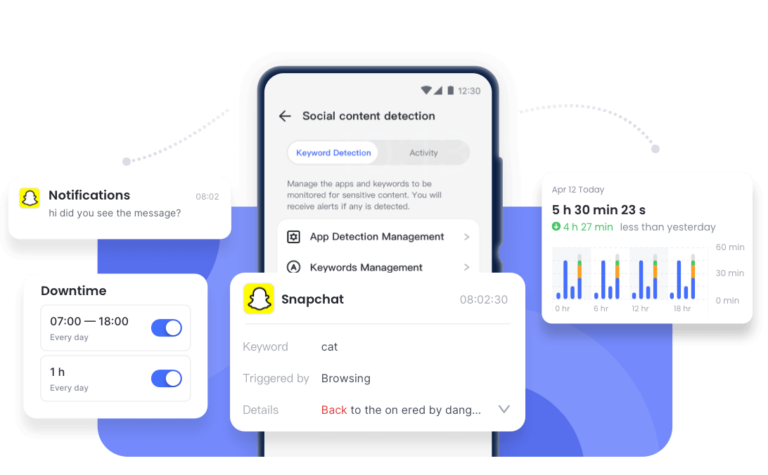
- Receive alerts when inappropriate content or keywords appear on your child's Snapchat conversations.
- Get insights into how your kids use Snapchat, and how long they spend on Snapchat daily.
- Set downtime (hours when explicit content is more likely to appear) when your kids cannot access Snapchat.
Final Thoughts
You can't remove or get rid of Snapchat Discover, but you're not powerless. Set up Family Center, hide and report inappropriate content, and stay involved. No single method is perfect — but combined, they make a real difference.










Leave a Reply.