AirDroid Parental Control
Track mobile live location and ensure safety around
- Locate an Android or iPhone in real-time and check routes history
- Remotely see, hear & record phone surroundings
- Set geofence zones and get instant alerts.
How to Pause Snapchat Location? Will Others Know?
Snap Map puts your location on display for friends in real-time. Most teens think that's harmless—after all, they only share with people they trust. But Bitdefender's guide to Snap Map risks points out that even trusted friends can expose your location through screenshots or map snaps, and repeated sharing lets others piece together your daily routines.
The good news: Snapchat lets you pause location sharing. The question most people have is whether friends will know when you do it. This post covers the different ways to freeze your location on Snap Map—and which methods tip your friends off.
How to Pause Location on Snapchat
No doubt, you can freeze your location on Snapchat at any time. And we found four ways to do so. Not sure which method is best for you? This table gives you a quick overview:
| Methods | Pause Location for Who? | Will My Friends Know? |
| Using Ghost Mode | Everyone | Yes. Your Bitmoji will disappear. |
| Adjusting Location Visibility | Specific friends | Yes. Your Bitmoji will disappear. |
| Disabling Location Services | Everyone | Yes. Your Bitmoji will disappear. |
| Enabling Airplane Mode | Everyone | No. Your Bitmoji won't disappear. |
Method 1. Enable Ghost Mode
Ghost mode is one of the effective privacy features for Snap Map. Location privacy is a bigger concern than many realize. Snapchat's own Digital Well-Being Index found that 81% of Gen Z teens experienced some form of online risk in early 2025, up from 80% the year before. Each time you activate ghost mode, Snapchat will stop fetching and updating your location data on the map. When this happens, your location and online status will become invisible to your friends.
Now, follow the steps to pause your location on Snapchat by enabling ghost mode:
- Step 1.Go to "Map" on Snapchat.
- Step 2.Tap the "Settings" icon in the top-right corner.
- Step 3.Toggle the Ghost Mode switch on and select how long you want your location paused.
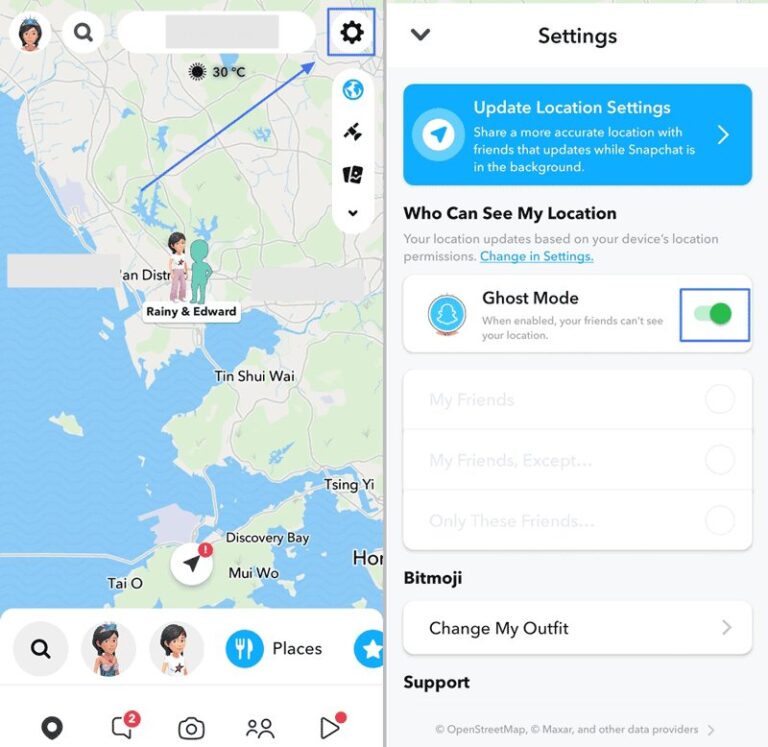
Although this way freezes your location effectively, it's not as discreet as you might think. Turning on Ghost Mode sounds easy, but many teens hesitate because of social pressure. Griffith University research on location-sharing norms found that young people often see tracking friends via Snapchat as a sign of care and trust, which makes it hard to pause without looking suspicious. As soon as ghost mode is activated, your Bitmoji will completely disappear from their Snap Map. This action will definitely give your friends clues that you've turned off your location sharing.
Method 2. Customize Who Can See Your Location
Another good thing about Snapchat location sharing is that it allows you to control who can see your live location. So, if you need to pause your location from specific friends, this is your go-to solution. To use this way:
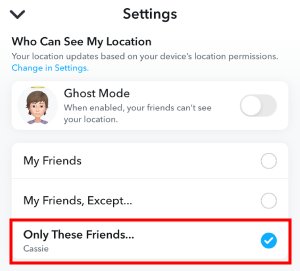
- Step 1.Open Snap Map's Settings.
- Step 2.Under "Who Can See My Location," choose from "My Friends," "My Friends, Except..." or "Only These Friends."
Method 3. Disable Location Services for Snapchat
We all know that the Snapchat location sharing feature depends on your device for location updates. That means, once you disable location services for Snapchat, your location will also be frozen on the Snap Map.
Disabling location services for Snapchat to pause location on Snapchat is very easy. Here's how:
On iPhone
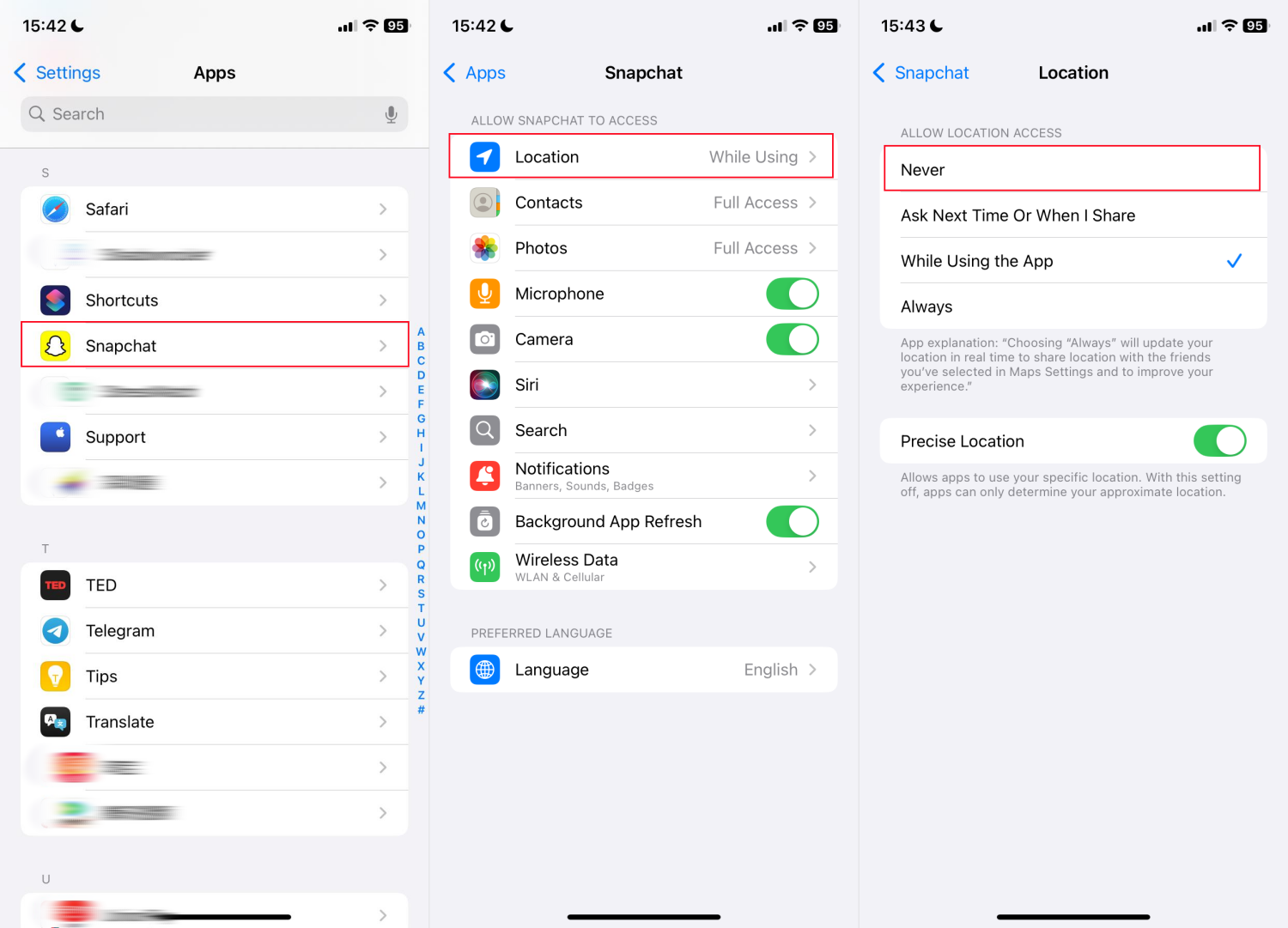
- Step 1.Open the Settings app.
- Step 2.Locate and tap "Snapchat" from "Apps."
- Step 3.Tap "Location" and select "Never" to turn off its location access.
On Android
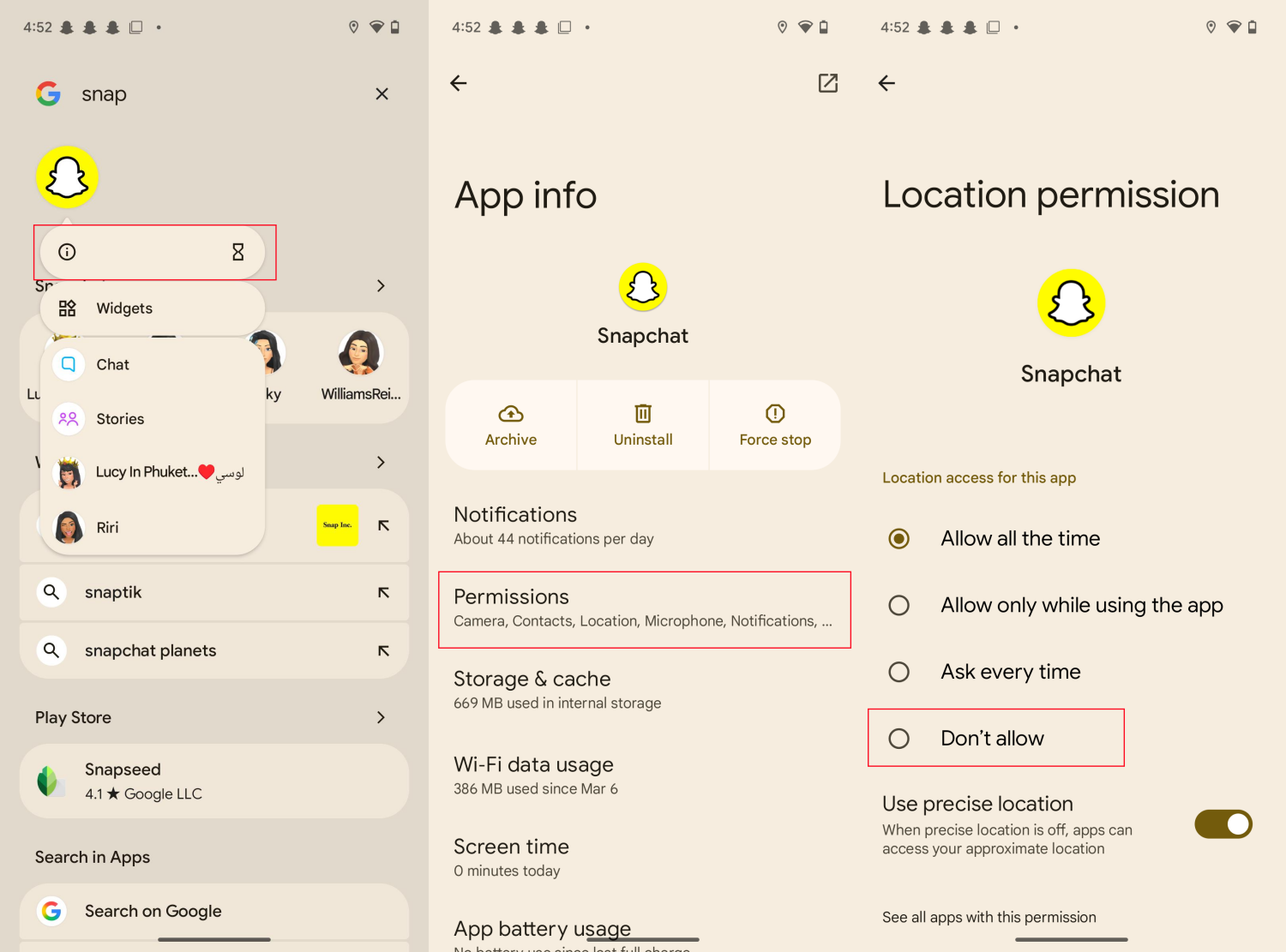
- Step 1.Long-press the "Snapchat" app on your home screen and go to the app info.
- Step 2.Tap "Permission" and select "Location."
- Step 3.Choose "Don't allow" to disable access to location service.
Method 4. Activate Airplane Mode
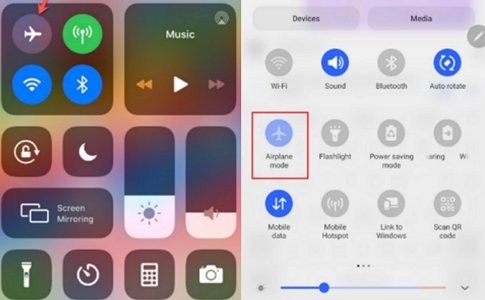
If you just need to pause location on Snapchat without them knowing, consider activating the airplane mode. Doing this disconnects your device from the internet connection and makes it difficult for Snapchat to share your location with others.
The best part about this method is that it is highly discreet compared to other methods on this list. When you toggle on flight mode, your Bitmoji won't disappear. Instead, Snapchat displays your last known location on your friends' map.
So, it will be very difficult for your friends to guess that your location was paused.
How to Know If Someone Paused Their Location on Snapchat
Since Snapchat won't notify users when someone pauses their location on the app, what if you need to know if your friends freeze their Snapchat location?
There is an obvious sign that can help you out. That is to check their Bitmoji on your snap map.
Snapchat's Bitmoji always appears on the snap map if users' locations are shared. Therefore, once you can no longer see your friends' Bitmoji on your snap map, then there is a high chance they've paused their location on Snapchat or they've hidden their location from you.
Track Snapchat Location Even If It Is Paused
Well, if the Snapchat location has been paused, it is no longer to track anymore. For parents worried when their kids disappear from the map, Snapchat has added its own safeguards. Mashable's report on Snapchat Family Center explained that parents can now request their teen's live location and get alerts when they arrive or leave up to three designated spots. However, for peace of mind, you may still want to stay connected with your friends or family to ensure they are safe. So, what's the best way to do that?
Consider using AirDroid Location Tracker, this app is designed to help you stay informed of your loved ones' real-time whereabouts.
It even features an instant SOS alert system, ensuring that if your child or loved one ever feels unsafe, they can send an unmissable distress signal to your device immediately.
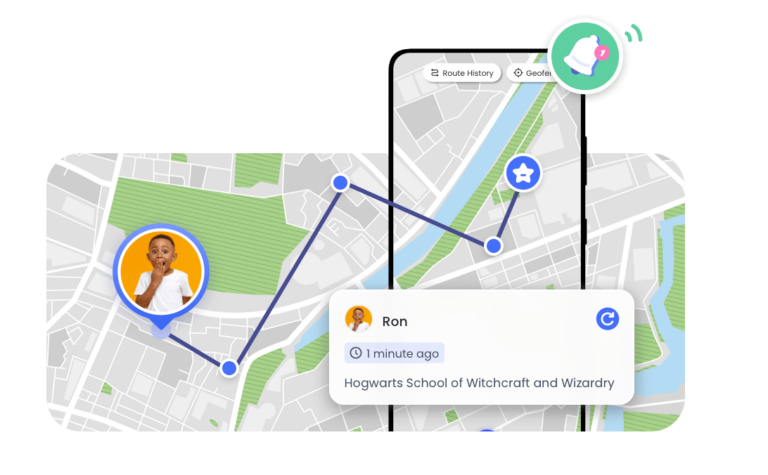
You can also set up geofencing to receive automatic notifications when they arrive at or leave specific areas, like school or home. Plus, with a 30-day location history, you can always look back to ensure everything was fine. Want to keep your loved ones safe? Click here to try it for free!
FAQs about Snapchat Location
When in doubt, keeping your location off is the safest move. Florida State University's location sharing safety guide recommends using Ghost Mode and turning off location services when you don't need them, since real-time updates can tip others off to when you're home or away.
Conclusion
To pause location on Snapchat, you have several options including turning on ghost mode, controlling location visibility, and disabling location service for Snapchat. Unfortunately, they are not completely discreet and your friends will notice your disappeared Bitmoji on the snap map. So, if you don't want your friends to know you've frozen your Snapchat location, it's better to activate airplane mode.
For parents, even if your children ghost the map, you can still monitor their Snapchat GPS and chats from the parent portal.
List of Sources
- How to Pause Location on Snapchat
- Bitdefender - What Parents Need to Know About Snap Map (https://www.bitdefender.com/en-us/blog/hotforsecurity/what-parents-need-to-know-about-snap-map)
- Snapchat - Digital Well-Being Index (https://values.snap.com/safety/dwbi)
- Method 1: Enable Ghost Mode
- Griffith University - Location-sharing apps are enabling domestic violence (https://blogs.griffith.edu.au/gci-insights/2025/04/23/location-sharing-apps-are-enabling-domestic-violence-but-young-people-arent-aware-of-the-danger/)
- Track Snapchat Location Even If It Is Paused
- Mashable - Snapchat introduces location alerts for parents and their teens (https://mashable.com/article/snapchat-location-sharing-family-center)
- FAQs about Snapchat Location
- Florida State University ITS - Location Sharing Risks (https://its.fsu.edu/article/location-sharing-risks)










Leave a Reply.