No. Delete the app only after you have canceled the subscription and saved proof.
ReelShort Is Still Charging You? Cancel the Right ReelShort Subscription
You may have discovered ReelShort through a dramatic clip in a Facebook or Instagram ad. You tapped the video, continued watching in a browser, and paid to see what happened next. At the time, it probably felt like a simple way to watch one more episode.
Then another charge appeared a few days later. You opened ReelShort, checked your phone’s subscription settings, and found nothing to cancel. This has happened to users who entered ReelShort through social media ads and later discovered that the payment was connected to a different account or checkout page.
The first question is not “Where is the cancel button?” It is: where did you originally pay? Find that answer, and the rest of the cancellation process becomes much easier.
Find Out Who Charged You for Your ReelShort Subscription First
Look at the email receipt or your bank statement.
| What you see on the receipt | Where you should cancel |
|---|---|
| Apple, App Store, or iTunes | Apple Account subscriptions → |
| Google Play | Google Play subscriptions → |
| ReelShort or ReelShort website | ReelShort VIP Center → |
| No matching record | Check another Apple/Google account, your original browser, or a Guest Account → |
This distinction matters because users often cancel the wrong account. ReelShort separates Apple and Google subscriptions from website and third-party payments. They also make one point clear: deleting the app or your ReelShort account does not cancel your subscription.
How to Cancel ReelShort Subscription on iPhone
If Apple billed you, cancel the subscription through your Apple Account:
- Step 1. Open "Settings" and tap your name.
- Step 2. Tap "Subscriptions".
- Step 3. Choose ReelShort.
- Step 4. Tap "Cancel Subscription" and follow the confirmation steps.
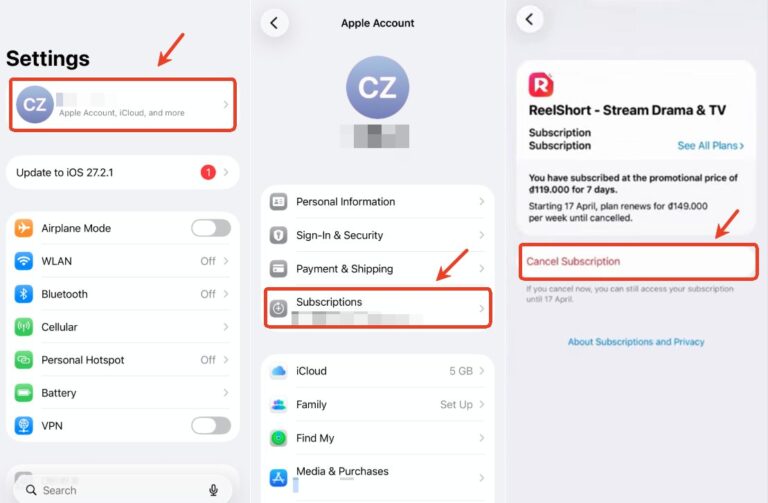
If you do not see the Cancel Subscription button, or you see an expiration date in red, the ReelShort subscription is canceled.
How to Cancel ReelShort Subscription on Android
If Google Play billed you:
- Step 1. Open the Google Play Store.
- Step 2. Tap your profile picture.
- Step 3. Tap "Payments & subscriptions".
- Step 4. Tap "Subscriptions" and select ReelShort.
- Step 5. Tap "Cancel subscription" and confirm it.
After cancellation, Google Play normally lets you use the remaining paid period. Canceling stops the next renewal; it does not automatically refund the current charge.
Make sure to cancel your ReelShort subscription at least 24 hours before your next renewal date to avoid being charged for another billing period. Don't wait until the renewal date, as you may still be charged. You can take a screenshot of the canceled status or expiration date, so you can verify later that your subscription has indeed been canceled.
How to Cancel A ReelShort Website Subscription Bought Through Facebook or Instagram
This is where I see the most confusion.
You may have subscribed after clicking a ReelShort ad on Facebook or Instagram. The link may have opened ReelShort in Safari, Chrome, or an in-app browser. You then paid directly on the website, perhaps with Apple Pay or a bank card.
When that happens, ReelShort may not appear in Apple Subscriptions or Google Play. The App may also show a different account because your website purchase was linked to a Guest Account created in the original browser.
One Reddit user described this exact situation: a Facebook ad opened ReelShort in Safari, where they paid with Apple Pay. The paid subscription was linked to a website Guest Account, while the ReelShort App displayed a different account. After matching the accounts through the UID, the user found the cancellation link inside the VIP Center.
If this sounds familiar, try these steps:
- Step 1. Open the same device and browser you used when you paid.
- Step 2. If you came through Facebook or Instagram, reopen the original ad or link history.
- Step 3. Sign in to the same ReelShort account, if possible.
- Step 4. Check your UID in the website profile and compare it with the UID shown in the App.
- Step 5. If the UIDs are different, do not delete either account or clear your browser data.
- Step 6. If possible, link the original paid account to Apple or Google sign-in, then reopen the ReelShort App and check that the UID matches.
- Step 7. Open ReeslShort App.
- Step 8. Tap the gold Crown or VIP membership card.
- Step 9. Scroll to the bottom of the page. Tap "Subscription Management".
- Step 10. Follow the cancellation instructions.
- Step 11. Confirm that the page shows an expiration date, Subscription expired, or a Renew button.
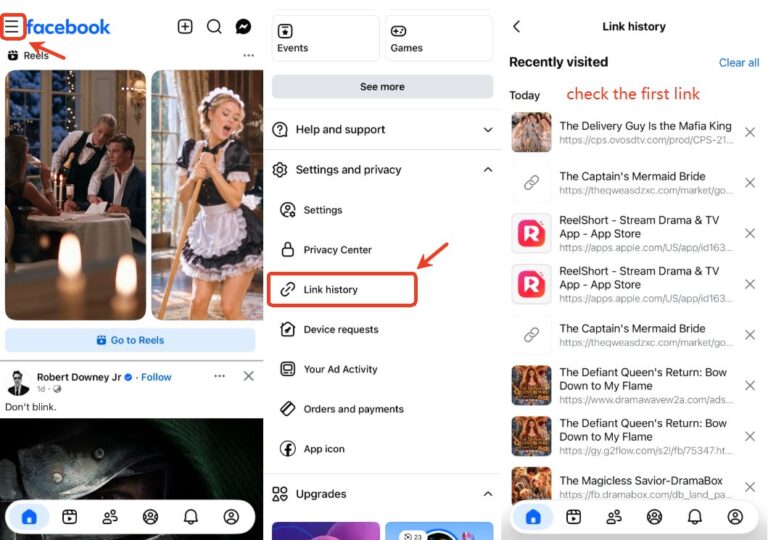
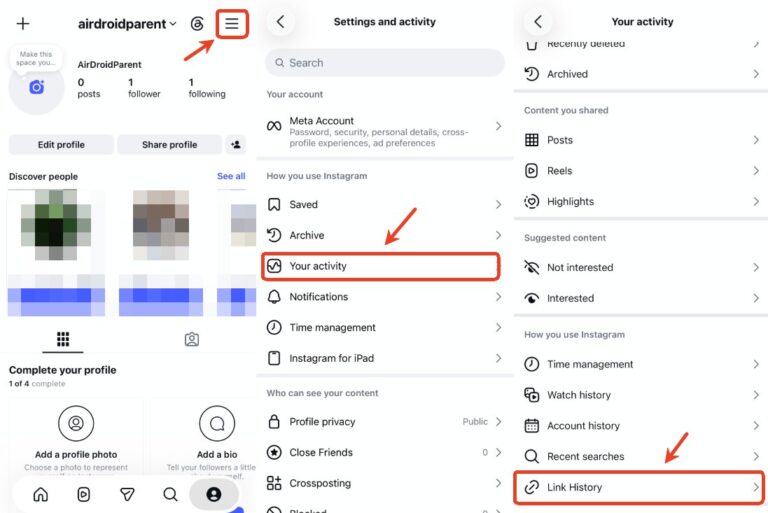
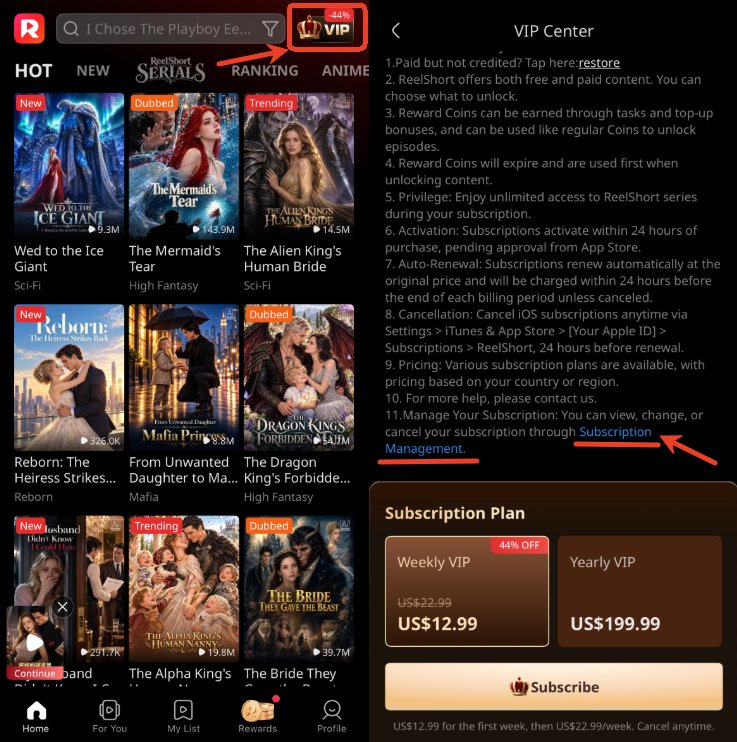
The link may be small and easy to miss near the bottom of the VIP page.
A Reminder before You Subscribe ReelShort through the Website
We tested this process and found that clearing your browser cache or history, or enabling Block All Cookies, can prevent the original Guest Account from loading. When you open the ReelShort link again, the website may create a new Guest Account instead. That new account may not contain your paid subscription.
To avoid this problem:
- Record your UID the first time you open the ReelShort website.
- Save your payment receipt and confirmation email.
- Sign in or link your account before subscribing.
- Keep the original browser data until you confirm that you can manage the subscription.
If you do not want to create or link an account, consider buying one-time coins instead of starting a recurring subscription. Coins do not create the same weekly auto-renewal risk, although you should still check the purchase details before paying.
What to Do Next If You Found A ReelShort Charge on Your Child's Phone?
If you discover a ReelShort charge on your child’s device, try not to blame them straight away. ReelShort uses short episodes, dramatic cliffhangers, and paid unlocks that can make paying feel like the quickest way to get instant satisfaction. For a child who is still developing self-control, making an impulsive purchase is not unusual.
After you resolve the current charge by following the above steps, you can make future purchases require your approval.
- On iPhone, you can use Apple’s Family Sharing and turn on Ask to Buy.
- On Android, you can enable purchase approval on Google Family Link.
Purchase controls can stop another payment, but they cannot show you which apps your child downloads or how long they use them. That is where AirDroid Parental Control can help.


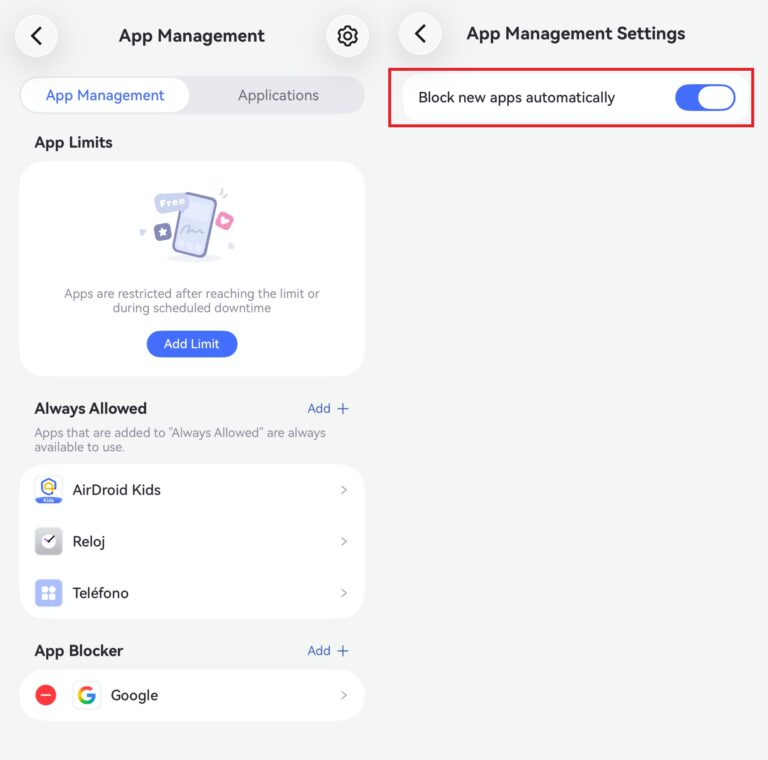
You can review installed and recently added apps, check usage time, set app limits, and receive alerts when your child installs a new app or tries to open a blocked one.
On an Android child device, AirDroid Parental Control includes a Block new apps automatically option. When you enable it, a newly downloaded App can remain blocked until I review and allow it. This is especially useful for Apps promoted through social-media ads.
Still Cannot Find the Cancellation Option? Send ReelShort Support
Contact ReelShort through: Profile >> Feedback inside the App.
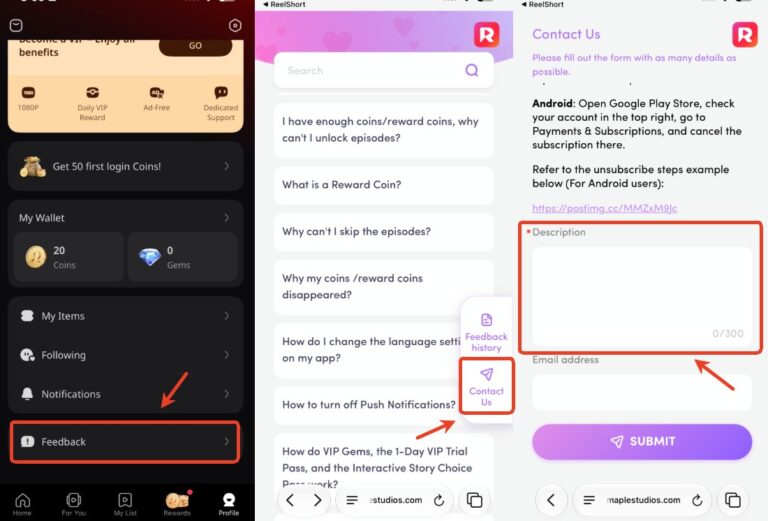
Send enough information for support to locate the billing record:
- Your name
- The email address used, if any
- ReelShort UID
- Transaction date
- Transaction amount and currency
- Payment method
- Order or transaction ID
- A screenshot of the charge
- A screenshot showing that the subscription is missing or cannot be canceled
Never send your full card number, CVV, password, or authentication code.
You can directly copy a useful message below:
Hello, I want to cancel my ReelShort subscription and stop all future recurring charges. I purchased it on [date] for [amount] using [payment method]. The charge does not appear in my Apple/Google subscriptions, and I cannot find the correct account or cancellation option. My UID is [UID]. Please cancel the subscription immediately and confirm in writing that no further charges will be made.
How to Request A ReelShort Refund
Canceling a subscription and requesting a refund are separate steps.
If Apple billed you
Go to reportaproblem.apple.com, sign in, select Request a refund, choose the reason, select the ReelShort charge, and submit the request.
If Google Play billed you
Use Google Play’s refund process. Google says that requests made within 48 hours may be eligible depending on the purchase details. After 48 hours, Google generally directs users to contact the developer.
If ReelShort billed you directly
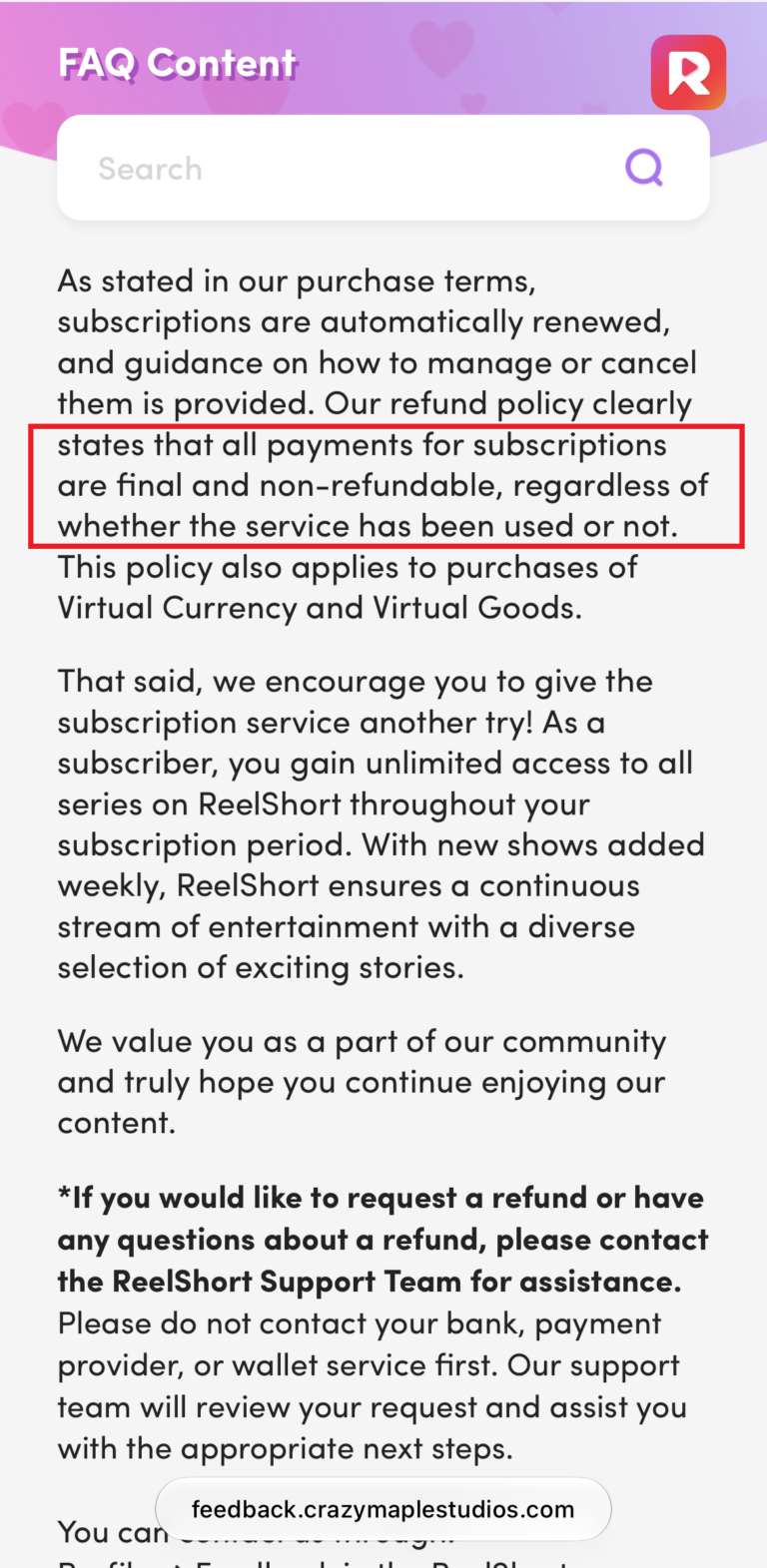
ReelShort’s terms describe subscription payments as generally final and non-refundable, but they also instruct users to contact the company about billing errors. A refund request is stronger when the charge clearly occurred after your cancellation.
ReelShort Charged Me After I Canceled Subscription
Several public reviews and BBB complaints describe this problem. Users report canceling through the app, receiving a cancellation confirmation, and still seeing weekly charges afterward. Some also say the subscription was connected to a Guest Account that they could not access.
If this happens, take these steps:
- Save the cancellation confirmation.
- Save every later charge.
- Ask ReelShort to confirm that recurring billing has been disabled.
- Contact Apple, Google Play, PayPal, or the payment provider involved.
- Contact your bank or card issuer.
- File a dispute for charges made after cancellation.
- Continue checking your statement during the next billing cycle.
The FTC recommends keeping copies of cancellation requests and disputing charges when a company continues billing after cancellation.
The CFPB also recommends notifying both the company and your bank in writing. Stopping an automatic payment does not necessarily cancel the underlying subscription, so complete both steps when possible.
Changing your card number may not be enough. Some recurring-payment systems can transfer billing information to a replacement card. Ask your bank what recurring-payment block or stop-payment options are available.
FAQs About Canceling ReelShort Subscription
Does deleting ReelShort cancel the subscription?

Why is ReelShort missing from Apple Subscriptions?
You may have paid through ReelShort’s website, a Facebook or Instagram browser, Apple Pay, another Apple Account, or a Guest Account.
Does canceling VIP cancel coin purchases?
Not necessarily. VIP access and one-time coin purchases may be separate transactions. Check your purchase history and bank statement.
Should I cancel my card?
Ask your bank about recurring-payment blocks and dispute procedures first. Replacing a card may not automatically stop every recurring payment.






Leave a Reply.