What Does Hide Alerts Mean on iPhone? How to Use It?
Ever been in a group chat that keeps buzzing, even when you're trying to focus? Or maybe you're in a conversation that doesn't need constant notifications? Here, the iPhone's "hide alerts" feature can be of great use.
With the help of it, you can control notifications for specific people or organizations. Let's investigate "hide alerts" in depth and how to maximize this function.
What Does Hide Alerts Mean on iPhone Message?
Indeed, alerts means notifications. So, you can understand "hide alerts" as "hide notification." When you hide alerts, the notifications for particular conversations in the Messages app will be silenced on your iPhone.
This can be useful when you wish to avoid continuous disruptions without completely muting your phone. Here's what happens when you enable "hide alerts" on iPhone:
- Muted Notifications: You will not receive banner alerts, badges, sounds, or any notifications for the new messages in the chat you enabled hide alerts.
- No Impact on Messages Delivery: Hiding alerts won't stop you from receiving messages from that individual or group. But you have to open the inbox to check them in case you miss them.
Everything about Hide Alerts iMessage
Here are some other things about "hide alerts."
Hide Alerts vs. Do Not Disturb
Although the hide Alerts and DND features are used for silent notifications, they work differently.
Hide alerts only silence notifications for specific message conversations, while Do Not Disturb mutes all notifications on your device, including calls and app alerts.
Does Hide Alerts Block Calls?
No, it does not block calls and FaceTime video calls. Even with hide alerts on, call notifications will continue as usual based on your phone's settings. This way, you'll still be reachable by phone or FaceTime, even if messages from certain chats are muted.
Can People See When You Hide Alerts?
No. When you hide alerts on iPhone, others can't see or tell that you've enabled "hide alerts" for their messages. There's no notification or visible indication on their end.
Does Hide Alerts Show Notifications Silenced?
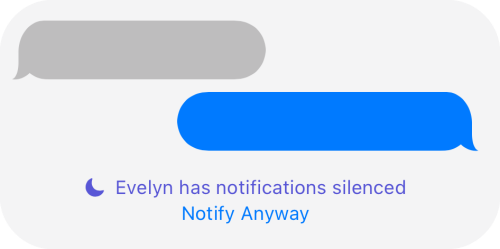
No. Only when you turn on DND mode or any other focus mode, and simultaneously you share these Focus Status, "xxx has notifications silenced" will show in the conversations to let your contacts know.
How to Use Hide Alerts on iPhone
After understanding what "hide alerts" can do on iPhone, now utilize the hide alerts feature by yourself! Here's how to silence notifications on iPhone for one person without missing other important messages and calls:
- Step 1.Open the "Messages" app on your iPhone.
- Step 2.Find the conversation you want to mute and swipe left across it.
- Step 3.Tap the "bell" icon that appears. You'll see the bell icon next to the conversation, showing that hide alerts are activated.
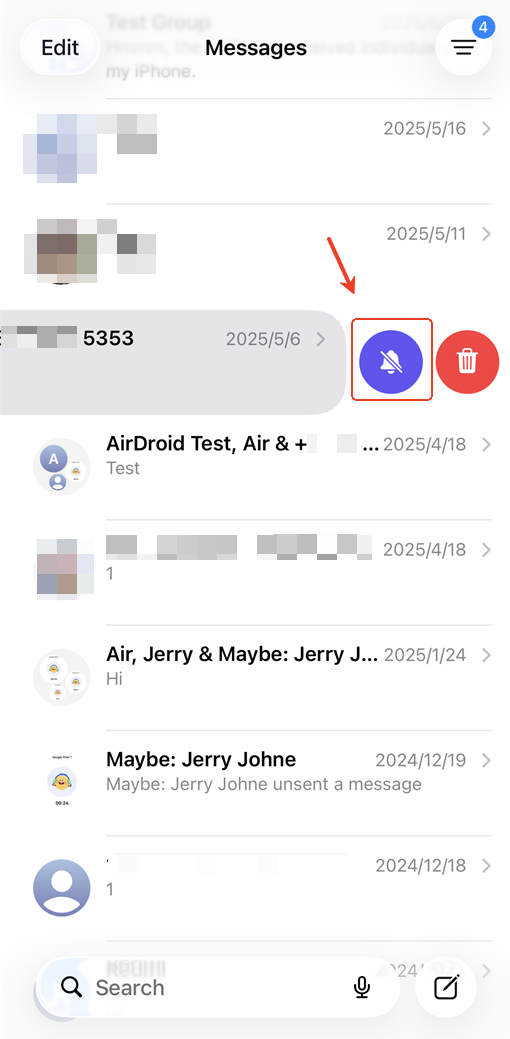
Alternatively, you can tap and hold the conversation in the Message app to find the "hide alerts" option.
Family Tips for Effective Notification Management
Try AirDroid Parental Control to stay on top of important updates from your family members' phone. It syncs all notifications from your child's device directly to your own, helping you quickly catch any messages and address concerns right when they come up.
Why Does Hide Alerts Keep Turning On?
By navigating through Apple Community, we found more than 1,600 users with the "hide alerts" problem, like "hide alerts" automatically turning on. If you're also struggling that iPhone hide alerts keep turning on after you turn it off, it could be due to a few common issues:
Activated Do Not Disturb Mode: Focus or Do Not Disturb settings can occasionally activate this feature, even if they are not fully enabled. Some Apple users fixed the "hide alerts keeping on" issue by turning off DND on their other Apple devices, such as Apple Watch or iPad.
Shortcuts or Automation: Any automation shortcuts on your phone may turn "Hide Alerts" on automatically. Check and remove any that could be triggering this behavior.
Temporary Glitches: Bugs in the Message app or the iOS versions have been known to cause this. Updating to the latest iOS or contacting Apple Support may help fix such glitches.
Conclusion
And that's all you might want to know about "hide alerts." The "hide alerts" feature in iPhone helps you mute particular conversations without silencing your entire phone. To use it, you can follow the above tutorial to enable "hide alerts" for iMessage or SMS chats. Then, you can better control your notification experience and minimize interruptions from selected conversations.










Leave a Reply.