Forgot Screen Time Passcode? How to Recover It
Losing the Screen Time passcode is frustrating because you need it to change settings and access the restricted content. That's because Screen Time on iPhone is an important and one of the most used privacy and security settings.
However, once you set up the passcode, you have to use it every time you need to make changes to the content or safety-related settings. So, it is important that you know the steps to recover the passcode. With this article, we are sharing how you can recover if you forgot Apple Screen Time passcode.
- Part 1: Immediate Steps to Take When Forgot Screen Time Passcode
- Part 2: Reset the Screen Time Passcode on Your Device
- Part 3: Reset Screen Time Passcode on Your Child's Device
- Part 4: Why Can't I Reset My Screen Time Passcode?
- Part 5: Extra Tip: Remove a Forgotten Screen Time Passcode via Factory Reset
- Part 6: FAQs about Screen Time Passcode
Immediate Steps to Take When Forgot Screen Time Passcode
The first thing people do is panic whenever they realize that they've forgotten the Screen Time passcode. However, panicking can worsen the situation. Instead, you have to take these steps.
Verify Your Memory
First of all, you should try remembering any previous passwords you might have used. Sometimes, we reuse passwords for different accounts, so it's worth checking.
Secondly, you should consider using similar passwords that you might have used in the past. For example, if your old password was "password123," try "password456" or "password1234." We are saying this because it's a common trend when people set up passwords.
Check Shared Devices
If you have Screen Time set up through Family Sharing, the passcode might be associated with the family organizer's account. If you're the family organizer, you can reset the Screen Time passcode through your Apple ID settings. In case you don't know how to reset the passcode, we are sharing the guide in this article.
Reset the Screen Time Passcode on Your Device
If you are the family organizer and need to reset the Screen Time passcode, you have the option to reset it. For this reason, we are sharing the step-by-step guide whether you are using iPhone, iPad, or Mac.
On iPhone/iPad
Step 1. Open Settings and go to "Screen Time."
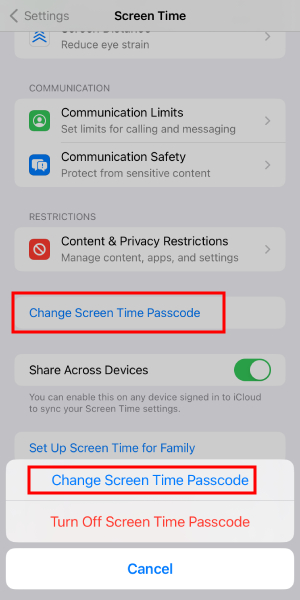
Step 2. Scroll down and tap "Change Screen Time Passcode."
Step 3. Tap "Change Screen Time Passcode" again.
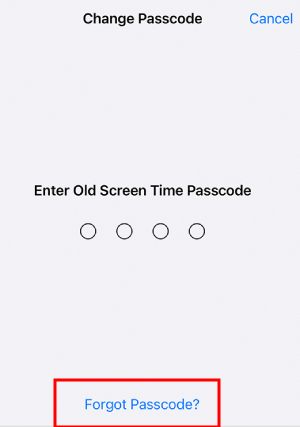
Step 4. Click "Forgot Passcode?"
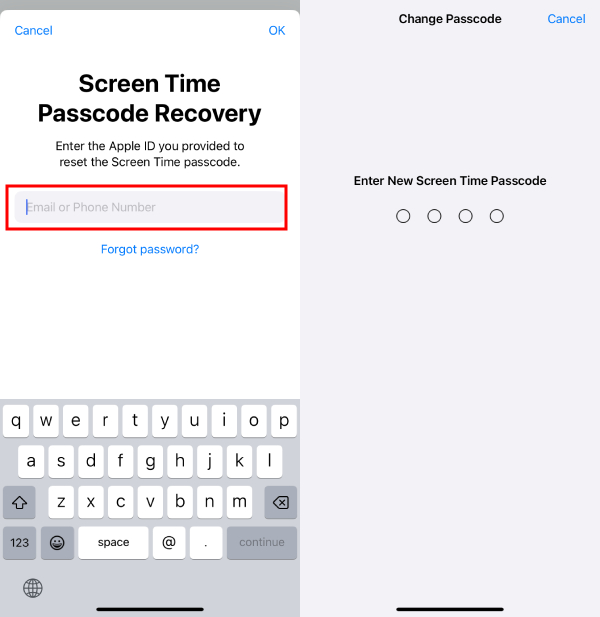
Step 5. Enter your Apple ID with the password.
Step 6. Enter a new Screen Time passcode to reset it.
On Mac
Step 1. Open the Mac and make sure you've installed the latest update. Go to the Apple Menu and go to the System Settings.
Step 2. Click on the "Screen Time"option. Then, you must choose the "Change Passcode"button.
Step 3. After this, you've to click on the "Forgot Passcode"option and enter your Apple ID details.
Step 4. Lastly, you will be able to enter the screen passcode. Also, you might have to enter it twice for confirmation purposes.
Reset Screen Time Passcode on Your Child's Device
Many parents use Family Sharing to manage their kid's account. So, if they have forgot iPhone Screen Time passcode, the family organizer will need to reset the passcode.
On iPhone/iPad
Step 1. Open the Settings on the device of the family organizer and then tap "Screen Time."
Step 2. Tap your kid's name under the Family tab and click on the "Change Screen Time Passcode."
Step 3. Click on "Change Screen Time Passcode" and enter your passcode.
Step 4. Lastly, you can add the new passcode.
Why Can't I Reset My Screen Time Passcode?
If you haven't been able to recover the Screen Time passcode, there could be a few reasons. Ranging from incorrect Apple ID to internet issues, there could be different reasons.
Incorrect Apple ID
First of all, you've to ensure that you're entering the correct Apple ID email address or username and password. Keep in mind that you've to use the account details associated with the device where Screen Time is set up. Secondly, you've to confirm that the device on which you're trying to reset the passcode is indeed signed in with the correct Apple ID.
Internet Issue
A stable internet connection is important for resetting the Screen Time passcode. You should verify that your Wi-Fi or cellular data connection is working properly. Also, if possible, switch to a different Wi-Fi network or use cellular data to see if the issue persists.
Contact Apple Support
If you've verified your Apple ID and internet connection but still can't reset the passcode, it's time to reach out to Apple Support. Make sure you provide all the necessary details.
Extra Tip: Remove a Forgotten Screen Time Passcode via Factory Reset
If you still need some options to recover the forgotten Screen Time passcode, you can do the factory reset. However, you've to remember that doing the factory reset will erase all the other settings as well. If you are okay with it, we are sharing the step-by-step guide with you.
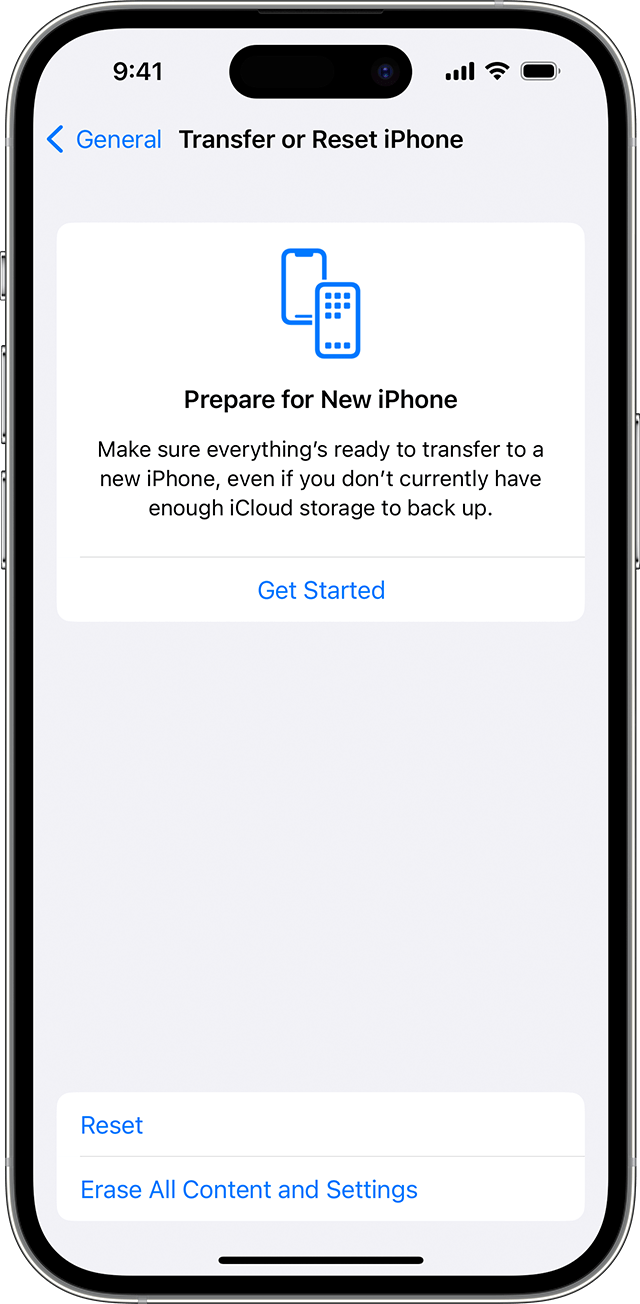
Step 1. Open the Settings on your iPhone and go to General.
Step 2. Click on the Transfer or Reset button.
Step 3. Tap on the "Reset"button. If they ask you to share your details, you might have to provide the Apple ID password.
Step 4. Once you provide the confirmation, you will be able to complete the factory reset.
Conclusion
It can be frustrating to not be able to change the privacy or content restriction settings when you have forgotten the Screen Time passcode. With this article, we tried our best to offer a comprehensive guide that helps you recover the passcode and make changes to the settings easily.

FAQs about Screen Time Passcode











Leave a Reply.