Do Voice Messages Disappear Before Being Read on iPhone? Tested!
Did you just send a voice message on your iPhone and now you're wondering if it might have vanished before the recipient read it? Well, if you're having this doubt right now, you're in luck!
I've tested this feature thoroughly and I will explain everything you need to know about iPhone audio messages, including whether they disappear before or after being read in this blog.
1Do Voice Messages Disappear Before Being Read on iPhone?
The short answer is NO! iPhone voice message won't disappear from the recipient's end until they listen to it. Here's how it works:
ℹ️When an iPhone voice message is sent, it will stay in both parties' chats as long as they do not delete the message or set an expiration timer.
ℹ️If you set audio messages to expire after 2 minutes, the sent and received audio messages will be only removed from your end, not the recipient's end. In general, the 2-minute expiration timer starts counting after you send or listen to them.
2Why Do Audio Messages Disappear on iPhone?
Well, now you know that iPhone audio messages won't disappear before being read. Then, why are you still seeing audio messages disappear from your chat?
After researching, we found that iPhone audio messages often vanished due to the following reasons:
Your Have Voice Message Set to Expire After 2 minutes
By default, iPhone voice messages disappear after 2 minutes. That means, if you haven't changed the default setting, the audio messages you sent are deleted 2 minutes after it is sent; while for the received voice messages, they disappear 2 minutes once you listened to them.
The Sender Undo the Send Audio Message
Another possibility for a voice message to disappear is that the audio message is unsent by the sender.
Since iOS 16, Apple allows users to undo send a message within two minutes of sending it. And then, the message will be removed from both parties' chat permanently.
Therefore, if you notice an audio message disappear for no reason, it might be the sender undo the already sent audio message. In this case, you will also be notified that "xxx unsent a message" in your chat.
There is No Enough Storage Space
Unlike text messages, voice messages require some amount of storage space to record, send, and save. If there is no sufficient storage space on your device, you may be unable to access and listen to the voice messages. This even removes old voice messages from your device to save storage.
3How to Prevent iPhone Voice Messages from Being Deleted
Okay, if you need to prevent audio messages from disappearing from your end, follow the tips below:
Keep the Audio Messages Forever
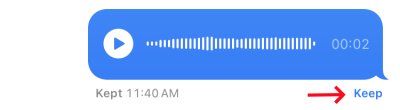
Whenever a voice message is sent or received, there is always an option for both parties saying "Keep." Just tap this "Keep" button that always appears under the voice message. Then, this will prevent the audio messages from getting deleted even if the 2-minute expiration timer is active.
You can also prevent the audio message from disappearing by following the steps below:
- Step 1.Go to "Settings" and open "Messages."
- Step 2.Scroll down to the "Audio Messages" section.
- Step 3.Tap on "Expire" and select "Never."
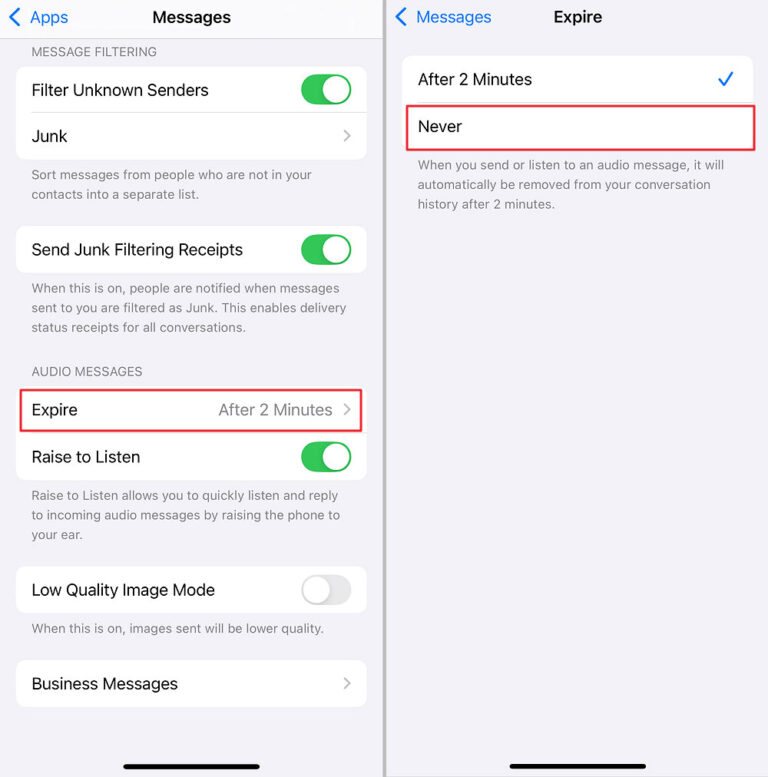
Once you've done that, either as a sender or recipient, the voice message will stay permanently in your chat.
Save the Audio Message to Voice Memos
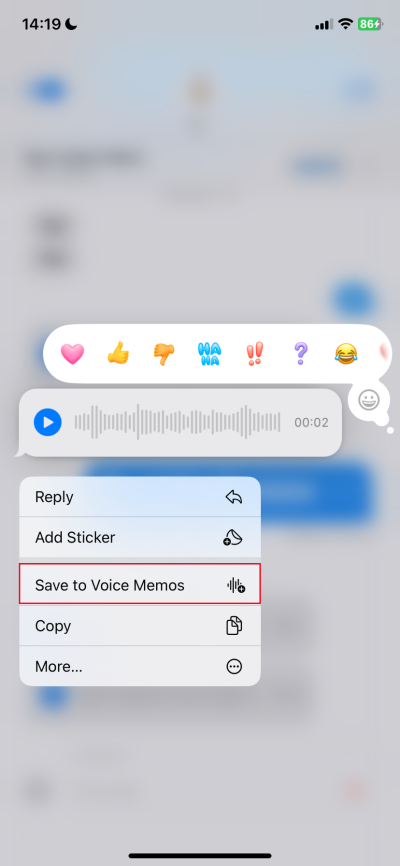
In addition to keeping the voice messages in your conversation history, you can also save the voice message to your device. And Apple supports saving audio messages to voice memos. Wondering how to do that? Here's it:
- Step 1.Long press the audio message until a menu pops up.
- Step 2.Tap "Save to Voice Memos."
Back up Messages with Third-party Tools
Another way to prevent your messages from losing is to back up them. To do so, you can use iCloud service or third-party tools.
There are various backup tools that can help you save and export files such as audio messages from your iPhone to their app or another device. However, the only issue with some of these tools is that they contain a lot of ads. Some may even steal and misuse your personal information.
4Voice Message Myths: Busted
In a nutshell, iPhone voice messages won't disappear before being read. If it disappears from your chat, it is likely that you have enabled the 2-minute expiration timer, so the message you sent will vanish from your end two minutes after it is sent. Of course, you don't have to worry, the message will stay on the recipient's end.
Therefore, to prevent message loss, both parties would better set the expiration timer to "Never," then the message will stay in the chat indefinitely.










Leave a Reply.