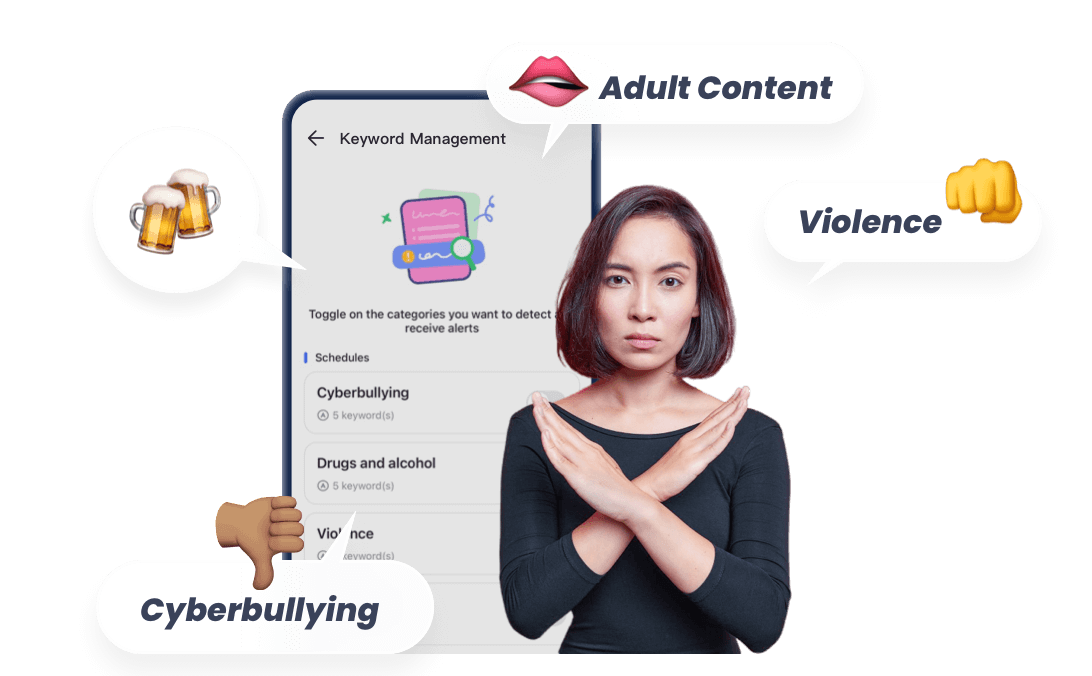
How to Block Adult Content on Chrome (Safer Ways to Block Porn for Kids)
Children are using Chrome at an increasingly younger age, and parents may worry that they may be exposed to adult content by accident and even be involved in the risks related to the search recommendation mechanism.
Instead of only monitoring after problems occur, it is far more effective to proactively create a safe browsing environment for children.
Why You Might Want to Block Adult Content on Chrome
While Google Chrome offers a gateway to endless learning, it also poses porn risks that minors aren't mature enough to handle.
According to Common Sense Media, kids often encounter explicit content accidentally. Below are some risks that parents need to pay attention:
Potential for Emotional Overload
Children lack the cognitive maturity to process adult themes. Explicit content often includes elements of aggression or coercion, which can be deeply confusing.
Instead of being educational, it can leave a child feeling overwhelmed and anxious, as they don't have the context to understand what they are seeing.
Normalization of Unhealthy Behaviors
Research, including studies cited by the American Academy of Pediatrics (AAP), suggests that early exposure to pornography can normalize sexual aggression.
Because children learn through observation, they may unconsciously absorb the idea that high-risk behaviors are normal acts in daily life.
Perceptions of Respect and Gender
Frequent exposure to pornography often depicts a skewed power dynamic, which can encourage aggression or a lack of respect toward women.
For a developing child, these "scripts" can blur their understanding of equality, potentially leading to harmful attitudes about consent and gender roles later in life.
May Lead to Addiction
Children are naturally driven by curiosity and immediate gratification.
The high-stimulation nature of explicit content can trigger dopamine responses that a child's underdeveloped self-control centers (the prefrontal cortex) struggle to manage, and lead to sexual addiction.
Affects Healthy Relationships
Pornography is a performance; it is rarely a reflection of real-world affection or mutual respect.
Explicit content often equates intimacy with violence or dominance.
And experts also note that heavy exposure to "plastic" digital relationships can make it harder for children to build genuine, stable connections with peers and family members.
By taking steps to block pornography on Chrome, you aren't just "restricting" your child; you are creating a healthier environment for their emotional and social evolution.
Quick Guide: How to Choose the Right Way to Block Adult Content on Chrome
With so many different ways to block adult content on Chrome, it can be hard to know where to start. The right solution often depends on your child's age, tech skills, and how much control you want to have.
Here's a quick guide to help you choose the most suitable method based on your situation:
- If your child is young (under 10) and just starting to use Chrome:
Start with Google SafeSearch and built-in browser filters. These are simple to set up and provide a basic level of protection against accidental exposure. - If you want a quick and easy solution without installing apps:
Use a Chrome extension to block adult websites. This works well for filtering specific sites but may require regular updates. - If your child uses iOS devices:
Consider Apple Screen Time or system-level controls to limit adult content on Safari and Chrome. - If your child uses Android devices or other apps:
Consider Google Family Link or system-level controls like Screen Time. These help manage content beyond just the Chrome browser. - If you're concerned about bypassing or want a more complete solution to block adult sites and apps:
A tool like AirDroid Parental Control offers more consistent protection across browsers, apps, and devices—without requiring constant manual checks. - If you want to protect your entire home network:
Set up router-level or DNS filtering. This creates a shared safety layer for all devices connected to your WiFi.
The Easiest First Step: Turn on Google SafeSearch
Google SafeSearch is a vital tool designed to help users manage explicit content in their search results.
Whether you are a parent looking to create a kid-friendly browsing environment or simply want to filter out sensitive material, understanding how to utilize Google Safe Search is the easiest first step.
What Is SafeSearch and How Does It Work?
SafeSearch is an automated filter used by Google Search to identify and block explicit content from appearing in your search results. According to Google's official documentation, SafeSearch is designed to filter out:
- Nudity or explicit content
- Violence and gore
How it works technically:
Google uses sophisticated algorithms and machine learning to categorize web pages and images. When safesearch is turned on, these filters are applied to your queries in real-time.
It is important to note that SafeSearch only affects Google search results; it does not block content on websites you visit directly or content found through other search engines.
How to Turn On SafeSearch on Chrome
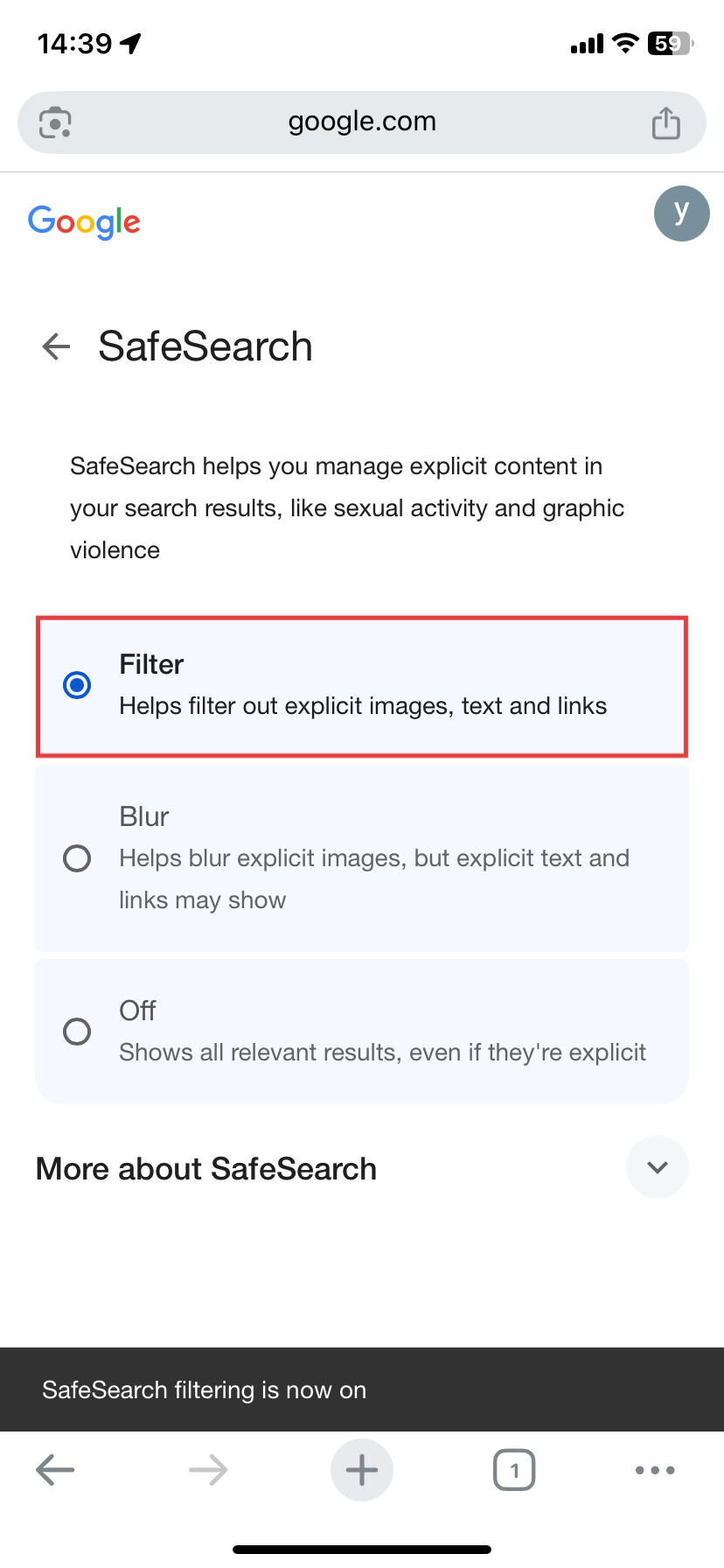
You can follow the steps below to adjust your safe search settings.
On Desktop:
- Step 1. Go to your Google Search settings.
- Step 2. You will see three options: Filter, Blur, or Off.
- Step 3. Select Filter to proactively block explicit text, images, and video. Select Blur if you want to see the search results but have explicit images hidden behind a blurred overlay.
On Mobile (Google App):
- Step 1. Open the Google app and tap your Profile Picture.
- Step 2. Tap Settings > SafeSearch.
- Step 3. Choose your preferred level of protection.
Limitations of SafeSearch (Important for Parents)
While Google safe search is a powerful ally, it is not a "set it and forget it" solution for total online safety. Understanding its limitations is crucial for comprehensive protection.
- Doesn't prevent direct access to porn sites.
- It can be turned off: SafeSearch can be toggled off by anyone with access to the settings.
- Doesn't work across apps: It only filters the results within the Google Search engine and does not filter content within third-party apps like TikTok, YouTube, or Instagram.
- Browser-Specific: If you set up SafeSearch on Chrome but then open Safari or Firefox, your settings will not carry over unless you are signed into your Google account on those browsers as well.
For parents, this means SafeSearch should be treated as a base layer of security. Because of these limitations, many parents choose to combine SafeSearch with more advanced parental control tools that can protect the entire device, not just search results.
7 Ways to Block Adult Sites on Chrome
1SafeSearch
SafeSearch is often the first layer of protection. It helps filter explicit results, but it shouldn't be your only solution. We've explained how to set it up above.
2Chrome Extensions
If you need a more aggressive solution than Google's built-in filters, BlockerX is a powerful ally. It doesn't just filter search results; it acts as a dedicated barrier against over 2 million explicit websites.
Follow these steps to to block adult sites on your Chrome browser:
- Step 1.Navigate to the BlockerX extension.
- Step 2.Click "Add to Chrome" to install the extension and sign in.
- Step 3.By default, the "Block Adult Content" setting is enabled.
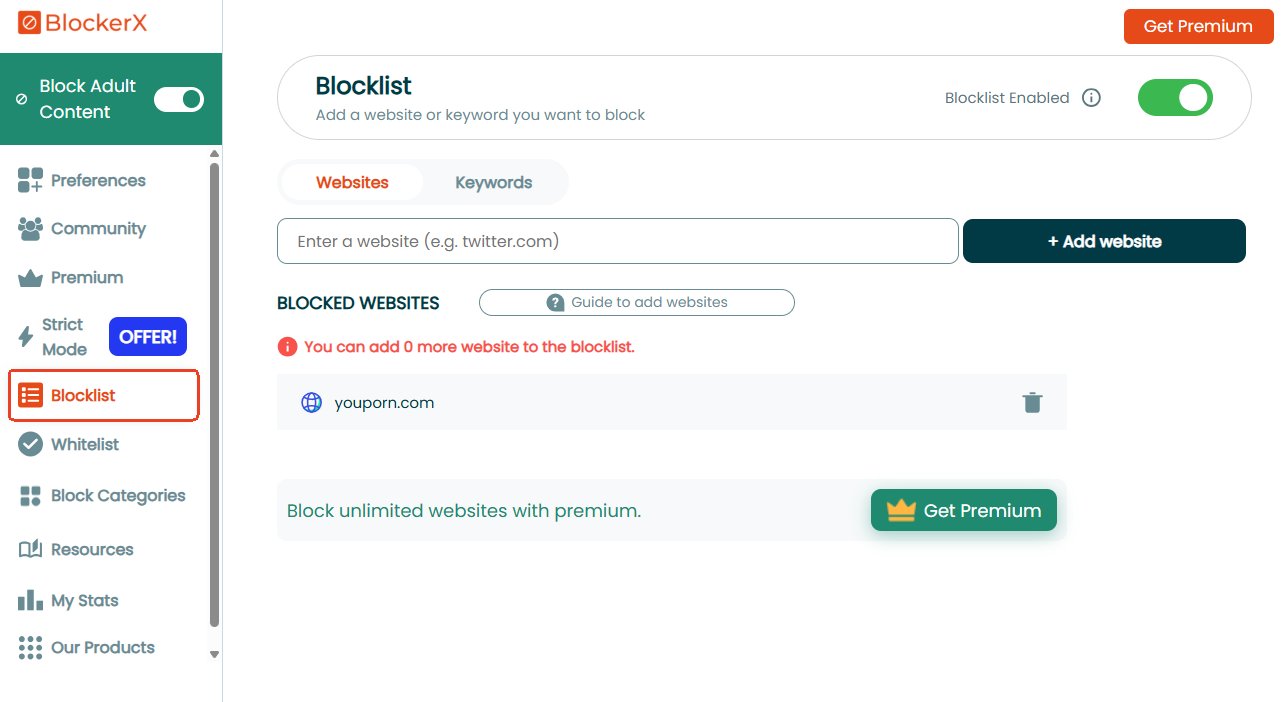
- Step 4.For blocking specific websites, go to "Blocklist" to add URLs one by one.
Pros
- A seamless experience across the Chrome extension, Android, and iOS
- Accountability Partner System can link your progress to a trusted friend
- Can run seamlessly even in Chrome's incognito mode.
Cons
- The free version is quite limited
- The Setup process can be lengthy
3Apple Screen Time
Apple comes with a built-in setting called "Screen Time" that can block access to adult websites on Chrome, Safari, and other browsers. To use it to block adult content on Chrome for iPhone and Mac, please follow:
- Step 1.Open the "Settings" app and go to "Screen Time."
- Step 2.Tap "Content & Privacy Restrictions" to turn this setting on.
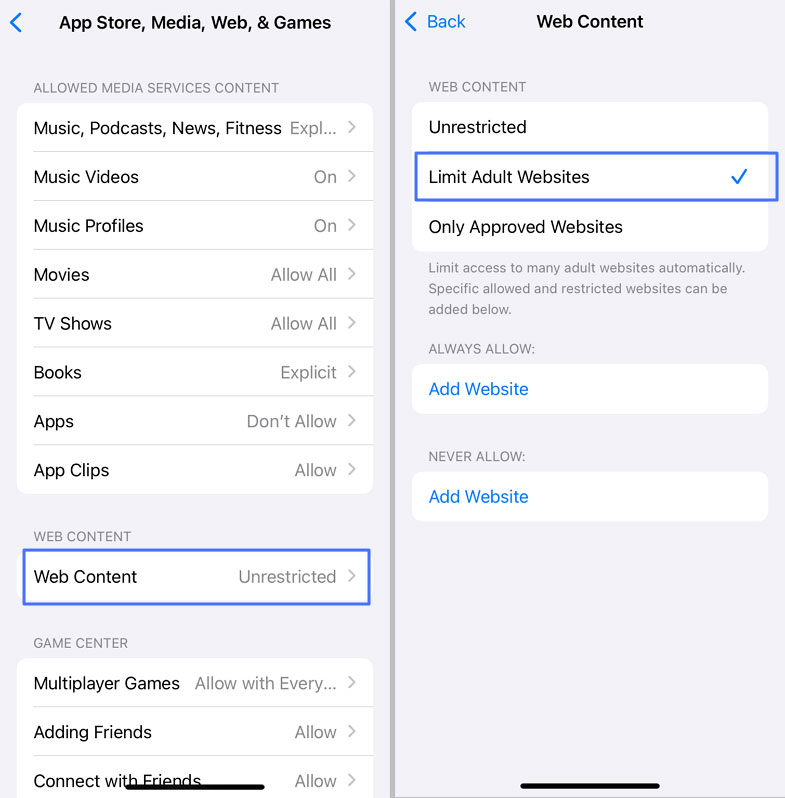
- Step 3.Select "App Store, Media, Web, & Games," and then "Web Content."
- Step 4.Choose "Limit Adult Websites."
Pros
- System-Level Integration
- Completely Free
- Privacy-Centric
Cons
- Only works on iOS
- Easy to Crack for tech-savvy teens
4Google Family Link
As we have mentioned, Safesearch can be easily turned off and can't work 100% accurate. And We totally understand that parents want to know how to block adult sites on chrome.
If your child already has a Google Account, you can use Google Family Link to add parental supervision to enforce safety filters:
- Step 1.Install the Family Link app and link your child's Google account.
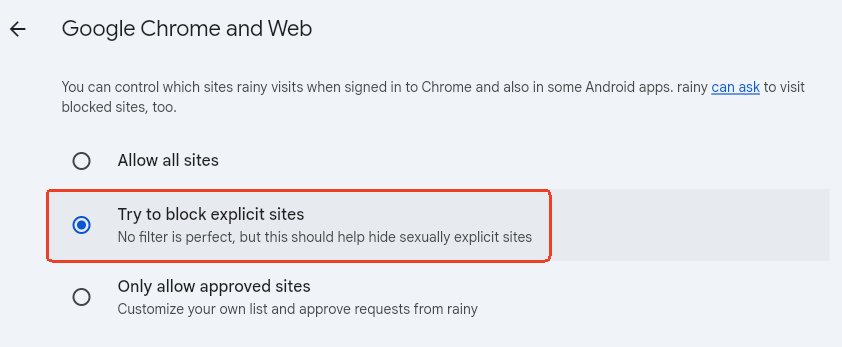
- Step 2.Tap on "Google Chrome and Web" in the "Controls" tab.
- Step 3.Toggle on "Try to block explicit sites."
- Step 4.To enforce SafeSearch, go to "Controls > Google Search > Filter."
Pros
- Free
- Web and YouTube supervision
Cons
- Only works on Android devices
- Youth aged 13 and above may remove supervision
- Requires a Google Account, which tech-savvy kids can easily switch or bypass
5Dedicated Parental Control App
While Google's built-in filters and Chrome extensions are excellent first steps, they often share a common weakness: they are browser-specific.
In today's world, most explicit content isn't accessed through a search engine—it's found within social media apps, hidden folders, or third-party browsers that kids can easily download.
If you find that safesearch is being bypassed or that your child is spending too much time on apps like TikTok or Discord, it's time to use tools like AirDroid Parental Control to move beyond the browser and secure the entire device.
It works on both Android and iOS, allowing you to easily block adult websites and apps. It can also help identify potential exposure to inappropriate content across photos, messages, and social platforms — allowing parents to respond with guidance instead of constant checking.
Additionally, this tool sends real-time alerts if your child attempts to access blocked pornographic sites.
- Step 1. Download AirDroid Parental Control and sign in.
- Step 2. Connect your child's iPhone or Android device.
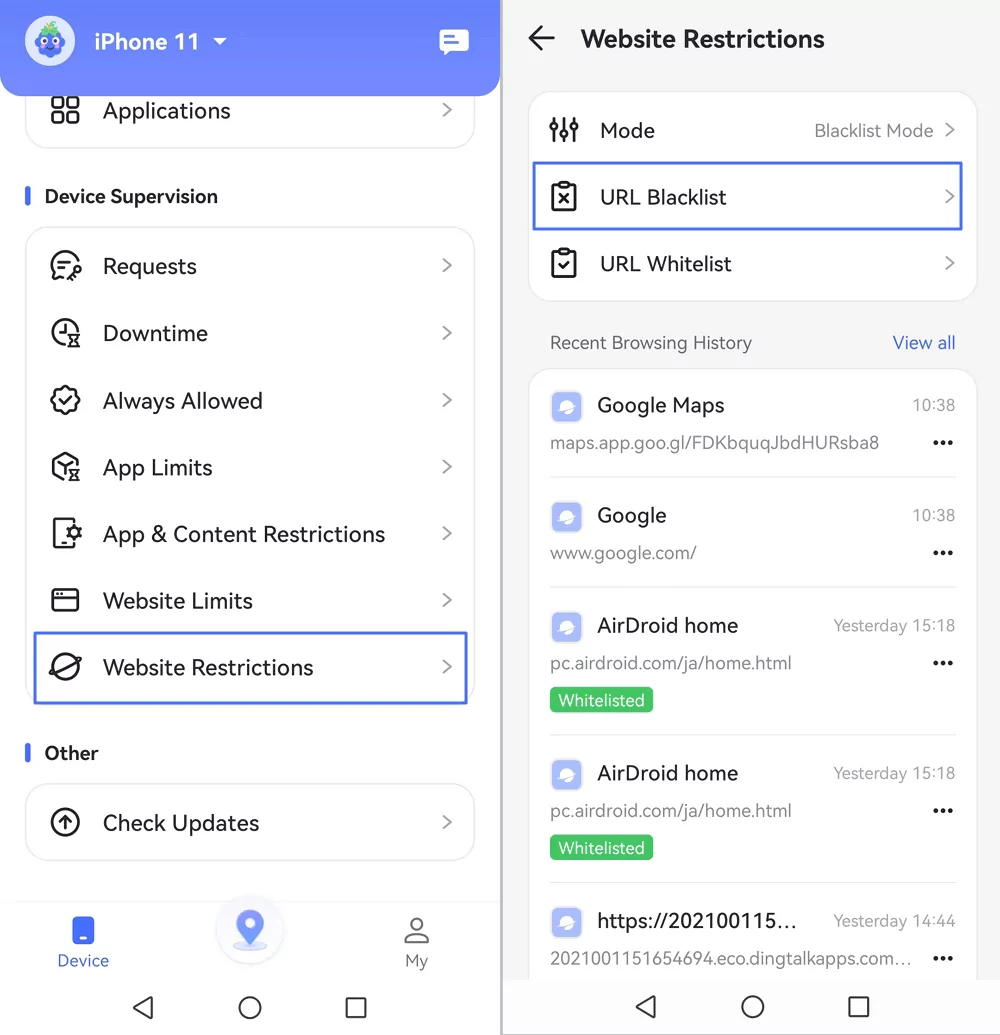
- Step 3. On your parental dashboard, tap on "Website Restrictions > URL Blacklist."
- Step 4. Then, create a custom website blacklist by manually entering URLs or by enabling specific website categories.


Pros
- Effective to block adult content on web and apps
- Unbypassable and uninstall-proof
- Works on Android and iOS
- Real-time alerts for suspicious activity
Cons
- Requires app installation on your child's device
- Subscription required after the 3-day free trial
6Network-Level Filtering
Currently, WiFi routers offer features to block porn and other mature content at the network level.
These routers allow you to manage internet usage, set website filters, and monitor activity on all devices connected through WiFi.
Therefore, look for router brands that offer these features when making your purchase.
- Step 1. Access Router Gateway: Open a browser and enter your router's IP address (usually 192.168.0.1 or 192.168.1.1).
- Step 2. Authentication: Log in using your admin credentials. (Tip: Check the sticker on the router's base if you haven't changed the default password.)
- Step 3. Locate Security Tools: Navigate to the "Parental Controls," "HomeShield," or "Access Control" tab in the dashboard.
- Step 4. Apply Content Filters:Create a profile for your child's device. You can then toggle the "Malicious Content" or "Adult Content" category to block thousands of sites instantly.
- Step 5. Save & Verify: Click "Save" and attempt to visit a restricted site on the child's device to ensure the "Safety Net" is active.
Pros
- Protects every device connected to your home WiFi (consoles, PCs, and tablets) with a single setup
- No software installation is required on the child's device
- Hard for children to bypass without administrative access to the hardware
Cons
- Basic routers may require manual URL entry, while advanced models offer category-based blocking but often require a subscription
- This filter only works on the home WiFi. It won't protect devices using mobile data or other WiFi networks
- New websites emerge daily; router databases may not catch everything as effectively as a dedicated parental control app
7DNS Filtering (OpenDNS)
If your router lacks built-in filters, changing your DNS is a powerful, free alternative. By using services like Cloudflare for Families or OpenDNS, you can block adult content at the network level by simply changing two numbers in your settings.
Pros
- Completely Free
- Network-Wide Protection: Like router filtering, it covers every device in the house
Cons
- May be intimidating for non-tech-savvy parents
- The filter applies to everyone on the WiFi equally
- Easily Bypassed: A clever teen can bypass this by simply switching to mobile data (4G/5G) or using a VPN/Proxy tool
While these tools can significantly reduce exposure, they work best when combined with something even more important: open and age-appropriate conversations.
How to Talk to Your Child About Online Pornography
While technical filters are essential, they are only half the battle. Real safety comes from open, honest communication.
Here is how to approach this sensitive topic with confidence and empathy.
1Start with Online Safety, Not Shame
The key to a successful conversation is the "Entry Point." Instead of making it about the explicit content itself, frame the discussion around digital well-being.
Leading child safety organization NSPCC, in their guide on talking to children about online safety, suggests that parents should focus on "how to use the internet safely" rather than just highlighting sensitive topics.
This reduces the child's defensiveness and helps them understand that your goal is protection, not punishment.
2Tailor the Conversation by Age
Children process information differently as they grow. Experts at Internet Matters recommend adjusting your language and boundaries based on their developmental stage, specifically when addressing online pornography with 6-10 year olds:
- Ages 6–10: Focus on "Curiosity vs. Safety." Use simple language to explain that just like some movies are for grown-ups, some websites are only for adults because they can be confusing or scary for kids. Reassure them that if they see something "weird," they can always come to you.
- Ages 11+: Start discussing the "Unreal" nature of online pornography. Explain that what is shown often doesn't reflect healthy, respectful relationships or real-life boundaries. This is the age to build their internal "critical thinking" filter.
3Reassure, Don't Punish
According to the NSPCC Helpline guidance, many children encounter explicit content accidentally through pop-ups, ads, or social media links.
If your child comes to you about an incident, your reaction is a defining moment. Multiple child protection guidelines emphasize that a "punishment-first" reaction often drives children to hide future encounters.
4Combine Conversation with Practical Protection
A conversation is a great foundation, but it needs a safety net. In today's hyper-connected world, relying on willpower alone is unfair to a child. The most effective strategy is a Dual-Layer Approach: Open Communication + Practical app-level Protection.
The goal isn't just to block content — it's to build a safer and more supportive digital environment.
An Effective Way to Block Adult Content (Without Constant Monitoring)
Many parents fall into the trap of constantly checking browsing histories, which can lead to friction and a loss of trust. However, effective digital parenting isn't about surveillance—it's about setting smart, automated boundaries.
Blocking content shouldn't feel like surveillance; it should feel like safety.
This is where a dedicated parental control tool can make things easier for both you and your child. It acts as a silent guardian that works quietly in the background, so you don't have to constantly intervene.
The Traditional Monitoring Trap
- Manual history checks that spark arguments
- Constant anxiety about what they might see next
- Reactive "firefighting" after exposure happens
AirDroid's Safe Zone Protection
- Automated Filtering: Thousands of sites are blocked instantly, removing the need for manual oversight.
- Risk Awareness: Get real-time alerts only when a line is crossed, allowing for calm, planned discussions.
- Healthy Boundaries: Set time-based rules that encourage balance rather than constant restriction.
By moving the focus from watching to protecting, you give your child the space to grow while ensuring their digital environment remains pure. It works quietly in the background — so parents don't have to constantly check or intervene.
FAQ
Sources & Recommended Reading
- Common Sense Media – Official Website
https://www.commonsensemedia.org/ - American Academy of Pediatrics (AAP) – Official Website
https://www.aap.org/ - NSPCC – Talking to Your Child About Online Safety
https://www.nspcc.org.uk/keeping-children-safe/online-safety/talking-child-online-safety/ - Internet Matters – Addressing Online Pornography with 6–10s
https://www.internetmatters.org/resources/addressing-online-pornography-with-6-10s/ - NSPCC Helpline – Responding to Concerns About Sexual Content Online (PDF)
https://norfolklscp.org.uk/media/kcqjpiae/what-should-i-do-nspcc-helplines-responding-to-childrens-and-parents-concerns-about-sexual-content-online.pdf - Google – SafeSearch Help Documentation
https://support.google.com/websearch/answer/510










Leave a Reply.