How to Tell If Someone Is Using a Fake Location?
Nowadays, people using fake locations is becoming common. The good news is that several warning signs may indicate that a shared location is not real.
Common signs include the location pin that never moves, impossible travel speeds, sudden location jumps, etc. However, these signs do not always mean someone is faking their GPS.
So, this article will walk you through key signs to detect location spoofing and know what each sign actually means to avoid false conclusions.
How Do People Fake Their Locations?
In general, people change or hide their real location using location spoofing apps, developer tools, or device settings.
1GPS Spoofing Apps
This is the most common and easiest method. Location spoofers let users select any coordinates they want. Once done, apps that rely on location services display the fake location instead of the device's actual position.
💡Spoofing Apps Are More Common on Android Than on iPhone
- This is because Android has a built-in "mock location" setting in Developer Options, letting any spoofing app override GPS data directly.
- While for iOS, it comes with stricter system-level restrictions, which typically requires a computer, a USB cable, and even jailbreaking to simulate a fake location.
2Using a Second Device
This method often gets overlooked. People with two devices can share a fake location. A parent on Reddit believes this is what his son is using to deceive him on iPhone.
They usually use an unused phone or tablet to share a location and then leave it at home. When this happens, others can not see where the person actually is.
3Location Setting Tricks
In some cases, people may hide their real-time location by turning off location services, cutting off internet connections, or enabling Ghost Mode (Snapchat). Once that happens, you can only view the outdated locations while the person is actually somewhere else.
Signs Someone Is Faking or Spoofing Their Locations
Fake or spoofed locations often leave traces. Below are the most common signs that may indicate someone is faking their location.
Sign 1: Locations Are Too Perfect
If you always notice that someone's location dot is always in the same or a repeated coordinate without drift, it's a sign the pin was placed manually rather than tracked by GPS satellite.
A real location is slightly imperfect by nature. The dot often drifts a few meters or snaps to a nearby place occasionally, even if the person stays in the same place.
Sign 2: Sudden or Frequent Location Jumps
If you notice someone appears at home and then shows up several miles away in seconds or minutes, it may indicate they're faking their location.
Location spoofing apps require users to pick and switch between fake locations manually. As such, the shared location may suddenly "jump" from one place to another.
Sign 3: Location Doesn't Change for Too Long
If you discover that someone's shared location always stays at one address for a long time (e.g., 10+ hours) without even a few feet of movement, it could be a sign that they froze or faked their locations.
This happens when someone uses spoofing tools or leaves the location-sharing device sitting at home. In these cases, the shared location keeps using the same coordinates instead of a real-time GPS location.
Sign 4: Location Doesn't Match the Routine
Have you ever noticed someone's location dot shows outdoors or in a strange place during sleeping hours, such as at 2 AM? If so, this could mean they're faking their location.
Most spoofing apps don't provide customizable options to automatically change or update locations based on a schedule. Users typically pick a static fake location and forget to change it according to real-life patterns.
Sign 5: Unrealistic Location History or Moving Speed
If your location-sharing apps provide a location history feature, look for whether someone's location appears to be crossing a river or mountain, traveling between two cities in 2 minutes, or moving at 300 mph. If yes, it is a red flag that they're faking locations.
Within seconds, the user can change their location from one location to another. However, not every spoofer can manipulate the movement route, often ignoring terrain or geography. That's why you may see the location routes that don't follow real situations.
Sign 6: Location Differs across Apps
You may also notice a change in their location across different apps. For example, their shared location is different from the IP address shown on their Instagram or Twitter.
Even though these spoofing tools create fake shared locations, they may not affect IP-based location data in some social apps. They often rely on network connections to detect users' IPs and locations.
For Families: How to Verify a Child's Real Location
Just like this parent on Reddit, you've confirmed your child is spoofing their location using the above signs. But currently your real worry isn't about spoofing; it's more about their safety.
Since Find My, Life 360, and other location-sharing apps display the pin your child wants you to see, how can you verify their real location? AirDroid Parental Control helps:
See and Verify Your Child's Surroundings
Unlike other location sharing apps, AirDroid has a remote camera that allows parents to view and hear from their child's location in real time. So, if your child spoofs their location, you'll easily see their surroundings to verify where they really are or if they are safe.
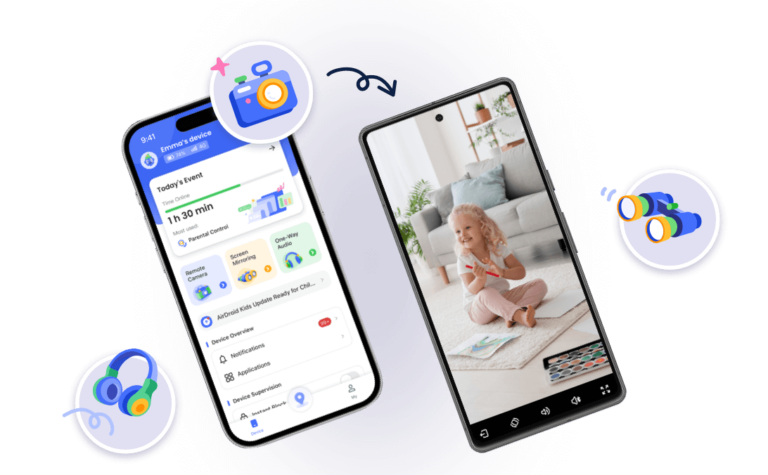
Detect GPS Spoofing Apps
AirDroid allows parents to review all the apps their kids have on their phones. In this way, you can easily find out if they're using location spoofing apps without checking signs one by one. It can also alert parents whenever they install new apps.
FAQs about Fake Locations
List of Resources:
- Mock Location App on Android: Developer Testing Guide (https://fone.tips/mock-location-app/)
- What is GPS spoofing? by McAfee (https://www.mcafee.com/learn/what-is-gps-spoofing/)
- GMDSOFT Tech Letter Vol15.Analyzing Anti-Forensic Traces Left by Location Spoofing Apps (https://www.gmdsoft.com/blog/gmdsoft-tech-letter-vol15-analyzing-anti-forensic-traces-left-by-location-spoofing-apps/)










Leave a Reply.